AWS
AWS Microsoft Azure
 Google Cloud

How Much Does an Azure Virtual Machine Cost?
Azure VMs are priced according to the compute resources you select. A small burstable VM costs less than a large memory-optimized or GPU instance, but the cheapest VM is not necessarily the most cost-effective for your workload.The following table shows representative Azure VM configurations. For accurate current rates, select the same region, operating system, and purchasing model in the Azure Pricing Calculator.
| VM size | vCPUs | RAM | Hourly price | Monthly price |
|---|---|---|---|---|
| Standard_B2s | 2 | 4 GiB | Verified rate | Rate × 730 |
| Standard_D2s_v5 | 2 | 8 GiB | Verified rate | Rate × 730 |
| Standard_D4s_v5 | 4 | 16 GiB | Verified rate | Rate × 730 |
| Standard_E4s_v5 | 4 | 32 GiB | Verified rate | Rate × 730 |
| Standard_F4s_v2 | 4 | 8 GiB | Verified rate | Rate × 730 |
For example, at an illustrative compute rate of $0.10 per hour, running a VM continuously for 730 hours costs $73 per month before additional services.
Microsoft publishes current VM rates on its official Linux VM pricing page.
Azure VM Pricing by Instance Type
Azure organizes virtual machines into families designed for different workloads. Selecting the appropriate family helps avoid paying for CPU, memory, or specialized hardware you do not need.| VM family | Common series | Best for |
|---|---|---|
| Burstable | B-series | Development, small applications, intermittent workloads |
| General purpose | D-series | Web servers, application servers, balanced workloads |
| Compute optimized | F-series | CPU-intensive processing and applications |
| Memory optimized | E-series | Databases, caching, memory-intensive applications |
| GPU accelerated | NC, ND, NV series | AI training, inference, graphics, specialized computing |
A B-series VM may suit a small development server with occasional CPU spikes. D-series instances are better starting points for applications requiring balanced CPU and memory, while E-series instances suit memory-heavy databases.
However, B-series VMs use CPU credits, so sustained high CPU utilization can reduce performance or make another VM family more appropriate.
Choose based on measured workload requirements rather than VM price alone.
Azure VM Pricing Models Compared
Azure provides four main purchasing options. Each offers different trade-offs between flexibility, commitment, and potential savings.| Pricing model | Commitment | Best for | Main consideration |
|---|---|---|---|
| Pay-as-you-go | None | Short-term or unpredictable workloads | Standard usage-based rates |
| Reserved VM Instances | 1 or 3 years | Stable, predictable VM usage | Unused reservations can waste value |
| Azure Savings Plan for Compute | 1 or 3 years | Flexible, consistent eligible compute spending | Fixed hourly spending commitment |
| Spot VMs | None | Interruptible workloads | Capacity can be reclaimed |
Pay-as-you-go
Pay-as-you-go charges for VM compute usage without a long-term commitment. It is useful for testing, temporary projects, and workloads with uncertain demand.For example, a VM running 100 hours at $0.10 per hour costs $10 in compute charges.
Azure Reserved VM Instances
Reserved VM Instances provide discounted compute pricing in exchange for a one-year or three-year commitment.Microsoft advertises savings of up to 72% on eligible Linux VM compute compared with pay-as-you-go, depending on configuration and terms.
Reservations work best when you have predictable VM requirements. However, unused reservation benefits generally cannot be carried forward to another hour.
Read Microsoft’s Reserved VM Instance documentation.
Azure Savings Plan for Compute
Azure Savings Plans require a fixed hourly spending commitment for one or three years.Unlike VM reservations tied to matching configurations, Savings Plans can provide greater flexibility across supported compute usage.
They are useful when workloads change between eligible VM sizes or regions but overall compute spending remains relatively consistent.
Reservations and Savings Plans do not provide stacked discounts on the same usage.
Azure Spot Virtual Machines
Spot VMs use Azure’s spare compute capacity at discounted rates.They suit batch processing, testing, rendering, and other workloads that can tolerate interruptions.
Azure can evict Spot VMs when capacity is needed or when the Spot price exceeds your configured maximum. Eviction notice may be as short as 30 seconds, and capacity is not guaranteed.
See the Azure Spot VM documentation.
How to Calculate Azure VM Monthly Costs
The most reliable way to estimate your Azure bill is to calculate compute charges first, then include associated resources.Example: Azure VM running 24/7
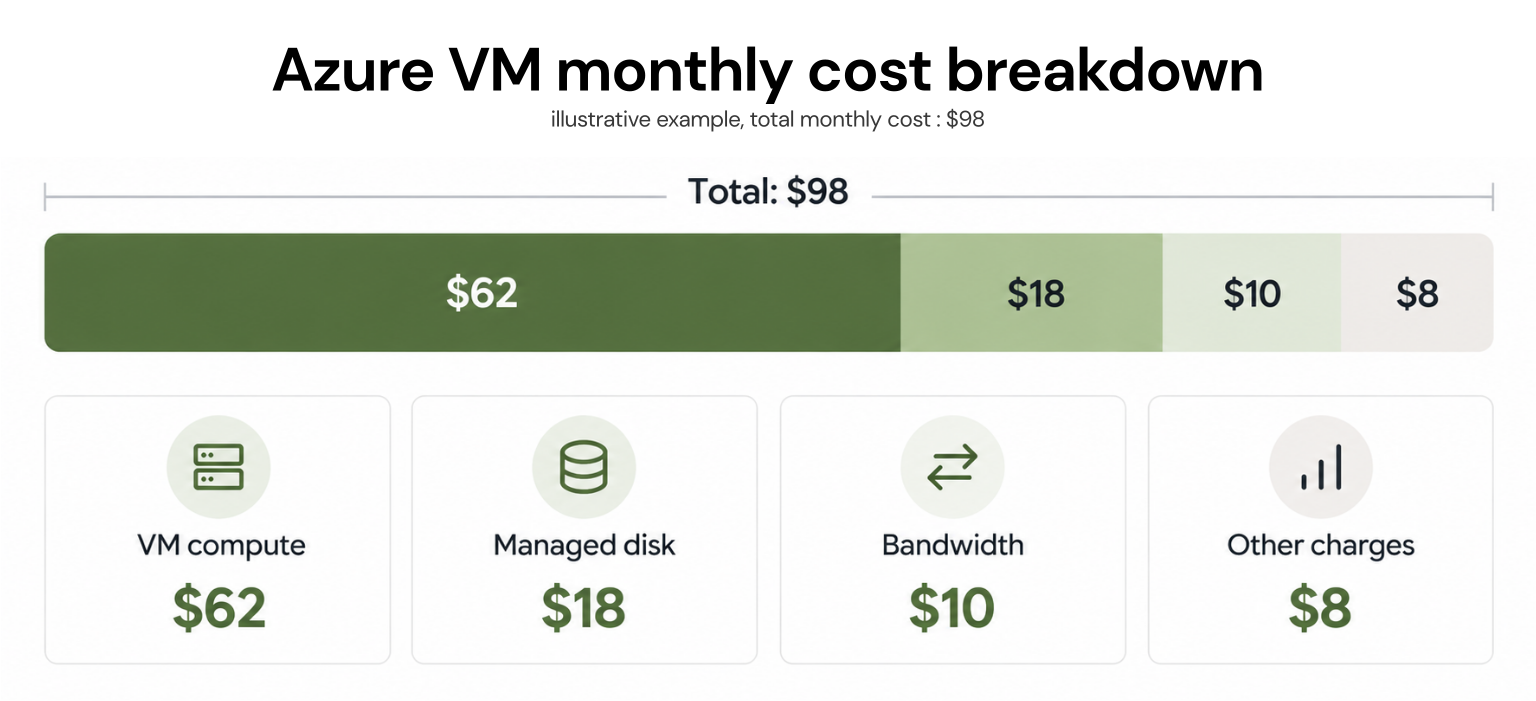
Suppose a Linux VM has the following illustrative costs:| Cost component | Monthly amount |
|---|---|
| VM compute ($0.10 × 730 hours) | $73 |
| Managed disk | $12 |
| Outbound bandwidth | $8 |
| Monitoring and other services | $5 |
| Estimated monthly total | $98 |
Although the compute charge is $73, the complete estimated monthly cost is $98.
What if the VM runs only during business hours?
Suppose the same VM operates eight hours daily for 22 days:However, managed disks and other retained resources may continue generating charges while the VM is deallocated.
This distinction matters when estimating development and testing environments.
Windows vs. Linux Azure VM Pricing
Windows Azure VMs commonly cost more than comparable Linux VMs because Windows Server licensing may be included in the hourly price.Windows vs. Linux VM Cost Example
Windows Server VMs generally cost more than equivalent Linux VMs because of licensing charges. To compare the difference accurately, select the same VM size, region, purchasing model, and running hours for both operating systems.| Configuration | Linux | Windows Server |
|---|---|---|
| VM size | Standard_D2s_v5 | Standard_D2s_v5 |
| Region | East US | East US |
| Hourly compute cost | Insert verified rate | Insert verified rate |
| Monthly compute cost | Hourly rate × 730 | Hourly rate × 730 |
Linux images such as standard Ubuntu distributions generally avoid an additional Windows Server license charge. However, some commercial Linux distributions and marketplace images have separate software or support fees.
Organizations with eligible existing Windows Server licenses may reduce costs through Azure Hybrid Benefit.
When comparing Windows and Linux prices, use the same VM size, region, and running hours to isolate the operating system cost difference.
Additional Azure VM Costs to Consider
The advertised VM compute rate does not necessarily represent your complete Azure bill.| Additional cost | What affects pricing |
|---|---|
| Managed disks | Disk type, provisioned capacity, performance |
| Snapshots | Snapshot type and stored data |
| Data transfer | Destination, region, and transferred volume |
| Public IP addresses | IP configuration and applicable rates |
| Azure Monitor | Log ingestion, retention, and monitoring configuration |
| Azure Backup | Protected instances and backup storage |
Network charges can also become significant when applications frequently transfer data outside Azure or between billable network boundaries.
Check Microsoft’s VM cost management documentation before finalizing your estimate.
How to Reduce Azure Virtual Machine Costs
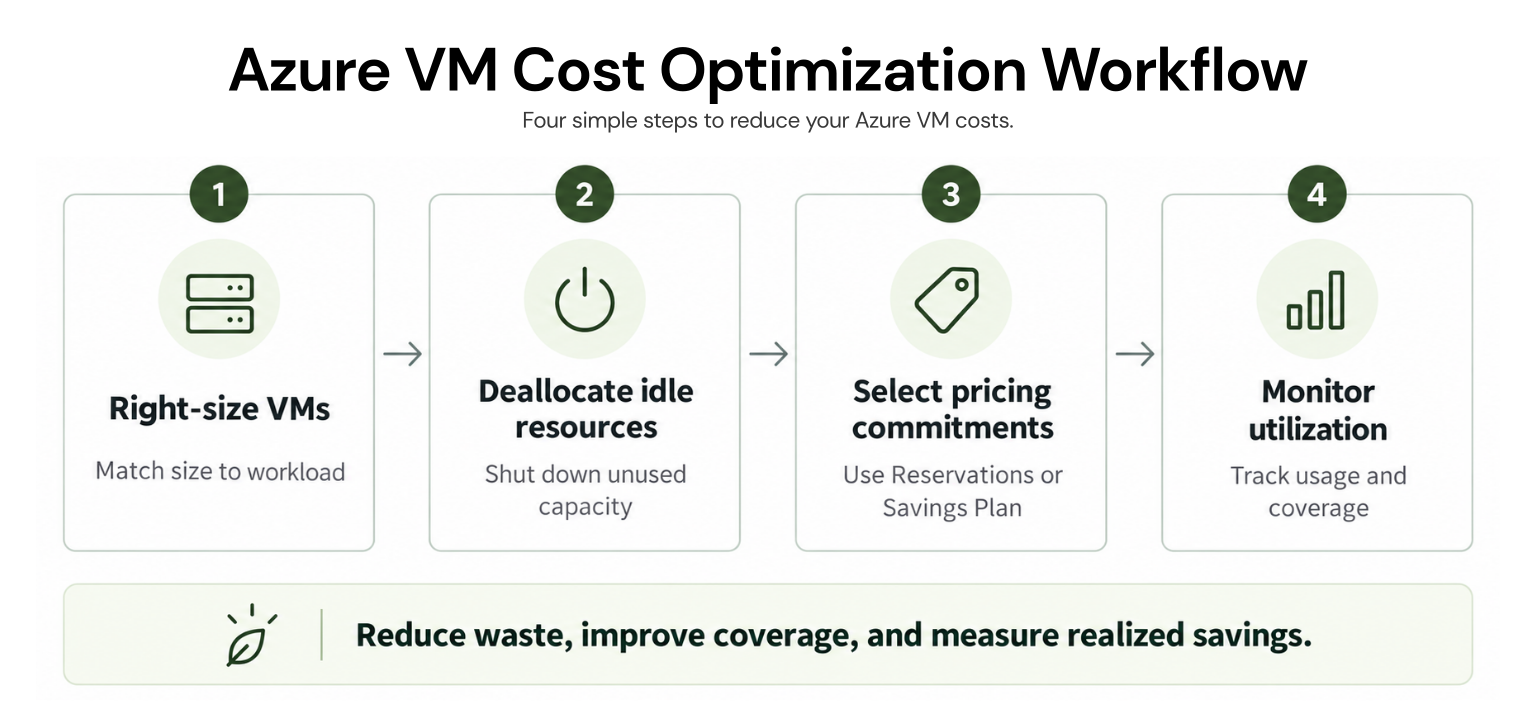
Reducing VM costs involves improving resource efficiency and choosing appropriate purchasing commitments.1. Right-size underutilized VMs
Review CPU, memory, and application performance before resizing.A VM consistently using a small portion of its available resources may be oversized. Moving to a smaller compatible instance can reduce compute costs, provided performance requirements remain satisfied.
2. Deallocate idle VMs
Development and testing VMs often do not need to run continuously.Schedule deallocation outside working hours to reduce pay-as-you-go compute usage.
Important: Shutting down a VM inside its operating system may leave it in the Stopped (Allocated) state, where compute charges continue. Verify that the VM is Stopped (Deallocated).
3. Use reservations for predictable workloads
Analyze historical utilization and expected demand before purchasing Reserved VM Instances.For stable workloads, reservations can provide meaningful savings. However, purchasing commitments for capacity you no longer use can reduce the realized benefit.
4. Consider Savings Plans for changing compute needs
When eligible compute usage remains consistent but VM configurations change, an Azure Savings Plan may offer more flexibility than individual reservations.Evaluate your hourly spending baseline before selecting a commitment.
5. Use Spot VMs for fault-tolerant workloads
Spot instances can lower costs for workloads that can restart or recover from interruption.Avoid depending exclusively on Spot capacity for critical services requiring uninterrupted availability.
Managing commitment-related savings
Right-sizing and scheduling reduce the amount of compute consumed. Commitment optimization focuses on how eligible remaining usage is purchased.Usage.ai’s Azure cost optimization platform helps organizations analyze commitment coverage and purchasing opportunities. Its Autopilot and CoPilot capabilities support automated purchasing or approval-based recommendations for supported commitments.
This complements infrastructure optimization rather than replacing VM sizing, scheduling, or performance management.
How to Use the Azure Pricing Calculator
The Azure Pricing Calculator helps estimate costs before deploying virtual machines.Open the calculator and add Virtual Machines.
Select the Azure region and operating system.
Choose the VM series and instance size.
Enter the expected running hours.
Compare available purchasing options.
Add managed disks, bandwidth, and other required services.
Review the estimated monthly total.
For a broader understanding of service charges, see our Azure pricing guide.
Discover eligible savings opportunities, optimize Azure commitments, and reduce financial exposure as your cloud usage changes.
Frequently asked questions
How much does an Azure VM cost per month?
Monthly Azure VM costs depend on the instance size, region, operating system, and running hours. For example, a VM priced at $0.10 per hour costs approximately $73 for 730 running hours, excluding storage, networking, and other charges. This rate is illustrative; use Microsoft's pricing calculator for actual prices.
What is the cheapest Azure virtual machine?
Small burstable B-series VMs are often among Azure's lowest-cost options for lightweight workloads. For example, Standard_B1s is a small VM configuration worth comparing for development and testing. However, the cheapest available VM depends on the Azure region, operating system, purchasing model, and available SKUs. B-series instances also have CPU-credit limitations, making them less suitable for sustained high CPU usage.
Does Azure charge for stopped VMs?
Yes, depending on the power state. Stopped (Allocated) VMs continue incurring compute charges. Stopped (Deallocated) VMs generally stop ordinary pay-as-you-go compute billing, although managed disks and other retained resources may still cost money. Existing purchasing commitments may also continue.
Are Azure Reserved Instances cheaper than pay-as-you-go?
Reserved VM Instances can offer lower effective compute rates for eligible usage through one-year or three-year commitments. However, they are most economical when enough matching workload usage exists to consume the purchased reservation benefit.
Is Windows more expensive than Linux on Azure?
Windows VMs commonly have higher prices because of operating system licensing. Standard Linux images generally avoid Windows Server licensing charges, although commercial Linux images may carry separate fees. Eligible organizations can use Azure Hybrid Benefit to reduce Windows licensing costs.