AWS
AWS Microsoft Azure
 Google Cloud


Coverage is healthy. Recommendations are reviewed. Engineering flags upcoming changes. Finance approves purchases. Utilization is monitored.
The question is not whether automation is more sophisticated. It is whether software can produce a better financial and operational outcome than your current process.
What your current Azure workflow already covers
Microsoft already gives FinOps teams a meaningful baseline for commitment management.Azure Reservation recommendations evaluate historical hourly usage and model the cost of running with and without Reservations. Microsoft supports 7-, 30-, and 60-day usage periods when calculating recommendations.
You can review the methodology in Microsoft’s Azure Reservation recommendation guidance.
Azure Savings Plan recommendations also analyze hourly pay-as-you-go usage and costs to model candidate commitment amounts.
Microsoft explains the process in its Azure Savings Plan recommendation guidance.
Software should not receive credit simply for identifying available Azure commitment discounts.
The real comparison begins after a recommendation appears.
What still requires a mature FinOps process?
Historical billing data cannot tell you everything about future infrastructure.Your team still needs to account for:
planned migrations or workload retirements;
rightsizing and architecture changes;
existing commitment coverage;
workload duration and predictability;
Reservation versus Savings Plan fit;
approval thresholds;
financial downside if demand changes.
It should make the operating model around them more economically effective.
Manual vs automated Azure commitment management
| Decision area | Mature manual process | Automated process |
|---|---|---|
| Analysis | FinOps reviews Azure data and forecasts | Supported opportunities can be evaluated continuously |
| Business context | Engineering and FinOps validate future changes | Internal context is still required |
| Approval | Internal purchasing workflow | Approval or configured automation |
| Purchase | Authorized employee executes | Supported purchases can use approved permissions |
| Monitoring | Periodic coverage and utilization reviews | Monitoring can become more continuous |
| Governance | Policies, RBAC, financial limits | Automation must remain inside those controls |
| Economics | Azure savings minus internal effort and waste | Incremental value minus fees and remaining costs |
The right answer depends on measurable economics.
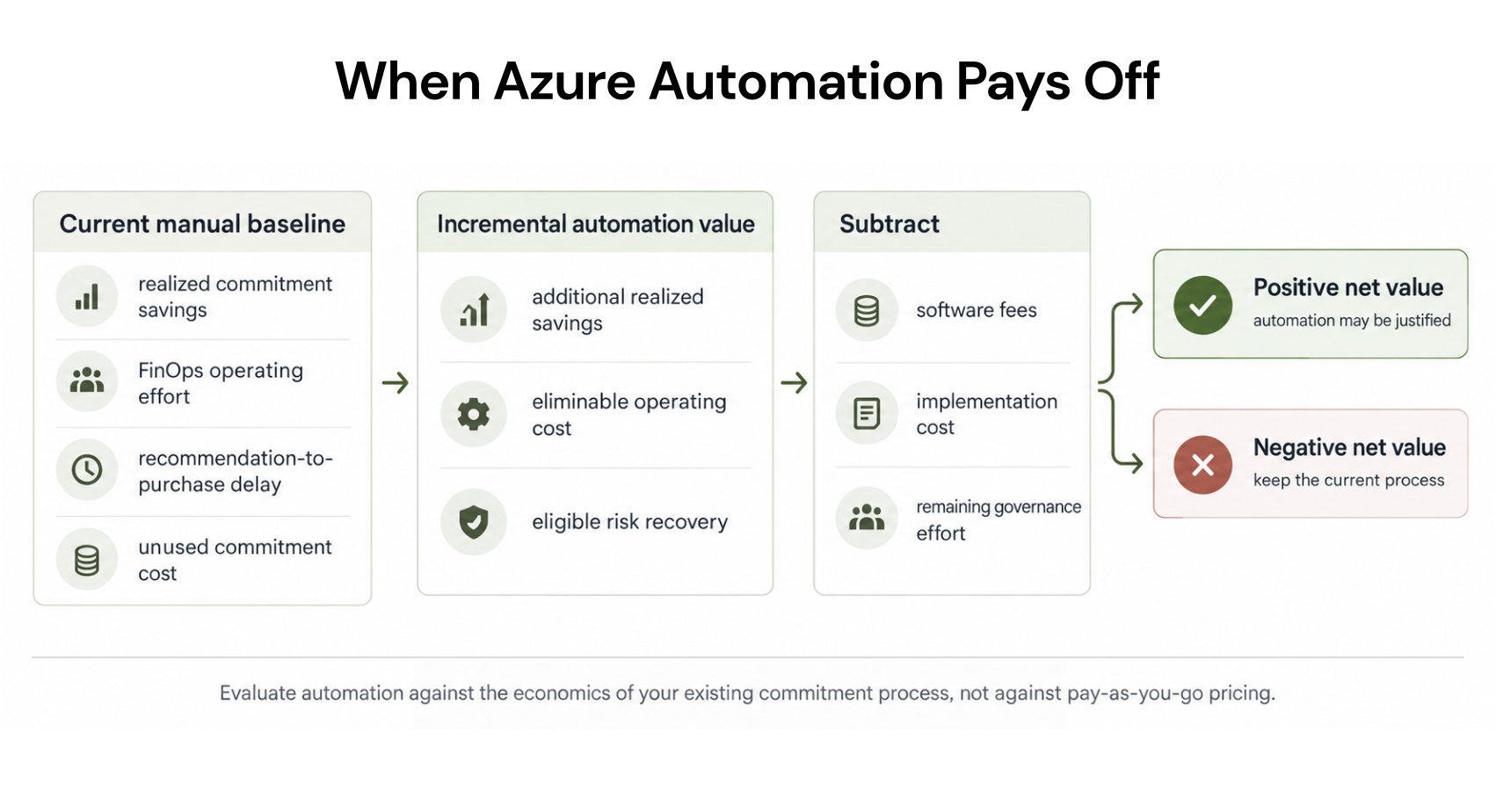
Use a break-even test
Use this equation:
Two rules keep the calculation defensible.
First, count operating cost only when it can actually be eliminated or credibly reassigned. Saving analyst hours does not automatically create an equal amount of cash savings.
Second, keep cashback or other qualifying recovery separate from cloud savings. Do not present protection as realized cloud savings before a qualifying financial outcome occurs.
For example, Microsoft currently advertises up to 65% savings for select Azure Savings Plan for compute usage. Its maximum illustration is based on a specific Azure VM running under a three-year Savings Plan, and actual savings vary by workload, region, instance type, and usage.
See the conditions behind that claim on Microsoft’s Azure Savings Plans pricing page.
That is a Microsoft pricing benefit, not software-generated savings.
Measure realized value, not just projected opportunity
A recommendation is an estimate.It becomes a financial result only after a commitment is purchased, usage occurs, and the result appears in Azure billing data.
Use this six-step check:
Baseline: Establish what the existing manual process already saves.
Coverage: Identify usage already covered by customer-owned commitments.
Change: Exclude known migrations, rightsizing, and retirements.
Delay: Measure how long valid recommendations wait before purchase.
Downside: Quantify unused or underutilized commitment cost.
Net value: Compare incremental realized savings after platform fees and remaining operating costs.
Microsoft explains these views in its Savings Plan utilization and cost reporting documentation.
Commitment product choice still matters
Automation cannot remove the underlying Azure commitment decision.Reservations are generally better suited to stable usage that can consistently match the applicable Reservation characteristics.
Savings Plans use an hourly spend commitment across eligible usage and provide broader flexibility as supported usage changes.
The instrument should still fit the workload.
Automation should not override that judgment.
Commitment risk belongs in the buying decision
Azure Savings Plans create financial exposure if actual usage falls below the committed hourly amount.Microsoft documents one- and three-year terms for Azure Savings Plan for compute and states that Savings Plans cannot be canceled after purchase.
Review the current mechanics in Microsoft’s Azure Savings Plan documentation.
Reservation flexibility is also changing.
Beginning February 1, 2027, Reservations purchased for services supported by Savings Plans generally will not be exchangeable.
Reservations purchased before that date can continue to use the current exchange rules before February 1. After the policy change, those previously purchased Reservations retain one final exchange. A Reservation received through an exchange after that date is not exchangeable.
Microsoft documents the transition in its Reservation exchange-policy guidance.
Review the applicable service and purchase history before treating exchangeability as protection against commitment risk.
When should you stay manual?
Manual management can remain the better choice when:your safe commitment opportunity is already captured;
approvals happen quickly;
utilization remains strong;
expirations are monitored reliably;
engineering changes reach FinOps before purchase;
recurring management effort is low;
software cannot demonstrate positive incremental value after fees.
Buying automation is not the objective.
Improving the economics is.
When is automation worth evaluating?
The case becomes stronger when measurable friction appears:durable eligible usage repeatedly remains uncovered;
approval delays leave savings unrealized;
commitment reviews consume material FinOps capacity;
utilization problems are detected late;
expirations require repeated manual coordination;
portfolio complexity makes consistent execution difficult.
What does our current process already achieve?
How much incremental opportunity remains?
Which purchases can the platform actually execute?
Who approves them?
What financial limits apply?
Can it modify workloads, or only commitments?
How are fees calculated?
How will realized savings be reconciled?
How Usage.ai changes the commitment-management equation
For a mature FinOps team, evaluate us against what you already achieve.Our read-only Savings Test lets you evaluate existing commitments, uncovered eligible usage, and potential incremental opportunity before enabling commitment purchasing.
Purchasing is a separate step. We begin with read-only billing and usage access, and add purchasing permissions separately if you decide to activate supported optimization workflows.
Our Usage.ai permissions guidance explains the separation between evaluation access and purchasing authority.
Our pricing is savings-based. We charge against new savings generated through the applicable arrangement rather than taking credit for savings already produced by existing customer-owned commitments. Review the current model in our pricing documentation.
With Flex Insured Commitments, teams can get the up to 65% savings of an eligible three-year Azure compute Savings Plan with none of the commitment risk.
Our cashback documentation explains how qualifying loss is calculated. Existing commitments you purchased directly remain separate and should not be assumed to receive the same protection.
For a broader view of how we support Azure commitment optimization, see our Azure Cost Optimization platform, including commitment analysis, automation, and risk-management workflows.
Compare manual vs automated economics
You do not need Azure commitment-management software simply because automation exists.You need evidence that it improves your current financial result.
Start with existing commitments, uncovered eligible usage, approval delays, utilization, and operating effort. Then compare that baseline with incremental savings, fees, purchasing controls, and qualifying downside protection.
Compare Azure commitments, uncovered usage, purchasing, and savings opportunities before changing management.
Frequently asked questions
Can a mature FinOps team manage Azure commitments manually?
Yes. Azure provides native recommendations, purchasing mechanisms, APIs, cost reporting, and utilization information. A capable team with reliable execution may manage commitments effectively without another platform.
Does automation automatically generate more Azure savings?
No. The relevant metric is incremental realized value compared with what your current manual process already achieves after fees and remaining costs.
Can an Azure Savings Plan be canceled if demand falls?
No. Microsoft states that Savings Plans cannot be canceled after the commitment is made. Unused commitment can therefore create downside when eligible usage falls below the purchased level.
Should staff hours saved be counted as ROI?
Only when the cost is actually avoided or Finance accepts the treatment. Freed capacity can be valuable, but it should not automatically be reported as direct cash savings.
Does the Usage.ai Savings Test give us purchasing authority?
No. The Savings Test is an evaluation step. Purchasing authority is enabled separately if you decide to proceed with supported commitment optimization.