AWS
AWS Microsoft Azure
 Google Cloud

This AWS Budgets vs Cost Explorer comparison explains their capabilities, forecasting behavior, pricing, limitations, and best-fit use cases. It also shows how to use both tools in one cost-management workflow.
The Short Answer
Use AWS Budgets when you need thresholds, notifications, scheduled budget reports, or predefined governance actions. It tells you whether cost, usage, or commitment performance is moving outside the boundary you set.Use AWS Cost Explorer when you need to understand cost drivers, compare periods, or analyze commitment performance. Most AWS teams can use Budgets for detection and Cost Explorer for investigation, then take the appropriate action separately.
AWS Budgets vs Cost Explorer Compared
The central difference is purpose: AWS Budgets evaluates defined targets, while Cost Explorer provides an interactive environment for exploring AWS cost and usage data.| Capability | AWS Budgets | AWS Cost Explorer |
|---|---|---|
| Primary purpose | Monitor cost, usage, utilization, and coverage against targets | Analyze cost and usage patterns |
| Best question | “Are we within plan?” | “What changed, and what caused it?” |
| Filters | Filters define the scope of a budget | Filters dynamically narrow an analysis |
| Grouping | No interactive group-by analysis | Group by dimensions such as service, account, Region, or tag |
| Cost and usage alerts | Actual and forecasted threshold alerts | No native cost or usage threshold alerts |
| Other alerts | Budget notifications and configured actions | Reservation-expiration and Savings Plans email alerts, including Savings Plans queued-purchase alerts |
| Forecasting | Evaluates expected cost or usage against a budget | Projects cost and usage for analysis |
| Historical access | Historical budget views vary by budget type and settings | Current month plus up to 13 previous months by default; an organization’s management account can enable up to 38 months at monthly granularity |
| Commitment visibility | Threshold monitoring for RI and Savings Plans utilization or coverage | Detailed utilization, coverage, savings, and recommendation reports |
| Purchase recommendations | No | Savings Plans and RI recommendations |
| Automatic optimization | No | No |
| Standard interface pricing | Budget monitoring and notifications are free | Cost Explorer interface is free |
Cost Explorer API requests using the primary billing view cost $0.01 per request, custom billing views cost $0.01 per source per request, and optional hourly granularity is separately charged based on stored usage records. See AWS Budgets pricing and AWS Cost Explorer pricing.
What AWS Budgets and Cost Explorer Do
What AWS Budgets Does
AWS Budgets tracks AWS costs and usage against targets you configure. Budget information can update up to three times a day, but billing and notification delays mean it should not be treated as an instantaneous control.AWS supports six budget types, which can be grouped into four broader families:
Cost budgets: Monitor monetary spend using blended, unblended, net unblended, amortized, or net amortized costs.
Usage budgets: Monitor selected usage types or usage-type groups, such as running hours or data transfer.
Savings Plans budgets: Monitor aggregate Savings Plans utilization or coverage.
Reservation budgets: Monitor RI utilization or coverage for a selected supported service.
Notifications can go to email recipients or Amazon SNS. AWS also supports budget alerts in chat applications. For cost and usage budgets, optional Budget Actions can apply an IAM policy or service control policy, or target specific EC2 or RDS instances, automatically or after approval.
These actions are scoped controls, not a hard billing cap. Existing resources can continue to generate charges, and costs can move beyond a threshold before updated billing data triggers the action.
What AWS Cost Explorer Does
AWS Cost Explorer is an interactive cost-and-usage analysis tool. It provides graphs, tables, saved reports, preconfigured views, forecasts, and Amazon Q explanations for supported cost reports.You can filter data by dimensions such as service, linked account, Region, instance type, usage type, API operation, purchase option, and activated cost-allocation tag.
You can then group the results to expose how costs are distributed. Budgets supports many comparable filters, but it uses them to define what a threshold monitor rather than to provide an interactive group-by investigation.
Cost Explorer supports five principal cost views:
Unblended cost reflects usage costs at unblended rates and separates applicable discounts when grouped by charge type.
Blended cost averages applicable usage rates across a consolidated billing family.
Amortized cost spreads applicable upfront and recurring commitment fees across the period.
Net unblended cost shows unblended cost after applicable discounts.
Net amortized cost combines amortization with applicable discounts.
For a deeper treatment of filters, reports, commitment analysis, and FinOps workflows, read our advanced AWS Cost Explorer guide.
How Their Forecasting Differs
Both products forecast AWS cost or usage, but they apply the forecast differently.AWS Budgets uses forecasting as a guardrail. For a cost or usage budget, you can create a forecasted alert that fires when AWS expects the period’s total to cross the configured threshold.
AWS requires approximately five weeks of usage data before it can generate a budget forecast, so new accounts may not receive forecast-based alerts immediately.
Cost Explorer uses forecasting for interactive financial analysis. It can forecast likely AWS spending for the next 18 months based on past usage and presents an 80% prediction interval when sufficient data exists.
A narrower range generally reflects more consistent historical spending; volatile history produces a wider range.
Neither forecast automatically understands an upcoming migration, product launch, architecture change, or planned commitment purchase. Treat the result as a history-based projection and compare it with forward-looking engineering and business plans.
Neither AWS Budgets nor Cost Explorer replaces real-time operational monitoring or incident response: Budgets information can update up to three times daily, while Cost Explorer refreshes cost data at least every 24 hours, subject to upstream billing-data timing.
AWS explains these limits in its Cost Explorer forecasting documentation.
When to Use Each or Both
Use the tool that matches the decision you need to make rather than treating one as a replacement for the other.| Scenario | Best fit | Why |
|---|---|---|
| A team may exceed its monthly target | AWS Budgets | A forecasted alert can warn before the period closes |
| The AWS bill increased unexpectedly | Cost Explorer | Filters and groupings help isolate the cost driver |
| You want to restrict selected provisioning after a threshold | AWS Budgets with Budget Actions | A configured policy action can limit defined activity |
| You need six months of commitment-performance trends | Cost Explorer | Utilization and coverage reports support historical analysis |
| Finance needs recurring budget-status reports | AWS Budgets | Scheduled reports summarize actual or forecasted progress |
| You need costs separated by team or environment | Cost Explorer | Activated tags can support group-by analysis and showback |
| You want both early warning and investigation | Both | Budgets detects the condition; Cost Explorer helps explain it |
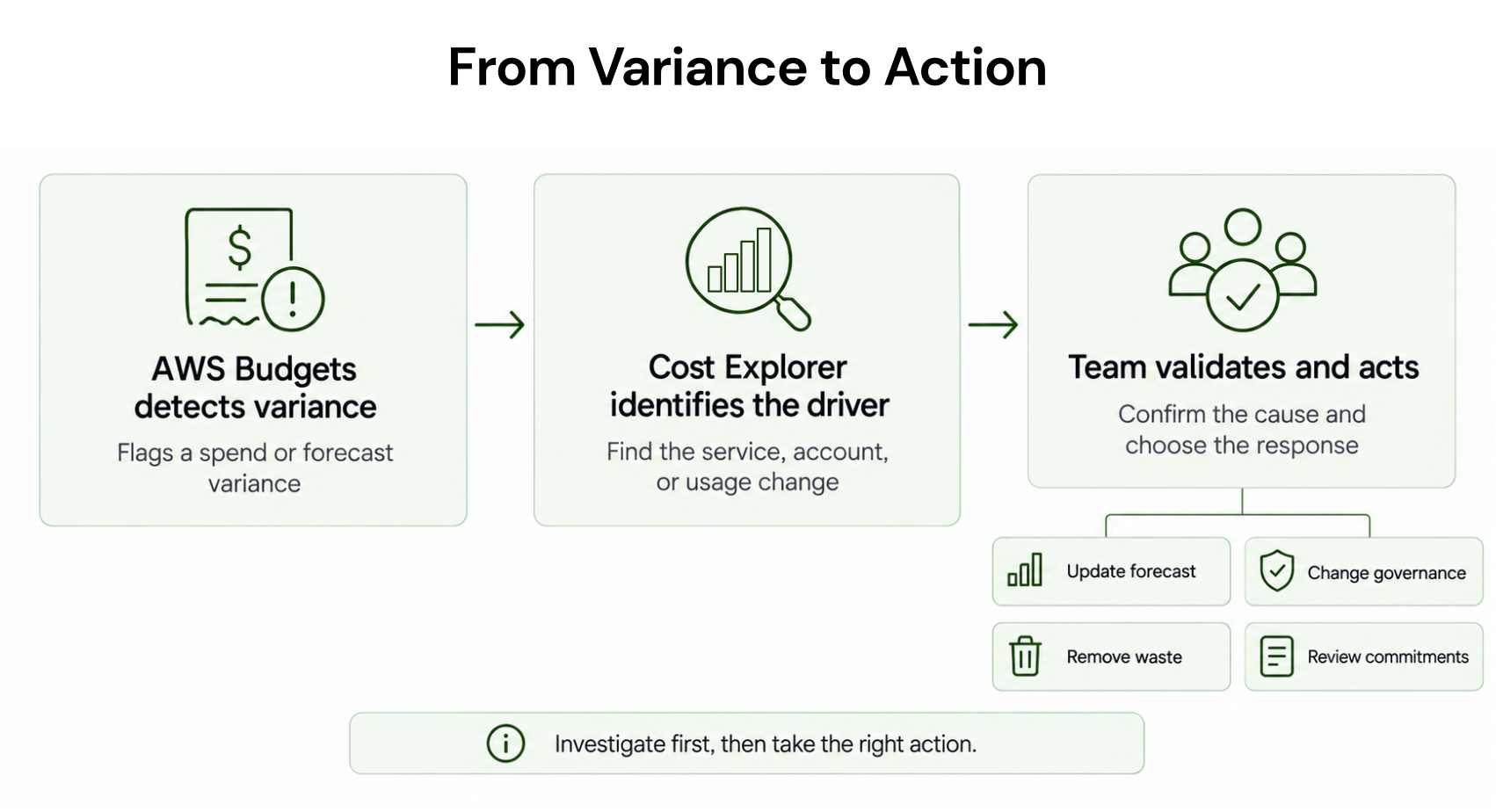
Define the boundary in AWS Budgets. Scope the budget by the relevant account, service, tag, Region, or other available filter, then select actual and forecasted thresholds.
Investigate in Cost Explorer. When the alert arrives, use the same scope and time range, then group by service, account, usage type, purchase option, or tag to identify the main driver.
Choose and execute the response. Validate whether the change is expected, then revise the forecast, adjust governance, remove waste, or review commitment coverage through the appropriate operational process.
What These Tools Do Not Automate
AWS Budgets and Cost Explorer improve financial control, but neither automatically reduces every AWS charge.Budget Actions can apply specific governance controls after a cost or usage threshold is reached. They do not diagnose the cause, select an optimal remediation, or continuously manage AWS pricing commitments.
Cost Explorer can reveal cost drivers and provide Savings Plans and Reserved Instance recommendations. It does not automatically purchase commitments or continuously rebalance a commitment portfolio simply because a recommendation appears.
The distinction matters operationally: detection is not investigation, and investigation is not execution. Teams still need a defined process for validating recommendations, approving changes, making purchases, and managing underutilization risk.
How Usage.ai Fits
AWS Budgets can flag a coverage problem, and Cost Explorer can help examine commitment performance. When the remaining need is commitment execution and downside protection, that is where we fit.With Flex Insured Commitments, teams can get up to 57% savings of a three-year AWS commitment with none of the commitment risk.
We analyze cloud usage data at the billing layer, present recommendations for approval, purchase approved commitments through the provider API, and manage them as Flex Commitments.
Cashback protection is conditional. If an eligible Flex Commitment costs more than the equivalent On-Demand usage, we calculate the covered loss and pay cashback according to the applicable program terms.
We charge an agreed percentage of realized savings, so the fee applies when verified savings are generated.
Review AWS commitment coverage, uncovered spend, and potential savings.
Frequently asked questions
What is the main difference between AWS Budgets and Cost Explorer?
AWS Budgets monitors defined cost, usage, utilization, and coverage targets and can send notifications when thresholds are crossed. Cost Explorer is an analytical interface for investigating costs, usage patterns, forecasts, and commitment performance.
Should you use AWS Budgets and Cost Explorer together?
Yes, when you need both guardrails and investigation. Budgets can identify an actual or forecasted variance, while Cost Explorer can help determine which service, account, Region, usage type, purchase option, or tag contributed to it.
Can AWS Cost Explorer send budget alerts?
No. Cost Explorer does not provide native cost or usage budget-threshold alerts; use AWS Budgets for those notifications. Cost Explorer separately supports reservation expiration email alerts, which should not be confused with budget alerts.
How does forecasting differ between the tools?
AWS Budgets compares forecasted cost or usage with a configured budget threshold. Cost Explorer provides an interactive history-based projection for financial analysis, with forecasts extending up to 18 months when sufficient data is available.
Do these tools automatically reduce AWS costs?
No. Budgets can run specifically configured governance actions, while Cost Explorer can surface analysis and recommendations, but neither automatically executes a complete, continuous AWS cost-optimization strategy.