.png)



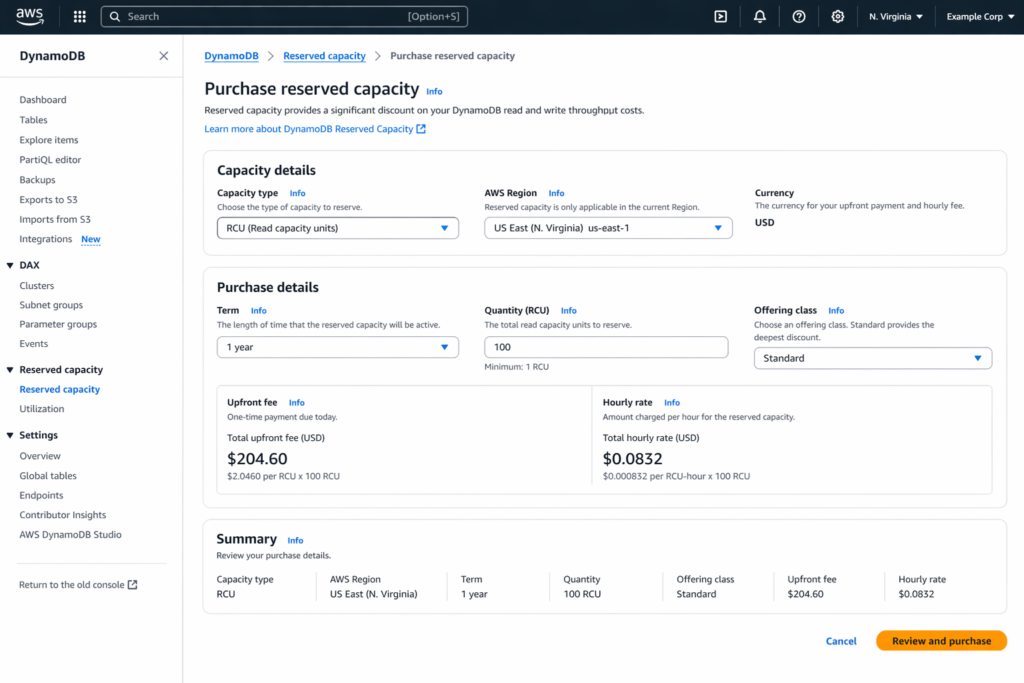
DynamoDB reserved read capacity units (RCU) cost approximately $0.0000256 per RCU-hour on a 1-year term with a $30 upfront fee per 100 RCU, compared to the standard provisioned rate of $0.00013 per RCU-hour with no upfront cost (verify at aws.amazon.com/dynamodb/pricing/reserved-capacity — rates change). That is a 54% reduction in effective hourly read cost for a 1-year commitment and 77% for a 3-year commitment. Reserved read capacity is purchased in blocks of 100 RCU, applies only to provisioned mode on the DynamoDB Standard table class, and is region-specific. You cannot purchase reserved RCU for on-demand tables, Standard-IA tables, or Global Tables replicated writes.
%2021%20(33).svg)
What Is the Exact DynamoDB Reserved Read Capacity Pricing?
Here is the complete DynamoDB read capacity units pricing table across all commitment options for US East (N. Virginia) as of April 2026 (verify at aws.amazon.com/dynamodb/pricing — rates change).
| Option | Upfront Fee (per 100 RCU) | Hourly Rate (per RCU) | Effective Monthly Cost (per 100 RCU) | Savings vs Standard |
| Standard Provisioned | $0 | $0.00013 | $9.49 | Baseline |
| 1-Year Reserved | $30.00 | ~$0.0000256 | ~$4.37* | ~54% |
| 3-Year Reserved | $60.00 | ~$0.0000102 | ~$2.39* | ~77% |
| On-Demand RRU (for comparison) | $0 | $0.25 per million RRU | Varies by usage | N/A |
Standard provisioned: 100 RCU x $0.00013 x 730 hours = $9.49/month. 1-year reserved: (100 x $0.0000256 x 730) + ($30/12) = $1.87 + $2.50 = $4.37/month effective. 3-year reserved: (100 x $0.0000102 x 730) + ($60/36) = $0.74 + $1.67 = $2.41/month effective. The savings are $5.12/month per 100 RCU on a 1-year term and $7.08/month per 100 RCU on a 3-year term.
How Many DynamoDB Reserved Read Capacity Units Should You Purchase?
The sizing decision for DynamoDB reserved read capacity should be based on your stable baseline consumed RCU, not your provisioned RCU or your peak RCU.
Step 1: Measure Your Baseline Consumed RCU
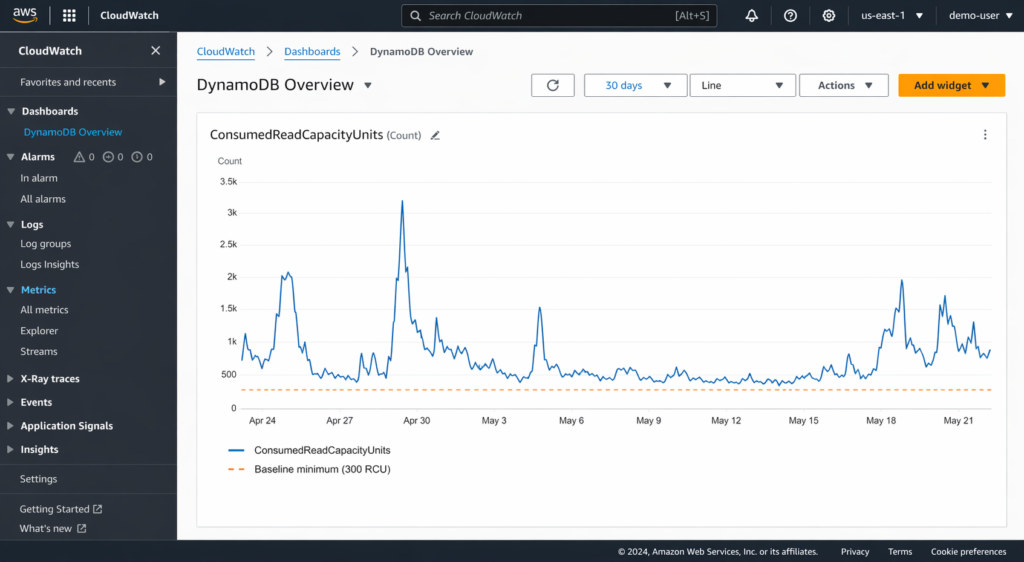
In CloudWatch, pull the ConsumedReadCapacityUnits metric at 1-hour granularity for the past 30-60 days. Identify the minimum sustained level across all hours. This minimum is your baseline, the floor below which your read consumption never drops. For many applications, the baseline is the overnight or weekend low.
Step 2: Calculate the Reservable Baseline
If your minimum consumed RCU over 30 days is 380, your reservable baseline is 300 RCU (rounded down to the nearest 100, since reserved capacity is purchased in 100 RCU blocks). Never round up: the 80 RCU above your reserved amount will be billed at the standard provisioned rate, which is still cheaper than over-reserving capacity you do not consistently use.
Step 3: Account for Eventually Consistent vs Strongly Consistent Reads
One RCU supports 1 strongly consistent read/second or 2 eventually consistent reads/second for items up to 4 KB. If your application primarily uses eventually consistent reads, your effective read throughput per RCU is doubled. CloudWatch ConsumedReadCapacityUnits already accounts for this, reporting the actual RCU consumed regardless of consistency mode. Use the CloudWatch number directly.
Step 4: Factor in GSI Read Capacity
Global Secondary Indexes consume their own RCU, separate from the base table. Reserved RCU applies to the total account-level provisioned read capacity, including GSIs. If your base table uses 300 RCU and two GSIs each use 100 RCU, your total reservable capacity is 500 RCU (if all are at baseline consistently). Check each GSI’s consumed RCU independently before including it in your reservation.
When Does DynamoDB Reserved Read Capacity Break Even?
The break-even point is when the cumulative savings from the discounted hourly rate exceed the upfront fee you paid.
1-Year Term Break-Even
For 100 reserved RCU: upfront fee = $30.00. Hourly savings = $0.00013 (standard) – $0.0000256 (reserved) = $0.0001044 per RCU-hour. For 100 RCU: $0.01044 per hour in savings. Hours to break even: $30.00 / $0.01044 = 2,874 hours, or approximately 120 days (4 months). After month 4, every hour of reserved capacity generates pure savings. Over the full 12-month term, total savings per 100 RCU = ($0.01044 x 8,760 hours) – $30.00 = $91.45 – $30.00 = $61.45 net savings.
3-Year Term Break-Even
For 100 reserved RCU: upfront fee = $60.00. Hourly savings = $0.00013 – $0.0000102 = $0.0001198 per RCU-hour. For 100 RCU: $0.01198 per hour in savings. Hours to break even: $60.00 / $0.01198 = 5,008 hours, or approximately 209 days (7 months). Over the full 36-month term, total savings per 100 RCU = ($0.01198 x 26,280 hours) – $60.00 = $314.84 – $60.00 = $254.84 net savings.
The 3-year term delivers 4.1x more net savings than the 1-year term ($254.84 vs $61.45 per 100 RCU), but requires committing to a specific capacity level for three years. If your workload is growing or may shift to on-demand mode, the 1-year term offers more flexibility.
What Are the Restrictions on DynamoDB Reserved Capacity?
DynamoDB reserved capacity has several constraints that affect the purchasing decision (verify at aws.amazon.com/dynamodb/pricing/reserved-capacity — rates change):
Minimum purchase: 100 RCU (or 100 WCU). You cannot reserve fewer than 100 units. If your baseline is under 100 RCU, reserved capacity does not make sense.
Maximum purchase: 1,000,000 combined RCU + WCU per purchase. Above this, request a quota increase through AWS Support.
Region-locked: Reserved capacity is tied to the region where you purchase it. If you move workloads to a different region, the reservation does not follow.
Table class: Standard table class only. DynamoDB Standard-IA tables are excluded.
No rWCU coverage: Reserved capacity does not apply to replicated write capacity units (rWCU) used by Global Tables.
No cancellation or transfer: Once purchased, reserved capacity cannot be cancelled, transferred to another account, or moved to another region.
Consolidated billing: Under AWS Organisations, reserved capacity is shared across all linked accounts. The billing system applies reserved rates first to minimise the organisation’s total cost.
Should You Reserve Read Capacity, Write Capacity, or Both?
Read and write capacity have different pricing and different utilisation patterns. The decision to reserve each should be independent.
Read capacity (RCU) is typically easier to reserve because read patterns are more predictable for most applications. User-facing read workloads tend to have a stable baseline with predictable daily peaks. The RCU reserved rate saves 54-77% on a cost base of $0.00013/RCU-hour.
Write capacity (WCU) is more variable for many workloads, especially those driven by batch jobs, event processing, or data ingestion pipelines. The WCU reserved rate saves 53-73% on a cost base of $0.00065/WCU-hour, which is 5x the RCU rate. Because writes cost 5x more per unit than reads, the dollar savings per reserved WCU are 5x larger than per reserved RCU.
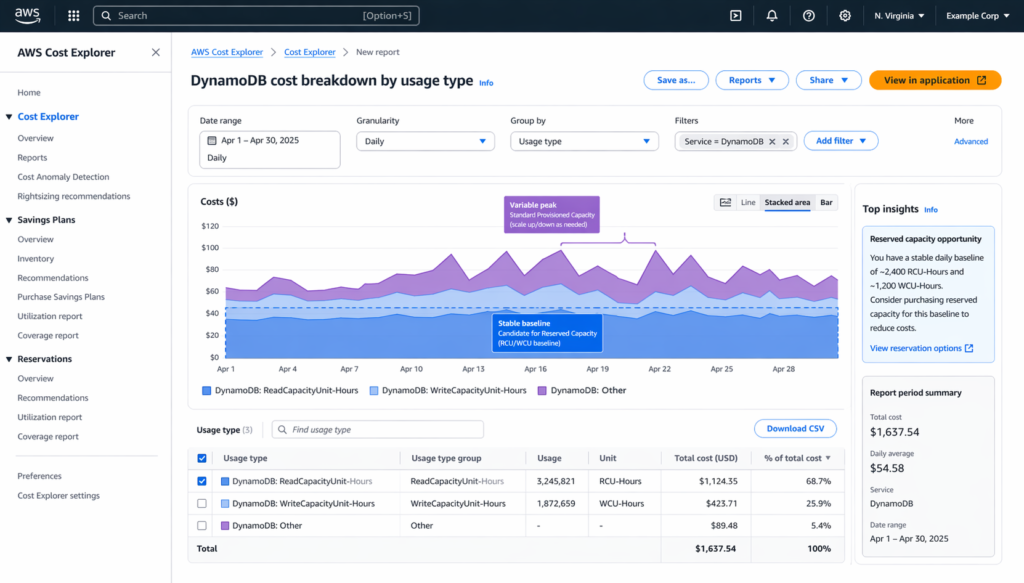
Decision framework: if your read baseline is above 100 RCU and stable, reserve it. If your write baseline is above 100 WCU and stable, reserve it. If one is variable and the other is stable, reserve only the stable one. Let standard provisioned rates cover the variable capacity.
Also read: DynamoDB Auto Scaling for Provisioned Capacity
How Does DynamoDB Reserved Read Capacity Work with Auto Scaling?
Reserved capacity and auto scaling work together. Reserved capacity is a billing mechanism that applies a discounted rate to provisioned RCU. Auto scaling is a provisioning mechanism that adjusts the number of provisioned RCU based on demand.
When auto scaling provisions 500 RCU and you have 300 reserved RCU, the first 300 RCU are billed at the reserved rate, and the remaining 200 RCU are billed at the standard provisioned rate. When traffic drops, and auto scaling reduces provisioned capacity to 300 RCU, all 300 RCU are billed at the reserved rate. If auto scaling drops below 300 RCU (for example, to 250 RCU during low traffic), you still pay for 300 reserved RCU.
This is why you reserve your baseline (the floor), not your average or peak. The reserved portion is always billed regardless of actual consumption. Any capacity above the reserved floor that auto scaling provisions are billed at the standard rate.
How Does Usage.ai Automate DynamoDB Reserved Capacity Purchasing?
The decision to purchase reserved capacity for DynamoDB read capacity units requires continuous monitoring of consumption patterns, accurate baseline identification, and timely purchases of the right quantity. This analysis needs to happen per table, per GSI, and per region.
Usage.ai automates this process through its Flex Reserved Instances product for DynamoDB. The platform monitors ConsumedReadCapacityUnits and ConsumedWriteCapacityUnits across all tables, GSIs, and regions in your account. It identifies stable baselines, calculates the optimal reservation quantity (always in 100 RCU/WCU blocks), and purchases reserved capacity on your behalf.
Usage.ai refreshes its analysis every 24 hours, compared to AWS Cost Explorer’s 72+ hour recommendation refresh cycle. At $6-12K/day in uncovered spend for large DynamoDB deployments, that 3-day detection gap compounds to $18K+ per refresh cycle.
If a reservation becomes underutilised due to a change in your workload pattern, Usage.ai provides cashback or credits for the unused portion. This is unique in the industry: no other platform offers financial protection on DynamoDB reserved capacity. The fee is a percentage of realised savings only.
Also read: AWS Savings Plans vs Reserved Instances
%2022%20(17).svg)
Frequently Asked Questions
1. How much does DynamoDB reserved read capacity cost?
DynamoDB reserved read capacity for a 1-year term costs approximately $30 upfront per 100 RCU plus $0.0000256 per RCU-hour, an effective rate of about $4.37/month per 100 RCU. The standard provisioned rate is $9.49/month per 100 RCU, so the 1-year reservation saves approximately 54%. A 3-year term costs $60 upfront plus $0.0000102/RCU-hour (verify at aws.amazon.com/dynamodb/pricing/reserved-capacity — rates change).
2. What is the equivalent of 1 DynamoDB read capacity unit?
One DynamoDB read capacity unit (RCU) supports one strongly consistent read per second for items up to 4 KB, or two eventually consistent reads per second for items up to 4 KB. Items larger than 4 KB consume additional RCU, rounded up to the next 4 KB increment. A 10 KB strongly consistent read consumes 3 RCU (10 KB / 4 KB, rounded up).
3. What is DynamoDB reserved capacity?
DynamoDB reserved capacity is a billing commitment where you pay an upfront fee plus a discounted hourly rate for a specified number of provisioned RCU or WCU over a 1-year or 3-year term. It provides 54% (1-year) to 77% (3-year) savings versus standard provisioned pricing. It applies to the DynamoDB Standard table class only, in the region where purchased.
4. Can you reserve capacity for DynamoDB on-demand tables?
No. Reserved capacity applies only to provisioned capacity mode on DynamoDB Standard table class tables. On-demand tables are billed per request and cannot use reserved capacity. Database Savings Plans (launched December 2025) are the only commitment discount that covers on-demand DynamoDB usage, offering 12-18% savings (verify at aws.amazon.com/savingsplans/database-pricing — rates change).
5. How is reserved capacity shared across AWS accounts?
Under AWS Organisations with consolidated billing, reserved capacity purchased by any account (payer or linked) is shared across all accounts in the organisation. The billing system applies reserved rates to matching provisioned capacity in any linked account, prioritising by lowest cost. You do not need to purchase reserved capacity in each individual account.
6. Can you cancel DynamoDB reserved capacity?
No. Once purchased, DynamoDB reserved capacity cannot be cancelled, transferred, or refunded. You are committed to the upfront payment and hourly charges for the full term (1 year or 3 years). This is why accurate baseline sizing is critical before purchasing. Reserve only your stable minimum capacity.
7. Should I buy a reserved RCU or a reserved WCU first?
Prioritise reserved WCU if your write baseline is stable, because WCU costs 5x more per unit than RCU ($0.00065 vs $0.00013 per hour). A 100 WCU reservation saves approximately $30.60/month versus standard, while a 100 RCU reservation saves approximately $5.12/month. However, if your writes are variable and reads are steady, reserve RCU first.
8. How does DynamoDB reserved capacity interact with Database Savings Plans?
Reserved capacity and Database Savings Plans are complementary. Reserved capacity is applied first to eligible provisioned usage at 54-77% savings. Any remaining eligible usage can then receive Database Savings Plan discounts at 12-18% savings. Using both together maximises savings: reserved capacity covers the stable baseline, and Savings Plans cover the variable overflow.