AWS
AWS Microsoft Azure
 Google Cloud


Azure may be recommending another Savings Plan or Reservation. Finance wants more discounted coverage, while Engineering knows the environment will change before the commitment ends.
The question is no longer whether commitments can save money. It is should you approve this purchase, reduce it, or defer it?
Answering it requires validating the recommendation before accepting the commitment.
Short answer
Approve only the portion of Azure usage that remains durable after accounting for existing commitments, planned workload reductions, and a realistic downside scenario.Reduce the amount when uncertain growth is required to consume the commitment, and defer the purchase when migrations, rightsizing, or architecture changes make the baseline unreliable.
Product distinction: Size Azure Savings Plans against eligible hourly spend. For Reservations, validate the matching service, SKU or family, region, quantity, scope, and expected utilization before deciding whether to approve, reduce, or defer.
Next, test whether the proposed commitment is supported by the usage you expect to keep.
Step 1: Validate the usage behind the proposed purchase
Monthly averages can make volatile demand look safer than it is.Suppose Savings Plan-eligible compute usage looks like this:
| Demand pattern | Illustrative PAYG-equivalent usage |
|---|---|
| Low-demand periods | $300/hour |
| Typical periods | $460/hour |
| Peaks | $700/hour |
Azure Savings Plans use a fixed hourly monetary commitment. Microsoft explains in its Savings Plan overview that unused commitment in one hour does not roll forward.
For Reservations, use Microsoft’s Reservation recommendation methodology to evaluate stable, matching resource consumption and quantity rather than applying this dollar-per-hour calculation directly.
The recommendation is a purchase candidate, not an automatic approval.
Step 2: Adjust the recommendation for changes Azure cannot see yet
Historical usage cannot account for Engineering plans to:retire an application;
complete a migration;
rightsize infrastructure;
close a temporary environment;
move regions;
change architecture; or
consolidate services.
That helps with changes already visible in billing data.
It cannot fully account for a migration scheduled for next month that has not yet occurred.
Adjust usage for those changes before approval.
Step 3: Test the Savings Plan purchase against downside demand
Build at least three scenarios:| Scenario | What it represents |
|---|---|
| Downside | Confirmed reductions happen; uncertain growth does not |
| Expected | High-confidence continuing demand plus likely growth |
| Upside | Additional launches or demand materialize |
Worked Savings Plan purchase example
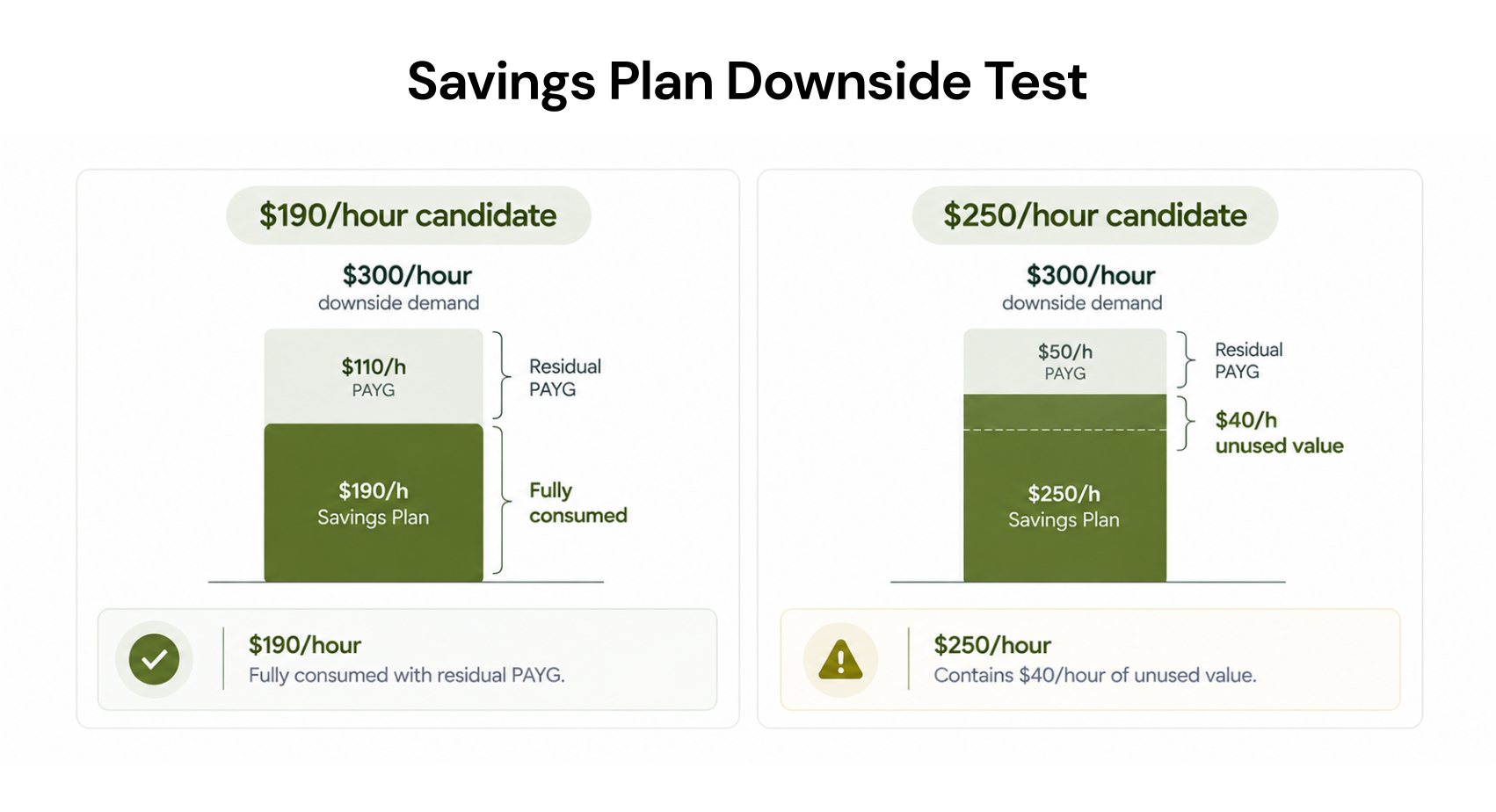
Assume:downside eligible usage would cost $300/hour at PAYG;
an illustrative Savings Plan effective rate equals 70% of PAYG;
covering all downside usage would therefore consume $210/hour of commitment.
| Proposed Savings Plan | Downside outcome | Decision |
|---|---|---|
| $190/hour | Fully consumed; some usage remains PAYG | Approve for final validation |
| $250/hour | $40/hour exceeds downside commitment consumption | Reduce |
For the $250 proposal, the downside workload can consume only $210 of commitment.
Buying more commitment produces worse downside economics.
Does the larger commitment reduce total cost after unused value is included?
Step 4: Validate the product, scope, and term
Once the amount passes the downside test, validate the actual product.| Workload evidence | Starting point |
|---|---|
| Stable resource configuration and duration | Evaluate reservation |
| Durable eligible spend with changing compute configuration | Evaluate Savings Plan |
| Demand may materially decline | Keep that portion PAYG |
Before approval, also confirm:
billing agreement eligibility;
eligible service and meters;
benefit scope;
region or resource matching requirements;
existing benefits;
exclusions from the commitment benefit; and
available term options.
Run the downside test separately for each proposed term. Do not choose a longer term simply because it offers a larger advertised discount.
For a deeper product comparison, see our Azure Reservations vs Savings Plans guide.
How the February 1, 2027 exchange-policy change affects volatile workloads
Microsoft’s Reservation exchange-policy guidance says Reservations purchased on or after February 1, 2027 cannot be exchanged when the corresponding service is supported by Savings Plans.
Reservations purchased before February 1, 2027 can be exchanged until that date and retain one final exchange afterward. A Reservation created through an exchange on or after February 1, 2027 is not exchangeable.
For volatile workloads, this makes confidence in the configuration more important before approving a Reservation.
Step 5: Check whether you are about to double-commit
Inventory:existing Reservations;
existing Savings Plans;
current scope;
utilization;
expiration dates;
renewal settings; and
recent purchases.
A new Reservation can therefore change what consumes an existing Savings Plan.
Microsoft also advises allowing recommendation systems time to reflect a recent purchase before adding the alternate commitment type. Its Savings Plan sizing guidance recommends waiting at least seven days.
Only the residual opportunity should proceed to the next approval.
Approve, reduce, or defer
Approve
Approve when:eligible usage supports the proposed amount;
downside economics remain attractive;
planned reductions are included;
existing benefits are reconciled;
product eligibility and scope are confirmed; and
the term fits the workload’s expected lifetime.
Reduce
Reduce when a durable baseline exists, but the proposal includes peak demand, uncertain growth, or capacity that would be unused in the downside case.Defer
Defer when rightsizing is unfinished, a migration is approaching, the architecture is unresolved, or the savings case depends on growth that has not happened.Before approving another Azure commitment
Right-size the workload first.
Isolate eligible usage only.
Reconcile existing commitments.
Confirm the billing agreement, service, scope, and exclusions.
Validate planned Engineering changes.
Test downside economics.
Test each proposed term separately.
Include unused commitment in total cost.
Document the owner approving the downside exposure.
After approval: verify the commitment before buying more
The purchase decision does not end when the commitment is created.Review:
hourly utilization;
unused commitment value;
amortized commitment cost, where appropriate;
remaining PAYG usage;
updated Azure recommendations; and
new Engineering changes.
When repeated commitment validation stops scaling
You can perform this process manually before each purchase.The harder part is repeating it as usage, Engineering plans, existing commitments, and recommendations change.
At Usage.ai, we analyze Azure usage and existing commitments, recommend appropriate commitment actions, and can purchase and manage eligible commitments in your Azure account.
Our Azure integration documentation describes read-only billing and usage access for analysis, while commitment purchasing uses separately scoped permissions.
With Flex Insured Commitments, teams can get the up to 65% savings associated with an eligible three-year Azure compute Savings Plan with none of the commitment risk.
If a covered commitment costs more than equivalent pay-as-you-go usage, we calculate the qualifying loss monthly and provide cashback protection for that difference. Cashback does not cancel the Azure commitment.
Our pricing model charges a percentage of realized savings generated through the Flex-Commit Program, billed monthly in arrears after provider billing data is finalized. Include that fee in your net-savings comparison.
The approval rule: buy only what you can defend
Volatile Azure usage does not mean you should avoid commitments.It means the purchase needs stronger evidence.
Approve when the amount remains economical after accounting for downside demand and planned reductions.
Reduce when a smaller commitment produces stronger economics.
Defer when the recommendation depends on uncertain growth or unresolved Engineering changes.
The right commitment is not the largest discount opportunity Azure can model.
It is the purchase you can still defend when the environment changes.
Review usage, commitments, workload changes, and risk before approving or deferring purchases.
Frequently asked questions
Should we approve the Azure commitment amount Microsoft recommends?
Treat it as a starting candidate. Before approval, validate eligibility, existing benefits, Engineering changes, term exposure, and downside economics.
Do Savings Plans and Reservations use the same sizing method?
No. Savings Plans use an hourly spend commitment. Reservations generally require validation of matching resource characteristics, quantity, scope, and utilization.
Should we choose the longest term for the largest discount?
Not automatically. Test each available term against the workload’s expected lifetime and downside scenario before approving the larger commitment.
Can an Azure Savings Plan be canceled if demand falls?
No. Microsoft’s current Savings Plan documentation states that purchases cannot be canceled or refunded.
When should we defer an Azure commitment purchase?
Defer when rightsizing, migrations, workload retirement, unresolved architecture changes, or recent purchases make the current baseline unreliable.