AWS
AWS Microsoft Azure
 Google Cloud

This guide explains how EST affects eligible Microsoft 365-style CSP subscriptions, where the 3% and 23% uplifts apply, and how to manage end-of-term decisions. It then covers Azure Reserved VM Instances and Savings Plans separately, so FinOps teams can optimize Azure consumption without confusing commitment savings with EST.
Short answer
Microsoft’s Extended Service Term (EST) is a license-based CSP subscription policy, not an Azure consumption pricing change. For eligible CSP subscriptions, EST can apply after the subscription term ends if the required end-of-term action is not completed. Azure pay-as-you-go consumption, Azure Reservations, and Azure Savings Plans follow separate pricing and commitment rules.What changed in CSP subscription pricing
Microsoft’s Extended Service Terms changed what happens when certain eligible license-based CSP subscriptions reach the end of their term without a completed renewal or cancellation action.Effective May 4, 2026, Microsoft removed the free grace period for eligible Cloud Solution Provider subscriptions after expiration. The change was announced in October 2025 and was originally scheduled for April 1, 2026 before being postponed.
Eligible subscriptions purchased or renewed between April 1, 2025 and May 4, 2026, with term end dates after May 4, 2026, can move to EST. For eligible subscriptions, auto-renew set to false without an explicit cancellation instruction can be converted to EST.
EST bills monthly at the current monthly term rate plus a 3% uplift. If no monthly SKU exists for the product, the uplift is 23%.
Does EST apply to Azure?
Not to Azure consumption-based pay-as-you-go charges.Microsoft describes EST as a license-based CSP subscription mechanism. Microsoft 365-style license subscriptions can be EST-eligible, while Azure consumption charges, Reservations, and Savings Plans follow separate pricing and commitment rules.
That distinction is important because a CSP customer can have both license subscriptions and Azure consumption under the same broader partner relationship. The EST workflow should be managed separately from Azure compute optimization.
Why the distinction changes the FinOps workflow
License-subscription renewal control and Azure consumption optimization should sit in the same cost-governance process, but they require different checks.EST exposure starts with subscription eligibility, renewal dates, and an explicit end-of-term instruction. Azure commitment optimization starts with actual compute consumption, current commitment coverage, and utilization.
A FinOps team should not use an EST audit as a substitute for an Azure cost review, or vice versa. A license subscription can require an end-of-term action even when Azure consumption is already optimized.
Similarly, avoiding EST does not reduce the pay-as-you-go rate of an Azure workload. Keeping the two workstreams separate makes it easier to identify whether a cost change comes from licensing, partner billing, Azure usage, or commitment coverage.
Hypothetical license-subscription EST cost example
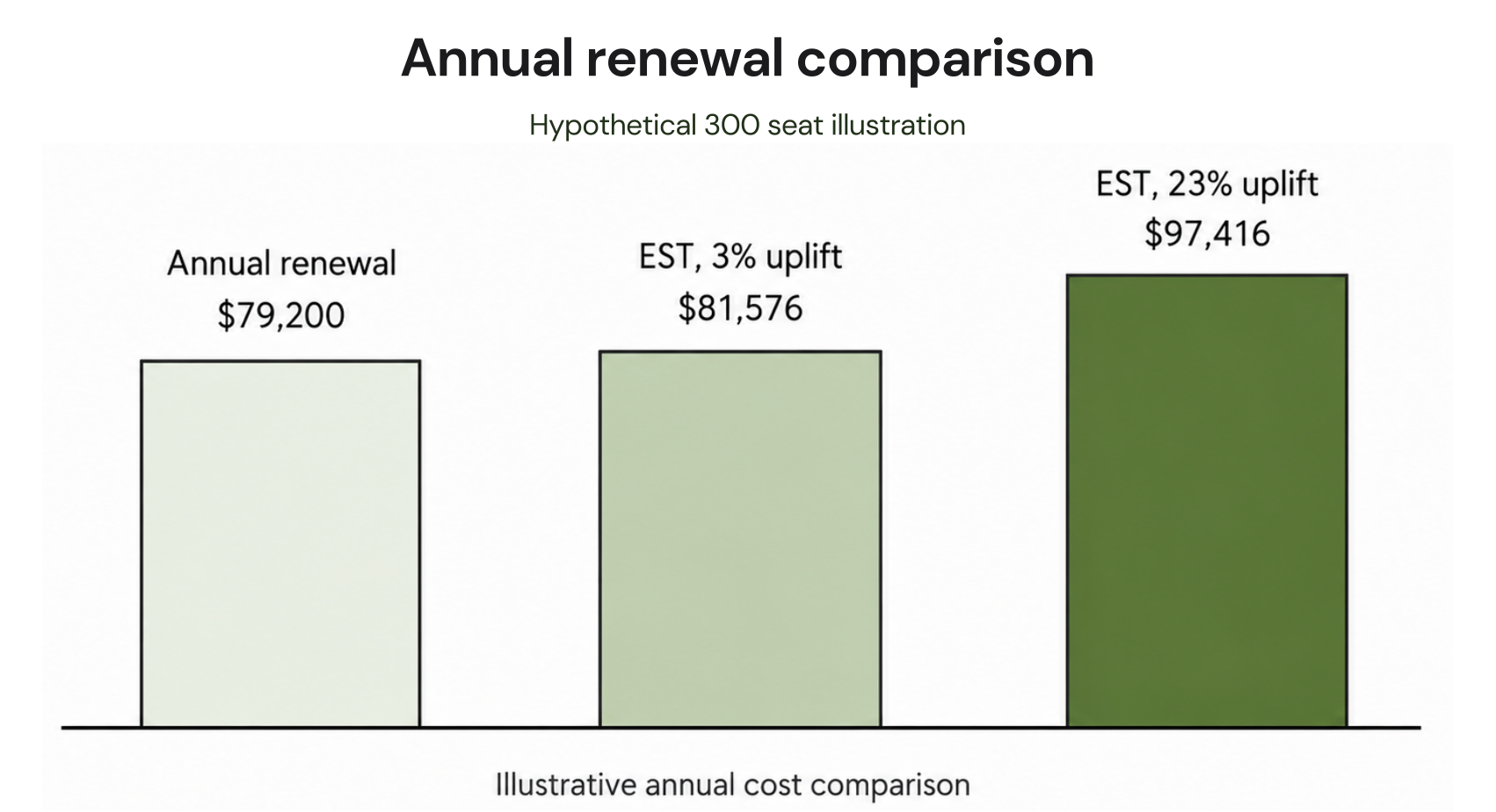
This example is for an eligible license-based CSP subscription. It is not an example of Azure consumption pricing.Assume a mid-market company has 300 Microsoft 365 Business Premium seats at an illustrative monthly-term rate of $22.00 per user.
| Scenario | Monthly cost | Annual cost |
|---|---|---|
| Renew on time | $6,600 | $79,200 |
| EST with a 3% uplift | $6,798 | $81,576 |
| EST where the 23% uplift applies | $8,118 | $97,416 |
The uplift percentages come from Microsoft’s EST guidance. The seat price is illustrative only, so use the contracted rate for the specific SKU before making a budget decision.
EST eligibility and end-of-term checklist
The practical goal is to make sure every eligible subscription has an explicit end-of-term instruction before expiry.- Export the license-based CSP subscriptions that may be EST-eligible.
- Confirm the purchase or renewal date and the subscription term end date.
- Select the intended end-of-term action: renew, cancel, or allow EST where appropriate.
- Record the responsible owner’s approval for that action.
- Verify in the partner workflow that the end-of-term instruction has been completed.
Which agreement governs this cost?
EA, CSP, and MCA-E can represent different commercial and support arrangements, but they should not be reduced to universal rules based only on user count.Instead of treating one model as automatically better, evaluate:
- Which agreement governs the specific license or Azure consumption charge?
- What contract term and renewal structure apply?
- What pricing has been negotiated for the organization and market?
- Is support handled directly with Microsoft or through a CSP partner?
- Which Azure commitment options are available under the current arrangement?
Azure commitment optimization with Reserved Instances and Savings Plans
This section addresses Azure compute savings separately from EST. Azure Reservations and Azure Savings Plans can be offered through CSP partners, but they are not part of the EST policy.Microsoft advertises savings of up to 72% versus pay-as-you-go pricing for eligible Azure Reserved VM Instances with one-year or three-year terms.
Microsoft also advertises savings of up to 65% from pay-as-you-go prices for eligible Azure Savings Plans. Actual rates vary by service, meter, term, region, configuration, and scope
| Area | Azure Reserved VM Instances | Azure Savings Plans |
|---|---|---|
| Commitment basis | Reservation tied to eligible VM usage | Fixed hourly compute spend |
| Microsoft savings claim | Up to 72% for eligible VMs | Up to 65% for eligible compute |
| Term | One-year or three-year terms are supported | Confirm the current plan term available for the workload |
| Scope and eligibility | Depends on the eligible reservation and Azure configuration | Depends on eligible compute usage, configuration, and scope |
| Cancellation or exchange | Review Microsoft’s current reservation rules before purchase | Review current Savings Plan terms before purchase |
Microsoft provides separate CSP guidance for Azure Savings Plans, while Reserved VM Instance pricing and terms should be checked against Microsoft’s current Azure Reservation documentation.
How to validate CSP and Azure pricing
Azure pricing is dynamic, and the customer’s actual charge can depend on the CSP agreement and partner billing arrangement.Before approving a renewal or commitment purchase, reconcile four sources:
Partner Center price lists: Confirm the current CSP offer and applicable price.
Partner invoice: Check what the customer is actually being billed.
Azure cost data: Validate the underlying Azure consumption and usage pattern.
Reservation or Savings Plan utilization reports: Confirm whether existing Azure commitments are being used as expected.
Next, use Azure cost data to identify the actual consumption pattern behind Azure charges. Finally, review Reservation or Savings Plan utilization reports before adding more commitment coverage.
This gives procurement and FinOps teams a common evidence trail for renewal and commitment decisions. It also helps prevent an EST licensing change from being misread as an Azure consumption price increase.
How we approach Azure commitment automation
We analyze cloud usage, recommend commitment coverage, and, after customer approval, automate eligible commitment purchasing.We help teams manage the commitment layer as usage changes. With Flex Insured Commitments, teams can get the 72% savings of a 1- or 3-year commitment with none of the commitment.
After you separate EST-eligible license subscriptions from Azure consumption spend, we can help you evaluate Azure commitment coverage with our Flex Commitments. After your approval, we automate eligible commitment purchasing and provide cashback protection for loss associated with a Flex Commitment, subject to current program eligibility and terms.See our cashback documentation for details.
Our goal is to help manage the commitment layer after you have established an appropriate Azure compute baseline, particularly when usage is stable enough to benefit from commitment pricing but may change over time.
Review commitment coverage, uncovered compute spend, and risk.
Frequently asked questions
Which CSP subscriptions can be eligible for EST?
Eligible license-based CSP subscriptions purchased or renewed between April 1, 2025 and May 4, 2026, with term end dates after May 4, 2026, can move to EST, subject to Microsoft’s eligibility and offer-specific rules.
Can I exit EST once I enter it?
Yes. Partners can cancel an EST subscription at any time during its monthly term or convert it to an eligible base or upgraded SKU.
Confirm the billing and proration outcome for the specific SKU and market with your CSP partner before making a change.
Does EST apply to Azure consumption?
No. EST applies to eligible license-based CSP subscriptions. Azure consumption-based pay-as-you-go charges, Azure Reservations, and Azure Savings Plans are outside EST.