.png)
 AWS
AWS Microsoft Azure
 Google Cloud


This guide compares the best cloud cost optimization tools for startups in 2026 by primary use case, execution depth, cloud coverage, pricing approach, and key buying consideration.
The Short Answer
There is no universal best tool for every startup. AWS, Azure, and Google Cloud’s native cost tools provide a practical baseline, while Vantage, Kubecost, Infracost, and CloudZero address different visibility, engineering, and allocation needs.For automated rate optimization, compare Pump, ProsperOps, Archera, and Usage.ai by supported services, permissions, pricing, and downside protection. Choose against your workload and operating model, not an arbitrary cloud-spend threshold.
How We Evaluated These Tools
This is a category-led shortlist, not a universal ranking. We assessed primary use case, cloud and workload coverage, recommendation-versus-execution depth, published pricing, and commitment-risk treatment.We publish this guide and include Usage.ai in the shortlist. Our product information comes from official Usage.ai documentation, while competitor details come from publicly available vendor sources and should be confirmed during procurement.
Cloud Cost Tools at a Glance
| Tool | Best for | Execution depth | Published pricing signal |
|---|---|---|---|
| Native cloud tools | Single-cloud cost visibility | Analysis and provider-native recommendations | Core cost-management interfaces are generally available without a separate platform subscription; service-specific charges may apply |
| Usage.ai | Flexible commitment management | Approval-based purchasing and active management | Percentage of realized savings |
| Vantage | Multi-provider visibility | Reports, recommendations, and AWS Savings Plans Autopilot | Free to $2,500 tracked monthly; paid from $30/month |
| Kubecost | Kubernetes allocation | Insights and selected automated actions | Free Foundations tier; enterprise options |
| Infracost | Pre-deployment cost control | CI/CD estimates, policies, and workflows | 1,000 free runs/month; paid from $250/month |
| CloudZero | Unit economics and allocation | Analytics, anomaly detection, and optimization recommendations | Request pricing |
| Pump | Broad cloud visibility and automated savings | Recommendations and Autopilot | Core platform advertised as free |
| ProsperOps | Multi-cloud commitment optimization | Autonomous commitment management | Savings Share tied to savings |
| Archera | Native and guaranteed commitments | Planning, purchasing, management, and optional guarantees | Free software; paid guarantee premiums |
Best Cloud Cost Tools for Startups
1. Native Cloud Cost Tools: Best Free Baseline
AWS, Azure, and Google Cloud provide native tools for analyzing costs, monitoring budgets, and reviewing optimization opportunities. AWS Cost Explorer supports cost analysis, forecasting, and commitment recommendations; Azure Cost Management provides cost analysis, budgets, and optimization guidance; and Google Cloud FinOps Hub centralizes savings opportunities and FinOps metrics.Best for: single-cloud startups needing a provider-native baseline before adding another platform. Consider: each tool is limited to its own cloud ecosystem, and teams generally remain responsible for evaluating and implementing recommendations.
2. Usage.ai: Flexible Commitment Protection
Usage.ai analyzes your AWS, Azure, and GCP usage, recommends commitments, and can purchase approved recommendations through each cloud provider’s API. We then identify and actively manage those commitments in the Usage.ai dashboard.Our pricing is performance-based: customers pay an agreed percentage of realized savings, billed monthly in arrears after the cloud provider finalizes the billing data.
Best for: Startups seeking multi-cloud commitment automation with defined cashback protection. Consider: Confirm eligible commitments, expected net savings, required permissions, and applicable program terms.
3. Vantage: Multi-Provider Visibility
Vantage combines cost reports, virtual tagging, forecasting, unit costs, anomaly alerts, and numerous cloud and SaaS integrations. It also offers Autopilot for AWS Savings Plans, so it should not be classified as recommendations-only.Its current pricing includes a free Starter tier for up to $2,500 in tracked monthly costs, then paid plans with higher limits.
Best for: startups consolidating cost visibility across providers. Consider: confirm which automation features and fees apply to your plan.
4. Kubecost: Kubernetes Cost Allocation
IBM Kubecost allocates Kubernetes costs across clusters, namespaces, workloads, teams, and shared resources. It can reconcile Kubernetes data with cloud-provider billing and surface overprovisioning, budgets, forecasts, and selected automated actions.The Foundations option is free for unlimited clusters up to 250 cores with 15-day metric retention; enterprise editions add scale, retention, controls, and support.
Best for: Kubernetes-heavy teams needing workload-level accountability. Consider: it is Kubernetes-focused, so broader FinOps needs may require another layer.
5. Infracost: Pre-Deployment Cost Control
Infracost places cost estimates and policies in infrastructure-as-code workflows before changes reach production. Its published support includes Terraform, CloudFormation, and CDK, with integrations for GitHub, GitLab, and Azure DevOps.Infracost pricing starts with 1,000 free CI/CD runs per month; paid plans add capacity, guardrails, dashboards, and team workflows.
Best for: engineering teams that want cost feedback in pull requests. Consider: resources created outside covered workflows need separate visibility.
6. CloudZero: SaaS Unit Economics
CloudZero maps cloud spend to business dimensions such as product, feature, customer, or tenant. Alongside allocation and reporting, it offers anomaly detection, budgets, forecasting, and optimization recommendations.Best for: SaaS teams tracking cost to serve and gross-margin drivers. Consider: pricing is quote-based, and commitment execution is not its primary positioning.
7. Pump: Free Core FinOps Platform
Pump now supports AWS, Azure, and GCP alongside many other provider integrations. Its platform includes spend visibility, recommendations, and Autopilot savings-plan capabilities; Pump says its core offering is free because cloud providers pay it to manage billing complexity.Best for: startups comparing low-cost visibility and automated savings. Consider: validate provider enrollment, account structure, covered actions, and commercial terms.
8. ProsperOps: Autonomous Commitment Management
ProsperOps automates commitment-based discount optimization across AWS, Azure, and Google Cloud. The service operates in the background within customer-defined controls, and its pricing uses a Savings Share calculated from generated savings.Best for: teams that want hands-off, multi-cloud commitment management. Consider: evaluate its savings calculation, controls, supported services, and fit within the wider Flexera offering.
9. Archera: Guaranteed Cloud Commitments
Archera supports AWS, Azure, and Google Cloud. Its free software covers visibility and native commitment planning, purchasing, and management; optional Guaranteed Commitments charge a monthly premium that varies by service and term and represents a share of savings.Archera’s guarantee options include a cash Rebate Guarantee for underutilization and a Release Guarantee that can remove an eligible commitment.
Best for: teams comparing native commitment management with opt-in insurance. Consider: model the premium, net savings, eligibility, and guarantee terms.
How to Choose the Right Tool
Use five questions to narrow the shortlist:Where is the problem? Choose native tools for a basic single-cloud view, Kubecost for Kubernetes allocation, Infracost for infrastructure-as-code controls, or CloudZero for unit economics.
Do you need insight or action? Reporting can expose waste; automation can execute selected rightsizing or commitment decisions. Verify approval controls and rollback or protection terms.
What must be covered? Check clouds, accounts, Kubernetes, databases, serverless services, and SaaS costs, not only the provider logo.
What is the net economic value? Compare subscription fees, savings-share fees, guarantee premiums, implementation effort, and savings after fees.
What access is acceptable? Review read and write permissions, least-privilege policies, data handling, auditability, and who approves purchases.
When Commitment Automation Makes Sense
Commitment automation becomes relevant after obvious idle resources and oversizing are addressed and a team has predictable, eligible usage. The decision should rely on historical demand, architecture plans, existing commitment coverage and utilization, and tolerance for term risk, monthly spend alone.Native commitments differ by provider. AWS Savings Plans exchange a consistent hourly spend commitment for discounted rates over one or three years. Google Cloud CUDs can be spend- or resource-based and generally use one- or three-year terms, while Azure provides savings plans and reservations with separate scopes and rules.
Before automating a purchase, require a baseline, conservative coverage level, clear approval ownership, net-savings calculation, and a documented response if demand falls.
How Usage.ai Fits Your Strategy
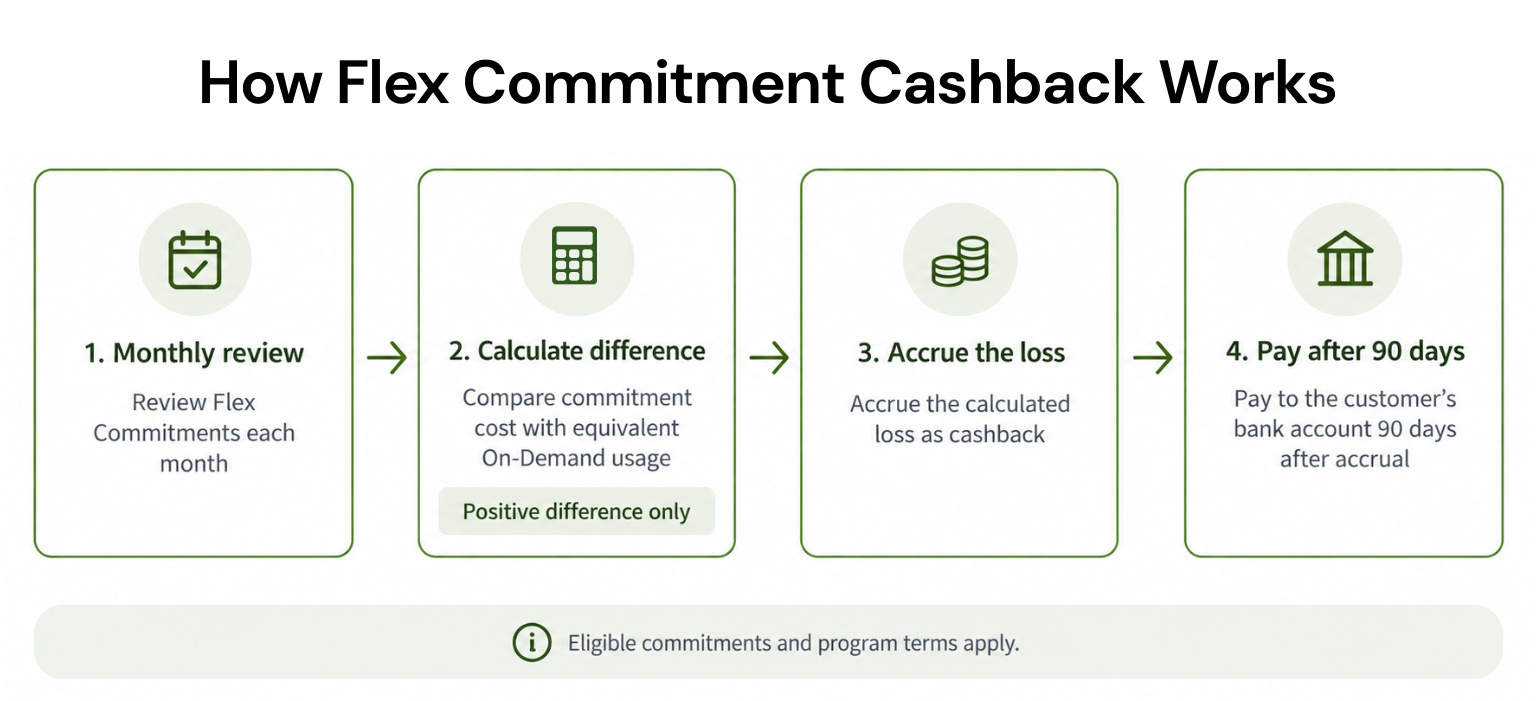
Usage.ai is relevant when stable, eligible usage remains at on-demand rates but the team is uncomfortable carrying the full downside of a long commitment. Under the Flex Insured Commitment Program, we recommend commitments, execute only after approval, manage them across connected AWS, Azure, or GCP accounts, and report realized savings.With Flex Insured Commitments, teams can get the 30–50% savings of a one or three year commitment with none of the commitment risk.
If an eligible Flex Commitment costs more than equivalent On-Demand usage, we provide cashback protection for the calculated loss, subject to the program terms.
Our pricing model charges a percentage of verified, realized savings. If Flex Commitments generate no realized savings, there is no savings-based fee.
Choose the Right Tool for Your Stage
Start with the smallest toolset that solves the current bottleneck. Native reporting may be enough initially; growing teams can add allocation, engineering guardrails, or unit-economics tooling as ownership becomes more complex.When predictable eligible usage becomes material, compare commitment platforms on execution, net savings, permissions, and downside protection. Run a proof or billing analysis with your own workload data before selecting any vendor.
Review eligible AWS, Azure, and GCP usage, projected net savings, permissions, and protection terms with a Usage.ai specialist.
Frequently asked questions
What is the best startup cloud cost tool?
It depends on the primary problem. Vantage supports multi-provider visibility; Kubecost specializes in Kubernetes; Infracost shifts cost control into development; CloudZero focuses on unit economics; and Pump, ProsperOps, Archera provide different forms of automation.We provide approval-based commitment management with cashback protection for eligible Flex Commitments.
Are free cloud cost tools enough?
They can be enough for basic visibility and manual governance. Paid or savings-based tools become easier to justify when they improve allocation, prevent costly deployments, execute changes, or manage commitments more effectively than the team can internally.
What separates visibility from automation?
Visibility tools organize costs and surface anomalies or recommendations. Automation tools can take approved or policy-controlled actions, so buyers must evaluate permissions, safeguards, and accountability as closely as projected savings.
Is commitment automation safe for startups?
It can reduce manual effort, but it does not make uncertain demand predictable. Review coverage, utilization, term, payment option, exit or protection mechanics, and net savings; start conservatively and confirm exactly which commitments a guarantee covers.
Do startups need multiple optimization tools?
Often, because the categories are complementary. A team might pair a native billing tool with Kubernetes allocation or pre-deployment controls, then add commitment management only for stable eligible usage.
If you notice any material information that is incorrect, outdated, or no longer applicable, please contact us at [email protected]. We’ll review the information and update the article where appropriate.