.png)



FOCUS, the FinOps Open Cost and Usage Specification, can reduce normalization work through a more consistent billing-data structure. It does not eliminate provider-specific fields, ownership context, telemetry, corrections, freshness issues, or schema management.
For broader context, review this cloud cost optimization guide and the difference between cloud cost optimization and cloud cost management.
The short answer
Buy if the requirement is common across FinOps teams, vendor coverage is adequate, and the value of earlier results or reduced maintenance exceeds the fees.
Use a portfolio approach if you want to retain strategic cost data, allocation logic, or approvals while using native, open-source, commercial, or managed solutions for specialist functions.
Evaluate tooling against functionality, integration complexity, cost, scalability, and long-term sustainability.
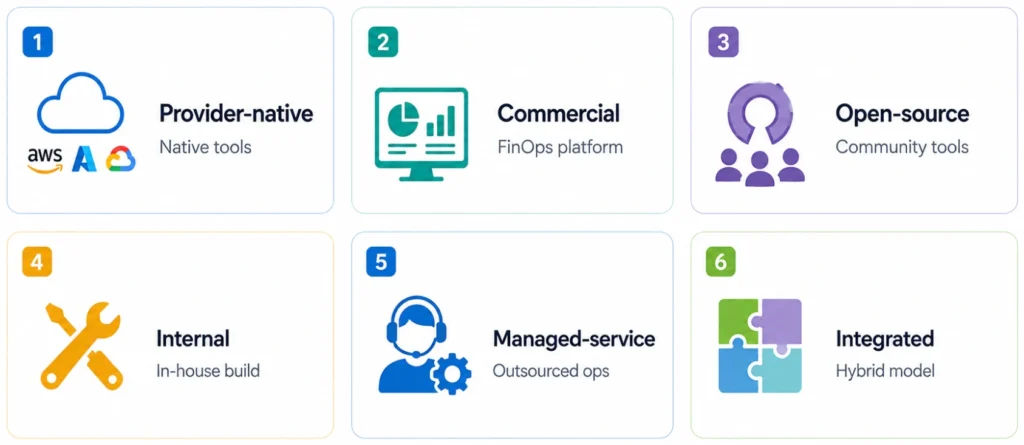
FinOps tooling options
Provider-native tools
Commercial or open-source tools
Internal automation
Professional or managed services
Integrated portfolio
Compare by capability
| Capability | Native tools | Build internally | Buy or adopt | Common approach |
|---|---|---|---|---|
| Billing ingestion | Strong for one provider | Customizable | Maintained connectors | Native or buy |
| Allocation | Basic to moderate | Potentially highest customization | Ranges from fixed to extensible | Build or portfolio |
| Forecasting | Native features available | Requires maintained models | Often included | Native or buy |
| Rightsizing | Provider-specific | Requires telemetry and logic | Often maintained | Native or buy |
| Commitment optimization | Provider-specific | Complex to maintain | Specialist options available | Buy or portfolio |
| Data portability | Provider-dependent | Potentially high with open schemas and tested exports | Contract and architecture dependent | Design explicitly |
Disclosure: Usage.ai sells cloud commitment automation and therefore has a commercial interest in commercial and integrated approaches. Buyers should validate vendor capabilities, controls, fees, guarantees, and contract terms directly.
Compare total cost, not sticker price
Do not compare a vendor fee with only the initial development cost. Include the full lifecycle.
Track cash savings, cost avoidance, run-rate reduction, recovered capacity, and risk reduction separately. Employee time counts as cash savings only when it avoids hiring, contractors, overtime, or headcount cost.
Illustrative example
These figures are illustrative. They do not represent vendor pricing or promised savings.
This example uses nominal totals. A formal case should use net present value because build costs may be front-loaded while subscriptions are distributed over time.
How to make the decision
1. Define outcomes before features
2. Map capabilities separately
Review this guide to cloud cost optimization tools.
3. Assess internal ownership
4. Create comparable cost models
5. Run a proof of value
This may include:
- Billing data
- Utilization telemetry
- Resource configuration
- Ownership metadata
- Observability data
- Business KPIs
Adjust the results for changes in traffic, architecture, services, and pricing. Track recommendations from identification through acceptance, implementation, realized run-rate reduction, persistence, and any reversal.
6. Evaluate security and automation
- Read-only versus action permissions
- SSO and role-based access control
- Encryption
- Data residency
- Data retention
- Audit logs
- Subprocessors
7. Stress-test continuity and exit
For vendors, examine:
- Minimum fees
- Renewal caps
- Support limits
- Data-export guarantees
- Recommendation explainability
- Audit rights
- Transition assistance
- Acquisition or insolvency risk
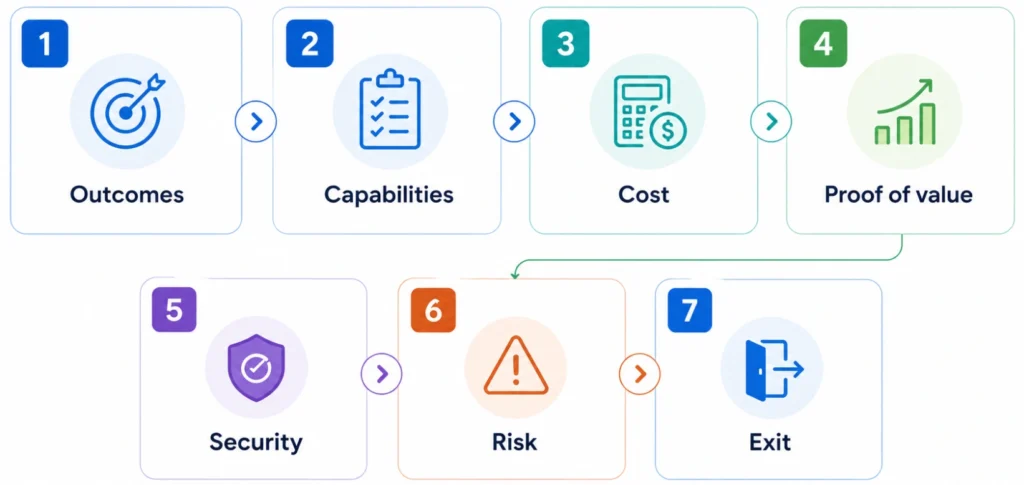
FinOps evaluation checklist
Measure adoption and realized value
Track:
- Active users by role
- Recommendation acceptance rate
- Action completion rate
- Time from recommendation to action
- Allocation coverage
- Forecast accuracy
- Percentage of automated activities
- Realized value after implementation costs and vendor fees
Which approach fits your team?
Build may fit when your processes are distinctive, the capability is strategically important, critical constraints prevent the adoption of available tools, and a durable engineering team can own the roadmap.
Buy may fit when the use case is established, faster value matters, advanced or multi-cloud capabilities would be expensive to reproduce, and the vendor satisfies your security and governance requirements.
Provider-native or open-source options may fit smaller or primarily single-cloud teams with narrower requirements.
An integrated portfolio may fit when some logic is proprietary, but maintaining every fast-changing capability is not a competitive advantage.
Evaluate with your cloud data
Compare total cost, engineering effort, time to value, risk, and net savings against the same cloud environment before committing.
Frequently asked questions
Is it better to build or buy a FinOps tool?
It depends on requirements, internal capacity, time to value, risk, and total cost. Building favors control, while buying favors maintained functionality. Native, open-source, managed, and integrated approaches may also fit.
What costs should a FinOps analysis include?
Include development, infrastructure, maintenance, support, compliance, procurement, vendor fees, internal administration, opportunity cost, training, adoption, and exit costs. Use the same time horizon for every option.
When should a company build internally?
Building is strongest when requirements are genuinely unique, the capability creates strategic value, available products cannot satisfy critical constraints, and a funded team can maintain it over time.
What is an integrated FinOps model?
An integrated model combines native, internal, open-source, commercial, or managed solutions. A company might own allocation and reporting while purchasing anomaly detection, rightsizing, or commitment automation.
How should teams test a FinOps vendor?
Use the same eligible data and success criteria. Verify access, accuracy, explainability, charge reconciliation, baseline methodology, realized value, integration effort, security, contract terms, downside behavior, and exit requirements.