AWS
AWS Microsoft Azure
 Google Cloud


By the end of this guide, you should have a candidate reservation baseline, a clearer view of what should stay flexible, and a checklist for validating the purchase.
Microsoft recommends sizing Reserved Capacity around Cosmos DB throughput used consistently on an hourly basis. Microsoft’s Azure Cosmos DB Reserved Capacity guidance
For the broader explanation of what Azure Reserved Capacity covers across services, see our Azure Reserved Capacity guide. This article focuses on the next decision: how much Cosmos DB throughput should you reserve?
Start with billed throughput, not application RU consumption
Cosmos DB uses request units to measure database operations, but application RU consumption is not the number to copy directly into a reservation purchase.For standard provisioned throughput, Azure charges an hourly rate for the RU/s you provision. For autoscale, billing is based on the highest throughput reached during the hour, subject to the autoscale minimum.
That makes hourly billed throughput a better starting point than average database activity.
Identify the portion of billed throughput that remains consistently present and is expected to stay that way throughout the reservation term.
Avoid sizing from a monthly average
A monthly average can hide large hourly differences.A workload may have regular peaks while operating well below that level for many hours. Reserving against the average can leave part of the commitment unused during quieter periods.
Cosmos DB reservation discounts apply hourly. If matching usage is not available during an hour, unused reservation capacity does not move into a future hour. See how Microsoft applies Cosmos DB reservation discounts
Before buying, compare historical usage with expected changes such as:
workload migrations
throughput rightsizing
application retirements
region additions or removals
traffic changes
autoscale changes
Treat autoscale separately
Autoscale needs additional review because billed throughput changes with workload demand.For single-write-region accounts, Microsoft says the Reserved Capacity discount for autoscale meter usage is applied at 1.5 times the ratio of the specific region. For example, covering 10,000 autoscale RU/s requires 15,000 RU/s of Reserved Capacity overall. Microsoft’s Cosmos DB autoscale FAQ
Autoscale also has a billing floor. If the workload does not scale above 10% of the configured maximum during an hour, Azure bills that 10% minimum.
So do not automatically reserve the configured autoscale maximum.
Review hourly billed throughput, including the autoscale billing floor, and identify the portion that remains durable.
Do not confuse multi-region with multi-write
A Cosmos DB account can use multiple regions without allowing writes in every region.For a multi-region account with a single write region, calculate autoscale reservation consumption for each active region using the throughput, the 1.5 autoscale adjustment, and that region’s reservation ratio.
For multi-write accounts, Microsoft states that Reserved Capacity works the same for autoscale and standard multi-write provisioned throughput.
Confirm both the regional topology and write configuration before choosing a reservation SKU or quantity.
Include the full regional footprint and reservation scope
With multi-region distribution, provisioned throughput is billed across every region associated with the account. Regional reservation ratios can also affect how quickly Reserved Capacity is consumed.Reservation scope matters too. Matching Cosmos DB usage within the selected scope can consume the reservation benefit.
Before purchasing, confirm:
every active region
applicable regional ratios
throughput type
reservation scope
matching eligible usage
existing reservation utilization
Calculate a candidate reservation before purchasing
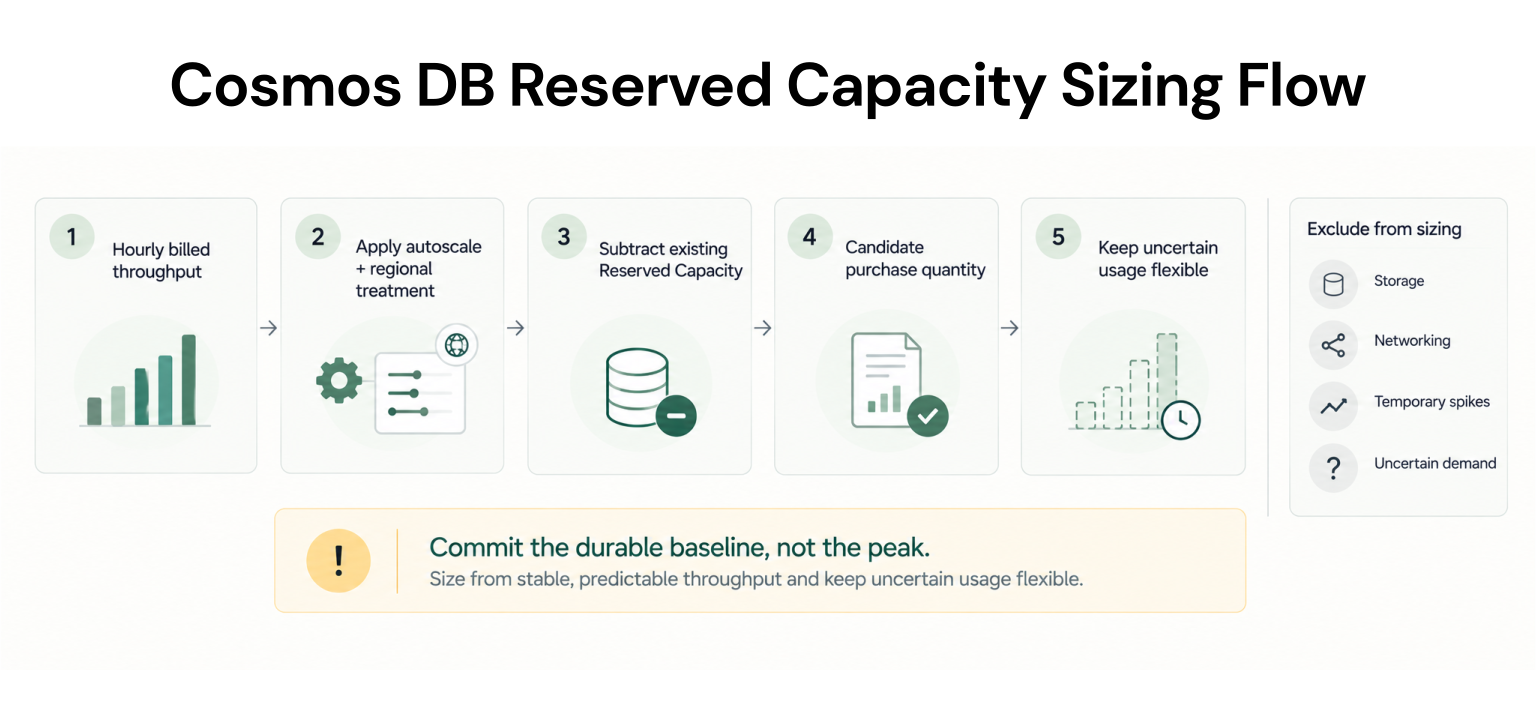
Use the same order every time:Review representative hourly billed throughput.
Separate standard from autoscale usage.
Confirm regional topology and write configuration.
Apply the relevant autoscale and regional treatment.
Subtract existing matching Reserved Capacity.
Reduce the candidate amount for usage expected to disappear during the term.
Simple two-region example
Suppose a single-write autoscale account has a durable hourly billed baseline of 10,000 RU/s in one region and 8,000 RU/s in another, and both regions have a 1.0 reservation ratio.The normalized reservation consumption is:
10,000 × 1.5 = 15,000 RU/s
8,000 × 1.5 = 12,000 RU/s
If 5,000 RU/s of matching Reserved Capacity already applies within the selected scope, the remaining candidate is 22,000 RU/s.
This is an illustrative sizing example, not a pricing quote. Reduce the candidate if planned workload changes make part of the baseline temporary.
Reserve the durable floor, not the peak
Microsoft currently lists standard Cosmos DB Reserved Capacity discounts of 20% for one year and 30% for three years. Reservations of at least 1 million RU/s can receive higher tiered discounts, reaching up to 63% depending on the reservation. See Microsoft’s Cosmos DB pricingThose percentages should not determine how much capacity you buy.
A smaller commitment that remains highly utilized can be more useful than a larger commitment that regularly goes unused.
Keep storage and networking outside the reservation baseline
Reserved Capacity does not discount the entire Cosmos DB bill.Cosmos DB separately bills throughput, consumed storage, and bandwidth. Storage therefore should not inflate the Reserved Capacity baseline.
Do not size the reservation from total monthly Cosmos DB spend.
Isolate the eligible provisioned throughput first.
Evaluate Savings Plan for Databases separately
Reserved Capacity and Savings Plan for Databases use different commitment models.Cosmos DB Reserved Capacity commits to provisioned throughput for one or three years.
Savings Plan for Databases is a separate spend-based product. Microsoft currently describes it as a one-year fixed hourly-spend commitment and lists Azure Cosmos DB among the eligible database services.
Microsoft’s current Cosmos DB pricing lists a 12% Savings Plan discount on eligible RU/s.
Before purchasing, validate which remaining Cosmos DB meters are eligible and size the Savings Plan only against uncovered eligible spend.
If both a reservation and Savings Plan can cover usage, Azure applies the more restrictive reservation benefit first. The Savings Plan then applies to remaining eligible usage.
The decision sequence is:
Remaining eligible hourly spend → evaluate Savings Plan for Databases
Uncertain or noneligible spend → keep flexible
For the broader spend-based approach, see our Azure Savings Plan for Databases guide.
Cosmos DB commitment checklist
Before purchasing, confirm:We reviewed hourly billed throughput, not only monthly averages.
Standard and autoscale usage are separated.
Regional topology and write configuration are confirmed.
Every active region and applicable regional ratio is included.
Reservation scope and matching usage are verified.
Existing reservation utilization is checked before adding more.
Storage and networking are excluded.
Each expected workload change has an owner, target date, and confidence level.
Remaining Cosmos DB meters are confirmed eligible before sizing a database Savings Plan.
How we help optimize Cosmos commitments
Sizing a Cosmos DB commitment is not necessarily a one-time decision.Throughput changes. Regions change. Workloads migrate. Existing commitments also change how much uncovered usage remains.
We help teams review commitment opportunities against actual Azure usage and existing coverage.
With Flex Insured Commitments, teams can access up to 65% savings through an eligible three-year Azure Savings Plan for compute with none of the commitment risk.
Eligible Flex Insured Commitments can include cashback protection for underutilization, subject to program terms. If an eligible Flex Commitment costs more than equivalent pay-as-you-go usage, we provide cashback for the difference under the program terms.
Final decision
The goal is not to reserve as much Cosmos DB capacity as possible.It is to reserve only the throughput you expect to use consistently.
Review hourly billed throughput, autoscale behavior, active regions, reservation scope, existing coverage, and planned workload changes.
Reserve the stable portion first. Then evaluate the eligible spend that remains.
This helps capture the Reserved Capacity discount without paying for capacity you may not use.
Review RU/s baseline, usage, coverage, and eligible spend before committing more.
Frequently asked questions
Does Azure Cosmos DB Reserved Capacity cover storage?
No. Reserved Capacity discounts eligible provisioned throughput. Storage and networking are separate charges.
Does Reserved Capacity work with Cosmos DB autoscale?
Yes. For single-write autoscale accounts, Microsoft applies the 1.5 autoscale adjustment together with the applicable regional ratio.
Should I reserve my maximum autoscale RU/s?
Not automatically. Review hourly billed throughput, including the autoscale billing floor, and expected future demand before choosing a reservation quantity.
How do multiple regions affect the purchase?
Provisioned throughput is billed across active regions, and regional ratios affect reservation consumption. Include the full regional footprint and reservation scope in the sizing review.
Can Cosmos DB use Savings Plan for Databases?
Yes. Azure Cosmos DB is an eligible Savings Plan for Databases service. Evaluate remaining eligible hourly spend after accounting for Reserved Capacity coverage.