New See exactly what you're overpaying AWS in under 60 seconds. Try the Calculator for free

Azure Reserved Capacity for SQL, Cosmos DB, Blob Storage, and Synapse: What Each Reservation Actually Covers

Updated July 7, 2026
17 min read
Azure Reserved Capacity for SQL, Cosmos DB, Blob Storage, and Synapse: What Each Reservation Actually Covers
On this page

Most Azure FinOps conversations about commitment discounts start and end with VM reservations and Savings Plans. That leaves a substantial part of the bill untouched — the data services layer that typically accounts for 20-40% of total Azure spend in organizations running any combination of SQL databases, Cosmos DB, blob storage, or Synapse workloads.

Azure Reserved Capacity is the commitment instrument for these services. It works differently from VM reservations and Savings Plans, and each service has its own coverage rules that determine what the reservation discounts and what still bills at pay-as-you-go rates. Getting those rules wrong — committing to more than you can use, or misunderstanding what’s covered — leads to either stranded commitments or unexpected charges.

This guide covers the reserved capacity mechanics for each major Azure data service, what each reservation covers and explicitly does not cover, the use-it-or-lose-it billing behavior, and where Azure Savings Plans and Usage.ai’s database Savings Plans fit into the picture alongside reservations.

Banner

The Terminology Problem: Azure Reservations vs Reserved Capacity vs Savings Plans

Microsoft uses the terms ‘Azure Reservations,’ ‘Reserved Instances,’ and ‘Reserved Capacity’ in ways that overlap, and most third-party guides don’t clean this up. The practical distinction matters for knowing which discount instrument to buy.

Azure Reservations is the umbrella term. Under that umbrella are three instruments. Reserved VM Instances commit to a specific VM family and size in a specific region. Azure Savings Plans for Compute commit to a fixed hourly dollar spend amount across eligible compute services — VMs, AKS, App Service, Azure Functions Premium, and Azure Container Instances.

Azure Reserved Capacity commits to specific data service resources: SQL Database vCores, Cosmos DB RU/s, Blob Storage capacity, Synapse DWUs, and others.

The critical boundary: Azure Savings Plans cover compute services and recently expanded to cover some database compute. They do not cover Cosmos DB provisioned throughput, Blob Storage capacity, Synapse DWUs, or most storage and analytics resource consumption. Those still require Reserved Capacity as the discount mechanism. If your Azure bill has significant Cosmos DB, large-scale storage, or Synapse spend, a Savings Plan alone will not address those costs.

The Universal Billing Mechanic: Use-It-or-Lose-It

Before going service by service, one billing rule applies to all Azure Reserved Capacity that FinOps engineers must understand before sizing any commitment.

A reservation discount is use-it-or-lose-it. If you do not have matching resources for any hour, then you lose a reservation quantity for that hour. You cannot carry forward unused reserved hours.

This means that if you purchase a Cosmos DB reserved capacity commitment and your actual provisioned throughput drops below the reserved RU/s in a given hour — because of a scale-down event, an architecture change, or a load pattern shift — the reservation quantity for that hour is lost. You paid for it and received no benefit.

The implication for sizing: always reserve to the stable floor, not the average. The stable floor is the level of provisioned throughput, vCores, or storage that will be present every single hour throughout the reservation term. Anything above the floor is better served by on-demand pricing than a reservation that might occasionally go unused.

When a resource is shut down, the reservation discount automatically applies to another matching resource in the specified scope. If no matching resources are found in the specified scope, the reserved hours are lost. Source: same DIRECT QUOTE. This is the key reason reservation scope matters — a shared scope reservation can be absorbed by other matching resources across subscriptions, while a single subscription scope reservation can strand if that specific subscription scales down.

Azure SQL Database Reserved Capacity

What SQL Database reservations cover

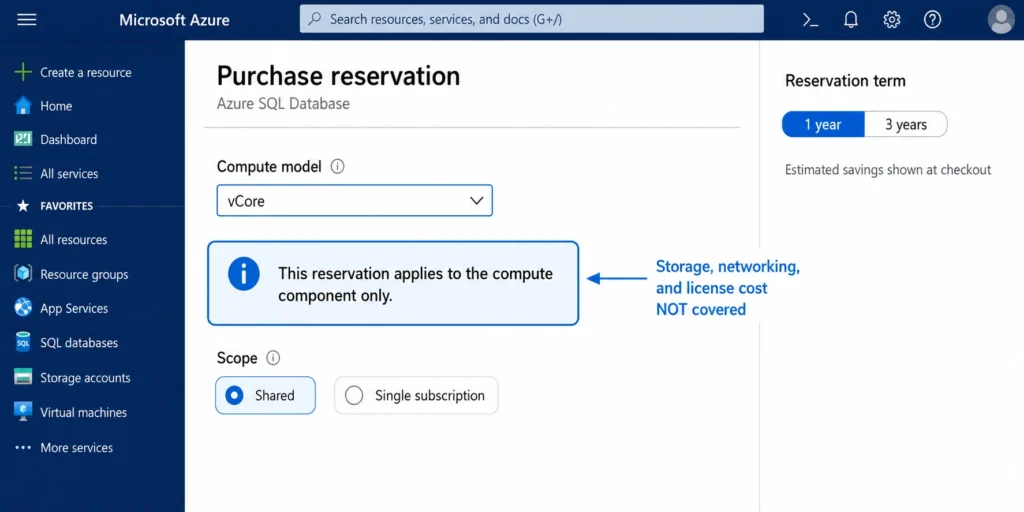
An Azure SQL Database reservation covers the compute costs only. It does not cover software license costs, networking, or storage charges.

This is the most important thing to know about SQL Database reservations. The reservation discount applies specifically to the vCore compute component of your SQL Database bill. Your storage bill (per-GB for data and backup), your networking charges, and your software license fee (if you are not using Azure Hybrid Benefit) continue at pay-as-you-go rates regardless of reservation coverage.

For the General Purpose service tier, reservations are also available to cover compute costs associated with the zone-redundancy add-on. Source: same DIRECT QUOTE. This is a relatively recent addition that allows teams running zone-redundant SQL Database configurations to extend reservation coverage to the redundancy component.

SQL Database reservations are available for the vCore purchasing model. DTU-based SQL Database configurations are not eligible for reserved capacity — only vCore-model databases can be covered by reservations. If you are running DTU-based SQL Database configurations and want to use reserved capacity, migration to the vCore model is required first.
Stacking SQL reservations with Azure Hybrid Benefit

When you stack Azure Hybrid Benefit with SQL Database reserved capacity, the two discounts apply to different components of the bill in a compounding way. Azure Hybrid Benefit removes the software license cost from the hourly rate. Reserved capacity then applies to the reduced compute-only rate. The combined effect can push total SQL Database discounts past 80% versus pay-as-you-go for organizations with existing SQL Server licenses with active Software Assurance. Source: Azure Hybrid Benefit documentation and Azure SQL Database pricing.

This stack works on SQL Database, SQL Managed Instance, and SQL Server on Azure VMs. For teams already paying SA on SQL Server licenses, enabling Azure Hybrid Benefit before purchasing SQL reserved capacity maximizes the reservation’s impact.

SQL Managed Instance reservations

Azure SQL Managed Instance reservations follow the same coverage rule as SQL Database: compute costs only, not software license, networking, or storage charges. Reservations are available for vCore counts in 1-year and 3-year terms. Reservations are also available to cover compute costs associated with the zone-redundancy add-on for SQL Managed Instance. Source: same DIRECT QUOTE.

Azure portal reservation purchase page for Azure SQL Database showing vCore selection, General Purpose tier, and 1-year versus 3-year term options with discount percentages. A cost comparison shows the compute component at pay-as-you-go versus reserved rates.

Also read: Azure Hybrid Benefit: How It Works, What It Actually Saves, and the SA Expiration Risk Most Teams Ignore

Azure Cosmos DB Reserved Capacity

What Cosmos DB reservations cover

An Azure Cosmos DB reservation covers throughput provisioned for your resources. It does not cover the storage and networking charges. Source: learn.microsoft.com/azure/cost-management-billing/reservations/save-compute-costs-reservations DIRECT QUOTE.

Cosmos DB bills on two dimensions: provisioned throughput (measured in Request Units per second, or RU/s) and storage (GB per month). A Cosmos DB reserved capacity commitment covers the RU/s dimension only. Your Cosmos DB storage continues to bill at standard pay-as-you-go rates regardless of reservation coverage. For workloads with significant storage (multi-TB Cosmos DB databases), this distinction matters — the storage component can be substantial.

The discount available: you can receive up to 63% discount on Azure Cosmos DB prices through Reserved Capacity. Source: learn.microsoft.com/azure/cosmos-db/reserved-capacity DIRECT QUOTE. This 63% figure applies at the maximum commitment (3-year term). The 1-year discount is lower.

RU/s sizing: the key challenge

Sizing a Cosmos DB reservation correctly requires understanding your provisioned throughput pattern across all containers and databases in scope. The use-it-or-lose-it rule means that if your Cosmos DB scales down — either because of autoscale behavior on an autoscale-provisioned container or because you manually reduced throughput — and the provisioned RU/s drops below the reserved amount, that hour’s reservation is partially wasted.

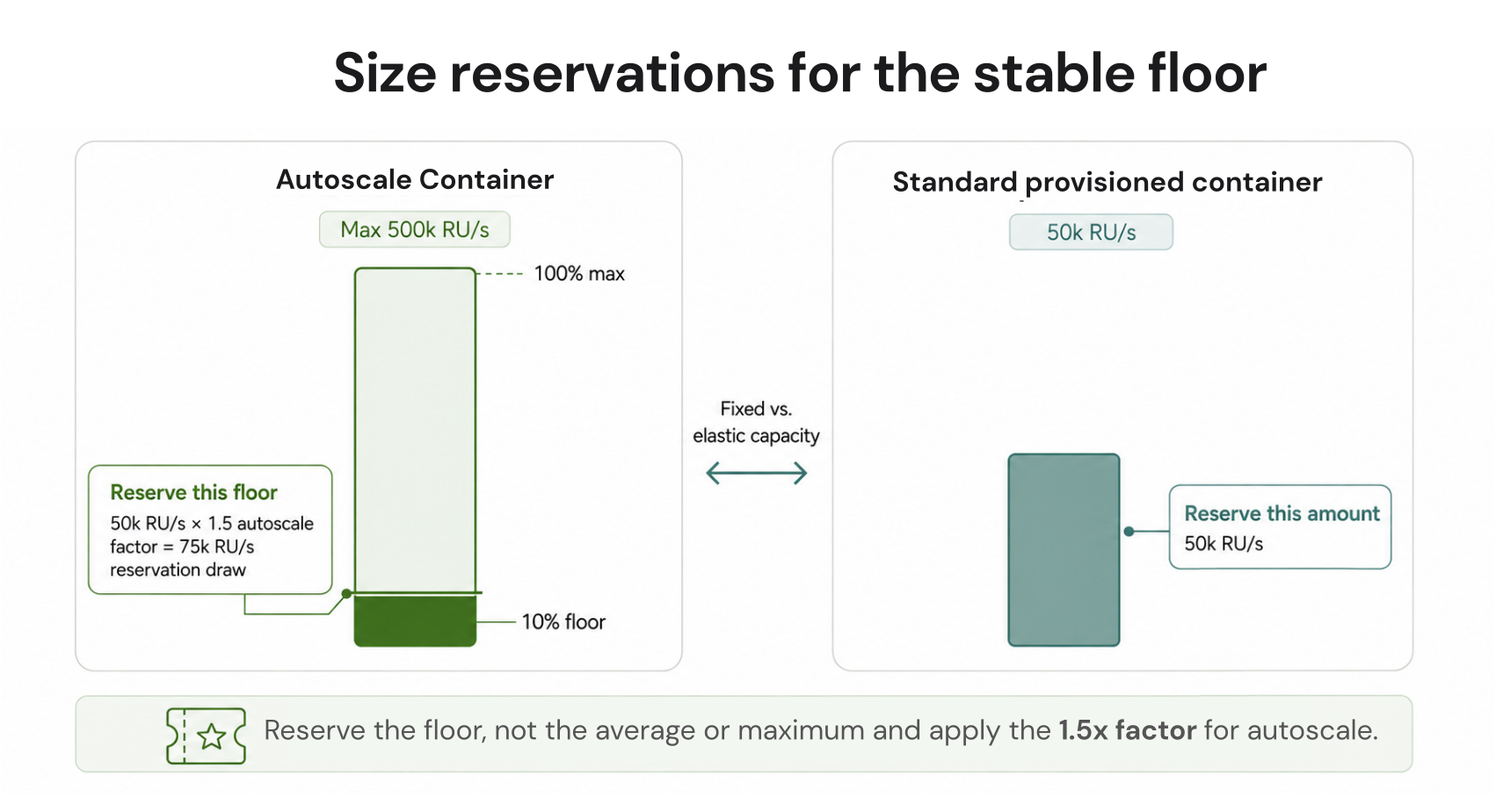
Cosmos DB supports two provisioning models: standard provisioned throughput (fixed RU/s you set manually) and autoscale throughput (scales between 10% and 100% of a maximum RU/s you configure). For standard provisioned containers, the RU/s is constant and easy to reserve. For autoscale containers, the actual provisioned RU/s varies between minimum and maximum, and reserving at the maximum would waste the reservation during low-traffic hours.

The practical recommendation: reserve at the minimum provisioned throughput that will be present continuously across all containers in scope. For autoscale databases, that is 10% of the maximum autoscale RU/s — the minimum the autoscale model will ever provision. For standard provisioned databases, it is the manual RU/s setting for each container.
The reservation scope can be set to a single subscription or shared across multiple subscriptions. A shared scope allows the reservation to cover Cosmos DB throughput across any subscription in the billing context, which is more efficient for organizations running multiple Cosmos DB accounts across subscriptions.

Azure Blob Storage Reserved Capacity

What Blob Storage reservations cover

Azure Blob Storage reserved capacity covers storage capacity only. The reservation discount applies to storage capacity, not to bandwidth or request rate charges. Source: learn.microsoft.com/azure/cost-management-billing/reservations/understand-storage-charges DIRECT QUOTE. Egress charges, PUT/GET/LIST operation charges, and data retrieval fees for cool and archive tiers continue at pay-as-you-go rates regardless of reservation coverage.

This is another important exclusion. A large organization storing 10 PB in Azure Blob Storage and making frequent API calls or retrieving cold data regularly will see a meaningful portion of its Blob Storage bill outside the scope of reserved capacity. The reservation only addresses the per-GB-month capacity storage charge.

Purchase units and access tier coverage

You can purchase Azure Storage reserved capacity in units of 100 TiB and 1 PiB per month for a one-year or three-year term. Source: learn.microsoft.com/azure/storage/blobs/storage-blob-reserved-capacity DIRECT QUOTE. Reserved capacity is available for all access tiers (hot, cool, and archive) and for any replication configuration (LRS, GRS, or ZRS).

The minimum purchase unit of 100 TiB is meaningful for smaller organizations. If your Blob Storage footprint is 50 TB, a 100 TiB reservation is the minimum purchase — you are reserving twice your current capacity, and the excess is wasted under the use-it-or-lose-it rule. Reserved capacity makes economic sense for Blob Storage only when you have stable, predictable baseline storage above the reservation unit threshold.

The reservation applies across the subscription or shared scope — it cannot be targeted to a specific storage account, container, or object within the subscription. Source: learn.microsoft.com/azure/storage/blobs/storage-blob-reserved-capacity DIRECT QUOTE. This means the reservation discount is absorbed by whatever matching storage exists in the scope, which is generally favorable for large accounts but means you cannot isolate cost attribution to a specific project’s storage using reserved capacity alone.

Azure Files reservations

Azure Files supports separate reservations with units of 10 TiB and 100 TiB per month for one-year or three-year terms. The mechanism is the same: discount applies to storage capacity, not to transaction or bandwidth charges. Higher discounts are available for the 100 TiB block versus the 10 TiB block.

Azure Data Lake Storage Gen2 is covered by the same Blob Storage reserved capacity. When you purchase a Blob Storage reservation, it applies to both block blob and Azure Data Lake Storage Gen2 data within the purchased scope. Source: learn.microsoft.com/azure/storage/blobs/storage-blob-reserved-capacity DIRECT QUOTE.

Blob Storage reservation sizing example from Microsoft documentation: if the cost of 1-year reserved capacity for cool tier storage is $966 and the pay-as-you-go rate is $0.0115/GB, the breakeven point is approximately 82 TB of stable cool tier storage for the reservation to deliver savings versus on-demand. If your stable cool storage is below that threshold, pay-as-you-go is cheaper than the reservation.

Azure portal Blob Storage reserved capacity purchase screen showing 100 TiB Hot LRS 1-year reservation with annual cost and pay-as-you-go equivalent, illustrating the discount available for large-scale stable Blob Storage commitments.

Azure Synapse Analytics Reserved Capacity

How Synapse uses a different model: SCU Pre-Purchase

Azure Synapse Analytics does not use the same per-resource reservation model as SQL Database or Cosmos DB. Instead, Azure Synapse uses a Pre-Purchase Plan based on Synapse Commit Units (SCUs). This is a meaningfully different commitment structure that FinOps engineers need to understand before purchasing.

An SCU is a commitment currency that you purchase in bulk. Once purchased, SCUs are consumed at retail prices for eligible Synapse usage — dedicated SQL pool DWUs, Apache Spark pools, Azure Synapse Link, and other Synapse services. The more SCUs you purchase, the higher the discount. For example, purchasing 100,000 SCUs might carry an 18% discount off retail prices.

When you use SCUs against Synapse workloads, you consume them based on the retail price of the usage. If you run a DWU100 pool for 1 hour at $1.20 retail price, 1.2 SCUs are consumed. Source: same DIRECT QUOTE.

The critical constraint: no cancellation, no exchange

The most important operational fact about Synapse Pre-Purchase Plans: cancel and exchange are not supported for Synapse Pre-Purchase Plans. All purchases are final. Source: learn.microsoft.com/azure/cost-management-billing/reservations/synapse-analytics-pre-purchase-plan DIRECT QUOTE.

This is a materially more restrictive policy than standard Azure reservations, which support cancellation with a 12% early termination fee and exchange for other reservations. Synapse Pre-Purchase Plan SCUs are purchased, full stop. If your Synapse workloads scale down, migrate to a different service, or are decommissioned, the unused SCUs cannot be returned or repurposed to other Azure services.

The sizing discipline required for Synapse Pre-Purchase Plans is therefore higher than for other Azure reserved capacity types. Only purchase SCUs against Synapse spend that you are highly confident will remain stable for the entire commitment period. Avoid the temptation to purchase at peak usage volumes — size to the stable baseline.

What Synapse reserved capacity covers

The reservation covers cDWU usage for Azure Synapse Analytics dedicated SQL pools. It does not cover storage or networking charges associated with Azure Synapse Analytics usage. Source: learn.microsoft.com/azure/cost-management-billing/reservations/save-compute-costs-reservations DIRECT QUOTE.

As with SQL Database and Cosmos DB, the storage component of Synapse Analytics bills separately at pay-as-you-go rates. For large Synapse deployments where significant data is stored in the data warehouse, the storage portion of the bill will remain unaffected by SCU coverage.

Also read: Azure Savings Plans vs Reserved Instances: Which One to Choose for Your Azure Environment

The Services Savings Plans Recently Expanded to Cover

Azure Savings Plans for Compute have historically covered VM, AKS, App Service, Container Instances, and Functions Premium. Microsoft has been expanding coverage. As of 2026, Azure Savings Plans have expanded to cover some database compute — specifically Azure SQL Database and related compute services in some configurations.

This expansion means the boundary between ‘use Savings Plans’ and ‘use Reserved Capacity’ for database services has shifted somewhat. The practical posture: verify which of your specific database configurations are covered by Savings Plans versus requiring Reserved Capacity by checking the current Azure Savings Plans eligibility list at azure.microsoft.com/pricing/offers/savings-plans before purchasing either commitment instrument.

The services that remain squarely in the Reserved Capacity-only camp: Cosmos DB provisioned throughput (RU/s), Azure Blob Storage capacity, Synapse DWUs, Azure Cache for Redis, and most storage and analytics resource consumption. These still require Reserved Capacity as the applicable discount mechanism.

The Layered Strategy for Maximum Azure Data Service Savings

For organizations running a full Azure data stack — VMs and AKS for compute, SQL Database for relational workloads, Cosmos DB for NoSQL, Blob Storage for object storage, Synapse for analytics — the complete coverage strategy layers all three discount instruments.

The first layer is Azure Savings Plans, covering eligible compute (VMs, AKS, App Service, Functions) and the database compute services now included in Savings Plan coverage. Savings Plans are the right starting instrument for dynamic workloads where resource types change over time.

The second layer is Reserved VM Instances, covering stable fixed-type VM pools where the deeper discount (up to 72% vs 65%) justifies the narrower commitment to a specific VM series.

The third layer is Reserved Capacity, covering stable data service consumption: SQL Database vCores (stacked with Azure Hybrid Benefit where applicable), Cosmos DB provisioned RU/s sized to the stable floor, Blob Storage in 100 TiB or 1 PiB units for large stable storage volumes, Synapse Analytics via SCU pre-purchase where Synapse spend is stable and the no-cancellation constraint is acceptable.

The FinOps Foundation’s cloud cost management framework describes the Operate phase as continuous execution of these optimization decisions — not quarterly reviews of a static commitment portfolio, but ongoing monitoring and adjustment as usage patterns evolve. The use-it-or-lose-it mechanics of all Azure Reserved Capacity make continuous monitoring and right-sizing of commitment coverage more consequential than for AWS or GCP equivalents.

How Usage.ai Fits Into Azure Data Service Commitments

Usage.ai handles both the compute commitment layer (Azure Savings Plans, Azure Reserved VM Instances) and — for supported database services — the data service reservation layer for Azure. The platform analyzes actual utilization of Azure compute and database resources daily, identifies the stable floor, and sizes commitment recommendations accordingly.

The buyback guarantee is particularly relevant for Azure data service commitments. The use-it-or-lose-it mechanics mean that over-sizing a Cosmos DB reserved capacity commitment or a SQL Database reservation creates immediate and ongoing waste. Usage.ai’s commitment sizing is designed to find the accurate stable floor rather than a conservative underestimate. The buyback guarantee covers the downside — if a data service workload is decommissioned or scaled down during a commitment term, the unused portion returns as cashback in real money rather than sunk cost.

$91M+ in savings delivered to 300+ customers across AWS, Azure, and GCP. Fee is a percentage of realized savings only. No savings, no fee. 30-minute setup, billing-layer access only.

Banner

Frequently Asked Questions

1. What is Azure Reserved Capacity?

Azure Reserved Capacity is the commitment instrument for Azure data services: SQL Database, Cosmos DB, Blob Storage, Synapse Analytics, PostgreSQL, MySQL, Redis, and others. It is distinct from Reserved VM Instances (which cover compute) and Azure Savings Plans for Compute (which cover VM and some managed service compute). Reserved Capacity delivers discounts by committing to a specific level of data service consumption for a 1-year or 3-year term. The discount depends on the service and term — Cosmos DB reserved capacity delivers up to 63% off provisioned throughput. Source: learn.microsoft.com/azure/cost-management-billing/reservations/save-compute-costs-reservations.


2. What does Azure SQL Database reserved capacity cover?

SQL Database reserved capacity covers compute costs only. It does not cover software license costs, networking, or storage charges. Source: learn.microsoft.com/azure/cost-management-billing/reservations/save-compute-costs-reservations DIRECT. The reservation applies to the vCore compute component of the SQL Database bill. Storage, networking, and software licensing continue at pay-as-you-go rates. DTU-based SQL Database configurations are not eligible — only vCore-model databases. Stacking Azure Hybrid Benefit with a SQL Database reservation can push total discounts past 80% for organizations with existing SQL Server Software Assurance.


3. What does Azure Cosmos DB reserved capacity cover?

Cosmos DB reserved capacity covers throughput provisioned for your resources — the RU/s dimension of the Cosmos DB bill. It does not cover storage or networking charges. Source: same DIRECT. Up to 63% discount is available through Reserved Capacity. Source: learn.microsoft.com/azure/cosmos-db/reserved-capacity DIRECT. The use-it-or-lose-it rule applies hourly: if provisioned RU/s drops below the reserved amount in any hour, that hour’s reservation is lost and cannot be carried forward.


4. How does Azure Blob Storage reserved capacity work?

Blob Storage reserved capacity is purchased in units of 100 TiB or 1 PiB per month for 1-year or 3-year terms. It covers storage capacity for block blobs and Azure Data Lake Storage Gen2 across all access tiers (hot, cool, archive) and all replication configurations (LRS, GRS, ZRS). The discount applies to capacity only — bandwidth, request operations, and data retrieval fees continue at pay-as-you-go rates. The reservation cannot be targeted to a specific storage account or container — it applies across the subscription or shared scope. Source: learn.microsoft.com/azure/storage/blobs/storage-blob-reserved-capacity DIRECT.


5. Can I cancel a Synapse Analytics Pre-Purchase Plan?

No. Cancel and exchange are not supported for Azure Synapse Analytics Pre-Purchase Plans. All purchases are final. Source: learn.microsoft.com/azure/cost-management-billing/reservations/synapse-analytics-pre-purchase-plan DIRECT QUOTE. This is a uniquely restrictive policy versus standard Azure reservations, which support cancellation with a 12% early termination fee. Synapse SCU pre-purchases should only be sized against stable, confirmed Synapse spend that will persist for the entire commitment period.

Cut cloud cost with automation
Latest from our blogs