AKS costs have a way of surprising people. You spin up what looks like a small cluster, add a few node pools, leave monitoring enabled, and the month-end bill is four times what you expected. The compute is the obvious line item, but AKS bills have several moving parts: the cluster management tier, the VM type and size for each node pool, the purchase model for those VMs, storage and networking, and monitoring infrastructure. Getting each layer right is the difference between AKS being expensive and AKS being cost-effective.
This guide covers how AKS pricing actually works, the cluster tier decision most teams get wrong, the purchase model choice between Azure Reservations and Azure Savings Plans for node VM costs, Spot node configuration, and the workload-efficiency practices that determine how well your provisioned capacity translates into useful compute.
The AKS Cost Structure: What You Actually Pay For
AKS has two distinct billing layers that are easy to conflate but important to keep separate for optimization purposes.
Cluster management tier charges
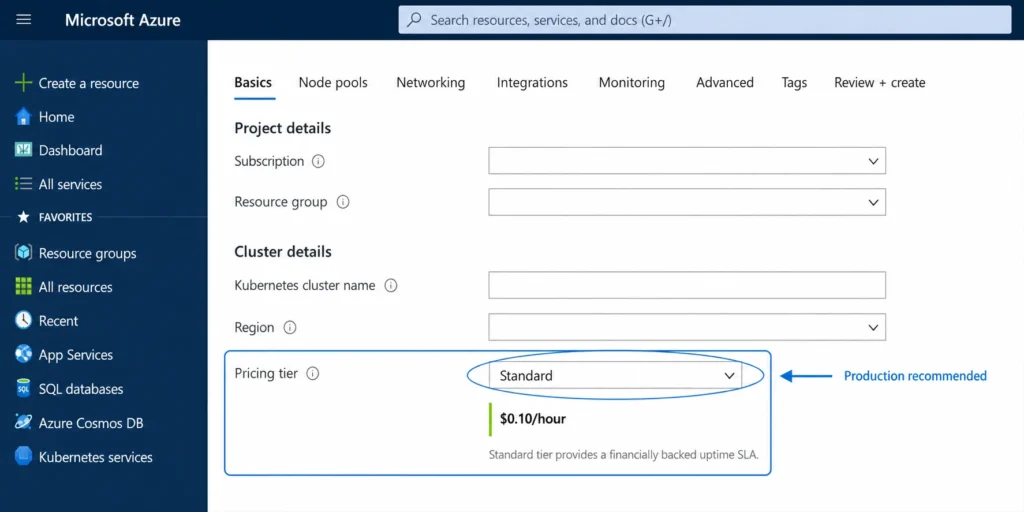
AKS offers three pricing tiers for cluster management: Free, Standard, and Premium. The tier you choose determines your Kubernetes control plane SLA, access to features like the AKS Cost Analysis add-on, and Long Term Support availability. Source: learn.microsoft.com/azure/aks/free-standard-pricing-tiers DIRECT.
The Free tier provides a cluster for development and testing. Microsoft’s own documentation is explicit: Free tier AKS clusters are not meant to run at scale above 10 nodes or support workloads that require high availability. There is no financially-backed SLA at the Free tier. If you are running production workloads on the Free tier to save money, you are trading reliability for a cost saving that probably does not exist — a single production incident from missing SLA coverage will cost more than the tier fee.
The Standard tier provides a financially-backed SLA: 99.95% availability of the Kubernetes API server with availability zones, or 99.9% without. Standard tier is strongly recommended for all production and at-scale deployments. Source: azure.microsoft.com/pricing/details/kubernetes-service/ DIRECT. Standard tier also enables the AKS Cost Analysis add-on, which provides namespace and workload-level cost attribution built on OpenCost.
The Premium tier adds Long Term Support (2-year extended Kubernetes version support) for Standard clusters. LTS is available only on Standard clusters using the Premium management tier. AKS Automatic — the fully managed cluster option that automates node provisioning and scaling — requires Standard tier.
Worker node VM charges
The much larger billing component is the VM cost for your worker nodes. AKS charges for only the nodes attached to the cluster. Source: learn.microsoft.com/azure/architecture/aws-professional/eks-to-aks/cost-management DIRECT. Worker nodes are standard Azure VMs billed at the same rates as any other Azure VM — pay-as-you-go, or discounted through Azure Reservations or Azure Savings Plans.
The node resource group contains the cluster infrastructure resources: node VMs, virtual networking, storage, load balancers. This resource group incurs charges in your subscription. AKS automatically deletes the node resource group when the cluster is deleted. Source: same DIRECT.
Additional VM-adjacent charges apply on top of the node compute: Managed Disk storage for node OS disks, public IP addresses if nodes or services expose public endpoints, egress data transfer, and Azure Monitor or Log Analytics costs if container monitoring is enabled. The monitoring infrastructure — particularly Log Analytics ingestion for container logs — can be a meaningful cost for high-log-volume clusters that is often overlooked in initial cost estimates.

Also read: Azure Reservations: The Complete Guide to Commitment Mechanics, Scope, and Exchange Policy
The Cluster Tier Decision in Practice
The most common tier mistake is running production clusters on the Free tier to avoid management fees. The Standard tier management fee is modest relative to the VM costs running underneath it, and the SLA gap between Free and Standard is significant for production workloads.
The second mistake is running large dev and test clusters on Standard when they could use Free tier with no operational risk. Dev and test clusters by definition do not need 99.9% API server uptime guarantees. Using Free tier for all non-production clusters and Standard for production is the correct split.
The third decision point is AKS Automatic. Automatic delivers production-ready clusters with automated node provisioning, scaling, upgrades, and network configuration without manual node pool management. It requires Standard tier, and the management overhead it eliminates can reduce the operational cost of running AKS even if the nominal management fee is the same.
For teams without dedicated platform engineering, AKS Automatic with Node Auto-Provisioning continuously right-sizes infrastructure to actual workload demands rather than requiring manual node pool configuration.
VM Sizing and Node Pool Configuration
Worker node VMs are the dominant cost in almost every AKS deployment. Choosing the right VM family and size, and structuring node pools to match workload requirements, is the highest-impact optimization before any commitment discounts are applied.
Match VM family to workload type
AKS node pools can use most Azure VM types directly. The principle is the same as for standalone VMs: general-purpose D-series for balanced workloads, compute-optimized F-series for CPU-heavy workloads, memory-optimized E-series and M-series for memory-heavy workloads, and GPU-enabled NC/ND/NV series for ML inference and training. Using a memory-optimized VM family for a CPU-intensive workload, or a large general-purpose VM for a workload that only needs 2 vCPU, wastes money at the per-node level that compounds across every node in the pool.
Microsoft’s cluster preset configurations in the Azure portal help teams start with cost-appropriate defaults. The Dev/Test preset is best for developing new workloads or testing existing ones — it reduces VM size and disables non-critical features. The Production Economy preset is best for serving production traffic cost-consciously when workloads can tolerate interruptions. Source: learn.microsoft.com/azure/aks/best-practices-cost DIRECT.
Pod resource requests: the sizing lever inside the cluster
Kubernetes schedules pods based on resource requests. If every pod requests 4 vCPU and 8 GB memory but typically runs at 0.5 vCPU and 1 GB, the cluster provisions VM capacity for the full requests. That over-requested headroom translates directly to node count and therefore to VM billing.
Setting accurate resource requests is the most direct lever for reducing AKS cost without changing infrastructure. The AKS Cost Analysis add-on (Standard or Premium tier required) provides namespace and workload-level attribution that makes it possible to identify which teams or services are driving request inflation. Node Auto-Provisioning in AKS Automatic continuously adjusts node pool sizing based on actual pod requirements rather than fixed node pool configurations.
Multiple node pools for different workload types
AKS supports multiple node pools per cluster with different VM families, sizes, and configurations. Separating workloads with genuinely different resource profiles into dedicated node pools — a CPU-optimized pool for processing workloads, a memory-optimized pool for in-memory databases, a spot pool for batch jobs — allows you to size and price each pool to match its workload rather than over-provisioning a single pool for the worst case.
The Commitment Layer: Azure Savings Plans vs Reservations for AKS Nodes
This is the layer most AKS cost guides reduce to ‘buy reserved instances.’ It deserves more precision than that, because the right commitment instrument for AKS nodes depends directly on whether your node configuration is stable or dynamic.
Azure Reservations on AKS nodes
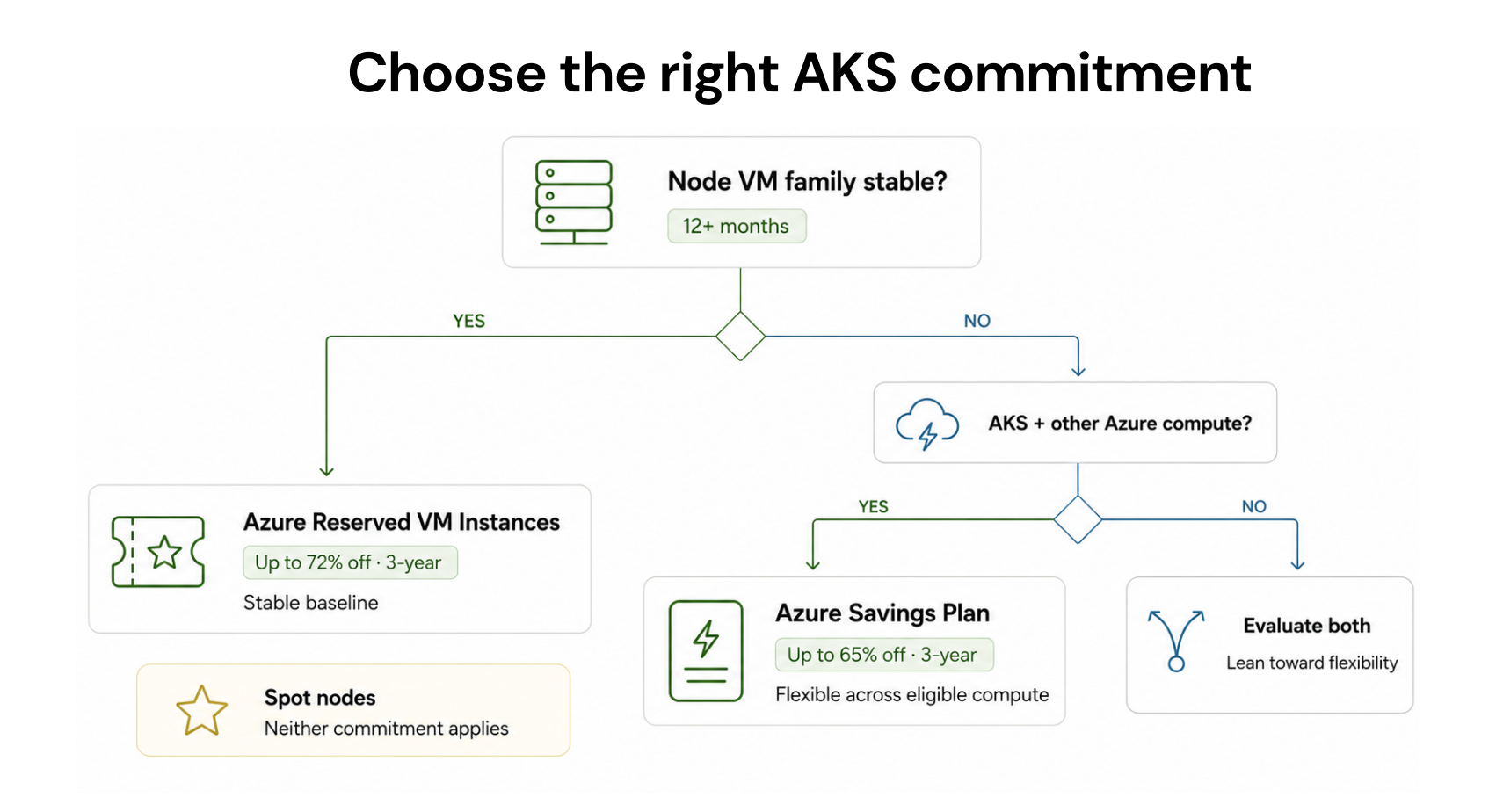
Azure Reserved VM Instances apply to a specific VM series and size in a specific region. Reservations can reduce AKS node resource costs up to 72% compared to pay-as-you-go prices.
The important nuance is size flexibility. Azure Reserved VM Instances include instance size flexibility within the same VM series. A reservation for a D4s_v5 can automatically cover two D2s_v5 instances or half a D8s_v5 without requiring a new reservation purchase. This makes reservations more practical for AKS clusters than many teams assume — the reservation does not need to match a single fixed node size, it can flex within the series.
Reservations are the correct choice for node pools with stable, well-defined VM configurations that will persist for at least one year. If your cluster uses D4s_v5 nodes across a predictable node pool and you have no plans to change VM series in the next 12 months, a 1-year reservation delivers 40-72% savings with minimal lock-in risk.
Azure Savings Plans for AKS nodes
Azure Savings Plans for Compute commit to a fixed hourly dollar amount of compute spend across eligible services including VMs, AKS, Azure Databricks, and Azure Virtual Desktop. In exchange, you receive discounts of up to 65% on hourly compute versus pay-as-you-go rates.
Savings Plans are more flexible than Reservations: the discount applies regardless of VM series, size, or region as long as the usage falls within the committed hourly spend. For AKS clusters where node pool VM types change over time — because of workload migrations, scaling strategy changes, or VM generation upgrades — a Savings Plan follows the spend rather than locking to a specific VM configuration.
The right choice depends on your environment. Stable, fixed VM series with predictable node counts: Azure Reservations deliver slightly deeper discounts (up to 72% vs 65%) and are appropriate. Dynamic clusters where VM series change, or multi-service environments where the same commitment should cover AKS nodes plus other Azure VMs: Azure Savings Plans provide better flexibility. For most teams running AKS alongside other Azure compute, a Savings Plan is the more practical instrument.
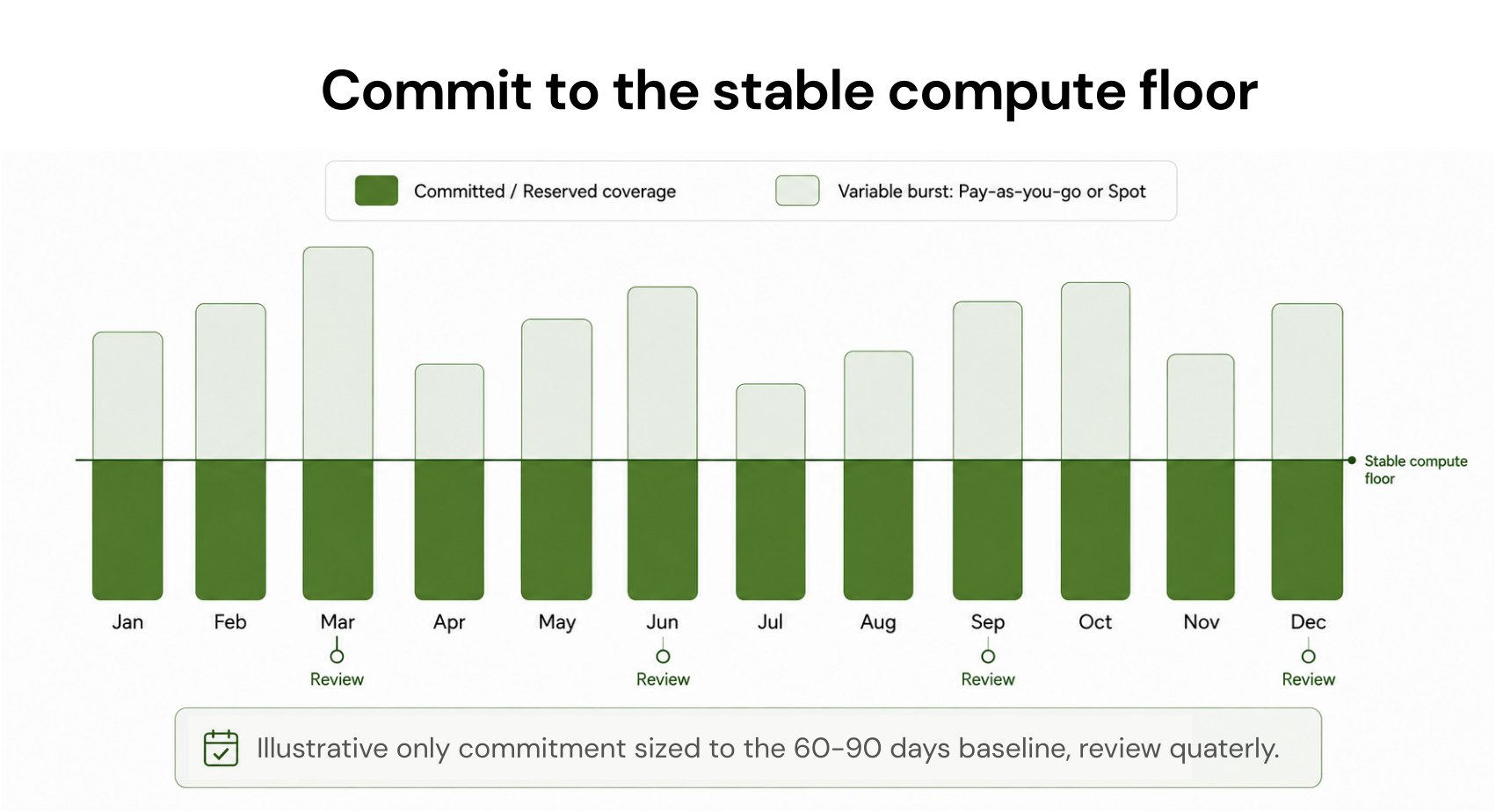
The sequencing that works: run your AKS clusters for 60-90 days with accurate monitoring enabled. Identify the stable compute floor — the minimum VM spend that persists across all usage patterns. Size an Azure Savings Plan or Reservation to that floor. Let the variable and burst capacity above the floor remain on pay-as-you-go or Spot. Review and adjust commitment coverage quarterly as workload patterns evolve. Source: Azure commitment best practices documentation.

Spot VMs for AKS: Up to 90% Off, with a 30-Second Eviction Notice
Azure Spot VMs provide access to unused Azure compute capacity at up to 90% discount compared to pay-as-you-go. Source: azure.microsoft.com/pricing/details/kubernetes-service/ DIRECT. For AKS, you can add spot node pools to your cluster using Virtual Machine Scale Sets backed by Spot VMs.
The critical operational distinction from AWS Spot: Azure can reclaim Spot VMs at any time with a 30-second notice, not 2 minutes. This is a meaningfully shorter eviction window that affects how you design workloads for Spot. Any application running on an AKS Spot node pool must either handle pod eviction gracefully within 30 seconds or accept the risk of mid-execution interruption.
Workloads suited for Spot node pools: batch processing jobs, data pipeline runs, CI/CD build workers, ML training with checkpointing, stateless services with multiple replicas and pod disruption budgets. Workloads that are not suited: stateful services without replica tolerance, databases without fast-failover capability, any latency-sensitive service where eviction would cause a user-visible gap.
AKS Spot node pools can be combined with on-demand node pools in the same cluster. The Cluster Autoscaler can scale Spot node pools up when Spot capacity is available and scale down or fall back to on-demand when evictions occur. This hybrid approach captures Spot savings for eligible workloads while maintaining reliability for production workloads in the same cluster.
Azure also offers Spot Priority Mix, which provides a flexible combination of standard and Spot VMs within a single VM Scale Set. This allows teams to define a minimum baseline of on-demand capacity with additional Spot capacity added when available, rather than an all-or-nothing per node pool approach. Source: Azure documentation on Spot Priority Mix.
Stop Clusters That Don’t Need to Run Continuously
When left unattended, development and test clusters accrue unnecessary costs. AKS provides a cluster start and stop feature that shuts down all system and user node pools so you don’t pay for extra compute. The state of your cluster and objects is maintained when you start the cluster again.
For clusters that need to exist but don’t need continuous compute — dev environments used only during business hours, staging clusters used for periodic testing, QA environments used for scheduled test runs — the start/stop feature translates directly into lower monthly VM costs. A cluster that runs 8 hours per business day at roughly 43% utilization of a full calendar month cuts its node VM bill by more than half.
The operational overhead is low: cluster state is preserved across stop/start cycles, and the operation can be automated via Azure DevOps pipelines, Azure Automation, or Logic Apps on a schedule. The control plane management fee continues to accrue during the stopped state, but the dominant VM cost stops.
Azure Hybrid Benefit for AKS Windows Node Pools
If your AKS cluster runs Windows node pools, Azure Hybrid Benefit reduces Windows licensing costs for those nodes when you have qualifying on-premises Windows Server licenses with active Software Assurance or a qualifying subscription. The benefit waives the Windows Server licensing component of the VM hourly rate, leaving only the base compute cost.
For AKS deployments on Azure Local (formerly Azure Stack HCI), the benefit goes further: both the host fee and Windows Server subscription fee are waived, with unlimited virtualization rights at no additional cost.
The operational requirement is the same as for standalone Windows VMs: active Software Assurance on the qualifying license. If your organization pays SA anyway for compliance or support reasons, the incremental cost of the AKS benefit is zero, and the savings are real.
AKS Cost Analysis: Built-In Namespace and Workload Attribution
Making cost optimization decisions without workload-level visibility is difficult at best. The AKS Cost Analysis add-on provides detailed cost allocation at the namespace and Kubernetes workload level, built on OpenCost and integrated directly into Azure Cost Management.
The add-on requires a Standard or Premium tier cluster — Free tier is not supported. When enabled, it provides cost views broken down by cluster, namespace, and workload, reconciled against your Azure invoice data. This means you can answer ‘which team’s namespace is driving 60% of our cluster cost’ directly from the Azure portal rather than requiring a separate third-party tool.
One nuance: the add-on supports approximately 7,000 containers per cluster based on the current memory limit. Very large clusters may need to consider this ceiling. The add-on itself has no separate charge beyond Standard or Premium tier management fees, but enabling it requires Log Analytics and Azure Monitor, which have their own data ingestion charges.
How Usage.ai Fits Into AKS Cost Management
Usage.ai handles the commitment layer for AKS — the Azure Savings Plan and Reservation purchasing that determines what you pay per node VM hour. The platform analyzes actual VM spend across your AKS node pools daily, identifies the stable compute floor, and sizes Azure Savings Plan or Reservation recommendations to that floor.
For AKS environments where VM series changes are common — node pool upgrades, workload migrations between VM families, Spot pool additions — Usage.ai recommends Azure Savings Plans over Reservations because the discount follows the spend regardless of which VM type your nodes are running. When your cluster shifts from D-series to E-series nodes, the Savings Plan coverage continues automatically.
Every commitment purchased through Usage.ai is backed by the buyback guarantee. If an AKS cluster is scaled down significantly, migrated to a different region, or decommissioned before a commitment term ends, the unused portion returns as cashback in real money. For organizations running dynamic AKS environments where cluster lifecycles can change rapidly, this downside protection is the difference between committing confidently at the right level and under-committing to avoid risk.
$91M+ in savings delivered to 300+ customers across AWS, Azure, and GCP. Fee is a percentage of realized savings only. No savings, no fee. 30-minute setup, billing-layer access only.
Frequently Asked Questions
1. What does AKS actually charge for?
AKS has two cost components. First, the cluster management tier fee: the Free tier has no management charge; Standard and Premium tiers have a management fee for the Kubernetes control plane. Second, worker node VM charges: AKS charges for only the nodes attached to the cluster, billed at standard Azure VM rates. Additional charges include Managed Disk storage for node OS disks, public IP addresses, egress data transfer, and Azure Monitor or Log Analytics for container monitoring. Source: azure.microsoft.com/pricing/details/kubernetes-service/ and learn.microsoft.com/azure/architecture/aws-professional/eks-to-aks/cost-management.
2. Should I use AKS Free tier or Standard tier?
Standard tier is strongly recommended for all production and at-scale deployments. Free tier is intended for development and testing only — Microsoft’s documentation states it is not meant to run at scale above 10 nodes or support workloads requiring high availability, and it does not include a financially-backed SLA. Free tier is appropriate for dev and test clusters where SLA is not required. Standard tier adds a financially-backed SLA (99.95% with availability zones, 99.9% without) and enables the AKS Cost Analysis add-on and AKS Automatic.
3. What is the difference between Azure Savings Plans and Reservations for AKS nodes?
Azure Reservations apply to a specific VM series and size, delivering up to 72% savings for eligible node VMs. They include instance size flexibility within the same series. Azure Savings Plans for Compute commit to a fixed hourly spend amount and apply across all eligible VM usage regardless of series, size, or region, delivering up to 65% savings. For stable, fixed-configuration node pools, Reservations deliver a deeper discount. For clusters where VM series change over time, Savings Plans are more appropriate. Source: azure.microsoft.com/pricing/details/kubernetes-service/ and learn.microsoft.com/azure/architecture/aws-professional/eks-to-aks/cost-management.
4. How do Azure Spot VMs work in AKS?
You can add spot node pools to an AKS cluster. Spot VMs provide access to unused Azure capacity at up to 90% discount versus pay-as-you-go. Azure can reclaim Spot VMs at any time with a 30-second notice — shorter than AWS Spot’s 2-minute notice — so workloads on Spot node pools must handle eviction gracefully. Spot is best for batch jobs, CI/CD builds, stateless services with multiple replicas, and fault-tolerant data processing. Not appropriate for stateful production workloads without fast-failover capability.
5. What is AKS Automatic?
AKS Automatic is a fully managed cluster mode released in 2024 that automates infrastructure operations including node provisioning, scaling, upgrades, and network configuration. It requires Standard tier and uses Node Auto-Provisioning to continuously right-size infrastructure to actual workload demands without manual node pool management. For teams without dedicated platform engineering, Automatic reduces operational overhead and can prevent cost drift from stale node pool configurations. Source: learn.microsoft.com/azure/aks/best-practices-cost.