.png)
 AWS
AWS Microsoft Azure
 Google Cloud


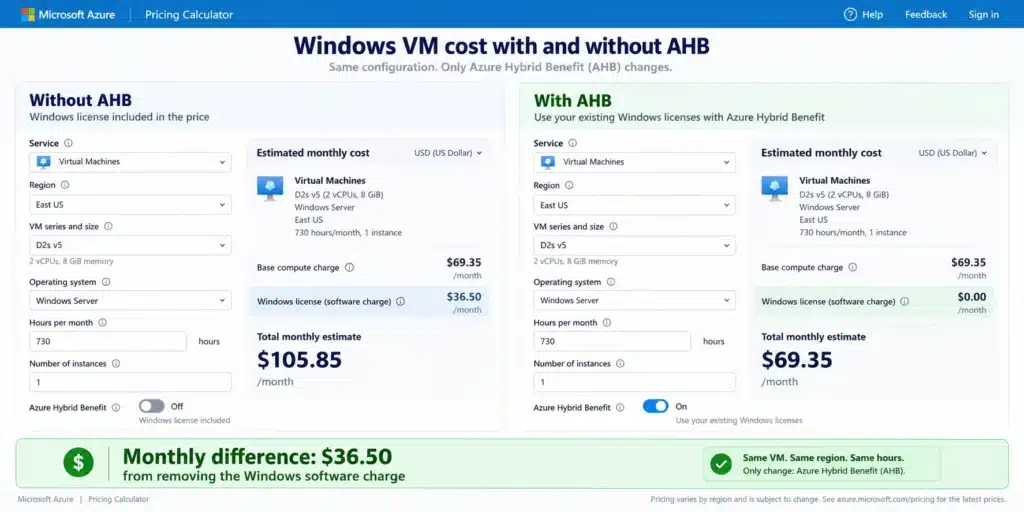
For Windows Server, Microsoft says AHB can be combined with a three-year Azure Reserved VM Instance to save up to 80% versus standard pay-as-you-go pricing. The real decision is not simply whether AHB is available, but whether your license rights, workload shape, and commitment strategy support using it safely. Microsoft Azure Hybrid Benefit pricing
What Azure Hybrid Benefit covers
AHB applies across several Azure services, but the rules are not interchangeable.| Workload | What AHB changes | Main condition |
|---|---|---|
| Windows Server VMs | Removes eligible Windows Server software charges | Standard or Datacenter licenses with active SA or qualifying subscription |
| Azure SQL Database and SQL Managed Instance | Reduces eligible SQL Server licensing cost | Provisioned vCore compute and qualifying SQL Server licenses |
| SQL Server on Azure VMs | Reduces eligible SQL Server licensing cost | Qualifying SQL Server licenses and correct license assignment |
| SQL Server Integration Services | Reduces eligible SSIS licensing cost | Qualifying SQL Server licenses |
| RHEL and SLES VMs | Converts eligible PAYG images to BYOS billing | Active qualifying Linux subscription |
| Azure Local and Dedicated Host | Can reduce software or host-related licensing cost | Product-specific licensing and topology rules |
For Windows-heavy estates, pair licensing review with Azure VM cost optimization so you do not apply discounts to oversized compute.
How much can AHB save?
There is no universal AHB percentage. Savings depend on the software charge removed, Azure service, edition, region, instance type, usage, and whether AHB is combined with another pricing instrument.Microsoft estimates savings of up to 76% versus pay-as-you-go for eligible Linux VMs when Azure Hybrid Benefit is combined with a three-year Azure Reserved VM Instance. Actual savings vary by region, instance type, and usage. Microsoft Learn explains Azure Hybrid Benefit for Linux VMs.
For Windows Server, Microsoft says AHB can be combined with a three-year Azure Reserved VM Instance to save up to 80% versus standard pay-as-you-go pricing. Microsoft Azure Hybrid Benefit pricing
Azure SQL requires more careful wording. Microsoft Learn says Azure SQL Database and Azure SQL Managed Instance can save up to 30% or more by using eligible Software Assurance-enabled SQL Server licenses. The 55% figure on Microsoft’s AHB pricing material applies to SQL Server Integration Services, not Azure SQL Database or SQL Managed Instance. Microsoft Azure SQL Hybrid Benefit guidance
Microsoft also advertises up to 85% savings versus pay-as-you-go for SQL Server on Azure, but the applicable maximum depends on the service, region, instance type, and usage. These are provider maximums, not forecasts.
If Software Assurance would not otherwise be required, include its cost when evaluating net savings.
Illustrative calculation, not Azure pricing
Assume 50 Windows Server VMs cost $300 per VM per month with the Windows license included, while the same base compute would cost $200 per VM per month after applying AHB.Annual AHB saving = $5,000 × 12 = $60,000
Who qualifies for AHB?
For Windows Server VMs, qualifying licenses include Windows Server Standard or Datacenter core licenses with active Software Assurance or qualifying subscription rights.Microsoft requires at least eight eligible core licenses per VM. A four-core VM still requires eight eligible cores, while a 12-core VM requires 12. Microsoft Windows VM Hybrid Benefit guidance
Migration rights depend on edition. Windows Server Standard generally has a one-time overlap of up to 180 days for migration. Datacenter provides broader rights, including qualifying simultaneous on-premises and Azure use scenarios.
For SQL Server, Enterprise and Standard core licenses with active SA or qualifying subscription rights can qualify.
Azure SQL Database supports AHB only on provisioned vCore compute, not DTU-based purchasing or serverless compute.
SQL Enterprise license ratios vary by service tier. One Enterprise core can provide four vCores in General Purpose for qualifying Azure SQL Database or Managed Instance configurations, while other tiers use different ratios. Verify current Microsoft conversion rules before assigning licenses.
For Linux, AHB supports eligible RHEL and SLES subscriptions and can convert supported pay-as-you-go VMs to bring-your-own-subscription billing without redeploying the VM.
Keep SQL scenarios separate
Do not transfer one Azure SQL rule, license ratio, or savings figure to every SQL workload.Azure SQL Database and SQL Managed Instance use provisioned-vCore eligibility and license-conversion rules.
SQL Server on Azure VMs follows VM and SQL Server licensing rules.
SQL Server Integration Services has its own pricing context, including Microsoft’s separate up-to-55% AHB savings claim.
That distinction matters because a percentage or license-conversion ratio that is correct for one SQL service may be wrong for another. Review Microsoft’s Azure SQL Hybrid Benefit documentation before modeling SQL savings.
What happens when SA expires?
If Software Assurance or the qualifying subscription expires, the related AHB right no longer applies.Microsoft instructs customers to renew qualifying coverage, remove AHB from affected resources, or deprovision workloads using the benefit. Microsoft Windows Server AHB guidance
This is a licensing-control issue, not simply a cost alert. Teams need a shared process for reconciling Azure resources with current license entitlements.
Record the SA or subscription end date for every entitlement used for AHB and set internal reminders before renewal. A 60-to-90-day reminder is an operational recommendation, not a Microsoft requirement.
AHB pre-commitment checklist
Before sizing an Azure Reservation or Savings Plan around an AHB-enabled workload, confirm these five items:Identify the exact workload and Azure service.
Confirm the Windows or SQL Server edition.
Count the eligible cores or vCores required.
Record the SA or subscription expiration date.
Review current Microsoft Product Terms for your agreement.
Where should you apply for AHB first?
| Situation | Recommended action |
|---|---|
| Eligible Windows VM | Apply AHB, then rightsize |
| Stable 24/7 Windows VM | Apply AHB, rightsize, then evaluate a Reservation |
| Variable Windows fleet | Apply AHB if eligible, but avoid rigid commitments until the stable baseline is clear |
| Azure SQL Database on provisioned vCore | Apply AHB if licensing and conversion ratios support it |
| Azure SQL Database on DTU or serverless | AHB is unavailable for that configuration |
| SQL Server on Azure VM | Validate SQL Server and Windows licensing separately |
| Entitlement unclear or expired | Resolve licensing before enabling AHB |
How to enable and audit AHB
For new Windows Server VMs, Microsoft exposes the AHB option during VM creation.For existing VMs, you can update the license type without restarting the VM.
Microsoft documents this Azure CLI query for listing Windows Server VMs with AHB enabled:
PowerShell and Azure CLI use BasePrice as the license type for supported SQL services. Microsoft Azure SQL Hybrid Benefit guidance
Centralized AHB management is available for supported SQL Server scopes, allowing eligible SQL licenses to be assigned at broader subscription or billing scope.
Review these controls alongside your broader Azure Cost Management process.
Reservation or Savings Plan after AHB?
AHB changes eligible software licensing costs. Reservations and Savings Plans discount eligible infrastructure usage.That is why they can complement each other, but they solve different problems.
| Choice | Best fit after AHB |
|---|---|
| Azure Reservation | Stable, specific VM or eligible resource demand with predictable matching attributes |
| Azure Savings Plan | Durable eligible compute spend where VM family, region, or configuration may change |
| Pay-as-you-go | Uncertain, temporary, or highly variable usage |
A Reservation is more precise when resource shape is stable. A Savings Plan provides greater flexibility because it follows eligible spend rather than one exact VM configuration.
Neither should be sized before AHB eligibility and rightsizing are complete.
For deeper comparison, review our Azure Reservations guide, Azure Savings Plans guide, and Reservations versus Savings Plans guide.
Optimize Azure commitments with Usage.ai
At Usage.ai, we can help with the commitment layer after your licensing position is clear.Through our Flex Commitment Program, we analyze utilization daily, size Azure compute commitments to your stable floor, and back every Flex Commitment with cashback protection: if a Flex Commitment ends up costing more than the on-demand equivalent for the same usage, that difference is returned as cashback in real money. Get the 65–72% savings of Azure compute commitments with none of the commitment risk. AHB entitlement remains a Microsoft licensing decision, while we focus on managing commitment risk around eligible Azure spend. Review our Azure integration guide and Flex Commitment eligibility requirements for current program details.
Review stable Azure usage, commitment coverage, and eligible savings opportunities after AHB validation.
Frequently asked questions
Can I use AHB without active Software Assurance?
For Windows Server and SQL Server, you need active Software Assurance or qualifying subscription rights. A perpetual license by itself does not provide these AHB rights.
Can I enable AHB on an existing VM?
Yes. Microsoft supports changing the license type on an existing Windows Server VM without restarting it.
Does AHB work with Azure Savings Plans?
Yes, where the workload is eligible. AHB addresses qualifying software licensing costs, while a compute savings plan discounts eligible infrastructure usage.
Does AHB apply to Azure SQL serverless?
No. Azure SQL Database AHB applies to provisioned compute in the vCore purchasing model, not serverless or DTU-based purchasing.
What should I verify before buying a commitment?
Confirm AHB eligibility, edition, required cores or vCores, SA or subscription end date, current Microsoft Product Terms, and your rightsized stable baseline. Then compare a Reservation with a Savings Plan based on how predictable the eligible usage is.