Every CFO looking at an Azure bill eventually asks the same question in a slightly different way: “how much of this is actually us growing, and how much of this is just nobody cleaning up after themselves?” That question does not have a spreadsheet answer. It has a framework answer, and most Azure cost content skips straight past it to talk about rightsizing tips and Reserved Instance percentages instead.
This guide answers the CFO’s actual question first, then works down into the tactics, because the tactics only make sense once you know which bucket you are optimizing.
Structural Azure VM spend scales with real business activity. It should grow and shrink in proportion to the business, and no amount of technical optimization eliminates it, because eliminating it means eliminating the workload. This includes:
- VMs added because customer volume or usage genuinely grew
- Redundant capacity across availability zones for a workload that cannot tolerate downtime
- Capacity carried for a specific, documented risk or compliance reason rather than convenience
Fixable Azure VM spend exists because of a gap in process, not a gap in business need. This includes:
- An idle dev environment running 24/7 because nobody wired up a shutdown schedule
- An oversized VM SKU chosen “to be safe” during a rushed deployment and never revisited
- A production fleet that has been stable for eighteen months and still never got a commitment applied
Independent research backs up how large this fixable layer typically is. Flexera’s 2026 State of the Cloud Report, based on a survey of 753 cloud decision-makers, found that estimated wasted cloud spend rose to 29% in 2026, reversing five years of decline as AI workloads added new forecasting complexity. Applied to an Azure VM estate, that means close to a third of a typical bill is not a reflection of business need at all, and it is exactly the portion a CFO can challenge without touching the workloads that actually matter.
Why this split beats another rightsizing checklist: engineering teams are evaluated on uptime and velocity, not on whether last quarter’s VM footprint still matches this quarter’s traffic. Nobody is deliberately wasting money; the waste accumulates because nobody owns the recurring decision to re-examine it. Left undifferentiated, a budget review turns into an unproductive standoff, engineering’s only defense is “we need it,” finance’s only lever is “cut it by some percentage.” Splitting the bill replaces that standoff with two sharper, separate conversations:
- Structural portion → a capacity-planning conversation: “Is this on the right commitment instrument?”
- Fixable portion → an accountability conversation: “Why does this still exist?”
Neither side of that split requires finance to learn Azure Advisor’s internals, or engineering to justify every VM one by one.

Also Read: Azure Cost Management: 10 Strategies Ranked by Savings Impact for 2026
How Much of Your Azure VM Bill Is Actually Fixable?
The honest answer is that most organizations do not know, because nobody has run the classification exercise. But the fixable layer tends to concentrate in a small number of predictable places.
Idle and Oversized VMs: The Rightsizing Waste Layer
Idle VMs are the easiest category to defend against removal, because they produce zero business value by definition. Oversized VMs are harder to catch because they are doing something, just not enough to justify the SKU. A VM provisioned as a D8s_v5 that has run at 20% average CPU for six months is not broken. It is simply sized for a peak load that either never arrived or arrived once and got treated as the new baseline.
The Usage.ai guide to cloud rightsizing is worth reading in full if this is new territory, but the sequencing rule that matters most for a CFO conversation is simple: rightsize before you commit. Buying a Reserved Instance or Savings Plan on top of an oversized VM does not fix the oversizing. It locks in a discount on a number that was already wrong.
Azure Advisor’s Underutilization Threshold, and Why It’s Conservative
Microsoft’s own Cost Management tutorial is specific about how Azure Advisor flags underutilization: virtual machines with CPU utilization of five percent or less and network usage of seven megabytes or less for four or more days are considered low-utilization virtual machines, and this five percent CPU threshold is the default setting, adjustable by the account owner. Advisor uses a separate ML-based evaluation of CPU, memory, and outbound network for resize recommendations, which has no single fixed threshold in the same way.
That threshold is deliberately conservative. A VM running at 15% average CPU will never appear on Advisor’s underutilization list, yet 15% utilization on a VM sized for 60% utilization is still a rightsizing opportunity worth real money at scale. Treat Advisor’s flagged list as a floor, not a ceiling, on what counts as fixable.

Also Read: Azure Savings Plan: How to Raise Coverage Without Overcommitting
A CFO Framework: Is This Structural or Negligence?
A short set of questions separates the two categories faster than a full utilization audit:
- Did this VM’s size or count change in the last usage-driven business event (customer growth, new product launch, seasonal traffic), or has it been static regardless of business change?
- Is this capacity justified by a documented resilience or compliance requirement, or is it “just in case”?
- Has anyone reviewed this VM’s sizing since it was originally provisioned?
- If this workload disappeared tomorrow, would revenue or reliability actually suffer?
A VM that fails all four questions is very likely fixable. A VM that passes even one or two with a real answer is more likely structural, and the conversation should shift from “cut it” to “is it committed at the right discount tier.”
How Do Governance and Tagging Prevent Fixable Waste From Recurring?
Resource tagging, RBAC, and Azure Policy are what prevent this quarter’s cleanup from becoming next quarter’s identical cleanup. Classifying and cleaning up the current fixable layer solves this quarter’s problem. It does not stop the same waste from reaccumulating next quarter, because the underlying process gap, nobody owning the recurring review, is still open.
Resource tagging is the foundation everything else depends on. Without a consistent tag schema for team, project, and environment applied at deployment time, cost attribution becomes a forensic exercise every time finance asks a question, rather than a query that returns an answer in minutes. A minimum viable schema covers owner, environment (production, staging, development), and cost center, enforced at deployment rather than audited after the fact.
Role-based access control (RBAC) limits who can provision new VMs and at what size, which prevents the most common source of new fixable waste: an oversized SKU chosen during a rushed deployment because restricting the choice felt like it would slow someone down. Pairing RBAC with Azure Policy lets an organization enforce that restriction structurally, for example by blocking deployment of VM sizes above a defined threshold outside of an approved exception process, rather than relying on someone remembering to check afterward.
None of these three mechanisms show up as a line item on the Azure bill, which is exactly why they get skipped in favor of one-time cleanup projects. But a one-time cleanup without governance behind it produces the same conversation again in two quarters, on a slightly different set of VMs. Governance is what turns fixable-waste reduction from a recurring fire drill into a number that actually goes down and stays down.
Also Read: Azure Savings Plan Scope: Subscription vs Shared vs Management Group vs Resource Group
What Are Azure Reserved VM Instances and Savings Plans, and How Much Do They Actually Save?
Once the fixable waste is addressed, the remaining structural baseline is where commitment discounts apply. Azure offers two primary mechanisms, and they trade off differently on savings depth versus flexibility.
Reserved VM Instances: Up to 72% but Rigid
Azure Reserved VM Instances let you commit to a specific VM series, size, and region for a 1-year or 3-year term in exchange for a discount of up to 72% compared to pay-as-you-go pricing (verify at azure.microsoft.com/pricing, rates change and vary by series and region). The size flexibility feature is a genuine advantage worth knowing about: a reservation purchased for one size within a series can automatically apply to other sizes in that same series, so scaling from a D4s_v5 to a D8s_v5 does not require canceling and repurchasing. What the reservation cannot flex on is the VM series itself or the region. Move workloads across series or across regions, and the discount stops following you.
Regional pricing also varies more than most budget models account for. The same VM size can price differently across Azure regions due to local demand, hardware availability, and operating costs, and a reservation locks in the discount rate for the specific region selected at purchase, not a portfolio-wide average. A workload that migrates from East US to West Europe mid-term effectively forfeits the remaining reservation value on the original region and needs a fresh purchase decision.
Azure Savings Plans for Compute: Up to 65% and Flexible
Azure Savings Plans for Compute take a different approach. Instead of committing to a specific VM configuration, you commit to a fixed hourly dollar amount of eligible compute spend for 1 or 3 years, and the discount, up to 65% compared to on-demand pricing (verify at azure.microsoft.com/pricing), applies automatically across VM series, regions, and operating systems, as well as several adjacent services including AKS node compute, Azure Virtual Desktop session hosts, and Azure Functions Premium plan. The tradeoff for that flexibility is a lower discount ceiling than Reserved Instances.
The practical decision most FinOps teams miss is that these two instruments are not mutually exclusive, and a mature Azure estate typically runs both simultaneously: Reserved Instances against the genuinely static portion of the fleet where the VM series will not change, and a Savings Plan layered underneath to capture flexible or evolving compute that would otherwise sit on full pay-as-you-go rates while a rightsizing or migration decision gets finalized. Neither instrument replaces autoscaling: Virtual Machine Scale Sets adjust instance count in response to real-time load, which is a separate lever from either commitment mechanism and should be configured on variable-traffic workloads before deciding how much of the baseline to commit.
Spot VMs and Azure Hybrid Benefit: Supplementary Layers
Azure Spot VMs offer discounts of up to 90% by using unused Azure capacity, with the catch that Microsoft can reclaim that capacity with short notice, making Spot suitable for interruptible batch jobs and fault-tolerant workloads, not production traffic that cannot absorb an eviction.
Azure Hybrid Benefit applies existing on-premises Windows Server and SQL Server licenses with Software Assurance toward Azure VM and database costs. Microsoft’s published figures are up to 40% on Windows Server VMs versus pay-as-you-go, and up to 85% when Hybrid Benefit is combined with a Reserved Instance and Extended Security Updates. That combined figure depends on stacking all three mechanisms and does not account for the ongoing cost of maintaining Software Assurance itself, which Usage.ai’s Azure Hybrid Benefit guide covers in more detail, including the compliance risk created when SA coverage lapses on VMs still claiming the benefit. Confirm the current figures at Microsoft’s Azure Hybrid Benefit pricing page before using them in a budget model.
Illustrative worked example (not a quote or guarantee, figures rounded for clarity): a fleet of 100 Standard_D4s_v5 VMs (4 vCPU, 16 GiB RAM) running continuously in the East US region prices at roughly $0.192 per hour on-demand, or approximately $14,000 per month for the fleet. The table below shows how that figure shifts under each commitment instrument at its advertised discount tier, including where an Insured Flex Commitment typically lands given its 30-60% range.
| Pricing model | Approx. hourly rate per VM | Approx. monthly cost (100 VMs) | Approx. annual cost (100 VMs) |
| Pay-as-you-go | $0.192 | $14,000 | $168,200 |
| 3-year Reserved Instance (up to 72% off) | $0.054 | $3,920 | $47,100 |
| 3-year Azure Savings Plan (up to 65% off) | $0.067 | $4,910 | $58,900 |
| Insured Flex Commitment (30-60% off) | $0.077-$0.134 | $5,600-$9,810 | $67,300-$117,700 |
These are illustrative figures based on published per-hour rates as of mid-2026 and the maximum advertised discount tiers. Actual discounts depend on term length, region, and current Azure pricing, so confirm exact numbers at Azure’s pricing page or with the Azure Pricing Calculator before budgeting against them. The Insured Flex Commitment range sits above the two Azure native instruments at its low end because it is priced for the flexibility of no multi-year lock-in, not because it is a worse discount mechanism; the trade-off it removes is the coverage-ratio risk described next.
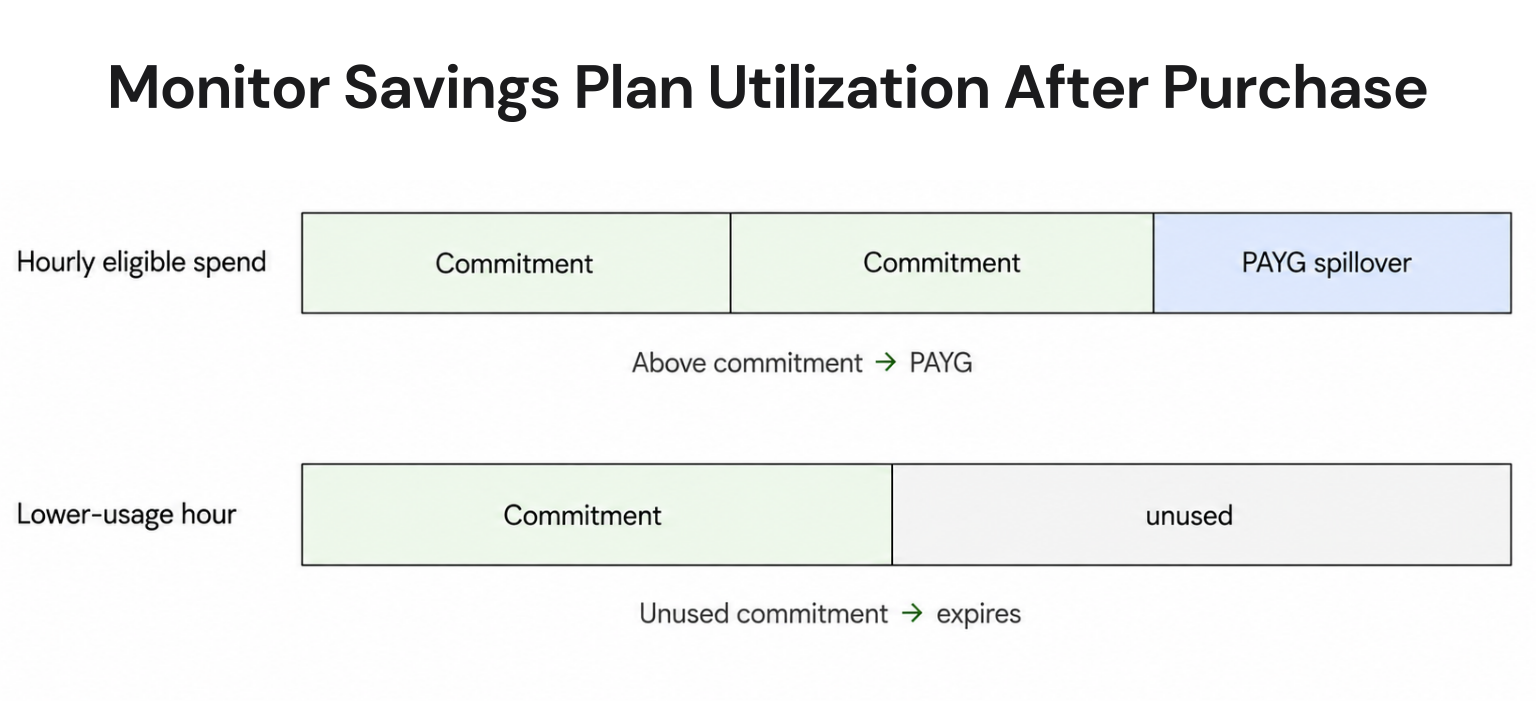
What this table does not show, and what most pricing comparisons leave out entirely, is coverage ratio risk. The annual savings figures above assume all 100 VMs run at full utilization for the entire term. If actual usage drops to 70 VMs worth of load by year two, whether from a product sunset, a migration, or simply better rightsizing catching up with the original estimate, a Reserved Instance still bills for 100 VMs worth of commitment. The unused 30% does not get refunded under either Azure native instrument. This is precisely the gap a buyback guarantee is built to close, and it is the reason the discount percentage alone is an incomplete way to compare these options.
Also Read: Azure Reservations: The Complete Guide to Commitment Discounts in 2026
What Happens If You Commit to a 3-Year Azure Reserved Instance and Usage Changes?
Azure allows you to exchange a Reserved Instance if workload needs shift, but it does not refund unused commitment value in cash. This is the question a CFO should be asking before signing off on any multi-year commitment, and it is the question most Azure cost guides skip entirely.
Azure’s Exchange and Early-Termination Policy for Reserved Instances
The exchange mechanism is narrower than it sounds. Microsoft lets you trade an existing reservation for a different one if workload needs shift, and a self-service trade-in path exists specifically for moving from a Reserved Instance to an Azure Savings Plan for Compute. What it does not do is return cash: the exchange path changes what you are committed to, it does not undo the commitment or refund the gap between what you committed to and what you actually used.
This distinction is worth spelling out for a finance audience specifically, because “exchangeable” and “refundable” sound similar in a vendor conversation but behave very differently on a balance sheet. An exchange means the unused value of the old reservation is applied toward a new one, so the money stays inside Azure’s commitment ecosystem rather than being returned. If the workload that justified the original commitment shrinks and no suitable replacement workload exists to redirect that value toward, the exchange mechanism has nothing to apply the credit to, and the practical outcome converges toward the same underutilization loss as a reservation with no exchange option at all.
The July 2026 Reserved VM Instance Retirement: A Live Example of Structural Risk
If you have been treating a 3-year Reserved Instance as a purely financial decision, a change Microsoft made just this month is worth building into every future commitment conversation. As of July 1, 2026, Azure stopped allowing new purchases or renewals of Reserved Instances for fourteen VM series, covering one-year reservations on the Av2, Amv2, Bv1, D, Ds, Dv2, Dsv2, F, Fs, Fsv2, G, Gs, Ls, and Lsv2 families, plus both one-year and three-year reservations on the Dv3, Dsv3, Ev3, and Esv3 families, per Microsoft’s own transition guide. Existing reservations continue honoring their discount through the end of their current term, and running VMs are not affected on the retirement date itself. But any reservation on an affected series that expires on or after July 1, 2026, cannot be renewed, whether the renewal attempt is manual or automatic, and the underlying workload reverts to full pay-as-you-go pricing the moment that happens.
This is exactly the kind of risk that never shows up in a Reserved Instance’s advertised discount percentage. You are not just betting on your own usage staying stable for three years. You are also betting that Microsoft does not retire the hardware generation underneath your commitment before the term ends. That risk was theoretical until this month. Now it has a real date attached to it, and it is a strong argument for building commitment strategy around instruments that do not require betting on hardware lifecycle timing at all. More detail on the retirement and what it means for FinOps teams currently managing Azure Reserved Instances is covered in Usage.ai’s Azure monthly update for June 2026.

Azure Native Commitment Discounts vs Insured Flex Commitments: What’s the Structural Risk?
Once the retirement event above is on the table, the comparison between Azure’s native commitment instruments and a third-party commitment layer stops being about discount percentage alone and starts being about who absorbs the risk when circumstances change.

| Dimension | Azure Reserved VM Instances | Azure Savings Plans for Compute | Insured Flex Commitments (Usage.ai) |
| Discount range | Up to 72% | Up to 65% | 30-60% |
| Commitment term | 1 or 3 years, fixed to VM series and region | 1 or 3 years, fixed hourly spend | No multi-year lock-in, adjusts quarterly |
| Underuse handling | No refund on unused portion | No refund on unused portion | Cashback (real money), not credits |
| Flexibility across VM changes | Size-flexible within the same series only | Flexible across series, regions, and select services | Flexible, cancel anytime |
| Exposure to platform retirement risk | Direct exposure, as shown by the July 2026 legacy series retirement | Lower, since the commitment is spend-based rather than SKU-based | Absorbed by the buyback guarantee |
| Setup and ongoing management | Manual purchase, manual monitoring for expiration and utilization | Manual purchase, manual monitoring | 30-minute setup, billing-layer access only, continuously managed |
Read across the “exposure to platform retirement risk” row specifically, since it is the dimension no competitor comparison table on this topic currently includes. A discount percentage tells you what you save if everything goes according to plan; it says nothing about who is exposed when the underlying assumption breaks, which is the more relevant comparison for a CFO’s purposes.
Cancel-Anytime and Buyback Guarantee vs Azure’s Rigid Terms
Usage.ai Insured Flex Commitments carry no multi-year lock-in. Commitments adjust quarterly. Scale down? No penalty. Underutilized? Cashback paid in real money, not credits.
The mechanism behind this is simple to describe. An Insured Flex Commitment is a Reserved Instance or Savings Plan-equivalent discount, in the 30-60% range, purchased on your behalf without requiring you to hold the multi-year exposure directly. If your usage drops or a VM series gets retired mid-term, the commitment adjusts on a quarterly cycle instead of locking you into a fixed configuration for one to three years.
Cashback vs Azure’s Credit-Only Underuse Handling
The buyback guarantee is the mechanism that closes the gap Azure’s native tools leave open. If a commitment purchased through Usage.ai goes underutilized for any reason, including a scenario like a VM series losing renewal eligibility, Usage.ai buys back the unused portion and returns the value as cashback, not credits. That distinction matters financially: a credit only has value if you keep spending with the same provider, while cashback is money your finance team can allocate anywhere, including toward a different cloud provider, a different Azure service entirely, or straight back to the general budget.
For a CFO evaluating this specifically, the practical question to ask any commitment-management vendor is not “what percentage do you save me” but “what happens to the unused portion of a commitment if my usage drops, and in what form does that value come back.” Two vendors quoting an identical savings percentage can produce very different outcomes once a workload genuinely shrinks, and that difference only shows up when the underutilization scenario actually happens, by which point the commitment decision has already been made.
Also Read: Azure Commitment Management Strategy: The 2026 Playbook That Actually Accounts for What Changed
How Should a CFO Decide Between Rightsizing, Reserved Instances, and Automated Commitment Management?
None of these three levers replace each other. They apply in sequence, and skipping the sequence is where most of the avoidable cost sits.
Choose rightsizing first, always, because committing to a discount on an oversized VM just makes the oversizing cheaper, not correct. This applies regardless of which commitment instrument you eventually choose. Skipping this step is the single most common reason organizations end up with a Reserved Instance portfolio that looks efficient on paper but is actually locking in yesterday’s overprovisioning at a discount.
Choose a Reserved Instance directly when:
- A workload has been stable for at least six months
- It is unlikely to change VM series or region during the term
- Your team has the bandwidth to actively track reservation expiration dates and utilization, including watching for series retirement notices like the one that took effect this month
This is the right call for genuinely static backend infrastructure, database-adjacent VMs, and other steady-state services, where the operational overhead of active tracking is justified by the deeper discount.
Choose an Azure Savings Plan directly when your workload is stable in dollar terms but the underlying VM configuration is likely to shift, whether from scaling, modernization, or a migration to newer VM generations. This tends to fit application tiers still under active development, or any fleet where engineering expects to change instance families within the commitment term.
Choose automated commitment management when:
- Your team does not have the ongoing capacity to monitor reservation utilization, exchange windows, and retirement notices across a growing VM estate
- The finance team wants the savings without carrying the underutilization risk on the balance sheet
This scenario compounds quickly for organizations running Azure alongside AWS or GCP, since each cloud uses a different commitment mechanism:
- Azure: Reserved VM Instances
- AWS: Savings Plans and Reserved Instances
- GCP: Committed Use Discounts
Each comes with its own exchange rules, term structures, and expiration tracking, so manually reconciling coverage and utilization across three separate billing systems is realistic for a small estate, but stops scaling well before most finance teams expect it to.
Platforms built specifically for this layer, rather than general visibility dashboards, have delivered $91M+ in savings across 300+ customers on AWS, Azure, and GCP combined, the kind of track record worth checking before assuming manual tracking is the cheaper option. Usage.ai’s multi-cloud cost optimization guide covers this reconciliation problem in more depth for teams evaluating whether to keep managing commitments cloud by cloud.
What About AKS and Non-VM Azure Compute?
Everything above focuses on standalone Azure VMs, but the same structural-versus-fixable logic and the same commitment instruments apply to Azure Kubernetes Service (AKS) node pools, since AKS worker nodes are billed as standard Azure VMs underneath the cluster abstraction. A CPU-optimized node pool running a processing workload and a memory-optimized node pool running an in-memory database have different utilization profiles and different rightsizing opportunities, and treating an entire AKS cluster as one undifferentiated line item hides that difference the same way treating an entire VM fleet as one line item does. Azure Reserved VM Instances apply to AKS node VMs exactly as they would to standalone VMs of the same series, including the size-flexibility benefit within a series, which makes reservations more practical for AKS node pools than many teams initially assume. The cluster management fee itself, separate from node compute, is not covered by either Reserved Instances or Savings Plans and needs to be tracked as its own structural cost.
What’s a Realistic Azure VM Cost Optimization Roadmap for the Next Quarter?
A practical sequence, achievable inside one budget cycle:
- Weeks 1-2: Classification. Run the structural-versus-fixable framework above across your top 20 VMs by spend, since that segment typically represents the majority of total compute cost. Pull Azure Advisor’s cost recommendations as a starting list, then extend the review past Advisor’s conservative 5%-CPU threshold for anything sized well above its observed utilization. Assign an owner to each VM or resource group during this phase, since classification without ownership just produces a spreadsheet nobody acts on.
- Weeks 3-4: Fix the fixable layer. Shut down or schedule non-production VMs through Azure Automation, resize confirmed oversized instances, and remove anything that fails all four questions from the CFO framework. Put a resource tagging schema and, if not already in place, RBAC restrictions on VM size in place at the same time, so this cleanup does not need to be repeated from scratch next quarter. This phase typically recovers cost within the first month with no commitment risk attached, since none of it involves a multi-year decision.
- Weeks 5-8: Commit the structural layer correctly. For workloads confirmed stable, apply Reserved Instances or Savings Plans against the now-correctly-sized baseline, not the original oversized one. Cross-check every existing reservation against the July 2026 retirement list before renewing anything, and treat any reservation on an affected series as a decision point rather than a routine renewal. Model coverage in tranches rather than committing the full estimated baseline in one purchase, since a partial commitment reviewed and expanded quarterly carries less risk than a single large commitment based on a first-pass utilization estimate.
- Ongoing: Automate the review cycle. Manual reservation tracking works for a small VM estate and breaks down as the estate grows, particularly across multiple Azure subscriptions or multiple clouds. This is where a platform managing the commitment layer directly, rather than just surfacing recommendations, changes the ongoing workload for both engineering and finance, turning a recurring quarterly fire drill into a standing process that requires periodic review rather than active manual execution.
If your team is running this cycle manually today and want to see what changes when the commitment layer is automated end to end, the setup process itself is short. Usage.ai’s Azure setup guide walks through what that looks like in practice, connecting at the billing layer only, with no infrastructure changes required.
Stop Guessing Which Azure Commitment Fits
See exactly which VMs qualify for automated commitment coverage across your Azure estate, with quarterly adjustment and a buyback guarantee built in, not bolted on.
Frequently Asked Questions
1. What is the difference between structural and fixable Azure VM spend?
Structural spend scales with real business activity, such as VM capacity added for genuine customer growth or redundancy required for uptime commitments. Fixable spend exists due to process gaps rather than business need, such as idle non-production VMs or oversized SKUs never revisited after deployment. The distinction determines whether the fix is elimination or commitment optimization.
2. What are the best practices for Azure VM cost optimization?
Core practices include rightsizing before committing to any discount, automating shutdown schedules for non-production VMs, applying Reserved Instances or Savings Plans to confirmed stable workloads, using Azure Hybrid Benefit where eligible licenses exist, and reviewing reservation utilization and expiration on a recurring monthly cadence rather than annually.
3. What does Azure Advisor flag as a cost recommendation?
Azure Advisor’s primary VM cost recommendations include resizing or shutting down virtual machines with CPU utilization of 5% or less and network usage of 7 MB or less over four or more days, along with purchase recommendations for Reserved Instances and Savings Plans on workloads with sustained on-demand usage patterns. The utilization thresholds are configurable by the subscription owner.
4. Can you cancel or exchange a 3-year Azure Reserved VM Instance?
Azure allows exchanging a Reserved Instance for a different reservation or trading into an Azure Savings Plan for Compute if workload needs shift, but there is no cash refund mechanism for underutilized commitment value. The exchange changes what you’re committed to; it does not return unspent money for a term that goes unused.
5. What happened to Azure Reserved VM Instances on July 1, 2026?
Microsoft stopped allowing new purchases and renewals of Reserved Instances for fourteen legacy VM series, including one-year terms on Av2, Amv2, Bv1, D, Ds, Dv2, Dsv2, F, Fs, Fsv2, G, Gs, Ls, and Lsv2, and both one- and three-year terms on Dv3, Dsv3, Ev3, and Esv3. Existing reservations continue through their current term, but any reservation expiring on or after that date cannot be renewed.
6. How much can Azure VM cost optimization actually save?
Combining rightsizing with commitment discounts typically delivers 30-50% total reduction in Azure compute spend, with waste elimination alone (idle and oversized VM cleanup) usually recovering 10-20% within the first month, and commitment discounts adding a further 30-72% on the correctly-sized baseline depending on which instrument is used.
7. Is it worth committing to a 3-year Azure Reserved Instance in 2026?
It depends on workload stability and platform risk tolerance. A 3-year Reserved Instance makes sense for genuinely static workloads on VM series not affected by retirement notices. For workloads likely to shift in configuration, or as a hedge against future series retirements like the one in July 2026, an Azure Savings Plan or an automated commitment layer carries less structural risk.
8. What happens if you do not fully use an Azure Reserved VM Instance?
Azure does not refund unused reservation value. If your commitment exceeds actual usage for the term, that gap is paid for with no return, unless you proactively exchange the reservation before expiration for something better matched to current usage. This is the core financial risk CFOs should weigh before approving multi-year commitments.
9. Do Azure commitment discounts lock you into a fixed term?
Yes, both Reserved Instances and Savings Plans require a 1- or 3-year commitment with no early cash-out option, though Reserved Instances can be exchanged for different configurations. Third-party platforms offering Insured Flex Commitments can deliver equivalent discount ranges without the multi-year lock-in, adjusting coverage quarterly instead.
10. How does cashback insurance work for underutilized Azure commitments?
Under a buyback guarantee model, if a commitment purchased on your behalf goes underutilized for any reason, including changing usage patterns or a VM series losing support, the unused portion is bought back and returned as cashback rather than credits. This removes the financial exposure that Azure’s native commitment tools leave with the customer.
11. Do Azure Reserved VM Instances apply to AKS node pools?
Yes. AKS worker nodes are billed as standard Azure VMs, so Reserved VM Instances and Azure Savings Plans for Compute apply to AKS node compute the same way they apply to standalone VMs of the same series, including size flexibility within a series. The separate AKS cluster management fee is not covered by either instrument and should be tracked as its own line item.
12. Where can I find a step-by-step tutorial for reducing my Azure VM bill?
Microsoft’s own Cost Management tutorial walks through viewing Advisor recommendations, resizing an underutilized VM, and verifying the resize completed successfully, and is the most reliable starting reference for a hands-on walkthrough. This guide does not cover CLI scripts or automation code; for the classification and commitment-strategy decisions that sit above the step-by-step mechanics, the framework in this guide is the more useful starting point.