.png)



When you purchase an Azure Savings Plan, the scope setting determines which resources are eligible to receive the discount benefit. Get it wrong and you lock savings into a single subscription that never fully utilizes the commitment, while other subscriptions in your org run at full pay-as-you-go rates. Get it right and a single commitment pools coverage across your entire billing account, maximizing utilization automatically.
This is one of the most consequential configuration decisions in Azure commitment management — and one that many teams set at purchase time without fully understanding the downstream impact on utilization, chargeback, and FinOps reporting. This guide covers all four scope types, how Azure applies benefits when multiple savings plans overlap, the decision framework for choosing the right scope, and how to change scope after purchase.
See exactly what you’re overpaying in under 60 seconds. Try the Calculator for free →
The Four Azure Savings Plan Scopes
Source: Microsoft official documentation (learn.microsoft.com/azure/cost-management-billing/savings-plan/scope-savings-plan), verified June 2026.
| Scope | What It Covers | When to Use |
| Resource Group | All eligible resources within one specific resource group in one subscription. | Tightest cost isolation. Single team or project accountability. Rarely the right default. |
| Subscription | All eligible resources across all resource groups within one Azure subscription. | Single-subscription orgs. Chargeback isolation per subscription. Business unit cost center control. |
| Management Group | All eligible resources from subscriptions that are in both the specified management group AND the billing account (EA/MCA). | Business unit grouping without full EA pooling. Partial consolidation. No native Azure Advisor recommendations. |
| Shared (default recommendation) | All eligible resources across all subscriptions in the EA Enrollment or MCA Billing Profile. Includes all Microsoft Entra tenants in the Enrollment/Profile. | Best for most multi-subscription orgs. Pools coverage across entire billing account. Maximizes utilization automatically. |
Source: Microsoft official documentation learn.microsoft.com/azure/cost-management-billing/savings-plan/scope-savings-plan, verified June 2026.
How Azure Applies Savings Plan Benefits: The Scope Waterfall
When you have multiple savings plans with different scopes — or when determining which plan’s benefit applies to a given resource — Azure processes them in a strict order from narrowest to broadest. Source: Microsoft official documentation.
The application order:
- Savings plans with resource group scope (applied first).
- Savings plans with subscription scope.
- Savings plans with management group scope.
- Savings plans with shared scope (applied last).
Within the same scope level, when multiple savings plans exist, Azure applies benefits from three-year plans before one-year plans. The intent: ensure the best discount rates are applied first. Within the same scope and term length, Azure applies benefits from the plan that provides the greatest savings to the eligible resources first — not first-in, first-out. Source: Microsoft official docs on how savings plan discounts are applied.
The scope waterfall has a practical implication for hybrid environments: if you have a subscription-scoped plan AND a shared-scoped plan, the subscription-scoped plan applies to eligible resources in that subscription first. The shared plan then covers remaining eligible usage across the billing account — including that same subscription if the subscription-scoped plan’s commitment is exhausted. Narrower scopes are never wasteful if the commitment is right-sized; they are wasteful when usage in the narrow scope is insufficient to fill the commitment.
Also read: Azure Database Savings Plans: how to buy, scope, and optimize
Shared Scope: Why It Is the Right Default for Most Organizations
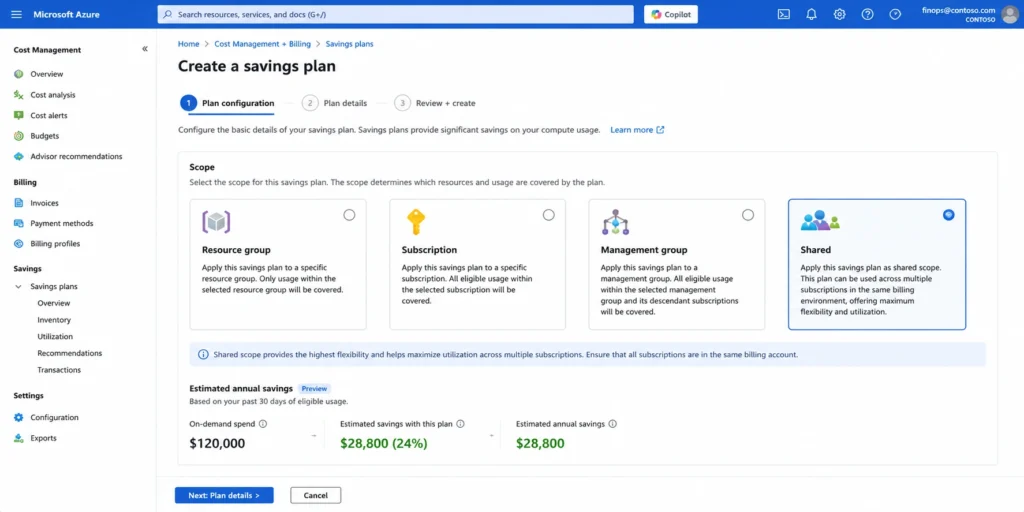
Shared scope is the broadest scope option and the correct default for organizations running workloads across multiple subscriptions under one EA Enrollment or MCA Billing Profile. Source: Microsoft official documentation and Azure cost management best practices.
The core advantage: shared scope pools eligible usage across your entire billing account. Azure applies the discount to whichever resources within the billing account have the highest eligible savings plan discount — automatically, every hour, without any manual routing.
A concrete example: your commitment is $50/hour under shared scope. In any given hour, your workloads may be split across 6 subscriptions. Azure’s benefit application scans all eligible compute usage across all 6 subscriptions and applies the $50/hour discount to the combination of resources that maximizes the total discount delivered. If usage shifts from Subscription A to Subscription B next month — because a team migrated a workload or a new project ramped up — the shared plan continues covering it with no action required.
For organizations with multiple subscriptions under one billing account: a shared-scope Savings Plan is significantly more efficient than subscription-scoped plans because it pools eligible usage across all subscriptions automatically. Single subscription scope only makes sense when you need to assign the discount to a specific cost center for chargeback purposes and cannot handle the allocation complexity of a shared plan.
Subscription Scope: When to Use It
Subscription scope restricts savings plan benefits to eligible resources within one Azure subscription. The benefit does not apply to any resource in a different subscription, even if both subscriptions are in the same billing account.
Valid reasons to choose subscription scope
Chargeback accountability: some FinOps teams allocate savings plan costs to specific business units or cost centers, and the chargeback model requires that each subscription’s discount be attributable to that subscription’s budget. A shared plan’s discount is distributed across subscriptions using Azure’s allocation logic, which can complicate deterministic chargeback reporting. A subscription-scoped plan assigned directly to a subscription eliminates the allocation step. Source: Microsoft documentation on savings plan cost allocation.
Single-subscription organizations: if your entire Azure footprint runs in one subscription, shared and subscription scope produce identical results. Subscription scope is equally valid in this case.
Controlled rollout: purchasing a subscription-scoped plan for a specific workload before expanding to a shared plan allows a team to validate that their workload’s savings plan utilization is healthy before broadening the commitment scope. This reduces the risk of over-committing on a shared plan when your eligible usage pattern is still being established.
The utilization risk of subscription scope in multi-subscription orgs
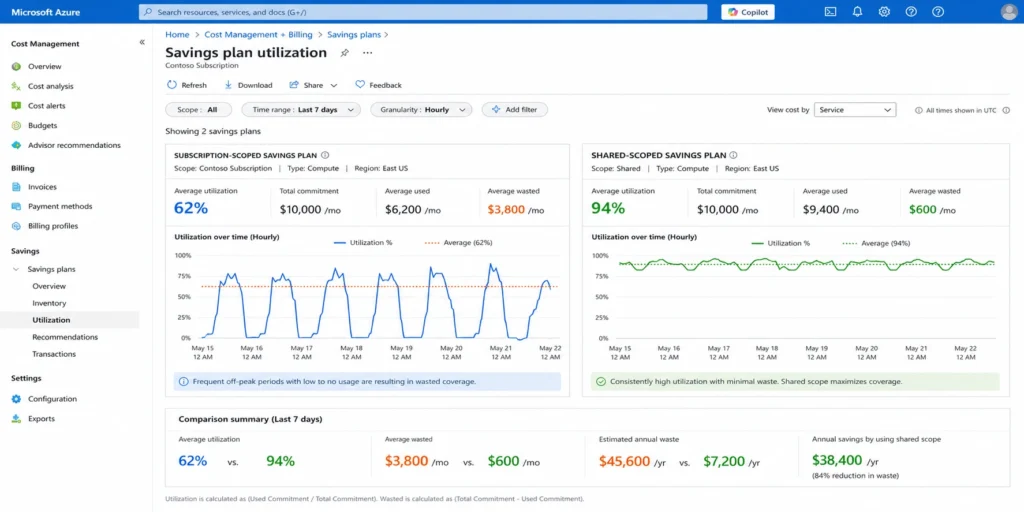
For organizations with multiple subscriptions, subscription scope creates a risk of low utilization if the target subscription’s eligible usage is variable or insufficient to fill the commitment. An $X/hour subscription-scoped commitment is billed whether or not Subscription A generates $X/hour of eligible usage in every hour. Hours where Subscription A’s eligible usage falls below the commitment are wasted — the benefit cannot spill over to Subscription B or C. A shared plan at the same commitment amount would never waste that coverage because it applies to any subscription’s eligible usage in the billing account.
The waste risk is highest for subscriptions with variable workloads — dev/test subscriptions, project-based subscriptions with defined lifetimes, or subscriptions for workloads that have seasonal demand patterns. For these, subscription scope is the worst-fitting choice. Source: analysis from Microsoft documentation on savings plan discount application and utilization monitoring.
Management Group Scope: The Middle Option
Management group scope applies savings plan benefits to all eligible resources from subscriptions that are in both the specified management group AND the billing account (EA Enrollment or MCA Billing Profile).
This scope is useful for organizations that have structured their Azure environment into management group hierarchies representing business units, regions, or product lines — and want to apply savings plan benefits within a business unit without pooling across the entire billing account.
Example: a company with three business units (Engineering, Finance, Marketing) each managing their own management groups under one EA Enrollment. A management group-scoped savings plan for the Engineering management group covers all subscriptions in that group without affecting the Finance or Marketing savings plan commitments.
Key limitations of management group scope
Azure Advisor does not provide native recommendations for management group scope. Azure Advisor surfaces 1-year and 3-year savings plan recommendations for subscription scope only. The Azure portal provides recommendations for shared, subscription, and resource group scopes — but not management group. To size a management group-scoped commitment, aggregate the recommended hourly commitments for all subscriptions within the management group from the Azure portal’s per-subscription recommendations. Source: Microsoft official documentation on savings plan purchase recommendations.
If all subscriptions are moved out of a management group, Azure automatically changes the savings plan scope to Shared. This prevents the plan from becoming stranded with no eligible resources. Source: Microsoft official documentation on managing savings plans.
Management group scope sits between subscription scope (too narrow for multi-subscription efficiency) and shared scope (too broad for business unit chargeback isolation). If your FinOps model needs billing unit separation without the utilization risk of per-subscription plans, management group scope is the right fit — but budget the additional overhead of manually aggregating Azure portal subscription-level recommendations to size the commitment.
Resource Group Scope: Tightest Isolation
Resource group scope applies savings plan benefits only to eligible resources within a single, specific resource group. It is the most restrictive scope and is rarely the appropriate default.
Resource group scope makes sense in specific scenarios: a team running a self-contained application entirely within one resource group wants to allocate savings plan discount directly and demonstrably to that team’s cost center, without any shared cost allocation overhead. The commitment must match only that resource group’s eligible usage, making right-sizing more precise but also more fragile — if workloads move to a different resource group, the savings plan benefit does not follow.
Azure portal provides recommendations at the resource group scope level alongside shared and subscription scopes. Azure Advisor does not surface resource group-level recommendations. Source: Microsoft documentation on savings plan recommendations.
Scope Application: Hourly Use-It-or-Lose-It
Azure savings plan benefits operate on an hourly use-it-or-lose-it basis. Each hour, Azure scans eligible usage within the savings plan’s scope and applies the discount until the hourly commitment is exhausted. Any unused commitment in a given hour does not carry forward to the next hour. Source: Microsoft official documentation on how savings plan discounts are applied.
This means scope choice directly affects hourly utilization: a shared-scoped plan that pools across many subscriptions is more likely to have sufficient eligible usage in every hour to fill the commitment. A subscription-scoped plan for a subscription that goes idle overnight (no VM activity, for example) leaves the commitment unused for those hours — billing still accrues but no benefit is delivered.
Within an hour, when Azure applies savings plan benefits, it prioritizes the resources with the greatest savings plan discount compared to their pay-as-you-go rate. This means the plan delivers maximum discount value in each hour by targeting the highest-discount-eligible resources first.
How to Change Scope After Purchase
You can change a savings plan’s scope at any time after purchase. Rescoping does not restart the term, does not trigger a new commercial transaction, and does not change the hourly commitment or pricing. Source: Microsoft official documentation: ‘Rescoping a savings plan isn’t a commercial transaction, so your savings plan term isn’t changed.’
To rescope: sign in to the Azure portal, navigate to Cost Management + Billing, select Savings Plans, choose the plan, select Settings, then Configuration, and change the scope. Billing administrators can rescope without restriction. Non-billing-admin users changing from shared scope to subscription scope can only select subscriptions where they are the subscription owner. Source: Microsoft official documentation.
Start broad, then narrow if needed. The safest initial scope for a new savings plan is Shared — this ensures maximum utilization from day one regardless of where eligible usage sits across your billing account. If chargeback reporting requires subscription-level attribution after purchase, Azure Cost Management’s savings plan utilization reports and cost allocation features allow you to allocate the shared plan’s discount to individual subscriptions for reporting purposes without changing the scope. Source: Microsoft documentation on savings plan cost allocation.
Recommendations by Scope: What Azure Provides and What It Misses
Azure provides savings plan recommendations through two channels, but neither covers all four scopes. Understanding the gap is important for right-sizing management group scope commitments.
Azure Advisor: provides 1-year and 3-year savings plan recommendations for subscription scope only. Advisor currently does not surface shared, resource group, or management group recommendations. Look-back period: 30 days. Source: Microsoft official documentation.
Azure portal (savings plan purchase experience): provides recommendations for shared, subscription, and resource group scopes. Does not provide management group recommendations. Look-back period: 30 days. Source: Microsoft official documentation.
Savings Plan Benefit Recommendations API: provides recommendations for shared, subscription, and resource group scopes with 7, 30, and 60-day look-back periods. Does not support management group scope. Source: Microsoft official documentation.
Management group scope gap: Azure does not provide native management group-level recommendations from any current tool. To size a management group-scoped commitment, go to the Azure portal savings plan purchase experience, view per-subscription recommendations for each subscription in the management group, aggregate the hourly commitment amounts, and use the total as your management group commitment. This is a manual step but ensures your commitment is grounded in actual usage data. Source: Microsoft documentation workaround for management group sizing.
One important timing note: if you purchase a shared-scoped plan, Azure Advisor’s single-subscription recommendations can take up to 25 days to adjust downward to reflect the new commitment. Do not repurchase subscription-scoped plans based on stale Advisor recommendations immediately after buying a shared plan. Source: Microsoft official documentation.
Scope and Chargeback: Practical FinOps Considerations
The scope choice intersects with how FinOps teams allocate savings plan costs to business units, departments, and projects. There are two approaches, each with trade-offs.
Approach 1: Scope-based allocation (subscription or resource group scope)
Purchase a savings plan scoped to the subscription or resource group responsible for the cost. The discount applies directly and exclusively to that scope’s eligible usage. Chargeback is simple: the subscription’s cost report shows the discounted rates with no allocation required. The trade-off: utilization risk. The commitment is wasted in hours when the scoped subscription or resource group has insufficient eligible usage.
Approach 2: Shared scope with cost allocation
Purchase a shared-scoped plan for maximum utilization, then use Azure Cost Management’s cost allocation features to distribute the savings plan discount and cost across subscriptions for chargeback reporting. The discount is applied optimally across the billing account; chargeback is handled in reporting after the fact. The trade-off: the allocation logic requires configuration and FinOps team oversight.
For most organizations with 3 or more subscriptions, Approach 2 delivers better unit economics (higher savings plan utilization = more actual discount delivered) with manageable allocation overhead. For organizations where each subscription is a standalone business with independent billing accountability, Approach 1’s simplicity may justify the utilization trade-off. Source: analysis from Microsoft documentation and Azure cost management best practices.
How Usage.ai Handles Azure Savings Plan Scope
Usage.ai analyzes Azure billing account structure and subscription-level eligible usage patterns to recommend the correct savings plan scope at purchase. For organizations with multiple subscriptions under one EA or MCA, the platform defaults to evaluating shared scope — the commitment level is sized based on the consistent floor of hourly eligible usage across the entire billing account, not per-subscription.
For organizations that need subscription-level chargeback attribution despite using shared scope, Usage.ai surfaces the savings plan discount allocation breakdown per subscription in its cost reporting layer. This allows teams to maintain shared scope for maximum utilization while still producing subscription-level discount reports for FinOps chargeback workflows.
Usage.ai’s 24-hour refresh detects when eligible Azure compute usage shifts between subscriptions — a common signal that a subscription-scoped plan is accumulating wasted hours while another subscription’s eligible usage grows. The platform surfaces rescoping recommendations before the utilization gap compounds. Usage.ai’s Insured Flex Commitments provide cashback in real money (not credits) if a commitment becomes underutilized mid-term. Fee: percentage of realized savings only.
See how Usage.ai optimizes Azure Savings Plan scope and commitment sizing
Frequently Asked Questions
1. What are the four Azure Savings Plan scope options?
Resource group scope: benefits apply to eligible resources in one specific resource group. Subscription scope: benefits apply across all eligible resources in one subscription. Management group scope: benefits apply to eligible resources in all subscriptions that are in both the management group and the billing account. Shared scope: benefits apply across all subscriptions in the EA Enrollment or MCA Billing Profile. Source: Microsoft official documentation (learn.microsoft.com/azure/cost-management-billing/savings-plan/scope-savings-plan), verified June 2026.
2. What is shared scope on Azure Savings Plans?
Shared scope applies savings plan benefits to eligible resources across all subscriptions in your EA Enrollment or MCA Billing Profile, including all Microsoft Entra tenants in the Enrollment or Profile. It is the broadest scope and the recommended default for organizations with multiple subscriptions under one billing account. Usage pools across the entire billing account, maximizing the chance that the hourly commitment is fully utilized in every hour. Source: Microsoft official documentation.
3. Which scope should I choose for Azure Savings Plans?
For most organizations with multiple subscriptions under one EA or MCA: Shared scope. It pools eligible usage across the billing account and maximizes utilization. Subscription scope is appropriate when you need direct chargeback attribution to a specific subscription and can accept the utilization risk of a narrower commitment. Management group scope suits business unit separation without full EA pooling. Resource group scope is for the tightest project-level isolation but has the highest underutilization risk. Source: Microsoft documentation and Azure cost management best practices.
4. In what order does Azure apply savings plan benefits?
Azure applies savings plan benefits from the narrowest scope to the broadest: (1) resource group scope plans, (2) subscription scope plans, (3) management group scope plans, (4) shared scope plans. Within the same scope, three-year plans are applied before one-year plans. Within the same scope and term, Azure applies the benefit to resources with the greatest discount first. Benefits are use-it-or-lose-it per hour — unused commitment does not carry to the next hour. Source: Microsoft official documentation.
5. Can I change my Azure Savings Plan scope after purchase?
Yes. You can change the scope at any time after purchase. Rescoping is not a commercial transaction — the term, commitment amount, and pricing are unchanged. Go to Azure portal, Cost Management + Billing, Savings Plans, select the plan, choose Settings, then Configuration, and update the scope. Billing administrators can change to any scope. Non-admin users changing from shared to subscription scope can only select subscriptions where they are the owner. Source: Microsoft official documentation.
6. Does Azure Advisor recommend savings plans for management group scope?
No. Azure Advisor currently provides savings plan recommendations for subscription scope only. The Azure portal provides recommendations for shared, subscription, and resource group scopes. No native tool provides management group-level recommendations. To size a management group-scoped commitment, aggregate per-subscription recommendations for all subscriptions in the management group from the Azure portal’s purchase experience. Source: Microsoft official documentation on savings plan recommendations, verified June 2026.