Key Takeaways
|
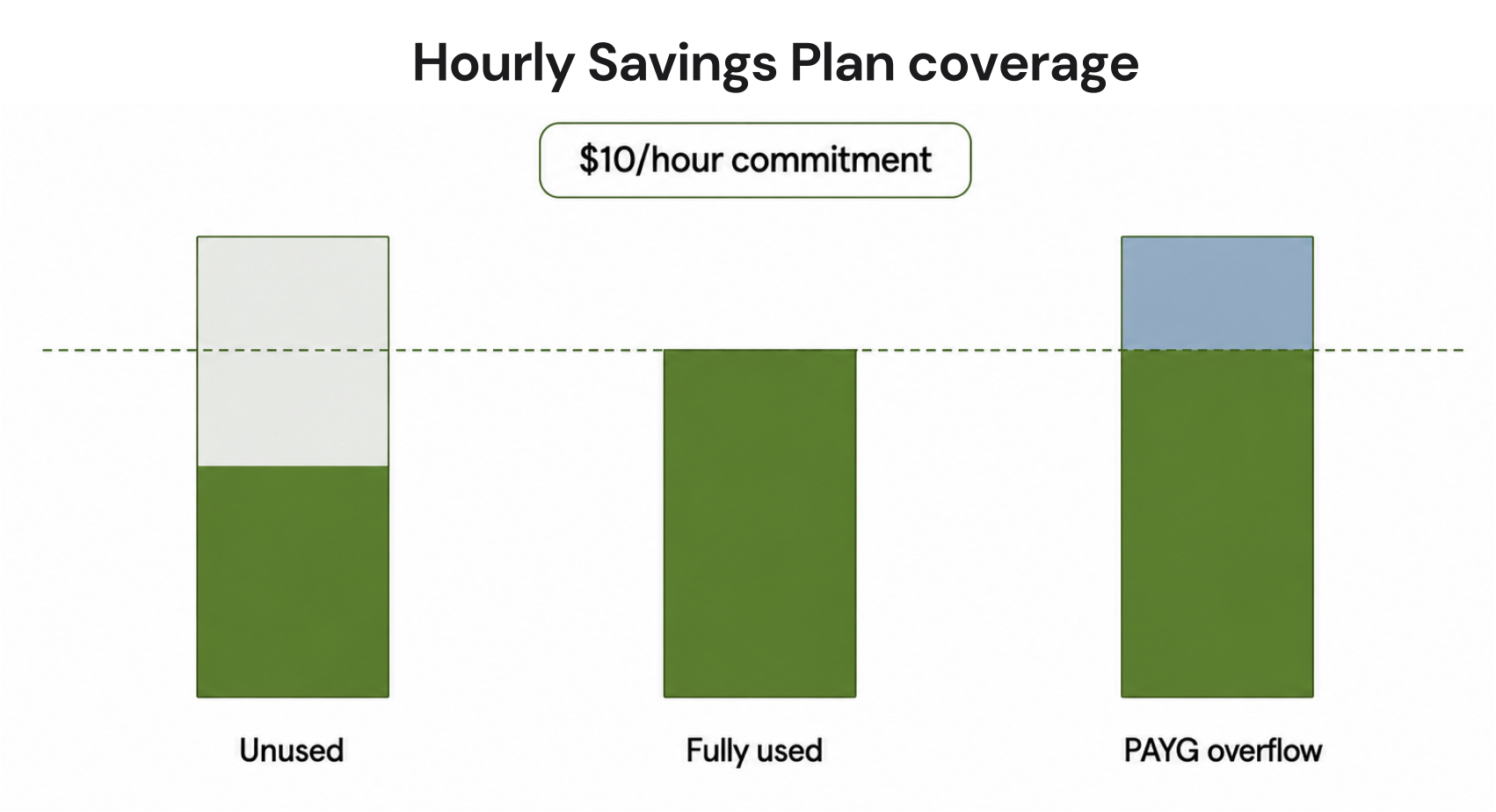
Microsoft has launched Azure Database Savings Plans on March 18, 2026 as its answer to commitment pricing for database workloads. You can now commit to spending a fixed dollar amount per hour for one year (say $10/hour) and Azure will apply the discounted rates to eligible database usage across Azure SQL Database, SQL Managed Instance, PostgreSQL, MySQL, and Cosmos DB up to that hourly cap.
You can save 35% without locking into a specific database service, region, or tier. Your commitment floats across services as your architecture evolves. If you migrate from SQL Database to PostgreSQL mid-year, the discount follows the usage.
The trade-off is equally immediate as you’re betting $87,600/year (at $10/hour) that your database compute spend won’t drop below your commitment. Azure bills the full amount whether you use $10/hour or $6/hour of eligible services. There are no refunds or auto-optimization available. If your usage drops in month 8, you pay the full commitment through month 12.
This guide explains what Azure Database Savings Plans actually cost, which database services qualify for discounts, and how Azure prioritizes discount applications when you’re running multiple database types. We’ll also compare this to AWS RDS Savings Plans (launched 3 months earlier), and walk through the purchase process step-by-step.
What is the Azure Database Savings Plan?
Azure Database Savings Plan is a spend-based commitment pricing model. Instead of reserving specific database instances (like Reserved Instances require), you commit to a dollar-per-hour spend amount for database compute usage.
- You select an hourly commitment amount (e.g., $5/hour, $10/hour, $25/hour)
- Term length: 1 year only (no 3-year option unlike Compute Savings Plans)
- Payment: monthly or upfront (no discount for paying upfront)
- Scope: shared (billing account), single subscription, resource group, or management group
- Auto-renewal: optional (disable 30+ days before expiration to prevent automatic renewal)
Once purchased, the commitment activates immediately. Azure applies discounted rates to eligible database usage every hour up to your commitment amount. Usage beyond the commitment is billed at standard pay-as-you-go rates.
The hourly commitment is fixed. $10/hour = $7,300/month = $87,600/year, billed regardless of actual usage.

Azure Database Savings Plans: Quick Reference
| Feature | Details |
|---|---|
| Launch Date | March 18, 2026 |
| Term Options | 1 year only |
| Discount Range | 0–35% depending on service and tier |
| Commitment Type | Fixed $/hour spend (not instance count) |
| Eligible Services | Azure SQL Database, SQL Managed Instance, PostgreSQL, MySQL, Cosmos DB |
| Coverage | Compute only; storage excluded |
| Flexibility | Cross-service, cross-region, cross-tier |
| Payment Options | Monthly or upfront (no upfront discount) |
| Cancellation | No early cancellation; trade-in only |
| Refunds | None; full hourly commitment billed whether used or not |
| Auto-purchase | No; manual purchase only through Azure Portal or API |
| Utilization Tracking | Azure Cost Management (manual review required) |
Also Learn: AWS Database Savings Plans Explained for DB Teams
Eligible Services and Discount Ranges
Not all Azure database services qualify for Database Savings Plans, and discount rates vary significantly by service and pricing tier.
Azure Database Savings Plans: Complete Eligibility Table
| Service | Eligible Components | Discount Range | What’s Excluded |
| Azure SQL Database | vCore compute (General Purpose, Business Critical, Hyperscale) | 12–35% | Storage, networking, backup storage |
| Azure SQL Database Serverless | Serverless vCore compute | 30–35% | Storage, pause billing not discounted |
| Azure SQL Managed Instance | vCore compute (General Purpose, Business Critical) | 15–30% | Storage, instance pool management fees |
| Azure Database for PostgreSQL | Flexible Server compute (General Purpose, Memory Optimized) | 18–32% | Storage, backup storage, Single Server deprecated |
| Azure Database for MySQL | Flexible Server compute (Burstable, General Purpose, Memory Optimized) | 18–32% | Storage, backup storage |
| Cosmos DB | Provisioned throughput (RU/s) for SQL API, MongoDB API, Cassandra API, Gremlin API, Table API | 20–35% | Serverless Cosmos DB excluded, storage excluded |
| SQL Server on Azure VMs | Hourly licensing (pay-as-you-go SQL Server licenses) | 0% | Consumes commitment at full PAYG rate with no discount; VM compute may qualify for Compute Savings Plan separately |
| SQL Server enabled by Azure Arc | Hourly licensing | 0% | Consumes commitment at full PAYG rate with no discount |
Source: Microsoft Azure Savings Plans documentation, March 2026 (verify at azure.microsoft.com/pricing — rates change)
The 35% maximum savings applies specifically to Azure SQL Database serverless tier. Most production workloads run on vCore General Purpose or Business Critical tiers, which deliver 12–18% discounts. The advertised “up to 35%” ceiling is accurate but applies to a minority of deployments.
What’s NOT Covered
Database Savings Plans apply only to database compute resources. These costs are excluded entirely:
- Storage: data files, transaction logs, backup storage, long-term retention
- Networking: private endpoints, virtual network integration, data egress
- High availability add-ons: geo-replication, zone redundancy fees
- Backup and restore operations: manual backups, point-in-time restore processing
- Licensing: bring-your-own-license (BYOL) deployments don’t consume the commitment
- Serverless Cosmos DB: only provisioned throughput (RU/s) is eligible
Most Azure SQL Database deployments split spend roughly 60/40 or 70/30 between compute and storage. If you’re spending $10,000/month on SQL Database, approximately $6,000–7,000 is compute (eligible) and $3,000–4,000 is storage (not eligible).

| THE PRACTICAL RULE
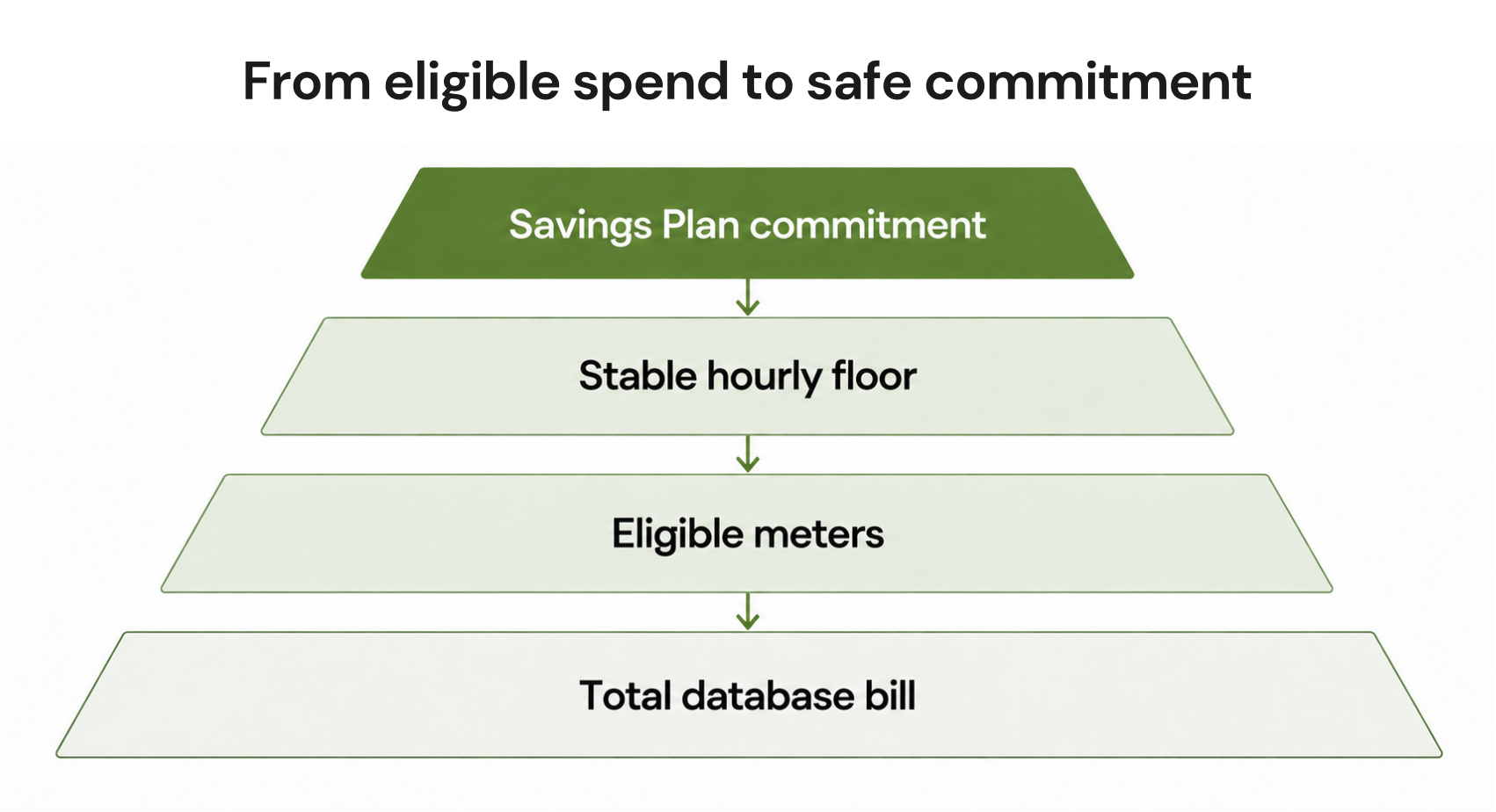
Before sizing your commitment, filter Azure Cost Management to “Compute” meter categories only for the past 60 days. Committing based on total database spend overcommits by 30-40%. Export compute-only hourly usage, calculate the average, and commit to that number, and not the full monthly invoice. |
How Azure Decides Which Database Gets the Discount First
When you’re running multiple database services simultaneously, like SQL Database, PostgreSQL, MySQL, and Cosmos DB, Azure must decide how to apply your fixed hourly commitment across competing usage. Microsoft calls this “automatic optimization,” but the algorithm follows a specific priority order.
The Automatic Optimization Algorithm
Azure applies your Database Savings Plan commitment to the highest-value usage first each hour. “Highest value” means the usage that would generate the largest absolute dollar savings if discounted.
The prioritization logic is as such:
- Highest per-unit discount percentage gets priority (35% discount beats 20% discount)
- Within the same discount tier, higher-cost resources get priority (expensive database SKU beats cheaper SKU)
- Across regions, no preference. Discount applies globally to the highest-value usage regardless of location
This optimization happens automatically every hour. You can’t configure it or get to see which specific resource received the discount in real-time (you only see aggregate savings in billing reports).
Multi-Service Utilization Example
Scenario: You commit $15/hour and run three database services concurrently.
Hourly usage breakdown:
- SQL Database serverless (East US): $8/hour compute usage; eligible for 35% discount
- PostgreSQL Flexible Server (West Europe): $6/hour compute usage; eligible for 25% discount
- MySQL Flexible Server (Central US): $4/hour compute usage; eligible for 25% discount
Total eligible usage: $18/hour
Your commitment: $15/hour
Uncovered usage: $3/hour (billed at pay-as-you-go)
How Azure applies the $15 commitment:
- SQL Database serverless gets full coverage: $8/hour at 35% discount
- Savings: $8 × 0.35 = $2.80/hour
- Commitment consumed: $8
- PostgreSQL gets next priority: $6/hour at 25% discount (but only $7 of commitment remains)
- Commitment applied: $6/hour
- Savings: $6 × 0.25 = $1.50/hour
- Commitment consumed: $6
- MySQL gets partial coverage: $1/hour covered (only $1 of commitment left), $3/hour uncovered
- Commitment applied: $1/hour at 25% discount
- Savings: $1 × 0.25 = $0.25/hour
- Uncovered usage: $3/hour billed at PAYG (no discount)
Total hourly savings: $2.80 + $1.50 + $0.25 = $4.55/hour ($3,285/month, $39,420/year)
Theoretical maximum savings if all $18/hour were covered: $6.30 + $1.50 + $1.00 = $8.80/hour (but this would require a $18/hour commitment = $157,680/year).
The gap between your commitment and total usage determines how much eligible spend goes unprotected. In this scenario, you’re leaving $3/hour on the table, and that’s $2,190/month in uncovered database spend that could save another $547.50/month if you increased the commitment to $18/hour. But increasing the commitment also increases your utilization risk if database usage drops later.
Azure Database Savings Plans vs. Reserved Instances: The Trade-Off
Azure offers two commitment pricing models for databases: Reserved Instances and Savings Plans. They serve different use cases and come with different trade-offs.
Side-by-side Comparison
| Dimension | Reserved Instances | Database Savings Plans |
| Discount depth | Up to 72% (3-year SQL Managed Instance) | Up to 35% (1-year serverless SQL Database) |
| Flexibility | Locked to specific service, region, tier | Floats across services, regions, tiers |
| Term options | 1 or 3 years | 1 year only |
| Commitment type | Specific instance count and size | Dollar-per-hour spend |
| Scope | Single subscription or shared | Subscription, resource group, management group, or shared |
| Instance exchanges | Allowed within same service family (e.g., SQL to SQL) | Not applicable; commitment floats automatically |
| Refund policy | No refunds; trade-in allowed with prorated credit | No refunds; trade-in allowed with prorated credit |
| Capacity guarantee | Yes (reserved capacity) | No (commitment-based pricing only) |
| Administrative overhead | High (must manage instance-level reservations) | Low (single $/hour commitment covers multiple services) |
Source: Microsoft Azure Reserved Instances and Savings Plans documentation, March 2026 (verify at azure.microsoft.com/pricing — rates change)
When to Use Reserved Instances
Choose Reserved Instances when you have:
- 3+ year stable workload on a single database service (SQL Managed Instance, SQL Database vCore)
- Maximum discount priority: 72% savings on 3-year SQL MI beats 35% savings on 1-year Savings Plan
- Known capacity requirements: specific vCore count, specific region, specific service tier
- Predictable, unchanging architecture: no planned migrations, no service consolidation, no regional expansion
Example use case: A production database runs the same workload on the same hardware for three years. A 3-year Reserved Instance saves 72%. Monthly cost drops from $41,472 to $11,612.
When to Use Database Savings Plans
Choose Database Savings Plans when you have:
- Multi-database environment: SQL Database + PostgreSQL + MySQL + Cosmos DB running concurrently
- Active migration or modernization: moving from on-prem SQL Server to Azure SQL, or SQL to PostgreSQL
- Regional expansion planned: opening new Azure regions within 12 months
- Service mix uncertainty: baseline spend predictable but which database service handles the load is uncertain
- Short-term commitment acceptable: 1-year term fits your planning horizon
Example use case: A SaaS company runs three different database types across multiple regions. Workload shifts between them monthly. A $25/hour Savings Plan covers all three without picking specific databases upfront.
Also read: AWS Savings Plans vs Reserved Instances: A Practical Guide to Buying Commitments
When to Use Both (Hybrid Strategy)
The most cost-effective approach for many organizations is combining both models:
- Reserve the stable core with Reserved Instances (maximum discount)
- Cover dynamic growth with Savings Plans (flexibility for expansion)
Azure applies discounts in this order:
- Reserved Instance discounts first (most restrictive, highest discount)
- Database Savings Plan discounts second (covers remaining eligible usage up to commitment)
- Pay-as-you-go pricing for any usage not covered by RI or Savings Plan
Example hybrid scenario:
- Production SQL MI: 32 vCores covered by 3-year RI (72% discount)
- Development/test databases: SQL Database, PostgreSQL, MySQL covered by $12/hour Savings Plan (18-35% discount depending on service)
- Overflow and experimentation: pay-as-you-go (no commitment)
This structure maximizes savings on predictable workloads while maintaining flexibility for unpredictable growth.

Real-World Pricing: What $10/Hour Actually Costs You
Database Savings Plans are sold as flexible hourly commitments, but the financial reality is an annual contract paid monthly.
The $87,600 Annual Commitment
This is the amount you commit to pay over 12 months, whether you use $10/hour of eligible database services or not. Microsoft bills this as $7,300/month (if you choose monthly payment) or $87,600 upfront (if you choose upfront payment; though there’s no discount for paying upfront, unlike AWS).
Utilization Scenarios
Your actual savings depend entirely on whether your eligible database compute usage stays at or above your commitment level.
Scenario 1: Perfect utilization (100%)
- Commitment: $10/hour
- Average actual usage: $10/hour of eligible database compute
- You pay: $87,600/year
- Savings vs. pay-as-you-go: depends on service mix (approximately $21,000–26,000/year assuming 25-30% average discount across SQL Database and PostgreSQL)
Scenario 2: Overcommitted (60% utilization)
- Commitment: $10/hour
- Average actual usage: $6/hour of eligible database compute
- You pay: $87,600/year (full commitment)
- Effective coverage: only $6/hour is discounted
- Waste: $4/hour × 8,760 hours/year = $35,040/year paid for unused commitment
- Actual savings vs. PAYG: approximately $13,140–15,800/year, but you overpaid by $35,040 for capacity you didn’t use
Scenario 3: Undercommitted (150% usage)
- Commitment: $10/hour
- Average actual usage: $15/hour of eligible database compute
- You pay: $87,600 (commitment) + $5/hour × 8,760 hours (uncovered usage at PAYG) = $131,400/year total
- Savings: approximately $21,000–26,000/year on the covered $10/hour
- Missed opportunity: the uncovered $5/hour could save another $10,000–13,000/year if you had committed higher
The commitment is a bet on future usage. Underutilization means paying for discounts you’re not receiving. Overuse means leaving money on the table.
The Storage Blind Spot
Most teams make commitment decisions based on total database spend visible in Azure Cost Management. This leads to significant overcommitment because storage costs are excluded from Savings Plans.
Typical Azure SQL Database cost breakdown:
- Compute: 60–70% of total spend (eligible for Savings Plan)
- Storage: 30–40% of total spend (not eligible)
Example: $50,000/month SQL Database deployment
- Compute: $30,000/month ($34.25/hour average)
- Storage: $20,000/month (data files, backups, logs)
If you commit based on total spend ($50,000/month = $68.49/hour), you’ve overcommitted by 100%. The correct commitment should be based on compute only: approximately $34/hour.
Overcommitment consequence:
- You committed: $68/hour = $595,680/year
- Actual eligible compute: $34/hour = $297,840/year
- Waste: $297,840/year paid for coverage on storage costs that don’t qualify

| THE PRACTICAL RULE
Always separate compute and storage costs before sizing a Database Savings Plan commitment. Use Azure Cost Management with filters for “Compute” vs “Storage” service categories over 60 days of usage to establish your baseline. |
How to Purchase an Azure Database Savings Plan (Step-by-Step)
Database Savings Plans are purchased through the Azure Portal or Azure CLI/API. The portal workflow provides usage-based recommendations; the API allows programmatic purchasing for organizations managing multiple subscriptions.
Prerequisites
Before purchasing, verify:
- Azure subscription with active database workloads
- At least 7 days of usage history (Microsoft recommends 30–60 days for accurate recommendations)
- Billing permissions: Subscription Owner, Contributor, or Savings Plan Purchaser role
- Cost Management access to review historical usage and recommendations
Step 1: Review Azure Advisor Recommendations
Navigate to: Azure Portal → Cost Management + Billing → Savings plans (Preview) → Recommendations
Azure Advisor analyzes your recent database usage across 7-day, 30-day, and 60-day windows and suggests:
- Recommended hourly commitment amount
- Estimated annual savings
- Payback period (how long until cumulative savings equal the commitment cost)
The recommendation algorithm optimizes for maximum savings at the lowest utilization risk. It typically suggests a commitment that covers 70-80% of your baseline usage, leaving headroom for variability.

Step 2: Analyze Your Database Compute Usage Patterns
Before accepting the recommendation, manually review your usage trends:
Azure Cost Management → Cost Analysis → Group by: Service Name
Filter for:
- Azure SQL Database
- Azure SQL Managed Instance
- Azure Database for PostgreSQL
- Azure Database for MySQL
- Azure Cosmos DB
Apply additional filter → Meter Category = “Compute” to exclude storage costs.
Export hourly usage data for the past 60 days and calculate:
- Minimum hourly usage (lowest point in 60 days)
- Average hourly usage (mean over 60 days)
- Maximum hourly usage (highest point in 60 days)
- Standard deviation (how much usage fluctuates)
Safe commitment sizing rule of thumb: Commit to average usage minus one standard deviation. This ensures 84% probability that your actual usage exceeds the commitment (assuming normal distribution).
Example calculation:
- Average usage: $18/hour
- Standard deviation: $6/hour
- Safe commitment: $18 – $6 = $12/hour
This approach balances savings capture with utilization risk.
Step 3: Choose Commitment Amount and Scope
Enter your chosen $/hour amount. Minimum is typically $0.01/hour; maximum varies by subscription spending limits.
Scope Options Include:
| Scope | Coverage | Use Case |
| Shared | All subscriptions under the billing account | Multi-subscription organizations; commitment applies across all subscriptions automatically |
| Single subscription | One subscription only | Isolated workload or department-specific commitment |
| Resource group | Specific resource group | Project-level commitment (e.g., all databases for Product A) |
| Management group | All subscriptions within a management group | Enterprise organizations with management group hierarchy |
Choose Shared for maximum flexibility. The commitment will cover eligible database usage in any subscription under your billing account, prioritizing highest-value usage first.
Step 4: Select Payment Option
Monthly billing (default): The annual commitment is divided into 12 equal monthly charges. If you commit $10/hour ($87,600/year), you pay $7,300/month.
Upfront billing: Pay the full annual amount immediately. Unlike AWS Savings Plans, Azure does not offer a discount for upfront payment. Both options cost the same total amount.
Choose monthly unless you have a specific financial reason to prepay (e.g., budget allocation rules require spending funds in current fiscal year).
Step 5: Configure Auto-Renewal
Auto-renewal enabled (default): At the end of the 1-year term, Azure automatically renews the commitment at the same hourly rate for another 12 months. You’re notified 30 days before renewal.
Auto-renewal disabled: The commitment expires after 12 months. You must manually purchase a new plan if you want to continue receiving discounts.
Recommendation: Disable auto-renewal initially. Database usage patterns change over 12 months. Review your actual utilization in month 10–11 and manually purchase a new plan sized appropriately for current usage rather than letting the original commitment auto-renew.
Step 6: Review and Purchase
The confirmation screen shows:
- Hourly commitment amount
- Total annual cost
- Billing frequency (monthly or upfront)
- Scope
- Auto-renewal status
- Estimated annual savings (based on current usage patterns)
Click Purchase. The commitment activates immediately and discounts apply starting the next billing hour.

Post-Purchase: Tracking Utilization
After purchase, monitor utilization monthly to catch underuse early:
Azure Cost Management → Savings Plans → Utilization
This report shows:
- Hourly commitment amount
- Average hourly usage (how much eligible compute you actually used)
- Utilization percentage (usage ÷ commitment)
- Total savings delivered
- Unused commitment (hours where usage fell below commitment)
Warning threshold: If utilization drops below 70% for two consecutive months, you’re likely overcommitted. Consider trading-in for a lower hourly amount.
Azure Database Savings Plans vs. AWS RDS Savings Plans
AWS launched RDS Savings Plans in December 2025, just three months before Azure. The models are nearly identical, but several key differences affect which platform delivers better value for multi-cloud organizations.
Feature-by-Feature Comparison
| Feature | AWS RDS Savings Plans | Azure Database Savings Plans |
| Launch date | December 2025 | March 2026 |
| Term options | 1 or 3 years | 1 year only |
| Discount range | 10–52% (3-year Aurora reserved) | 0–35% (1-year serverless SQL Database) |
| Payment options | No upfront / Partial upfront / All upfront (discounted) | Monthly or upfront (no upfront discount) |
| Eligible databases | RDS (PostgreSQL, MySQL, MariaDB, Oracle, SQL Server), Aurora, Redshift, ElastiCache, MemoryDB | SQL Database, SQL Managed Instance, PostgreSQL, MySQL, Cosmos DB |
| Storage coverage | Excluded | Excluded |
| Auto-purchase | No (manual only via console or CLI) | No (manual only via portal or CLI) |
| Utilization tracking | CloudWatch + AWS Cost Explorer | Azure Monitor + Cost Management |
| Trade-in policy | Allowed; prorated credit applied to new plan | Allowed; prorated credit applied to new plan |
| Stackable with RIs | Yes; RI applied first, Savings Plan second | Yes; RI applied first, Savings Plan second |
| Cross-region coverage | Yes (automatically applies globally) | Yes (automatically applies globally) |
| Recommendation engine | AWS Cost Explorer (manual refresh) | Azure Advisor (manual refresh) |
Source: AWS and Microsoft official documentation, December 2025 and March 2026
Key Differences That Matter
- Term flexibility: AWS offers 1-year and 3-year terms; Azure offers 1-year only. If you have multi-year database stability, AWS delivers deeper discounts (up to 52% on 3-year Aurora vs. 35% max on Azure).
- Upfront payment discount: AWS discounts all-upfront payment by approximately 3-5% vs. monthly payment. Azure charges the same amount whether you pay monthly or upfront. There is no financial incentive to prepay.
- Discount depth: AWS RDS Savings Plans reach 52% on 3-year Aurora Reserved pricing. Azure Database Savings Plans cap at 35% on 1-year serverless SQL Database. For maximum discount, AWS wins. For flexibility without long-term lock-in, both are comparable.
- Service coverage: AWS covers RDS, Aurora, Redshift, ElastiCache, and MemoryDB. Azure covers SQL Database, SQL Managed Instance, PostgreSQL, MySQL, and Cosmos DB. If you run Redis (ElastiCache) or data warehouse workloads (Redshift), AWS Savings Plans cover those; Azure does not have equivalent database savings plans for Redis Cache or Synapse Analytics.
Which Platform Delivers Better Database Commitment Value?
Choose AWS RDS Savings Plans if:
- You need 3-year term options for maximum discount depth
- You run Aurora (AWS-proprietary engine with deepest discounts)
- You want upfront payment discounts (3-5% additional savings)
- Your database estate includes Redshift, ElastiCache, or MemoryDB
Choose Azure Database Savings Plans if:
- You run SQL Server workloads (native Azure SQL Database and SQL Managed Instance support)
- You need Cosmos DB coverage (globally distributed NoSQL database)
- Your organization is standardized on Azure and doesn’t need cross-cloud optimization
- 1-year terms fit your commitment tolerance
For multi-cloud organizations: Both platforms now offer comparable database commitment flexibility. The decision comes down to where your database workloads actually run and which native services you depend on. Neither platform automates commitment purchasing or provides continuous re-optimization. Both require manual sizing, purchasing, and quarterly utilization reviews.
The Utilization Problem Microsoft Doesn’t Mention
Azure Database Savings Plans solve the flexibility problem (commitments that move across services and region), but they don’t solve the utilization management problem. You’re responsible for buying the right commitment, monitoring usage continuously, and adjusting when patterns shift.
No Auto-Purchase
Azure Advisor provides recommendations based on historical usage, but purchasing is entirely manual. You must:
- Navigate to the Savings Plan portal
- Review the recommendation
- Manually enter the commitment amount
- Click Purchase
There is no continuous optimization engine that automatically increases your commitment when usage rises or decreases it when usage falls. You purchase once, and that commitment runs for 12 months unless you manually intervene with a trade-in.
Operational burden: In an organization with 15 subscriptions running 60+ databases across SQL, PostgreSQL, and MySQL, determining the optimal shared commitment requires aggregating usage data across all subscriptions, filtering out storage costs, calculating hourly averages, and manually updating the commitment quarterly. This is a recurring manual process.
No Continuous Re-Optimization
Azure Advisor refreshes recommendations when you visit the portal, but it doesn’t proactively notify you when your usage pattern changes enough to warrant a commitment adjustment.
Example scenario:
- Month 1: You commit $20/hour based on 60-day average usage
- Month 4: You complete a database consolidation project; actual usage drops to $14/hour
- Month 7: Azure Advisor would recommend $14/hour if you checked the portal, but there’s no alert, no email, no automatic notification
You continue paying $20/hour ($175,200/year) when a $14/hour commitment ($122,640/year) would provide the same coverage. The $52,560/year difference is waste—paid for unused commitment.
Recommendation: Set a quarterly calendar reminder to manually review Savings Plan utilization in Azure Cost Management. If utilization drops below 80% for two consecutive months, consider trading-in for a lower commitment.
No Utilization Alerts
Azure Cost Management tracks Savings Plan utilization, but it doesn’t generate automatic alerts when utilization falls below acceptable thresholds.
You must manually configure budget alerts in Azure Monitor with custom queries to track:
- Savings Plan utilization percentage
- Unused commitment hours per month
- Trend analysis (is utilization increasing or decreasing over time?)
Manual alert setup:
Without this manual configuration, you won’t know your commitment is underutilized until you manually check Cost Management, which many teams do quarterly, meaning you could operate at 60% utilization for 3 months before discovering the waste.
The 12-Month Visibility Gap
Most finance and FinOps teams review cloud commitments quarterly (every 90 days). Database Savings Plans lock you in for 12 months.
Timeline of waste discovery:
- Month 1-3: Commitment is utilized at 95%+ (healthy)
- Month 4: Database migration completes early; usage drops to 65% utilization
- Month 4-6: No one notices (next quarterly review is in month 6)
- Month 6: FinOps team discovers 65% utilization in quarterly review
- Month 6-7: Decision process: trade-in or wait out the remaining 6 months?
- Month 7: Trade-in executed; new $12/hour commitment purchased (prorated credit applied)
Waste incurred: Months 4-7 = 4 months at $6/hour unused commitment = $17,520 in waste before correction.
The gap between usage shifts and organizational visibility creates unavoidable waste. The 1-year term locks the commitment; the lack of auto-optimization means human review cycles determine when adjustments happen.
What Happens When You Underutilize a Database Savings Plan?
Underutilization is the primary financial risk with Database Savings Plans. Unlike pay-as-you-go pricing (which scales down automatically), a Savings Plan commits you to paying the full hourly amount whether you use it or not.
No Refunds
Azure bills the full hourly commitment every hour for 12 months. If you commit $15/hour and your actual eligible database usage is $10/hour, you pay $131,400/year but only receive discounts on $87,600 worth of usage. The remaining $43,800 is paid for unused commitment. You receive no refund, credit, or it gets rolled over to future months.
Savings Plans trade flexibility for predictability. You get the flexibility to shift usage across services; Azure gets predictable revenue regardless of your actual consumption.
Trade-In Option
If you discover underutilization mid-term, Azure allows trading-in your current Savings Plan for a new one with a different commitment amount or scope.
Trade-in mechanics:
- Navigate to: Azure Portal → Savings Plans → Active Plans → Select plan → Trade-in
- Choose new commitment amount (can be higher or lower)
- Azure calculates prorated credit for unused portion of original plan
- Credit is applied toward the new plan
- New 12-month term starts immediately
Here’s the financial impact of trade-in:
Original plan:
- $20/hour commitment
- Purchased in January 2026
- 6 months remaining (July-December 2026)
Current usage:
- Actual database usage: $12/hour
- Utilization: 60%
Trade-in scenario:
- New commitment: $12/hour
- Prorated credit: $20/hour × 4,380 hours remaining = $87,600
- New plan cost: $12/hour × 8,760 hours (new 12-month term) = $105,120
- Net cost adjustment: You pay $105,120 – $87,600 credit = $17,520 additional (spread over new 12-month term)
Key point: Trade-ins don’t refund the original commitment, but they apply credit toward a new 12-month commitment. You’re restarting the clock, not exiting the commitment. If you trade-in 6 months into the original plan, you’re now committed for another 12 months, meaning you’ve effectively committed for 18 months total (6 original + 12 new).
Some Real World Underutilization Scenario
Company Size: Mid-sized SaaS company running Azure SQL Database and PostgreSQL across 4 regions
Original commitment (January 2026): $25/hour based on 60-day average usage
Annual cost: $219,000
What changed:
- Month 5: Completed migration from SQL Server on-prem to SQL Database 3 months ahead of schedule
- Month 6: Shut down 40% of SQL Database dev/test environments as migration completed
- Month 7: Actual usage dropped to $15/hour (60% utilization)
Financial consequences:
- Committed: $25/hour = $219,000/year
- Actual eligible usage: $15/hour = $131,400/year
- Waste: $10/hour × 8,760 hours = $87,600/year paid for unused commitment
Months 5-7: 3 months at $10/hour waste = $21,900 paid for unused coverage before the underutilization was discovered in quarterly review
Month 8 decision: Trade-in to $15/hour commitment
- Prorated credit: $25/hour × 4,380 hours (6 months remaining) = $109,500
- New plan: $15/hour × 8,760 hours (new 12-month term) = $131,400
- Net additional cost: $131,400 – $109,500 = $21,900 paid over next 12 months
Total financial impact:
- $21,900 wasted in months 5-7 (before correction)
- Locked into new 12-month commitment (cannot exit without paying full amount)
- Original plan was designed to end in December 2026; new plan extends commitment through July 2027
This scenario is quite common across teams where database migrations complete early, workloads consolidate faster than expected, or business priorities shift. The 1-year term and no-refund policy mean you absorb the cost of faster-than-expected efficiency gains.
How Usage.ai Eliminates Azure Commitment Risk
The utilization monitoring gap described in this guide is a manual commitment management problem that exists across all Azure commitment types. Usage.ai solves this for Azure VM Savings Plans and Reservations through automated purchasing and continuous re-optimization.
How It Works
- Continuous Usage Analysis
Usage.ai analyzes Azure compute usage every 24 hours across all subscriptions, identifying:
- Current VM usage patterns and trends
- Existing commitment coverage and utilization rates
- Gaps where pay-as-you-go spend could be covered by commitments
- Utilization drops that signal overcommitment risk
- Automated Commitment Purchasing
Usage.ai purchases commitments automatically based on:
- Real-time usage trends (not 60-day historical averages)
- Conservative sizing to minimize underutilization risk
- Multi-subscription optimization across your entire Azure estate
- Cashback Protection
The reason teams hesitate to commit is what if usage drops? Usage.ai provides cashback insurance on underutilized commitments. If your Azure usage falls below the commitment level, you receive cash back on the unused portion. This eliminates the $35,040/year waste scenarios described earlier. - Zero Manual Oversight
Usage.ai runs on autopilot. There is no need for quarterly utilization reviews, or trade-in decisions. The platform adjusts commitment levels automatically as usage patterns shift, maintaining 85-95% utilization without human intervention.
Key Benefits
- 30–50% savings on Azure VM spend: verified across 300+ enterprise customers
- 24-hour recommendation refresh: catch usage changes 3 days faster than Azure Advisor’s 72-hour cycle
- Cashback protection: the only platform offering cash refunds on underutilized commitments
- Fee model: % of realized savings only: if Usage.ai saves nothing, you pay nothing
Ready to automate Azure commitments without utilization risk? Book a 15-minute savings assessment with a Usage.ai Azure expert to see exactly how much you’ll save.
Usage.ai manages over $91M in verified cloud savings for customers including Motive, EVGo (NASDAQ: EVGO), Blank Street Coffee, and Secureframe.
Should You Buy an Azure Database Savings Plan?
Database Savings Plans deliver real savings for organizations with predictable baseline database compute spend and multi-service database estates. They are not universally beneficial as commitment risk outweighs savings potential in several scenarios.
Buy an Azure Database Savings Plan If:
You have 60+ days of stable database usage history: Commitments based on 7-day snapshots carry high risk. You need enough historical data to identify true baseline usage vs. seasonal spikes.
Database compute spend exceeds $5,000/month across eligible services: Below this threshold, the administrative overhead of monitoring and managing commitments outweighs the absolute dollar savings (typically $1,000–1,500/month on a $5,000/month spend base).
You run 2+ database types concurrently: Savings Plans deliver maximum value when you have SQL Database + PostgreSQL + MySQL + Cosmos DB usage that shifts between services. Single-service deployments may get better savings from Reserved Instances.
Your architecture is evolving but aggregate usage is predictable: For example, you’re migrating from on-prem SQL Server to Azure SQL Database over 12 months. Individual service usage is uncertain (which databases migrate when?), but total database compute spend is stable at $25,000/month.
You can commit to monthly utilization reviews: Set a calendar reminder to check utilization in Azure Cost Management on the 1st of each month. If you can’t commit to this operational discipline, you’ll discover waste too late to correct it.
Storage is <40% of your total database spend: If storage dominates your costs, Savings Plans won’t deliver meaningful savings because storage is excluded.
Don’t Buy an Azure Database Savings Plan If:
Your database estate is <6 months old: Insufficient usage history. You don’t know your true baseline yet. Wait until you have 60+ days of stable production usage.
You’re mid-migration with unknown completion timeline: If you’re 3 months into a 12-month migration from on-prem to Azure SQL Database and the timeline is uncertain, committing to a fixed $/hour spend is gambling on migration velocity. One 2-month delay could leave you with 40% underutilization.
Storage costs are >50% of your database spend: Savings Plans apply only to compute. If you’re running large SQL Databases with high storage-to-compute ratios, most of your spend is ineligible for discounts.
You can’t monitor utilization at least quarterly: Without regular utilization reviews, you won’t catch underuse until months of waste have accumulated. If your organization doesn’t have FinOps processes or dedicated cloud cost management, the operational risk outweighs the savings.
Your database usage fluctuates >30% month-to-month: High variability creates utilization risk. If November usage is $20/hour but February usage is $12/hour, you’ll either overcommit (waste in low months) or undercommit (miss savings in high months).
Use Reserved Instances Instead If:
Switch to Reserved Instances (not Savings Plans) when:
- Single database service, single region, 3-year stable forecast: A production SQL Managed Instance that will run unchanged for 36 months delivers 72% savings with a 3-year RI vs. 35% max with a 1-year Savings Plan
- Maximum discount priority: If saving the absolute maximum amount matters more than flexibility, RI discounts are 2-3× deeper than Savings Plan discounts
- Capacity guarantees required: Reserved Instances guarantee capacity availability; Savings Plans do not
Reserved Instances are the right tool for stable, predictable, long-running production workloads. Savings Plans are the right tool for dynamic, multi-service, evolving database estates.
Frequently Asked Questions
1. What is an Azure Database Savings Plan?
An Azure Database Savings Plan is a 1-year commitment to spend a fixed dollar amount per hour on eligible Azure database compute usage. You commit to a specific $/hour (e.g., $10/hour), and Azure applies discounts of 0–35% to database usage across SQL Database, PostgreSQL, MySQL, and Cosmos DB up to that hourly cap. Storage costs are excluded from all savings plans.
2. Which Azure databases are eligible for Database Savings Plans?
Eligible services include Azure SQL Database (vCore tiers), Azure SQL Managed Instance, Azure Database for PostgreSQL Flexible Server, Azure Database for MySQL Flexible Server, and Azure Cosmos DB provisioned throughput. SQL Server hourly licensing on Azure VMs and Azure Arc consumes the plan at pay-as-you-go rates with no discount applied. Storage costs are excluded from all database services.
3. How much can you save with Azure Database Savings Plans?
Savings range from 0–35% depending on the database service and pricing tier. SQL Database serverless offers the highest discount at 30–35%. PostgreSQL and MySQL Flexible Server deliver 18–32% savings. Cosmos DB provisioned throughput saves 20–35%. vCore SQL Database General Purpose and Business Critical tiers save 12–18%, and SQL Managed Instance saves 15–30%.
4. What happens if I don’t use my full Database Savings Plan commitment?
Azure bills the full hourly commitment every hour for 12 months regardless of actual usage. If you commit $10/hour but only use $6/hour of eligible database compute, you pay the full $87,600/year with no refund or credit for the unused $4/hour. You can trade-in for a lower commitment mid-term, receiving prorated credit toward a new plan, but this starts a new 12-month term.
5. Can I use Database Savings Plans with Reserved Instances at the same time?
Yes. Azure applies Reserved Instance discounts first (most restrictive, highest discount rates), then applies Database Savings Plan discounts to remaining eligible usage up to your hourly commitment. This hybrid strategy works well when you have a stable production database core (covered by RI for maximum savings) and dynamic development or multi-service workloads (covered by Savings Plan for flexibility).
6. Do Azure Database Savings Plans cover storage costs?
No. Database Savings Plans apply only to database compute resources such as vCores for SQL Database, provisioned throughput for Cosmos DB, and compute tiers for PostgreSQL and MySQL Flexible Server. Storage costs including data files, transaction logs, backup storage, long-term retention, and geo-replication are excluded and billed at standard pay-as-you-go rates. Most deployments split 60/40 or 70/30 between compute and storage.
7. How does Azure decide which database gets the discount first when running multiple services?
Azure automatically applies your commitment to the highest-value usage each hour, meaning the database usage that would generate the largest absolute dollar savings if discounted gets priority. Services with higher per-unit discount percentages get covered first (35% discount beats 20% discount). Within the same discount tier, higher-cost database SKUs get priority over lower-cost SKUs. Discounts apply globally across all regions with no geographic preference.
8. Can I cancel an Azure Database Savings Plan early?
No. There is no early cancellation option. You can trade-in your current plan for a new commitment with a different hourly amount or scope, but the trade-in starts a new 12-month term. The original commitment is converted to prorated credit applied toward the new plan. The only way to prevent renewal is disabling auto-renewal at least 30 days before the 12-month term expires.