AWS
AWS Microsoft Azure
 Google Cloud

The key questions are how sharing is controlled, how benefits are attributed, and what happens when account structures change.
What consolidated billing changes
AWS Organizations consolidated billing combines usage and payment into a single bill for the management account. Savings Plans can therefore benefit eligible usage across accounts in the consolidated billing family, subject to sharing settings.For a broader overview of Savings Plans and commitment sizing, see our AWS Savings Plan buying strategy.
The important distinction is between the commitment owner and the account receiving the discount. A Savings Plan purchased in one account can benefit eligible usage in another account, but that does not mean the commitment charge moves with the benefit.
How Savings Plans apply
AWS applies Savings Plans in a defined sequence:- Owner account first. The Savings Plan first applies to eligible usage in the account that owns the plan.
- Cross-account sharing. When sharing is enabled, any remaining benefit can apply to eligible usage in other accounts.
- Savings optimization. AWS prioritizes accounts based on the calculated savings from applying the remaining Savings Plan benefit.
AWS also applies Savings Plans within a broader commitment order. Reserved Instances apply before Savings Plans. When multiple Savings Plans apply, EC2 Instance Savings Plans are applied before Compute Savings Plans because Compute Savings Plans have broader applicability.
Worked example: $10/hour commitment
The following is illustrative, not an AWS billing quote.
Assume a $10/hour Compute Savings Plan in Account A. During one billing hour, Account A has $4 of eligible usage, Account B has $3.50, and Account C has $2. The organization has sharing enabled.
| Account | Eligible usage | Commitment amount |
|---|---|---|
| Account A | $6.00 | $6.00 |
| Account B | $3.50 | $3.50 |
| Account C | $0.50 | $0.50 |
| Unused | — | $0.50 |
Four sharing configurations
AWS now provides organization-wide sharing plus RISP Group Sharing controls and per-account deactivation.| Configuration | Best fit | Benefit flow |
|---|---|---|
| Organization-wide sharing | Maximum organization-wide utilization | Owner first, then eligible accounts |
| Prioritized Group | Business-unit showback or soft isolation | Owner, defined group, then organization |
| Restricted Group | Hard cost boundaries | Owner and defined group only |
| Deactivated account | Full account isolation | No sharing in or out |
RISP Group Sharing
AWS made Reserved Instances and Savings Plans Group Sharing generally available on November 19, 2025. It lets the management account define account groups with AWS Cost Categories and control whether commitment benefits stay within those groups or spill over to the organization.Prioritized Group Sharing gives the defined group priority after the purchasing account, then allows unused capacity to benefit the rest of the organization. Restricted Group Sharing keeps the benefit within the defined group and does not allow unused capacity to spill outside it.
Before you configure group sharing, check these requirements:
- Configuration is performed from the management account.
- Sharing groups use the Accounts dimension in AWS Cost Categories.
- An account can belong to only one sharing group, and the payer account cannot be part of a group.
- The Cost Category’s Uncategorized costs default value cannot use the same name as a sharing group.
When to deactivate sharing
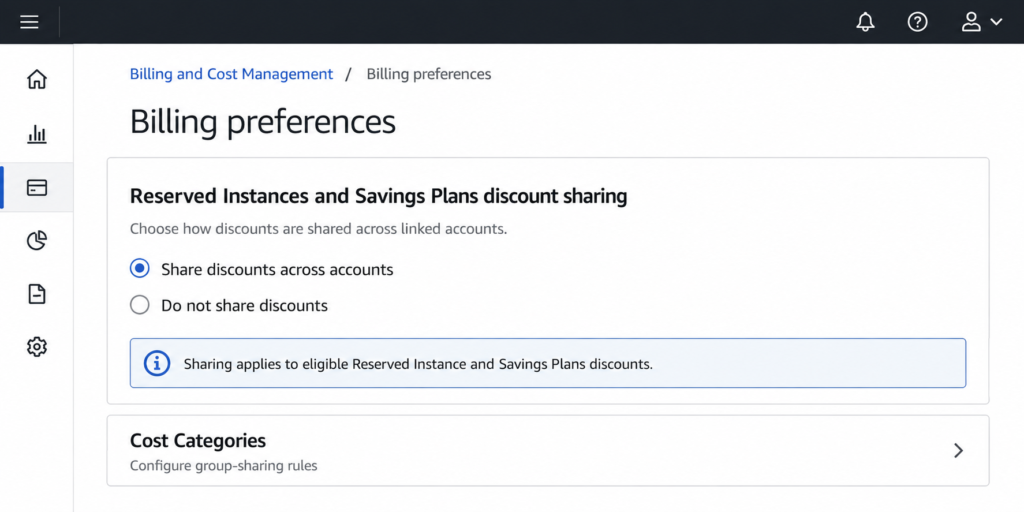
The management account can deactivate Reserved Instances and Savings Plans discount sharing for individual member accounts from Billing preferences.When sharing is deactivated for an account:
- Savings Plans owned by that account no longer share their benefit with other accounts.
- The account cannot receive shared Savings Plans benefits from other accounts.
- A commitment that exceeds the account’s own eligible usage can therefore become underutilized.
AWS’s current Billing documentation explains the activation and deactivation controls.
How to choose a sharing mode
Use the simplest model that matches your financial control requirements.| Situation | Recommended approach | Reason |
|---|---|---|
| One organization, shared financial ownership | Organization-wide | Maximizes the pool available for eligible usage |
| Business units need showback | Organization-wide + CUR attribution | Keeps sharing broad while reporting benefit by account |
| Business units need priority | Prioritized Group | Gives a defined group first access, then allows spillover |
| Business units need strict isolation | Restricted Group | Prevents benefit spillover outside the group |
| Tenant-level isolation | Deactivated sharing | Prevents inbound and outbound sharing |
How to track usage by account
Organization-wide utilization can hide which linked accounts are consuming a commitment. For account-level attribution, use AWS Cost and Usage Reports and Cost Explorer.In CUR, use lineItem/UsageAccountId to identify the account associated with a usage or fee line. Filter lineItem/LineItemType for SavingsPlanCoveredUsage to identify covered usage, then use savingsPlan/SavingsPlanEffectiveCost on those rows to allocate the effective cost of the benefit.
For commitment charges, filter lineItem/LineItemType for SavingsPlanRecurringFee and SavingsPlanUpfrontFee. AWS documents SavingsPlanUpfrontFee for All Upfront and Partial Upfront purchases and SavingsPlanRecurringFee for recurring charges.
For a broader explanation of Cost Explorer, see our AWS Cost Explorer guide.
How to reconcile Savings Plans for chargeback
Sharing controls determine where a discount can be used. They do not create your internal chargeback policy.A practical model separates three things:
- Showback: Report SavingsPlanCoveredUsage by lineItem/UsageAccountId so teams can see the usage that received the benefit.
- Benefit-based chargeback: Allocate savingsPlan/SavingsPlanEffectiveCost to the accounts associated with covered usage.
- Commitment-cost chargeback: Separately allocate SavingsPlanRecurringFee and SavingsPlanUpfrontFee according to your organization’s ownership policy.
For a deeper treatment of amortized commitment cost, see our AWS Savings Plan amortized cost guide.
What happens when accounts move
Moving an account between organizations or billing structures can change Savings Plans coverage. Shared benefits depend on the accounts remaining within the applicable consolidated billing family and on sharing being enabled. If a Savings Plan owner account leaves the organization, AWS states that the Savings Plan no longer applies to the consolidated bill.Before moving an account:
- Identify Savings Plans owned by the account.
- Document which accounts currently receive shared benefits.
- Review the account’s sharing preference.
- Model the post-move coverage and any On-Demand exposure.
- Recheck commitments after the organization change.
AWS recommendation refresh
AWS lets you manually refresh Savings Plans purchase recommendations up to three times per day for a consolidated billing family. Recommendations are based on historical usage and the selected lookback period, so the result should be reviewed against known workload changes before committing.For broader cost optimization practices, see our guide to cloud cost optimization challenges.
Common sharing mistakes
- Buying without considering future isolation.
- Treating aggregate utilization as account-level performance.
- Using Restricted Group without modeling utilization.
- Ignoring organizational changes.
How Usage.ai Solves Multi-Account Savings Plans Management
Managing Savings Plans across consolidated billing accounts requires continuous visibility into usage, commitment coverage, and account-level allocation.Faster commitment decisions: Usage.ai helps FinOps teams monitor commitment opportunities and make sizing decisions using current usage data.
Multi-account visibility: See commitment coverage and usage across linked AWS accounts, making it easier to understand where Savings Plans benefits are being used and support showback.
Reduced commitment risk: With cashback protection for eligible commitments, Usage.ai helps reduce the risk of paying for commitments that become underutilized, subject to applicable terms.
Proven AWS savings: Customers such as EVgo and Motive have reported significant annual savings in AWS-heavy environments, demonstrating the potential impact of structured commitment management.
we focus on the commitment layer. We identify eligible AWS commitment opportunities and, once you approve a recommendation, automatically initiate the commitment purchase. The commitment is then managed through our Flex Commitment Program. Learn more about Flex Commitment eligibility
With Flex Commitments, teams can access up to 57% savings associated with a 3-year AWS commitment without taking on the long-term commitment risk. If a commitment becomes more expensive than the equivalent On-Demand usage, Usage.ai provides cashback protection to help cover the difference.
Access up to 57% savings with a three-year AWS commitment, while reducing long-term exposure. Eligible commitments include cashback protection, subject to applicable terms.
Frequently asked questions
Can a member account's Savings Plan benefit other accounts?
Yes. The Savings Plan first applies to eligible usage in the owner account. When sharing is enabled, remaining benefit can apply to eligible usage in other accounts in the consolidated billing family.
Can I restrict Savings Plans to specific account groups?
Yes. RISP Group Sharing provides Prioritized and Restricted Group Sharing. The groups are defined with AWS Cost Categories using the Accounts dimension.
What happens when Savings Plans sharing is deactivated?
The affected account cannot share its Savings Plans benefits outward and cannot receive shared benefits from other accounts. The account's own eligible usage can still use its owned commitment, subject to the applicable sharing preference.
How should Savings Plans benefits be charged back?
Use CUR to separate covered usage from commitment fees. lineItem/UsageAccountId identifies the account, SavingsPlanCoveredUsage identifies covered usage, and savingsPlan/SavingsPlanEffectiveCost shows the effective cost allocated to that usage. Track upfront and recurring commitment fees separately.
Can Savings Plans share across separate AWS Organizations?
No. Savings Plans and Reserved Instances cannot be shared outside the purchasing AWS Organization. Each organization remains its own sharing boundary.
How we help with AWS commitments
At Usage.ai, we help FinOps teams access up to 57% savings with a three-year AWS commitment while reducing long-term commitment exposure. Eligible commitments receive cashback protection subject to applicable terms.