.png)



Most Azure commitment guides are written from the premise that the main decision is how much to commit and for how long. In 2026, that framing misses three structural changes to the Azure commitment landscape that directly affect which instruments you can use, what flexibility you retain, and whether specific VM series will even have RI discounts available when your current terms expire.
This guide covers the current state of Azure commitment mechanics from Microsoft official documentation, the specific decisions those mechanics force, and the commitment strategy that maximizes savings while managing the policy risks that most playbooks ignore.
| Because “We’ll Figure It Out Later” Gets Expensive.
Start your free Azure Commitment Strategy Analysis with Usage.ai |
The Three Structural Changes Every Commitment Plan Must Account For
1. Compute reservation exchanges are extended — not guaranteed
Azure compute reservation exchanges — the ability to swap VM, Dedicated Host, and App Service reservations across instance series and regions — were originally planned to end on January 1, 2024. They have been extended until further notice. The current status from Microsoft official documentation: you can continue exchanging your compute reservations for different instance series and regions until Microsoft notifies you again, which will be at least six months in advance.
This creates a strategy problem that is easy to underestimate. Every organization that has built multi-year commitment plans with exchange flexibility as an assumed fallback — a way to course-correct if VM choices turn out wrong — is exposed to that fallback disappearing with six months notice. Building a three-year reservation strategy that depends on exchange availability is building on a foundation with an unknown expiry date.
There is one important nuance: any compute reservation purchased during the current extended grace period retains the right to one more exchange after the grace period ends, even after the general exchange policy closes. This means newly purchased compute reservations in 2026 carry one additional flexibility mechanism — but only one, not unlimited. Source: Microsoft official reservation exchange policy documentation.
The practical implication: for any long-term Azure commitment strategy, assume compute reservation exchanges will eventually end. Design the commitment portfolio so it does not require exchanges to correct for infrastructure changes. Use Azure Savings Plans for compute where workload configurations are likely to change, and use reservations only where the specific VM series, region, and size are confirmed stable. Savings Plans provide the flexibility that exchanges currently provide for compute, without the policy dependency.
2. RI discounts for specific VM series end July 1, 2026
This is the most time-sensitive structural change in Azure commitment management. Microsoft official documentation confirms that for Dv3, Dsv3, Ev3, and Esv3 VM series, three-year and one-year reserved instance discounts will no longer be available for new purchases or renewals after July 1, 2026. These VM series are not being retired, but new RI purchases will not be available after this date.
Existing RIs remain valid through the end of their original term. After expiry, those workloads transition to pay-as-you-go unless another commitment instrument is selected. Microsoft’s primary recommendation for these VM series post-expiry is the Azure Savings Plan for compute.
Additional affected series: one-year RI purchases for Av2, Amv2, Bv1, D, Ds, Dv2, Dsv2, F, Fs, Fsv2, G, Gs, Ls, and Lsv2 are no longer available. Source: Microsoft official VM sizes retirement and migration documentation.
Any organization running these VM series on active RIs needs a migration path documented before current RI terms expire. The transition is not automatic. When the RI expires, compute reverts to pay-as-you-go unless a Savings Plan is in place to continue covering that spend.
Action before July 1, 2026: audit your Azure reservation portfolio for Dv3, Dsv3, Ev3, Esv3 instances. For those whose RIs are expiring after July 1, 2026: the RI cannot be renewed. Either migrate the workload to a newer VM series that supports RIs (Dsv5, Ddsv5, Dasv5 for D-family; equivalent v5/v6 options for E-family), or purchase an Azure Savings Plan for compute to cover the spend post-expiry. Do not wait until the RI expires to make this decision.
3. The $50,000 refund cap constrains large portfolio restructuring
Azure Reservations can be refunded, with limits. The total canceled commitment cannot exceed $50,000 USD in a rolling 12-month window for a billing profile or single enrollment. There is no early termination fee currently, but Microsoft documentation notes that a 12% early termination fee may be introduced in future. Source: Microsoft official self-service exchanges and refunds documentation.
For large Azure commitments, this cap creates a sequencing problem during portfolio restructuring. If an organization needs to exit multiple reservations simultaneously — for example, during an EA-to-MCA migration, a major VM series migration, or a strategic shift from reservations to savings plans — the $50,000 monthly cap limits how much can be unwound in a single month. A $500,000 reservation portfolio cannot be fully restructured in a single billing cycle; it requires a 10-month sequenced unwind.
The cap applies per billing profile or enrollment, not per reservation. Multiple smaller reservations being refunded in the same month all count toward the same rolling limit. Refunded amounts increase the available limit 365 days after the refund event.
Matching Commitment Instruments to Workload Behavior
The most expensive Azure commitment mistake is using one instrument type for all spend. Reservations deliver the deepest discounts — up to 72% on VMs for three-year terms. Savings Plans deliver lower discounts — up to 65% on compute — but apply automatically across VM sizes, families, and regions regardless of changes. The correct instrument depends on how predictable the workload configuration is.
Reservations: for genuinely stable configurations
Azure Reserved Instances are the right instrument when three conditions hold: you know the specific VM family and series, you know the region, and neither will change during the reservation term. Databases, core infrastructure VMs running the same workload for 18 or more months, and managed services with stable throughput configurations all fit this profile.
For databases specifically, Azure SQL Database, SQL Managed Instance, and Cosmos DB reservations offer deep discounts with service-specific flexibility. SQL Database and Managed Instance support vCore size flexibility within a performance tier and region. Cosmos DB reservations cover provisioned throughput. These database reservations do not carry the same exchange policy uncertainty as VM compute reservations — the Microsoft documentation is clear that the exchange policy changes apply specifically to Virtual Machine, Dedicated Host, and App Service reservations. Non-compute reservation exchanges remain unchanged.
Savings Plans: for dynamic and evolving compute
Azure Savings Plans for compute commit to a fixed hourly spend amount across eligible compute services. The discount applies automatically to eligible usage regardless of VM family, size, region, or operating system. When engineering swaps VM series, migrates from VMs to AKS, or shifts regions, the Savings Plan continues applying without requiring manual adjustment.
The trade-off is discount depth. A Savings Plan will typically deliver a lower savings rate than a reservation for the same configuration on stable workloads. The decision is whether the flexibility value — absorbing infrastructure change without exchange risk or stranding commitments — is worth the discount reduction. For most compute fleets where VM configurations change over a three-year horizon (and they do), the answer is yes.
Savings Plans cannot be modified or cancelled once the commitment is made. If your usage needs grow, you may purchase an additional Savings Plan. If your usage shrinks, the committed hourly spend continues billing for the full term regardless of actual consumption. The one-way commitment means sizing accuracy is as important for Savings Plans as for reservations — the main advantage is that coverage automatically follows the compute wherever it runs.
Also read: Azure Reservations: The Complete 2026 Guide
The hybrid approach: which layer gets which instrument
The highest-performing Azure commitment portfolios use both instruments simultaneously, matched to the stability profile of each workload layer.
Stable foundation: databases, managed services, and core infrastructure VMs running the same configuration for 12 or more months belong on reservations. The deep discount is justified by the configuration stability. Use three-year terms only for services where you are confident the specific series, tier, and region will not change. Use one-year terms where stability is established but a three-year commitment feels risky.
Dynamic compute layer: VM fleets that change with product releases, AKS node pools that scale and shift families as Kubernetes versions change, App Service deployments that flex with traffic patterns — these belong on Savings Plans. The compute coverage follows the workload automatically, and a VM series migration or region expansion does not create a stranded reservation.
Variable and peak layer: burst compute, AI/GPU experimental deployments, batch workloads, and seasonal spikes are not candidates for either instrument. Pay-as-you-go rates are the correct price for genuine on-demand capacity. Azure Spot VMs can reduce the cost of fault-tolerant burst workloads by up to 90% versus pay-as-you-go. Committing capacity that exists only during peak periods wastes the commitment during all the off-peak hours.
Still managing Azure commitments manually?See how Usage.ai identifies the right mix of Reservations and Savings Plans, tracks renewals, and prevents costly overcommitments. |
Commitment Laddering: Eliminating the Renewal Cliff
One of the most consistent sources of Azure commitment waste is the renewal cliff: a large single commitment expires, the team scrambles to analyze current usage and build a new purchase case, and for the weeks or months that analysis takes, all the covered compute runs at pay-as-you-go rates.
The math is concrete. A Savings Plan covering $50,000 per month in compute at 30% savings delivers $15,000/month in savings. If that plan expires and four weeks pass before the replacement is purchased, that is $15,000 in avoidable overpayment — per month, per commitment. Scale this across a portfolio with multiple expiring commitments in the same quarter and the loss is material.
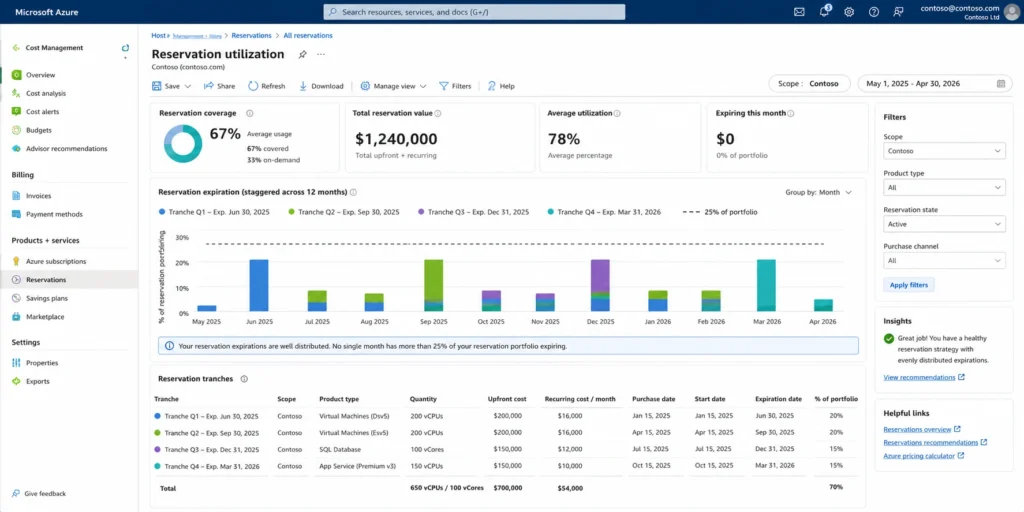
Laddering prevents this by staggering commitment expirations across the year rather than concentrating them at single points. Instead of purchasing all commitments at an annual planning cycle, commitments are purchased in smaller increments on a rolling basis — each sized to current stable usage rather than a forecast that will be stale within weeks of being made.
The mechanism: when purchasing a new commitment, cover only the stable baseline that exists right now. Set a calendar reminder at 60 days before expiration. At that point, analyze current usage, right-size the renewal, and purchase the next tranche. Each renewal is sized on current data rather than projections, which means the commitment portfolio continuously recalibrates to actual infrastructure state.
The practical benefit beyond avoiding cliff risk: each smaller commitment is a lower-stakes decision. A miscalculated $5,000/month commitment costs a fraction of what a miscalculated $50,000/month annual commitment costs. More frequent, smaller decisions with real-time data outperform annual large decisions with forecast data.
Also read: Multi-Cloud Savings Plan Strategy: Applying Azure Commitments Alongside AWS and GCP
Sizing from the Floor, Not the Average
The most common oversizing mistake in Azure commitment management is using average utilization as the sizing baseline. If average hourly spend is $100/hr but minimum overnight spend is $40/hr, a $100/hr Savings Plan commitment generates 40% waste during off-peak hours.
The correct baseline is the stable floor: the minimum consistent spend level that exists in every hour across your evaluation window — including nights, weekends, and seasonal low periods. A commitment should cover usage that will always be there, not usage that will sometimes be there.
Microsoft’s guidance is explicit on this: analyze your consistent base usage before purchasing. The recommendation is to look at your lowest usage points to understand the stable floor, then build commitments upward from there.
For most Azure environments, the stable floor is 60-75% of average hourly spend when overnight and weekend utilization is included in the analysis. A commitment at 70% of average covers the floor without generating waste during low-use periods. The remaining 30% of average spend sits above the floor and should either remain on pay-as-you-go or be covered by a separate small commitment after the floor commitment’s utilization pattern is validated.
The conservative starting point: commit at 70% of the minimum spend level observed in the past 60 days. After 30 days of observing the new commitment’s utilization (target 90%+ utilization), purchase an additional increment. This approach is slower to reach full commitment coverage but eliminates the over-commitment risk that creates stranded spend.
AI and GPU Workloads: A Different Risk Profile
AI and GPU workloads in Azure present a commitment risk profile that differs from standard compute in two ways: utilization patterns are highly variable (training jobs run intensely for specific windows; inference workloads may run continuously at unpredictable volumes), and the service landscape is changing rapidly (new GPU VM series, Azure OpenAI provisioned throughput, and Azure AI services are all expanding as Azure commitment instruments).
GPU VM reservations
Azure Reserved Instances are available for GPU VM series. For AI training workloads that run on a predictable schedule — a nightly training job, a weekly fine-tuning run — a reservation can capture meaningful savings if the GPU instance runs consistently enough to meet the utilization threshold. For experimental or variable-schedule GPU workloads, pay-as-you-go or Spot instances are more appropriate.
The key evaluation: pull 30 days of hourly utilization for the GPU instance. If it is running above 80% of hours, a reservation is worth evaluating. If utilization is concentrated in specific daily windows with long idle periods, the effective utilization rate may not justify the commitment cost.
Azure OpenAI provisioned throughput reservations
Azure now offers reservations for Azure OpenAI provisioned throughput. Provisioned throughput reservations deliver significant savings versus on-demand rates for consistently used AI inference capacity. The commitment is to provisioned throughput units (PTUs), not to a specific model version. For organizations running production AI workloads with consistent inference volume, provisioned throughput reservations represent the primary cost reduction lever for AI infrastructure spend.
The same sizing principle applies: commit based on the minimum consistent inference volume, not the peak or average. AI workload volume tends to be highly variable, and over-committing PTU reservations against peak traffic patterns generates substantial waste during off-peak periods.
Keep AI/GPU variable capacity uncommitted
For GPU capacity used for experimentation, model training on irregular schedules, or inference workloads whose volume is still growing, the commitment risk outweighs the savings benefit. Committing to a GPU reservation on a workload that turns out to be lower-volume than projected wastes the full committed cost for every underutilized hour. Use pay-as-you-go for genuine variable AI/GPU capacity until stable utilization patterns are established.
Monitoring Commitment Health: The Three Metrics That Matter
Most Azure commitment monitoring tracks the wrong metrics. Reservation utilization — the percentage of committed hours matched to running resources — is the standard monitoring metric but tells only part of the story.
Utilization rate
Track reservation utilization at daily granularity, not monthly. A monthly average of 85% utilization can hide two weeks at 100% and two weeks at 70% — the latter representing significant stranded commitment. Azure Cost Management provides reservation utilization dashboards showing daily utilization breakdowns. Any reservation consistently below 80% utilization is a candidate for right-sizing or trade-in.
Coverage rate
Coverage rate measures the percentage of eligible compute spend actually covered by a commitment instrument versus running on pay-as-you-go. High utilization on your existing commitments combined with low coverage means your committed capacity is fully used but a large portion of compute is still running uncovered. The coverage gap is recoverable savings — each percentage point of coverage improvement represents a specific dollar amount multiplied by the reservation discount.
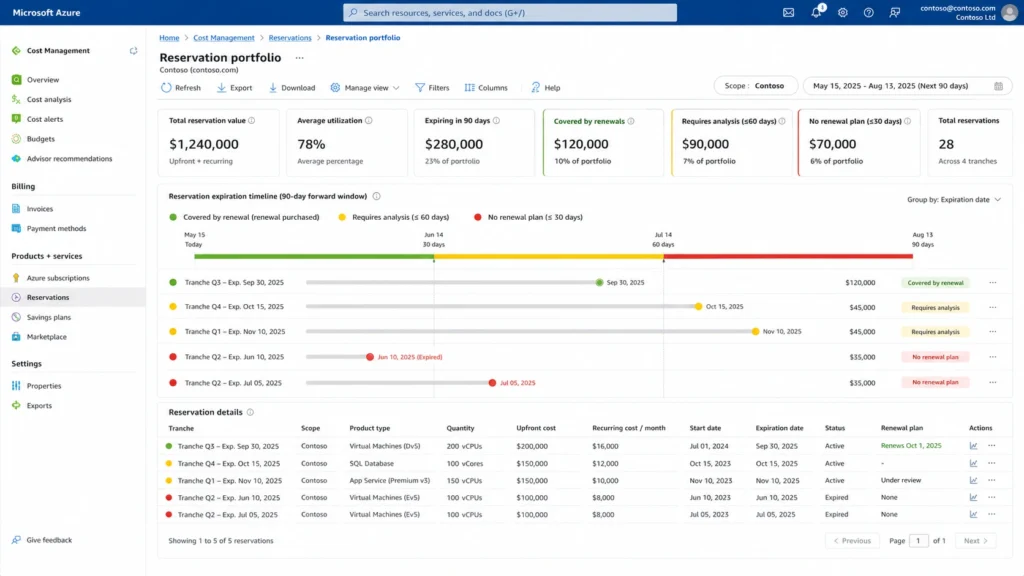
Commitment expiration forecast
Track expiration dates at the individual commitment level, not just as an aggregate portfolio view. A portfolio with 10 commitments expiring in the same 30-day window represents a renewal cliff risk regardless of how spread out the other 90% of commitments are. The target is no more than 15-20% of total committed spend expiring in any single month. If the expiration schedule is more concentrated than that, begin laddering new purchases now to distribute future expirations.
The Scope Mistake That Silently Wastes Commitments
Reservation scope determines which subscriptions and resource groups a commitment covers. Commitments scoped to a single subscription stop applying coverage when matching resources move to a different subscription — a common occurrence during team reorganizations, environment consolidation, or billing restructuring.
Shared scope (billing account-wide) maximizes coverage utilization by allowing the commitment discount to apply to the highest-discount usage anywhere within the billing account. Subscription scope or resource group scope provides more granular chargeback visibility but creates stranding risk when resources move.
Microsoft’s documentation describes the application order: when multiple commitments exist, more restrictively scoped ones are applied first. A resource-group-scoped commitment applies before a subscription-scoped one, which applies before a management-group-scoped one, which applies before shared scope. This means restrictive scoping on stable workloads consumes those commitments efficiently, while shared-scope commitments cover the remainder.
The monitoring action: quarterly, verify that resource groups and subscriptions containing significant committed resources still align with your commitment scope configurations. Any organizational restructuring that moves resources across subscription boundaries should include a commitment scope review.
Also read: Azure Savings Plan Scope: Subscription vs Shared vs Management Group vs Resource Group
The Cost of Waiting: Quantifying On-Demand Overpayment
The instinct to delay commitment purchases until certainty arrives is the most expensive commitment management behavior, and it is more common than any other mistake. Teams wait for migrations to complete, for the next planning cycle, for finance approval, for more utilization data. While they wait, compute runs at full pay-as-you-go rates.
The opportunity cost is quantifiable. If $100,000 per month of compute is eligible for a 30% commitment discount, each month of delay costs $30,000. A three-month wait while a migration is evaluated costs $90,000 in avoidable overpayment. That is $90,000 that a reservation or savings plan would have saved had the commitment been purchased at the start of the three months rather than at the end.
The correct response to uncertainty is not to wait for certainty. It is to purchase a conservative commitment covering the stable baseline that exists today, and expand the commitment incrementally as certainty increases. Microsoft’s guidance acknowledges this directly: rather than letting coverage lapse during evaluation periods, organizations can trade in underutilized reservations for savings plans to maintain coverage while their needs evolve.
The laddering model is the practical implementation: purchase commitments sized to current known-stable spend. When the migration completes, the post-migration commitment right-sizes to the new configuration. The coverage gap during the transition is small (the difference between the conservative baseline commitment and actual spend) rather than total (the entire uncovered spend during a wait period).
Wondering how much you’re overpaying?Find your Azure commitment coverage gaps and estimated savings in under 60 seconds. |
How Usage.ai Manages Azure Commitment Strategy
Usage.ai manages Azure commitment portfolios alongside AWS and GCP commitments in a single multi-cloud platform. For Azure, the platform operates on three continuous optimization loops.
Commitment sizing and purchasing: Usage.ai analyzes Azure Cost and Usage data to identify the stable spend floor per commitment instrument type — separately for VM reservations, database reservations, and Savings Plans. The 24-hour recommendation refresh cycle means commitment sizing reflects current usage rather than usage snapshots from the prior week. This matters most during periods of rapid infrastructure change, when static monthly analyses consistently lag reality.
Expiration management: Usage.ai tracks individual commitment expiration dates and surfaces upcoming renewals 90, 60, and 30 days in advance with the recommended renewal sizing based on current utilization. The goal is that no commitment expires without a renewal decision already in progress — the renewal cliff is prevented at the individual commitment level, not managed as a portfolio-level fire drill.
The overcommitment problem solved differently: Usage.ai Insured Flex Commitments include a buyback guarantee on every Azure commitment purchased through the platform. If a reservation or savings plan becomes underutilized — because a VM series is migrated, a workload is decommissioned, or usage patterns shift — the unused commitment is bought back and the value returned as cashback in real money. Not credits. This directly addresses the core tension that causes most Azure commitment underinvestment: teams commit conservatively to avoid the risk of stranded commitments. With a buyback guarantee, the conservative hedge is replaced by an accurate commitment sized to actual data, because the downside risk of over-commitment is insured rather than absorbed.
$91M+ in savings delivered to 300+ enterprise customers across AWS, Azure, and GCP. Fee: percentage of realized savings only. $0 if Usage.ai saves nothing. 30-minute setup, billing-layer access only. No infrastructure changes required.
Frequently Asked Questions
1. Can I still exchange Azure compute reservations in 2026?
Yes. Compute reservation exchanges for Azure Virtual Machine, Dedicated Host, and App Service reservations are currently extended until further notice. Microsoft has committed to providing at least six months advance notice before ending this grace period. Reservations purchased during the current grace period retain the right to one additional exchange after the grace period ends. Instance size flexibility within a VM family remains available regardless of when the exchange grace period ends. The exchange policy applies only to VM, Dedicated Host, and App Service — non-compute reservation exchanges for SQL, Cosmos DB, and other services are unchanged. Source: Microsoft official reservation exchange policy documentation.
2. Which Azure VM series are losing RI discounts in 2026?
Dv3, Dsv3, Ev3, and Esv3 VM series: three-year and one-year RI discounts are no longer available for new purchases or renewals after July 1, 2026. Existing RIs remain valid through their original term. After expiry, Microsoft’s primary recommendation is Azure Savings Plans for compute. Organizations using these VM series should either plan migration to supported newer families (Dsv5, Ddsv5, Dasv5, Dadsv5 for D-family; Esv5, Edsv5 equivalents for E-family) or ensure a Savings Plan covers the spend when current RIs expire. Source: Microsoft official VM retirement and migration documentation (May 2026).
3. What is the Azure Reservation refund limit?
The total canceled commitment cannot exceed $50,000 USD in a rolling 12-month window per billing profile or enrollment. There is currently no early termination fee, but Microsoft documentation notes a 12% fee may be introduced in the future. Refunded amounts increase the available limit 365 days after the refund event. This cap applies to all reservations within the scope of your agreement with Microsoft — multiple reservations refunded in the same period all count toward the same rolling limit. Source: Microsoft official self-service exchanges and refunds documentation.
4. Should I use reservations or savings plans for Azure VMs?
Reservations deliver deeper discounts (up to 72% for three-year VM terms) and are best for VM configurations confirmed stable over the commitment term — same series, same region, same size. Savings Plans deliver lower discounts (up to 65% for compute) but apply automatically across VM sizes, families, and regions. Use reservations for stable configurations and savings plans for dynamic workloads where VM series or regions may change. For VM series approaching RI retirement (Dv3, Dsv3, Ev3, Esv3) where RI renewals after July 1, 2026 are not possible, savings plans become the primary post-expiry commitment path. Source: Microsoft official.
5. What happens when an Azure commitment commitment expires without renewal?
The compute covered by the expired commitment reverts to pay-as-you-go pricing immediately. For a Savings Plan covering $50,000/month of compute at 30% savings, expiry without renewal results in $15,000/month of avoidable overpayment from the expiry date until a replacement is purchased. Microsoft recommends that organizations manage renewals proactively rather than reactively to prevent coverage gaps. The laddering approach — staggering expiration dates and reviewing renewals 90 days in advance — is the most reliable way to prevent this.