AWS
AWS Microsoft Azure
 Google Cloud

Short answer
AWS amortized cost spreads commitment fees over the period they apply instead of concentrating an upfront charge on the purchase date. It is usually better for FinOps reporting, commitment-aware allocation, and trend analysis. It does not replace the Savings Plans Utilization report, which is the clearer source for used versus unused commitment.How AWS amortized cost works
AWS Cost Explorer offers unblended, amortized, blended, net unblended, and net amortized views. AWS describes amortized cost as the effective cost of upfront and recurring commitment fees spread across the billing period. See AWS Cost Explorer advanced options.| Cost view | What it answers | Best use |
|---|---|---|
| Unblended | What cost was recorded for usage and charges | Charge-timing analysis |
| Amortized | What commitment cost applies over the period | FinOps reporting, allocation, trend analysis |
| Blended | What average rate applies across a consolidated billing family | Legacy organization-level averaging |
| Net amortized | What amortized commitment cost remains after applicable discounts | Post-discount commitment reporting |
Illustrative example
Assume a one-year Savings Plan with a $1.00-per-hour commitment and an $8,760 All Upfront payment. The normalized amortized equivalent is $24 per day, while unblended cost preserves the upfront charge timing.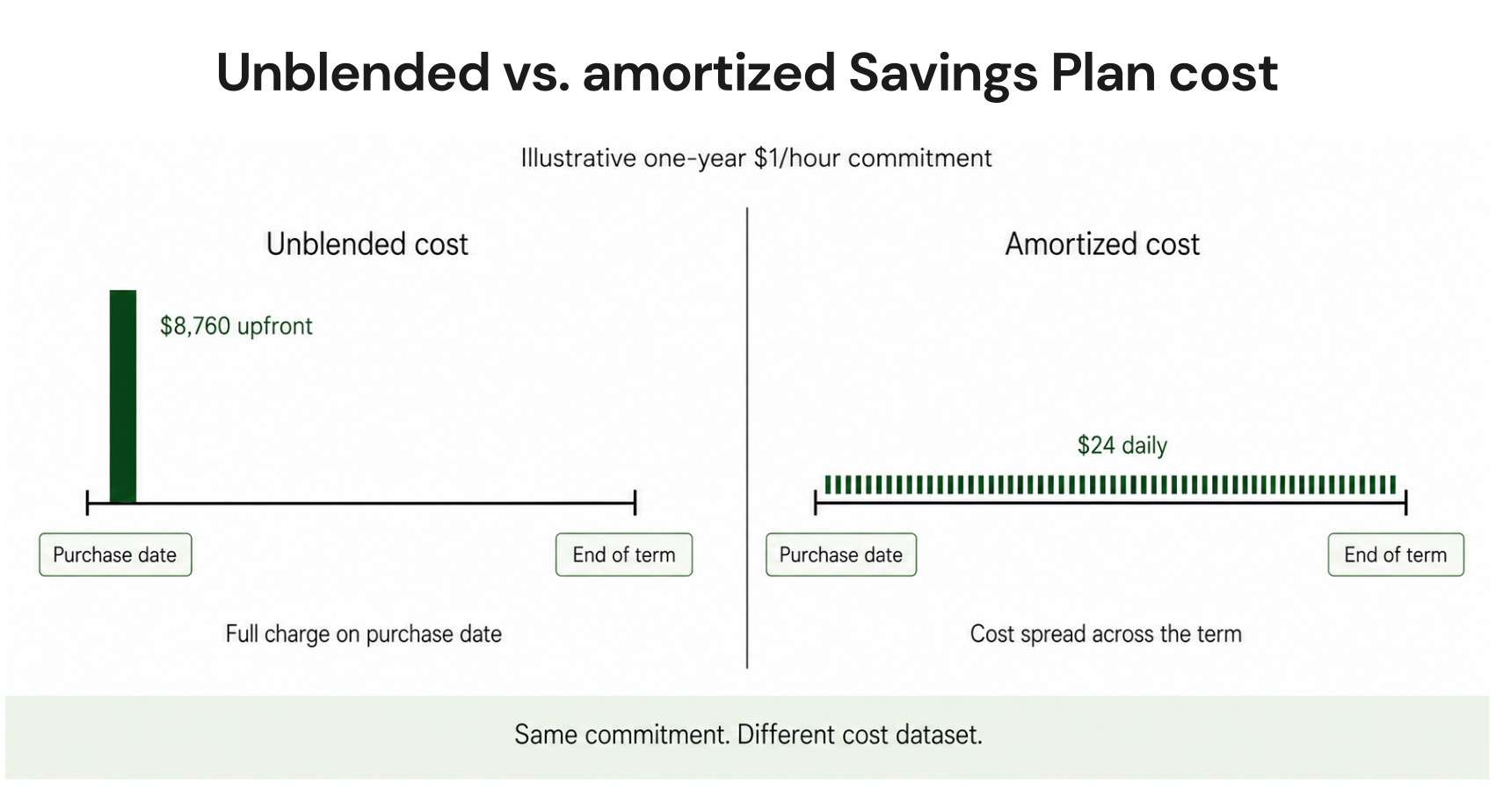
How to view amortized cost
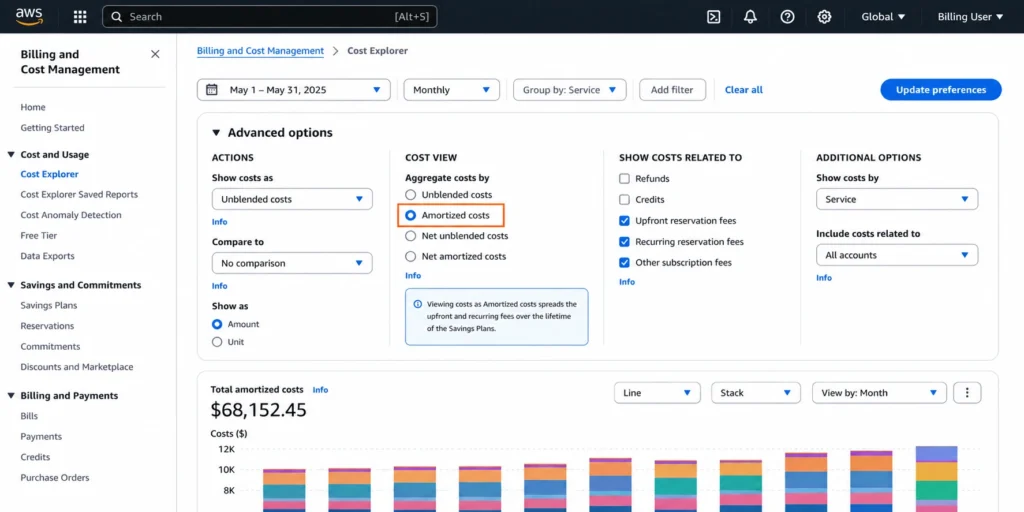
AWS says current-month Cost Explorer data is normally available in about 24 hours and refreshes at least once every 24 hours, although upstream billing data can arrive later. See AWS Cost Explorer documentation.Open Billing and Cost Management, then Cost Explorer.
Choose the date range and granularity.
In the right pane, open Advanced options.
Under Aggregate costs by, choose Amortized costs.
Add dimensions such as Service, Linked account, or Purchase option when useful.
Detecting unused Savings Plan spend
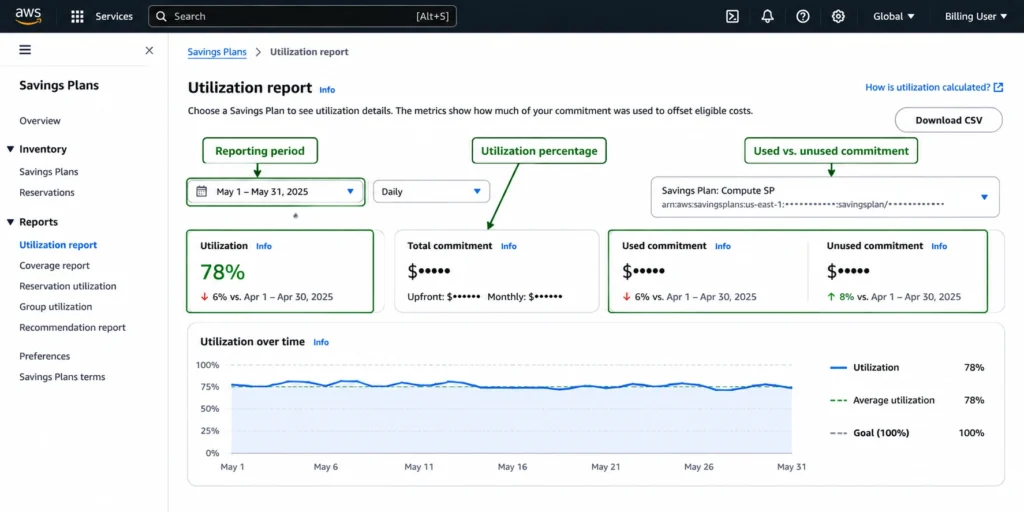
Amortized cost can surface unused commitment, but it is not the cleanest utilization measure. In daily views, unused portions can appear on the first day of the month or purchase date. For explicit utilization, use the Savings Plans Utilization report or API. See AWS amortized cost documentation.AWS defines utilization as used commitment divided by total commitment. The Savings Plans utilization API exposes TotalCommitment, UsedCommitment, UnusedCommitment, and UtilizationPercentage.
Do not confuse utilization with coverage. Utilization measures commitment consumed; coverage measures how much eligible usage received Savings Plans pricing. High utilization does not prove sufficient coverage.
Worked example
Suppose a Savings Plan commits $1.00 per hour. During one 24-hour period, only $0.75 per hour of eligible usage consumes the commitment at Savings Plans rates.Total commitment: $24.00
Used commitment: $18.00
Unused commitment: $6.00
Utilization: 75%
Which AWS cost view should you use?
| Goal | Recommended view or report | Why |
|---|---|---|
| Analyze charge timing | Unblended | Preserves when charges were recorded |
| Reconcile the final AWS bill | AWS Bills and invoices | Final billing record |
| Normalize upfront commitments | Amortized | Spreads commitment economics across the period |
| Measure Savings Plans utilization | Utilization report | Exposes used and unused commitment directly |
| Compare post-discount commitment cost | Net amortized | Adds applicable discount logic |
| Analyze multi-account allocation | Amortized plus CUR | Supports account-level attribution |
Multi-account allocation and sharing
AWS supports organization-wide sharing, prioritized group sharing, restricted group sharing, and account-level controls. Commitments benefit the owner account first; remaining benefits follow the configured organization-wide, prioritized-group, or restricted-group mode. See AWS Savings Plans discount-sharing documentation.For unexpected allocation, confirm the owner account, sharing status, selected mode, group configuration, and which accounts received covered usage.
CUR fields for amortized analysis
For line-item allocation and custom analytics, use CUR and respect which fields apply to each line-item type. See AWS CUR Savings Plans columns.| CUR field | Use |
|---|---|
lineItem/UnblendedCost |
Unblended cost recorded on the row |
savingsPlan/SavingsPlanEffectiveCost |
Effective cost on SavingsPlanCoveredUsage rows
|
savingsPlan/SavingsPlanRate |
Savings Plans rate on covered usage |
savingsPlan/UsedCommitment |
Used commitment on SavingsPlanRecurringFee rows
|
savingsPlan/TotalCommitmentToDate |
Amortized upfront plus recurring commitment to date |
CUR calculation map
SavingsPlanCoveredUsage: use SavingsPlanEffectiveCost as the commitment-aware effective cost for the covered-usage row.
SavingsPlanNegation: treat it as the offset to CoveredUsage, not as standalone spend to add on top of effective cost.
SavingsPlanRecurringFee: for amortized dashboard logic, unused commitment is represented by TotalCommitmentToDate - UsedCommitment.
Do not add unblended CoveredUsage and SavingsPlanEffectiveCost as independent spend. That can double-count the same billing mechanics.
AWS amortized cost reporting checklist
Confirm whether the report is for reconciliation, allocation, utilization, or savings measurement.
Use one cost methodology consistently inside each metric.
Separate CoveredUsage, Negation, RecurringFee, and UpfrontFee logic in CUR queries.
Validate Savings Plans sharing settings before allocating costs across accounts.
Reconcile a sample month against Cost Explorer and AWS Bills before publishing a dashboard.
Track utilization and coverage separately rather than inferring both from amortized cost.
Where amortized cost stops helping
Amortized cost is diagnostic, not predictive. It normalizes historical commitment cost but cannot tell you whether future usage will rise, fall, or strand a commitment.Cost Explorer is not real time. Cost data refreshes at least every 24 hours, and optional all-service hourly granularity becomes available within 48 hours after enablement. Do not use it as same-day incident-response telemetry. See AWS hourly Cost Explorer guidance.
A commitment workflow still needs forecasting, approval, purchase controls, utilization review, and a response when usage changes. Once a stable baseline or recurring underutilization is confirmed, the next question is how to capture savings without unnecessary commitment exposure.
How we fit after reporting
At Usage.ai, we focus on the commitment layer after reliable cost visibility is established. Our Flex Commitment Program analyzes usage, presents recommendations, and after approval can initiate eligible commitment purchases through the provider API. See our Flex Commitment Program documentation.For eligible Flex Commitments, cashback is tied to an actual loss condition. We calculate a loss when commitment cost exceeds equivalent On-Demand usage and pay cashback according to the program process. Our cashback documentation explains the conditions.
With our Flex Commitments, teams can access up to 57% savings associated with a three-year AWS commitment without taking on the same long-term commitment exposure. If an eligible commitment becomes more expensive than equivalent On-Demand usage, we provide cashback protection to help cover the difference, subject to current program eligibility and terms.
Get more from AWS commitments with smarter coverage, lower risk, and eligible cashback protection.
Frequently asked questions
What is the amortized cost in AWS Cost Explorer?
Amortized cost spreads applicable commitment fees across the period they cover, making it useful for normalized reporting and commitment-aware allocation.
Why does amortized cost differ from my AWS invoice?
AWS Bills and invoices are the final billing references. Amortized reporting redistributes commitment economics across the period, so upfront purchases can look materially different.
What is the net amortized cost?
Net amortized cost applies amortization while including applicable discount adjustments, making it useful for post-discount commitment reporting.
Should I use amortized cost for showback and chargeback?
Usually, when commitments materially affect internal allocation. Validate sharing settings and CUR attribution so chargeback reflects the configured model.
Does amortized cost show unused Savings Plans commitment?
It can surface unused commitment cost, but the Savings Plans Utilization report or API is cleaner when you need explicit used, unused, and utilization values.