
 AWS
AWS Microsoft Azure
 Google Cloud

Most AWS teams either over-commit (locking in spend that later sits unused) or under-commit (paying on-demand rates for baseline workloads that will never go away). Both failures trace back to the same root cause and it is treating a Savings Plan purchase as a one-time event rather than a structured, ongoing portfolio decision.
Compute Savings Plans offer up to 66% off eligible compute; EC2 Instance Savings Plans offer up to 72%. Actual discounts depend on the workload, Region, term and payment option. Database Savings Plans offer up to 35% on eligible database usage, with a one-year No Upfront term. Provisioned database eligibility generally requires generation 7 or newer; ElastiCache eligibility is Valkey only. Check the AWS Savings Plans FAQ before sizing a purchase.
This blog covers the mechanics of building that portfolio correctly. It explains how to layer plan types, how to sequence purchases over time, and how to size commitments without locking in waste.
What is an AWS Savings Plan Buying Strategy and Why Does It Matter?
An AWS Savings Plan buying strategy is the deliberate approach to deciding which plan types to buy, how much hourly commitment to enter for each, when to purchase, and how to sequence renewals to maintain coverage without overexposure.
A $2M monthly bill with 60% eligible On-Demand-equivalent usage has a $1.2M eligible baseline. A 15-percentage-point coverage gap represents $180,000 of uncovered usage, not $180,000 of lost savings. At an illustrative 30% discount, the opportunity is $54,000/month or $648,000/year if that usage remains eligible and consistent. Overcommitment waste instead equals the unused commitment measured at Savings Plans rates; it must be calculated separately.
Three variables control outcomes:
- Plan type selection (which SP covers which workloads)
- Commitment sizing (hourly $ amount; too low leaves savings on the table, too high creates waste)
- Purchase timing (when you buy relative to your usage cycle, expiration staggering)
Each is covered below.
Also Read: AWS Savings Plans Explained: Types, Pricing & How They Work
How Do the Three AWS Savings Plan Types Differ and Which Goes First?
(All figures: verify at aws.amazon.com/savingsplans/pricing as rates change)
Here’s a buying order for most organizations:
- Compute Savings Plan first: It offers the highest flexibility, broadest coverage, absorbs workload shifts between instance families and services. This is your baseline layer.
- EC2 Instance SP second: Only after you have ≥90 days of stable, proven usage on a specific instance family (e.g., m6i in us-east-1). The higher discount justifies the tighter constraint.
- Database SP third: if you have meaningful, stable RDS, ElastiCache, or DocumentDB spend. These plans do not overlap with Compute SPs.
A common mistake is reversing this order by committing to an EC2 Instance SP on a specific family before validating that the usage pattern is genuinely stable.
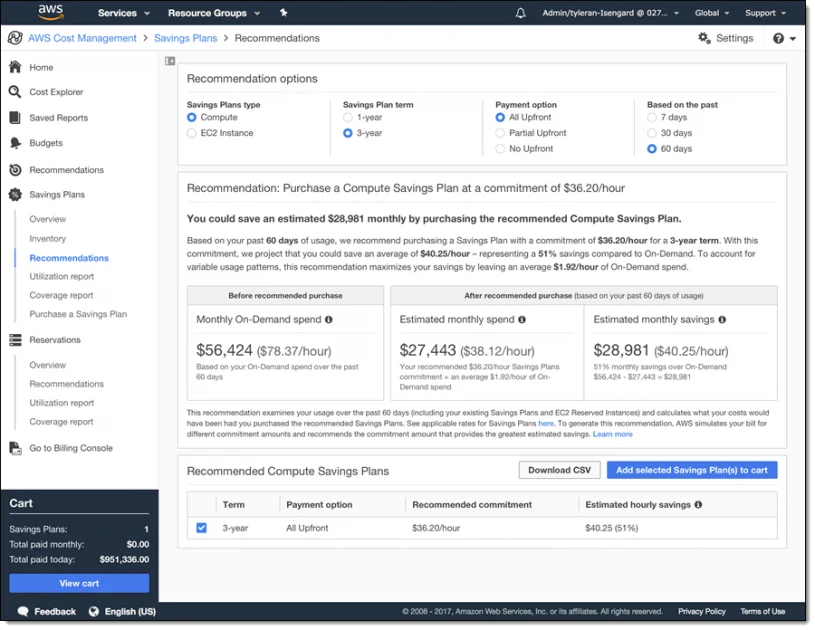
How Much Should You Commit? The Right-Sizing Framework
1. Never commit to average usage, but to minimum baseline
Start with a representative hourly usage floor after rightsizing. On-Demand-equivalent spend and purchased commitment are different units: convert the usage you want to cover to the selected plan’s discounted rates before entering a $/hour commitment.
Illustration: a $12.50/hour On-Demand floor × 75% coverage = $9.375/hour of covered On-Demand usage. At an assumed 40% discount, purchase $5.625/hour, not $9.38/hour. Fully utilized savings are $3.75/hour × 8,760 = $32,850/year. Other usage remains On-Demand. Use actual per-SKU plan rates when the workload mix has different discounts.
A 70–80% starting coverage target is a risk-management choice, not an AWS rule. Check recent hourly patterns, seasonality, existing commitments and the recommendation’s generation time before purchasing.
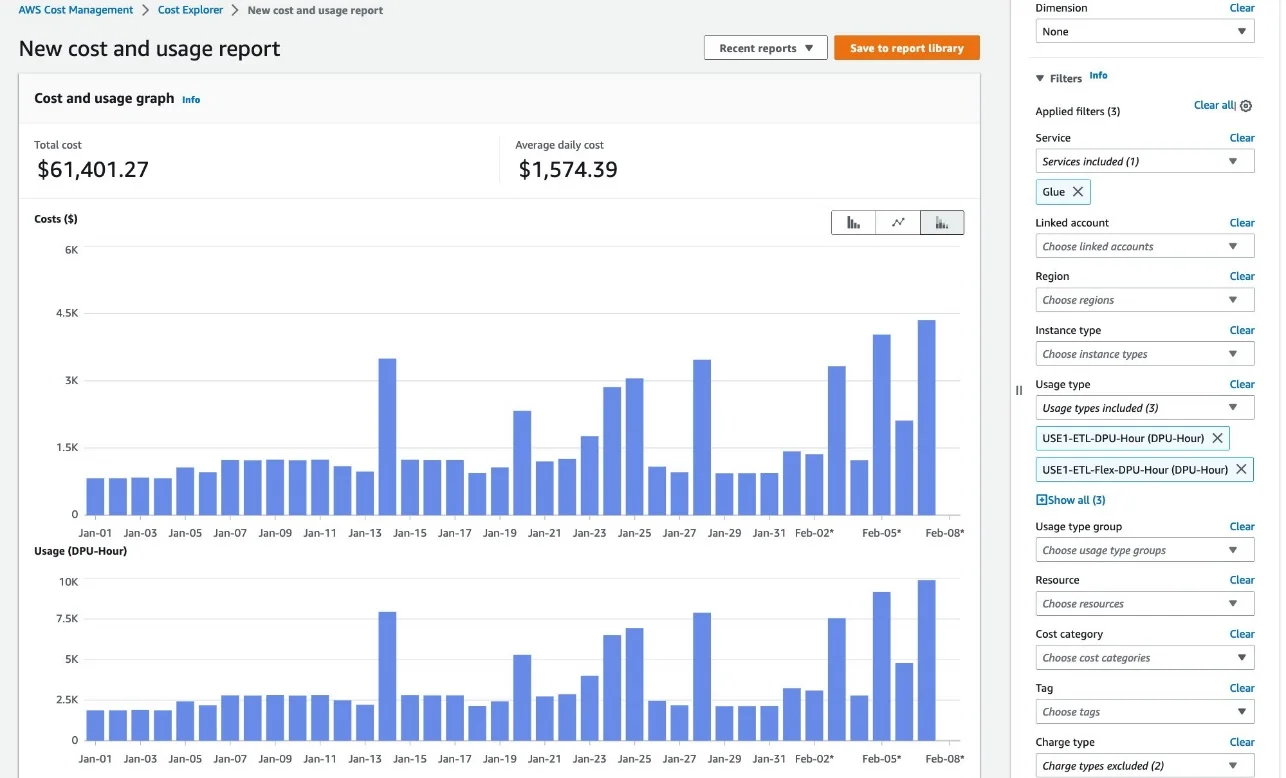
2. Rightsizing before committing is non-negotiable
A Savings Plan can discount an oversized instance while preserving unnecessary spend. CPU utilization alone cannot determine the correct instance size or quantify waste: include memory, throughput, latency and headroom, then compare the resulting instance prices before buying a commitment.
Pre-commitment rightsizing checklist:
- Pull Compute Optimizer recommendations for all instances covered by the planned commitment
- Resize or accept recommendations for any instance with <30% average CPU utilization
- Wait 14 days post-resize before purchasing the AWS Savings Plan (allow new baseline to stabilize)
- Re-pull the minimum-baseline calculation on the post-resize usage data
Skipping this step is the single largest source of over-commitment waste we see in FinOps audits.
Also read: Why Cloud Resource Optimization Alone Doesn’t Fix Cloud Costs
What Is Layering and How Do You Build an AWS Savings Plan Portfolio?
Layering is the practice of holding multiple AWS Savings Plans simultaneously, each covering a different segment of your workload, with purchase dates and expiration dates deliberately offset from each other.
A layered portfolio looks like this:
Why this structure outperforms a single large plan:
- Expiration staggering: If all plans expire on the same day, you face a cliff. Full on-demand rates for however long it takes to analyze and repurchase. Offset expirations mean you’re always partially covered.
- Risk isolation: If a workload shrinks, only one tranche of commitment is at risk, not the entire portfolio.
- Rolling optimization: Each renewal cycle is an independent decision point. Usage patterns from 12 months ago are incorporated into a fresh sizing exercise for that specific tranche.
The staggering rule of thumb: No two plan expirations should fall within 60 days of each other, and no single plan should represent more than 40% of total committed spend.
When Is the Right Time to Buy an AWS Savings Plan?
Timing matters in three ways: day of the month, quarter of the year, and relative to workload changes.
Choose the start date from workload readiness
A Savings Plan begins on its selected start date and runs for its full term. Buying near month-end does not remove days from that term. Purchase when the workload baseline and start date justify it; the first partial calendar-month bill does not shorten the discount period.
Post-change waiting periods
If your team has recently:
- Migrated workloads to new instance families
- Deployed significant new capacity
- Completed a rightsizing exercise
- Moved from EC2 to Fargate or Lambda
Then, collect enough representative post-change data to establish the new floor. A fixed 45-day wait is not an AWS requirement and can leave stable usage unnecessarily uncovered. Check the selected recommendation lookback and current usage directly.
Seasonality awareness
If your workload is seasonal (e-commerce traffic spikes in Q4, for example), your minimum baseline will be skewed if calculated during a peak period. Pull the usage floor from your lowest historical quarter, not the most recent 90 days.
Q1 purchasing: timing the re:Invent pricing window
AWS typically announces pricing changes at re:Invent (late November/early December). Plans purchased before a pricing change lock in old rates. New plans purchased after take advantage of any favorable changes. If you have plans expiring in Q1, check whether any re:Invent pricing announcements affect your instance families before renewing at the old commitment level.
The table uses Linux/shared m5.large in N. Virginia, $0.096/hour On-Demand, checked October 15, 2026 against the AWS public Savings Plans catalog. All Upfront figures are effective amortized hourly rates. Compare term costs under realistic utilization scenarios. There is no universal 15% usage-drop threshold or 14-month break-even point: the result depends on the selected rates, remaining term, payment timing and sustained eligible usage. With a discount d, a simplified no-financing-cost commitment breaks even against paying only for used On-Demand capacity at utilization 1 − d.
If you want the 3-year discount without 3-year lock-in risk, that’s the structural problem that alternative commitment models (covered below) are designed to solve.
Also read: How to Choose Between 1-Year and 3-Year AWS Commitments
What Is the Payment Option Strategy?
Compute and EC2 Instance Savings Plans offer three payment options. Database Savings Plans offer only one-year No Upfront:
- All Upfront: Largest upfront cash outlay, lowest effective hourly rate, highest total discount
- Partial Upfront: At least half upfront and the remainder over the term, moderate discount improvement over No Upfront
- No Upfront: No initial cash payment; the full contractual term still applies
When comparing All Upfront and No Upfront, use the quoted rates and term cash flows, including your financing or discount rate. There is no supportable universal $8,000 NPV advantage for a $100,000 annual workload.
No Upfront preserves initial cash, but it does not remove the term commitment or protect against underutilization. Choose it using cash-flow needs and the actual rate difference, not an assumption that monthly billing is cancellable.
The partial upfront case: Useful when you want meaningful savings but finance limits the capital available for upfront cloud commitments. Run the break-even math for your specific commitment size before selecting. The improvement over No Upfront varies by plan type and term.
How Do AWS Savings Plans Apply Across AWS Organizations?
Savings Plans can be purchased in any account in an AWS Organization. Discount sharing is enabled by default across the consolidated billing family, subject to the organization’s sharing settings and any configured account-group restrictions. A member-account purchase is not inherently isolated to that account. Centralized purchasing can simplify governance, but inspect the actual sharing configuration before estimating utilization.
What Happens If You Over-Commit?
Over-commitment is an operational reality. Infrastructure gets decommissioned, products get sunset, workloads migrate to different services. When it happens, these are the levers available to you:
1. AWS Marketplace (EC2 Reserved Instances only, not Savings Plans): Standard RIs can be listed on the AWS Marketplace. Savings Plans cannot. This is a structural limitation.
2. Convertible RI exchange: Convertible RIs can be exchanged for different instance families, operating systems, or tenancy within the same Region at any time. Savings Plans are not exchangeable.
3. Wait for natural expiration: For Savings Plans specifically, the recovery path is to let the plan expire without renewal, or to reduce the renewal commitment. The plan continues to apply to any eligible usage you do have. It only produces waste when usage falls below the commitment level.
4. Platform-level buyback (Usage.ai Flex Commitments): The structural problem with standard AWS Savings Plans is that over-commitment waste has no recovery mechanism. This is the gap that Flex Commitment models are built to address: the platform holds the commitment on your behalf and provides cashback on underutilization, so the financial risk of a usage drop does not transfer to your AWS bill.
For teams managing $1M+/month in commitment-eligible spend, the cost of a single over-commitment event can exceed the platform fee many times over.
Also read: AWS Reserved Instances: Complete Guide to Pricing, Types & Savings
The Recommendation Data Problem: Why 72-Hour Lag Matters at Scale
Check the generation timestamp and lookback period of a recommendation before acting. A longer observation or refresh interval can matter when usage changes, but spend observed during a delay is not itself lost savings.
For example, $6,000–$12,000/day over three days is $18,000–$36,000 of On-Demand spend. At an illustrative 30% discount, the maximum opportunity on fully eligible, consistently used capacity is $5,400–$10,800. Actual avoidable loss may be lower. Comparing a 72-hour and 24-hour interval gives a two-day difference, not three days.
How to Monitor AWS Savings Plan Utilization and Coverage After Purchase
Purchasing an AWS Savings Plan is not the end of the workflow. Two metrics matter post-purchase:
- Utilization rate: The percentage of your hourly commitment that is actually being consumed by eligible usage. A Savings Plan with 100% utilization means you committed exactly right (or slightly under). Below 80% utilization means you over-committed for that period.
- Coverage rate: The percentage of your eligible on-demand spend that is being covered by Savings Plans. Below 80% coverage means you have significant on-demand spend that could be covered by additional commitments.
- The relationship between them: High utilization + low coverage = under-committed (left savings on the table) Low utilization + high coverage = over-committed (paying for unused commitment) High utilization + high coverage = optimal
Pull both reports from Cost Explorer > Savings Plans > Utilization Report and Coverage Report weekly during the first 90 days after a new purchase. After 90 days, monthly monitoring is sufficient for stable workloads.
Also read: AWS Budgets vs Cost Explorer: Key Differences Explained
AWS Savings Plan Buying Strategy for Specific Workload Types
EC2 heavy workloads (>70% of bill)
Lead with a Compute SP covering 70% of minimum EC2 baseline. After 90 days of stable data, layer an EC2 Instance SP for the single highest-spend instance family. Do not purchase EC2 Instance SPs across more than 2 instance families simultaneously. The monitoring overhead and fragmentation risk outweigh the incremental discount improvement.
Container workloads (ECS/Fargate)
Compute Savings Plans are the only SP type that covers Fargate. If Fargate is a significant portion of your bill, your Compute SP sizing should incorporate Fargate hourly spend into the baseline calculation, not just EC2. Many teams miss this and under-commit their Compute SP because they calculated the floor using EC2 data only.
Serverless / Lambda
Lambda is also covered by Compute SPs. The discount is modest (~17% on Compute Savings Plans), but for high-invocation-volume Lambda workloads the absolute dollar impact is material. Include Lambda spend in your Compute SP commitment baseline.
Database-heavy workloads (RDS, ElastiCache, DocumentDB)
Database Savings Plans cover a different eligibility set from Compute Savings Plans. A $50,000 RDS bill and $200,000 EC2 bill do not imply commitments equal to either total: exclude ineligible items, subtract existing coverage, model a stable hourly usage floor, and price that usage at the chosen plan’s discounted rates. For databases, verify generation, engine and serverless eligibility first.
Also read:AWS Database Savings Plans: Save Across Aurora, RDS, DynamoDB & 7 More
Multi-account Organizations
Purchase all Savings Plans from the payer account. Coordinate purchase timing to avoid staggering collisions (two plans expiring in the same month). Enable Savings Plans sharing for all member accounts in the Organization settings.
Also read: An Introduction to Cloud Unit Economics
A Practical Example: Building a Layered Portfolio from Scratch
Illustrative arithmetic, not an AWS price quote. Assume a stable On-Demand-equivalent compute floor of $14/hour EC2 + $3.50/hour Fargate + $1.20/hour Lambda = $18.70/hour. For simplicity, assume a blended 34% Compute Savings Plan discount and full utilization throughout a 365-day year.
| First tranche | Covered On-Demand usage/hour | Purchased commitment/hour | Savings/hour | Annual savings |
|---|---|---|---|---|
| Compute: 75% of $18.70 floor | $14.025 | $9.2565 | $4.7685 | $41,772.06 |
| Eligible database: 75% of $7.50 floor, assumed 30% discount | $5.625 | $3.9375 | $1.6875 | $14,782.50 |
| Total | $19.650 | $13.1940 | $6.4560 | $56,554.56 |
After 90 days, review actual hourly utilization and coverage before buying another tranche. A proposed additional $3/hour plan is a new discounted-rate commitment, not $3 of savings. Its contribution requires its own rate mix, utilization and start date, and is excluded from the first-tranche annual total above. Staggering later purchases spreads renewal dates; the first two plans in this example still expire together.
Frequently Asked Questions
1. What is the safest commitment level to start with for a first AWS Savings Plan?
Choose a conservative fraction of a representative post-rightsizing hourly usage floor, then convert the covered On-Demand usage to the selected plan’s discounted rates. For example, 70% coverage at a 40% discount requires a commitment equal to 42% of the On-Demand floor, assuming a uniform discount and full utilization. Validate the actual rate mix and existing commitments before purchase.
2. How many Savings Plans should you hold at the same time?
Most organizations with $500K–$2M/month in AWS spend benefit from 3–5 simultaneous Savings Plans with 1–2 Compute SPs (staggered expirations), 1 Database SP, and optionally 1 EC2 Instance SP for a high-volume, proven instance family. More than 5–7 simultaneous plans creates monitoring overhead without proportional savings improvement. Fewer than 3 typically means you are either relying on a single plan expiration date or missing database workload coverage.
3. Can you buy a Savings Plan mid-year and have it still make sense financially?
Yes. The plan runs for its full term from the selected start date. Buying mid-year or near a calendar-month end does not shorten that term. Use workload readiness and the expected usage horizon to decide when to start.
4. What is the difference between Savings Plan utilization rate and coverage rate?
Utilization rate measures how much of your purchased commitment is being used by eligible workloads. 100% means zero waste. Coverage rate measures how much of your eligible on-demand spend is protected by Savings Plans. Here 100% means nothing is paying on-demand rates unnecessarily. You want both high. If utilization is high but coverage is low, you are under-committed. If coverage is high but utilization is low, you are over-committed. Monitor both in AWS Cost Explorer > Savings Plans > Utilization and Coverage reports.
5. Should you buy All Upfront, Partial Upfront, or No Upfront?
Compare actual quoted rates, payment timing and expected utilization. All Upfront uses cash earlier; No Upfront preserves initial cash but retains the term obligation. Partial Upfront is another option for Compute and EC2 Instance plans. Database Savings Plans offer only one-year No Upfront.
6. How do Savings Plans work in AWS Organizations with multiple accounts?
Plans can be purchased in management or member accounts. Benefits are shared across the consolidated billing family by default, subject to sharing settings and configured account-group restrictions. Verify that configuration before relying on other accounts to consume unused capacity.
7. What happens to unused Savings Plan commitment?
Unused commitment expires each hour. If a $10/hour commitment covers usage worth $7 at Savings Plans rates, $3 is unused; there is no carry-forward. AWS provides a limited return process for eligible plans with hourly commitments of $100 or less within seven days of purchase and in the same calendar month. Outside that policy, the term obligation continues. See the AWS Savings Plans FAQ for current conditions.
8. How does Usage.ai handle Savings Plan purchasing differently than buying directly on AWS?
Usage.ai purchases Savings Plan-equivalent commitments on your behalf through its Flex Commitment model, delivering 40–60% discounts on EC2, Fargate, and Lambda without requiring the customer to own the multi-year commitment. Recommendations refresh every 24 hours (vs 72+ hours on AWS native tools), providing a shorter observation interval; the actual detection advantage depends on generation times. If commitments go underutilized, Usage.ai provides cashback, which is real money, not credits. The fee is a percentage of realized savings; if nothing is saved, nothing is charged.




