.png)
 AWS
AWS Microsoft Azure
 Google Cloud


Neither advantage tells you what to buy until you know what is already covered and likely to change.
Short Answer
Choose a matching RDS Reserved Instance when its effective cost is lower and you expect enough compatible instance usage throughout its term. Consider a Database Savings Plan when the usage qualifies and a one-year commitment across supported database services offers better value after accounting for likely changes.The answer can be both for different workloads, or neither if the remaining usage is too uncertain. An existing RI and a Database Savings Plan cannot discount the same workload twice.
Which RDS Usage Can Each Option Discount?
An RDS RI reduces the instance charge when usage matches the reservation’s Region, engine, class, and applicable size, edition, and license attributes. It is a billing discount, not a separate database. AWS’s reserved DB instance matching rules mean a reservation may stop applying after a configuration change.AWS currently limits provisioned Database Savings Plan coverage to Generation 7 and newer across supported services. A db.r6g instance, for example, is not plan-eligible merely because it is RDS.
The Database Savings Plans also includes supported serverless offerings, such as Aurora Serverless, and services beyond RDS. That broader pool matters when your estate changes, but check each usage type.
RDS RIs discount instance usage, not storage, backups, or I/O. AWS’s Database Savings Plans pricing page says that for RDS for SQL Server, Windows Server and SQL Server licenses remain separate On-Demand charges. Do not apply either headline percentage to the whole bill.
What Commitment Does Each Option Require?
An RDS RI ties its benefit to matching usage for one or three years. AWS offers No Upfront, Partial Upfront, and All Upfront payment types, although availability varies by class; No Upfront is a one-year offering.The obligation continues if usage stops matching, and RDS RIs cannot be cancelled. A longer term can lower the rate while extending exposure to a migration. Our one-year versus three-year RDS RI break-even guide explores that trade-off.
AWS allows RI size flexibility within an instance class type and Region for Db2, MariaDB, MySQL, PostgreSQL, and Oracle BYOL; SQL Server and Oracle License Included lack it. A family or engine change still needs a matching check.
A Database Savings Plan commits you to spend a specified amount each hour for one year, with no upfront payment. It can apply across supported services and Regions, but the obligation remains when eligible usage falls.
Usage above the commitment costs On-Demand rates. Portability does not make an oversized purchase free.
How Do Existing RDS RIs Change the Decision?
Before pricing another commitment, list active RIs and Database Savings Plans, matching attributes, utilization, and expiration dates. Match their discounts to hourly usage. The resulting uncovered usage, not total RDS spend, is the starting pool.AWS says an RDS RI and Database Savings Plan cannot discount the same workload. You can hold both for different usage: an RI might cover an older instance while a plan discounts other qualifying usage. As RIs expire, reassess uncovered hours instead of replacing their entire spend with a plan. AWS recommends this approach in its Database Savings Plans FAQ.
If a migration leaves an RI unused, another compatible instance may consume its benefit; otherwise its cost remains. Check discount-sharing settings before assuming another account can absorb it. Our RDS Reserved Instances guide explains the matching rules.
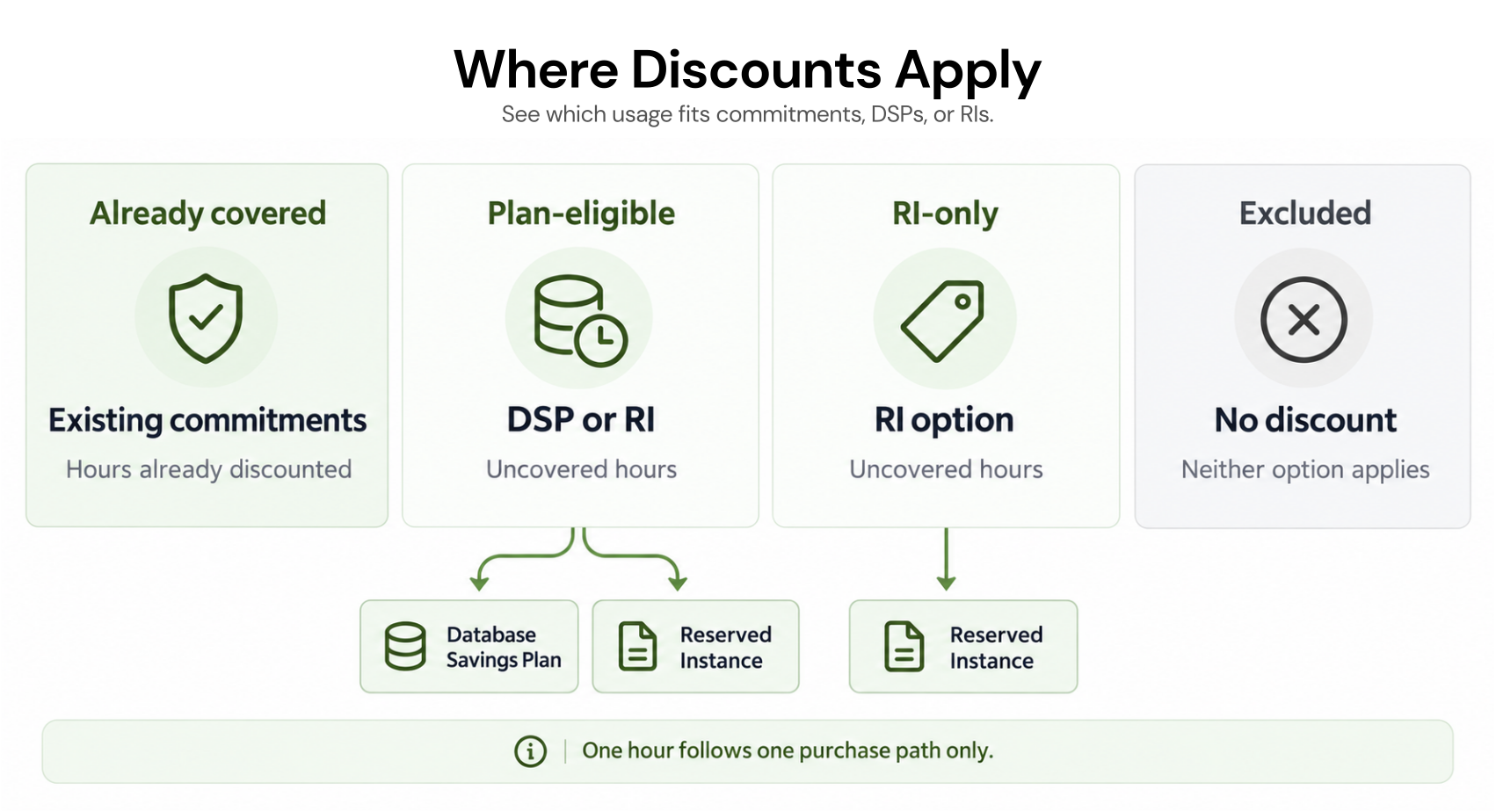
How to Compare Effective Cost, Not the Headline Discount
AWS advertises up to 69% off for steady-state RDS RIs and up to 35% for Database Savings Plans. Its plan launch guidance described up to 20% for provisioned instances and up to 35% for serverless. These ceilings are not your actual RDS rates. Check current offers.Compare the same eligible usage over the same horizon:
Set the baseline. Price uncovered usage at its On-Demand rate and expected hours. Keep other charges in the overall budget; include them in the discount comparison only if AWS lists them as eligible.
Calculate the RI's effective cost. Amortize any upfront payment over its term, add recurring charges, and count hours without compatible usage. Model one- and three-year offers separately. For a three-year RI, compare three years of costs; treat new one-year plan purchases in years two and three, their rates, and eligibility as scenarios rather than known outcomes.
Calculate the plan's cost. Apply published rates up to the hourly commitment. Include the full obligation in underused hours and On-Demand charges above the commitment.
| Scenario | On-Demand | One-year RI | Database Savings Plan |
|---|---|---|---|
| Same eligible instance all year | $8,760 | $6,132 | $7,446 |
| After 4,380 hours, replace it with plan-eligible usage at the same assumed rates, with no other RI match | $8,760 | $10,512 | $7,446 |
The plan continues covering the replacement only under our assumptions of continuous eligibility, full hourly use, and an unchanged plan rate.
Actual rates may differ after a move. Test that move before treating the RI’s initial $1,314 advantage as certain.
Which Option Fits Your RDS Workload?
Apply the cost method to each workload group. The next moves below are inferences, not AWS recommendations.| Workload and eligibility | Term | Effective cost to compare | Flexibility needed | Existing commitments and next move |
|---|---|---|---|---|
| Stable, continuously running, plan-eligible provisioned RDS | One-year RI vs one-year plan; three-year RI vs modeled plan renewals | Quote a matching RI and the exact plan rate; test utilization over each term | Limited, if engine, family, and Region will remain | Reserve only the uncovered stable portion if its modeled cost wins; leave variable excess uncommitted or evaluate a plan |
| Older provisioned RDS class outside plan eligibility | Available matching RI term | RI against On-Demand until the workload changes | Upgrade timing matters more than plan portability today | Use existing RIs first; do not buy plan coverage for ineligible hours |
| Planned engine, family, or Region change | Compare one-year paths and any longer RI against the migration date | Include RI cost after it stops matching and rates for the successor usage | Plan may follow the new usage if it qualifies | Check whether another workload can use the existing RI before adding a plan |
| Provisioned RDS alongside eligible Aurora or serverless usage | RI for matching RDS; one-year plan for eligible pool | Separate rates by usage type and model the hourly mix | Broader plan pool can absorb eligible shifts | Keep already-discounted hours out of the new plan opportunity |
What to Verify Before Purchasing
Before approving a purchase, reconcile Engineering’s plans with Finance’s cost basis:The exact eligible usage, engine, instance generation, Region, deployment, licensing model, and charges outside the discount.
Current matching RI offerings and Database Savings Plan rates, including payment timing and the total obligation for the term.
Active RI and Database Savings Plan coverage and expirations, organization sharing settings, and hourly uncovered usage after current discounts.
Rightsizing, engine upgrades, serverless moves, retirements, or regional changes that would alter either option's utilization.
An expected case and a downside case using the same scope and dates.
How We Evaluate Database Commitments at Usage.ai
The difficult part is keeping an accurate view of uncovered usage as databases and existing commitments change. That is where we help.We analyze usage at the billing layer, recommend commitments, and keep customer-owned RIs separate from the Flex Commitments we manage. After you approve a recommendation, we call provider APIs to execute approved purchases; the Flex Commitment remains visible in the dashboard.
With Flex Insured Commitments, eligible teams can get up to 30% savings from a one-year RDS Reserved Instance with none of the commitment risk.
If a covered Flex Commitment costs more than equivalent On-Demand usage, our cashback protection covers the difference. The AWS commitment remains in force; existing customer-owned commitments do not automatically receive that protection.
Customers pay an agreed percentage of realized savings, billed monthly in arrears after provider billing data is finalized.
Final Verdict: Match the Commitment to Your Workload Plans
Buy an RI when durable matching usage justifies its cost and term. Choose a plan when eligible spend persists across expected changes and its flexibility outweighs the RI price advantage. If neither survives a downside scenario, wait for a clearer baseline.Review current RI coverage, plan eligibility, and effective savings before adding another AWS obligation.
Frequently asked questions
Can we use an RDS RI and a Database Savings Plan together?
Yes, for different usage. AWS does not combine their discounts on the same workload, so identify hours already discounted by existing commitments before sizing the plan commitment.
What happens to our RDS RI if we migrate to another engine?
It keeps its obligation but may no longer match the migrated workload. Check whether another compatible instance can use it; a Database Savings Plan may cover the new usage only if that usage qualifies.
Do these commitments discount storage or SQL Server licenses?
RDS RIs do not discount storage, backups, or I/O. For RDS for SQL Server, AWS says Database Savings Plans discount the instance price, while Windows Server and SQL Server licensing charges stay at On-Demand rates. Check the exact billing components before calculating a percentage of total spend.