.png)


Choose a 3-year RDS reserved instance when your database has run stably for at least 12 months, you have confidence it will continue on the same instance family for 36 months, and the engine version is not approaching end-of-standard-support within the term. Choose a 1-year RDS RI when your architecture is evolving, your team is evaluating Aurora or a different engine, or your instance is on a version that reaches end-of-life within 18 months. For pure savings, the 3-year term wins by 18-26% over three sequential 1-year renewals. The question is how much risk you attach to 36 months of stability.
%2024%20(17).svg)
What Are the Exact Savings: 1-Year vs 3-Year RDS Reserved Instances Side by Side?
Here is the complete comparison of 1-year and 3-year RDS reserved instance pricing for key engines and instance types in US East (N. Virginia) as of April 2026 (verify at aws.amazon.com/rds/pricing — rates change).
| Engine / Instance | On-Demand/hr | 1-Yr Partial Upfront/hr | 1-Yr Savings | 3-Yr All Upfront/hr | 3-Yr Savings |
| MySQL db.r8g.large (Single-AZ) | $0.240 | ~$0.156 | ~35% | ~$0.108 | ~55% |
| MySQL db.r8g.xlarge (Single-AZ) | $0.480 | ~$0.312 | ~35% | ~$0.216 | ~55% |
| MySQL db.r8g.xlarge (Multi-AZ) | $0.960 | ~$0.624 | ~35% | ~$0.432 | ~55% |
| PostgreSQL db.r8g.2xlarge (Multi-AZ) | $1.920 | ~$1.248 | ~35% | ~$0.864 | ~55% |
| SQL Server SE db.r8g.xlarge (Multi-AZ) | $2.448 | ~$1.836 | ~25% | ~$1.444 | ~41% |
| Oracle LI db.r8g.xlarge (Multi-AZ) | $3.124 | ~$2.343 | ~25% | ~$1.843 | ~41% |
| Oracle BYOL db.r8g.xlarge (Multi-AZ) | $0.960 | ~$0.624 | ~35% | ~$0.432 | ~55% |
| Aurora MySQL db.r8g.xlarge | $0.480 | ~$0.264 | ~45% | ~$0.163 | ~66% |
What Is the True 3-Year vs Three Sequential 1-Year Cost Comparison?
Most guides compare 3-year RDS reserved instances against on-demand pricing. That is the wrong comparison for most FinOps engineers. The real decision at renewal time is: should I buy a 3-year RI now or keep renewing 1-year RIs?
Here is the answer for a db.r8g.xlarge MySQL Single-AZ running continuously:
Option A: Three sequential 1-year Partial Upfront RIs. Year 1: ~$0.312/hr x 8,760 = $2,733. Year 2: ~$0.312/hr x 8,760 = $2,733. Year 3: ~$0.312/hr x 8,760 = $2,733. Total 3-year cost: $8,199.
Option B: One 3-year All Upfront RI. ~$0.216/hr effective x 8,760 hrs x 3 years = $5,680. Total 3-year cost: $5,680.
3-year All Upfront saves $2,519 more over 3 years compared to three sequential 1-year Partial Upfront renewals. That is a 30.7% cost reduction of the RI cost itself, on top of the already-discounted 1-year rate.
For a db.r8g.xlarge MySQL Multi-AZ (double the compute rate): 3-year All Upfront saves $5,038 more over 3 years versus three sequential 1-year renewals. For PostgreSQL db.r8g.2xlarge Multi-AZ: $10,076 more. The absolute savings from the 3-year decision grow linearly with instance size and rate.
| Instance | 3x 1-Year Partial Upfront | 1x 3-Year All Upfront | Extra Savings (3-yr) | 3-Yr Advantage % |
| MySQL db.r8g.large (Single-AZ) | $4,100 | $2,840 | $1,260 | 31% |
| MySQL db.r8g.xlarge (Single-AZ) | $8,199 | $5,680 | $2,519 | 31% |
| PostgreSQL db.r8g.xlarge (Multi-AZ) | $16,398 | $11,360 | $5,038 | 31% |
| PostgreSQL db.r8g.2xlarge (Multi-AZ) | $32,796 | $22,720 | $10,076 | 31% |
| SQL Server SE db.r8g.xlarge (Multi-AZ) | $48,233 | $37,898 | $10,335 | 21% |
| Oracle LI db.r8g.xlarge (Multi-AZ) | $61,572 | $48,390 | $13,182 | 21% |
| Aurora MySQL db.r8g.xlarge | $6,934 | $4,283 | $2,651 | 38% |
The 3-year advantage ranges from 21% (commercial engines like SQL Server and Oracle LI, where the discount percentage difference between 1-year and 3-year is smaller) to 38% (Aurora, which has the deepest percentage gap between 1-year and 3-year rates). For every RDS engine, the 3-year All Upfront is meaningfully cheaper than three consecutive 1-year renewals.
When Does the 3-Year RDS Reserved Instance Break Even vs 1-Year?
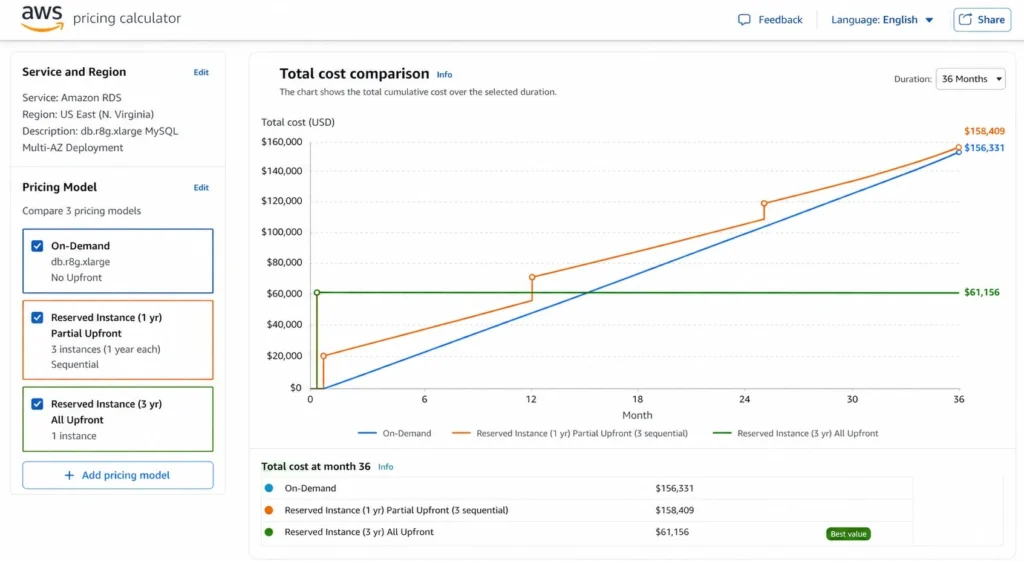
If you buy a 3-year All Upfront RI today and your instance runs for only 24 months before being deprecated, was the 3-year term the right choice? Here is the break-even analysis.
For db.r8g.xlarge MySQL Single-AZ: 3-year All Upfront total cost = $5,680. 1-year Partial Upfront annual cost = $2,733/year. The 3-year All Upfront becomes cheaper than a 1-year Partial Upfront renewal at exactly the point where the accumulated 1-year costs exceed $5,680. That happens at: $5,680 / ($2,733/12 months) = 24.9 months. The 3-year RI pays off versus 1-year renewals at approximately 25 months of continuous usage. If the instance runs past 25 months, the 3-year was the right choice. If it is deprecated before 25 months, the 3-year was more expensive.
For SQL Server SE db.r8g.xlarge Multi-AZ: 3-year All Upfront = $37,898. 1-year Partial Upfront = $16,078/year. Break-even vs 1-year renewals: $37,898 / ($16,078/12) = 28.3 months. Commercial engines with smaller 3-year vs 1-year savings gaps break even later.
For Aurora MySQL db.r8g.xlarge: 3-year All Upfront = $4,283. 1-year Partial Upfront = $2,311/year. Break-even: $4,283 / ($2,311/12) = 22.2 months. Aurora’s larger discount gap between 1-year and 3-year means the 3-year breaks even earlier.
The Practical Implication
If a database has run stably for 12 months and you have reasonable confidence it will continue for another 12 months, the 3-year RI has already demonstrated stability for 12 months of confirmed history. Another 12 months gets you to 24 months of confirmed usage. The 3-year RI needs 25 months of future run time to pay off versus 1-year renewals. With 12 months of confirmed history as a signal, the forward 25-month runway is more likely than not for a production database.
What Is the Payment Option Effect on 1-Year vs 3-Year RDS RIs?
The comparison changes significantly depending on which payment option you use for each term. Here is the full matrix for a db.r8g.xlarge MySQL Single-AZ.
| Option | Upfront Cost | Effective Hourly | 3-Year Total | vs On-Demand Savings |
| On-Demand (baseline) | $0 | $0.480 | $12,614 | 0% (baseline) |
| 1-Yr No Upfront | $0 | ~$0.341 | ~$8,973 (3x annualized) | ~29% |
| 1-Yr Partial Upfront | ~$1,250/yr x 3 | ~$0.312 | ~$8,199 total | ~35% |
| 1-Yr All Upfront | ~$3,960/yr x 3 | ~$0.303 | ~$7,974 total | ~37% |
| 3-Yr Partial Upfront | ~$3,500 once | ~$0.243 | ~$6,396 total | ~49% |
| 3-Yr All Upfront | ~$5,680 once | ~$0.216 | ~$5,680 total | ~55% |
Two things stand out from this table. First, the difference between 1-year All Upfront and 1-year Partial Upfront over a 3-year horizon is only $225 ($7,974 vs $8,199), making the capital outlay difference ($3,960 paid 3 times vs $1,250 paid 3 times) hard to justify for the incremental savings. For 1-year terms, Partial Upfront is usually the rational choice.
Second, the jump from 1-year All Upfront to 3-year Partial Upfront ($7,974 vs $6,396) is $1,578 over 3 years. If your cash flow can absorb the higher upfront on a 3-year Partial rather than three separate 1-year All Upfront payments, the 3-year Partial is cheaper in total. The 3-year All Upfront adds another $716 in savings over the 3-year Partial, with a single large upfront payment.
How Does RDS RI Size Flexibility Change the 1-Year vs 3-Year Decision?
RDS RI size flexibility applies to MySQL, MariaDB, PostgreSQL, Aurora, and Oracle BYOL. It allows your reservation to cover any instance size in the same family using normalization units. This changes the risk calculus for 3-year commitments significantly.
Without size flexibility (SQL Server, Oracle LI): a 3-year RI is locked to a specific instance size. If you resize from db.r8g.xlarge to db.r8g.2xlarge partway through the 3-year term, your reservation no longer applies to the new instance size. You pay on-demand for the 2xlarge and continue paying the reserved rate for the xlarge you no longer run. The resizing risk makes 1-year terms significantly safer for SQL Server and Oracle LI workloads with any uncertainty about future sizing.
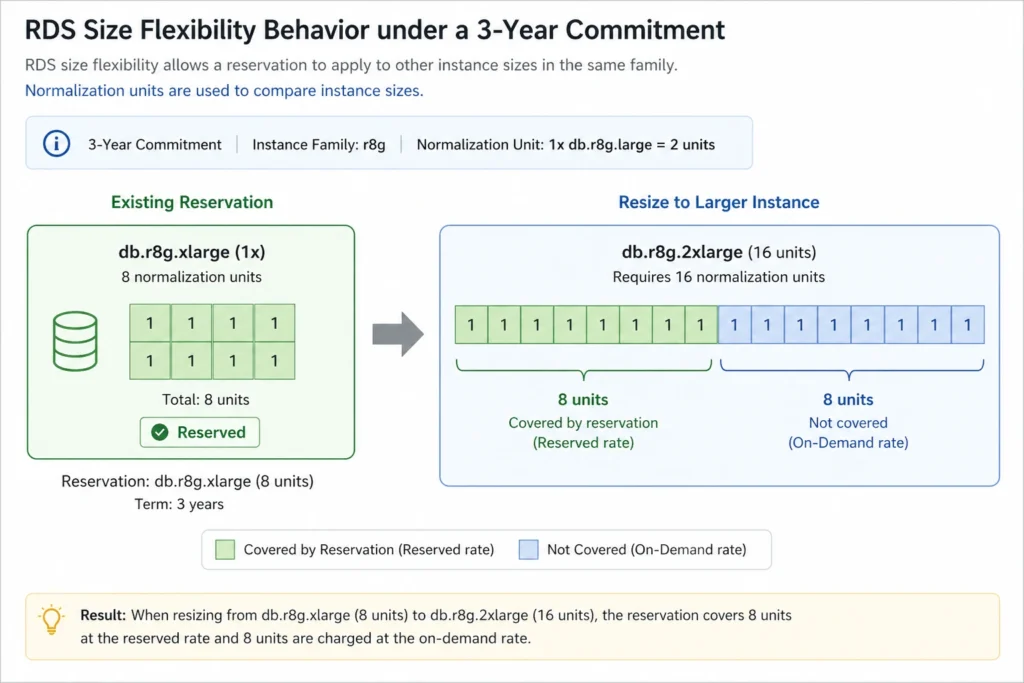
With size flexibility (MySQL, PostgreSQL, Aurora, Oracle BYOL): a 3-year reservation for the db.r8g family covers any r8g size proportionally. If you resize from xlarge to 2xlarge, the xlarge reservation (8 normalization units) partially covers the 2xlarge (16 units), applying the reserved rate to 50% of the 2xlarge’s capacity. The remainder runs at on-demand rates. You lose some savings but do not lose the reservation entirely.
This means for MySQL, PostgreSQL, and Aurora workloads, the 3-year RI risk is substantially lower than commonly assumed. You are committing to an instance family and region for 3 years, not an exact instance size. The size flexibility provides a meaningful safety net that makes the 3-year term more defensible for these engines.
Practical recommendation: for MySQL and PostgreSQL on size-flexible families, buy 3-year reservations at the family level at your current consumption. If you scale up, the reservation covers a proportional share and only the increment runs at on-demand rates. If you scale down, the reservation covers your entire new size plus leaves surplus units for other instances in the family.
How Does Extended Support Risk Change the 3-Year RDS RI Decision?
This is the interaction that most teams discover too late. Buying a 3-year RDS reserved instance on an engine version that reaches end-of-standard-support within the term adds a mandatory Extended Support surcharge that is not covered by the RI discount.
Extended Support charges for RDS: $0.20 per vCPU-hour in US East starting March 1, 2026 for affected versions. This is charged on top of your reserved instance rate, not instead of it.
Example: db.m7g.xlarge (4 vCPUs) MySQL 8.0 entering Extended Support. Reserved rate (3-yr): ~$0.127/hr. Extended Support surcharge: 4 vCPUs x $0.20/hr = $0.80/hr. Combined effective rate: $0.927/hr. On-demand rate without Extended Support: $0.311/hr. The team on a 3-year RI is now paying nearly 3x the original on-demand rate.
The Extended Support charge specifically wipes out RI savings. This scenario makes a 3-year RI actively harmful if the engine version hits EOL within the term, because you are paying the commitment premium on top of paying full price for Extended Support anyway.
Engine versions at risk as of April 2026: MySQL 8.0 (community EOL April 2026, AWS standard support ending date to be confirmed), PostgreSQL 14 (community EOL November 2026). Before purchasing any 3-year RDS RI, verify the engine version’s AWS standard support end date at docs.aws.amazon.com/AmazonRDS/latest/UserGuide/USER_UpgradeDBInstance.Upgrading.html and plan an engine upgrade before the EOL date if the term extends past it.
How Do You Evaluate Whether Your RDS Instance Is Ready for a 3-Year Commitment?
The 3-year RDS reserved instance decision requires three separate assessments: utilization stability, engine longevity, and architectural trajectory. Here is how to run each one.
Assessment 1: Utilization Stability
Pull 90 days of CloudWatch DatabaseConnections and ConsumedReadIOPS metrics for the candidate instance. If the average daily usage has varied by less than 20% across the 90-day window, the instance qualifies as stable. If there are multi-week gaps in usage (low or zero connections), the instance is probably not running 24/7 and the reservation may pay for idle hours. The break-even analysis assumes 8,760 hours per year of continuous operation. An instance that is stopped for 20% of the year is paying for 1,752 hours of reserved capacity it does not use, which erodes the savings significantly.
CloudWatch metric to check: RDS FreeableMemory over 90 days. A consistently low FreeableMemory (under 20% of total instance RAM) suggests the instance is at or near its memory ceiling and may need a larger instance type soon. If an upsize is likely within 12 months, the 1-year term gives you the option to right-size before committing to 3 years.
Assessment 2: Engine Version Longevity
Every RDS engine version has an AWS standard support end date. After that date, running the instance incurs Extended Support charges that RI discounts do not cover. For a 3-year RI, verify that the engine version’s AWS standard support end date is at least 36 months away, giving the full term of clean reserved pricing without EOL risk. If the support date is 24-36 months away, plan the engine upgrade first, then buy the 3-year RI on the upgraded version. If the support date is under 24 months away, buy a 1-year RI and plan the upgrade for the following year.
Assessment 3: Architectural Trajectory
Run a quick inventory of planned changes to the database within the next 36 months. Planned Aurora migration: buy a 1-year RDS RI and use the migration window to plan the Aurora RI on the other side. Planned database engine change (e.g., MySQL to PostgreSQL for PostGIS support): buy a 1-year RI on the current engine. Planned instance family upgrade (e.g., moving from db.m5 to db.m7g Graviton): for size-flexible engines, buy the 3-year RI for the current family now. Size flexibility will let you move to m7g within the same family. For SQL Server or Oracle LI (no size flexibility), a family change means the current RI no longer applies, so use a 1-year term until after the migration.
Teams that run through all three assessments before purchasing have dramatically lower rates of stranded reserved capacity versus teams that buy based on the headline savings percentage alone.
What Are the Most Common Mistakes in the 1-Year vs 3-Year RDS RI Decision?
Mistake 1: Buying 3-Year on a Database Due for Migration
The most expensive mistake is buying a 3-year RDS reserved instance six months before a planned Aurora migration. Aurora runs on a different billing model and requires Aurora reserved instances, not RDS ones. The RDS 3-year RI continues billing until expiration regardless. A team that buys 3-year RDS RIs in Q1 and migrates to Aurora in Q3 pays for 2.5 years of reserved capacity on instances that no longer exist. Always check the migration roadmap before committing to 3 years.
Mistake 2: Forgetting No Upfront Is 1-Year Only
A common planning error is budgeting for 3-year No Upfront, which does not exist. The 3-year term requires either Partial Upfront or All Upfront. Teams that plan zero-capital-outlay 3-year RDS commitments discover at purchase time that they must choose between Partial Upfront (several thousand dollars for most production instances) or All Upfront (tens of thousands for larger instances). Budget the upfront separately before the renewal conversation with finance.
Mistake 3: Reserving Staging and Development Instances
RDS reserved instances bill every hour of the term regardless of whether the instance runs. Development and staging databases that are stopped during off-hours or on weekends can easily run at 30-50% utilization. A reservation on a 50%-utilized instance is paying full price for half the reserved capacity in waste hours. Staging instances should run on-demand. Only reserve instances that run 24/7 in steady state.
Mistake 4: Not Accounting for Multi-AZ Upside
Multi-AZ RDS instances cost approximately 2x Single-AZ compute in hourly rate. A 3-year RI on a Multi-AZ db.r8g.xlarge MySQL saves roughly $5,000 more over 3 years versus three sequential 1-year renewals. The absolute dollar savings from the 3-year decision are highest on Multi-AZ production instances, yet teams often focus 3-year analysis on Single-AZ rates. When evaluating the 3-year vs 1-year decision, always run the analysis on the actual deployment type (Multi-AZ or Single-AZ), not the single-AZ rate.
Mistake 5: Missing the Shared Organization Benefit
RDS reserved instances can be shared across linked accounts in an AWS Organization via consolidated billing. A 3-year RI purchased in the main account can apply to matching instances in any linked account in the same region. Teams that buy reservations account-by-account miss the opportunity to centralize reservation purchases at the organization level, where a larger 3-year purchase provides better coverage utilization and simplifies renewal tracking. Check your organization’s consolidated billing configuration before deciding on per-account versus centralized reservation purchasing.
Choose 3-Year When… Choose 1-Year When…
Choose 3-Year RDS Reserved Instance When:
The database has run on the same instance family for at least 12 months with stable utilization. The engine version has at least 30 months of AWS standard support remaining (giving a safe buffer within the 36-month term). You use MySQL, PostgreSQL, Aurora, or Oracle BYOL where size flexibility reduces the resizing risk. The workload supports a production SLA that makes deprecation within 3 years unlikely. You want the maximum savings: 3-year All Upfront saves an additional $1,260-13,000+ versus three sequential 1-year terms depending on instance size.
Choose 1-Year RDS Reserved Instance When:
The architecture is actively evolving with potential engine changes, migration to Aurora, or significant instance family changes within 18 months. The database runs SQL Server or Oracle License Included, where no size flexibility applies and resizing voids coverage. The engine version has less than 18 months of standard support remaining. You are evaluating RDS to Aurora migration within the next 12 months (a 3-year RDS RI on a table you are migrating to Aurora is pure waste). The workload has seasonal usage that makes long-term commitment risky.
The Hybrid Approach: Reserve at Different Tiers
For clusters with a mix of stable and flexible components, use a layered approach. Buy 3-year RIs for the core database nodes that have been running stably for 12+ months and support a critical production SLA. Buy 1-year RIs or use on-demand for read replicas, staging instances, and databases supporting features under active development. This approach maximizes savings on the stable base while keeping flexibility where the architecture is likely to change.
How Does Usage.ai Handle the 1-Year vs 3-Year Decision Automatically?
The 1-year versus 3-year RDS reserved instance decision is not a one-time choice. It is a continuous optimization: new instances become candidates for reservation, existing reservations approach expiration, engine versions approach EOL, and workload patterns shift. Manually tracking all of this across 20-50 RDS instances is not sustainable.
Usage.ai Flex Reserved Instances monitor RDS instance utilization every 24 hours, compared to AWS Cost Explorer’s 72+ hour refresh cycle. The platform evaluates each instance against the 1-year versus 3-year decision criteria: utilization stability over 30 days, engine version support status, historical reservation coverage, and the break-even timeline. For instances that cross the threshold justifying a 3-year commitment, Usage.ai purchases the reservation automatically. For instances where the 1-year term is safer (approaching EOL engine, potential migration candidate), it selects the shorter term.
The 24-hour vs 72-hour refresh gap matters directly for this decision: at $6-12K per day in uncovered RDS spend for a mid-size fleet, a 3-day analysis lag means $18-36K in unnecessary on-demand charges per review cycle. If a reservation becomes underutilized because an instance is resized or deprecated, Usage.ai provides cashback and credits on the unused portion rather than letting it run to expiration at a loss. The fee is a percentage of realized savings only.
See how much you can save on RDS with Usage.ai
%2021%20(23).svg)
Frequently Asked Questions
1. Which RDS pricing option is most cost-effective for a 3-year need?
The 3-year All Upfront RDS reserved instance provides the lowest total cost for a 3-year commitment, saving up to 69% versus on-demand (55% for most open-source engines, up to 66% for Aurora). If capital for the full upfront is constrained, 3-year Partial Upfront saves 49-60%, still significantly outperforming three sequential 1-year renewals by 21-38% in total spend.
2. What are AWS RDS reserved instances?
RDS reserved instances are billing commitments that discount your RDS instance hourly rate by 29-69% in exchange for a 1-year or 3-year term. Payment options are No Upfront (1-year only), Partial Upfront, and All Upfront. Reservations apply automatically to matching running instances. They are non-refundable and non-cancellable.
3. Can you reserve an EC2 instance for other terms besides 1 or 3 years?
For EC2, only 1-year and 3-year terms are available. For RDS, the same applies: 1-year or 3-year only, with No Upfront available exclusively for 1-year terms. There are no 6-month, 2-year, or flexible-duration options for RDS reserved instances.
4. Is a 3-year RDS RI worth it for SQL Server?
SQL Server has no size flexibility, so a 3-year RI locks you to a specific instance size for 36 months. The 3-year term saves 21% more than three sequential 1-year terms, which is substantial in absolute dollars on SQL Server’s high rates ($10,000-13,000+ over 3 years). Worth it when you are highly confident the exact instance size will not change for 36 months.
5. What happens if I resize my RDS instance while on a 3-year RI?
For MySQL, PostgreSQL, Aurora, MariaDB, and Oracle BYOL (size-flexible engines): the reservation covers a proportional share of the new size via normalization units. For SQL Server and Oracle LI (not size-flexible): the reservation no longer applies to the resized instance. You pay on-demand for the new size while still paying the reserved rate for the old one until the term expires.
6. Is No Upfront available for 3-year RDS reserved instances?
No. No Upfront is only available for 1-year RDS reserved instance terms. The 3-year term requires either Partial Upfront or All Upfront payment. This is a commonly misunderstood constraint that affects cash flow planning for teams assuming they can commit to 3 years with zero upfront.
7. How do I know if my RDS instance qualifies for a 3-year RI?
Qualifications to check: the instance has run continuously for at least 30 days with stable utilization above 70%, the engine version has at least 30 months of AWS standard support remaining, the instance family is expected to remain appropriate for 36 months, and the workload supports a production SLA that makes deprecation within 3 years unlikely. Pull 30 days of CloudWatch ConsumedReadIOPS and ConsumedWriteIOPS data to assess utilization stability.
8. What is RDS RI size flexibility?
RDS RI size flexibility allows a reserved instance to apply proportionally to different instance sizes within the same family using normalization units. Available for MySQL, PostgreSQL, Aurora, MariaDB, and Oracle BYOL. Not available for SQL Server or Oracle License Included. A db.r8g.xlarge reservation (8 units) can cover two db.r8g.large instances (4 units each) or partially cover one db.r8g.2xlarge (16 units).