.png)



Amazon RDS is where database spend lives — and for most organizations running steady production workloads, it is one of the largest untapped savings opportunities in the entire AWS bill. Reserved instances cut the hourly rate by 33% to 69% depending on the engine, term, and payment option.
The math compounds quickly: a fleet of 20 db.r8g.xlarge Multi-AZ instances on-demand at $0.956/hr each costs $167,537/year. Those same 20 instances on 1-year No Upfront RIs at $0.640/hr cost $112,128/year. The $55,409 annual difference requires no architecture changes, no migration, and no downtime.
What it does require: buying the right RI for the right instance, in the right region, with the right deployment type. Buying the wrong one — or buying one before checking Extended Support status — can turn a savings program into a locked-in mistake. This guide covers the complete mechanics, every engine-specific rule, and the correct sequence of optimization actions.
This is the master reference. Every section below links to the dedicated deep-dive guide for that topic. Each linked guide has verified pricing, engine-specific details, and worked examples that go beyond what any single page can cover.
%2021%20(27).svg)
What Are RDS Reserved Instances?
An RDS Reserved Instance is a billing commitment, not a physical resource. When you purchase one, nothing changes about your running databases — the same instances keep running on the same hardware. What changes is the per-hour rate AWS charges for matching instances.
You specify five attributes at purchase: database engine, instance family, deployment type (Single-AZ or Multi-AZ), AWS region, and term length (1-year or 3-year) plus a payment option. AWS then applies the reserved rate automatically to any running RDS instance in your account matching all five attributes. No tagging, no assignment, no configuration change required.
Key mechanic: the RI is a billing artifact, not a resource. Nothing changes about your database. The same instance keeps running. The only change is what AWS charges per hour. If you stop or delete the database, the RI continues billing until term expiration — the commitment is to the payment, not to a running instance. Source: AWS RDS Reserved Instances documentation.
RDS Reserved Instances have been available since 2013 and cover all major RDS engines: MySQL, PostgreSQL, MariaDB, Oracle (BYOL and License Included), Microsoft SQL Server (License Included and BYOL), and Amazon Aurora. Each engine has slightly different pricing, flexibility rules, and optimization considerations.
Deep dive: RDS Reserved Instances engine-by-engine pricing
How Much Do RDS Reserved Instances Save?
Savings range from approximately 33% on 1-year No Upfront to up to 69% on 3-year All Upfront, depending on engine and instance family. Here is a verified reference using db.r8g.xlarge MySQL in US East (Vantage.sh May 2026, sourced from AWS API — verify at aws.amazon.com/rds/mysql/pricing, rates change):
| Payment Option | Term | db.r8g.xlarge Single-AZ/hr | Savings vs On-Demand | Annual Saving (1 instance) |
| On-Demand (baseline) | None | $0.478 | 0% | $0 |
| No Upfront | 1-year | $0.320 | 33% | $1,384 |
| Partial Upfront | 1-year | ~$0.292 | ~39% | ~$1,655 |
| All Upfront | 1-year | ~$0.283 | ~41% | ~$1,709 |
| Partial Upfront | 3-year | ~$0.226 | ~53% | ~$2,218 |
| All Upfront | 3-year (max savings) | ~$0.200 | ~58% | ~$2,370 |
db.r8g.xlarge MySQL Single-AZ, US East. 1-yr No Upfront: VERIFIED (Vantage.sh May 2026). Partial/All Upfront and 3-yr rates: approximate from AWS pricing page structure. Verify exact rates at aws.amazon.com/rds/mysql/pricing — rates change.
The 33% verified at 1-year No Upfront is a solid, low-risk starting point. The 58% at 3-year All Upfront requires high confidence in the workload’s stability for 36 months. For most production databases, starting with 1-year No Upfront and assessing the workload before committing to 3-year terms is the right approach.
Deep dive: 1-Year vs 3-Year RDS RI break-even analysis across all engines
RDS Reserved Instances vs Database Savings Plans: Which Saves More?
nOps’ guide introduces a useful comparison that most teams have not seen clearly laid out. AWS offers two distinct discount mechanisms for RDS: Reserved Instances and the Database Savings Plan. They are not the same product and they do not deliver the same savings.
| Dimension | On-Demand | Database Savings Plan | RDS Reserved Instance | Winner for savings |
| Max discount | 0% | Up to 35% | Up to 69% | RDS RI (2x more) |
| Term | None | 1-year only | 1-year or 3-year | RDS RI (3-yr option) |
| Flexibility | Full | Any RDS/Aurora, any region | Specific engine + family + region | DSP (more flexible) |
| Engines covered | All | MySQL, PostgreSQL, Aurora only | All engines including Oracle, SQL Server | RDS RI (broader coverage) |
| No Upfront option | N/A | Yes | Yes (1-year only) | Tie |
| Cross-region coverage | N/A | Yes — any region | No — one region only | DSP (flexible) |
| Best for | Testing, variable workloads | Multi-region MySQL/PostgreSQL fleets, or teams migrating between regions | Stable, specific-configuration RDS fleet — Oracle, SQL Server, large MySQL/PostgreSQL deployments |
Source: nOps (February 2026), AWS Savings Plans documentation. DSP savings up to 35% verified from AWS documentation. RDS RI savings up to 69% verified from AWS pricing pages.
The decision rule: if you run MySQL or PostgreSQL across multiple regions and expect to move workloads between regions, the Database Savings Plan’s flexibility justifies its lower discount ceiling. If you run Oracle or SQL Server (which the DSP does not cover), or if your MySQL/PostgreSQL fleet is stable and region-specific, RDS Reserved Instances deliver significantly higher savings.
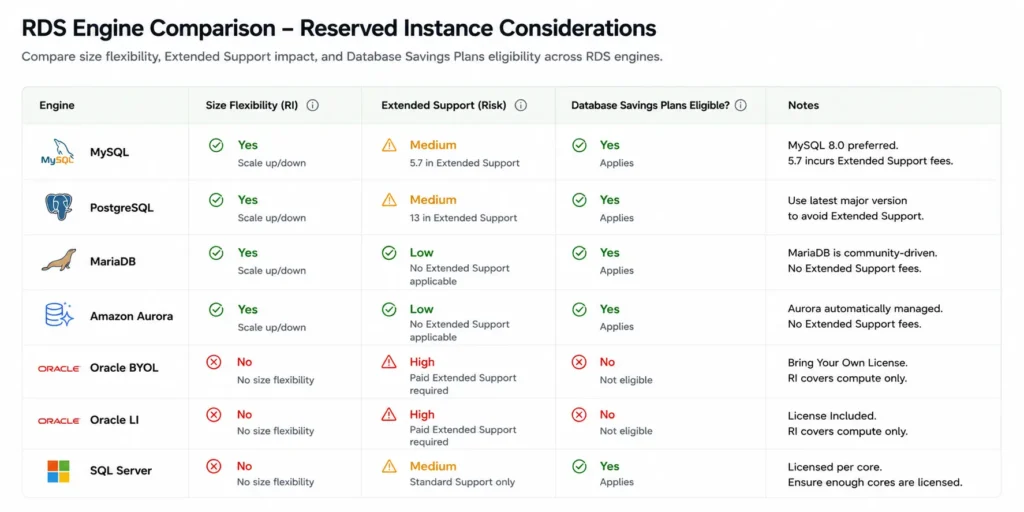
Size Flexibility: Which Engines Get It and Which Do Not
Size flexibility is the mechanism that lets one RDS RI cover different instance sizes within the same family, using normalization units. It exists for some engines and not others — and this distinction has significant implications for your RI purchasing strategy.
Engines WITH Size Flexibility
MySQL, MariaDB, PostgreSQL, Amazon Aurora (all editions), Oracle BYOL (Bring Your Own License). A db.r8g.xlarge RI for MySQL automatically covers 2x db.r8g.large, or 4x db.r8g.medium, or any combination totaling 8 normalization units within the r8g family.
Engines WITHOUT Size Flexibility
Microsoft SQL Server (License Included and BYOL) and Oracle License Included. These engines require exact-size reservations. A db.r8g.xlarge SQL Server RI covers only db.r8g.xlarge SQL Server instances. A resize to db.r8g.large means the RI no longer applies.
The normalization unit scale: db.micro = 0.5 | db.small = 1 | db.medium = 2 | db.large = 4 | db.xlarge = 8 | db.2xlarge = 16 | db.4xlarge = 32. Size flexibility applies only within the same instance family (same processor generation). An r8g reservation does not cover r7g or m7g instances.
Full guide: how to maximize RDS RI savings — including size flexibility strategy
The Five RDS RI Rules That Are Commonly Misunderstood
Rule 1: Multi-AZ and Single-AZ RIs Are Separate Products
A Single-AZ RI does not cover a Multi-AZ instance. A Multi-AZ RI does not cover a Single-AZ instance. You must purchase each separately and they cannot be interchanged. The deployment type is a hard match requirement. If you convert a Multi-AZ instance to Single-AZ after purchasing a Multi-AZ RI, the RI no longer covers the instance — it continues billing and will apply only to other Multi-AZ instances matching its attributes in the same account and region.
Deep dive: RDS Multi-AZ vs Single-AZ RI cost analysis
Rule 2: RDS Does Not Have Convertible Reserved Instances
Unlike EC2, RDS offers only Standard Reserved Instances. There is no Convertible RDS RI that allows you to exchange one instance type for another mid-term. If you buy a db.r8g.xlarge RI and later need a db.r8g.2xlarge, the original RI does not convert. For MySQL, PostgreSQL, MariaDB, Aurora, and Oracle BYOL, size flexibility within the same family mitigates this. For SQL Server and Oracle LI, the RI is fully locked to the purchased configuration.
Rule 3: No Upfront Is Only Available for 1-Year Terms
The 3-year RDS RI term requires at least Partial Upfront. There is no 3-year No Upfront option for RDS (unlike EC2 Savings Plans). Teams that plan a 3-year commitment expecting zero upfront cash outlay need to recalculate their cash flow plan.
Rule 4: Extended Support Charges Are Not Discounted by RIs
MySQL 5.7 and PostgreSQL 11 entered Year 3 Extended Support on March 1, 2026 ($0.200/vCPU-hr surcharge). This charge applies on top of the RI rate and is not reduced by the reserved instance discount. A db.r8g.xlarge MySQL 5.7 with a 3-year All Upfront RI (effective ~$0.200/hr compute) pays an additional $0.800/hr in Extended Support surcharge. The combined rate ($1.00/hr) is significantly higher than the on-demand rate for a current MySQL version ($0.478/hr). Upgrade the engine before reserving.
Deep dive: RDS Extended Support pricing — what staying on old MySQL costs
Rule 5: Cross-Region Read Replicas Need Separate RIs in the Replica Region
An RI in us-east-1 does not cover a read replica in eu-west-1. Each region requires its own RI purchase. A primary plus 3 same-region replicas needs 4 Single-AZ RIs in the same region. A primary plus 1 cross-region replica in eu-west-1 needs 1 Single-AZ RI in us-east-1 and 1 separate Single-AZ RI in eu-west-1.
The Engine-by-Engine Guide to RDS Reserved Instances
MySQL
The most widely deployed RDS engine. Size flexibility applies. Graviton4 (r8g) carries deeper RI discounts than Graviton3 (r7g) at identical on-demand rates. T4g burstable instances have CPU credit charges not covered by the RI. MySQL 5.7 is in Year 3 Extended Support ($0.200/vCPU-hr) — do not reserve before upgrading.
MySQL RI pricing: Graviton generations, T4g trap, Extended Support interaction
MariaDB
Priced identically to MySQL for all instance types, regions, and deployment configurations. Size flexibility applies. The same Graviton generation selection advice applies. MariaDB’s thread pool feature can reduce required instance size for high-concurrency workloads, indirectly reducing RI cost by enabling a smaller reservation.
MariaDB RI pricing: same price as MySQL, but worth the switch?
PostgreSQL
Size flexibility applies. PostgreSQL 11 is in Year 3 Extended Support since March 2026 — same rules as MySQL 5.7. PostgreSQL benefits from multi-master capabilities and advanced indexing that can change the instance sizing requirements versus MySQL. The 1-year vs 3-year decision for PostgreSQL follows the same break-even framework as MySQL.
Amazon Aurora
Aurora MySQL and Aurora PostgreSQL have distinct pricing from standard RDS — Aurora charges per ACU (Aurora Capacity Unit) for Serverless v2 or per-instance for provisioned. Reserved instances for Aurora apply to provisioned Aurora instances (not Serverless v2, which has no RI option). Aurora delivers the highest percentage RI savings of any engine — up to 66% on 3-year All Upfront. Size flexibility applies to both Aurora MySQL and Aurora PostgreSQL.
Oracle
Oracle has two license models with dramatically different pricing: Oracle License Included (LI) where AWS provides the Oracle license, and Oracle BYOL where you bring your existing license. BYOL pricing is significantly lower but requires existing Oracle license entitlements. Size flexibility applies to Oracle BYOL but NOT to Oracle LI. Oracle LI reserved instances are exact-size — a resize voids the RI. For Oracle deployments, the LI vs BYOL decision should precede any RI purchasing discussion since the two have different base rates.
SQL Server
SQL Server License Included is the most expensive RDS engine per vCPU-hour. Size flexibility does NOT apply to SQL Server — reserved instances are exact-size only. This makes right-sizing before reserving especially critical for SQL Server fleets. A SQL Server RI purchased on an oversized instance generates more waste per term than any other engine because there is no size flexibility to fall back on. SQL Server is also not eligible for the Database Savings Plan.
Multi-AZ Configurations: Instance vs Cluster
AWS offers two Multi-AZ configurations for MySQL and PostgreSQL, and they have very different cost structures.
Multi-AZ Instance (Standard)
One primary plus one non-readable standby in a second AZ. Costs exactly 2x Single-AZ. Failover in approximately 60 seconds. The correct Multi-AZ option for most production databases. One RI covers the full Multi-AZ deployment as a single purchase at the 2x rate.
RDS Multi-AZ vs Single-AZ RI: when does the HA premium pay off?
Multi-AZ DB Cluster
One primary plus two readable standbys across 3 AZs. Costs 3x Single-AZ because all three instances are billed separately. Failover in under 35 seconds. Readable standbys (unlike standard Multi-AZ standby which is non-readable). Requires 3 separate Single-AZ RI purchases to cover all three nodes. MySQL 8.0.28+ and PostgreSQL 13.4+ only.
RDS Multi-AZ DB Cluster pricing: 3 nodes, faster failover, higher bill
The Correct Optimization Sequence for RDS Reserved Instances
Most teams approach RDS RI optimization in the wrong order. They purchase RIs on the current fleet first, then try to optimize the underlying instances. The correct sequence extracts significantly more savings because it avoids locking in optimized pricing on a suboptimal baseline.
| Step | Action | Why First | Monthly Impact Example | RI Impact |
| 1 | Upgrade Extended Support engines | ES charges dwarf RI savings on the same instance | $1,168/month eliminated (4-vCPU Multi-AZ MySQL 5.7 Year 3) | RI discount is irrelevant vs $1,168 surcharge |
| 2 | Convert non-prod Multi-AZ to Single-AZ | Multi-AZ premium on dev/staging is pure waste | $116.80/month saved per db.r8g.large converted | Lower RI cost on correctly-typed instances |
| 3 | Right-size every instance (30-day CloudWatch review) | RI on oversized instance locks in waste for 1-3 years | $115-467/month per oversized xlarge converted to large | RI on correct size saves more than RI on wrong size |
| 4 | Migrate to current Graviton (r8g, m8g) if on r7g or older | r8g RI is cheaper than r7g RI at same on-demand price | $210/year per instance in deeper RI discounts | Deeper discounts on same base rate |
| 5 | Purchase RIs on clean, right-sized fleet | All prior steps maximized the savings per dollar committed | 33-69% discount on optimized base | Full RI savings on correct baseline |
| 6 | Monitor utilization monthly | Unmatched RIs waste money silently | Catch $116-467/month of unused RI early | Prevent waste from running to term |
How to Purchase RDS Reserved Instances
AWS Console
Open the Amazon RDS console. In the navigation pane, click Reserved Instances. Click Purchase Reserved DB Instances. Select: engine, instance class, Single-AZ or Multi-AZ, 1-year or 3-year term, payment option (No Upfront, Partial Upfront, or All Upfront), and quantity. Review the Offering Details showing the effective hourly rate and upfront cost. Click Purchase.
AWS CLI
Step 1 — Find the offering ID: aws rds describe-reserved-db-instances-offerings –db-instance-class db.r8g.xlarge –product-description mysql –offering-type ‘No Upfront’ –duration 31536000. Step 2 — Purchase: aws rds purchase-reserved-db-instances-offering –reserved-db-instances-offering-id [offering-id] –reserved-db-instance-id my-reservation-id –db-instance-count 1.
Verify Coverage After Purchase
Pull the RI utilization report in Cost Explorer within 48 hours of purchase. Navigate to Reservations > Utilization Report > filter by Amazon RDS. Every newly purchased RI should show 100% utilization if there are matching running instances. An RI showing 0% utilization indicates a mismatch on engine, family, region, or deployment type.
Payment Options: Which Should You Choose?
No Upfront (1-year only)
Zero capital required. Discounted hourly rate for 12 months. Approximately 33% savings. Best for: first RI purchase on any database, lower-confidence workloads, teams with constrained capital budgets. Not available for 3-year terms.
Partial Upfront (1-year or 3-year)
Moderate lump sum plus reduced monthly charges. Approximately 35-53% savings depending on term. Best for: most production databases where 12+ months of stable usage is confirmed and some capital is available.
All Upfront (1-year or 3-year)
Full term cost at purchase. Highest savings (up to 58-69% on 3-year). No monthly charges during the term. Best for: the most stable, longest-running production databases with high confidence in a 36-month stable configuration. The 3-year All Upfront has the most exposure to Extended Support risk if the engine version is approaching end-of-standard-support during the term.
How Usage.ai Automates RDS Reserved Instance Management
Managing RDS reserved instances manually across a production fleet requires monthly utilization reviews, quarterly purchase decisions, Extended Support tracking per engine version, right-sizing analysis across multiple engines, and renewal management for expiring terms. For teams with 20+ RDS instances, this is a significant recurring engineering and FinOps time commitment.
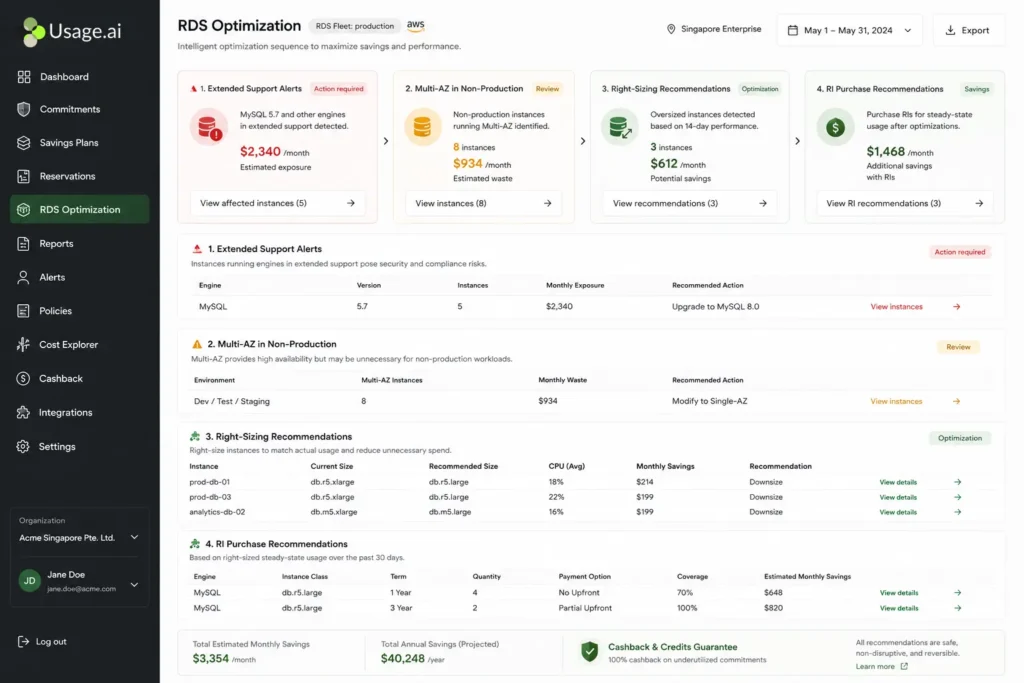
Usage.ai Flex Reserved Instances automates the entire lifecycle. The platform analyzes all RDS instances (every engine, Multi-AZ and Single-AZ separately) with a 24-hour data refresh versus AWS Cost Explorer’s 72+ hour cycle. It follows the correct optimization sequence automatically: Extended Support alerts surface first, non-production Multi-AZ conversion opportunities second, right-sizing recommendations third, RI purchases last.
For teams whose workloads change — instances resized, deprecated, or migrated — Usage.ai provides cashback in real money when RIs become underutilized. The commitment adjusts rather than generating irreversible waste. The fee is a percentage of realized savings only. Zero savings means zero fee.
Usage.ai has delivered $91M+ in savings to 300+ enterprise customers. Setup: 30 minutes, billing-layer access only, no infrastructure changes. Verified from Usage.ai documentation.
%2024%20(20).svg)
Frequently Asked Questions
1. What are RDS Reserved Instances?
RDS Reserved Instances are billing commitments that reduce the per-hour rate of RDS databases by 33-69% in exchange for a 1-year or 3-year term. You specify the engine, instance family, region, and deployment type. AWS applies the discount automatically to any matching running instance. Nothing about the database changes — only the billing rate.
2. How much do RDS Reserved Instances save?
Approximately 33% on 1-year No Upfront (verified for MySQL db.r8g at 33% from $0.478 to $0.320/hr), up to 58% on 3-year All Upfront for MySQL, and up to 66-69% for Aurora on 3-year All Upfront terms. Source: Vantage.sh May 2026 (AWS API) and AWS pricing pages. Verify at aws.amazon.com/rds/pricing — rates change.
3. Which RDS engines support size flexibility?
MySQL, MariaDB, PostgreSQL, Amazon Aurora (all editions), and Oracle BYOL support size flexibility. SQL Server (License Included and BYOL) and Oracle License Included do not — these require exact-size reservations. Size flexibility uses normalization units (large=4, xlarge=8, 2xlarge=16) and applies only within the same instance family.
4. Does RDS have Convertible Reserved Instances?
No. RDS offers only Standard Reserved Instances. There is no Convertible RDS RI. If you need flexibility to change configurations mid-term, use 1-year terms or evaluate the Database Savings Plan (more flexible, lower max discount of approximately 35% vs 69% for RDS RIs).
5. What is the Database Savings Plan vs RDS Reserved Instances?
Database Savings Plans cover any RDS or Aurora usage (MySQL, PostgreSQL, Aurora only) in any region for a 1-year spend commitment, saving up to 35%. RDS Reserved Instances save up to 69% but require a specific engine, instance family, and region match. For Oracle, SQL Server, and stable MySQL/PostgreSQL fleets: RDS RIs deliver significantly higher savings. For multi-region flexible MySQL/PostgreSQL: Database Savings Plans offer flexibility at the cost of a lower ceiling.
6. What happens if I do not use my RDS reserved instance?
The RI continues billing until expiration. It applies to any matching running instance in the same account and region. If no matching instance exists, the RI generates no savings but still charges the committed rate. Launch a new matching database or let the RI expire at term end. There is no cancellation or refund option for Standard RDS RIs.
7. How do I check if my RDS RIs are being used?
AWS Cost Explorer > Reservations > Utilization Report > filter by Amazon RDS. RIs at 100% utilization are fully applied. RIs below 80% warrant investigation — the matching instance may have been resized, deleted, or converted to a different deployment type. Run this review monthly. An unmatched RI billing for 6 months silently wastes $500-2,000 depending on instance size.
8. Should I reserve dev and staging RDS databases?
Rarely. Dev and staging databases often run multi-AZ unnecessarily (convert to Single-AZ first), get deleted between projects, or change size frequently. Single-AZ conversion saves more than RI optimization on dev instances. For truly stable dev databases that run 24/7 with consistent size and configuration: a 1-year No Upfront RI is appropriate. Avoid 3-year terms on non-production databases.