
When a MySQL or PostgreSQL major version reaches end of standard support, AWS does not force an upgrade. Instead, it automatically enrolls your database in Extended Support and begins charging an additional per-vCPU-hour surcharge on top of your normal instance costs.Â
The surcharge starts at $0.100 per vCPU-hour in US East for the first two years. In year 3, it doubles to $0.200 per vCPU-hour. For a 4-vCPU instance, that is $292/month in year 3 that does not appear anywhere in the instance pricing table and is not reduced by your reserved instance discount.
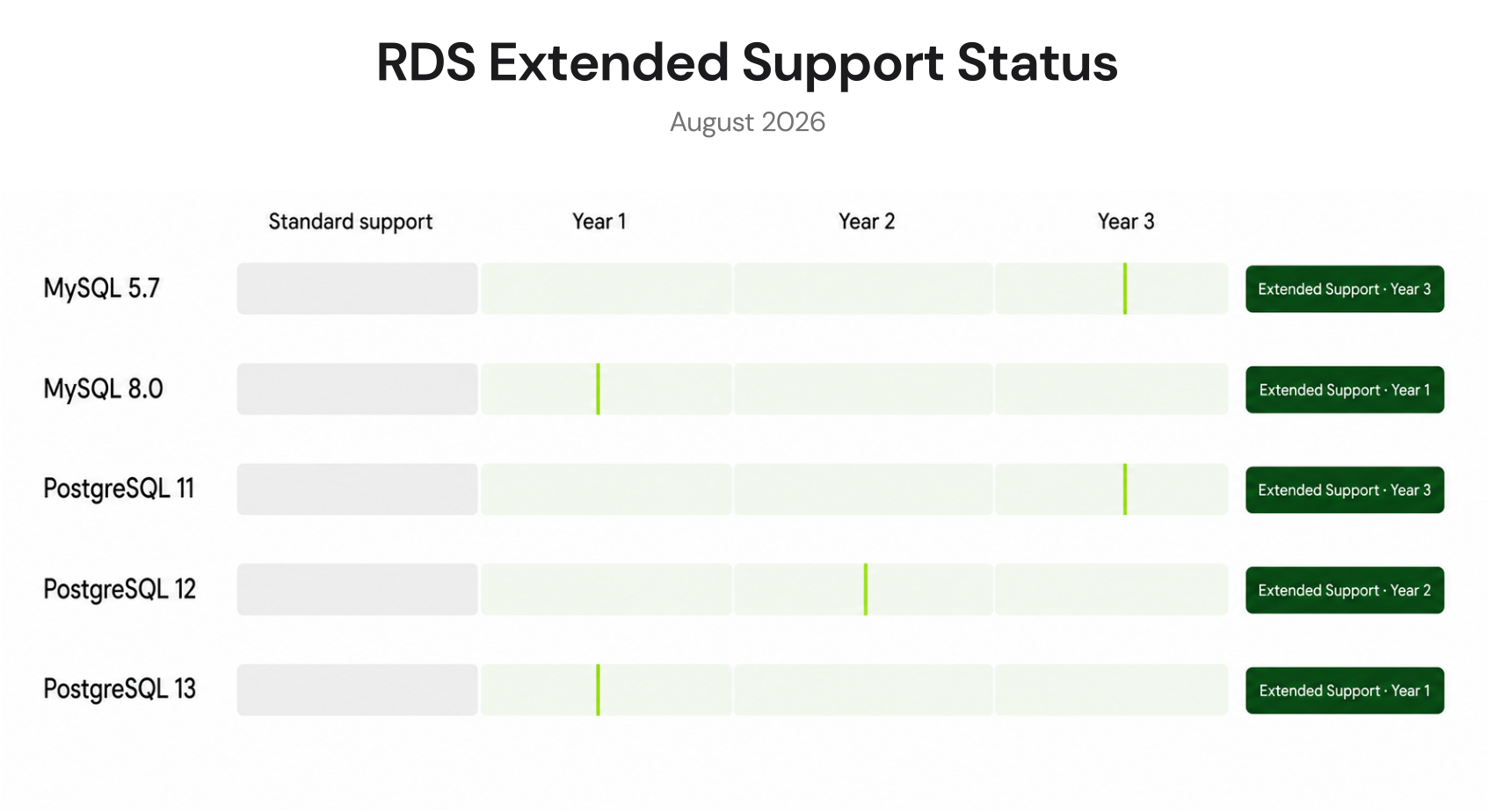
MySQL 5.7 and PostgreSQL 11 both entered year 3 Extended Support pricing on March 1, 2026. Every team still running these versions saw their Extended Support surcharge double on that date. PostgreSQL 12 entered year 1 pricing in March 2025. If you are running any of these versions today and have not scheduled an upgrade, this guide shows you exactly what it is costing you and what the upgrade timeline needs to look like to stop paying it.
Which RDS Engine Versions Are Currently in Extended Support?
Here is the current Extended Support status for all affected engine versions as of May 2026 (verify at aws.amazon.com/rds/mysql/pricing and aws.amazon.com/rds/postgresql/pricing — EOL dates and rates change).
| Engine | Version | End of Standard Support | Year 1-2 Rate (US East) | Year 3 Rate (US East) | Year 3 Start Date |
| RDS MySQL | 5.7 | February 29, 2024 | $0.100/vCPU-hr | $0.200/vCPU-hr | March 1, 2026 (ACTIVE NOW) |
| RDS PostgreSQL | 11 | November 9, 2023 | $0.100/vCPU-hr | $0.200/vCPU-hr | March 1, 2026 (ACTIVE NOW) |
| RDS PostgreSQL | 12 | February 28, 2025 | $0.100/vCPU-hr | $0.200/vCPU-hr | March 1, 2027 |
| RDS MySQL | 8.0 | TBD (community EOL April 2026) | $0.100/vCPU-hr (expected) | TBD | TBD — verify at AWS |
| RDS PostgreSQL | 13 | November 13, 2025 | $0.100/vCPU-hr | $0.200/vCPU-hr | November 2027 |
| Aurora MySQL | 2 (MySQL 5.7 compat.) | October 31, 2024 | $0.100/vCPU-hr | NO Year 3 rate (stays Y1 price) | N/A — no Year 3 for Aurora MySQL |
| Aurora PostgreSQL | 11 | February 29, 2024 | $0.100/vCPU-hr | $0.200/vCPU-hr | March 1, 2026 (ACTIVE NOW) |
The Aurora MySQL anomaly is important: Aurora MySQL versions in Extended Support are charged at Year 1 rates for the entire duration, with no Year 3 escalation.Â
This is different from RDS MySQL and RDS PostgreSQL, which both double their surcharge in year 3. If you run Aurora MySQL 2 (MySQL 5.7 compatible), your Extended Support charge will not double — it stays at $0.100/vCPU-hr throughout. The same is not true for Aurora PostgreSQL, which does escalate to Year 3 pricing.
Also read: RDS Reserved Instances: Engine-by-Engine Pricing and Commitment GuideÂ
What Is the Exact Extended Support Cost at Different Instance Sizes?
The Extended Support surcharge multiplies by the number of vCPUs on your instance. Here is the full cost breakdown at common instance sizes for US East (N. Virginia) Year 3 rates — the rates currently active for MySQL 5.7 and PostgreSQL 11 as of March 2026.
| Instance Type | vCPUs | Y1-2 Surcharge/hr | Y1-2 Surcharge/month | Y3 Surcharge/hr | Y3 Surcharge/month |
| db.t4g.micro | 2 | $0.20 | $146 | $0.40 | $292 |
| db.m7g.large / db.r8g.large | 2 | $0.20 | $146 | $0.40 | $292 |
| db.m7g.xlarge / db.r8g.xlarge | 4 | $0.40 | $292 | $0.80 | $584 |
| db.m7g.2xlarge / db.r8g.2xlarge | 8 | $0.80 | $584 | $1.60 | $1,168 |
| db.r8g.4xlarge | 16 | $1.60 | $1,168 | $3.20 | $2,336 |
| db.r8g.8xlarge | 32 | $3.20 | $2,336 | $6.40 | $4,672 |
| db.r8g.16xlarge | 64 | $6.40 | $4,672 | $12.80 | $9,344 |
How Does Extended Support Interact with Multi-AZ and Read Replicas?
This is where the actual monthly cost can shock teams that only modeled the primary instance. Extended Support charges apply to every running instance on the affected engine version, not just the primary.
Multi-AZ Deployments
A Multi-AZ RDS deployment runs a synchronous standby instance in a separate Availability Zone. Both the primary and the standby are charged the Extended Support surcharge. For a db.r8g.xlarge (4 vCPUs) MySQL 5.7 Multi-AZ in Year 3: primary surcharge: 4 vCPUs x $0.200 x 730 hrs = $584/month. Standby surcharge: $584/month. Total Multi-AZ Extended Support surcharge: $1,168/month. This is on top of the normal Multi-AZ instance cost of approximately $960/month (2 x $0.480/hr x 730 hrs). Combined effective cost: $2,128/month versus the $960/month before Extended Support year 3 began. MySQL 5.7 Multi-AZ effectively became 2.2x more expensive in March 2026.
Read Replicas
Every read replica running the same affected engine version is also charged the Extended Support surcharge independently. A primary with three read replicas (all MySQL 5.7) on db.r8g.xlarge in Year 3: primary: $584/month. Each replica: $584/month. Total surcharge for the cluster: $584 x 4 = $2,336/month. The replicas contribute the same per-vCPU surcharge as the primary regardless of whether they are used for read offloading, DR, or standing by idle.
Snapshots Are NOT Charged
DB snapshots (automated backups and manual snapshots) are not charged the Extended Support surcharge. You can create and retain snapshots of EOL databases without incurring Extended Support fees on those snapshots. The charge applies only to running DB instances. However, if you restore from a snapshot of an EOL version, the restored instance immediately begins incurring Extended Support charges. Plan restore events carefully.

Do Reserved Instances Reduce Extended Support Charges?
No. This is one of the most important cost planning facts for teams with existing reserved instance commitments. RDS Extended Support charges are billed as a completely separate line item from instance compute charges. Reserved instance discounts apply to the compute portion of your RDS bill. They do not apply to Extended Support surcharges.
The compound effect: you are paying two separate bills simultaneously for the same database. Your reserved instance covers the base compute at the discounted rate. Your Extended Support surcharge bills at full rate on top. There is no offset, no proration, and no discount mechanism that reduces the Extended Support line item.
AWS states this explicitly: ‘RI discounts do not apply to Amazon RDS Extended Support.’ This is confirmed on the AWS Cloud Financial Management blog and the AWS RDS pricing documentation.
Practical implication: a team with a 3-year All Upfront RI on a db.r8g.xlarge MySQL 5.7 instance that is now in Year 3 Extended Support is paying approximately: Reserved instance effective rate (3-year All Upfront): ~$216/month. Extended Support Year 3 surcharge: $584/month (4 vCPUs x $0.200 x 730 hrs). Total monthly cost: $800/month. Compare to the original Reserved Instance commitment expectation of $216/month. The Extended Support surcharge is 2.7x the RI rate on this instance. The team saved 55% on compute, then had 270% added back in Extended Support charges.
How Do RDS Extended Support Pricing Rates Vary by Region?
Extended Support pricing varies significantly by region. US East (N. Virginia) and US East (Ohio) have the lowest rates. Other regions carry premiums of 10-110% above US East rates.
| AWS Region | Year 1-2 Rate (/vCPU-hr) | Year 3 Rate (/vCPU-hr) | Y1-2 Monthly (4 vCPU) | Y3 Monthly (4 vCPU) |
| US East (N. Virginia / Ohio) | $0.100 | $0.200 | $292 | $584 |
| US West (Oregon / N. California) | $0.110 | $0.220 | $321 | $642 |
| EU West (Ireland / London) | $0.112 – $0.118 | $0.224 – $0.236 | $327 – $344 | $654 – $688 |
| Asia Pacific (Singapore / Sydney) | ~$0.120 – $0.130 | ~$0.240 – $0.260 | $350 – $379 | $700 – $758 |
| South America (Sao Paulo) | $0.210 | $0.419 | $613 | $1,224 |
For a production database on a db.r8g.xlarge in Sao Paulo running MySQL 5.7 in Year 3: Extended Support surcharge = 4 vCPUs x $0.419/hr x 730 hrs = $1,223.60/month. The surcharge alone exceeds the on-demand instance compute cost ($350/month) by 3.5x. Teams running large instances in high-cost regions on EOL versions are facing the most severe cost impact.
How Much Does Staying on an EOL Version Cost Over the Full 3-Year Extended Support Period?
Let us model the full 3-year Extended Support cost for three common scenarios, using US East rates (verify all — rates change).
Scenario 1: Small Production Database (db.r8g.large, 2 vCPUs, Single-AZ)
Year 1: 2 vCPUs x $0.100/hr x 8,760 hrs = $1,752. Year 2: $1,752. Year 3: 2 vCPUs x $0.200/hr x 8,760 hrs = $3,504. Total 3-year Extended Support cost: $7,008. Compare to upgrading: a major version upgrade takes 4-8 weeks of engineering time. At $120/hr for a senior engineer working 10 hrs/week for 6 weeks: $7,200 in labor. Break-even: the upgrade labor cost roughly equals the first-year Extended Support savings. After year 1, every additional month of delay costs $292/month in Extended Support that could fund the upgrade.
Scenario 2: Standard Production Database (db.r8g.xlarge, 4 vCPUs, Multi-AZ)
Year 1: 4 vCPUs x 2 nodes x $0.100/hr x 8,760 hrs = $7,008. Year 2: $7,008. Year 3: 4 vCPUs x 2 nodes x $0.200/hr x 8,760 hrs = $14,016. Total 3-year Extended Support cost: $28,032. This is one instance. A fleet of 10 similar instances incurs $280,320 over the 3-year Extended Support period — enough to fund a dedicated database platform team to execute upgrades.
Scenario 3: Large Enterprise Database (db.r8g.4xlarge, 16 vCPUs, Multi-AZ with 2 read replicas)
Instances billed: primary (16 vCPUs) + Multi-AZ standby (16 vCPUs) + 2 read replicas (16 vCPUs each) = 64 vCPUs total. Year 1: 64 vCPUs x $0.100/hr x 8,760 hrs = $56,064. Year 2: $56,064. Year 3: 64 vCPUs x $0.200/hr x 8,760 hrs = $112,128. Total 3-year cost: $224,256. This level of Extended Support cost is sufficient justification for a full database platform modernization program, including dedicated engineering resources, testing environments, and external consulting.

Also read: RDS Reserved Instances: 1-Year vs 3-Year Break-Even Across All Engines
How Do You Opt Out of RDS Extended Support?
RDS provides an opt-out mechanism for new instance creation or restore operations. You cannot opt out existing instances that are already enrolled in Extended Support — the opt-out only prevents enrollment for new or restored instances.
The Opt-Out Flag
When creating or restoring an RDS DB instance, set the engine lifecycle support parameter: AWS CLI: add –engine-lifecycle-support open-source-rds-extended-support-disabled. AWS API: set LifecycleSupport to open-source-rds-extended-support-disabled. CloudFormation: EngineLifecycleSupport: open-source-rds-extended-support-disabled.
When this flag is set, AWS will not create or restore the instance if the requested engine version is in or approaching Extended Support. The instance creation fails with an error stating that the version requires Extended Support and the flag disables it. This is a guardrail for development and staging environments where you want to prevent accidentally spinning up EOL instances.
When to Use the Opt-Out
Development and staging environments: set the flag in your deployment scripts to prevent dev environments from accidentally using EOL versions. New production deployments: never intentionally create production databases on EOL versions. The opt-out enforces this policy programmatically. Existing instances cannot be opted out retroactively; the only option for existing instances is to upgrade to a supported version.
Checking Your Current Extended Support Exposure
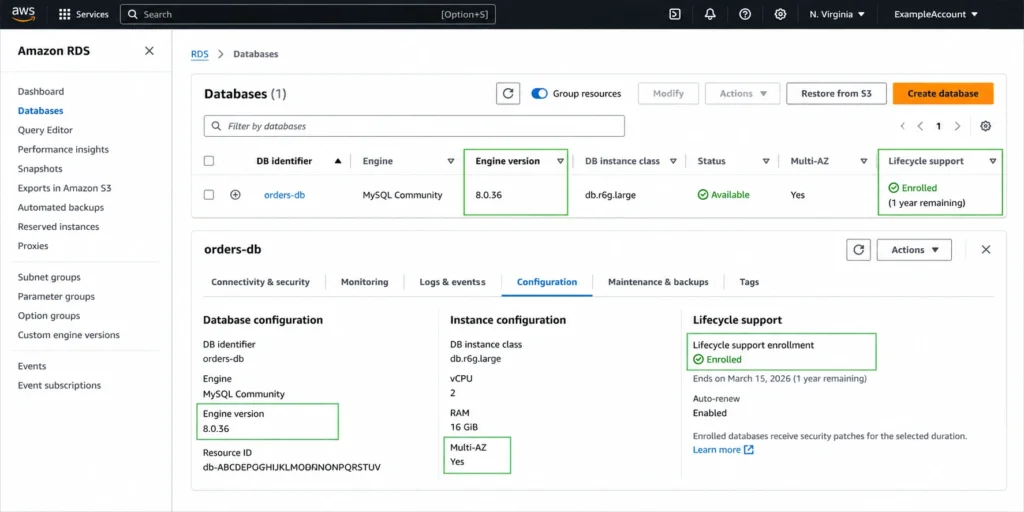
To find all RDS instances currently in Extended Support across your account, use the AWS CLI: aws rds describe-db-instances –query ‘DBInstances[?EngineVersion starts_with(EngineVersion, `5.7`) || starts_with(EngineVersion, `11`) || starts_with(EngineVersion, `12`)].[DBInstanceIdentifier,Engine,EngineVersion,MultiAZ,DBInstanceClass]’. Cross-reference the version list with the EOL dates in the table above. Alternatively, use AWS Cost Explorer filtered by Usage Type containing ExtendedSupport to see current monthly charges immediately.
How Do You Identify All RDS Extended Support Charges in Your Account Right Now?
Before planning upgrades, you need to know exactly how much Extended Support is costing you today and which instances are responsible. Here is a three-step audit process.
Step 1: Check AWS Cost Explorer for Extended Support Line Items
In AWS Cost Explorer, set the date range to the last 30 days. Group by Usage Type. Filter for usage types containing ‘ExtendedSupport’. The results will show line items formatted as Region-ExtendedSupport:Yr1-Yr2:MySQL57 or Region-ExtendedSupport:Yr3:PostgreSQL11. These line items show exactly which engine versions are being charged and in which regions. If you see Yr3 line items, you are already paying doubled rates. Export the data to CSV to calculate monthly totals by version.
Step 2: List All Instances on EOL Versions via AWS CLI
Run the following to identify every RDS instance on an EOL engine version in your account: aws rds describe-db-instances –query ‘DBInstances[*].[DBInstanceIdentifier,Engine,EngineVersion,DBInstanceClass,MultiAZ,ReadReplicaDBInstanceIdentifiers]’ –output table. Filter the output for engine versions matching MySQL 5.7, MySQL 8.0 (once confirmed EOL), PostgreSQL 11, 12, 13 or earlier. For each identified instance, note whether it is Multi-AZ (doubles the charge) and how many read replicas it has (each adds another surcharge at the same vCPU rate).
Step 3: Calculate Your Monthly Exposure
For each instance found in step 2: look up its vCPU count from the DB instance class table at docs.aws.amazon.com/AmazonRDS/latest/UserGuide/Concepts.DBInstanceClass.html. Multiply: vCPU count x current rate per vCPU-hr x 730 hrs/month. For Multi-AZ: double the result. Add each read replica separately at the same formula. Sum all instances and read replicas. The total is your monthly Extended Support exposure. Compare this to the engineering effort estimate for upgrading to understand the ROI of prioritizing the upgrade now versus next quarter.
AWS also provides an open-source cost estimator script at github.com/aws-samples/rds-extended-support-cost-estimator that automates this calculation across your entire organization, outputting a CSV with every affected instance, its vCPU count, EOL dates, current year pricing tier, and monthly estimated charge.
What Is the Compounded Cost of Extended Support on Top of Reserved Instances?
Most FinOps teams build their RDS cost models based on reserved instance rates. Extended Support breaks this model by adding a fully uncapped surcharge that grows independently of the compute cost. Here is the compound picture for three reserve-and-delay scenarios.
Scenario: 1-Year No Upfront RI on MySQL 5.7 db.r8g.xlarge (4 vCPU, Single-AZ)
Base RI rate (1-year No Upfront): ~$0.341/hr, $249/month. Extended Support Year 3: 4 vCPUs x $0.200/hr x 730 hrs = $584/month. Combined effective monthly cost: $833. Compare to: standard provisioned MySQL 8.4 (current version) on-demand: $0.480/hr = $350/month. The reserved MySQL 5.7 instance in Extended Support year 3 costs $833/month versus $350/month for an on-demand current version. The team paying for RI savings on an EOL version is paying 2.4x more than a team with no reservations on a current version.
Scenario: 3-Year All Upfront RI on PostgreSQL 11 db.r8g.xlarge (4 vCPU, Multi-AZ)
Base RI rate (3-year All Upfront, Multi-AZ): ~$0.470/hr effective, $343/month. Extended Support Year 3 (Multi-AZ): 4 vCPUs x 2 nodes x $0.200/hr x 730 hrs = $1,168/month. Combined: $1,511/month. Compare to: current PostgreSQL 16 on-demand Multi-AZ: $0.960/hr = $701/month. The team that bought a 3-year All Upfront RI expecting to pay $343/month is paying $1,511/month and cannot exit the reservation. Extended Support year 3 made the carefully committed 3-year discount irrelevant and then some.
The Lesson for RI Purchasing
Never buy a 3-year reserved instance on an engine version that will enter Extended Support within the term. Before any multi-year RI purchase, verify the engine version EOL date and confirm it has at least 36 months of standard support remaining.Â
If a version reaches end of standard support in month 18 of a 36-month RI, you will pay Extended Support surcharges for the remaining 18 months of the term while also paying the RI commitment on top. Plan engine upgrades before purchasing 3-year reserved instances, not after.
What Is the Fastest Path to Eliminating RDS Extended Support Charges?
Option 1: In-Place Major Version Upgrade
The simplest path for most workloads. Use the RDS console to modify the DB instance and select a new major engine version within standard support. For MySQL 5.7 to MySQL 8.0 or 8.4: in-place upgrade, downtime of 10-30 minutes during the maintenance window. For PostgreSQL 11 to PostgreSQL 16: can usually upgrade directly to a recent version, downtime of 15-60 minutes. Extended Support charges stop immediately after the upgrade completes.
Option 2: Blue/Green Deployment for Zero-Downtime Upgrade
Use RDS blue/green deployment to perform the major version upgrade with under 5 seconds of switchover time. The green environment runs the new engine version while the blue continues serving production. Test on the green for days or weeks, then switch over. Extended Support charges continue on the blue environment until switchover.Â
The green environment may incur Extended Support on the old version or standard charges on the new version depending on configuration. Switchover ends Extended Support charges on the production instance immediately.
Option 3: Snapshot, Upgrade, Restore
For complex applications requiring extensive testing: create a snapshot of the current instance, restore it as a new instance with the upgraded engine version in a non-production environment, run your full test suite, then perform the production upgrade. Extended Support charges continue on the production instance until upgrade.Â
This approach is slower but provides the most comprehensive pre-production testing. Use the AWS Schema Conversion Tool (SCT) and AWS Database Migration Service (DMS) for complex schema changes that cannot be handled by an in-place upgrade alone.
Also read: RDS Encryption: Does Encrypting Your Database Add Cost?
How Does Usage.ai Help with Extended Support Cost Management?
RDS Extended Support charges are a separate cost category that appear as distinct line items in Cost Explorer and the Cost and Usage Report. They are billed independently from instance compute charges and are not reduced by reserved instances. Usage.ai monitors RDS instance inventory and surfaces Extended Support exposure as a distinct cost alert.
The immediate, high-priority optimization Usage.ai highlights for instances with Extended Support charges: upgrade the engine version. This is the only action that eliminates the surcharge entirely. Until the upgrade is complete, Usage.ai tracks the ongoing Extended Support cost and shows the accumulated monthly waste attributed to the version delay, providing the financial data engineering and product teams need to prioritize the upgrade.
For the base instance compute costs that persist alongside Extended Support charges, Usage.ai Flex Reserved Instances automate the reservation purchasing. A db.r8g.xlarge in Year 3 Extended Support is paying $584/month in unavoidable surcharge plus approximately $480/month in on-demand compute. The RI optimization reduces the compute portion by 29-69%, capturing savings on the component that can be discounted while the Extended Support piece remains at full rate. The platform refreshes analysis every 24 hours versus AWS Cost Explorer’s 72+ hour cycle. The fee is a percentage of realized savings only.
See how much you can save on RDS with Usage.ai

Frequently Asked Questions
1. How much does RDS Extended Support cost?
US East (N. Virginia): $0.100 per vCPU-hour for years 1-2, $0.200 per vCPU-hour in year 3. Charges apply to every running instance: primary, Multi-AZ standby, and read replicas separately. A 4-vCPU Single-AZ instance: $292/month (Y1-2) or $584/month (Y3). A 4-vCPU Multi-AZ instance: $584/month (Y1-2) or $1,168/month (Y3). Rates vary by region — Sao Paulo reaches $0.419/vCPU-hr in year 3.
2. What is RDS Extended Support?
RDS Extended Support is a paid program that allows you to continue running MySQL and PostgreSQL databases on major versions that have reached end of AWS standard support. AWS provides security patches and critical bug fixes for up to 3 years past standard support end. The charge is $0.100/vCPU-hr (years 1-2) and $0.200/vCPU-hr (year 3) in US East, in addition to normal instance costs.
3. Does RDS Extended Support apply to reservations?
No. Reserved instance discounts do not apply to RDS Extended Support charges. The surcharge is billed at full rate on top of the discounted reserved instance rate. A 3-year All Upfront RI reduces the compute cost but provides zero offset against the Extended Support surcharge. The two billing items are completely independent.
4. What RDS versions are currently in Extended Support?
As of May 2026: MySQL 5.7 (in Year 3 since March 2026), PostgreSQL 11 (in Year 3 since March 2026), PostgreSQL 12 (in Year 1 since March 2025), PostgreSQL 13 (in Year 1 since November 2025), Aurora MySQL 2 (in Year 1 pricing for full duration), Aurora PostgreSQL 11 (in Year 3 since March 2026). MySQL 8.0 community EOL was April 2026 — verify AWS end of standard support date. Confirm current versions at aws.amazon.com/rds/mysql/pricing and aws.amazon.com/rds/postgresql/pricing.
5. How do you avoid RDS Extended Support charges?
Upgrade to a major version within AWS standard support. Use the –engine-lifecycle-support open-source-rds-extended-support-disabled flag when creating or restoring instances to prevent deployment of EOL versions. Monitor upcoming EOL dates and schedule major version upgrades at least 6 months before the standard support end date. Delete non-production databases running EOL versions rather than upgrading them.
6. Are RDS snapshots charged Extended Support fees?
No. Snapshots (automated backups and manual snapshots) of EOL databases are not charged Extended Support fees. The surcharge applies only to running DB instances. However, restoring from an EOL version snapshot immediately begins accruing Extended Support charges on the restored instance, continuing until upgraded or deleted.
7. Does Aurora MySQL have Year 3 Extended Support pricing?
No. Aurora MySQL is unique: it stays at Year 1 pricing ($0.100/vCPU-hr in US East) for the entire duration of Extended Support, with no Year 3 doubling. Aurora PostgreSQL does have Year 3 pricing (same doubling as RDS PostgreSQL). This distinction makes Aurora MySQL somewhat less financially risky to leave on EOL versions compared to RDS MySQL, though upgrading remains the recommended action.
8. How much does RDS cost per month?
Base RDS cost: instance compute (varies by engine and size), storage ($0.115/GB-month for gp3), backups (free up to 100% of DB size), and optional data transfer. For EOL versions, add Extended Support surcharges ($0.100-0.200/vCPU-hr depending on year and region). A db.r8g.xlarge MySQL on-demand Single-AZ in US East: approximately $350/month compute. With Year 3 Extended Support: $350 + $584 = $934/month.