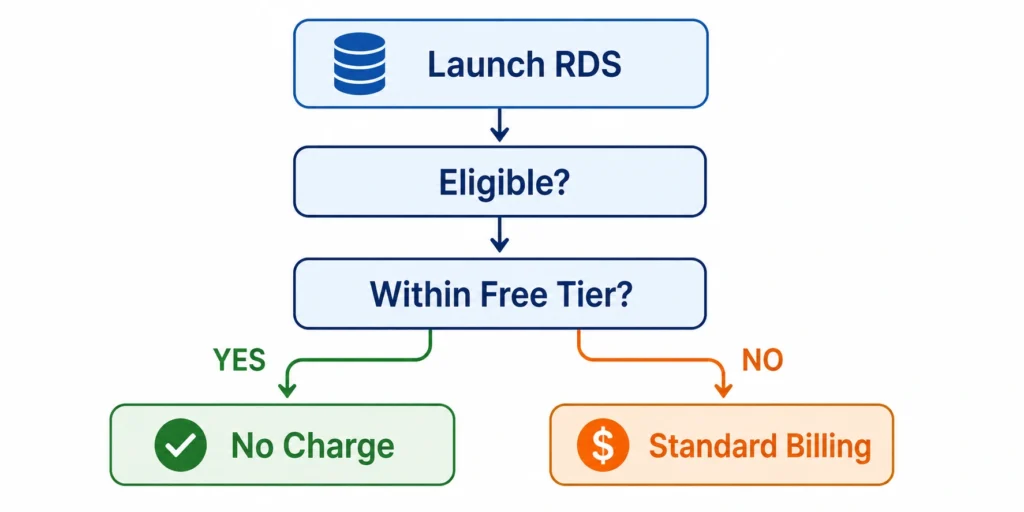
The AWS RDS free tier is more constrained than most developers realize until their first unexpected bill arrives. It gives you one db.t3.micro running continuously for 12 months at no charge — but only one. Run a second db.t3.micro simultaneously and you consume the 750-hour pool twice as fast, hitting the limit in 15.6 days instead of 31. Enable Multi-AZ and you are immediately billed at the Multi-AZ rate for every hour. Add an RDS Proxy and a separate billing clock starts. Use Aurora and there is no free tier at all.
This guide documents every component of the AWS RDS free tier precisely: what is included, what is not, what happens after 12 months, and the three billing traps that catch most new users.
What Exactly Does the AWS RDS Free Tier Include?
Here is the complete inventory of what the amazon rds free tier provides, per month, for the first 12 months after AWS account creation (verify at aws.amazon.com/free — offer terms change).
| Free Tier Component | Quantity | Details | Engines Eligible | Catch |
| db.t3.micro instance hours | 750 hours/month | Single-AZ only. Shared across all RDS instances in the account globally. | MySQL, MariaDB, PostgreSQL, SQL Server Express | Pool depletes 2x faster with two simultaneous instances |
| db.t2.micro instance hours | 750 hours/month | Legacy option where t3.micro is not available | Same engines as t3.micro | t3.micro is preferred in most regions |
| db.t4g.micro instance hours | 750 hours/month | Graviton2 variant, eligible in supported regions | MySQL, MariaDB, PostgreSQL | Not available in all regions; SQL Server Express excluded |
| Database storage (General Purpose SSD) | 20 GB/month | gp2 or gp3 storage. The 20 GB is for the primary volume only. | All free tier eligible engines | Exceeding 20 GB billed at $0.115/GB-month (gp3) or $0.115/GB-month (gp2) |
| Backup storage (automated backups + snapshots) | 20 GB/month | Separate from the database storage allocation. Includes automated backups. | All free tier eligible engines | Any backup storage above 20 GB charged at $0.095/GB-month |
| Duration | 12 months | From initial AWS account creation date, not from first RDS instance launch. | All | No grace period after 12 months. Billing starts immediately. |
Also read: RDS Reserved Instances: Engine-by-Engine Pricing and Commitment GuideÂ
What Is NOT Included in the AWS RDS Free Tier?
The list of exclusions is where most unexpected charges come from. Every item below bills at standard on-demand rates from the first hour of usage.
| Not Free | Rate if Used | Common Mistake | Free Alternative | Source |
| Multi-AZ deployment | 2x instance rate (~$0.032/hr for t3.micro Multi-AZ) | Checking Multi-AZ in the console during setup | Single-AZ only | aws.amazon.com/rds/pricing |
| Aurora (MySQL or PostgreSQL compatible) | From $0.073/hr for db.t4g.medium Aurora | Choosing Aurora engine thinking it is RDS | RDS MySQL or PostgreSQL | No Aurora free tier exists |
| RDS Proxy | $0.015/hr per vCPU of the proxied database | Adding Proxy to improve connection pooling on dev database | Connect directly to RDS endpoint | aws.amazon.com/rds/proxy/pricing |
| Oracle (any edition) | From $0.025/hr (t3.micro BYOL) to $0.462/hr (SE2 LI) | Assuming Oracle has a free tier like MySQL | No free Oracle — use MySQL or PostgreSQL | aws.amazon.com/rds/oracle/pricing |
| SQL Server Standard or Enterprise | From $0.178/hr (t3.small SE2 LI) | SQL Server Standard thinking ‘Express is too limited’ | SQL Server Express Edition only in free tier | aws.amazon.com/rds/sqlserver/pricing |
| Provisioned IOPS (io1/io2) storage | $0.125/GB-month + $0.10/IOPS-month | Selecting io1 storage for higher IOPS | gp2 or gp3 (General Purpose SSD) | aws.amazon.com/rds/pricing |
| db.t3.micro CPU credits when bursting above baseline | $0.075/vCPU-hour for credits consumed above baseline | Running sustained CPU-heavy workloads on t3.micro | Limit CPU or use non-burstable instance | aws.amazon.com/rds/pricing |
| Data transfer out to internet | First 100 GB/month free; $0.09/GB after | Application outside AWS querying the free tier database | Keep application in same region | aws.amazon.com/ec2/pricing/on-demand |
| Read replicas | Same rate as primary instance ($0.016/hr for t3.micro) | Adding a read replica for testing | No replicas in free tier | aws.amazon.com/rds/pricing |

How Does the 750-Hour RDS Free Tier Pool Actually Work?
The 750 hours is a monthly pool that is shared across all db.t3.micro (and equivalent) RDS instances in your AWS account, regardless of region. It is not 750 hours per instance.
A single db.t3.micro running continuously for a 31-day month uses: 31 days x 24 hrs = 744 hours. Under the 750-hour cap. Fully free.
Two db.t3.micro instances running simultaneously for a 31-day month: 744 hours x 2 instances = 1,488 hours. Over the 750-hour cap by 738 hours. You pay for 738 hours at the db.t3.micro on-demand rate: 738 x $0.016/hr = $11.81.
Three db.t3.micro instances running simultaneously: 2,232 hours, 1,482 hours above the cap, $23.71 in charges.
The 750-hour cap is generous for one instance. It is a hard limit that generates real charges the moment you run a second simultaneous instance. Common scenarios that exceed the cap without the developer realizing: launching a test instance while keeping a development instance running, restoring a snapshot as a new instance for debugging, running a staging instance alongside a dev instance.
What Happens After the 12-Month RDS Free Tier Period Ends?
When the 12-month free tier period expires, AWS does not pause, stop, or warn you about your RDS instances. Every db.t3.micro that was running under free tier instantly begins billing at the standard on-demand rate. No email is sent. No grace period applies. The billing starts at the exact hour the 12-month window closes.
The on-demand rate for a db.t3.micro MySQL Single-AZ in US East is $0.016/hr ($11.68/month, $140.16/year). That is not a significant charge in isolation. The risk is that teams running multiple free tier instances, with storage that has grown beyond 20 GB, and with automated backups that have accumulated over 12 months, suddenly see charges across several line items simultaneously.
What typically appears on the bill after free tier expiry: instance hours at $0.016/hr x hours used, storage charges at $0.115/GB-month for any storage above 20 GB (including any snapshots and backups above the 20 GB backup allocation), and data transfer charges for any outbound traffic above the 100 GB/month free tier.
The right action two months before your free tier expires: run a cost estimate in AWS Cost Explorer using the ‘RDS’ service filter for the last 30 days of usage, and project what those hours would cost at standard rates. If you are using a free tier database for an actual production application, this is also the right moment to evaluate whether db.t3.micro is the right instance size for production workloads or whether you need to resize and purchase a reserved instance.

Is the db.t3.micro Right for a Production RDS Database?
The db.t3.micro has 2 vCPUs and 1 GiB of RAM. For a free tier learning or development database running low-volume queries, it is perfectly adequate. For production workloads, it has limitations that matter.
What the db.t3.micro Can Handle
A db.t3.micro is appropriate for applications with fewer than 10 concurrent database connections, query volumes under 100 per second, and datasets under 1 GB of active working set that fits in RAM. WordPress sites with under 500 daily visitors, personal projects, API prototypes, and low-traffic web apps with infrequent database writes typically run fine on a t3.micro.
Where It Falls Short
The 1 GiB RAM limitation is the most common constraint. MySQL and PostgreSQL both benefit significantly from RAM for buffer caching. A database with a 1 GiB buffer pool that is being queried across 3 GB of data will experience constant cache misses and generate I/O load that the t3.micro cannot absorb efficiently. Applications with more than 25 concurrent connections, any use of connection pooling, or read-heavy OLAP queries should size up to db.t3.small (2 GiB RAM) or db.t3.medium (4 GiB RAM) before launch.
The T3 Unlimited CPU Credit Trap
All db.t3 instances run in Unlimited CPU credit mode by default on RDS. This means that if your database’s average CPU utilization exceeds the baseline (10% for db.t3.micro) over a rolling 24-hour period, AWS charges CPU credits at $0.075 per vCPU-hour for each vCPU-hour consumed above the baseline.
For a db.t3.micro with 2 vCPUs: if your workload drives average CPU to 30% (3x the baseline), you are consuming 0.2 vCPU-hours of excess burst per hour (30% – 10% = 20% excess x 2 vCPUs x 1 hr = 0.4 excess vCPU-hours per hour). At $0.075/vCPU-hr, the CPU credit charge is $0.03/hr ($21.60/month) for sustained 30% average CPU. This charge is not covered by the free tier and does not stop after 12 months because it is charged by default on all T3 instances.
The fix: set the T3 instance to Standard mode to cap CPU at the baseline and avoid unexpected credits. AWS CLI: aws rds modify-db-instance –db-instance-identifier mydb –processor-features ‘Name=coreCount,Value=1’. Alternatively, size up to a non-burstable instance class (db.m7g.large or db.r8g.large) when graduating from free tier to production.
Also read: RDS Reserved Instances: 1-Year vs 3-Year Break-Even Across All Engines
Is RDS Proxy Free Tier Available?
No. RDS Proxy does not have a free tier. Not for the first 12 months, not for any eligible engine, not as part of any bundle.
RDS Proxy charges $0.015 per vCPU-hour of the proxied RDS database instance. For a db.t3.micro (2 vCPUs): $0.015 x 2 vCPUs x 730 hrs = $21.90/month just for the Proxy. This is significantly more than the database instance itself ($11.68/month after free tier expiry).
Teams add RDS Proxy to free tier databases for good reasons: Lambda functions that open hundreds of short-lived connections benefit from connection pooling, and Proxy provides a stable endpoint during failover. But the cost needs to be understood upfront. For a Lambda-backed API on a free tier database, adding RDS Proxy triples the monthly database infrastructure cost from $11.68 to approximately $33.58 per month.
Alternatives to Proxy for free tier and low-cost RDS instances: use connection pooling in your application layer (PgBouncer for PostgreSQL, ProxySQL for MySQL), limit Lambda concurrency to prevent connection storms, and use RDS with a longer idle connection timeout. These approaches eliminate the need for Proxy at the cost of some application complexity.

Is Aurora Part of the AWS RDS Free Tier?
No. Aurora does not have a free tier under the AWS RDS free tier offer. This surprises many developers because Aurora appears alongside MySQL and PostgreSQL in the RDS console and is marketed as an AWS-native database service. The free tier applies specifically to db.t3.micro instances running MySQL, MariaDB, PostgreSQL, and SQL Server Express Edition on standard RDS. Aurora runs on a different pricing model (ACU-based for Serverless, instance-based for provisioned) and has no equivalent free tier allocation.
The cheapest Aurora option is Aurora Serverless v2 with a 0.5 ACU minimum ($0.06/ACU-hr x 0.5 ACU = $0.03/hr = approximately $21.90/month with minimal usage). Aurora provisioned starts at db.t4g.medium ($0.073/hr = approximately $53.29/month) with no free tier.
For developers exploring Aurora features: the AWS free tier does not apply to Aurora. If you want to explore Aurora without charges, use a dedicated sandbox account with an AWS cost limit alert set at $5 or $10/month, run Aurora for a short defined window, then delete the cluster. Never leave an Aurora cluster running in a learning environment without a billing alert.
The practical implication for free tier planning: if your application ultimately needs Aurora (Global Database, Serverless scaling, Aurora-specific features), build and test on RDS MySQL or PostgreSQL using the free tier, then migrate to Aurora when you are ready to commit to production costs.
Which RDS Engines Are Available in the Free Tier?
Here is the complete engine eligibility matrix for the AWS RDS free tier (verify at aws.amazon.com/free — eligibility changes).
| Engine | Free Tier Eligible? | Free Tier Instance | Edition Restriction | Notes |
| MySQL | Yes | db.t3.micro | None — all editions eligible | Most popular free tier choice |
| MariaDB | Yes | db.t3.micro | None | Open-source MySQL fork; API-compatible |
| PostgreSQL | Yes | db.t3.micro | None | db.t4g.micro also eligible for PostgreSQL |
| SQL Server | Yes (Express Edition only) | db.t3.micro | Express Edition only — 10 GB max DB size | SQL Server SE/EE are NOT free tier eligible |
| Oracle | No | N/A | No edition eligible | Use MySQL or PostgreSQL for free tier testing |
| Aurora MySQL | No | N/A | No Aurora engine eligible | Aurora Serverless v2 starts at ~$21.90/month |
| Aurora PostgreSQL | No | N/A | No Aurora engine eligible | No free tier for any Aurora variant |
Four Real Scenarios Where the RDS Free Tier Generates Unexpected Charges
The free tier is well-designed for a single-instance development workflow. These four scenarios represent the most common paths to an unexpected first bill.
Scenario 1: The Tutorial Stack — Two Instances Running Simultaneously
A developer follows an AWS tutorial that creates a primary database and then creates a second instance to demonstrate snapshots or read replicas. Both instances run for the rest of the month. Monthly hours: 2 instances x 720 hours = 1,440 hours. Free tier pool: 750 hours. Chargeable hours: 690 hours at $0.016/hr = $11.04. The developer sees a $11.04 charge that was not expected, logs a support ticket, and discovers the pool-sharing mechanic for the first time.
Prevention: delete any instance that is no longer actively needed. The free tier rewards single-instance workflows. For snapshot or replica testing, create the second instance, complete the test, and delete it within the same day to minimize overage.
Scenario 2: The Forgotten Dev Database — Backup Storage Above 20 GB
A developer creates a free tier database in January, uses it actively through April, then forgets about it. By July, six months of daily automated backups have accumulated. The 7-day retention window means only 7 days of backups are kept at any time, but the first full snapshot is 15 GB and each incremental adds 500 MB per day. After 6 months with a 5% daily change rate on a 15 GB database: total backup storage is approximately 15 GB + (0.75 GB x 7 days) = approximately 20.25 GB, just barely over the 20 GB free tier backup allocation. Monthly backup charge: 0.25 GB x $0.095 = $0.02. Negligible but technically a charge. If the database grows to 25 GB, the backup overages compound quickly.
Scenario 3: The Lambda Developer — RDS Proxy Added Without Noticing the Cost
A developer builds a serverless API with Lambda and adds RDS Proxy for connection management. The tutorial they follow recommends Proxy without mentioning the cost. For a db.t3.micro (2 vCPUs): RDS Proxy at $0.015/vCPU-hr x 2 x 730 hrs = $21.90/month. This is not covered by the free tier and is the same cost as running a second db.t3.micro for a full month. The first monthly bill shows $21.90 from RDS Proxy and nothing from the database instance itself. The developer assumes the database is being charged and overlooks the Proxy line item in Cost Explorer for several months.
Prevention: before adding RDS Proxy to any free tier database, check the estimated monthly cost. For Lambda-to-RDS connections under moderate concurrency (under 50 concurrent Lambda executions), direct RDS connections work without Proxy. The Proxy becomes valuable at high Lambda concurrency where connection storms are a risk.
Scenario 4: The Post-12-Month Surprise — Billing Starts Without Warning
A team uses a free tier database for a side project launched in June. They are aware the free tier has a 12-month limit but forget the exact start date. In July of the following year, they notice a $14 charge on the AWS bill. On investigation: db.t3.micro MySQL Single-AZ for 744 hours = $11.90 (744 x $0.016). Storage overage for 3 GB above the 20 GB free tier allocation (the database grew to 23 GB) = $0.35. Backup storage overage = $0.12. Total: $12.37. AWS did not send a warning or notification that the free tier period was ending or had ended. Setting a $1 billing alert on the AWS account billing threshold would have caught this immediately.
Prevention: on day one of a new AWS account, set a billing alert at $1 and another at $10 in CloudWatch Billing Alarms. The $1 alarm catches any unexpected charges the moment they appear. The $10 alarm catches gradual cost growth before it becomes a significant amount.
How Do You Monitor RDS Free Tier Usage to Avoid Surprise Charges?
The AWS Free Tier usage dashboard in the Billing console shows your current month free tier consumption across all services. For RDS specifically, it shows hours consumed versus the 750-hour limit. Check this weekly if you are running any RDS instances under a new account.
Setting a Billing Alert
Navigate to AWS Billing and Cost Management, then Billing Preferences. Enable AWS Free Tier usage alerts to receive an email when you are approaching the 750-hour or 20 GB storage limits. Additionally, set a CloudWatch billing alarm for any RDS charges above $0: AWS Billing > Billing Alerts > Create Alarm > Filter by service = Amazon RDS > Threshold = $0. This alarm triggers the moment any RDS charge appears on your bill, which should not happen during the free tier period if all settings are correct.
Using AWS Cost Explorer for RDS Spend
In AWS Cost Explorer, select the last 30 days, group by Service = Amazon RDS, and check Usage Type for any non-zero charges. Look specifically for: RDS:db.t3.micro — should be $0 if within free tier. RDS:StorageUsage — should be $0 if under 20 GB. RDS:BackupUsage — should be $0 if under 20 GB. RDS:CPUCredits — any non-zero amount means your instance is burstng above the CPU baseline. RDS:Proxy — any amount means you have an RDS Proxy running that is not in the free tier.
Also read: RDS Encryption: Does Encrypting Your Database Add Cost?
What Should You Do When the Free Tier Expires?
The 12-month free tier is a useful learning environment, but it is not a production hosting strategy. When the free tier period approaches its end, you face a clear decision: continue on on-demand db.t3.micro at $0.016/hr, upgrade to a production-appropriate instance, or shut down the database if it is no longer needed.
If You Are Using RDS for Production at Free Tier Scale
If your application has been running on a free tier db.t3.micro and is actively serving users, evaluate whether db.t3.micro is actually sufficient for production. Check: is CPU utilization below 10% on average (no credit charges)? Is memory (FreeableMemory in CloudWatch) consistently above 200 MB? Are connection counts below 50? If all three pass, db.t3.micro at $0.016/hr may be entirely appropriate for your workload scale. Purchase a 1-year No Upfront reserved instance for the db.t3.micro (approximately $0.011/hr, saving 29%) to reduce the ongoing cost.
If You Need to Upgrade to Production Scale
If your application has grown during the free tier period and db.t3.micro is showing stress (high CPU, low FreeableMemory, increasing latency), the free tier expiry is the right moment to resize. Move to db.t3.medium (2 vCPUs, 4 GiB RAM) or db.m7g.large (2 vCPUs, 8 GiB RAM) for a production-grade configuration. At this point, evaluate whether a 1-year reserved instance makes sense. For a db.m7g.large MySQL Single-AZ, the 1-year No Upfront RI reduces the $0.185/hr on-demand rate to approximately $0.131/hr, saving $474/year.
See how much you can save on RDS when you outgrow the free tier with Usage.ai

Frequently Asked Questions
1. Is the db.t3.micro free tier?
Yes, for the first 12 months after AWS account creation. The free tier provides 750 hours per month of db.t3.micro Single-AZ instance usage. A single instance running continuously uses 720-744 hours per month, staying within the limit. The 750 hours are shared across all db.t3.micro instances in your account globally. After 12 months, the db.t3.micro is billed at $0.016/hr ($11.68/month) in US East.
2. How much is the RDS db.t3.micro after the free tier?
In US East (N. Virginia) as of May 2026: $0.016/hr for MySQL, MariaDB, and PostgreSQL Single-AZ. For SQL Server Express Edition: $0.024/hr. Multi-AZ doubles the compute rate to approximately $0.032/hr. Verify current rates at aws.amazon.com/rds/pricing — rates change. Purchasing a 1-year No Upfront RI reduces the MySQL rate to approximately $0.011/hr.
3. What does the AWS free tier include for RDS?
750 hours/month of db.t3.micro Single-AZ, 20 GB General Purpose SSD storage, 20 GB backup storage. Covers MySQL, MariaDB, PostgreSQL, and SQL Server Express Edition. Valid for 12 months from account creation. Does not cover: Oracle, SQL Server SE/EE, Aurora, Multi-AZ, RDS Proxy, Provisioned IOPS storage, or CPU credits when bursting above the t3.micro baseline.
4. What are the AWS RDS free tier limits?
750 instance hours per month (shared across all eligible instances in the account). 20 GB database storage. 20 GB backup storage. Single-AZ only. db.t3.micro or db.t2.micro only. Eligible engines only (MySQL, MariaDB, PostgreSQL, SQL Server Express). 12-month time limit from account creation date. All limits are hard caps with no grace period.
5. Does RDS Proxy have a free tier?
No. RDS Proxy has no free tier. It charges $0.015 per vCPU-hour of the connected database instance. For a db.t3.micro (2 vCPUs): $0.015 x 2 x 730 = $21.90/month. This charge applies immediately, including during the 12-month free tier period if you add a Proxy to a free tier database.
6. Does Aurora have a free tier on AWS?
No. Aurora (MySQL-compatible or PostgreSQL-compatible) has no free tier. Aurora Serverless v2 starts at approximately $21.90/month at 0.5 ACU minimum usage. Aurora provisioned starts at approximately $53.29/month for db.t4g.medium. Use standard RDS MySQL or PostgreSQL for free tier development, then migrate to Aurora when ready for production costs.
7. What happens when the RDS free tier ends?
AWS begins billing at standard on-demand rates immediately with no warning, no grace period, and no automatic instance stop. A single db.t3.micro running continuously starts generating $11.68/month in instance charges, plus storage charges for any usage above 20 GB, plus backup charges above 20 GB. Review your RDS usage two months before the 12-month expiry and make an active decision about each running instance.
8. Can you run two RDS instances on the free tier?
Yes, but not simultaneously for a full month. Two db.t3.micro instances running simultaneously consume 1,488 hours per 31-day month against the 750-hour pool, generating charges for 738 hours at $0.016/hr = $11.81 in overage. Running two instances on alternate days or weeks can keep total hours under 750. Monitor the Free Tier usage dashboard in the Billing console to track consumption.