.png)



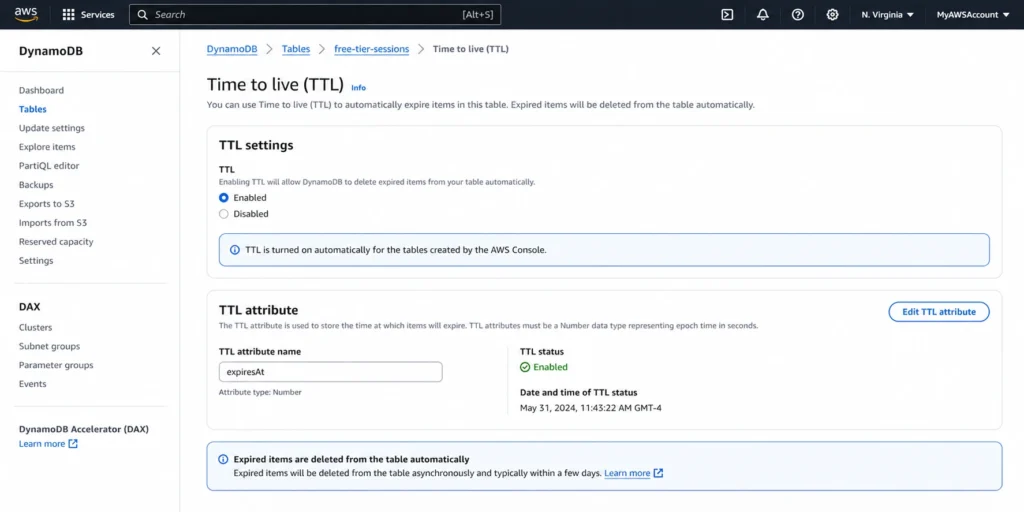
DynamoDB TTL (Time to Live) deletes expired items automatically without consuming any write capacity units. The deletion is completely free: no WCU, no WRU, no additional charges. Every item deleted by DynamoDB TTL removes its data from storage, reducing your monthly storage bill at $0.25 per GB for Standard class tables or $0.10 per GB for Standard-IA tables.
TTL also removes expired items from all Global Secondary Indexes and Local Secondary Indexes at no extra cost. For a table growing by 10 GB per month of temporary data (session tokens, cache entries, event logs), enabling DynamoDB TTL saves $2.50/month in storage costs, $30/year, with zero engineering effort after initial setup.
What Exactly Is Free About DynamoDB TTL?
DynamoDB TTL pricing has a simple structure: the deletion operation itself costs nothing. Here is the complete DynamoDB TTL cost breakdown.
| Action | WCU/WRU Cost | Storage Cost | Streams Cost | Notes |
| TTL deletes expired item | $0.00 (free) | Removed after deletion | Stream record created (free for Lambda) | Uses backend capacity, not your provisioned/on-demand |
| TTL removes item from GSI | $0.00 (free) | Removed after deletion | N/A | All GSIs and LSIs cleaned automatically |
| Expired item in 48-hour window | $0.00 (no write) | Still billed until deleted | N/A | Appears in reads, queries, scans |
| Reading expired (not yet deleted) item | Normal RCU/RRU consumed | Still billed | N/A | Filter expressions needed to exclude |
| Manual BatchWriteItem delete (alternative) | 1 WRU per 1 KB item | Removed after deletion | Stream record created | Consumes your provisioned/on-demand capacity |
The key distinction: DynamoDB TTL uses internal backend capacity for deletions, not your table’s provisioned or on-demand throughput. This is why TTL deletions are free. Manual deletions through the API (DeleteItem, BatchWriteItem) consume your WCU/WRU at standard rates.
How Much Does DynamoDB TTL Save on Storage Costs?
The DynamoDB TTL cost savings scale directly with the amount of expired data your tables accumulate. Here is the savings calculation at five different data volumes.
| Expired Data Removed/Month | Standard Storage Saved | Standard-IA Storage Saved | Annual Savings (Standard) | PITR Backup Savings | Total Annual (Standard + PITR) |
| 1 GB | $0.25 | $0.10 | $3.00 | $2.40 | $5.40 |
| 10 GB | $2.50 | $1.00 | $30.00 | $24.00 | $54.00 |
| 50 GB | $12.50 | $5.00 | $150.00 | $120.00 | $270.00 |
| 100 GB | $25.00 | $10.00 | $300.00 | $240.00 | $540.00 |
| 500 GB | $125.00 | $50.00 | $1,500.00 | $1,200.00 | $2,700.00 |
The PITR backup savings are the hidden multiplier that most DynamoDB TTL cost guides miss. PITR charges $0.20 per GB-month based on your table’s size. Every GB of expired data that TTL removes also reduces your PITR bill. For a table with PITR enabled, the combined storage + PITR savings from DynamoDB TTL are $0.45 per GB-month ($0.25 storage + $0.20 PITR), almost doubling the effective savings.
At 500 GB of monthly expired data removed, DynamoDB TTL saves $2,700/year in combined storage and PITR costs. That is $2,700 per year from a feature that requires zero ongoing maintenance after initial setup.
Also read: DynamoDB Free Tier: 25 GB + 25 WCU + 25 RCU Always Free
How Does DynamoDB TTL Compare to Manual Deletion Methods?
If you do not use DynamoDB TTL, the alternative is deleting items manually through the API. Here is the cost comparison between TTL and the three manual approaches.
| Deletion Method | WCU/WRU Cost (10M items, 1 KB) | Engineering Effort | Deletion Timing | Best For |
| DynamoDB TTL | $0.00 (free) | One-time setup (minutes) | Within 48 hours of expiry | All time-based expiration |
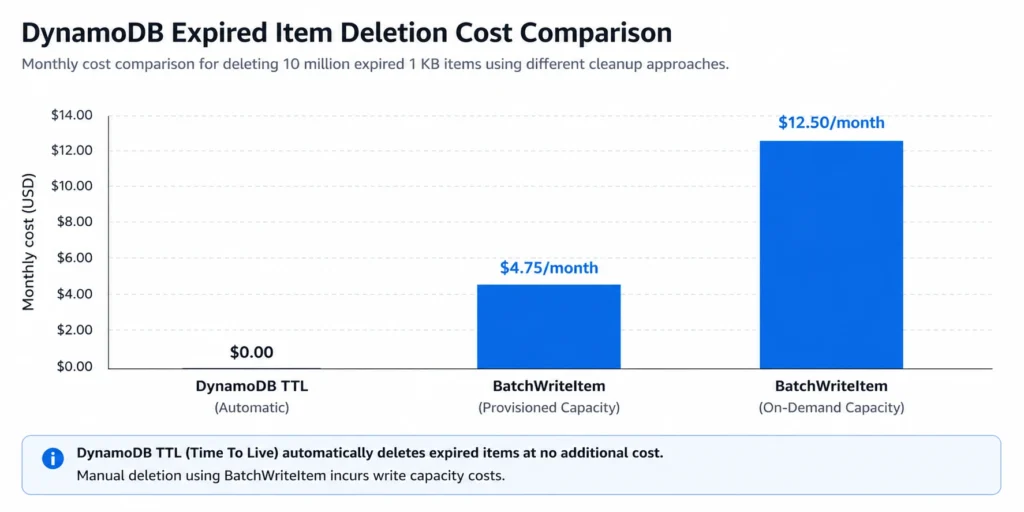
| BatchWriteItem (on-demand) | $12.50 (10M x $1.25/M) | Custom script + scheduling | Immediate | Immediate deletion required |
| BatchWriteItem (provisioned) | ~$4.75 (at standard WCU rates) | Custom script + capacity planning | Immediate | Controlled throughput deletion |
| Lambda + Scan + Delete | Scan RCU + Delete WCU + Lambda | Lambda function + CloudWatch Events | Scheduled (hourly/daily) | Complex expiration logic |
| Export + Reimport (skip expired) | $0.25/GB round-trip | S3 pipeline + table swap | Hours (migration window) | One-time massive cleanup |
For 10 million expired 1 KB items per month, DynamoDB TTL saves $12.50/month versus on-demand BatchWriteItem and $4.75/month versus provisioned BatchWriteItem. The engineering effort difference is even more significant: TTL requires one-time setup (enable TTL, set the attribute), while manual deletion requires building, deploying, and maintaining a cleanup script or Lambda function.
What Is the 48-Hour Deletion Window and Why Does It Cost You Money?
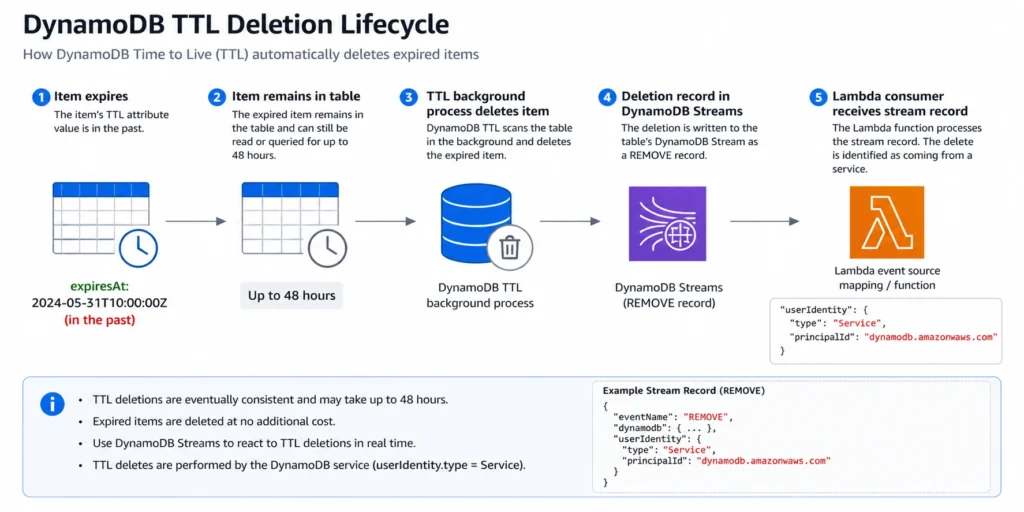
DynamoDB TTL does not delete items instantly at the expiration timestamp. The TTL background process runs continuously but deletion typically occurs within 48 hours of the item’s expiration time. During this window, expired items remain in your table and continue to incur costs.
Storage Cost During the Window
Expired items that have not yet been deleted still count toward your table’s storage size. If your table has 10 GB of items that expired in the last 48 hours but have not been cleaned up yet, you are paying $0.25/GB x 10 GB = $2.50/month for data that your application considers expired. For tables with high expiration rates (session stores expiring millions of items daily), the in-flight expired data can represent 5-10% of total table size.
Read Cost During the Window
Expired items appear in Query and Scan results until they are actually deleted. If your application reads these items without filtering, you consume RCU/RRU for data your application does not need. A Scan over a 50 GB table where 5 GB is expired-but-not-yet-deleted reads 55 GB total, paying for 10% more RCU than necessary.
The Filter Expression Solution
Add a filter expression to every Query and Scan that excludes items where the TTL attribute is less than or equal to the current Unix epoch timestamp. This prevents expired items from appearing in results. However, filter expressions are applied after DynamoDB reads the data, so you still pay for the RCU consumed to read the expired items before filtering. The filter reduces the result set size (saving network transfer and application processing) but not the RCU consumed.
For tables where the 48-hour window represents a significant percentage of data, consider combining TTL with a GSI that only indexes non-expired items (a sparse index where the TTL attribute is absent or set to a far-future timestamp). This eliminates the read cost for expired items entirely by keeping them out of the index.
How Do DynamoDB TTL Stream Deletions Affect Downstream Costs?
When DynamoDB TTL deletes an item, the deletion generates a stream record in DynamoDB Streams. This DynamoDB TTL stream record is marked with a special identifier: userIdentity.type = “Service” and userIdentity.principalId = “dynamodb.amazonaws.com”. This distinguishes TTL deletions from application-initiated deletions.
The DynamoDB TTL stream cost impact depends on your consumer architecture:
Lambda Consumers
Lambda reads from DynamoDB Streams are free. However, each DynamoDB TTL stream deletion triggers a Lambda invocation (or adds to a batch). If your table expires 5 million items per month and your Lambda function processes all stream events, those 5 million TTL deletions generate Lambda invocations that consume execution time and memory. At 128 MB memory and 50 ms average per batch of 100 records, that is: 50,000 invocations x $0.20/M = $0.01 in invocation cost, plus compute cost of approximately $0.05/month. Minimal, but not zero.
If your Lambda consumer only cares about application writes (not TTL deletions), add a filter expression to the event source mapping: {“eventName”: [“INSERT”, “MODIFY”]}. This prevents TTL DELETE events from invoking your function at all, eliminating the Lambda execution cost for TTL deletions.
Custom Consumers
Non-Lambda consumers pay $0.02 per 100,000 GetRecords calls. DynamoDB TTL stream records increase the volume of data in the stream, requiring more GetRecords calls to process all records. For tables with high expiration rates, TTL deletions can represent 30-70% of total stream volume. This directly increases the non-Lambda Streams read cost.
Also read: DynamoDB Contributor Insights Pricing
How Should You Configure DynamoDB TTL for Maximum Cost Savings?
Step 1: Choose the Right TTL Attribute
The TTL attribute must be a top-level attribute of type Number containing a Unix epoch timestamp in seconds (not milliseconds). Common choices: ‘expiresAt’, ‘ttl’, ‘expiration’. If your items already have a timestamp attribute in a different format (ISO 8601, milliseconds), you need to add a separate epoch-seconds attribute for TTL. DynamoDB ignores items where the TTL attribute does not exist, is not a Number type, or contains a timestamp more than 5 years in the past.
Step 2: Enable TTL on the Table
Navigate to the DynamoDB console, select your table, go to Additional settings, and enable Time to Live. Specify the TTL attribute name. Alternatively, use the AWS CLI: aws dynamodb update-time-to-live –table-name YourTable –time-to-live-specification “Enabled=true, AttributeName=expiresAt”. TTL takes effect immediately, but existing expired items may take up to 48 hours to start being deleted.
Step 3: Set TTL Values on Items
When writing items, compute the expiration timestamp and include it in the TTL attribute. For a session that should expire in 24 hours: expiresAt = current_epoch_seconds + 86400. For a cache entry expiring in 1 hour: expiresAt = current_epoch_seconds + 3600. For items that should never expire, either omit the TTL attribute entirely or set it to a far-future timestamp (e.g., epoch for year 2099).
Step 4: Add Filter Expressions to Reads
Update all Query and Scan operations to include a filter expression: FilterExpression = ‘#ttl > :now’ with ExpressionAttributeNames = {‘#ttl’: ‘expiresAt’} and ExpressionAttributeValues = {‘:now’: current_epoch_seconds}. This prevents expired-but-not-yet-deleted items from appearing in your results.
Step 5: Configure Streams Filters (If Using Lambda)
If your Lambda consumer should not process TTL deletions, add an event source mapping filter: FilterCriteria = {“Filters”: [{“Pattern”: “{\”eventName\”: [\”INSERT\”, \”MODIFY\”]}”}]}. This excludes all DELETE events, including both TTL and application-initiated deletes. If you need application deletes but not TTL deletes, filter on the userIdentity field instead.
What Are the Best Use Cases for DynamoDB TTL Cost Savings?
Session Stores
Web application sessions typically expire after 30 minutes to 24 hours. A session store handling 1 million daily active users with 2 KB sessions and a 1-hour TTL generates approximately 1 million expired items per day (30M/month). Without DynamoDB TTL, those 30 million items accumulate at roughly 60 GB/month, costing $15/month in storage that serves no purpose. With TTL enabled, the table stays at roughly 2-4 GB (active sessions plus the 48-hour deletion backlog), saving approximately $14/month. Over a year, that is $168 in storage savings from a one-time configuration change.
Event Logs and Audit Trails
Application event logs are typically written continuously and only relevant for 7-30 days. A logging table ingesting 500,000 events per day at 1 KB each accumulates 15 GB/month. With a 30-day TTL, the table stabilizes at approximately 15-16 GB (30 days of active data plus the deletion backlog). Without TTL, the table grows by 15 GB every month indefinitely. After 6 months, the table holds 90 GB, costing $22.50/month in storage. With TTL, it stays at 16 GB, costing $4.00/month. Savings: $18.50/month, or $222/year.
Cache Tables
DynamoDB is sometimes used as a durable cache layer. Cache entries with a 1-hour TTL are naturally high-volume and short-lived. TTL keeps the table small by automatically removing stale cache entries, preventing unbounded table growth that would increase both storage and PITR backup costs.
Temporary Tokens and One-Time Codes
Password reset tokens, email verification codes, and one-time access tokens typically expire within minutes to hours. Without TTL, these items accumulate forever. A system generating 100,000 tokens per day at 500 bytes each adds approximately 1.5 GB/month. With a 1-hour TTL, the table stays under 100 MB (active tokens plus backlog), saving $0.35/month. Individually small, but across dozens of token tables, the savings compound.
How Does DynamoDB TTL Interact with the Archival Pattern (TTL + Streams + S3)?
For data that must be deleted from DynamoDB for cost reasons but retained for compliance, the DynamoDB TTL stream archival pattern captures expired items before they disappear.
How the Pattern Works
- Enable DynamoDB TTL on the table with the appropriate expiration timestamp. 2. Enable DynamoDB Streams with NEW_AND_OLD_IMAGES view type (to capture the full item before deletion). 3. Create a Lambda function triggered by the stream that filters for TTL DELETE events (userIdentity.type = Service). 4. The Lambda function writes the expired item data to an S3 bucket (or S3 Glacier for long-term archival). 5. The expired item is automatically deleted from DynamoDB by the TTL process.
Archival Pattern Cost
DynamoDB TTL deletion: $0.00. Lambda Streams read: $0.00 (free for Lambda). Lambda execution (128 MB, 100 ms per batch): approximately $0.30/month for 10 million archived items. S3 Standard storage: $0.023/GB-month. S3 Glacier storage: $0.004/GB-month. For 10 GB of archived data per month stored in Glacier: $0.04/month. Total archival cost: approximately $0.34/month for 10 million items (10 GB) archived to Glacier. Compare to keeping the same 10 GB in DynamoDB Standard class: $2.50/month + $2.00/month PITR = $4.50/month. The archival pattern saves $4.16/month per 10 GB while retaining full data access for compliance.
At scale, the savings compound. A 500 GB archival pipeline: DynamoDB storage saved = $125.00/month. S3 Glacier cost = $2.00/month. Net savings: $123.00/month ($1,476/year) with full data retention for audit and compliance.
How Does DynamoDB TTL Fit into the Broader DynamoDB Cost Optimization Strategy?
DynamoDB TTL is a table-level cost optimization that reduces storage and backup costs. It works independently of the capacity mode and reserved capacity decisions, making it a complementary optimization that stacks on top of throughput savings.
Here is where DynamoDB TTL fits in the cost optimization hierarchy:
- Capacity mode selection (on-demand vs provisioned): 5-6x cost impact on throughput. 2. Reserved capacity (for provisioned mode): 53-77% additional throughput savings. 3. Item size optimization: 1-3x cost multiplier on reads/writes.
- DynamoDB TTL: Direct storage cost reduction ($0.25-0.45/GB-month including PITR). 5. Table class selection (Standard vs Standard-IA): Up to 60% storage savings for remaining data. 6. Eventually consistent reads: 50% read cost reduction.
DynamoDB TTL is the highest-impact storage optimization because it eliminates data entirely rather than just storing it more cheaply. Standard-IA reduces the rate you pay per GB; TTL removes the GB completely.
After DynamoDB TTL reduces your table size and your traffic patterns stabilize, the provisioned capacity and reserved capacity decisions become the primary cost levers. Usage.ai Flex Reserved Instances automate the reserved capacity purchasing for DynamoDB, analyzing your read and write consumption patterns (on the now-smaller, TTL-optimized table) and purchasing reserved capacity blocks where utilization justifies the commitment.
The platform refreshes analysis every 24 hours versus AWS Cost Explorer’s 72+ hour cycle. If a reservation becomes underutilized, Usage.ai provides cashback and credits on the unused portion. The fee is a percentage of realized savings only.
See how much you can save on DynamoDB with Usage.ai
How Do DynamoDB TTL and Standard-IA Table Class Work Together?
DynamoDB TTL and Standard-IA table class are complementary storage optimizations. TTL removes expired data entirely. Standard-IA reduces the cost of storing the data that remains. Combining both produces the maximum storage cost reduction.
Worked example: A 200 GB audit log table growing by 50 GB per month, with a 90-day retention requirement. Without any optimization (Standard class, no TTL): after 6 months, the table holds 500 GB. Storage cost: $125.00/month. PITR cost: $100.00/month. Total: $225.00/month.
With DynamoDB TTL (90-day expiration, Standard class): the table stabilizes at approximately 150 GB (90 days of data plus the deletion backlog). Storage cost: $37.50/month. PITR cost: $30.00/month. Total: $67.50/month. Savings vs no optimization: $157.50/month (70% reduction).
With DynamoDB TTL plus Standard-IA: the 150 GB table at Standard-IA rates. Storage cost: 150 GB x $0.10 = $15.00/month. PITR cost: 150 GB x $0.20 = $30.00/month. Throughput (low-traffic audit logs, assume $10/month on-demand at Standard rates): $12.50/month at Standard-IA rates (25% higher). Total: $57.50/month. Savings vs no optimization: $167.50/month (74% reduction). Savings vs TTL alone (Standard class): $10.00/month additional from Standard-IA.
The marginal benefit of adding Standard-IA on top of TTL depends on how much data remains after TTL cleanup. For tables where TTL reduces storage to under 25 GB, the Standard class free tier (25 GB free) is more valuable than Standard-IA pricing. For tables that remain above 100 GB after TTL, Standard-IA adds meaningful additional savings.
What Is the DynamoDB TTL Cost Savings Operational Checklist?
Use this checklist when evaluating and implementing DynamoDB TTL across your account.
Discovery Phase
Identify all DynamoDB tables with time-series or temporary data by reviewing table names and schemas for timestamp attributes. Check each table’s TableSizeBytes metric in CloudWatch to quantify the storage cost baseline. Calculate the percentage of each table’s data that is older than the desired retention period by sampling items with a Scan limited to a date range. Estimate monthly savings: (expired data GB) x $0.25 (Standard) or $0.10 (Standard-IA) plus (expired data GB) x $0.20 if PITR is enabled.
Implementation Phase
Add the TTL attribute (Unix epoch seconds, Number type) to new items in your application code. Backfill the TTL attribute on existing items using a BatchWriteItem script or DynamoDB import-from-S3 approach if the table is large. Enable TTL on the table through the console or CLI. Add filter expressions to all Query and Scan operations that should exclude expired items. Configure Lambda event source mapping filters if DynamoDB Streams consumers should ignore TTL deletions.
Monitoring Phase
Monitor TableSizeBytes and ItemCount in CloudWatch weekly for the first 30 days after enabling TTL. Compare actual storage reduction against your estimated savings. Check the /aws-dynamodb/imports log group in CloudWatch for any TTL-related errors (rare, but possible for malformed timestamps). Verify that your Streams consumers are not processing an unexpected volume of TTL deletion events. Review your DynamoDB bill in Cost Explorer after the first full billing cycle to confirm the storage cost reduction.
Ongoing Maintenance
TTL requires zero ongoing maintenance after implementation. The only maintenance scenario: if your application changes the TTL attribute name, you must update the table’s TTL configuration to match. Periodically audit tables where TTL was enabled to confirm that the TTL attribute is still being set correctly on new items. Tables where developers stopped populating the TTL attribute will accumulate data indefinitely despite having TTL enabled.
What Are the Common DynamoDB TTL Pitfalls That Increase Costs?
Pitfall 1: TTL Attribute in Milliseconds Instead of Seconds
DynamoDB TTL requires Unix epoch timestamps in seconds. If your application writes milliseconds (e.g., 1714000000000 instead of 1714000000), DynamoDB interprets the value as a timestamp thousands of years in the future and never deletes the item. Your table grows indefinitely with items that should have expired. This is the single most common DynamoDB TTL implementation error.
Pitfall 2: Forgetting to Filter Expired Items in Reads
Expired items remain readable for up to 48 hours. If your application does not add filter expressions to queries, users may see stale or expired data. Worse, every read of an expired item consumes RCU that your application does not need.
Pitfall 3: Not Monitoring TTL Deletion Backlog
DynamoDB does not provide a direct CloudWatch metric for TTL deletion backlog. The closest proxy is comparing your table’s ItemCount (from DescribeTable) against your expected active item count. If the gap grows over time, your TTL deletion process may be falling behind, possibly due to extremely high table activity that consumes the backend capacity used for TTL deletions.
Pitfall 4: Enabling TTL Without Updating Downstream Consumers
If your Lambda function processes DynamoDB Streams and you enable TTL without adding a filter for TTL deletions, every expired item triggers a Lambda invocation. For tables with high expiration rates, this can double or triple your Lambda invocation count, increasing both Lambda costs and downstream processing load.
Pitfall 5: Using TTL for Immediate Deletion Requirements
DynamoDB TTL is best-effort with a 48-hour window. If your application requires that items be unavailable immediately after expiration (for example, GDPR right-to-erasure), TTL alone is not sufficient. You need either a synchronous DeleteItem call (which consumes WCU) or a combination of TTL plus client-side filtering to ensure expired items are never returned in responses.
Frequently Asked Questions
1. Is DynamoDB TTL free?
Yes, the deletion operation itself is completely free. DynamoDB TTL does not consume any provisioned or on-demand write capacity units when deleting expired items. You save both the deletion cost and the ongoing storage cost of the removed data. The only indirect costs are expired items consuming storage during the 48-hour deletion window and Streams records triggering downstream consumers.
2. What does TTL mean in DynamoDB?
TTL (Time to Live) is a per-item expiration mechanism. You designate a Number attribute containing a Unix epoch timestamp in seconds. When the current time passes that timestamp, DynamoDB automatically deletes the item within a few days (typically 48 hours). TTL is enabled at the table level and applies to all items that have the designated TTL attribute.
3. Does DynamoDB have TTL?
Yes. DynamoDB TTL is a built-in feature available on all DynamoDB tables at no additional cost. You enable it through the console, CLI, or SDK by specifying a TTL attribute name. TTL works with both provisioned and on-demand capacity modes, both Standard and Standard-IA table classes, and Global Tables.
4. How long does DynamoDB TTL take to delete items?
DynamoDB TTL typically deletes expired items within 48 hours of the expiration timestamp. The exact timing depends on table size and activity level. Items are not deleted instantly at the expiration time. During the deletion window, expired items still appear in reads, queries, and scans and still consume storage costs. Always filter expired items client-side.
5. Do TTL deletions appear in DynamoDB Streams?
Yes. Every DynamoDB TTL stream deletion creates a stream record marked with userIdentity.type = Service and principalId = dynamodb.amazonaws.com. Lambda consumers read these for free. Non-Lambda consumers pay $0.02/100K reads. Use event source mapping filters to exclude TTL deletions from Lambda consumers that do not need them.
6. Can you set different TTL values for different items?
Yes. DynamoDB TTL is per-item, not per-table. Each item can have a different expiration timestamp in the TTL attribute. A session item might expire in 1 hour (current_time + 3600) while an order history item in the same table might expire in 90 days (current_time + 7776000). Items without the TTL attribute are never expired by TTL.
7. Does DynamoDB TTL work with Global Tables?
Yes. TTL works with Global Tables, but with a nuance: the TTL deletion is replicated to all replica regions. If an item expires and is deleted in the primary region, that deletion replicates to all other regions. DynamoDB TTL stream records for TTL deletions are only identifiable in the region where the deletion originated, not in regions where it was replicated.
8. What happens if I update an item’s TTL attribute after it expires?
You can still update expired items that have not yet been deleted by the TTL background process. If you update the TTL attribute to a future timestamp, the item will no longer be eligible for TTL deletion. Use a condition expression when updating expired items to ensure the item has not been deleted between expiration and your update attempt.