
 AWS
AWS Microsoft Azure
 Google Cloud


Many teams assume Multi-AZ should be the default for every production database, while others focus on minimizing costs with Single-AZ deployments. In reality, the right choice depends on your application’s recovery objectives, downtime tolerance, and business impact.
Another common misconception is that purchasing Reserved Instances makes the additional cost of Multi-AZ negligible. These are two separate decisions.
Your deployment architecture determines your database’s availability and resilience. Reserved DB Instances and Database Savings Plans are billing discounts that reduce eligible compute costs. They don’t provide high availability or change your architectural requirements.
This guide explains how the two deployment options differ, how reserved instances and database savings plans apply, common misconceptions, and how to choose the right option for different workloads.
The short answer
For development, testing, QA, and other non-production environments where brief downtime is acceptable, Single-AZ is generally the more cost-effective option.
Once you’ve chosen the appropriate deployment model, you can reduce long-term costs with Reserved Instances or Database Savings Plans, depending on your organization’s commitment strategy.
These pricing options help lower eligible compute charges but don’t change the architectural trade-offs between Single-AZ and Multi-AZ.
Decide how resilient your workload needs to be before deciding how to optimize its cost.
Single-AZ vs Multi-AZ at a Glance
A Single-AZ deployment runs your database on a single DB instance in one Availability Zone. A standard Multi-AZ deployment provisions a primary DB instance and a synchronously replicated standby instance in another Availability Zone.
If the primary becomes unavailable because of qualifying infrastructure failures or certain maintenance events, Amazon RDS automatically promotes the standby and updates the database endpoint, reducing application downtime.
| Feature | Single-AZ | Standard Multi-AZ |
|---|---|---|
| Deployment | One DB instance in one Availability Zone | Primary DB instance with a standby in another Availability Zone |
| High availability | No automatic failover | Automatic failover during qualifying failures and many maintenance events |
| Standby instance | Not available | Continuously synchronized standby |
| Read traffic | All reads go to the primary | Standby doesn't serve application reads |
| Replication | N/A | Synchronous |
| Infrastructure cost | Lower | Higher because a standby instance is maintained |
| Best suited for | Development, testing, staging, internal workloads | Production workloads requiring higher availability |
What Is the Difference Between Single-AZ and Multi-AZ?
A Single-AZ deployment runs your database on one DB instance in a single Availability Zone. Amazon RDS still manages routine administrative tasks such as automated backups, monitoring, software patching, and point-in-time recovery.
However, if the underlying infrastructure or Availability Zone experiences a qualifying failure, your database may be unavailable until AWS restores service or replaces the instance.
A standard Multi-AZ deployment provisions a standby DB instance in a different Availability Zone within the same AWS Region.
Amazon RDS continuously synchronizes data between the primary and standby so the standby can be promoted automatically if the primary becomes unavailable.
For applications, this means less downtime during qualifying infrastructure failures and many maintenance operations, but not zero downtime. Existing database connections are interrupted during failover, so applications should implement retry logic and resilient connection handling.
It’s also important to understand what Multi-AZ doesn’t do.
Multi-AZ is a high availability feature. Do not treat it as a disaster recovery solution. It doesn’t protect against accidental data deletion, logical corruption, or an AWS Regional outage. For those scenarios, organizations should combine Multi-AZ with backups, point-in-time recovery, snapshots, or cross-Region disaster recovery strategies where appropriate.
How Does Automatic Failover Work?
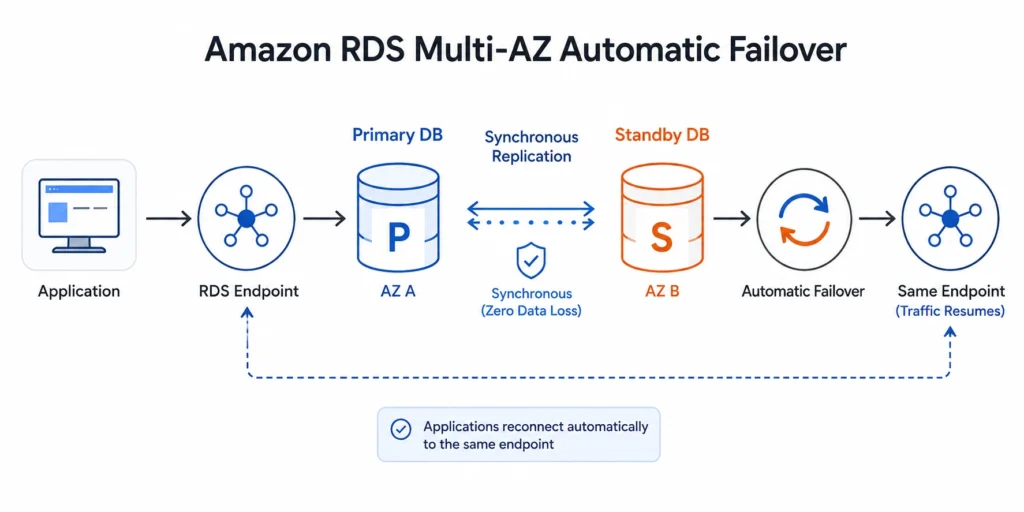
If Amazon RDS detects a qualifying infrastructure failure, such as compute, storage, or Availability Zone issues, or performs certain maintenance operations that require a failover, it automatically promotes the standby instance to become the new primary and updates the endpoint accordingly.
Because the endpoint remains the same, applications don’t need to change connection strings. However, existing database connections are interrupted during failover, so applications should implement retry logic, connection validation, and resilient connection pooling.
While failover times vary depending on the database engine, workload, and recovery state, standard Multi-AZ deployments typically complete failover within one to two minutes.
Some events may take longer. Newer Multi-AZ DB Clusters generally provide faster failovers for supported engines.
Multi-AZ vs Read Replicas
They don’t.
Although both involve replication, they’re designed for entirely different objectives.
A standard Multi-AZ deployment improves availability by maintaining a synchronously replicated standby database that automatically takes over during qualifying infrastructure failures. During normal operation, the standby remains unavailable for application reads.
Read Replicas, on the other hand, improve read scalability. They use asynchronous replication to create one or more read-only copies of the primary database that applications can query for reporting, analytics, or other read-heavy workloads.
Because replication is asynchronous, replicas can experience replication lag and aren’t intended to provide automatic failover.
| Feature | Standard Multi-AZ | Read Replica |
|---|---|---|
| Primary purpose | High availability | Read scaling |
| Replication | Synchronous | Asynchronous |
| Automatic failover | Yes | No (manual promotion required) |
| Read traffic | Standby doesn't serve reads | Yes |
| Replication lag | Not application-facing | Possible |
| Best suited for | Production resilience | Reporting, analytics, read-heavy applications |
- Choose Multi-AZ when your priority is minimizing downtime.
- Choose Read Replicas when your database is limited by read throughput.
Related: Learn how to choose the right deployment model before optimizing commitments in our AWS Reserved Instances guide.
Does Multi-AZ Improve Performance?
A standard Multi-AZ deployment is designed to improve availability, not increase database throughput.
The standby database doesn’t process application read traffic, so enabling Multi-AZ won’t improve read performance.
In fact, because data is synchronously replicated to the standby before a transaction is committed, some write operations may experience a small increase in commit latency compared to a Single-AZ deployment.
For most production workloads, this trade-off is acceptable because it provides automatic failover and better resilience.
If your workload is constrained by read performance, Amazon RDS Read Replicas, or, for supported engines, Multi-AZ DB Clusters are typically more appropriate than a standard Multi-AZ deployment.
Also read :RDS Reserved Instances: Engine-by-Engine Pricing and Commitment Guide
- Need higher availability? → Multi-AZ
- Need more read capacity? → Read Replicas
- Need both? → Use both where appropriate
Multi-AZ DB Instances vs Multi-AZ DB Clusters
The traditional Multi-AZ DB instance deployment, which is the focus of this article uses one primary database and one standby instance in another Availability Zone. The standby exists solely to improve availability and doesn’t serve application reads.
Multi-AZ DB Clusters, available for supported database engines, extend this model by adding two readable instances across multiple Availability Zones. This provides faster failover and enables applications to offload read traffic using a dedicated reader endpoint.
| Feature | Standard Multi-AZ DB Instance | Multi-AZ DB Cluster |
|---|---|---|
| Primary purpose | High availability | High availability + read scaling |
| Readable standby | No | Yes |
| Reader endpoint | No | Yes |
| Automatic failover | Yes | Yes |
| Typical failover | Around 1–2 minutes | Generally faster |
| Best suited for | Most production workloads | Applications requiring both resilience and read scaling |
For many organizations evaluating Single-AZ versus Multi-AZ, the traditional Multi-AZ deployment remains the right comparison because it’s the most widely adopted architecture for production databases.
If your workload requires both high availability and significant read throughput, evaluate whether a Multi-AZ DB Cluster is a better fit than combining a traditional Multi-AZ deployment with multiple Read Replicas.
Common Misconceptions
Multi-AZ doubles database performance.
No. A standard Multi-AZ deployment doesn’t increase read capacity or processing power. It improves resilience by maintaining a synchronized standby database.
Read Replicas replace Multi-AZ.
Multi-AZ is a disaster recovery solution.
Multi-AZ doubles database performance.
How Reserved Instances Apply to Single-AZ and Multi-AZ
This is where many organizations conflate architecture decisions with pricing decisions.
Choosing Single-AZ or Multi-AZ determines your database’s availability and resilience. Reserved DB Instances and Database Savings Plans determine how eligible compute usage is billed. They reduce long-term costs but don’t change whether your workload requires high availability.
For predictable, long-running databases, commitment-based discounts can significantly reduce compute costs compared to On-Demand pricing.
However, they don’t discount storage, backup storage, snapshots, provisioned IOPS, or data transfer, so it’s important to evaluate your total cost of ownership, and not just instance pricing.
Reserved DB Instances vs Database Savings Plans
- Reserved DB Instances (RIs) – Best suited for stable workloads where you know the database engine, Region, and instance family are unlikely to change over the commitment term.
- Database Savings Plans (DSPs) – Better suited for organizations that want commitment discounts while retaining greater flexibility across eligible AWS database services, instance families, and deployment options.
| Feature | Reserved DB Instances | Database Savings Plans |
|---|---|---|
| Commitment | 1 or 3 years | 1 or 3 years |
| Best for | Stable, predictable databases | Evolving or modernizing environments |
| Flexibility | Lower | Higher |
| Typical use case | Long-lived production databases | Organizations expecting infrastructure changes |
Learn more about how Usage.ai supports all 10 AWS database savings plans and here’s what that means for your database bill.
Do Reserved Instances Work Differently for Single-AZ and Multi-AZ?
Reserved DB Instances are billing discounts, not physical database instances.
Whether your database runs as Single-AZ or Multi-AZ, AWS applies reservation benefits to eligible DB instance usage based on the reservation’s attributes and the database engine.
For several engines, including MySQL, PostgreSQL, MariaDB, Oracle BYOL, and Db2, AWS supports instance size flexibility. It allows reservation benefits to automatically apply across instance sizes within the same instance family using normalization factors.
For Microsoft SQL Server and Oracle License Included, instance size flexibility isn’t available, making reservation planning more important.
| Database Engine | Instance Size Flexibility |
|---|---|
| MySQL | Yes |
| PostgreSQL | Yes |
| MariaDB | Yes |
| Oracle (BYOL) | Yes |
| Db2 | Yes |
| Oracle (License Included) | No |
| Microsoft SQL Server | No |
For size-flexible engines, AWS can automatically apply reservation benefits across eligible Single-AZ and Multi-AZ deployments based on normalized usage. For engines without size flexibility, reservations generally need to match the running instance’s attributes more closely.
Understanding the Cost of Multi-AZ
The answer is usually for the DB instance component, but not necessarily for your total RDS bill.
A standard Multi-AZ deployment provisions both:
- A primary DB instance
- A standby DB instance in another Availability Zone
However, your overall monthly bill also includes costs such as:
- Storage
- Provisioned IOPS (if applicable)
- Backup storage
- Snapshots
- Data transfer
- RDS Extended Support (where applicable)
Beyond Compute: Evaluate Total Cost of Ownership
A complete FinOps review should also evaluate:
- Storage utilization
- Provisioned IOPS
- Backup retention policies
- Snapshot lifecycle management
- Idle or underutilized databases
- Instance rightsizing opportunities
- RDS Extended Support costs
- Application architecture that drives unnecessary Multi-AZ usage
Choosing the Right Commitment Strategy
| Scenario | Recommended Approach |
|---|---|
| Stable production database with predictable usage | Reserved DB Instance or Database Savings Plan |
| Organization frequently modernizes infrastructure | Database Savings Plan |
| Development and testing environments | On-Demand in most cases |
| Short-term projects | On-Demand |
| Uncertain architecture or upcoming migrations | Delay long-term commitments until infrastructure stabilizes |
Purchasing long-term commitments before finalizing your architecture can reduce flexibility and lower commitment utilization if workloads are resized, migrated, or retired.
Which Should You Choose: Single-AZ or Multi-AZ?
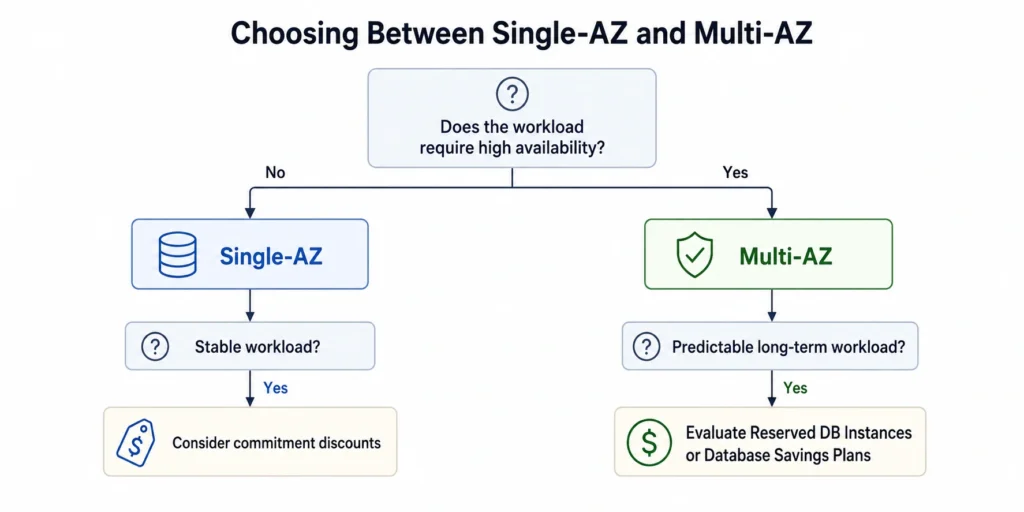
While Multi-AZ improves resilience through automatic failover, it isn’t the default answer for every workload. Likewise, choosing Single-AZ purely to save money can increase operational risk if downtime affects customers or revenue.
Use the following decision framework as a starting point.
| Workload | Recommended Deployment | Why |
|---|---|---|
| Customer-facing production applications | Multi-AZ | Reduces downtime during infrastructure failures and many maintenance events |
| Business-critical databases | Multi-AZ | Supports higher availability for workloads with strict uptime requirements |
| Internal business applications with moderate availability needs | Evaluate business impact | Balance downtime tolerance against infrastructure cost |
| Development and testing | Single-AZ | Lower cost with sufficient resilience for non-production workloads |
| QA and staging | Usually Single-AZ | Suitable unless the environment must closely mirror production |
| Sandbox, proof of concept, temporary workloads | Single-AZ | Avoid paying for availability that isn't required |
- Business impact of downtime
- Recovery Time Objective (RTO)
- Recovery Point Objective (RPO)
- Compliance requirements
- Service Level Objectives (SLOs)
- Cost of an outage versus the cost of additional infrastructure
Common Cost Optimization Mistakes
1. Running Multi-AZ Everywhere
It is not automatically the best choice for development, testing, staging, or temporary environments.
Review database deployments regularly to ensure you’re paying for additional resilience only where it provides measurable business value.
2. Buying Commitment Discounts Too Early
If you expect to:
- migrate databases,
- resize instances,
- change instance families,
- or modernize infrastructure,
3. Assuming Multi-AZ Improves Performance
If your bottleneck is read throughput, evaluate:
- Amazon RDS Read Replicas
- Multi-AZ DB Clusters (where supported)
- Query optimization
- Database indexing
4. Looking Only at Compute Costs
Also review:
- Storage utilization
- Provisioned IOPS
- Backup retention
- Snapshot lifecycle
- Idle databases
- Rightsizing opportunities
- Extended Support charges
- Commitment utilization
5. Treating Every Production Database the Same
For example:
- An online checkout database likely justifies Multi-AZ.
- An internal reporting database that can tolerate scheduled downtime may not.
For example:
- An online checkout database likely justifies Multi-AZ.
- An internal reporting database that can tolerate scheduled downtime may not.
How Usage.ai Helps Optimize Amazon RDS Costs
Usage.ai automates RDS commitment management by analyzing eligible database spend and managing commitments on your behalf. Instead of relying on manual forecasting and one-time purchasing decisions, Usage.ai continuously optimizes commitments as usage evolves.
With its Flex Insured Commitments program, teams can capture up to 69% savings available through Amazon RDS Reserved Instances without taking on the long-term commitment risk. If a commitment no longer delivers savings compared with equivalent On-Demand usage, Usage.ai provides cashback protection to help cover the difference.
The result is a managed RDS commitment strategy that combines AWS database discounts with automation, flexibility, and protection against commitment risk.
Explore how Usage.ai helps organizations identify commitment opportunities and reduce cloud costs with data-driven recommendations.
Frequently asked questions
Does Multi-AZ always cost twice as much as Single-AZ?
Not necessarily. A standard Multi-AZ deployment provisions both a primary and standby DB instance, so the DB instance component is typically about twice that of an equivalent Single-AZ deployment.
However, your total monthly bill also depends on storage, backups, provisioned IOPS, snapshots, Extended Support, and other usage-based charges.
Does Multi-AZ improve database performance?
A standard Multi-AZ deployment is designed for high availability, not performance.
The standby instance doesn't process application reads. If your goal is improving read throughput, consider Amazon RDS Read Replicas or Multi-AZ DB Clusters for supported engines.
Can I use Reserved DB Instances with both Single-AZ and Multi-AZ deployments?
Yes. Reserved DB Instances reduce eligible compute charges for both deployment models. How reservation benefits are applied depends on factors such as the database engine, licensing model, and reservation attributes.
Should I choose Reserved DB Instances or Database Savings Plans?
It depends on how predictable your workloads are. Reserved DB Instances are well suited to stable, long-running databases, while Database Savings Plans generally offer more flexibility for organizations that frequently modernize infrastructure or resize workloads.
What is the difference between Multi-AZ and Read Replicas?
Multi-AZ improves availability through synchronous replication and automatic failover. Read Replicas improve read scalability using asynchronous replication. Many production environments use both technologies together.




