.png)
 AWS
AWS Microsoft Azure
 Google Cloud


Amazon ElastiCache is a fully managed in-memory data store service on AWS. It stores data in RAM rather than on disk, which is the fundamental reason it exists: reading 1 MB of data sequentially from RAM takes approximately 250 microseconds.
The same read from an SSD takes approximately 250 milliseconds — 1,000 times longer. For applications that read the same data repeatedly, that latency difference compounds across millions of requests per day into a measurable gap in user experience and database infrastructure cost.
ElastiCache sits between your applications and your primary databases — RDS, DynamoDB, Aurora, or any other data store. Applications check the cache first. If the data is there (a cache hit), it is returned from RAM in sub-millisecond time. If it is not (a cache miss), the application reads from the primary database and writes the result to the cache for the next request. Databases receive fewer direct queries. Response times improve. Infrastructure costs decrease because you can handle more requests per second without scaling the database.
As of June 2026, ElastiCache supports three open-source caching engines and two deployment modes. The engine choice and deployment mode determine your pricing model, feature availability, and the optimal cost management strategy. This guide covers all of them.
See exactly what you’re overpaying in under 60 seconds. Try the Calculator for free →
The Three ElastiCache Engines: Valkey, Redis OSS, and Memcached
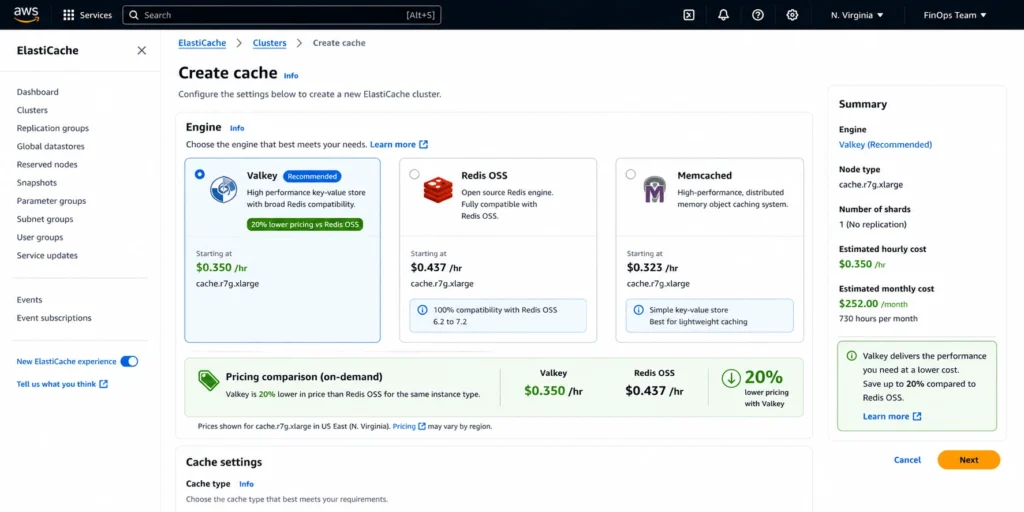
ElastiCache has supported Redis and Memcached since its launch in 2012. In October 2024, AWS added Valkey as a third engine — and the recommended choice for new deployments. Understanding the distinctions among the three is the first step toward choosing the right configuration.
Valkey (Recommended for New Deployments, October 2024)
Valkey is an open-source, Redis-compatible key-value store stewarded by the Linux Foundation and backed by over 40 companies. It was created in March 2024 when the Redis project changed its open-source licensing. Valkey development is led by engineers who were the primary maintainers of Redis OSS for years. The codebase is a direct fork of Redis 7.2 and is a drop-in replacement for Redis OSS — no application code changes are required to switch.
AWS recommends Valkey for all new ElastiCache deployments in 2026. The primary reason is pricing: Valkey is 20% cheaper than Redis OSS for node-based clusters and 33% cheaper for ElastiCache Serverless. On a cache.r7g.xlarge node in US East (N. Virginia): Redis OSS costs $0.437/hr on-demand. Valkey costs $0.350/hr. For a six-node production cluster running 24/7, that difference is approximately $4,590/year in on-demand costs before any Reserved Node discounts. Source: Usage.ai live blog, verified April 2026. Verify at aws.amazon.com/elasticache/pricing — rates change.
Valkey supports: all Redis OSS data types (strings, hashes, lists, sets, sorted sets, streams, HyperLogLog, geospatial indexes, bitmaps). All major Redis commands. Cluster mode for horizontal sharding. Replication groups for high availability. RESP protocol for client compatibility. pub/sub messaging. Lua scripting. Transactions (MULTI/EXEC). Source: AWS Database Blog (October 2024 Valkey launch announcement).
Valkey is a drop-in replacement for Redis OSS. If your application connects to Redis OSS on ElastiCache today, migrating to Valkey requires changing the engine type when creating a new cluster — no client library changes, no connection string format changes, no command changes. The RESP protocol used by Valkey is identical to Redis OSS. Most existing Redis client libraries (redis-py, ioredis, Jedis, StackExchange.Redis) connect to Valkey without modification.
Redis OSS (Established, Broader Third-Party Ecosystem)
Redis OSS on ElastiCache is the original managed Redis offering and remains fully supported. It is functionally equivalent to Valkey from an application perspective — same commands, same data types, same cluster topology options. The reason to choose Redis OSS over Valkey in 2026 is narrow: some third-party management tools, monitoring integrations, or compliance requirements specify Redis explicitly and have not yet been validated with Valkey. For most applications, Valkey is the better choice on cost grounds alone.
Redis OSS on ElastiCache supports the same versions (6.2, 7.0, 7.1) as Valkey. Extended Support pricing applies to Redis OSS versions past their end-of-standard-support date (covered in detail below). Valkey does not yet have any versions in Extended Support.
Memcached (Simple, Multi-Threaded, No Persistence)
Memcached is the simpler of the three engines. It supports only string key-value pairs — no complex data types, no persistence, no replication, no pub/sub, no Lua scripting, no cluster mode. What it provides: multi-threaded architecture (Redis and Valkey are single-threaded per shard), horizontal scaling by adding nodes to a cluster without data redistribution, and a straightforward protocol.
Memcached is the right choice when: the caching use case is simple key-value storage with no need for complex data structures, the application already has its own data distribution logic, and there is no requirement for data persistence across cache restarts. For most teams in 2026 evaluating a new caching solution, Valkey covers all Memcached use cases plus much more at similar pricing. The primary reason Memcached remains relevant is existing application compatibility — teams running Memcached-based applications that would require code changes to switch protocols.
The Two Deployment Modes: Node-Based and Serverless
ElastiCache offers two fundamentally different ways to deploy a cache, each with its own billing model, scaling behavior, and cost optimization path.
Node-Based Clusters
Node-based clusters are the traditional ElastiCache deployment model. You provision specific cache node types (cache.r7g.xlarge, cache.m7g.large, etc.), choose a cluster topology (single node, primary/replica, or cluster mode with multiple shards), and AWS bills you per node-hour for every running node.
Node-based clusters give you predictable capacity, consistent performance, and the ability to purchase Reserved Nodes (the primary mechanism for reducing ElastiCache costs by 30-55%). They require capacity planning — you choose a node size that fits your expected dataset and throughput — but they deliver the best cost per throughput at production scale.
For production workloads with stable, predictable cache usage, node-based clusters are the correct choice. The combination of right-sized nodes and Reserved Node purchases consistently delivers better economics than Serverless at sustained scale.
ElastiCache Serverless
ElastiCache Serverless launched in 2023. It eliminates capacity planning: you create a Serverless cache and ElastiCache automatically scales compute and memory to match your workload demand. Billing is per ECPU (ElastiCache Compute Unit, a measure of processing capacity consumed per request) and GB-hour of data stored.
The pricing floor for Serverless matters: Redis OSS and Memcached Serverless have a minimum of 1 GB stored, which costs approximately $91/month even if you store almost nothing. Valkey Serverless has a 100 MB minimum, bringing the floor down to approximately $6/month. This makes Valkey Serverless the correct choice for teams that want Serverless economics with minimal baseline cost. Source: dev.to (April 2026) and cloudchipr.com citing AWS official pricing. Verify at aws.amazon.com/elasticache/pricing.
Serverless is appropriate when: usage patterns are unpredictable or highly variable, the development overhead of capacity planning is not justified by the scale, or the workload is new and the cache size is unknown. For workloads processing hundreds of thousands of requests per second at consistent volume, node-based clusters are almost always cheaper.
Serverless discount path: Reserved Nodes do not apply to Serverless caches. The discount mechanism for Serverless ElastiCache is AWS Database Savings Plans, which provide a committed hourly spend rate across eligible services including ElastiCache Serverless. Source: Usage.ai live ElastiCache Reserved Nodes guide.
Also read: ElastiCache Reserved Nodes: complete pricing guide for node-based clusters
What Does ElastiCache Actually Do? The Core Use Cases
Database Query Caching
The most common ElastiCache use case is caching results of expensive database queries. A query that JOINs three tables, applies filters, and aggregates results may take 200-500 milliseconds on a busy RDS instance. If 10,000 users per minute request the same dashboard data, the database receives 10,000 queries per minute for identical results. With ElastiCache in front, the first request executes against the database and the result is cached. The next 9,999 requests in that minute return from ElastiCache in sub-millisecond time. The database receives one query instead of 10,000.
This pattern is called the cache-aside strategy (also known as lazy loading). Application code checks the cache before querying the database. On a miss, the application queries the database and writes the result to the cache with a TTL (time-to-live) expiration. When the TTL expires, the next request repopulates the cache from the database. The TTL determines how stale cached data can become.
Session Storage
Web applications that maintain user sessions (shopping carts, authentication tokens, user preferences) need to store and retrieve session data on every authenticated request. Traditional approaches store sessions in the application database or in files on the web server. Both create problems at scale: the database handles high-volume small reads for every authenticated page load, and file-based sessions do not work across multiple web server instances.
ElastiCache is the standard solution for distributed session storage in AWS applications. Session data is stored as a key-value pair (session ID as key, serialized session data as value). Any web server instance can read any session. Reads are sub-millisecond. The cache operates independently from the primary database. If the cache fails, the application can fall back to re-authenticating users, which is acceptable downtime for the database to handle. Sessions typically have short TTLs (15-60 minutes of inactivity), which keeps the cache dataset small even for large user bases.
Real-Time Leaderboards and Ranked Data
Redis OSS and Valkey support sorted sets — a data type that stores members with an associated score, maintaining the set in sorted order. This makes ElastiCache the natural solution for real-time leaderboards, ranking systems, and any use case that requires fast ordered access to a large dataset. Adding or updating a score: O(log N) time. Retrieving the top 100 players: O(log N + 100) time. Both operations complete in microseconds regardless of leaderboard size.
Building an equivalent leaderboard in a relational database requires either maintaining a sorted index (expensive to update at high write rates) or running a full ORDER BY query on every request (expensive to read at scale). ElastiCache’s sorted set handles both reads and writes efficiently without database overhead.
Rate Limiting and Request Throttling
APIs and web applications often need to limit the number of requests a single user or IP address can make per time window. A common pattern: increment a Redis counter with each request, set a TTL on the counter equal to the rate limit window, and reject requests when the counter exceeds the threshold. This requires atomic increment-and-read operations — ElastiCache supports INCR and EXPIRE in a single atomic operation (using MULTI/EXEC or Lua scripts).
Implementing rate limiting in a relational database requires row-level locking or optimistic concurrency control, which does not scale to the thousands of atomic increments per second that a busy API generates. ElastiCache handles this trivially, processing hundreds of thousands of INCR operations per second per node.
Pub/Sub Messaging
Redis OSS and Valkey support publish/subscribe messaging — a pattern where publishers send messages to channels and subscribers receive them. This enables lightweight asynchronous communication between microservices or between servers and connected clients. ElastiCache pub/sub is not a full message queue replacement (it does not persist messages if no subscribers are connected), but for use cases where message delivery is best-effort and real-time — live notifications, chat presence, event broadcasting — it provides low-latency message distribution without a separate messaging service.
AI and Vector Search (pgvector Alternative on Valkey)
Valkey and Redis OSS support storing and searching vector embeddings using the HNSW and Flat indexing algorithms (via the Search module). This enables semantic search, recommendation engines, and retrieval-augmented generation (RAG) pipelines that require fast vector similarity search without a dedicated vector database. For workloads where the vector dataset fits in memory and the primary requirement is sub-millisecond search latency, ElastiCache is a cost-effective alternative to standalone vector databases or pgvector on a large RDS PostgreSQL instance.
ElastiCache Architecture: How a Cluster Is Structured
Nodes
A cache node is the smallest unit in ElastiCache. Each node runs an instance of the cache engine and has a fixed amount of memory and CPU based on the node type. The node type determines both capacity and cost. For Valkey and Redis OSS: node types range from cache.t4g.micro (0.5 GB RAM, $0.016/hr on-demand) to cache.r7g.12xlarge (317 GB RAM) and beyond. For production workloads, r-family (memory-optimized) nodes are the correct choice — they provide more RAM per vCPU, which is the binding constraint for in-memory caches.
An important capacity nuance: AWS recommends reserving approximately 25% of a node’s total memory for non-data overhead (replication buffers, OS memory, engine overhead). The usable cache capacity of a cache.r7g.xlarge (26.32 GB total RAM) is approximately 19.74 GB of usable data storage. Plan your node sizing based on usable capacity, not total RAM. Source: dev.to (April 2026) citing AWS official recommendation. Verify at aws.amazon.com/elasticache/pricing.
Replication Groups (Redis OSS and Valkey)
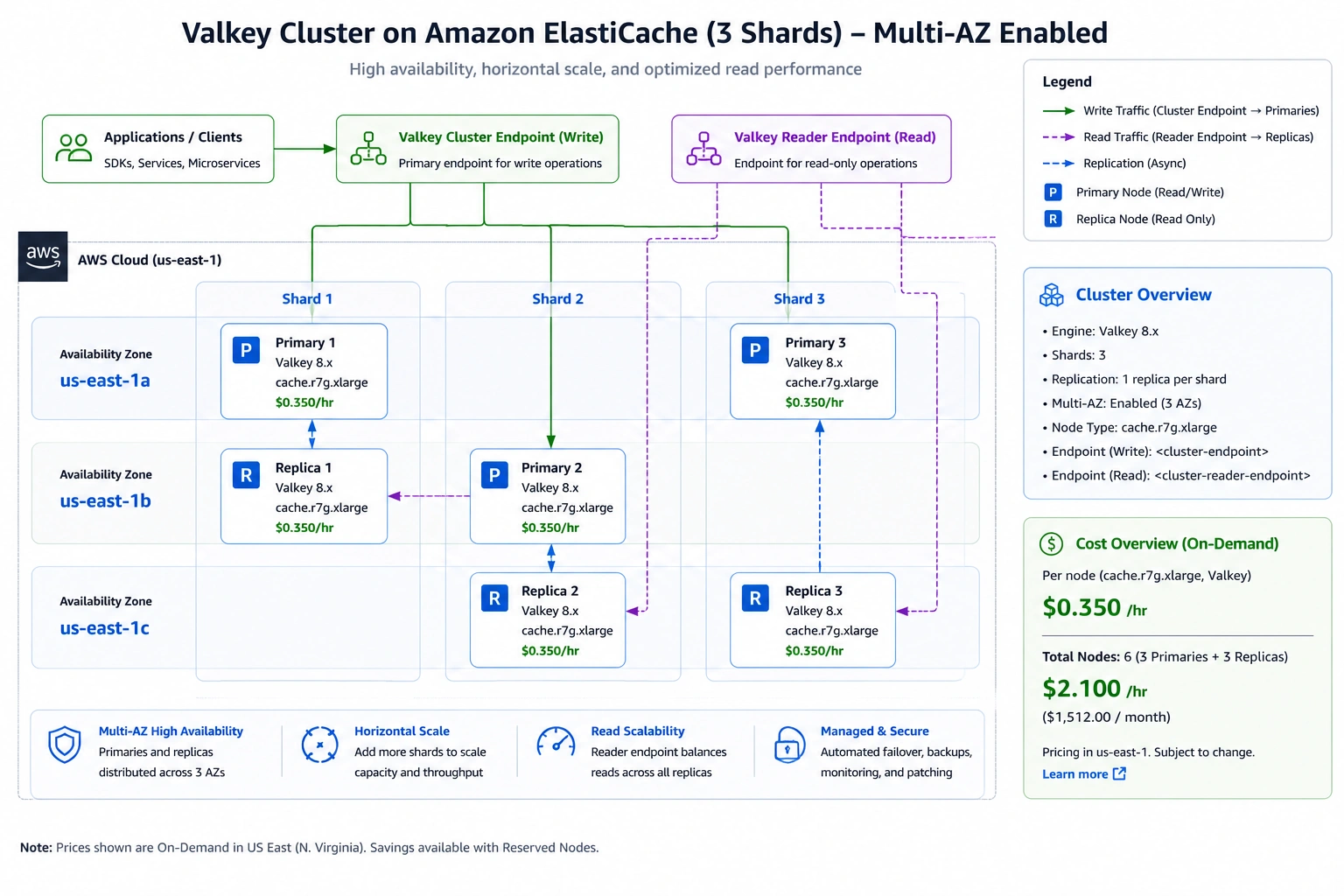
For high availability, Valkey and Redis OSS use replication groups. A replication group consists of a primary node that handles reads and writes and one or more read replica nodes that handle read traffic and serve as automatic failover targets. With Multi-AZ enabled, replicas are placed in different Availability Zones from the primary. If the primary fails, ElastiCache automatically promotes a replica to primary within 60 seconds.
Every replica node is a full node billed at the same hourly rate as the primary. A three-shard cluster with one replica per shard has six nodes total (three primaries, three replicas) — each billed independently. For a cache.r7g.xlarge Valkey cluster at $0.350/hr per node: 6 nodes x $0.350 x 730 hours = $1,533/month on-demand. The replica cost is not an add-on — it is a full node cost for each replica.
Cluster Mode
Redis OSS and Valkey support cluster mode, which distributes your dataset across multiple shards (also called node groups). Each shard handles a portion of the keyspace and has its own primary/replica replication group. Cluster mode enables horizontal scaling: as your dataset grows or throughput requirements increase, you add shards. The data is automatically distributed using consistent hashing.
Cluster mode is appropriate when a single node cannot hold your full dataset in memory, or when write throughput exceeds what a single primary node can handle. Non-cluster mode (a single primary with optional replicas) is simpler and sufficient for most production workloads. Choose cluster mode when your dataset approaches the usable capacity of your largest single node type.
Memcached Cluster
Memcached clusters consist of independent nodes with no replication between them. Data is distributed across nodes using consistent hashing at the client level — the cache client determines which node holds each key. If a node fails, the data on that node is lost (consistent with Memcached’s no-persistence design) and the client falls back to the database for those keys. New Memcached nodes can be added to or removed from a cluster with client-side reconfiguration.
ElastiCache Pricing in 2026: What You Actually Pay
| Node Type | Engine | RAM | On-Demand/hr | 1-yr RI/hr | 3-yr RI/hr | 3-yr saving |
| cache.t4g.micro | Valkey | 0.5 GB | $0.013 | ~$0.008 | ~$0.006 | ~53% |
| cache.t4g.micro | Redis OSS | 0.5 GB | $0.016 | ~$0.010 | ~$0.007 | ~55% |
| cache.m7g.large | Valkey | 8.64 GB | $0.124 | ~$0.081 | ~$0.056 | ~55% |
| cache.m7g.large | Redis OSS | 8.64 GB | $0.155 | ~$0.101 | ~$0.070 | ~55% |
| cache.r7g.large | Valkey | 13.07 GB | $0.174 | ~$0.113 | ~$0.078 | ~55% |
| cache.r7g.large | Redis OSS | 13.07 GB | $0.218 | ~$0.142 | ~$0.098 | ~55% |
| cache.r7g.xlarge | Valkey | 26.32 GB | $0.350 | ~$0.228 | ~$0.158 | ~55% |
| cache.r7g.xlarge | Redis OSS | 26.32 GB | $0.437 | ~$0.284 | ~$0.197 | ~55% |
| cache.r7g.2xlarge | Valkey | 52.82 GB | $0.699 | ~$0.454 | ~$0.315 | ~55% |
| cache.r7g.2xlarge | Redis OSS | 52.82 GB | $0.874 | ~$0.568 | ~$0.394 | ~55% |
| cache.r7g.xlarge | Memcached | 26.32 GB | $0.437 | ~$0.284 | ~$0.197 | ~55% |
All rates: US East (N. Virginia), June 2026. Verify at aws.amazon.com/elasticache/pricing — rates change.
Sources: Usage.ai live ElastiCache Reserved Nodes guide (verified April 2026), cloudburn.io ElastiCache pricing calculator (April 2026). RI rates approximate at standard discount percentages. Valkey rates = Redis OSS x 0.80 (20% lower). All rates per node-hour, US East (N. Virginia). Verify at aws.amazon.com/elasticache/pricing — rates change.
Serverless Pricing
ElastiCache Serverless is billed on two dimensions: ECPUs consumed per request and GB-hours of data stored.
ECPU (ElastiCache Compute Unit): a measure of compute capacity consumed per cache operation. Simple GET/SET operations consume approximately 1 ECPU per request. More complex operations (HSET with many fields, ZADD with large sorted sets, Lua scripts) consume more ECPUs. ECPU pricing: approximately $0.0034 per 1,000 ECPUs (verify at aws.amazon.com/elasticache/pricing).
Storage: approximately $0.125 per GB-hour (verify current rate at AWS official pricing). Minimum stored: 1 GB for Redis OSS and Memcached Serverless (approximately $91/month floor). 100 MB for Valkey Serverless (approximately $6/month floor).
At very high request volumes, Serverless costs can significantly exceed node-based costs because you pay per ECPU per request rather than a flat hourly rate regardless of actual utilization. Run the math for your specific throughput before choosing Serverless for a high-traffic production workload.
Additional Cost Components
Backup storage: $0.085/GB-month across all AWS regions for Redis OSS and Valkey snapshots. This applies to backup storage beyond the free tier (100% of primary data size is free for daily snapshots). Manual snapshots are charged from creation. Source: cloudchipr.com citing AWS official pricing (2024-2026). Verify at aws.amazon.com/elasticache/pricing.
Data transfer: standard AWS data transfer rates apply to data flowing out of ElastiCache to the internet or to other regions. Data transfer within the same AZ using private IPs is free. Cross-AZ data transfer between application instances and cache nodes is charged at $0.01/GB each direction — for applications in different AZs from the cache, this adds up for high-throughput workloads. Deploy application instances in the same AZ as the cache primary for write-intensive paths.
Global Datastore: cross-region replication for Redis OSS and Valkey creates secondary clusters in additional regions. Each secondary node is billed at the same per-node-hour rate as primary region nodes, plus standard cross-region data transfer charges. Source: AWS official ElastiCache Global Datastore documentation.
The Extended Support Trap: What Happens When You Run Old Engine Versions
This is the single most important cost risk for teams running ElastiCache on older engine versions and it affects many production deployments in 2026.
When a Redis OSS or Memcached engine version reaches end-of-standard-support on AWS, ElastiCache continues providing security patches and maintenance through Extended Support — at a significant premium added to the base node-hour rate.
Extended Support pricing structure: Year 1-2 of Extended Support: 80% of the base node-hour rate added as a surcharge. Year 3+: 160% of the base node-hour rate added as a surcharge. For a cache.m5.large running Redis 5 (which reached end-of-standard-support January 31, 2026):
Base rate: $0.156/hr. Year 1-2 Extended Support: $0.156 + ($0.156 x 80%) = $0.281/hr (~$205/month). Year 3+ Extended Support: $0.156 + ($0.156 x 160%) = $0.406/hr (~$296/month). That is nearly triple the base node cost by year three simply from not upgrading the engine version. Source: dev.to (April 2026), cloudcostwise.io (April 2026), both citing AWS official Extended Support pricing.
Redis EOL dates you should know for 2026: Redis 5.0.6 reached end-of-standard-support January 31, 2026 — now in Extended Support. Redis 6.0.x: verify current EOL date at aws.amazon.com/elasticache/faqs. Valkey 7.2 launched October 2024 with no end-of-support date announced — the newest engine and zero Extended Support risk. The simplest way to avoid Extended Support costs is to migrate to Valkey, which has the longest remaining support horizon of any ElastiCache engine.
Security and Compliance Features
ElastiCache operates entirely within your VPC (Virtual Private Cloud). This means the cache is not accessible from the public internet by default — only resources within the same VPC or connected networks can reach it. This is architecturally superior to self-managed Redis instances that require manual network security configuration.
Encryption at rest: ElastiCache encrypts data stored on disk (for Redis OSS and Valkey persistence backups) using AES-256. Encryption at rest is enabled per cluster and cannot be changed after creation. Source: AWS official ElastiCache security documentation.
Encryption in transit (TLS): all ElastiCache engines support TLS encryption for data in transit between clients and cache nodes. This is enabled at cluster creation and adds minimal latency overhead for most workloads. For compliance requirements (PCI-DSS, HIPAA, SOC 2), TLS in transit is typically required.
Authentication: Redis AUTH and ACLs (Access Control Lists) allow per-user authentication and command-level authorization. Valkey supports the same authentication mechanisms. For Memcached, authentication is handled at the network level via VPC security groups rather than protocol-level credentials.
IAM integration: ElastiCache integrates with IAM for managing who can create, modify, and delete cache clusters. RBAC controls which users and roles can perform administrative actions through the AWS API. Source: AWS official IAM ElastiCache documentation.
ElastiCache vs Building Your Own Redis on EC2
A common consideration: why use ElastiCache when you could run Redis directly on EC2 instances? The answer is the management overhead you avoid.
Self-managed Redis on EC2 requires: choosing and provisioning EC2 instances, installing and configuring Redis, setting up replication manually, configuring automatic failover (Redis Sentinel or Redis Cluster), managing Redis upgrades and security patches, monitoring with custom CloudWatch metrics, handling backup and restore, and maintaining security configurations. For teams where database infrastructure management is a core competency, this can be reasonable. For most application teams, the operational overhead is not a good use of engineering time.
ElastiCache provides: automated multi-AZ failover (60 seconds), automated backups, AWS-managed security patches, native CloudWatch metrics for cache hits, evictions, memory usage, and connections, and integration with AWS services without additional configuration. The trade-off is flexibility — you cannot modify Redis configuration parameters that ElastiCache does not expose, and you cannot install custom Redis modules (the pgvectorscale gap discussed in the PostgreSQL extensions blog is one example).
For most production teams, ElastiCache’s operational simplicity and reliability justify the managed service premium. For teams with specific Redis configuration requirements or non-standard modules, EC2-based Redis remains the alternative.
How to Reduce ElastiCache Costs: The Two Main Levers
Reserved Nodes for Node-Based Clusters
The primary cost reduction mechanism for node-based ElastiCache clusters is Reserved Nodes — a commitment purchase that reduces the per-node-hour rate by 30-55% in exchange for a 1-year or 3-year term. Since October 2024, Reserved Nodes support size flexibility within an instance family: a single reservation can cover multiple node sizes in the same family using normalization units, making them more useful than the previous exact-size model.
For a production cache.r7g.xlarge Valkey cluster with 6 nodes running 24/7: on-demand cost = $15,330/year. 3-year All Upfront reserved: approximately $8,300/year effective. Annual saving: approximately $7,000 per cluster. For teams running multiple production ElastiCache clusters, Reserved Nodes are often the single largest available cost reduction action.
Also read: ElastiCache Reserved Nodes: complete pricing guide for Redis OSS, Valkey, and Memcached
Engine Migration: From Redis OSS to Valkey
If your clusters run Redis OSS, migrating to Valkey reduces on-demand rates by 20% and Serverless rates by 33% with no application code changes required. The migration is a create-new-cluster-and-migrate operation — you cannot change the engine of an existing cluster in-place. AWS provides migration documentation and the process is straightforward for applications using standard Redis client libraries.
For teams on Redis versions approaching end-of-standard-support: migrating to Valkey simultaneously upgrades the engine and eliminates the Extended Support risk. Valkey 7.2 is fully compatible with Redis 7.x commands and data formats.
Database Savings Plans for Serverless
If you run ElastiCache Serverless, Reserved Nodes do not apply. The discount path is AWS Database Savings Plans — a commitment to a minimum hourly spend across eligible database services including ElastiCache Serverless. Database Savings Plans provide up to 40% savings on Serverless workloads with flexible coverage across multiple database services.
Usage.ai’s Insured Flex Commitments apply to ElastiCache Reserved Nodes. The platform analyzes your node-based ElastiCache cluster utilization, identifies the correct Reserved Node family and quantity, purchases automatically, and provides cashback in real money if any commitment becomes underutilized. Fee: percentage of realized savings only.
See how Usage.ai optimizes ElastiCache Reserved Node purchasing

Frequently Asked Questions
1. What is Amazon ElastiCache?
Amazon ElastiCache is AWS’s fully managed in-memory caching service. It stores data in RAM rather than on disk, delivering sub-millisecond response times. It supports three engines: Valkey (recommended for new deployments, 20% cheaper than Redis OSS), Redis OSS (the established engine), and Memcached (simple key-value, multi-threaded). It deploys inside your VPC and integrates natively with AWS databases and compute services. Source: AWS official ElastiCache documentation.
2. What is the difference between ElastiCache and a database?
ElastiCache is a cache, not a primary database. It stores a subset of your data (the most frequently or recently accessed data) in RAM for fast retrieval. When data is not in the cache, the application reads from the primary database. ElastiCache is faster than a database for cached reads but does not replace a database — it does not handle complex queries, ACID transactions, or serve as the system of record. It works alongside a primary database (RDS, DynamoDB, Aurora) to reduce that database’s load and improve application latency.
3. Is Amazon ElastiCache free?
ElastiCache is not free in general. AWS offers a free tier: 750 node-hours per month of cache.t3.micro or cache.t4g.micro for the first 12 months of a new AWS account. Beyond the free tier, ElastiCache is billed per node-hour at standard on-demand rates (for example, $0.016/hr for cache.t4g.micro Redis OSS in US East). ElastiCache Serverless has a 100 MB minimum for Valkey (approximately $6/month floor) or 1 GB minimum for Redis OSS/Memcached (approximately $91/month floor). Source: aws.amazon.com/elasticache/pricing.
4. What is the difference between Valkey and Redis on ElastiCache?
Valkey is an open-source fork of Redis 7.2 that is functionally identical to Redis OSS — same commands, same data types, same client protocols. Valkey is priced 20% lower than Redis OSS for node-based clusters and 33% lower for Serverless on ElastiCache. AWS recommends Valkey for all new deployments. Migrating existing Redis OSS clusters to Valkey requires creating a new cluster and migrating data, but no application code changes are needed. Source: AWS Database Blog (October 2024), AWS official ElastiCache documentation.
5. What is the difference between ElastiCache node-based and Serverless?
Node-based clusters provision specific cache node types (cache.r7g.xlarge, etc.) and bill per node-hour regardless of actual request volume. They require capacity planning but offer predictable costs and are eligible for Reserved Node discounts of 30-55%. Serverless caches auto-scale and bill per ECPU (compute unit per request) and GB-hour stored. No capacity planning required. Minimum cost: ~$6/month (Valkey Serverless) or ~$91/month (Redis OSS Serverless). Discount path: Database Savings Plans. Best for unpredictable workloads. Node-based is cheaper at stable production scale.
6. How does ElastiCache compare to Redis on EC2?
ElastiCache is managed: automated failover, backups, security patches, CloudWatch monitoring, and VPC integration. Redis on EC2 is self-managed: you configure replication, failover (Sentinel or Cluster), backups, monitoring, and patching. ElastiCache costs more than the raw EC2 instance cost for equivalent capacity but eliminates the operational overhead of database management. Most application teams choose ElastiCache over self-managed Redis unless they have specific Redis module requirements (like pgvectorscale) that are not available on ElastiCache.
7. How do you reduce ElastiCache costs?
Three main levers: (1) Migrate to Valkey for 20% lower on-demand rates with no application code changes. (2) Purchase Reserved Nodes for 30-55% savings on node-based clusters — size-flexible since October 2024. (3) For Serverless, use AWS Database Savings Plans. Additionally: monitor for Extended Support charges on old engine versions (Redis 5 reached EOL January 2026), right-size nodes based on actual memory utilization with 25% overhead headroom, and co-locate application instances in the same AZ as cache nodes to avoid cross-AZ data transfer charges.
8. What is ElastiCache Serverless?
ElastiCache Serverless is a deployment mode where AWS manages all capacity automatically — no node types to choose, no cluster sizing, instant scaling. It launched in 2023 and supports Valkey, Redis OSS, and Memcached. Billing is per ECPU (compute units consumed per request) and GB-hour of data stored. Serverless is appropriate for variable or unpredictable workloads where capacity planning overhead is not justified. For stable, high-volume workloads, node-based clusters with Reserved Nodes are almost always cheaper.