.png)
 AWS
AWS Microsoft Azure
 Google Cloud


Key Takeaways
|
EC2 instances are virtual machines running on AWS physical hardware, billed by the second. Pick a size, pick an OS, pay while it runs. That is the complete definition. What this guide covers is everything that comes after; the instance families, the four pricing models, and the specific reason most teams running EC2 at scale are leaving 30-50% of their compute budget on the table every month.
What Does EC2 Stand For?
EC2 stands for Elastic Compute Cloud. “Elastic” means you can scale capacity up or down programmatically. “Compute” is the CPU and RAM your workload uses. “Cloud” means the hardware is AWS-managed and shared across customers via virtualization.
Each EC2 instance is a virtualized slice of a physical server running in one of AWS’s Availability Zones. When you launch an instance, AWS allocates a specific amount of CPU, memory, network bandwidth, and storage I/O to that virtual machine. When you stop or terminate it, those resources return to the shared pool.
What Are the EC2 Instance Families?
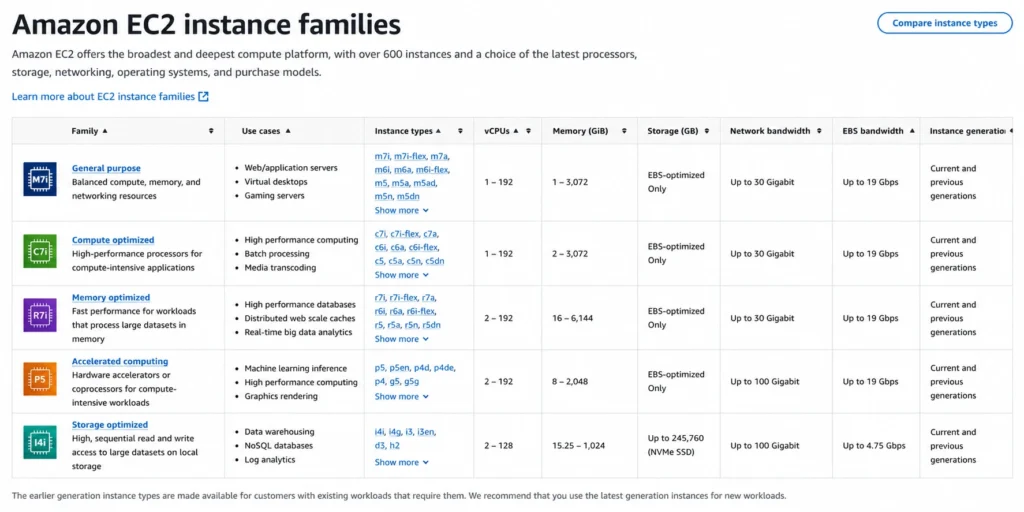
AWS organizes EC2 instances into families based on the workload they are built for. Choosing the wrong family is one of the fastest ways to overpay.
| Instance Family | Optimized For | Common Families | Typical Use Case |
| General Purpose | Balanced CPU/memory | t3, t4g, m5, m6i, m7i | Web servers, dev/test, small databases |
| Compute Optimized | High CPU, lower memory | c5, c6i, c6g, c7g | Batch processing, HPC, gaming servers |
| Memory Optimized | High memory ratios | r5, r6i, x2idn, u-6tb1 | In-memory databases, SAP HANA, Redis |
| Storage Optimized | High sequential I/O | i3, i4i, d3, h1 | Distributed file systems, data warehousing |
| Accelerated Computing | GPU/FPGA/inferentia | p3, p4d, g4dn, trn1, inf2 | ML training, video encoding, HPC |
| HPC Optimized | High-performance networking | hpc6a, hpc7g | Tightly-coupled scientific workloads |
Within each family, instance sizes follow a predictable naming convention.
- m6i.large means: M family (general purpose), 6th generation, Intel processor, large size (2 vCPU, 8 GiB RAM).
- m6i.2xlarge doubles it: 4 vCPU, 16 GiB RAM.
What Are the EC2 Pricing Models?
EC2 has four purchasing options: On-Demand Pricing, Spot Instances, Reserved Instances (RI) and Savings Plans. The difference between them can exceed $100K/year on a mid-sized workload.
On-Demand Pricing
On-demand means no commitment, no upfront cost, and no discount. AWS bills you by the second (minimum 60 seconds) for exactly as long as the instance runs.
That flexibility has a price. Take an m6i.large in us-east-1, which is a standard general-purpose instance used for web servers and application backends.
On-demand rate is approximately $0.096/hour (verify at Amazon EC2 On-Demand Pricing, rates change). If you run it 24/7 for a year, you’d have spent ~$841 on a single instance. Scale that to 50 instances and the annual bill hits ~$42,000 with zero discount applied, year after year.
On-demand is the right choice when your workload is genuinely unpredictable: a traffic spike you cannot forecast, a short-lived data processing job, a staging environment that runs three days a week. For anything running consistently beyond 30 days, on-demand is not a pricing model, it is a penalty for not committing
Spot Instances
AWS sells unused capacity at discounts of 60-90% below on-demand. The catch: AWS can reclaim Spot capacity with a two-minute warning when demand spikes. That m6i.large might run at $0.012/hour on Spot, but your workload needs to tolerate interruption.
Spot is suitable for fault-tolerant batch jobs, CI/CD pipelines, ML training runs, and stateless web tiers with proper Spot interruption handling.
Reserved Instances (RI)
A 1- or 3-year commitment to a specific instance type in exchange for a discount of 30-60% off on-demand. That same m6i.large on a 1-year no-upfront RI will account to approximately $0.061/hour – a 36% discount (verify at Amazon EC2 RI Pricing, rates change).
The problem: you commit to a specific instance type, size, and region for up to three years. If your workload changes, you own the commitment.
Savings Plans
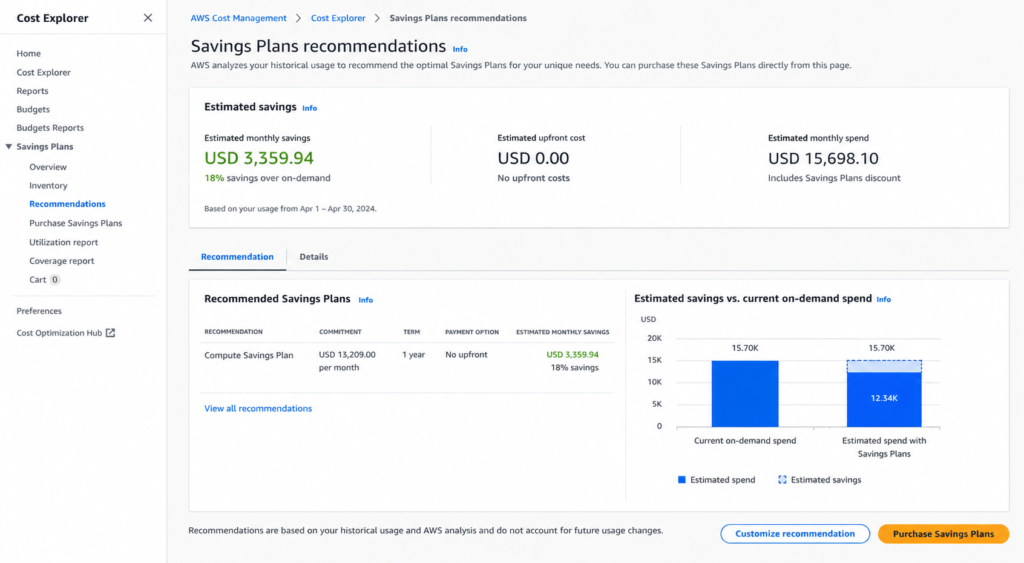
Introduced in 2019, Savings Plans offer RI-like discounts in exchange for a spend commitment (e.g., $0.05/hour) rather than an instance type commitment. Compute Savings Plans apply to EC2 regardless of instance family, size, OS, or region. This is also the most flexible commitment option AWS offers natively.
A 1-year Compute Savings Plan on m6i.large is approximately $0.064/hour, which is roughly 33% off on-demand (verify at Compute and EC2 Instance Savings Plans, rates change). EC2 Instance Savings Plans are less flexible but give deeper discounts (up to 66% on 1-year terms; 3-year all-upfront Reserved Instances can reach 72% on specific families).
How Much Do EC2 Instances Cost?
Here is a worked cost scenario for a realistic mid-market engineering team.
Setup: 20 x m6i.xlarge instances running 24/7 in us-east-1, mixed web tier and application servers.
| Model | Hourly Rate (per instance) | Monthly Cost (20 instances) | Annual Cost |
| On-Demand | $0.192/hr | ~$27,648 | ~$331,776 |
| 1-yr Savings Plan (no upfront) | ~$0.124/hr | ~$17,856 | ~$214,272 |
| 3-yr Savings Plan (no upfront) | ~$0.086/hr | ~$12,384 | ~$148,608 |
| 1-yr Reserved Instance (no upfront) | ~$0.122/hr | ~$17,568 | ~$210,816 |
(Note: All figures are approximates)
The difference between pure on-demand and a 1-year Savings Plan in this scenario is $117,504/year. For a team that has never purchased a commitment, that is entirely recoverable spend.
What Are EC2 Instances Used For?
EC2 is a general-purpose compute. The most common production use cases include:
- Web application hosting: EC2 instances run web servers (Nginx, Apache), application servers (Node, Java, Python), and API backends behind an ALB or NLB.
- Database servers: Teams that self-manage MySQL, PostgreSQL, or MongoDB on EC2 rather than using RDS. More control, more operational overhead, and different cost dynamics.
- Batch and data processing: Compute-optimized instances (c6i, c7g) running ETL pipelines, Spark jobs, or scientific simulations.
- Machine learning training: GPU instances (p3, p4d, g4dn) for model training. These instances are expensive on-demand. For example, a p3.8xlarge runs $12.24/hour (verify at Amazon, rates change). Savings Plans on GPU instances are one of the highest-ROI commitment purchases available.
- Development and test environments: t3/t4g instances for lower-cost dev workloads. These benefit less from commitments due to variable runtime.
What Is the Difference Between EC2 Instance Types?
Every EC2 instance name tells you exactly what you are getting, once you know how to read it. Take c6g.2xlarge as an example:
- c = compute-optimized family (high CPU, lower memory ratio)
- 6 = 6th generation hardware
- g = AWS Graviton processor (ARM-based, AWS-designed)
- 2xlarge = 8 vCPU, 16 GiB RAM in this family
Change one letter and the economics shift. The same c6i.2xlarge swaps Graviton for Intel — slightly higher cost, broader software compatibility. The c6a.2xlarge uses AMD; sits between Graviton and Intel on price.
The processor suffix is where most teams leave money behind. Graviton instances (m6g, c6g, r6g) run on AWS-designed ARM chips and cost roughly 10-20% less than their Intel equivalents at comparable performance. For stateless Linux workloads, like web servers, API layers, and containerized services, migration to Graviton requires no application code changes and delivers immediate cost reduction on the next billing cycle.
The pattern holds across families:
- No suffix or i = Intel (e.g., m6i, c6i)
- a = AMD (e.g., m6a, c6a); slightly cheaper than Intel
- g = Graviton ARM (e.g., m6g, c6g); cheapest of the three for Linux workloads
Pick the wrong processor generation or suffix and you are paying an Intel premium on a workload that would run identically on Graviton at 15% less.
How Do EC2 Savings Plans Compare to Reserved Instances?
This is the question that determines commitment strategy for most teams. The short answer is Savings Plans are more flexible, RIs can go deeper on specific instance types.
| Dimension | Compute Savings Plan | EC2 Instance Savings Plan | Reserved Instance |
| Commitment type | Hourly spend ($) | Hourly spend ($) | Instance type + region |
| Flexibility | Any EC2, Fargate, Lambda | Same family, any size/OS | Specific instance type |
| Max discount vs on-demand | ~66% | ~66% | ~72% (3-yr all-upfront RI) |
| Term | 1 or 3 years | 1 or 3 years | 1 or 3 years |
| Upfront requirement | Optional | Optional | Optional |
| Convertibility | N/A | N/A | Convertible RIs allow changes |
| AWS native tooling refresh | 72+ hours | 72+ hours | 72+ hours |
| Unused = wasted | Yes | Yes | Yes unless sold on Marketplace |
The hidden cost in both models: AWS recommends commitment amounts based on data that is 72+ hours old. If your usage patterns shift, AWS’s recommendation lags. At $6,000-12,000/day in uncovered compute spend, that lag is a computable cost. Also see: AWS Savings Plans vs Reserved Instances: A Practical Guide to Buying Commitments.
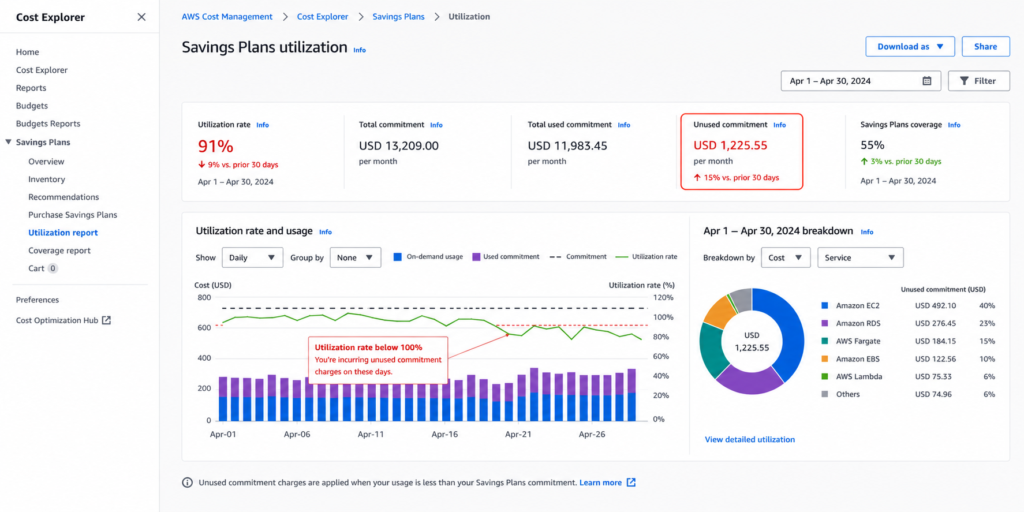
What Happens If You Don’t Use Your AWS Savings Plan?
Unused Savings Plan commitments are not refunded. If you commit to $1.00/hour and only use $0.60/hour of eligible compute, you pay the full $1.00/hour and absorb the $0.40/hour shortfall. AWS does not reimburse underutilized commitments and native AWS tools do not offer buyback.
This is the structural risk in commitment purchasing that most teams either underestimate or accept as the cost of doing business.
How Do You Reduce EC2 Costs?
There are four levers, ranked by impact.
- Right-size before committing. Committing to oversized instances locks in waste. Use AWS Compute Optimizer or third-party tooling to identify instances where average CPU is below 10-15%. These are right-sizing candidates before any commitment purchase.
- Purchase commitments at the right coverage level. Target 80-85% of your baseline compute covered by commitments. Keep 15-20% on-demand to absorb spikes. Over-committing is a harder mistake to reverse than under-committing.
- Use Spot for interruption-tolerant workloads. Batch jobs, CI/CD, ML training, and Spark clusters, all these candidates for Spot. Mixing Spot with on-demand via Auto Scaling Groups is the standard pattern.
- Automate commitment management. The biggest problem with manual commitment management is AWS Cost Explorer recommends commitments based on data that is 72+ hours old. Engineers typically review commitments monthly or quarterly. In a cloud environment where workloads change weekly, that creates coverage gaps.
This is where Usage.ai addresses a real operational problem. The platform refreshes EC2 commitment recommendations every 24 hours, which is 3x faster than AWS native tooling. At a compute spend of $6,000-12,000/day in uncovered workloads, that 48-hour advantage in coverage timing compounds to $18,000+ per refresh cycle in recoverable on-demand spend.
Usage.ai’s Insured Flex Commitments apply Savings Plan and Reserved Instance-equivalent discounts of 30-60% without requiring multi-year lock-in. Usage.ai holds the underlying AWS commitment on your behalf, so you face no multi-year obligation directly. Every commitment purchased through the platform carries a buyback guarantee. If your usage pattern shifts and the commitment goes underutilized, Usage.ai buys it back in cashback (real money, not credits). AWS native commitments carry no such protection.
Usage.ai Insured Flex Commitments carry no multi-year lock-in. Commitments adjust quarterly. Scale down? No penalty. Underutilized? Cashback paid in real money.
What Are the EC2 Instance Families in Detail?
General Purpose: t3, t4g, m5, m6i, m7i
t-family instances are burstable. They accumulate CPU credits during idle periods and spend them during spikes. A t3.medium (2 vCPU, 4 GiB) is the default choice for low-traffic web servers and development workloads. m-family instances provide consistent (non-burstable) CPU for production workloads.
Compute Optimized: c5, c6i, c6g, c7g
High compute-to-memory ratio. c6g instances run on Graviton2 and deliver substantially better price-performance than comparable x86 compute-optimized instances for most Linux workloads. HPC, video transcoding, and CPU-intensive API services are the primary targets.
Memory Optimized: r5, r6i, x2idn
High memory-to-vCPU ratio. r6i.32xlarge delivers 1,024 GiB RAM. These instances run SAP HANA, large in-memory caches, and real-time analytics engines. x-family instances go further, x2idn.32xlarge has 2,048 GiB RAM. The cost per GiB of RAM is substantially lower than assembling the equivalent capacity from general-purpose instances.
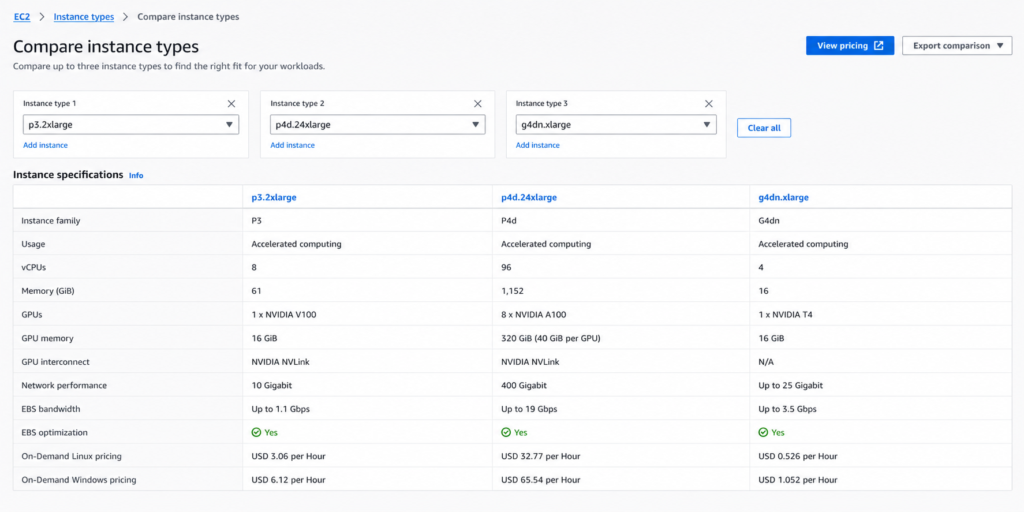
Accelerated Computing: p3, p4d, g4dn, trn1
p3 and p4d are the ML training workhorses. g4dn instances pair NVIDIA T4 GPUs with Intel Cascade Lake CPUs and cover both inference and light training. trn1 runs on AWS Trainium chips, purpose-built for deep learning training and priced below equivalent GPU instances for training workloads.
A single p4d.24xlarge (8x NVIDIA A100) costs $32.77/hour on-demand (verify at Amazon EC2 On-Demand Pricing as rates change). Teams running consistent ML training pipelines on GPU instances see among the highest absolute dollar savings from Savings Plans, both natively and through Usage.ai’s platform.
How Do EC2 Instances Work Under the Hood?
Each physical AWS server runs a Nitro hypervisor, i.e., AWS’s custom virtualization layer. The Nitro System offloads I/O processing to dedicated hardware, which means EC2 instances get near-bare-metal network and storage performance. This is why m6in.large (with enhanced networking) can deliver up to 25 Gbps of network bandwidth.
When you launch an instance, you select an AMI (Amazon Machine Image), the operating system and software image, and a VPC/subnet where it runs. The instance sits inside an Availability Zone, which is a physically separate data center within an AWS Region.
Instance state: running (billed), stopped (EBS volumes still billed, compute not billed), terminated (permanent deletion, no further billing).
EC2 vs. AWS Lambda vs. AWS Fargate: Which Compute Should You Use?
| Dimension | EC2 | Lambda | Fargate |
| Management overhead | High (OS patching, sizing) | Zero | Low (container, no host) |
| Billing unit | Per second | Per request + GB-second | Per vCPU-second + GB-second |
| Cold starts | None | Yes (variable) | Yes (container startup) |
| Max runtime | Indefinite | 15 minutes | Indefinite |
| Savings Plans coverage | Yes | Yes | Yes |
| Right workloads | Always-on servers, databases | Event-driven, short functions | Containerized workloads |
EC2 gives maximum control and is the right choice for workloads that need persistent state, specific OS configuration, or consistent CPU availability. Lambda and Fargate trade control for reduced operational overhead.
What Is EC2 Auto Scaling?
Auto Scaling adjusts the number of running EC2 instances automatically based on defined policies. A scale-out policy might add 2 instances when the average CPU exceeds 70% for 5 minutes. A scale-in policy removes instances when CPU drops below 20% for 15 minutes.
Auto Scaling is critical for cost management because it prevents both under-provisioning (which causes latency) and over-provisioning (which wastes money). The commitment purchasing strategy interacts with Auto Scaling: commitments should cover your minimum stable capacity, while on-demand handles the burst capacity above it.
EC2 Cost Optimization Checklist
Before purchasing any commitments, run through these five checks:
- Rightsizing audit – export the last 30 days of CPU and memory utilization from AWS Compute Optimizer. Identify instances below 20% average CPU. Downsize before committing.
- Idle instance check – instances with 0% network I/O for 7+ days are candidates for termination. AWS Cost Explorer’s “Idle Instances” recommendation surfaces these.
- Baseline compute calculation – sum the hourly on-demand cost of instances running at least 200 hours/month. This is your commitment target range.
- Spot candidate identification – map each workload against the Spot interruption tolerance rubric. Stateless, fault-tolerant, batch — Spot. Stateful, latency-sensitive, real-time API — on-demand or committed.
- Coverage gap analysis – open AWS Cost Explorer, filter to EC2 compute, group by purchase option. The on-demand percentage of your stable workload is your uncovered spend.
For teams spending $50K+/month on EC2, manual execution of these five steps every week becomes a little unrealistic. Usage.ai automates the coverage gap analysis with 24-hour refresh cycles, surfaces commitment recommendations before the AWS native 72-hour lag catches up, and executes purchases autonomously with the buyback guarantee ensuring underutilized commitments are not a financial risk.
Setup takes 30 minutes, requires billing-layer access only, and has zero infrastructure changes. The fee is a percentage of realized savings. Usage.ai earns nothing if you save nothing.
Frequently Asked Questions
1. What are EC2 instances in simple terms?
EC2 instances are virtual computers running on AWS physical servers. You rent one, pick the size (CPU and memory), choose an operating system, and pay by the second for as long as it runs. AWS manages the underlying hardware. You manage everything above the operating system. It is the most widely used compute service in the world by volume of workloads.
2. What is the difference between EC2 instance types?
EC2 instance types differ in their CPU-to-memory ratio and the specific hardware optimizations AWS has applied. General purpose (m, t families) balance CPU and memory. Compute optimized (c family) prioritize CPU. Memory optimized (r, x families) prioritize RAM. Storage optimized (i, d families) maximize I/O throughput. Accelerated computing (p, g, trn families) include GPUs or ML accelerators. Choosing the wrong type typically means paying for resources your workload does not use.
3. How much does an EC2 instance cost per month?
Cost depends on instance type, size, and pricing model. A t3.micro on on-demand costs approximately $0.0104/hour or ~$7.50/month. An m6i.xlarge on on-demand runs approximately $0.192/hour or ~$140/month. A p4d.24xlarge (GPU) on-demand is $32.77/hour or ~$23,594/month. All prices are approximate and region-dependent as rates change.
4. What is the difference between EC2 and a regular server?
A regular (physical) server is hardware you own or lease with a fixed cost regardless of utilization. EC2 is a virtual machine on shared hardware. You pay only for runtime, can resize in minutes, and spin up hundreds in parallel without procurement lead time. The tradeoff: shared hardware means noisy neighbor risk, and per-second billing accumulates fast if you leave instances running without a commitment.
5. Are EC2 Spot Instances reliable for production?
Spot Instances can be reclaimed by AWS with two minutes notice when capacity demand spikes. This makes them unreliable for stateful production services that cannot tolerate interruption. They are highly reliable for stateless, fault-tolerant workloads: batch jobs, CI/CD pipelines, ML training with checkpointing, Spark clusters with worker redundancy. The 60-90% discount makes them the most cost-effective option for interruptible compute.
6. What is the best way to reduce EC2 costs?
The highest-impact cost reduction for stable EC2 workloads is purchasing Savings Plans or Reserved Instances at the right coverage level. The risk is over-committing to usage that does not materialize. The solution is automated commitment management with a buyback guarantee – Usage.ai applies Savings Plan-equivalent discounts of 30-60% across EC2 (and Fargate/Lambda where applicable), and returns underutilized commitments as cashback.