New See exactly what you're overpaying AWS in under 60 seconds. Try the Calculator for free

EC2 Warm Pools: Faster Scale-Out at Lower Cost Than Full Pre-Provisioning

Updated July 8, 2026
22 min read
EC2 Warm Pools: Faster Scale-Out at Lower Cost Than Full Pre-Provisioning
On this page

Standard EC2 Auto Scaling scales by launching new instances when needed. For most applications, that works well — a modern stateless service booting a small AMI can be in service in under two minutes.

But for applications with 5-10 minute initialization times — large Java applications, ML inference servers loading multi-GB models, applications that register with service meshes, or workloads that download large configuration packages at startup — standard Auto Scaling simply cannot respond fast enough to traffic spikes.

The traditional solution was to over-provision: keep more instances in service than you need so that sudden demand increases are already covered by running capacity. Over-provisioning works, but it means paying full on-demand compute rates for capacity that sits idle during normal traffic periods.

EC2 Warm Pools are the middle ground. They keep instances pre-initialized but in a cost-reduced state, ready to move into service quickly when needed. The key is that pre-initialized does not mean running — warm pool instances in the Stopped or Hibernated state have completed their initialization but are not actively consuming compute. You pay EBS storage rates instead of full instance rates while the capacity waits.

This guide covers how warm pool pricing works across all three pool states, how pool sizing is calculated, the lifecycle hook configuration that makes warm pools actually work correctly, integration patterns for EKS and ECS, and the operational gaps that most warm pool guides never mention.

Banner

What Problem Warm Pools Actually Solve

To understand the value of warm pools, you need to understand what initialization time actually means for Auto Scaling responsiveness. Auto Scaling responds to demand by launching instances.

Those instances go through several phases before they can serve traffic: the EC2 instance launches and boots, the AMI-defined OS starts, application software installs or starts (often downloading packages or models), configuration runs, and the instance registers with the load balancer and passes health checks. Only after all of this is complete does the instance begin receiving user traffic.

For a service with a 30-second initialization time, this is fine. Auto Scaling can keep up with most organic traffic growth patterns. For a service with an 8-minute initialization time, this is a serious problem.

A sudden traffic spike that arrives in under 8 minutes will hit your existing InService instances with 100% of the increased load while new instances are still initializing. If that spike is large enough, your existing capacity degrades under the load before relief arrives.

Pre-provisioning (keeping extra instances always running) solves the latency problem but defeats the cost efficiency of Auto Scaling. If your application needs 10 instances at peak and 3 instances at minimum, running 10 instances continuously eliminates the cost benefit of scaling entirely.

Warm pools solve both: instances are pre-initialized (so they can enter service quickly) but not fully running (so you pay EBS rates rather than instance compute rates while they wait). For a 100 GB gp3 EBS volume, the monthly cost is approximately $8 at current rates versus $50-200+ for a running medium-to-large instance.

The Three Warm Pool States: Stopped, Hibernated, and Running

Stopped state (default and recommended)

When instances are stopped, you are saving the cost of the instances themselves. You pay for the instances only when they are running. With stopped instances, you pay only for the volumes that you use and the Elastic IP addresses attached to the instances.

Stopped is the default pool state when you create a warm pool, and it is the recommended choice for cost minimization. The trade-off versus Hibernated or Running is that stopped instances must boot from scratch when moved into service — the OS restarts, user data does not re-run by default, but the instance state and initialized software state from before stopping is preserved on the EBS root volume.

For most applications, Stopped is the correct choice. The initialization work was already done when the instance first launched and went through the warm pool lifecycle. When the instance moves from Stopped to InService, it boots quickly (typically 30-60 seconds for a Linux instance on modern hardware) and enters service far faster than a cold launch would because all the slow initialization is already complete.

Hibernated state: preserving RAM at EBS cost

Hibernation stops instances without deleting their memory contents (RAM). When an instance is hibernated, this signals the operating system to save the contents of your RAM to your Amazon EBS root volume. When the instance is started again, the root volume is restored to its previous state and the RAM contents are reloaded. While the instances are in hibernation, you pay only for the EBS volumes, including storage for the RAM contents, and the Elastic IP addresses attached to the instances. Source: same DIRECT QUOTE.

The cost is slightly higher than Stopped because the EBS root volume must be large enough to hold both the OS state and the full RAM contents. If your warm pool instances have 16 GB of RAM, your EBS root volume must have at least 16 GB of additional space to store the hibernation snapshot. This adds to the EBS storage cost versus a Stopped instance with the same AMI.

Hibernated is the right choice when your application has meaningful in-memory state that takes significant time to rebuild on restart — large caches, JVM warm-up with JIT compilation, or applications that load large datasets into memory at startup. The hibernation-to-InService transition is faster than Stopped because the OS does not fully restart and the application can resume from its last memory state rather than reinitializing.

Not all instance types support hibernation. The Hibernated pool state is only supported on specific instance types.

Running state (highly discouraged)

Keeping instances in a Running state inside the warm pool is also possible, but is highly discouraged to avoid incurring unnecessary charges.

Running warm pool instances are fully powered on and consuming compute at the same rate as your InService instances. For fast-launching instances (under 2 minutes to initialize), a running warm pool costs nearly as much as simply over-provisioning the ASG and provides minimal benefit over just keeping extra InService instances. The only scenario where Running is defensible is when Stopped/Hibernated resume times are still too slow for your scaling requirements AND your application absolutely cannot tolerate any boot delay. Even then, Hibernated is a better option for most workloads.

Before selecting Running state, calculate the actual cost difference between Running warm pool instances and simply adding them to your desired capacity in the ASG. In most cases, using Running state for warm pools costs approximately the same as over-provisioning while adding the operational complexity of warm pool management without the cost benefit.

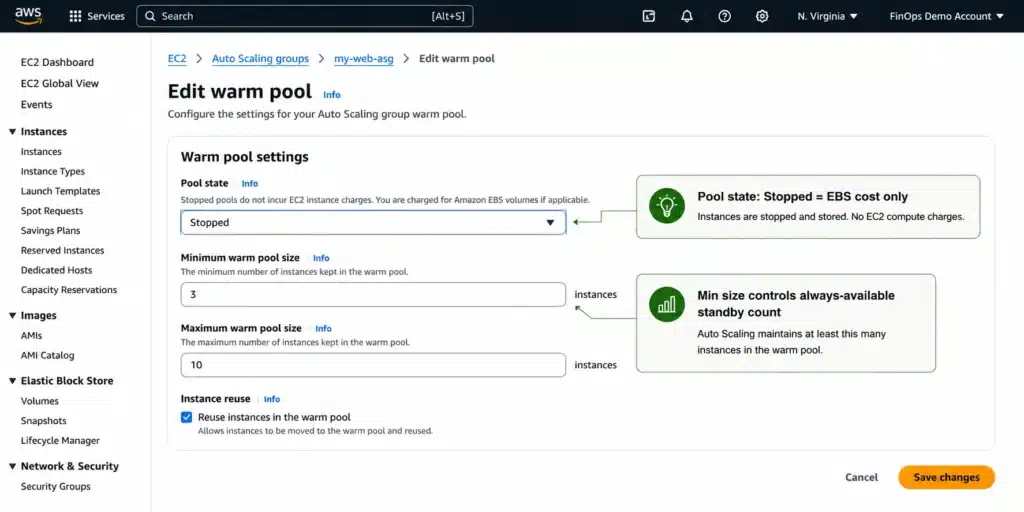
Amazon EC2 Auto Scaling console Instance management tab showing warm pool section with instances in Warmed:Stopped state, minimum pool size of 2, Stopped pool state configured, and the Instance reuse on scale-in checkbox enabled.

Warm Pool Pricing: The Exact Math

The cost of a warm pool depends on: the number of instances in the pool, the pool state, the EBS volumes attached to those instances, and whether Elastic IPs are associated.

Stopped state cost model

For each stopped warm pool instance, you pay: EBS storage for the root volume (gp3 pricing approximately $0.08/GB-month in US East, verify at aws.amazon.com/ebs/pricing/), EBS storage for any additional attached data volumes, and the Elastic IP address hourly rate if one is attached ($0.005/hour per IP when associated with a stopped instance, verify at aws.amazon.com/vpc/pricing/).

A worked example: 5 warm pool instances, each with a 100 GB gp3 root volume, no Elastic IPs. Monthly EBS cost: 5 instances x 100 GB x $0.08/GB-month = $40/month. Compare this to 5 m5.large instances running continuously at $0.096/hour: 5 x $0.096 x 720 hours = $345.60/month. The warm pool approach costs 88% less for the same pre-initialized capacity. Verify current rates before modeling.

Hibernated state cost model

For each hibernated warm pool instance, you pay: EBS storage for the root volume including the space used to store RAM contents, EBS storage for additional volumes, and Elastic IPs if attached. The additional EBS cost for hibernation is the RAM size of the instance — an instance with 16 GB of RAM requires 16 GB of additional EBS root volume space allocated for the hibernation snapshot. At $0.08/GB-month, 16 GB of RAM adds approximately $1.28/month per instance to the Stopped cost. For most workloads this is a small additional cost for meaningful startup time reduction.

The Savings Plans interaction

Compute Savings Plans apply to EC2 instance compute charges when instances are running. Stopped warm pool instances are not running, so Compute Savings Plans do not apply to them — there is no compute charge to discount. The relevant cost for stopped warm pool instances is EBS storage, which is not covered by Compute Savings Plans or Reserved Instances.

When a warm pool instance moves from Stopped to InService (enters the running state), it begins consuming EC2 compute hours. At that point, any applicable Compute Savings Plans discount applies to those compute hours. For organizations with Savings Plans sized to their expected running capacity, warm pool instances that enter service simply consume from the existing Savings Plan commitment rather than incurring separate costs.

The practical implication for Savings Plan sizing: size your Savings Plan commitment to the expected steady-state and peak InService instance count, not to the warm pool size. Warm pool instances sitting in Stopped state have no compute charge and therefore no Savings Plan coverage needed.

Also read: Amazon EC2: Complete Pricing and Cost Optimization Guide — Purchase Options, Instance Families, and Rightsizing

Warm Pool Sizing: How the Math Actually Works

Understanding how pool size is calculated is critical for cost management. An incorrectly sized warm pool either wastes money (too many pre-initialized instances sitting idle) or fails to help (too few instances to cover the scale-out demand).

Dynamic sizing (default)

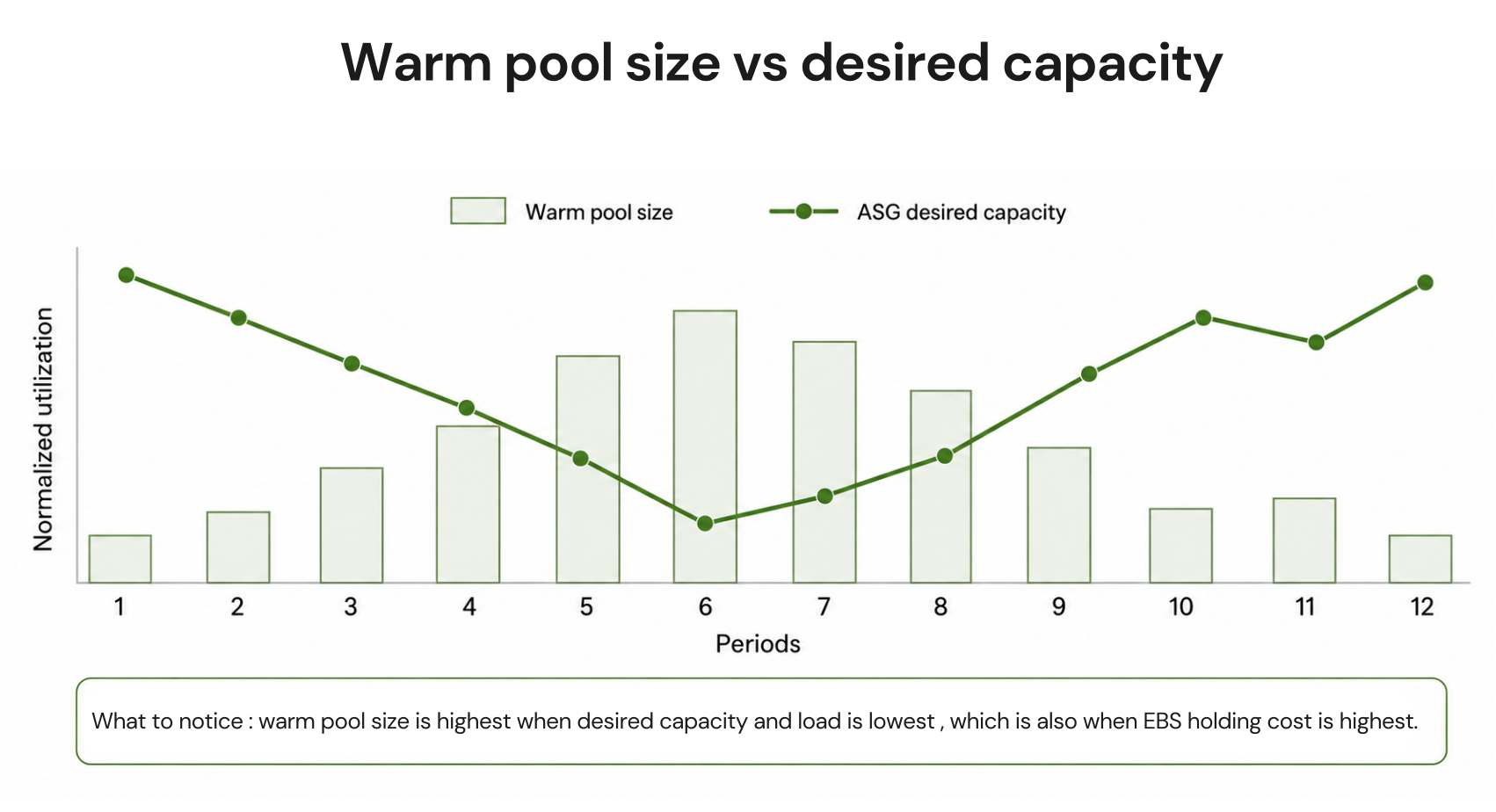
By default, warm pool size is dynamic. The size equals MaxGroupPreparedCapacity minus the Auto Scaling group’s current desired capacity. If MaxGroupPreparedCapacity is set to 10 and the desired capacity is 4, the warm pool maintains 6 instances. When desired capacity increases to 7 (because of a scaling event), the warm pool shrinks to 3. Auto Scaling launches new instances into the warm pool automatically to maintain the warm pool size relative to MaxGroupPreparedCapacity.

This dynamic behavior means warm pool costs vary with your ASG’s current desired capacity. During periods of high load when desired capacity is large, the warm pool shrinks (and costs less). During quiet periods when desired capacity is small, the warm pool grows (and costs more in EBS). Factor this inverse relationship into cost modeling — warm pool costs are naturally highest when your application load is lowest.

Absolute sizing

Only when MaxGroupPreparedCapacity and MinSize are set to the same value does the warm pool have an absolute size. Source: same DIRECT QUOTE. Setting both to the same value pins the warm pool to a fixed count regardless of ASG desired capacity changes. This is useful for applications where you always want a specific number of spare pre-initialized instances regardless of current demand level.

Minimum size

The MinSize parameter specifies the minimum number of instances to maintain in the warm pool, which helps ensure that there is always a certain number of warmed instances available to handle traffic spikes. Defaults to 0 if not specified. Source: same DIRECT QUOTE. When the warm pool shrinks below MinSize because instances moved to InService, Auto Scaling automatically launches new instances into the warm pool to restore the minimum count.

Setting MinSize to 0 means the warm pool can fully drain when the ASG scales out heavily. This is appropriate when your primary goal is to handle moderate spikes quickly, not to maintain continuous standby capacity. Setting a non-zero MinSize ensures some pre-initialized capacity is always available, at the cost of maintaining that minimum count continuously.

Sizing rule of thumb: set MinSize to the number of instances you need immediately available during your fastest-rising traffic pattern, not the total capacity needed at peak. If your load can double within 5 minutes but the doubled capacity only needs to be fully ready within 10 minutes, a MinSize of 2-3 instances covers the immediate response while standard cold launches cover the remainder. Sizing the warm pool to cover your full peak demand defeats much of the cost advantage over simple over-provisioning.

Lifecycle Hooks: The Required Configuration for Correct Warm Pool Behavior

Before you create a warm pool for your Auto Scaling group, decide how you will use lifecycle hooks to initialize new instances with an appropriate initial state. Without lifecycle hooks, warm pools can fail in subtle ways that manifest as instances entering service before they are ready.

What lifecycle hooks do in a warm pool

When an instance first launches into the warm pool, it goes through: instance launch, user data execution, application initialization. Without a lifecycle hook, Auto Scaling moves the instance to the Stopped or Hibernated state based on your pool state setting as soon as the instance launches — potentially before your initialization script finishes. An instance stopped mid-initialization is in an incomplete state and will fail when it enters service.

In a warm pool configuration, lifecycle hooks delay instances from being stopped or hibernated and from being put in service during a scale-out event until they have finished initializing. Source: same DIRECT QUOTE. The lifecycle hook puts the instance into a Warmed:Pending:Wait state. Your initialization script completes, signals the lifecycle hook with a complete-lifecycle-action call, and only then does the instance move to the stopped or hibernated warm pool state.

During scale-out, lifecycle hooks also control the final preparation before an instance enters InService. A warm pool instance moving from Stopped to InService goes through a second Pending:Wait state where final configuration can run — updating the app to the latest version, joining a database cluster, running health checks. This two-stage hook model (once on initial warm pool entry, once on scale-out to InService) is what makes warm pools reliable for complex initialization scenarios.

Without lifecycle hooks: the failure mode

If you add a warm pool to your Auto Scaling group without a lifecycle hook, instances that take a long time to finish initializing could be stopped or hibernated and then put in service during a scale-out event before they are ready. Source: same DIRECT QUOTE. This is not a theoretical concern — it is a predictable failure mode for any application with a multi-step initialization process. Always configure lifecycle hooks before creating the warm pool.

User data re-execution on restart

A stopped instance that restarts when moving to InService does NOT automatically re-run its user data script by default on Linux. User data runs once on first launch. This is important for warm pools: the initialization your user data performs is preserved in the stopped instance state, which is exactly why stopping the instance after initialization is valuable. However, if you need a final step to run each time the instance enters InService (such as registering with a service discovery system or fetching the latest configuration), that logic belongs in the second lifecycle hook at the Pending:Wait state, not in user data.

AWS Management Console lifecycle hooks configuration for a warm pool-enabled Auto Scaling group, showing two hooks: one for initial warm pool entry (Warmed:Pending:Wait) and one for InService transition (Pending:Wait), with heartbeat timeouts and ABANDON default results.

Instance Reuse Policy: Returning Instances to the Warm Pool on Scale-In

By default, Amazon EC2 Auto Scaling terminates your instances when your Auto Scaling group scales in. Source: docs.aws.amazon.com/autoscaling/ec2/userguide/ec2-auto-scaling-warm-pools.html DIRECT QUOTE. For warm pools, there is an alternative: instance reuse policy.

When instance reuse is enabled, scaling-in instances are returned to the warm pool (moved to Stopped or Hibernated state) instead of being terminated. This preserves their initialization state, so they can re-enter service on the next scale-out event without going through the full initialization process again. The cost benefit: you skip the time and compute cost of re-initializing an instance that has already been initialized.

The operational caveat: instances returned to the warm pool may have running processes, temporary files, or state changes from their InService period. If your application leaves state on the instance that should not be present when it re-enters service, you need to handle cleanup either in the scale-in lifecycle hook or by not using instance reuse. Always test your specific application’s behavior under instance reuse before enabling it in production.

The CLI-only constraint

Currently, you can only specify an instance reuse policy by using the AWS CLI or an SDK. This feature is not available from the console. Source: docs.aws.amazon.com/autoscaling/ec2/userguide/ec2-auto-scaling-warm-pools.html DIRECT QUOTE. This is not an insignificant limitation — it means teams managing infrastructure primarily through the AWS console cannot enable instance reuse without switching to CLI or SDK-based tooling.

Warm Pools with EKS and ECS

EKS managed node groups

Amazon EKS managed node groups support Amazon EC2 Auto Scaling warm pools. Amazon EKS manages warm pools throughout the node group lifecycle using the AWSServiceRoleForAmazonEKSNodegroup service-linked role.

Four limitations specific to EKS warm pools. Custom AMIs are not supported — you must use Amazon EKS optimized AMIs. Bottlerocket AMIs do not support the Hibernated pool state; use Stopped or Running only. The reuseOnScaleIn feature is not supported with Bottlerocket AMIs. The Hibernated pool state is only supported on specific instance types that meet hibernation prerequisites. Source: same DIRECT QUOTE.

For EKS clusters using the warm pool with the Stopped state, the primary benefit is reducing the time for new nodes to join the cluster during scale-out events. The Kubernetes node registration and container scheduling steps still need to complete when the node enters service, but the underlying instance boot time is eliminated from the critical path.

ECS clusters

Amazon ECS supports Amazon EC2 Auto Scaling warm pools. When you configure a warm pool for an ECS cluster, you must set the ECS_WARM_POOLS_CHECK agent configuration variable to true in the user data to enable the ECS agent to participate correctly in the warm pool lifecycle.

For ECS, the ReuseOnScaleIn feature is not supported — you cannot configure instances to return to the warm pool on scale-in for ECS Auto Scaling groups. Source: same DIRECT. Scaling-in ECS instances are terminated rather than returned to the warm pool. This means each scale-out event still draws from pre-initialized warm pool instances, but scale-in events terminate instances rather than recycling them.

For Windows instances using the Stopped pool state with ECS, lifecycle hooks are required to ensure user data execution completes before the instance is stopped. Without lifecycle hooks, the instance may be stopped before Amazon ECS initialization finishes.

The CloudFormation Rolling Update Gap

One operationally important behavior that most warm pool guides never mention: during a CloudFormation rolling update, only InService instances are replaced, not warm pool instances. Source: docs.aws.amazon.com/AWSCloudFormation/latest/TemplateReference/aws-resource-autoscaling-warmpool.html DIRECT QUOTE.

This creates a configuration drift scenario. If you update your launch template (new AMI, updated software package, changed user data) and deploy via CloudFormation AutoScalingRollingUpdate, your InService instances get the new configuration but your warm pool instances retain the old configuration. The next time the warm pool instances enter InService — either during a scale-out event or after a scale-in that deploys them — they run the old configuration.

The mitigation is to perform an instance refresh explicitly after any launch template update that should propagate to the warm pool. An instance refresh replaces both InService and warm pool instances with instances based on the latest launch template. Schedule instance refreshes as part of your deployment pipeline whenever AMI or configuration changes occur, not just when CloudFormation rolling updates run.

This gap is particularly relevant for security-sensitive environments where AMI updates carry security patches. A security patch deployed via CloudFormation rolling update would miss the warm pool instances until an explicit instance refresh is triggered.

Also read: AWS Savings Plans: The Complete Guide to Compute Savings Plans for EC2, Fargate, and Lambda

When Warm Pools Are the Right Solution and When They Are Not

Strong warm pool use cases

Applications with 3+ minute initialization times are the clearest candidates. If your application takes 8 minutes to start, you cannot meaningfully autoscale without warm pools unless you massively over-provision. Warm pools bring the effective scale-out time from 8 minutes to under 2 minutes for instances already in the pool.

Applications that load large models or datasets at startup — ML inference servers, large JVM applications with multi-GB classpath initialization, or services that precompute caches at start. These initialization costs are real compute work that you should pay for once (when the instance enters the warm pool) rather than every time the ASG scales.

Event-driven workloads with predictable spike patterns — applications that experience traffic bursts at known times (end of month processing, scheduled batch jobs, business-hour peaks) can pre-heat the warm pool in advance of the anticipated spike to ensure capacity is ready exactly when needed.

When standard autoscaling or alternatives are better

Applications with under 2-minute initialization times generally do not benefit significantly from warm pools. The operational complexity of lifecycle hook management, the CloudFormation rolling update gap, and the EBS cost of maintaining the warm pool add overhead that the minimal scaling latency reduction does not justify.

Applications already using Spot Instances for their Auto Scaling group face additional complexity with warm pools. Spot Instances can be interrupted during the warm pool initialization phase. A lifecycle hook that expects an instance to complete initialization may not succeed if the instance is interrupted before the lifecycle action completes.

Applications that need to scale very large — hundreds of instances — may find that the warm pool size required to cover large-scale events makes the approach impractical from a cost perspective. A warm pool of 50 stopped instances at 100 GB gp3 each costs approximately $400/month in EBS storage. At that scale, revisiting the initialization time reduction (improving startup speed through application optimization or leaner AMIs) may deliver better ROI than warm pool maintenance.

How Warm Pools Fit Into Your EC2 Cost Strategy

Warm pools solve the scaling latency problem for long-initializing applications. They do not solve the compute cost problem for your running fleet. The two optimization layers are distinct.

Warm pool instances in Stopped state cost EBS storage rates, not compute rates. Savings Plans do not apply to stopped instances. The warm pool cost optimization is handled through pool state selection (Stopped vs Hibernated vs Running) and through right-sizing the warm pool to the minimum needed rather than the maximum possible.

The InService instances — the ones actually handling production traffic — are where Savings Plans and Reserved Instances deliver their value. Sizing Compute Savings Plans to the stable baseline of InService compute is the commitment purchasing decision, separate from the warm pool configuration.

Usage.ai handles the InService compute commitment layer: analyzing actual EC2 utilization across your Auto Scaling groups, identifying the stable floor of InService capacity, and sizing Compute Savings Plans to that floor. The warm pool capacity in Stopped state has no compute charge and therefore no Savings Plan coverage needed — the two optimization paths are parallel and complementary.

$91M+ in savings delivered to 300+ customers across AWS, Azure, and GCP. Fee is a percentage of realized savings only. No savings, no fee. 30-minute setup, billing-layer access only.

Banner

Frequently Asked Questions

1. What does an EC2 Warm Pool cost?

The cost depends on the pool state. Stopped state (recommended): you pay only for attached EBS volumes and Elastic IP addresses — not compute. A 100 GB gp3 root volume costs approximately $8/month at $0.08/GB-month in US East (verify at aws.amazon.com/ebs/pricing/). Hibernated state: you pay for EBS volumes including the space storing RAM contents. Running state: you pay full on-demand compute rates — AWS explicitly discourages this. For most configurations, Stopped state warm pool instances cost 85-95% less than equivalent running instances. Source: docs.aws.amazon.com/autoscaling/ec2/userguide/ec2-auto-scaling-warm-pools.html.


2. What are the three EC2 Warm Pool states?

Stopped (default and recommended): instance is not running, OS is off, you pay EBS and Elastic IP only. Hibernated: instance stops but RAM contents are saved to the EBS root volume; the instance resumes from its exact memory state when started, faster than a cold boot; you pay EBS including the hibernation snapshot. Running: instance stays fully powered on, you pay full compute rates — highly discouraged. Source: docs.aws.amazon.com/autoscaling/ec2/userguide/ec2-auto-scaling-warm-pools.html DIRECT.


3. Can I return instances to the warm pool on scale-in?

Yes, through the instance reuse policy. When enabled, scaling-in instances return to the warm pool (Stopped or Hibernated) instead of being terminated, preserving their initialization state for the next scale-out event. However, instance reuse policy can only be configured via the AWS CLI or SDK — this feature is not available in the console. Source: docs.aws.amazon.com/autoscaling/ec2/userguide/ec2-auto-scaling-warm-pools.html DIRECT. ECS clusters do not support instance reuse.


4. Do I need lifecycle hooks for warm pools?

Yes, lifecycle hooks are required for warm pools to work correctly. Without lifecycle hooks, instances that take a long time to initialize could be stopped or hibernated before initialization completes, and then put in service before they are ready. Source: same DIRECT QUOTE. Lifecycle hooks delay the instance from entering the stopped/hibernated state until initialization finishes, and can also delay the instance from entering InService until final configuration is complete.


5. Do warm pool instances get updated during CloudFormation rolling updates?

No. During a CloudFormation rolling update (AutoScalingRollingUpdate), only InService instances are replaced. Warm pool instances are not replaced. Source: docs.aws.amazon.com/AWSCloudFormation/latest/TemplateReference/aws-resource-autoscaling-warmpool.html DIRECT. To update warm pool instances, perform an explicit instance refresh after any launch template change. This is a critical operational gap — security patches deployed via CloudFormation rolling update will not reach warm pool instances.

Cut cloud cost with automation
Latest from our blogs