
 AWS
AWS Microsoft Azure
 Google Cloud

While launching an instance takes only a few minutes, understanding what determines its cost is significantly more complex. Compute charges are only one component of the total bill. Storage, networking, public IPv4 addresses, software licensing, and purchasing commitments can all influence what you ultimately pay.
AWS offers multiple purchasing options that trade flexibility for discounted pricing. Choosing the right option depends on how predictable your workloads are, how much operational flexibility you need, and whether your applications can tolerate interruptions.
This guide explains how Amazon EC2 pricing works, compares the available purchasing models, highlights common cost drivers beyond compute, and outlines practical strategies that organizations can use to improve cost efficiency.
How Amazon EC2 Pricing Works
The total cost of running an EC2 workload may include:
- EC2 compute
- Amazon EBS storage
- EBS snapshots
- Data transfer
- Public IPv4 addresses
- Elastic Load Balancing
- NAT Gateway usage
- Software licensing (for example, Windows Server or SQL Server)
A Worked Monthly Bill Example
As one small, concrete example: a single public IPv4 address running for a full month (730 hours) costs approximately $3.65 at AWS’s $0.005/hour rate. That’s before data-transfer charges.
Multiplied across dozens of addresses, it’s a cost that’s easy to overlook but simple to audit.
Amazon EC2 Purchasing Options
AWS offers four primary purchasing options for Amazon EC2. Each balances flexibility, pricing, and long-term commitment differently.
| Purchasing Option | Best For |
|---|---|
| On-Demand Instances | Short-lived, unpredictable, or variable workloads with no long-term commitment |
| Savings Plans | Consistently running workloads that benefit from flexible long-term discounts |
| Reserved Instances | Specific long-running workloads that require predictable capacity or existing RI investments |
| Spot Instances | Fault-tolerant, interruption-tolerant workloads that can use spare AWS capacity |
1. On-Demand Instances
They are best suited for:
- Development and testing
- New applications
- Short-term projects
- Seasonal workloads
- Unpredictable traffic patterns
View AWS On-Demand official documentation
2. Savings Plans
AWS offers two types:
Compute Savings Plans
These provide the greatest flexibility and automatically apply to eligible EC2 usage regardless of instance family, size, Availability Zone, operating system, or AWS Region, while also covering eligible AWS Lambda and AWS Fargate usage.
Best for:
- Growing organizations
- Frequently changing infrastructure
- Teams adopting newer instance generations
These provide larger discounts but apply only to a specific EC2 instance family within a chosen AWS Region.
Best for:
- Stable production workloads
- Predictable infrastructure
- Long-running applications
3. Reserved Instances
An RI is a billing construct that applies a discount to matching usage, not a physical machine set aside for you (that’s what Capacity Reservations do, covered below).
Key mechanics to understand before purchasing:
- Regional vs. Zonal: Regional RIs float across Availability Zones with no capacity reservation; Zonal RIs are tied to one AZ and are the only type that also reserves capacity.
- Standard vs. Convertible: Standard RIs offer the largest discounts but can’t change instance family; Convertible RIs offer somewhat lower discounts but can be exchanged for a different family, OS, or tenancy.
- Size flexibility: Eligible Regional RIs can apply their discount across sizes within the same instance family, based on normalization factors.
- Modification, exchange, and Marketplace: Standard RIs can be modified (AZ, network platform, size) but not exchanged for a different family; Convertible RIs can be exchanged, sometimes with an additional payment. Unneeded Standard RIs can be sold on the RI Marketplace.
- Payment options: All Upfront, Partial Upfront, and No Upfront, trading a larger upfront payment for a lower effective hourly rate.
- Unused RI exposure: If usage doesn’t match the RI’s attributes, the commitment goes unused for those hours. You pay for both the RI and any mismatched On-Demand usage, with no refund for unused capacity.
Although Savings Plans are now the preferred commitment model for many organizations, Reserved Instances remain useful when:
- Existing Reserved Instance investments already exist
- You require Zonal Reserved Instances, which also reserve capacity in a specific Availability Zone
- Your workload configuration is highly stable over time
View AWS Reserved Instances official documentation
These are not merely different interfaces around the same engine. One product makes a financial protection mechanism central to the offer; the other emphasizes continuous management of the customer’s native commitment portfolio.
Understanding Commitment Economics
A few mechanics determine whether a Savings Plan or RI actually saves money:
- Coverage vs. utilization: coverage is the % of usage discounted; utilization is the % of the commitment actually used. High coverage with low utilization signals overcommitment.
- Hourly commitment, no rollover: a Savings Plan commitment is an hourly $ amount; unused amounts in one hour don’t carry over to another.
- 1-year vs. 3-year terms: longer terms offer deeper discounts but less flexibility. It is best for baselines you’re confident will persist.
- Effective vs. amortized cost: amortizing any upfront payment across the term gives the comparable hourly rate for evaluating options against each other and On-Demand.
- If usage falls: commitments aren’t usage caps. A drop in usage doesn’t reduce the bill; you keep paying the committed amount.
- Discount application order: Reserved Instances apply first, then EC2 Instance Savings Plans, then Compute Savings Plans.
- Org-level sharing: Savings Plans and RIs can, depending on AWS Organization settings, be shared across linked accounts to improve utilization.
- Sizing risk: committing to average usage still overcommits during low-usage hours (nights, weekends, seasonal lulls). Size to the durable, always-on baseline and leave variable usage on-demand or Spot, rather than targeting 100% coverage.
A Layered Purchasing Strategy
Rather than one purchasing option per workload, cost-efficient environments layer several against the actual shape of usage:
- Stable baseline: EC2 Instance Savings Plans, Compute Savings Plans, or selected RIs.
- Interruptible capacity: Spot Instances.
- Short-lived spikes / uncertain growth: On-Demand.
- Capacity assurance: Capacity Reservations or Zonal RIs.
- Short-duration GPU assurance: Capacity Blocks for ML.
- Server-bound licensing: Dedicated Hosts, subject to license terms.
4. Spot Instances
Because AWS can reclaim Spot capacity when it is needed elsewhere, these instances are appropriate only for workloads that can tolerate interruptions. AWS typically provides a two-minute interruption notice before reclaiming capacity.
Common use cases include:
- Batch processing
- CI/CD pipelines
- Containerized workloads
- Big data processing
- Machine learning training
- Media rendering
Capacity Reservations vs. Purchasing Options
- Purchasing options determine how you pay for compute.
- Capacity Reservations ensure EC2 capacity is available in a specific Availability Zone when you need it.
Because these concepts are independent, Capacity Reservations can complement your chosen purchasing strategy.
EC2 Purchase Decision Flowchart
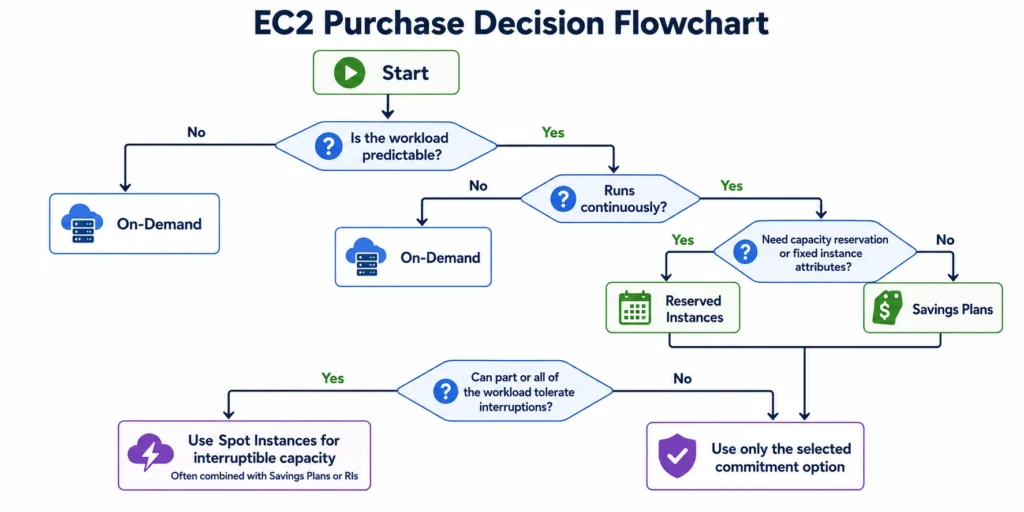
This visual simplifies the decision-making process.
What Else Contributes to Your EC2 Bill?
Amazon EBS Storage
Migrating eligible workloads from gp2 to gp3 volumes can often improve price-performance while reducing storage costs. AWS states gp3 storage pricing can be up to 20% lower than gp2.
Unlike gp2, where IOPS and throughput scale with volume size, gp3 lets you configure storage capacity, IOPS, and throughput independently. You can right-size each dimension separately rather than over-provisioning capacity just to get more performance.
For higher-performance needs, io1 and io2 volumes should also be periodically rightsized. Provisioned IOPS that exceed what the workload actually uses are a direct, ongoing cost with no automatic adjustment.
EBS Snapshots
Other easy-to-miss snapshot costs:
- Snapshot Archive: cheaper storage for rarely-accessed snapshots, but has a 90-day minimum duration and a restore fee.
- Fast Snapshot Restore: removes first-access latency but bills hourly per snapshot, per AZ, while enabled.
- Cross-Region copies: incur destination-Region storage plus a data-transfer charge.
- Recycle Bin: retains deleted snapshots/volumes for a set period, and they keep billing until that period expires.
- DeleteOnTermination: if set to false, a volume can outlive and keep billing after the instance it was attached to.
Data Transfer
- Internet egress
- Inter-Region traffic
- Certain cross-Availability Zone traffic
The actual traffic path matters as much as knowing a charge exists:
- Same-AZ vs. cross-AZ: same-AZ traffic is generally free; cross-AZ traffic (even within one Region) is typically billed both ways.
- Gateway vs. interface VPC endpoints: Gateway endpoints (S3, DynamoDB) have no hourly charge; interface (PrivateLink-based) endpoints add an hourly-per-AZ plus per-GB charge. Sometimes pricier than the public path they replace for low-traffic use.
- Transit Gateway / PrivateLink: both combine hourly charges with per-GB data processing, easy to underestimate at scale.
- CloudFront: can lower origin transfer cost at volume, but adds its own request and transfer charges to model against the savings.
Public IPv4 Addresses
Elastic Load Balancing
NAT Gateway
Software Licensing
Burstable (T-Family) Instance Costs
By default, T3, T3a, and T4g instances launch in Unlimited mode, which allows them to burst above baseline indefinitely.
This is convenient, but it has a cost implication that’s easy to miss. Sustained CPU usage above baseline in Unlimited mode incurs surplus credit charges, billed per vCPU-hour.
For workloads with sustained (rather than bursty) CPU demand, this can make a T-family instance more expensive than a comparable fixed-performance instance of the same size. The instance itself looks cheaper on the price list, but the surplus-credit charges erode or reverse that advantage.
T-family instances are best suited to workloads with genuinely intermittent CPU spikes, and their CPU credit balance and surplus charges are worth monitoring directly rather than assuming the “burstable” label is always a discount.
7 Practical Ways to
Optimize Amazon EC2 Costs
The following best practices can help organizations lower compute costs without compromising performance or availability.
1. Match the Right Purchasing Option to Each Workload
| Workload | Recommended Purchase Option |
|---|---|
| Production applications | Compute Savings Plans |
| Stable, long-running workloads | EC2 Instance Savings Plans or Reserved Instances |
| Development and testing | On-Demand Instances |
| Batch processing | Spot Instances |
| Machine learning training | Spot Instances |
| Licensed enterprise software | Dedicated Hosts |
2. Rightsize Your EC2 Instances
- CPU percentiles (p90/p99) rather than averages, which can mask important peaks.
- Memory headroom via the CloudWatch Agent, since memory isn’t a default EC2 metric.
- Network throughput and EBS IOPS/queue depth/latency, which can bind before CPU or memory does.
- T-instance CPU credit balance (to catch surplus-credit charges) and GPU utilization where relevant.
- Auto Scaling group min/desired/max and seasonal or monthly usage cycles.
AWS Compute Optimizer can generate rightsizing recommendations from historical usage. It defaults to a 14-day lookback, with longer 32-day and paid 93-day options available, and needs sufficient metric history to produce a recommendation at all.
3. Schedule Non-Production Resources
Automatically stopping these resources outside working hours can significantly reduce compute costs without affecting production systems.
Typical candidates include:
- Development environments
- Test environments
- Training environments
- Temporary project infrastructure
4. Adopt Newer Instance Generations
Where application compatibility allows, consider upgrading to the latest instance generations during infrastructure refresh cycles instead of continuing to run older families.
For compatible workloads, AWS Graviton-based instances can often provide improved price-performance compared to comparable x86 instances. Before migrating, validate:
- Application compatibility
- Third-party libraries and native dependencies
- Container images
- Performance benchmarks
- Rollback procedures
5. Optimize Storage Costs
Consider regularly reviewing:
- Unattached EBS volumes and old snapshots with unclear ownership
- Underutilized Provisioned IOPS (io1/io2) volumes
- Opportunities to migrate gp2 to gp3, configuring capacity, IOPS, and throughput independently
- Snapshot Archive eligibility for rarely-accessed snapshots
- DeleteOnTermination settings and Recycle Bin retention rules, both of which can keep charges alive after a resource is deleted
6. Reduce Networking Costs
Review your architecture for opportunities to reduce:
- Internet egress traffic against the 100 GB monthly free-tier allowance
- Cross-Availability Zone and inter-Region data transfer
- Unused public IPv4 addresses
- NAT Gateway data processing (Gateway VPC endpoints can offload S3/DynamoDB traffic)
- Interface endpoint, Transit Gateway, and PrivateLink usage that may cost more than the traffic it’s meant to optimize
7. Continuously Monitor Costs
Establish a regular review process that includes:
- Reviewing EC2 utilization
- Tracking Savings Plans and Reserved Instance coverage
- Monitoring storage growth
- Reviewing networking costs
- Evaluating newer EC2 instance generations
- Investigating unexpected cost increases
- AWS Cost Explorer, AWS Cost Anomaly Detection and AWS Budgets.
- AWS Cost Optimization Hub, now generally recommended over the older Cost Explorer rightsizing view.
- AWS Data Exports / CUR 2.0 for detailed, queryable billing data, and cost allocation tags/Cost Categories for attributing spend.
- Savings Plans/RI utilization and coverage reports, and Purchase Analyzer for evaluating commitments before and after purchase.
- Organization-level sharing and chargeback configuration for aligning commitment benefits across linked accounts.
Common EC2 Cost Optimization Mistakes
Running Everything On-Demand
Purchasing Long-Term Commitments Too Early
Ignoring Storage Costs
Overprovisioning Instances
Overlooking Networking Charges
Which EC2 Pricing Option
Should You Choose?
Use this decision framework as a starting point:
| If your workload is ... | Choose |
|---|---|
| Short-lived or unpredictable | On-Demand Instances |
| Running continuously with changing infrastructure | Compute Savings Plans |
| Stable with fixed instance requirements | EC2 Instance Savings Plans or Reserved Instances |
| Fault-tolerant and interruption-resistant | Spot Instances |
| Subject to licensing or compliance requirements | Dedicated Hosts |
Many organizations use a combination of these purchasing options. They are layered against their durable baseline, interruptible capacity, and short-lived spikes to balance flexibility, performance, and cost.
Download our Amazon EC2 Cost Optimization Checklist to help your team identify common cost-saving opportunities.
How Usage.ai Helps Optimize EC2 Commitment Planning
Optimizing your EC2 infrastructure is only the first step. To maximize savings, you also need the right commitment strategy. But traditional Savings Plans and Reserved Instances require accurate long-term forecasting. If your workloads change, you can end up paying for unused commitments.
Usage.ai solves this with Flex Insured Commitments. The platform analyzes your cloud usage, identifies commitment opportunities, and purchases and manages commitments on your behalf. If your usage changes over time, Usage.ai continuously optimizes your commitment portfolio to keep it aligned with your actual consumption.
Unlike native AWS commitments, Usage.ai backs every eligible commitment with Cashback Protection. If a commitment becomes underutilized, Usage.ai reimburses the loss through cashback, allowing teams to pursue deeper commitment discounts without taking on the financial risk of overcommitting.
Customers pay only a percentage of the savings realized, aligning Usage.ai’s success with yours.
Ready to maximize EC2 savings without commitment risk?
Schedule a demo to see how Usage.ai helps you capture Savings Plans–level discounts with built-in protection against changing cloud usage.
Frequently asked questions
What is the cheapest Amazon EC2 pricing option?
Spot Instances typically offer the deepest discounts because they use spare AWS capacity. However, AWS can interrupt Spot Instances with a two-minute notice, making them suitable only for fault-tolerant workloads such as batch processing, CI/CD pipelines, distributed computing, and machine learning training.
Should I choose Savings Plans or Reserved Instances?
For most organizations, Compute Savings Plans are the preferred commitment option because they provide flexibility across eligible EC2 instance families, sizes, Availability Zones, Regions, operating systems, and even AWS Fargate and AWS Lambda. Reserved Instances remain valuable for workloads with fixed infrastructure requirements, existing RI investments, or when Zonal Reserved Instances are needed to reserve capacity.
Does stopping an EC2 instance stop all charges?
No. Stopping an EC2 instance stops compute charges, but other associated resources may continue to incur costs, including Amazon EBS volumes, EBS snapshots, Public IPv4 addresses (where applicable), Elastic IP addresses (if applicable), and other attached AWS services.
What contributes to an EC2 bill besides compute?
A typical EC2 bill may include EC2 compute, Amazon EBS storage, EBS snapshot storage, Data transfer, Public IPv4 addresses, Elastic Load Balancing, NAT Gateway charges, Software licensing (Windows Server, SQL Server, etc.). The exact cost breakdown depends on your workload architecture and AWS services in use.
Are AWS Graviton instances always cheaper?
AWS Graviton instances often deliver better price-performance than comparable x86 instances, but they're not automatically the right choice for every workload. Migration decisions should always be based on testing rather than assumptions.




