.png)
 AWS
AWS Microsoft Azure
 Google Cloud


Short answer
Start EKS cost optimization with workload efficiency, not commitments. Correct oversized requests, reduce idle nodes, use Spot where interruptions are acceptable, and let Karpenter consolidate dynamically. Then measure the stable eligible On-Demand spend that remains. Use Compute Savings Plans for changing fleets, consider EC2 Instance Savings Plans for stable family-and-Region demand, and review Reserved Instances where their matching or capacity characteristics help.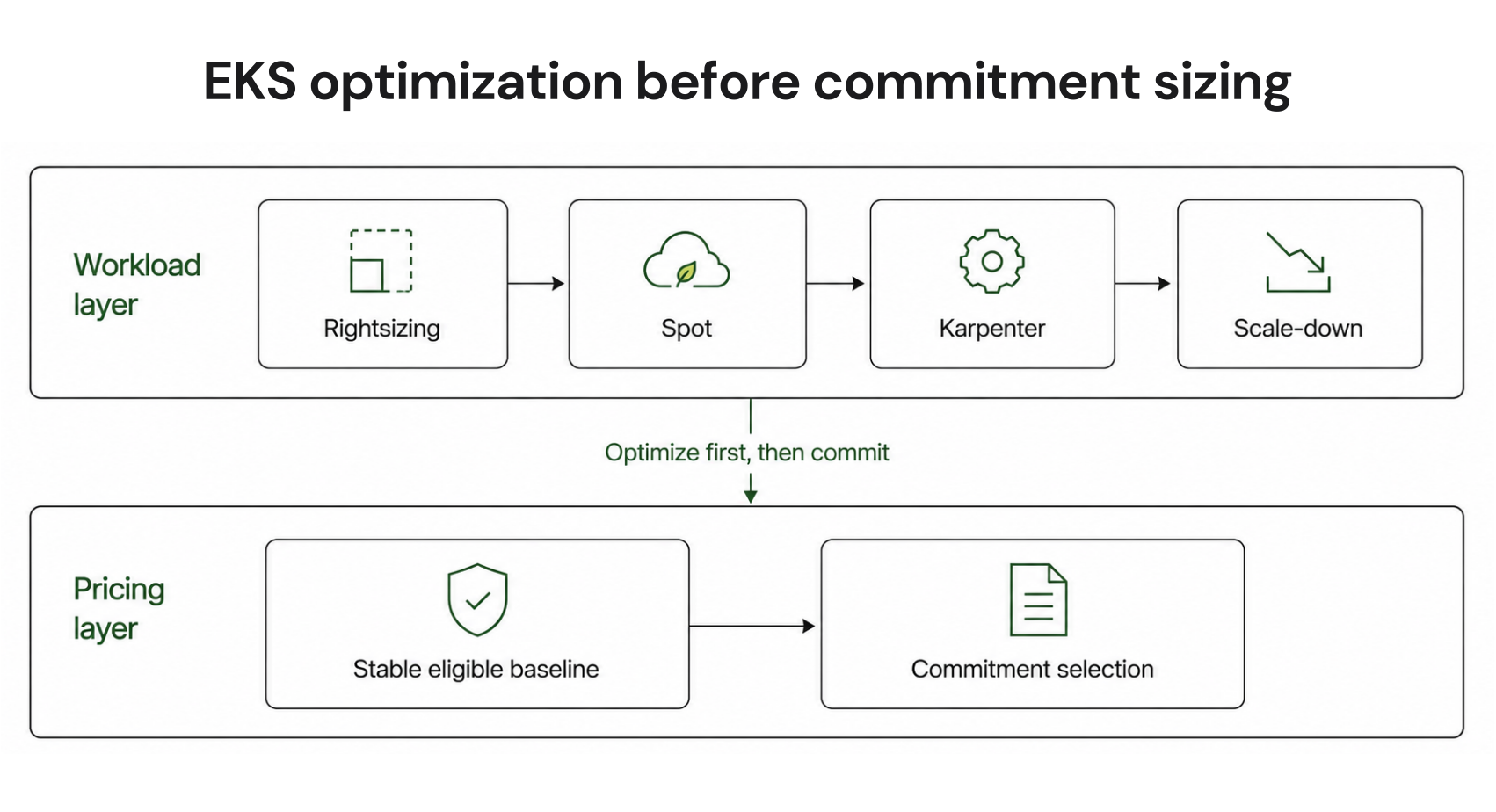
What makes up your EKS bill
The control plane is only one line item. Worker compute, Fargate, storage, networking, public IPv4 addresses, load balancers, and optional EKS features can all add cost. AWS now also offers a separately priced Provisioned Control Plane for clusters that need predictable high control-plane performance. See current Amazon EKS pricing| Cost component | How AWS charges it | Main optimization lever |
|---|---|---|
| EKS cluster support | $0.10 per cluster-hour in standard support; $0.60 in extended support | Upgrade on time; delete retired clusters |
| Provisioned Control Plane | Additional hourly tier fee when enabled | Use where predictable high control-plane performance is required |
| EC2 worker nodes | EC2 rates by instance and purchase option | Rightsizing, Spot, Karpenter, Savings Plans |
| EKS Auto Mode | EC2 price plus separate Auto Mode management fee | Compare operational value with added cost |
| Fargate | Requested vCPU, memory, and storage | Right-size requests; compare with EC2 |
| Storage and networking | Service-specific charges | Remove idle resources; reduce unnecessary data movement |
Optimize the workload layer first
Right-size pod requests
Kubernetes scheduling depends on declared CPU and memory requests. If requests materially exceed actual needs, the scheduler can reserve more node capacity than necessary and push node count upward.Use representative runtime data and Vertical Pod Autoscaler recommendations in audit mode to identify oversized requests. Validate changes against production reliability needs. AWS recommends starting cost optimization with workload requirements and dynamic scaling before reducing provisioned capacity. Read AWS EKS compute cost optimization guidance
Use Spot for interruptible workloads
EC2 Spot can provide discounts of up to 90% compared with On-Demand prices, but instances can be interrupted. Batch processing, CI workers, and replicated stateless services are common candidates.Karpenter helps when NodePools expose multiple eligible instance types instead of one fixed shape. More diversity gives it more capacity pools to consider as Spot availability changes.
Let Karpenter consolidate safely
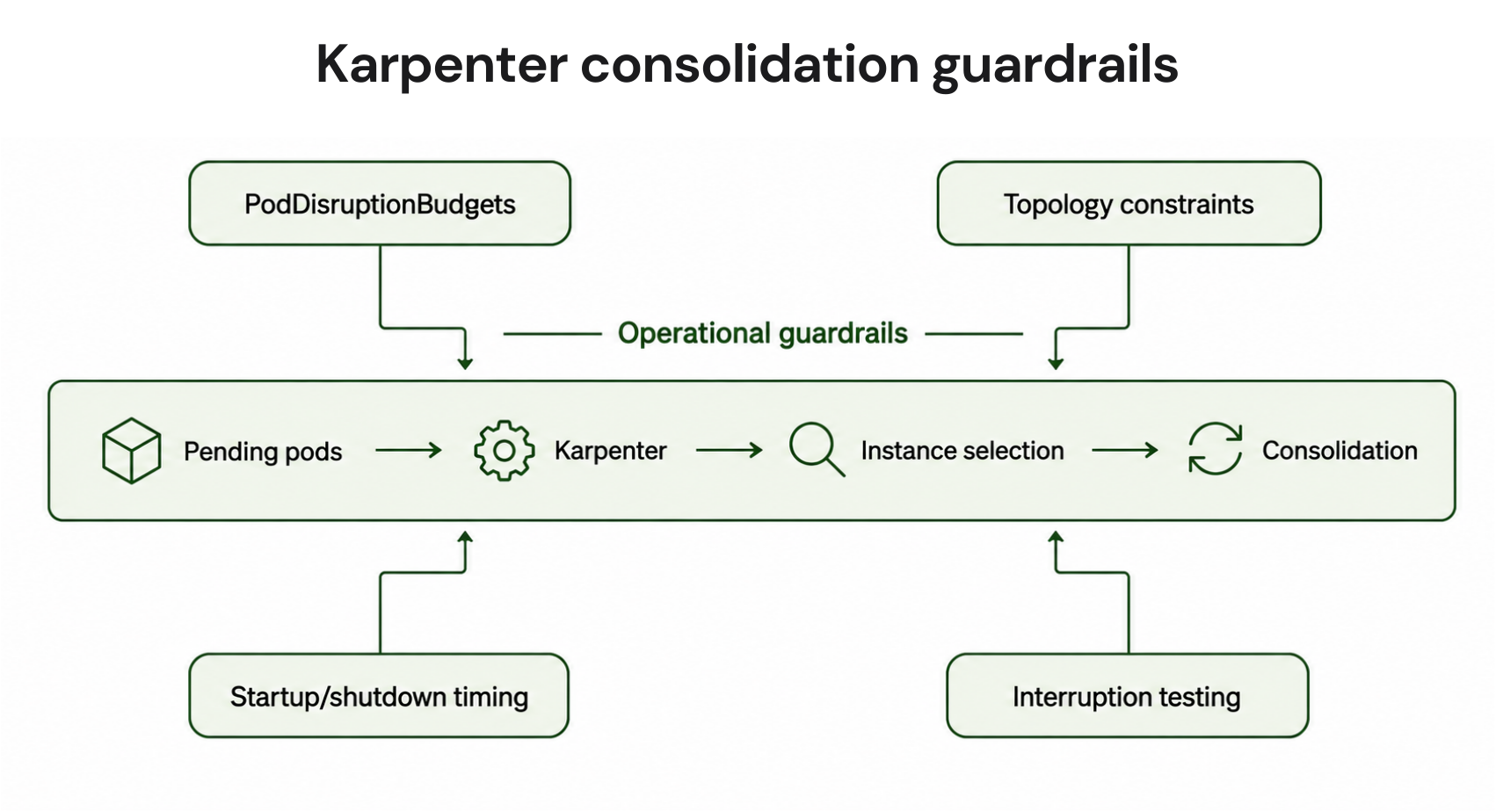
Karpenter reduces waste by provisioning around pending pod requirements and consolidating nodes when workloads can be packed more efficiently.Restrictive PodDisruptionBudgets can prevent Karpenter and Cluster Autoscaler from scaling nodes down. Before increasing consolidation or Spot aggressiveness, verify PodDisruptionBudgets, topology constraints, startup and shutdown duration, and interruption behavior.
Full Karpenter interruption handling uses an SQS queue fed by EventBridge so Karpenter can respond to events such as Spot interruption warnings and begin draining affected nodes.
Scale down nonproduction compute
Development, QA, and staging may not need production-level capacity around the clock. Scale workloads and nodes down during known idle windows where operationally safe. The EKS cluster charge continues while the cluster exists.EKS commitment-readiness guide
Pod CPU and memory requests reflect representative usage.
Spot-eligible workloads have tested PodDisruptionBudgets and interruption behavior.
Karpenter NodePools allow useful instance diversity.
Nonproduction capacity scales down during predictable idle periods.
Kubernetes versions are reviewed before extended support starts.
Stable hourly eligible On-Demand spend is measurable.
Savings Plans coverage and utilization are reviewed with existing commitments.
Each material namespace or workload has a cost owner.
Size the stable baseline before committing
Do not size a Savings Plan from a monthly average alone. It can hide hourly troughs, seasonality, migrations, and bursts that should remain uncommitted.Use this five-step method:
Exclude Spot-covered demand. Savings Plans do not apply to Spot.
Normalize planned changes. Remove capacity likely to disappear through migration, decommissioning, rightsizing, or scale-down.
Inspect hourly eligible On-Demand usage. Find the lower persistent spend level rather than peak demand.
Account for seasonality. Compare representative periods before setting the baseline.
Commit incrementally. Cover the most stable portion first, then add commitments as utilization and coverage data builds confidence.
Choose the right commitment model
Compute Savings Plans are generally the most flexible native AWS option for dynamic Karpenter fleets. They offer up to 66% off eligible On-Demand rates and can apply across EC2 families, sizes, operating systems, tenancy, and Regions, plus eligible Fargate and Lambda usage. See AWS Savings Plans typesFor a deeper explanation of the mechanics, see our Compute Savings Plans guide.
EC2 Instance Savings Plans offer up to 72% off On-Demand rates but are tied to a selected instance family in one Region. They can fit stable family-and-Region demand.
Reserved Instances remain useful when their matching rules fit predictable EC2 usage or an RI-specific strategy is required. Regional Standard and Convertible RIs can provide size flexibility in qualifying cases, so not every RI is locked to one exact size. Our Savings Plans vs Reserved Instances comparison covers the trade-offs in more detail.
For a broader overview of plan types, terms, and commitment mechanics, see our AWS Savings Plans guide.
Do not evaluate one cluster in isolation
Savings Plans apply after EC2 Reserved Instances. EC2 Instance Savings Plans apply before Compute Savings Plans because their scope is narrower. In a consolidated billing family, Savings Plans first apply to the owner account and can then apply to eligible usage in other accounts when sharing is enabled.A cluster-only model can therefore mispredict where the Savings Plan benefits land.
Before buying more coverage, review the billing family, commitment inventory, sharing configuration, utilization, and coverage together.
Fargate and EKS Auto Mode
Fargate removes node management and bills EKS pods based on requested resources. Compute Savings Plans can apply to eligible Fargate usage.EKS Auto Mode adds a management fee to the underlying EC2 price. Its managed EC2 instances can still use On-Demand, Reserved Instances, Compute Savings Plans, or Spot. Compare both infrastructure economics and operational value.
Make EKS cost visible by workload
AWS split cost allocation data can attribute EC2 costs to EKS pods and aggregate them by cluster, namespace, deployment, and workload. It is available through CUR and CUR 2.0, not Cost Explorer. See AWS split cost allocation setup for EKSThe management account must opt in, include the data in a Cost and Usage Report, and activate relevant Kubernetes labels as cost allocation tags when needed. Split allocation creates additional pod-level records, so plan for a larger CUR dataset. AWS notes that two new usage records are created per Kubernetes pod per hour for CPU and memory cost allocation.
Use the data for showback or chargeback and connect material workloads to accountable teams. Our Kubernetes cost allocation guide explains how to break spend down by team, namespace, and workload.
How we fit into EKS cost optimization
Once cost allocation makes the stable eligible baseline visible, the next decision is how to manage the commitment risk around it. At Usage.ai, we focus on this commitment layer after workload waste has been addressed.With Flex Insured Commitments, teams can get up to 57% savings of a three-year AWS commitment with none of the commitment risk, depending on the service, configuration, and payment option.
For eligible Flex Commitments, we calculate a loss when a managed commitment costs more than equivalent On-Demand usage. That loss is calculated at the end of each month, accrued to the account, and paid as cashback 90 days after it accrues, subject to current program eligibility and terms. See how Usage.ai cashback works
Our pricing is performance-based, so we charge a percentage of realized savings. This protection is separate from AWS’s native Savings Plans terms. The goal is not to replace rightsizing, Spot, or Karpenter. It is to manage commitments against the stable eligible baseline left after those steps.
Get up to 57% savings with reduced commitment risk and conditional cashback protection.
Frequently asked questions
How should I size a Savings Plan for EKS?
Size against stable hourly eligible On-Demand usage after rightsizing, Spot adoption, scale-down, and planned workload changes. Avoid using peak demand or a monthly average as the target.
Do Savings Plans apply only to the EKS cluster I analyzed?
No. They apply according to AWS application rules. In a consolidated billing family, benefits can flow across linked accounts when sharing is enabled, so model the wider commitment environment.
When is an EC2 Instance Savings Plan better for EKS?
It can fit when material compute stays in one instance family and Region for the term. Dynamic Karpenter pools that move between families usually favor Compute Savings Plans.
Do Savings Plans reserve EC2 capacity?
No. Savings Plans provide discounted pricing, not capacity assurance. If guaranteed capacity is needed, evaluate an On-Demand Capacity Reservation separately.
Is Fargate or EC2 cheaper for EKS?
There is no universal winner. Fargate trades node management for pod-level billing, while EC2 offers more control over instance selection, Spot, Karpenter, and utilization. Compare the same workload pattern and operating requirements.


