.png)



UNLOAD is one of those Redshift features that looks completely free on the surface. Same-region data transfer from Redshift to S3 is explicitly free for unload operations. No per-byte egress, no feature surcharge, no surprise line item. That’s mostly true and often the full story for teams with straightforward configurations.
Where costs do appear is at the edges: when Enhanced VPC Routing is enabled and the network path is not correctly configured, when the destination S3 bucket is in a different region, when UNLOAD generates hundreds of small files and each one is a separate S3 PUT request, and crucially — when the format and structure of the exported data is left at defaults that make every downstream Athena or Spectrum query against the data lake more expensive than it needs to be.
This guide covers the full cost picture for Redshift UNLOAD operations: what is genuinely free, what is not, the Enhanced VPC Routing detail most teams miss, and the format and partitioning decisions that determine your downstream data lake query costs far beyond the cost of the export itself.
%2021%20(3).svg)
The Free Transfer Rule: What It Covers and What It Doesn’t
AWS’s official Redshift pricing documentation states it plainly: there is no charge for data transferred between Amazon Redshift and Amazon S3 within the same AWS Region for backup, restore, load, and unload operations. Source: aws.amazon.com/redshift/pricing/ DIRECT QUOTE. This is an explicit AWS pricing commitment, not an inference. UNLOAD to same-region S3 is free at the data transfer layer.
For all other data transfers into and out of Amazon Redshift, you are billed at standard AWS data transfer rates. Source: same DIRECT QUOTE. This includes cross-region UNLOAD, JDBC/ODBC connections to your cluster endpoint from within a VPC, and data sharing across regions.
Cross-region UNLOAD charges
If the destination S3 bucket is in a different AWS Region from your Redshift cluster or Serverless endpoint, you incur standard inter-region data transfer charges. The REGION parameter in the UNLOAD command is required when the S3 bucket is not in the same AWS Region as the database. Source: docs.aws.amazon.com/redshift/latest/dg/r_UNLOAD.html DIRECT. For most US-to-US region pairs, this is approximately $0.02/GB, but rates vary by region pair. Verify at aws.amazon.com/ec2/pricing/on-demand/ under Data Transfer.
Most teams should keep the S3 destination in the same region as the Redshift cluster for UNLOAD operations. If downstream consumers of the exported data are in a different region, consider whether the data movement happens at UNLOAD time (paying per-byte transfer once) or at query time (paying Athena/Spectrum scan charges repeatedly in the consumer region after a one-time copy).
Enhanced VPC Routing: the nuance that changes costs
Enhanced VPC Routing forces all COPY and UNLOAD traffic between your Redshift cluster or workgroup and data repositories through your VPC rather than over the public internet. When you use Enhanced VPC Routing and unload data to Amazon S3 in a different region, you incur standard AWS data transfer charges. Source: docs.aws.amazon.com/redshift/latest/mgmt/enhanced-vpc-routing.html DIRECT QUOTE.
There is no additional charge for using Enhanced VPC Routing itself. The charge consideration is what happens when Enhanced VPC Routing is enabled but the network path is not correctly configured. For traffic to an S3 bucket in the same region, the recommended configuration is a VPC endpoint for S3. When a VPC endpoint is in place, UNLOAD traffic routes directly to S3 through the private network, keeping the free transfer rule intact and adding no routing cost.
When Enhanced VPC Routing is enabled without a VPC endpoint for S3, traffic may route through a NAT gateway. NAT gateway processing charges ($0.045 per GB in US East, verify at aws.amazon.com/vpc/pricing/) apply to all data processed through the NAT gateway, including same-region UNLOAD traffic. A large UNLOAD operation — say, 1 TB of data — routed through a NAT gateway incurs approximately $45 in NAT processing charges that would not exist with a properly configured VPC endpoint. This is a common configuration mistake in environments that enable Enhanced VPC Routing for security reasons without fully tracing the resulting network paths.
The Three Costs That Are Always Present
Even for a perfectly optimized same-region UNLOAD with a correctly configured VPC endpoint, three cost components remain.
Redshift compute: the cost of running the UNLOAD query
UNLOAD is a SQL command that runs on your Redshift cluster. For provisioned clusters, the cluster is running and billing by the hour regardless of whether UNLOAD is running. The UNLOAD query consumes compute resources during execution, but there is no separate feature charge for the export. You pay for the cluster time, not for a per-row or per-byte UNLOAD rate.
For Redshift Serverless, UNLOAD runs on your configured RPU capacity and bills per-second for the RPU-hours consumed during the query execution. Because Serverless scales to zero during inactivity, a large overnight UNLOAD job that takes 30 minutes and consumes 64 RPUs costs 64 RPUs times 0.5 hours times the RPU-hour rate, not a full hour at the maximum configured capacity.
The compute cost of UNLOAD is where format choice has a direct financial implication. Parquet is up to 2x faster to unload than text formats. Source: docs.aws.amazon.com/redshift/latest/dg/r_UNLOAD.html DIRECT QUOTE. For a provisioned cluster, 2x faster means the cluster is occupied with the export operation for half as long, freeing capacity for user queries sooner. For Serverless, 2x faster means roughly half the RPU-hours billed for the same data volume.
S3 PUT request charges
When Redshift writes files to S3 during an UNLOAD, each file is a separate S3 PUT operation. S3 charges standard PUT request rates, currently $0.005 per 1,000 PUT requests in US standard regions (verify at aws.amazon.com/s3/pricing/). For small data volumes, this cost is negligible. For large UNLOAD operations that produce many small files, it can be meaningful.
By default, UNLOAD writes one or more files per node slice. UNLOAD appends a slice number and part number to the specified name prefix. For a cluster with 10 nodes, each with 4 slices, a single UNLOAD produces at least 40 output files, potentially more if each slice splits output into multiple parts. If UNLOAD produces 1,000 files from a large export, that is $0.005 in PUT charges — essentially zero. If a workflow runs thousands of small UNLOAD operations per day, each producing many files, the PUT request charges begin to accumulate. Source: docs.aws.amazon.com/redshift/latest/dg/t_Unloading_tables.html.
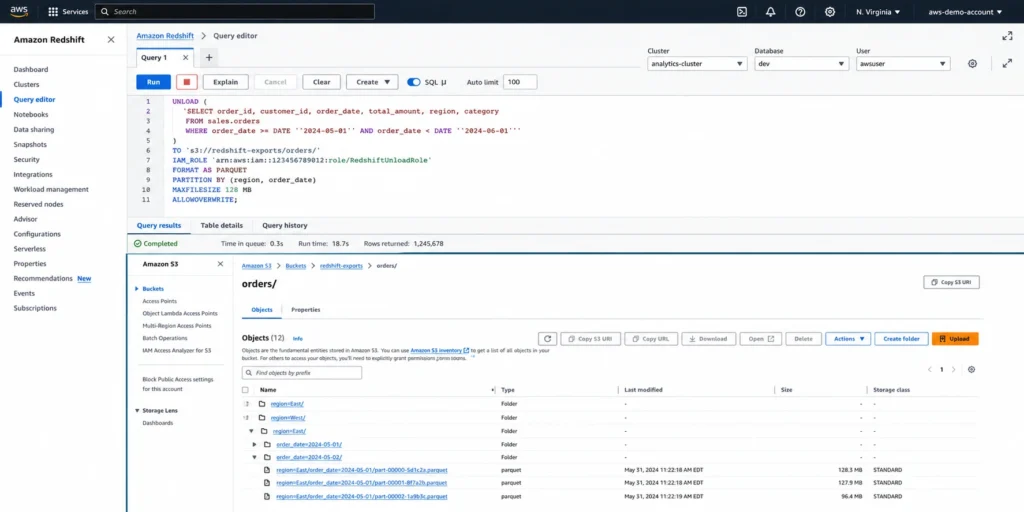
The MAXFILESIZE parameter controls the maximum file size in S3. Setting MAXFILESIZE to a larger value reduces the total number of output files from a single UNLOAD, which reduces S3 PUT requests and also improves downstream query performance (fewer files to open and scan). The PARALLEL OFF option writes output serially to fewer files rather than in parallel per slice, useful when downstream tools require sequential, single-file output.
S3 storage for the exported data
Standard S3 storage rates apply to the exported files from the moment they land in S3. For S3 Standard in US East (N. Virginia), the current rate is approximately $0.023 per GB-month for the first 50 TB, decreasing at higher volumes. Verify current rates at aws.amazon.com/s3/pricing/. S3 Intelligent-Tiering, Infrequent Access, and other storage classes are options for data that is queried infrequently after export.
This is where Parquet’s 6x storage reduction relative to text formats has the most direct financial impact. A 10 TB text-format export that would cost approximately $230/month in S3 Standard storage becomes approximately 1.67 TB in Parquet, costing approximately $38/month. Over a year, that is roughly $2,280 in S3 storage cost savings from format choice alone. Source: docs.aws.amazon.com/redshift/latest/dg/r_UNLOAD.html DIRECT QUOTE on 6x storage reduction.
Also read: Redshift Reserved Nodes: the complete guide to node types, pricing, and purchase strategy
Format and Structure: The Decisions That Determine Downstream Costs
Most UNLOAD cost discussions stop at the export itself. But the decisions made during UNLOAD — format choice, partition structure, file size — directly determine the cost of every query run against the exported data in S3, often for years after the export.
Parquet vs text: the format decision
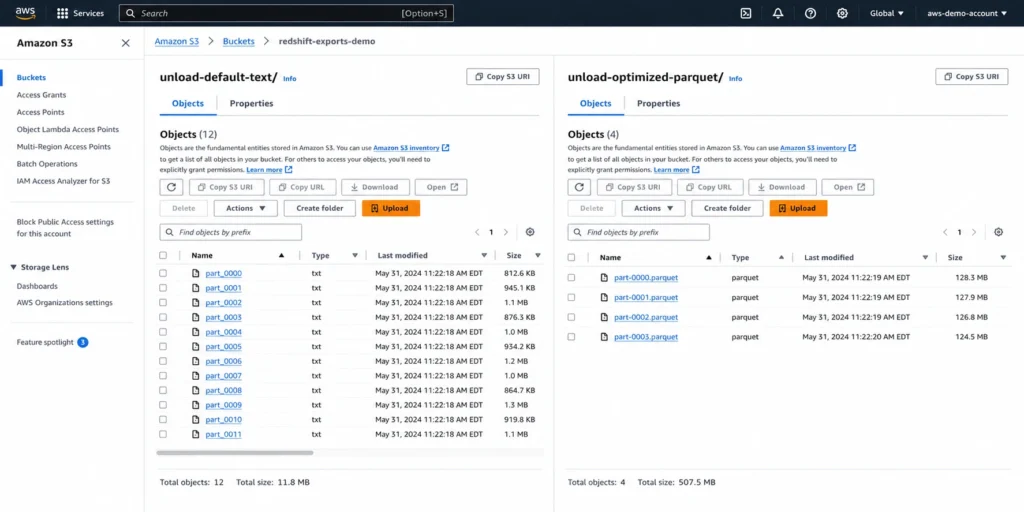
The UNLOAD command supports text (pipe-delimited by default), JSON, and Apache Parquet formats. Parquet is an efficient open columnar storage format optimized for analytics. AWS documentation states two key performance facts: Parquet format is up to 2x faster to unload and consumes up to 6x less storage in Amazon S3 compared with text formats. Source: docs.aws.amazon.com/redshift/latest/dg/r_UNLOAD.html DIRECT QUOTE.
The 2x speed and 6x compression advantages compound when considering Athena and Redshift Spectrum usage. Both services charge per byte scanned. Athena currently charges $5 per TB scanned in US East (verify at aws.amazon.com/athena/pricing/). A query that scans 1 TB in text format scans approximately 167 GB in Parquet format for the same logical data — roughly a 6x cost reduction on every Athena scan. This downstream query cost saving often exceeds the initial storage and export cost savings by a large multiple over time for active data lake datasets.
Parquet is also a columnar format, which means analytical queries that access only a subset of columns read only those columns from disk. A text format file stores all columns in each row and must be read fully even when the query needs only 3 of 50 columns. Parquet’s columnar layout provides additional scan cost savings on top of the compression benefit.
PARTITION BY: the structure decision
The PARTITION BY clause in UNLOAD automatically organizes exported data into folder structures in S3 based on the values of specified columns. For example, PARTITION BY (year, month) creates a folder hierarchy like year=2026/month=07/ in S3, allowing downstream tools to scan only the relevant partitions when queries filter on those fields.
Without PARTITION BY, all UNLOAD output lands in a flat structure, and every downstream query must scan all files even if it only needs data from a specific date range. With PARTITION BY on commonly filtered columns, a query for July 2026 data reads only the July 2026 partition — often a tiny fraction of the total dataset.
This partition pruning behavior reduces Athena charges (billed per bytes scanned), Redshift Spectrum charges (also billed per bytes scanned at $5 per TB), and query latency. The combination of Parquet format and PARTITION BY on relevant columns is the standard recommendation for any UNLOAD that produces data intended for regular analytical querying.
File size and the MAXFILESIZE parameter
UNLOAD’s default behavior produces one or more files per node slice. For large clusters with many slices, this creates many small files. Small files are expensive to query at scale: each file requires an S3 API call to open, and small files underutilize the block-level compression efficiency of Parquet. The recommendation for Athena and Spectrum performance is files in the range of 128 MB to 1 GB after compression.
MAXFILESIZE parameter specifies the maximum size of files written to S3. You can use MAXFILESIZE to control file size and limit the total number of files generated by UNLOAD. Larger MAXFILESIZE values reduce file count but may slow the unload by reducing write parallelism. The right value depends on your cluster size and target file count. Source: docs.aws.amazon.com/redshift/latest/dg/r_UNLOAD.html.
A Worked Cost Example
To ground the format and structure decisions in real numbers, consider a hypothetical UNLOAD operation: exporting 10 TB of transaction data from a provisioned RA3 cluster to S3 for downstream Athena querying, with the export running monthly.
Scenario A: default UNLOAD to text format, no PARTITION BY, no MAXFILESIZE. Export produces approximately 10 TB of pipe-delimited text files in a flat S3 structure. Monthly S3 storage cost: approximately $230 per month at $0.023/GB-month. An Athena query scanning the full dataset: $50 at $5/TB. Running 100 such queries per month: $5,000 in Athena charges. Total monthly operating cost for the data lake export: approximately $5,230 on stable usage.
Scenario B: UNLOAD with FORMAT AS PARQUET, PARTITION BY (year, month), MAXFILESIZE 1GB. Export produces approximately 1.67 TB of Parquet files in a partitioned folder structure. Monthly S3 storage: approximately $38/month. An Athena query scanning data for a single month (one partition): approximately 1.67 TB divided by 12 months equals 139 GB, so $0.70 per full-month partition scan. Running 100 such queries per month: $70 in Athena charges. Total monthly operating cost: approximately $108 per month.
The difference is approximately $5,122 per month — essentially the same data, the same cluster, the same monthly export operation, with dramatically different ongoing data lake operating costs from format and partition choices. These numbers are illustrative and directional; actual Athena scan costs depend on query selectivity and how well partition pruning works for your query patterns. Verify current S3 and Athena rates before building a real cost model.
The UNLOAD Command Syntax Reference for Pricing-Relevant Parameters
For a FinOps engineer reviewing an existing UNLOAD workflow or building a new one, these are the parameters most directly relevant to cost outcomes.
FORMAT AS PARQUET enables Parquet output, delivering the 2x faster export and 6x storage compression benefit versus text. The default format is pipe-delimited text. Source: docs.aws.amazon.com/redshift/latest/dg/r_UNLOAD.html.
PARTITION BY (column1, column2) creates a folder hierarchy in S3 based on the column values. A forward slash is automatically added to the end of the name-prefix value if needed. Source: same DIRECT. Essential for downstream query cost reduction.
MAXFILESIZE parameter controls maximum file size per output file. Specify in MB or GB. Reducing file count reduces S3 PUT requests and improves downstream scan efficiency. Balance against the parallel write performance of your cluster.
PARALLEL OFF writes output serially to one or more files rather than in parallel per slice. Use when downstream tools require fewer, larger files or sequential output. The trade-off is longer export time since write parallelism is disabled.
REGION specifies the target S3 bucket region. Required when the S3 bucket is in a different region from the Redshift database. When specified for a cross-region destination, standard inter-region data transfer charges apply. Source: docs.aws.amazon.com/redshift/latest/dg/r_UNLOAD.html DIRECT.
ALLOWOVERWRITE prevents UNLOAD from failing if output files already exist at the destination path. Without this option, UNLOAD fails rather than overwriting existing files. Source: same.
UNLOAD automatically creates encrypted files using Amazon S3 server-side encryption (SSE-S3) by default. You can also specify SSE-KMS. UNLOAD connects to S3 using HTTPS. Source: docs.aws.amazon.com/redshift/latest/dg/r_UNLOAD.html DIRECT QUOTE. No additional cost for the default SSE-S3 encryption.
UNLOAD for Redshift Serverless
The UNLOAD command works identically on Redshift Serverless. The key billing difference is that Serverless charges per-second for the RPU-hours consumed while the UNLOAD query runs, rather than continuously billing a provisioned cluster’s hourly rate.
For large overnight export jobs, Serverless can be more cost-efficient than a provisioned cluster if the cluster would otherwise be idle. A 2-hour UNLOAD consuming 64 RPUs at $0.375/RPU-hour costs $48 in Serverless compute. A provisioned ra3.4xlarge single-node cluster running 24 hours for the same job costs approximately $80/day in on-demand compute even if UNLOAD only runs for 2 hours of that 24-hour period.
The same free transfer rule applies: no data transfer charge for Serverless UNLOAD to same-region S3. The same Enhanced VPC Routing considerations apply: Serverless supports Enhanced VPC Routing and the VPC endpoint configuration requirement is the same as for provisioned clusters. Source: aws.amazon.com/blogs/aws/amazon-redshift-serverless-now-generally-available-with-new-capabilities/.
For teams running large monthly or weekly batch exports from Redshift, Serverless UNLOAD combined with properly configured VPC endpoints, Parquet format, and PARTITION BY represents the fully cost-optimized configuration: no idle compute charges between jobs, free same-region data transfer, minimum S3 storage from compression, and minimum downstream Athena/Spectrum charges from column pruning and partition pruning.
How UNLOAD Fits in a Broader Redshift Cost Strategy
UNLOAD to S3 is a data movement pattern, not a compute cost driver in the way cluster sizing and reservation coverage are. The costs it creates — S3 storage, downstream query charges, occasional cross-region transfer — are real but secondary to the cost of running the Redshift cluster itself.
The highest-leverage cost decision in any Redshift deployment is the cluster compute model: on-demand versus reserved nodes for provisioned clusters, or Serverless with appropriately sized base RPU capacity. Usage.ai handles the reserved node layer: analyzing actual utilization, sizing reservation recommendations to the stable floor, purchasing commitments automatically with a 24-hour refresh cycle, and providing a buyback guarantee if cluster configurations change.
The UNLOAD-layer decisions — format, partitioning, file size, Enhanced VPC Routing path — are one-time configuration choices that, once correctly set, deliver ongoing downstream savings without requiring active management. Getting the UNLOAD configuration right before the first large export is far less expensive than retroactively reformatting and re-partitioning a multi-TB data lake six months later.
$91M+ in savings delivered to 300+ customers across AWS, Azure, and GCP. Fee is a percentage of realized savings only. No savings, no fee. 30-minute setup, billing-layer access only.
%2010%20(3).svg)
Frequently Asked Questions
1. Is Redshift UNLOAD to S3 free?
The data transfer itself is free when the Redshift cluster or Serverless endpoint and the S3 destination bucket are in the same AWS Region. AWS documentation explicitly states there is no charge for data transferred between Amazon Redshift and Amazon S3 within the same AWS Region for backup, restore, load, and unload operations. You still pay for Redshift compute time while the UNLOAD query runs, S3 PUT request charges for each file written, and S3 storage for the exported data at standard S3 rates. Source: aws.amazon.com/redshift/pricing/ DIRECT.
2. Does Enhanced VPC Routing affect UNLOAD costs?
Potentially. When Enhanced VPC Routing is enabled and no S3 VPC gateway endpoint is configured for the subnet where your Redshift cluster runs, UNLOAD traffic may route through a NAT gateway, which charges per GB processed ($0.045/GB in US East, verify at aws.amazon.com/vpc/pricing/). With a properly configured S3 VPC gateway endpoint, UNLOAD traffic routes directly to S3 at no additional cost, maintaining the free same-region transfer rule. Source: docs.aws.amazon.com/redshift/latest/mgmt/enhanced-vpc-routing.html.
3. What format should I use for Redshift UNLOAD to a data lake?
Apache Parquet is the correct default for analytical data lake use cases. Parquet is up to 2x faster to unload and consumes up to 6x less storage in Amazon S3 than text formats. The compressed, columnar format also reduces downstream Athena and Redshift Spectrum query costs because both services charge per bytes scanned. Use FORMAT AS PARQUET in the UNLOAD command. Combine with PARTITION BY on commonly filtered columns to enable partition pruning in downstream queries. Source: docs.aws.amazon.com/redshift/latest/dg/r_UNLOAD.html DIRECT.
4. What are S3 PUT request charges for UNLOAD?
Each file written to S3 by UNLOAD is a separate PUT request. S3 charges $0.005 per 1,000 PUT requests in US standard regions (verify at aws.amazon.com/s3/pricing/). UNLOAD by default writes one or more files per node slice, so a large cluster can produce many output files per UNLOAD operation. Use the MAXFILESIZE parameter to control output file size and reduce total file count, which reduces both S3 PUT request charges and improves downstream analytical query performance.
5. Does UNLOAD to a different AWS region cost money?
Yes. Cross-region UNLOAD incurs standard AWS inter-region data transfer charges. The REGION parameter is required in the UNLOAD command when the S3 bucket is in a different region from the Redshift database. Rates vary by region pair — for most US-to-US transfers, approximately $0.02/GB, but verify the exact rate for your specific source and destination at aws.amazon.com/ec2/pricing/on-demand/. Source: aws.amazon.com/redshift/pricing/ and docs.aws.amazon.com/redshift/latest/dg/r_UNLOAD.html DIRECT.