The appeal of Redshift Data Sharing is easy to understand. You have data in one cluster, multiple teams or accounts need to query it, and the traditional solution — copying data to each consumer’s cluster — wastes storage, creates sync problems, and takes engineering time to maintain.
Data Sharing eliminates the copy. The producer owns the data, consumers query it live, and everyone sees the same current state.
The cost question is equally straightforward in theory: no copy means no extra storage, and the sharing feature itself has no per-use fee. In practice, the cost picture has a few layers that deserve attention before you architect a cross-account or cross-region data mesh around this feature.
This guide covers the full pricing model for Redshift Data Sharing across every configuration — same-account same-region, same-account cross-region, cross-account same-region, and cross-account cross-region — along with the node type constraints, encryption requirements, and cost control mechanisms that determine whether Data Sharing is available to you and what it will actually cost.
The Node Type Constraint: Why DC2 Clusters Cannot Use Data Sharing
Before getting into pricing, there is an eligibility constraint that stops many teams before they start. Data Sharing in Amazon Redshift is supported only for all provisioned RA3 cluster types (ra3.16xlarge, ra3.4xlarge, and ra3.xlplus) and Amazon Redshift Serverless. It is not supported for other cluster types. Source: docs.aws.amazon.com/redshift/latest/dg/considerations.html DIRECT QUOTE.
DC2 clusters — the older Dense Compute node type that predates Redshift Managed Storage — cannot participate as data sharing producers or consumers. If you are running DC2 nodes and want to use Data Sharing, migration to RA3 or Serverless is required first.
The RA3 requirement exists because Data Sharing operates through Redshift Managed Storage, which is the underlying storage layer that separates compute from storage in the RA3 and Serverless architecture. DC2 nodes use local SSD storage, which does not support the cross-cluster data access mechanism that Data Sharing relies on.
Migration from DC2 to RA3 changes your cost structure: RA3 clusters separate compute charges from managed storage charges, billing for each independently. The migration itself is supported via Elastic Resize for node type changes. Factor the new RA3 billing model into your total cost comparison before deciding to migrate specifically for Data Sharing access.
The Encryption Requirement: Prerequisites Before Cross-Account Sharing
The second constraint is encryption. The rules differ based on whether sharing is within the same account or across accounts.
For same-account sharing: if both the producer and consumer clusters and serverless namespaces are in the same account, they must have the same encryption type — either both unencrypted, or both encrypted.
For cross-account and cross-region sharing: both the producer and consumer clusters and serverless namespaces must be encrypted. This is for security purposes. However, they don’t need to share the same encryption key.
The practical implication: if you want to share data cross-account with a partner organization, both sides must have encryption enabled on their Redshift clusters before the first datashare is created. An unencrypted consumer cluster cannot access a cross-account datashare, regardless of how the producer is configured. Enabling encryption on a running Redshift cluster requires a cluster modification that causes a brief performance impact while the data is re-encrypted. This is a one-time operation but should be planned rather than discovered as a blocker mid-implementation.
For Amazon Redshift Serverless, encryption is enabled by default, so Serverless workgroups already meet the encryption requirement on both producer and consumer sides.
How Data Sharing Works at a Cost Level
Understanding the pricing requires understanding the fundamental data flow. When a consumer cluster queries shared data, the query runs on the consumer’s compute nodes. The consumer does not access data directly from the producer’s local storage. Instead, it reads the data from Redshift Managed Storage (RMS) — the underlying shared S3-backed storage layer — using its own compute resources.
This architecture has direct cost implications. The producer cluster’s performance is not affected by consumer queries. Consumer queries consume the consumer’s compute capacity, not the producer’s.
From a storage perspective, the data physically exists once, in the producer’s Redshift Managed Storage. There is no duplication into the consumer’s storage. The producer pays for its own RMS storage as it always would. The consumer pays zero for storage of the shared data — it reads live from the producer’s storage layer.
Same-Region Data Sharing Costs
Same-account same-region: completely free
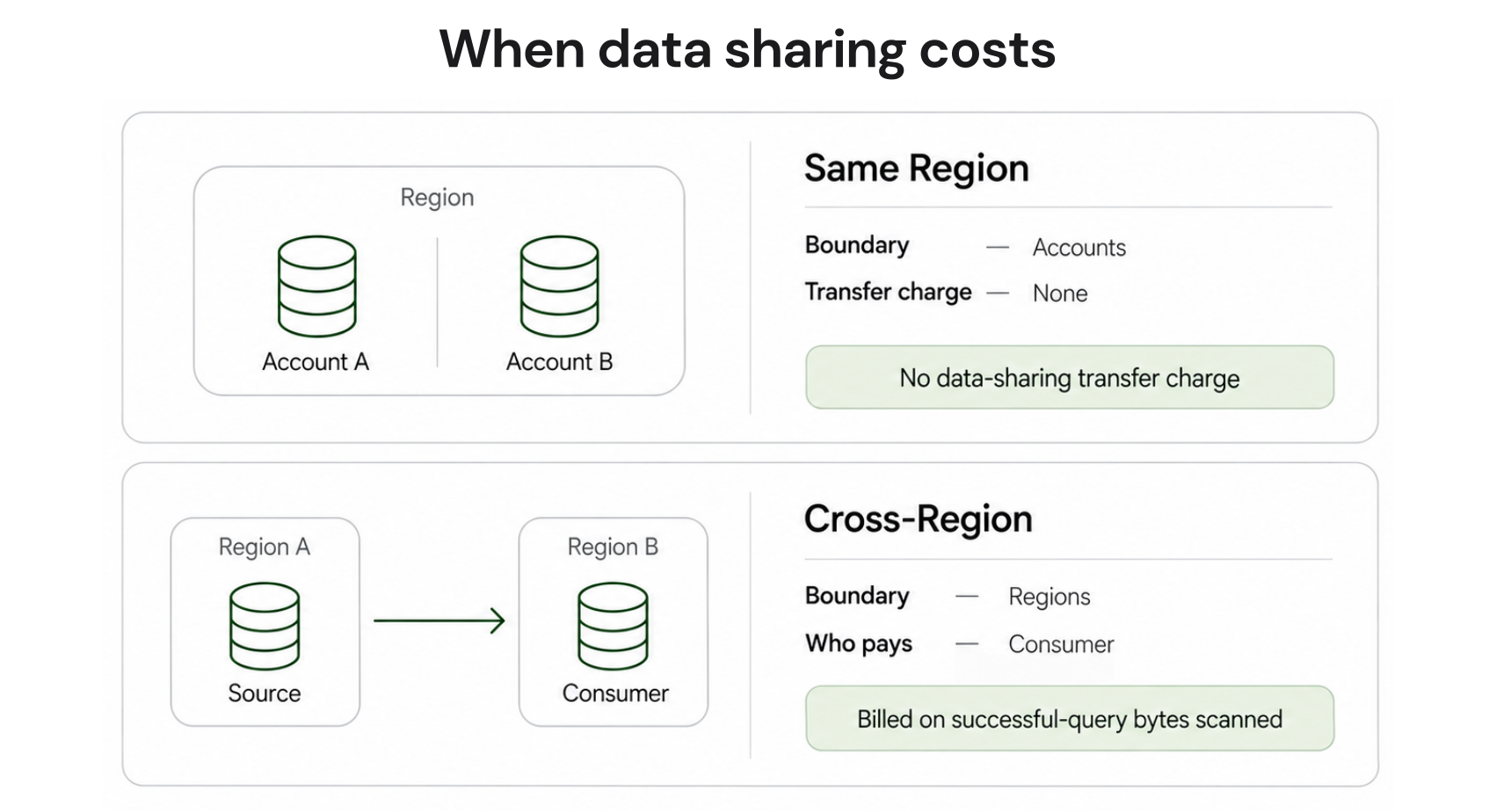
When both the producer and consumer clusters or workgroups are in the same AWS Region and the same AWS account, data sharing has no additional cost beyond each cluster’s normal running costs. The producer pays its own cluster compute and RMS storage. The consumer pays its own cluster compute when running queries. No data transfer fees, no sharing feature fee. The sharing itself is free.
Cross-account same-region: still no data transfer fee
When the producer is in one AWS account and the consumer is in a different account, but both are in the same AWS Region, there is still no data transfer charge. Cross-region data sharing includes additional cross-region data-transfer charges. These data-transfer charges do not apply within the same region, only across regions. Source: docs.aws.amazon.com/redshift/latest/dg/considerations.html DIRECT QUOTE.
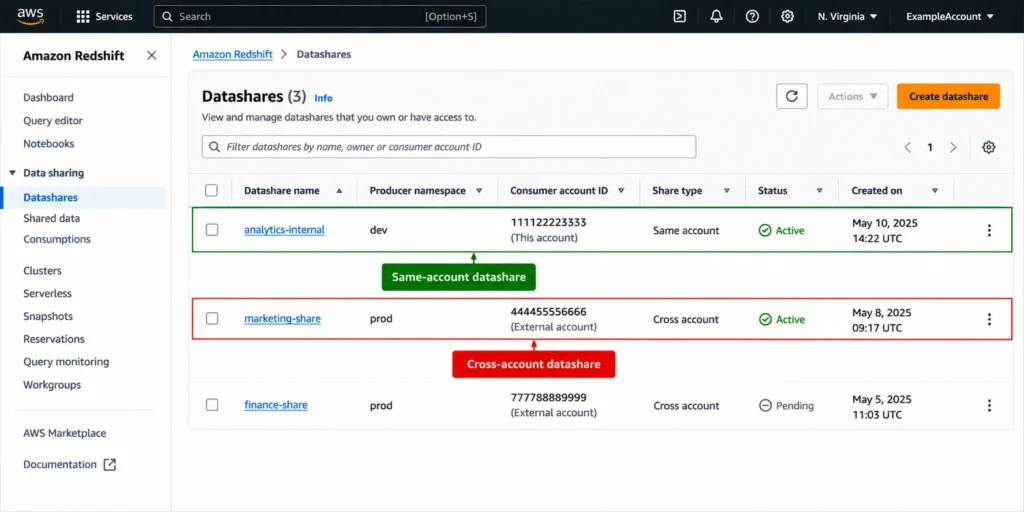
The cross-account setup requires a two-way handshake: the producer account administrator authorizes the datashare for the consumer account, and the consumer account administrator associates it. This is an administrative process but carries no per-authorization cost. The ongoing cost structure is the same as same-account sharing: each side pays its own cluster costs, no transfer fees apply.

Also read: Redshift Reserved Nodes: The Complete Guide to Node Types, Pricing, and Purchase Strategy
Cross-Region Data Sharing Costs
Cross-region data sharing is where variable costs appear. When consuming data from a different AWS Region, the consumer pays the cross-region data transfer fee from the producer region to the consumer region. Source: docs.aws.amazon.com/redshift/latest/dg/across-region.html DIRECT QUOTE.
How the charge is calculated
The cross-region charge is based on the bytes of data scanned for every successful query run. Source: docs.aws.amazon.com/redshift/latest/dg/cross-region-billing.html DIRECT QUOTE. This is an important distinction from how most people expect data transfer pricing to work. You are not paying for a one-time bulk transfer of the dataset from the producer region to the consumer region. You pay each time a query runs against shared data, based on how much data that query scanned.
The per-query scan-based billing model creates a different cost optimization incentive than bulk transfer. With bulk transfer, you pay once per copy regardless of how often the data is queried. With scan-based billing, efficient queries that scan less data (through effective partitioning, clustering, and filter predicates) cost less, and queries that scan the same data repeatedly each incur separate charges. This makes query optimization and table design directly relevant to your cross-region data sharing cost.
The per-byte data transfer rate varies by region pair. Verify current rates for your specific source and destination regions at aws.amazon.com/ec2/pricing/on-demand/ under the Data Transfer section. For common US-to-US region pairs the rate is typically around $0.02/GB, but varies by combination.
Same-account cross-region vs cross-account cross-region
With cross-region data sharing, you can share data across clusters in the same AWS account, or in different AWS accounts even when the clusters are in different regions. Source: docs.aws.amazon.com/redshift/latest/dg/across-region.html DIRECT QUOTE. In both cases, the cross-region data transfer charge applies when consuming data from a different region. The billing responsibility is on the consumer side: the consumer pays the cross-region data transfer fee from the producer region to the consumer region.
Encryption requirement for cross-region
For cross-region data sharing, both producer and consumer must be encrypted. This applies regardless of whether they are in the same account or different accounts. Serverless workgroups meet this requirement by default. Provisioned clusters require encryption to be explicitly enabled if not already configured.
Cost Control Mechanisms for Cross-Region Data Sharing
AWS provides explicit cost control tools for cross-region data sharing, recognizing that scan-based billing can create unpredictable charges if queries are inefficient or high-volume.
Usage limits
You can configure data sharing usage limits to cap the amount of data transferred between AWS regions. A concurrency scaling usage limit specifies a threshold of total data transfer in specified increments. The period can be daily, weekly, or monthly. When the threshold is reached, you can configure one of two actions: alert (send an SNS notification and optionally create a CloudWatch event, but continue allowing cross-region queries) or disable (stop cross-region data sharing for the remainder of the period).
Usage limits are not set by default. If you enable cross-region data sharing without configuring usage limits, there is no automatic cap on transfer charges. For organizations sharing high-query-volume datasets cross-region, setting daily or weekly usage limits with alert mode is a minimum cost governance practice.
CloudWatch monitoring
To create usage limits in the Amazon Redshift console, choose Configure usage limit under Actions for your cluster. You can monitor your usage trends and get alerts on usage exceeding your defined limits with automatically generated CloudWatch metrics from the Cluster performance or Monitoring tabs.
The CloudWatch metrics for cross-region data sharing transfer give you visibility into how much data each region pair is consuming on a regular basis. This is the same monitoring pattern as Concurrency Scaling usage limits — set a budget threshold, monitor against it, and intervene before the threshold causes a disable action that affects consumer query availability.
A worked cost scenario: a consumer cluster in us-west-2 runs 1,000 queries per month against a datashare hosted in us-east-1. Each query scans an average of 100 GB of shared data. At $0.02/GB inter-region transfer rate, the monthly cross-region charge is 1,000 x 100 GB x $0.02 = $2,000. The same dataset accessed with better partitioning that reduces average scan to 10 GB per query would cost $200/month instead. This illustrates both the query optimization incentive and the value of setting a usage limit before cross-region sharing goes live.

Also read: Redshift Cross-Region Snapshots: Backup and DR Cost Breakdown
Data Sharing Architecture Options and Their Cost Implications
Data Sharing can be used in several architectural patterns, each with different cost profiles.
Centralized data mesh (producer serves many consumers)
A single RA3 or Serverless producer cluster holds the canonical dataset. Multiple consumer clusters in the same region (same or different accounts) query it. This is the zero-transfer-cost model: all consumers pay their own compute, nobody pays transfer fees, and the producer’s storage bill covers the data once. This is the most cost-efficient configuration and the primary use case Data Sharing was designed for.
The scaling consideration: the producer’s performance is not directly affected by consumer queries, but all consumers share the same underlying Redshift Managed Storage. Very high concurrent consumer query volume can create contention at the storage layer, which AWS mitigates through RMS caching. For organizations with very high consumer query rates, monitoring producer cluster performance metrics alongside consumer usage is advisable.
Cross-region data access without copying
A team in us-east-1 needs to query data owned by a cluster in eu-west-1 for regulatory or proximity reasons. Cross-region data sharing enables this without a full data copy. The us-east-1 consumer pays the cross-region scan charge per query but does not need to maintain a separate copy of the full dataset. For use cases where cross-region access is infrequent or query volume is low, this is often cheaper than maintaining a full replicated cluster or snapshot-based copy in the consumer region.
The comparison that matters: cross-region Data Sharing (scan-based, pay-per-query) versus cross-region snapshot copy (one-time transfer plus ongoing storage in the destination region). For high-query-volume cross-region access, the ongoing scan charges of Data Sharing can exceed the one-time transfer plus storage cost of a snapshot copy. For low-volume, read-focused access to current data, Data Sharing is typically the better choice. The decision point is query frequency and scan volume versus snapshot maintenance cost.
Dev/test isolation from production data
A production cluster shares tables with a development or test cluster in the same region and account. Dev/test engineers can query live production data for testing and debugging without creating a full copy of the production dataset. Same-region same-account sharing means zero transfer cost, and the dev/test cluster’s own compute charges cover query processing. This is one of the most operationally valuable and cheapest use cases for Data Sharing.
Write Access: A Newer Capability Most Guides Treat as Read-Only
Redshift Data Sharing was originally a read-only feature. Objects in datashares were read-only for consumers in all circumstances. This has changed. Writing to an object in a datashare is now supported. Objects in datashares are only write-enabled when a producer specifically grants write privileges like INSERT or CREATE on objects to the datashare. Additionally, for cross-account sharing, a producer has to authorize the datashare for writes and the consumer has to associate specific clusters and workgroups for writes. Source: docs.aws.amazon.com/redshift/latest/dg/datashare-considerations.html DIRECT QUOTE.
The write capability enables use cases previously not possible: consumers can insert records back into producer tables (useful for acknowledgment workflows or audit logging), update business source data on the producer, or communicate current values from consumer to producer. For data engineering teams building bidirectional data flows between clusters or accounts, this is a significant operational simplification compared to maintaining separate COPY-based pipelines for the write direction.
The cost implication of write access is that write operations consume producer cluster compute resources, not just storage. When a consumer inserts into a shared table, the insert executes in the context of the producer’s cluster, consuming its WLM slots and compute capacity. For write-heavy cross-cluster workloads, monitor the producer cluster’s WLM queue depth and compute utilization when write-enabled datashares are in active use.
AWS Data Exchange Integration: When Data Sharing Becomes Revenue
Beyond internal data sharing within or across accounts, Redshift datashares can be published to the AWS Data Exchange catalog. Approved providers can add AWS Data Exchange datashares to AWS Data Exchange products. When a customer subscribes to a product with AWS Data Exchange datashares, AWS Data Exchange automatically adds the customer as a data consumer on all AWS Data Exchange datashares included with the product. AWS Data Exchange also automatically manages billing, invoicing, payment collection, and payment distribution for paid products with AWS Data Exchange datashares. Source: docs.aws.amazon.com/redshift/latest/dg/concepts.html DIRECT QUOTE.
For organizations with proprietary datasets that have commercial value — financial data, weather data, reference datasets — Data Exchange integration means the same data sharing architecture used for internal access can become a revenue stream. The producer still pays its own compute and storage. The consumer pays their own compute for queries. AWS Data Exchange manages the commercial relationship, pricing, and payments.
Comparing Data Sharing to Alternative Data Access Patterns
Data Sharing is not always the right choice. Understanding the alternatives and their cost differences helps make the right architecture decision.
Cross-region snapshot copy (the traditional DR and data replication pattern): copies the full dataset to the consumer region as a manual snapshot. Pays one-time data transfer at copy time, then ongoing storage in the destination region. Downstream queries run entirely locally — no per-query transfer charges. Better for high-volume, high-frequency cross-region query scenarios where the ongoing scan cost of Data Sharing would exceed the snapshot copy cost.
UNLOAD to S3 with Athena or Spectrum access: exports data from Redshift to S3, then makes it queryable via Athena or Redshift Spectrum. No cross-region Redshift-to-Redshift transfer charges, but involves S3 storage costs and Athena scan charges. Good for large-scale data lake publishing where data consumers use SQL-on-S3 tools rather than Redshift clusters.
Full cluster replication with separate ETL: maintains a separate Redshift cluster in the consumer account or region, continuously loaded from the producer via ETL pipelines. Full independence, full cost: producer cluster compute and storage, consumer cluster compute and storage, ETL infrastructure, and data transfer at each load cycle. The highest-cost and highest-complexity option, justified only when full consumer independence and isolation are required.
Data Sharing wins when: consumers need live, current data (not a snapshot from yesterday’s ETL run); the dataset is large enough that copying it to each consumer would incur significant storage overhead; and access is within the same region (no transfer charges) or cross-region but at modest query volume.
How Redshift Data Sharing Fits Into Overall Cost Strategy
Data Sharing is a data access and governance feature, not a cost optimization tool in the direct sense. Its cost benefit is in what it replaces: duplicate storage charges from maintained copies, ETL infrastructure costs, and engineering time to keep replicated datasets synchronized.
The underlying cluster costs — compute node charges, Redshift Managed Storage billing — are unchanged by enabling Data Sharing. Reserved node purchasing, which is the highest-leverage cost optimization for provisioned Redshift, applies exactly as it would without Data Sharing. Usage.ai handles this layer: sizing reserved node recommendations to the stable utilization floor for RA3 clusters, purchasing commitments automatically with a 24-hour refresh cycle, and providing a buyback guarantee if cluster configurations change.
For organizations building cross-account data architectures on Redshift, the sequence is: confirm RA3 or Serverless on both producer and consumer sides, ensure encryption meets the requirement for the sharing pattern, enable Data Sharing, and separately optimize each cluster’s compute costs through reserved node coverage. The two decisions are independent and both worth getting right.
$91M+ in savings delivered to 300+ customers across AWS, Azure, and GCP. Fee is a percentage of realized savings only. No savings, no fee. 30-minute setup, billing-layer access only.
Frequently Asked Questions
1. Is Redshift Data Sharing free?
Same-region data sharing — whether within the same account or across different accounts — is free from a data transfer perspective. The producer pays its own cluster compute and storage. The consumer pays its own compute when running queries. No extra fee applies for the sharing feature itself. Cross-region data sharing introduces a data transfer charge: the consumer pays the cross-region data transfer fee from the producer region based on bytes scanned per successful query. Source: docs.aws.amazon.com/redshift/latest/dg/considerations.html DIRECT.
2. Which Redshift node types support Data Sharing?
Data Sharing is supported only for RA3 provisioned cluster types (ra3.16xlarge, ra3.4xlarge, ra3.xlplus) and Amazon Redshift Serverless. It is not supported for DC2 or DS2 nodes. Source: docs.aws.amazon.com/redshift/latest/dg/considerations.html DIRECT. Organizations running DC2 clusters must migrate to RA3 or Serverless to use Data Sharing.
3. What encryption is required for cross-account Data Sharing?
For cross-account and cross-region data sharing, both the producer and consumer clusters and serverless namespaces must be encrypted. For same-account sharing, both must have the same encryption type — either both encrypted or both unencrypted. Encryption keys do not need to match across accounts. Amazon Redshift Serverless is encrypted by default, so Serverless workgroups meet the requirement automatically. Source: docs.aws.amazon.com/redshift/latest/dg/considerations.html DIRECT.
4. How is cross-region Data Sharing billed?
When consuming data from a different region, the consumer pays the cross-region data transfer fee from the producer region to the consumer region. The charge is based on bytes of data scanned per successful query run — not on a bulk transfer of the dataset. This means efficient queries that scan less data cost less, and each query run incurs a separate charge. Source: docs.aws.amazon.com/redshift/latest/dg/cross-region-billing.html DIRECT.
5. How do I control cross-region Data Sharing costs?
AWS provides usage limits for cross-region data sharing: a configurable threshold of total data transfer in daily, weekly, or monthly periods. When the threshold is reached, the configured action fires — alert (SNS notification) or disable (stops cross-region data sharing for the remainder of the period). Monitor usage via automatically generated CloudWatch metrics. Set limits before enabling cross-region sharing on high-volume datasets. Source: docs.aws.amazon.com/redshift/latest/dg/cross-region-billing.html DIRECT.
6. Does Redshift Data Sharing support write access?
Yes, as of a recent update. Consumers can be granted write privileges (INSERT, CREATE) on shared objects by the producer. For cross-account sharing, the producer must authorize the datashare for writes and the consumer must associate specific clusters or workgroups for writes. Write operations consume producer cluster compute resources. The feature was originally read-only. Source: docs.aws.amazon.com/redshift/latest/dg/datashare-considerations.html DIRECT.