New See exactly what you're overpaying AWS in under 60 seconds. Try the Calculator for free

Auto Scaling Lifecycle Hooks: Graceful Startup & Shutdown Without Waste

Updated July 8, 2026
23 min read
Auto Scaling Lifecycle Hooks: Graceful Startup & Shutdown Without Waste
On this page

Auto Scaling lifecycle hooks do not appear as a line item anywhere on your AWS bill. There is no “Lifecycle Hooks” SKU in Cost Explorer, no per-hook charge, no per-invocation fee. If you are searching for that number to budget for a new hook, stop searching.

What is not $0.00 is everything a lifecycle hook touches: the extra minutes an old instance and its replacement both run, the EC2 hours a retained instance racks up after a failed shutdown script goes unnoticed, and the automation (Lambda, EventBridge) you build around the hook to make it useful.

This guide breaks down the real auto scaling lifecycle hooks graceful shutdown cost with real numbers, covers the instance retention feature AWS shipped in November 2025 that most existing content has not caught up to, and gives you a HeartbeatTimeout configuration that will not quietly inflate your bill.

This matters for a feature most engineers set up once and forget. A fleet running weekly deploys, health-check-driven replacements, and occasional Spot interruptions can accumulate dozens of termination events a day. Multiply a small, overlooked timeout misconfiguration by that churn, and a feature AWS correctly advertises as free becomes the source of a line item nobody can explain on next month’s invoice.

Banner

What Is a Lifecycle Hook in Auto Scaling?

A lifecycle hook is a pause button on an EC2 instance’s transition between states in an Auto Scaling group (ASG). A launch hook holds a newly launched instance in Pending:Wait while your bootstrap script installs dependencies and confirms the application is ready for traffic. A termination hook holds an instance scheduled for termination in Terminating:Wait while you drain connections, flush logs to Amazon S3, or complete an in-flight job.

The instance sits in the wait state until one of two things happens: your code calls CompleteLifecycleAction (with a result of CONTINUE or ABANDON), or the timeout expires. That timeout has two layers, HeartbeatTimeout and GlobalTimeout, covered in full detail in the next section, and mixing them up is where most misconfigurations start.

Citable definition: An Auto Scaling lifecycle hook is a pause mechanism that holds an EC2 instance in a wait state during launch or termination so a custom action, such as connection draining or state persistence, can finish before the instance transitions further. The hook itself carries no charge; the instance continues billing normally for every second it remains in the wait state.

Auto Scaling console displaying an EC2 instance paused in the Terminating:Wait state during a termination lifecycle hook. The lifecycle hook name and remaining wait time are visible in the instance details panel.

Launch Hooks vs Termination Hooks: Where the Cost Logic Differs

The two hook types share a mechanism but carry different cost profiles, and conflating them is a common source of confusion.

A launch hook holds a newly launched instance in Pending:Wait before it becomes InService. That instance is already billing (EC2 charges start at launch, not at InService), so a slow bootstrap script does not create double billing on its own; it creates a longer window before that instance contributes to effective capacity, which matters most during a real traffic spike. Teams often compensate with a larger baseline fleet, a real but indirect cost. If bootstrap time is the bottleneck, warm pools solve it by pre-initializing instances ahead of demand instead of paying for a larger always-on baseline.

A termination hook holds an outgoing instance in Terminating:Wait, and this is where direct double billing happens: Auto Scaling frequently launches a replacement to hold desired capacity while the old instance runs out its wait period. If you are optimizing for cost specifically, termination hooks deserve tighter timeout discipline than launch hooks, since every extra minute on a termination hook is a minute of two instances billing for the capacity of one.

Do Auto Scaling Lifecycle Hooks Cost Anything to Use?

No. Creating, attaching, and triggering a lifecycle hook has no direct AWS charge. You can add hooks through the console, CLI, CloudFormation, or an SDK at no cost, and Auto Scaling routes the corresponding events to Amazon EventBridge automatically, also at no direct charge for same-account delivery to most targets.

The catch is that a lifecycle hook does not pause billing, it pauses the instance’s state transition. The instance keeps running at its normal On-Demand, Reserved, or Spot rate for every second it sits in Pending:Wait or Terminating:Wait. A hook is a scheduling and safety mechanism, not a cost center of its own; the cost only shows up when it interacts with how Auto Scaling replaces capacity.

How Does the Terminating:Wait State Create Double Billing?

Here is the mechanism, stated plainly: when Auto Scaling selects an instance for termination and a termination lifecycle hook is attached, the instance does not disappear from your bill immediately. It moves to Terminating:Wait.

If that instance was providing capacity the ASG still needs (which is nearly always true during a rolling deploy, an instance refresh (Auto Scaling’s rolling-replacement mechanism for updating a fleet’s launch template or AMI), or unhealthy-instance replacement), Auto Scaling launches a replacement right away rather than waiting for the old instance to fully terminate. For the length of the hook’s wait period, you are billed for both instances.

This is by design, and for most workloads it is a rounding error. Take a realistic case: an ASG of 20 m5.large instances running a weekly instance refresh with a 10-minute (600-second) termination hook for connection draining.

Item Value
Instances refreshed per cycle 20
Overlap window per instance 10 minutes
m5.large On-Demand rate $0.096/hour
Extra cost per instance per refresh $0.096 x (10/60) = $0.016
Extra cost per refresh (20 instances) $0.32
Refreshes per month (weekly) ~4.3
Total monthly overlap cost ~$1.38

That is the cost of doing lifecycle hooks correctly: about the price of a coffee, per month, for a 20-instance fleet doing weekly refreshes. The AI-generated overview that prompted this article is right that lifecycle hooks “cost nothing” for a well-tuned setup. The real financial exposure lives somewhere else entirely.

Where Load Balancer Deregistration Fits Into the Overlap Window

If your ASG sits behind an Elastic Load Balancer, the Terminating:Wait overlap is not just about your custom lifecycle hook script. Auto Scaling first deregisters the instance from the load balancer, and if connection draining is enabled, the instance stops accepting new connections and waits for existing ones to finish before the lifecycle hook even begins its countdown. This delay stacks on top of your HeartbeatTimeout, not inside it.

A target group with a 300-second deregistration delay and a 120-second lifecycle hook script effectively creates a 420-second overlap window, not 120 seconds. Teams that size HeartbeatTimeout without accounting for this delay consistently underestimate their real overlap cost by 2 to 3 times.

What Is the Default Lifecycle Hook Timeout, and Why Does It Matter for Cost?

Two numbers govern how long an instance can sit in a wait state, and they are not the same thing. Getting them confused is one of the most common lifecycle hook mistakes, and it directly affects your overlap billing exposure.

HeartbeatTimeout defaults to 3,600 seconds (one hour) if you do not set it explicitly verify at docs.aws.amazon.com/autoscaling – defaults can change. This is the window for a single lifecycle action before it times out and Auto Scaling applies your DefaultResult. If your actual cleanup work takes 90 seconds, leaving this at the one-hour default means a hung or crashed script leaves a duplicate instance billing for up to 59 minutes longer than necessary.

GlobalTimeout is the outer ceiling across all heartbeats for one lifecycle action, capped at 172,800 seconds (48 hours) or 100 times your HeartbeatTimeout, whichever is smaller.

This catches people off guard: a short HeartbeatTimeout chosen for cost discipline can silently cap GlobalTimeout far below 48 hours, since AWS always takes whichever number is smaller.

Configuration HeartbeatTimeout Effective GlobalTimeout Cap Worst-case single-instance overlap cost (m5.large)
AWS default, untouched 3,600 sec (1 hr) 172,800 sec (48 hr, if heartbeats sent) $0.096 x 1 hr = $0.096 per stall, before any heartbeat extension
Tuned for fast web app draining 120 sec 12,000 sec (100x) $0.096 x (120/3600) = $0.0032 per stall
Tuned for batch job completion 900 sec 90,000 sec (25 hr) $0.096 x (900/3600) = $0.024 per stall
Misconfigured, assumed 48-hr ceiling 30 sec 3,000 sec (50 min, not 48 hr) Timeout arrives 57x sooner than the team expected

The table’s last row is the one worth sitting with. A team that sets a short HeartbeatTimeout for cost discipline but assumes the full 48-hour GlobalTimeout still applies will find their lifecycle action abandoned in under an hour, either terminating the instance prematurely or, if retention is enabled, retaining it far sooner than intended.

What Changed in November 2025: Instance Retention and the Real Waste Risk

Before November 2025, a termination lifecycle hook was strictly best-effort. If your cleanup script hung, crashed, or never called CompleteLifecycleAction, Auto Scaling terminated the instance anyway once the HeartbeatTimeout or GlobalTimeout expired. Annoying if you lost in-flight cleanup work, but the instance was gone and the billing stopped.

AWS changed that with the launch of instance lifecycle policies, a feature that shipped to the US East (N. Virginia), US West (Oregon), Europe (Ireland), and Asia Pacific (Singapore) regions in November 2025 verify at aws.amazon.com/about-aws/whats-new – regional availability expands over time. With a TerminateHookAbandon retention trigger configured, an instance whose termination lifecycle action ends in ABANDON (whether you set that result explicitly, or it happens because the HeartbeatTimeout or GlobalTimeout expired) is retained instead of terminated.

Retained instances keep running and keep billing at the standard EC2 rate. They do not count toward the ASG’s desired capacity, so Auto Scaling launches a replacement to make up the difference, meaning you now pay for the retained instance and its replacement until someone manually calls TerminateInstanceInAutoScalingGroup verify at docs.aws.amazon.com/autoscaling – feature behavior can change as it matures.

Citable definition: Instance retention (via an instance lifecycle policy with a TerminateHookAbandon trigger) is an Auto Scaling feature that keeps an instance running in a retained state, rather than terminating it, when a termination lifecycle hook is abandoned or times out. Retained instances continue billing at full EC2 rates and require a manual API call to terminate.

This is genuinely useful for stateful workloads where a failed graceful shutdown risks data loss and you want a human to look before the instance disappears. It is also a straightforward way to accumulate zombie compute if you turn it on without a corresponding alert.

Enable retention when your instances hold state that cannot be reconstructed if cleanup fails, such as an unflushed write-behind cache or an in-progress data migration. Skip retention when your workload is fully stateless and a lost cleanup cycle is merely an inconvenience, not a data-loss risk; the default best-effort termination is cheaper to run unattended.

EC2 Auto Scaling group configuration showing the instance lifecycle policy with the TerminateHookAbandon retention trigger enabled.

 How to Know If You Have Retained Instances Piling Up

Retained instances will not show up in your ASG’s DesiredCapacity or InService instance count, which is exactly why they go unnoticed. Check for them with:

aws autoscaling describe-auto-scaling-groups \
–auto-scaling-group-name your-asg-name \
–query “AutoScalingGroups[].Instances[?LifecycleState==’Terminating:Wait’ || LifecycleState==’Terminating:Retained’]”

If this returns results older than your HeartbeatTimeout, you have found the leak. To find this cost after the fact, filter your Cost and Usage Report or Cost Explorer by instance ID for EC2 usage that doesn’t match a normal launch-to-termination pair in CloudTrail.

Banner

How Do Lifecycle Hooks Work With Spot Instances?

Lifecycle hooks work with Spot Instances, but they do not change the fundamental deal you make with Spot capacity. Amazon EC2 gives a Spot Instance a two-minute interruption notice before it is stopped or terminated to reclaim capacity and notice windows are a service commitment, not a guarantee.

What the hook does give you is a structured place to run your two-minute shutdown routine: stop accepting new work, checkpoint progress, deregister from service discovery. Pairing this with Capacity Rebalancing is the better move. It watches for the earlier rebalance recommendation signal, which can arrive before the two-minute notice, and proactively launches a replacement Spot Instance while the at-risk one is still healthy. That overlap is billed like any other termination hook overlap, and at Spot pricing (up to 90% below On-Demand, it is proportionally smaller.

Do not configure instance retention on a Spot-heavy ASG expecting it to save you from interruptions. Retention only affects what happens when your own termination lifecycle action is abandoned; it has no power over EC2 reclaiming Spot capacity on its own clock.

Quick cost comparison: the same overlap math from the On-Demand example applies at Spot rates, just smaller. A c5.xlarge On-Demand rate of $0.17/hour verify at aws.amazon.com/ec2/pricing/on-demand – rates change, at a typical 65-70% Spot discount, lands around $0.05-0.06/hour – Spot prices float with supply and demand. A 10-instance fleet with Capacity Rebalancing enabled, averaging a 90-second proactive overlap per rebalance event across roughly 15 events a month, costs approximately 10 x 15 x $0.055 x (90/3600) = $0.21/month. Spot’s discount makes the double-billing side effect a non-issue; the bigger risk on Spot fleets is skipping Capacity Rebalancing entirely and eating availability gaps instead of a few cents of overlap.

What Does It Cost to Automate Lifecycle Hooks With Lambda and EventBridge?

Most production lifecycle hook setups are not manual. Auto Scaling automatically sends lifecycle events to the default EventBridge event bus, and a rule matching Auto Scaling’s lifecycle action events routes them to a Lambda function that does the actual cleanup work: drain connections, flush logs to S3, call CompleteLifecycleAction.

Here is what that automation stack actually costs, with real 2026 rates:

Run the numbers for a fleet doing 5,000 instance terminations a month: that is 5,000 Lambda invocations, comfortably inside the 1 million free requests, and at a typical 3-second execution time and 256 MB memory, roughly 3,750 GB-seconds, well inside the 400,000 GB-second free tier. The automation cost for a fleet of that size rounds to $0.00 per month.

EventBridge rule routing EC2 Auto Scaling lifecycle events directly to an AWS Lambda function. 

Worked Example: What a Misconfigured Lifecycle Hook Actually Costs

Two scenarios, same fleet, same instance type, wildly different outcomes. The fleet: 40 m5.xlarge instances at $0.192/hour On-Demand ($140.16/month each, verify at aws.amazon.com/ec2/pricing/on-demand – rates change), running a mix of scheduled deploys and health-check-driven replacements. Run your own fleet’s numbers through the AWS Pricing Calculator before assuming either scenario applies directly to you.

Scenario A, configured correctly: A 10-minute termination hook drains connections before shutdown, no retention policy. During a normal month with roughly 60 termination events, each overlap costs $0.192 x (10/60) = $0.032. Total monthly overlap cost: 60 x $0.032 = $1.92, the negligible tax for doing graceful shutdown properly.

Scenario B, retention enabled with no cleanup automation: The same team adds an instance lifecycle policy with a TerminateHookAbandon trigger to catch failed shutdowns on a fleet handling in-flight financial transactions, but builds no alert for retained instances. Over a month, a slow-draining dependency causes roughly 10 shutdowns to abandon and get retained instead of terminated. Nobody notices for 30 days, because retained instances do not appear in standard ASG health dashboards.

Item Value
Retained instances accumulated 10
Instance type m5.xlarge
On-Demand monthly rate $140.16
Days retained before discovery 30 (full month)
Wasted spend for the month 10 x $140.16 = $1,401.60

That $1,401.60 buys nothing. The replacement instances Auto Scaling launched to cover desired capacity are already doing the work; the retained instances sit idle, billed at full rate, waiting for a TerminateInstanceInAutoScalingGroup call that never comes.

The lesson is not “do not use instance retention,” a legitimate safety feature for stateful workloads. The lesson is that retention without a paired cleanup alarm converts a safety feature into a slow, silent leak, roughly 730x more expensive per month than the double-billing overlap that lifecycle hooks are usually blamed for.

How Do You Configure a Termination Lifecycle Hook With Cost-Safe Defaults?

What you will accomplish: attach a termination lifecycle hook sized to your actual cleanup work, not the one-hour default. Estimated time: 15 minutes.

Prerequisites: an existing Auto Scaling group, an IAM role allowing Auto Scaling to publish to your notification target (not needed for EventBridge routing, only for SNS/SQS), and a cleanup script with a known runtime.

1. Time your cleanup script in isolation first. Run your connection-draining or log-flushing routine against a live instance under realistic load, not an idle test box.

2. Set HeartbeatTimeout to that measured time plus a safety margin, typically 1.5 to 2x. A script that reliably finishes in 60 seconds justifies a 120-second HeartbeatTimeout, not the 3,600-second default.

aws autoscaling put-lifecycle-hook \  –lifecycle-hook-name graceful-shutdown-hook \  –auto-scaling-group-name your-asg-name \  –lifecycle-transition autoscaling:EC2_INSTANCE_TERMINATING \  –heartbeat-timeout 120 \  –default-result CONTINUE

3. Decide your DefaultResult deliberately. CONTINUE terminates the instance anyway if the timeout is reached; ABANDON is the safer choice for stateful workloads, especially paired with an instance lifecycle policy for retention.

4. Create an EventBridge rule matching Auto Scaling’s termination lifecycle action events for your ASG, targeting a Lambda function that performs the actual cleanup and calls CompleteLifecycleAction when finished.

5. Test the failure path, not just the happy path. Manually force a slow or failing cleanup script and confirm the instance behaves as expected at timeout, whether that is termination or retention.

What to do if this doesn’t work: if instances appear stuck in Terminating:Wait past your configured HeartbeatTimeout, check your Lambda function’s CloudWatch Logs for a thrown exception before CompleteLifecycleAction is called. A failed Lambda invocation is the single most common reason a lifecycle action never completes on its own, forcing it to ride out the full timeout instead.

How do you know it worked: describe the ASG’s activity history after a deploy or scale-in event and confirm instances transition from Terminating:Wait to fully terminated (or intentionally Retained) within your expected HeartbeatTimeout window, not the AWS default.

Common Mistakes That Turn a Free Feature Into a Billing Problem

Leaving HeartbeatTimeout at the one-hour default “to be safe,” and forgetting the ELB deregistration delay when sizing it. Both are covered above: an untuned default silently doubles overlap billing when a script hangs, and the deregistration delay stacks in front of the hook’s own timeout, which is the most common reason teams underestimate their real overlap window.

Enabling instance retention without a monitoring alarm. The single most expensive mistake covered in this article, quantified in the Worked Example above. A retained instance with no alarm attached is just an EC2 instance nobody remembers running.

Assuming a lifecycle hook can rescue a Spot Instance. It cannot extend past the two-minute interruption notice, a limitation covered in the Spot Instances section above.

Not testing the failure path. Most configurations are validated only on the happy path. The cost-relevant failures, a hung script or a Lambda function that throws before calling CompleteLifecycleAction, only surface when something breaks, which is precisely when nobody is watching the clock.

See exactly what you’re overpaying on AWS in under 60 seconds. Try the Free Savings Calculator

How Do You Set Lifecycle Hook Timeouts Without Wasting Money?

  1. Time your actual cleanup script, then add margin. If connection draining reliably finishes in 90 seconds, set HeartbeatTimeout to something like 180 to 300 seconds, not the 3,600-second default. Every second of default timeout is a second of potential double-billing if the script hangs. Measure this under realistic production load, not a quiet staging box, since draining time often scales with active connection count.
  2. Use heartbeats for genuinely variable-length work. If your cleanup time depends on in-flight job size, such as finishing a batch processing task of unknown duration, call RecordLifecycleActionHeartbeat to extend the timeout incrementally instead of setting one enormous fixed window that overpays for the common case to cover a rare long-running one.
  3. Set an explicit DefaultResult. Decide deliberately whether a timeout should CONTINUE (accept the risk, terminate anyway) or ABANDON (retain for investigation on a stateful fleet where lost cleanup work is unacceptable), rather than leaving an implicit default unverified.
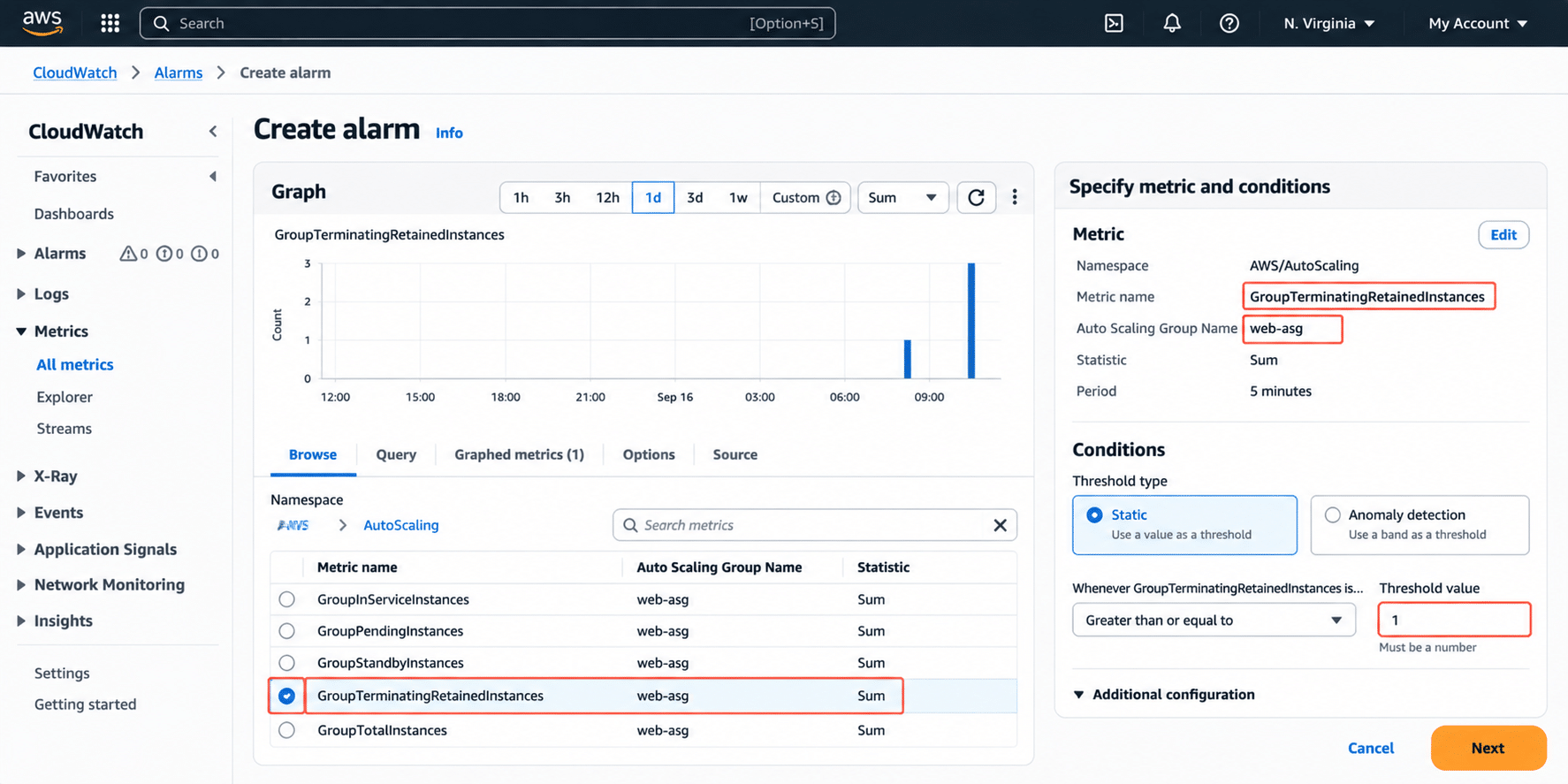
  4. If you enable instance retention, alarm on it. A CloudWatch alarm on retained instance count, checked hourly, costs a fraction of a cent and prevents the exact scenario in the worked example above.
  5. Test your GlobalTimeout math before you rely on it. It is capped at 172,800 seconds or 100 times your HeartbeatTimeout, whichever is smaller, per the table earlier in this article verify at docs.aws.amazon.com/autoscaling. A short HeartbeatTimeout chosen for cost discipline can silently cap your GlobalTimeout far below 48 hours.
  6. Never rely on a lifecycle hook to save a Spot Instance. Pair Spot fleets with Capacity Rebalancing instead, and treat the two-minute interruption notice as the real deadline your application needs to respect, regardless of what your lifecycle hook is configured to do.

A Quick Sizing Reference by Workload Type

Workload Typical HeartbeatTimeout Reasoning
Stateless web server behind an ALB 60-180 sec Connection draining is usually fast; align with your target group’s deregistration delay
Background job worker (queue-based) 300-900 sec Needs time to finish or safely checkpoint an in-flight job before exiting
Stateful cache or in-memory data node 600-1,800 sec May need to flush data to persistent storage or replicate state before shutdown
Batch processing node Heartbeat-based, no fixed value Variable job length means incremental heartbeats beat a single fixed timeout
Spot-backed fault-tolerant worker 60-120 sec Must complete before the 2-minute Spot interruption notice expires regardless of hook settings

Use this as a starting point. The only number that matters is how long your actual cleanup code takes on your actual fleet, measured under real conditions.

CloudWatch alarm monitoring retained EC2 Auto Scaling instances to detect abandoned lifecycle hooks before costs increase. 

How Does Usage.ai Help Control Auto Scaling Waste From Idle Instances?

Cleaning up lifecycle hook configuration fixes the mechanism, not the fact that most FinOps teams lack a standing process to catch retained or double-billed instances before they hit a monthly invoice. That is closer to what Usage Flex Savings Plan is built for: automated Savings Plan-equivalent discounts of 40-60% across EC2, Fargate, and Lambda, refreshed every 24 hours instead of AWS’s 72-plus hour native cadence.

Usage.ai customers including Motive, EVGo, Blank Street Coffee, and Secureframe have used this model to realize six and seven-figure annual EC2 savings. On a fleet where instance count is a moving target, that faster refresh matters more than on a static fleet, since EC2 Savings Plans compatibility with Auto Scaling only works if the commitment can track a fleet that resizes itself.

This matters for the retention scenario earlier in this article: a Compute Savings Plan sized manually and reviewed monthly will not catch 10 retained instances idling for weeks, because a monthly review cycle isn’t built to catch a leak that started mid-cycle. A 24-hour refresh does not prevent the retention misconfiguration itself, that is still a lifecycle hook and alarm problem to fix directly, but it keeps commitment coverage accurate on the rest of the fleet while the underlying issue gets resolved.

Usage.ai does not touch your infrastructure to do this. Setup is billing-layer access only, no code changes, no agent installed, and takes about 30 minutes to verify current setup details at usage.ai. The fee model is a percentage of realized savings only; if Usage.ai does not save you money, you do not pay a fee.

None of this replaces fixing the lifecycle hook timeout itself. A commitment plan optimizes the compute you are actually using; it cannot distinguish a legitimately busy fleet from one padded with retained zombie instances. Fix the HeartbeatTimeout and the retention alarm first, then let a commitment platform handle the discount math on what is left.

Frequently Asked Questions

1. Do Auto Scaling lifecycle hooks cost money to use? 

No. Creating and using a lifecycle hook has no direct AWS charge. The instance you attach it to keeps billing normally for every second it spends in a wait state, and if Auto Scaling launches a replacement during that window, you pay for both instances until the hook completes or times out.


2. What is a lifecycle hook in Auto Scaling? 

A lifecycle hook pauses an EC2 instance in Pending:Wait or Terminating:Wait during launch or termination so a custom action, like installing software or draining connections, can finish first. The instance transitions further once your code calls CompleteLifecycleAction or the configured timeout expires, whichever happens first.


3. Is EC2 Auto Scaling itself free to use? 

Yes, the Auto Scaling service has no separate fee. You only pay for the underlying EC2 instances, EBS volumes, and any load balancer or CloudWatch resources the ASG creates and manages on your behalf. Lifecycle hooks, scaling policies, and warm pool configuration follow the same rule: the orchestration is free, the compute it manages is not.


4. How much does an Auto Scaling group cost per month? 

An ASG itself adds no fee; the cost is the sum of its running instances at their pricing model (On-Demand, Reserved, or Spot), plus attached EBS storage and any load balancer. A 15-instance m5.large fleet running 24/7 On-Demand costs roughly 15 x $70.08 = $1,051.20/month for compute alone verification at aws.amazon.com/ec2/pricing/on-demand – rates change, before storage or data transfer.


5. What is the difference between an Auto Scaling group and an Elastic Load Balancer? 

An Auto Scaling group manages the number of EC2 instances running, launching or terminating them based on demand or health. An Elastic Load Balancer distributes incoming traffic across those instances. They are typically used together: the ASG decides how many instances exist, and the load balancer decides which one handles each request, but neither service replaces the other.


6. What happens if a lifecycle hook times out? 

By default, if a termination lifecycle hook’s HeartbeatTimeout or GlobalTimeout expires without a completion call, Auto Scaling proceeds with terminating the instance on a best-effort basis. If an instance lifecycle policy with a TerminateHookAbandon retention trigger is configured, the instance is retained instead of terminated, and it continues billing until manually terminated.


7. Do lifecycle hooks prevent Spot Instance interruptions? 

No. A lifecycle hook cannot prevent a Spot Instance from being reclaimed once EC2 needs the capacity back. Spot Instances still receive only the standard two-minute interruption notice, and a hook does not extend that window; it only gives you a structured place to run your shutdown routine inside it.


8. How do I avoid paying for retained instances I forgot about? 

Set a CloudWatch alarm or scheduled check on your ASG’s retained and Terminating:Wait instance counts, and alert if any instance stays in that state longer than your expected HeartbeatTimeout. Since retained instances do not count toward desired capacity, they are invisible in standard capacity dashboards and require a dedicated check.


9. What is the difference between CONTINUE and ABANDON in a lifecycle hook? 

CONTINUE tells Auto Scaling your action succeeded and it should proceed to the next state, terminating the instance normally after a termination hook. ABANDON signals failure; by default the instance still terminates, but if an instance lifecycle policy with a TerminateHookAbandon trigger is configured, ABANDON instead moves the instance to a retained state.


10. Does a scale-in event trigger the same lifecycle hooks as an instance refresh? 

Yes. Any event that terminates an instance, a scale-in policy, an instance refresh, an unhealthy-instance replacement, or a manual termination call, invokes the same termination lifecycle hooks and follows the same Terminating:Wait billing mechanics described in this article. The trigger differs; the hook behavior and cost exposure do not.


11. How do I test a lifecycle hook without waiting for a real termination? 

Manually terminate a specific instance using the terminate-instance-in-auto-scaling-group CLI command, or force a scale-in, then watch the instance transition to Terminating:Wait in the console or via describe-auto-scaling-groups. This lets you validate your HeartbeatTimeout and cleanup script without waiting for a scheduled deploy or health-check failure.

Cut cloud cost with automation
Latest from our blogs