Every RDS MySQL instance running on-demand is paying the most expensive rate AWS charges for that database. Reserved instances cut that rate by 29% on the lowest 1-year commitment and up to 69% on a 3-year All Upfront term. But the instance family you reserve against matters as much as the term you choose. A 3-year RI on a db.r7g delivers strong savings. A 3-year RI on a db.r8g delivers deeper savings on an instance with 29% better price-performance. Reserving the right generation is as important as reserving at all.
This guide covers the complete RDS MySQL reserved instance pricing across all current Graviton and x86 generations, the MySQL-specific sizing methodology, how size flexibility works, the T4g CPU credit trap, and the Extended Support compounding that makes MySQL 5.7 one of the most expensive database versions in AWS today.
What Graviton Generation Should You Run MySQL On?
AWS offers four current Graviton generations for RDS MySQL, each with meaningfully different performance characteristics and cost structures. Choosing the right generation before purchasing a reserved instance avoids locking in a suboptimal baseline.
T4g: Graviton2, Burstable (Development and Light Workloads)
The db.t4g family (micro, small, medium, large, xlarge, 2xlarge) is the burstable tier designed for workloads with variable CPU. A db.t4g.large has 2 vCPUs and 8 GB RAM. On-demand: $0.073/hr ($53/month). The key caution: T4g instances run in Unlimited CPU credit mode by default on RDS. Sustained CPU above the 10% baseline for a db.t4g.large generates CPU credit charges at $0.075/vCPU-hr for consumed excess credits. These charges are not covered by reserved instances. For a development database that occasionally runs high-CPU migrations or analytics queries, T4g at the free tier or on-demand is appropriate. For production workloads with sustained CPU demand, size up to a non-burstable family.
M7g: Graviton3, General Purpose (Previous Generation Production Standard)
The db.m7g family (large through 16xlarge) provides Graviton3 compute at general-purpose memory ratios (1:4 vCPU-to-RAM). A db.m7g.large has 2 vCPUs and 8 GB RAM. On-demand: $0.185/hr ($135/month). M7g was the general-purpose production standard for open-source RDS databases in 2023-2024 and delivers up to 30% better performance than Graviton2 (M6g) and up to 27% better price-performance. RIs for M7g are available for 1-year and 3-year terms.
R7g: Graviton3, Memory Optimized (Previous Generation Memory-Intensive Workloads)
The db.r7g family provides Graviton3 compute at memory-optimized ratios (1:8 vCPU-to-RAM). A db.r7g.large has 2 vCPUs and 16 GB RAM — double the RAM of the M7g.large at $0.240/hr ($175/month) on-demand. R7g is the right choice for MySQL workloads where the InnoDB buffer pool needs more than 50% of available RAM to maintain high cache hit rates. RIs for R7g are available for 1-year and 3-year terms.
R8g / M8g: Graviton4, Latest Generation (Current Best for Reserved Instances)
The db.r8g and db.m8g families launched in November 2024, and reserved instances for R8g/M8g became available in May 2025. Graviton4 delivers up to 40% performance improvement and 29% better price-performance over Graviton3 (r7g/m7g) instances. AWS specifically notes that R8g/M8g RIs carry deeper discounts than R7g/M7g, further improving the cost case for migrating to the latest generation before purchasing a long-term reservation.
For any team purchasing a 3-year reserved instance in 2026, the R8g or M8g family is the correct starting point. Running a 3-year RI on R7g when R8g offers 29% better price-performance and deeper reserved discounts compounds the cost disadvantage over the full 3-year term.
| Instance Family | Graviton Gen | vCPU:RAM Ratio | db.large On-Demand/hr | Best Use Case | RI Available? |
| db.t4g | Graviton2 (burstable) | 1:4 | $0.032 (t4g.micro: $0.016) | Dev/test, low-traffic | Yes (1-yr and 3-yr) |
| db.m7g | Graviton3 (general-purpose) | 1:4 | $0.185 | Compute-balanced workloads | Yes (1-yr and 3-yr) |
| db.r7g | Graviton3 (memory-opt.) | 1:8 | $0.240 | Memory-intensive MySQL, large buffer pools | Yes (1-yr and 3-yr) |
| db.m8g | Graviton4 (general-purpose) | 1:4 | ~$0.193 (estimated) | Compute-balanced, latest gen | Yes (1-yr only currently — verify) |
| db.r8g | Graviton4 (memory-opt.) | 1:8 | $0.240 (r8g.large) | Memory-intensive MySQL, best price-perf 2026 | Yes (1-yr and 3-yr confirmed May 2025) |
| db.r6i / db.m6i (x86) | Intel (6th gen x86) | Varies | $0.240 (r6i.large) | x86 compatibility requirements only | Yes |
Source: aws.amazon.com/rds/mysql/pricing, AWS What’s New announcements. db.r8g large = $0.240/hr (same as r7g.large), but with 40% better performance and deeper RI discounts. db.m8g large estimated ~$0.193/hr — verify at aws.amazon.com/rds/mysql/pricing — rates change. May 2026.
Also read: RDS Encryption: Does Encrypting Your Database Add Cost?
What Are the Exact RDS MySQL Reserved Instance Rates?
Here is the complete RDS MySQL RI pricing comparison for r8g (Graviton4) and m7g (Graviton3) instance types in US East (N. Virginia) as of May 2026 (verify at aws.amazon.com/rds/mysql/pricing — rates change).
| Instance Type | On-Demand/hr | 1-Yr No Upfront/hr | 1-Yr Savings | 3-Yr All Upfront/hr | 3-Yr Savings |
| db.t4g.micro (Single-AZ) | $0.016 | ~$0.011 | ~31% | ~$0.007 | ~56% |
| db.m7g.large (Single-AZ) | $0.185 | ~$0.131 | ~29% | ~$0.083 | ~55% |
| db.m7g.xlarge (Single-AZ) | $0.370 | ~$0.263 | ~29% | ~$0.166 | ~55% |
| db.r7g.large (Single-AZ) | $0.240 | ~$0.171 | ~29% | ~$0.108 | ~55% |
| db.r8g.large (Single-AZ) | $0.240 | ~$0.163 (deeper discount) | ~32% | ~$0.100 (deeper discount) | ~58% |
| db.r8g.xlarge (Single-AZ) | $0.480 | ~$0.326 | ~32% | ~$0.200 | ~58% |
| db.r8g.xlarge (Multi-AZ) | $0.960 | ~$0.653 | ~32% | ~$0.401 | ~58% |
| db.r8g.2xlarge (Multi-AZ) | $1.920 | ~$1.306 | ~32% | ~$0.802 | ~58% |
NOTE: db.r8g RI rates are estimates based on AWS May 2025 announcement confirming ‘deeper discounts than R7g/M7g.’ Exact rates: verify at aws.amazon.com/rds/mysql/pricing — rates change. R7g rates confirmed from official pricing page. May 2026.
The key comparison: db.r8g.large and db.r7g.large have the same on-demand rate ($0.240/hr), but r8g delivers 40% better performance and carries deeper RI discounts. If your workload needs the same amount of database processing power, r8g achieves it with fewer instances or smaller sizes, and the RI on r8g costs less per unit of actual database work delivered.

What Is the Complete Payment Option Comparison for MySQL Reserved Instances?
All three payment options are available for MySQL RIs. No Upfront is 1-year only. Here is the full six-option matrix for db.r8g.xlarge Single-AZ over a 3-year horizon.
| Option | Term | Effective Hourly | 3-Yr Total | vs On-Demand Savings |
| On-Demand (baseline) | N/A | $0.480 | $12,614 | 0% |
| No Upfront | 1-year x 3 | ~$0.326 | ~$8,572 | ~32% |
| Partial Upfront | 1-year x 3 | ~$0.298 | ~$7,838 | ~38% |
| All Upfront | 1-year x 3 | ~$0.289 | ~$7,606 | ~40% |
| Partial Upfront | 3-year | ~$0.230 | ~$6,055 | ~52% |
| All Upfront | 3-year (best) | ~$0.200 | ~$5,256 | ~58% |
db.r8g.xlarge MySQL Single-AZ, US East. Rates estimated from AWS May 2025 announcement of deeper discounts for r8g vs r7g, applied proportionally. No Upfront is 1-year only. Verify exact rates at aws.amazon.com/rds/mysql/pricing — rates change. May 2026.
How Do MySQL Reserved Instances Work? Size Flexibility Explained
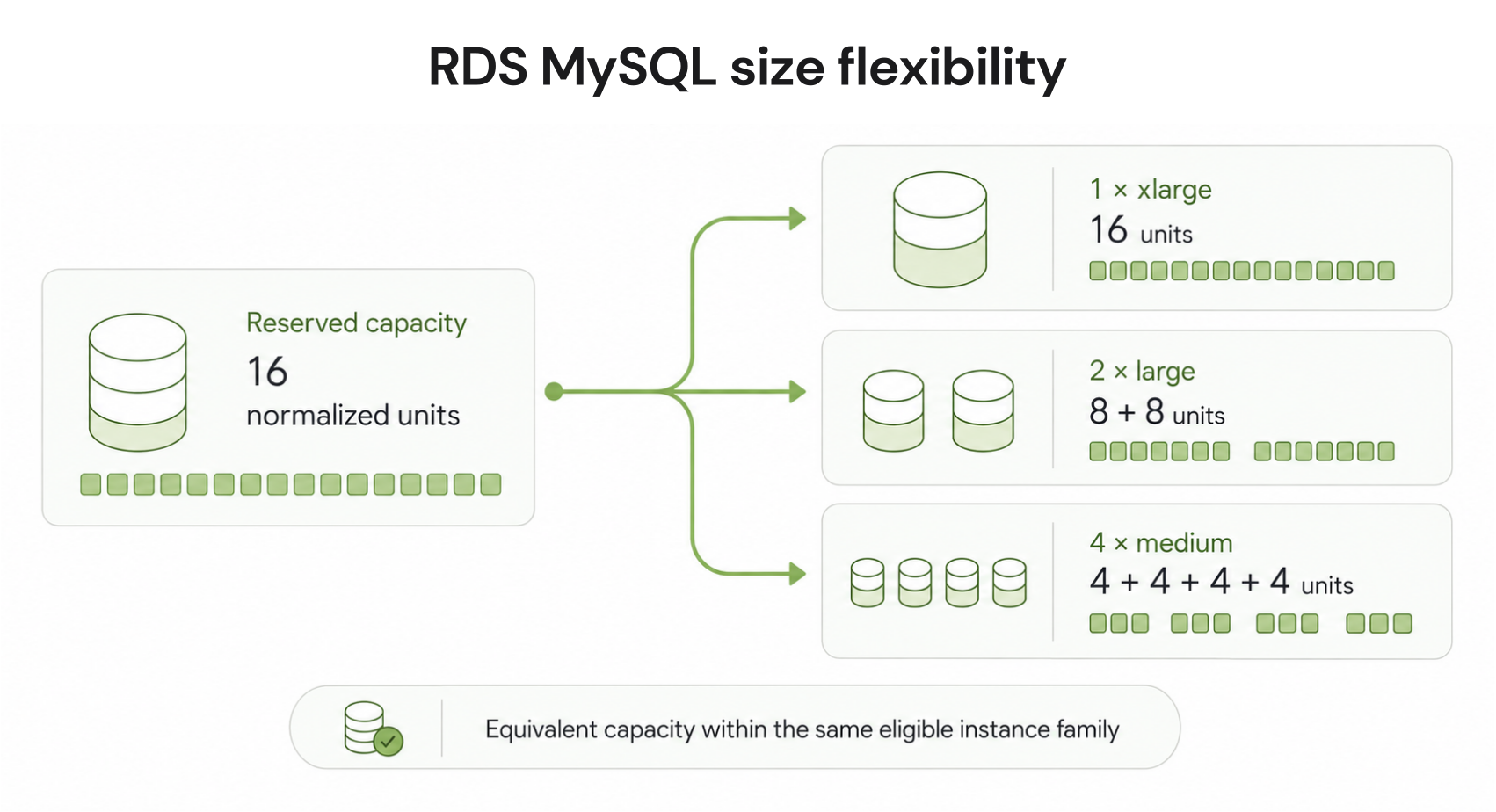
RDS MySQL reserved instances support size flexibility within the same instance family. A reservation on any db.r8g instance applies proportionally to any other db.r8g size using AWS normalization units.
Normalization Units for MySQL
db.micro = 0.5 units. db.small = 1. db.medium = 2. db.large = 4. db.xlarge = 8. db.2xlarge = 16. db.4xlarge = 32. db.8xlarge = 64. db.16xlarge = 128. db.24xlarge = 192. db.48xlarge = 384.
If you purchase a 3-year db.r8g.2xlarge reservation (16 units) and later downsize to two db.r8g.xlarge instances (8 units each = 16 total), your reservation automatically covers both smaller instances. If you scale up to db.r8g.4xlarge (32 units), your 2xlarge reservation (16 units) covers 50% of the 4xlarge at the reserved rate, with the remaining 50% at on-demand.
Size Flexibility Does Not Cross Families
A db.r8g reservation does not cover db.m7g instances or db.r7g instances. Size flexibility works within the reserved family only. If you migrate from r7g to r8g during an active r7g reservation, the r7g reservation no longer applies to the r8g instances. The r7g reservation continues billing until term expiration and can apply to any other r7g instances running in the same account and region.
This makes the family selection decision important before a long-term commitment. Once you purchase a 3-year r8g reservation, you are committing to the r8g family for that term. Migrating to a different family requires waiting for the reservation to expire or accepting that the reservation will apply only to whatever r8g instances are running.

How Should You Size a MySQL Reserved Instance?
Getting the right size before purchasing a reserved instance avoids locking in the wrong capacity for 1-3 years. MySQL sizing depends on four metrics: memory, CPU, connections, and IOPS.
Step 1: Size for the InnoDB Buffer Pool
The InnoDB buffer pool is MySQL’s primary in-memory cache. Performance degrades significantly when the working set of data exceeds the buffer pool size and MySQL must read from disk. AWS best practice for RDS MySQL production instances is to provision enough RAM that the InnoDB buffer pool can hold at least 70% of the active dataset.
AWS reserves approximately 25% of instance RAM for OS overhead, connection handling, and MySQL process overhead beyond the buffer pool. A db.r8g.xlarge with 32 GB RAM provides approximately 24 GB for the buffer pool. If your active dataset is 20 GB, db.r8g.xlarge is a good fit. If your active dataset is 30 GB, size up to db.r8g.2xlarge (64 GB RAM, approximately 48 GB available for the buffer pool).
CloudWatch metric to check: BufferCacheHitRatio. A production MySQL instance should maintain above 95% cache hit ratio. If your cache hit ratio is below 90%, your instance is undersized for memory. If it is above 99.5% consistently, you may have room to downsize.
Step 2: Check CPU and Avoid T4g CPU Credit Traps
For non-burstable instances (r8g, r7g, m7g), check CPUUtilization in CloudWatch over 30 days. Average CPU below 20% with FreeableMemory above 50% of total RAM indicates over-provisioning. Average CPU above 60% sustained indicates under-provisioning or a need for query optimization.
For T4g burstable instances: check CPUCreditBalance over 30 days. If your credit balance is consistently depleted (below 10% of maximum), the instance is bursting above its CPU baseline and generating CPU credit charges at $0.075/vCPU-hr. These charges are not covered by the T4g reserved instance. If this pattern is sustained, the T4g is the wrong instance family for your workload — migrate to m7g or r8g before purchasing a reserved instance.
Step 3: Check DatabaseConnections
MySQL connection overhead is different from PostgreSQL. MySQL creates a thread per connection, and at high connection counts (300+), thread management overhead consumes significant memory and CPU. The practical connection limit for a db.r8g.xlarge MySQL is approximately 500 active connections before performance degrades. If your connection count regularly exceeds 300, either implement connection pooling (ProxySQL or RDS Proxy) or plan for a larger instance. Check DatabaseConnections CloudWatch metric over 30 days and target a peak below 70% of the instance maximum.
Step 4: Validate with a Benchmark Before Committing
For any 3-year reserved instance, running a 24-48 hour on-demand benchmark on the target instance type before committing is worth the cost. A db.r8g.xlarge running for 48 hours on-demand costs $0.480 x 48 = $23.04. That $23 benchmark can validate whether the instance handles your peak workload before you commit to 3 years of payments. Use the MySQLSlap, SysBench, or pt-query-digest replay tools against the new instance under production-representative load.
What Is the T4g CPU Credit Trap for MySQL Reserved Instances?
The T4g CPU credit trap is one of the most commonly missed costs in MySQL RI planning. It affects every team running db.t4g instances for anything other than truly low-sustained-CPU workloads.
T4g instances receive a per-hour allocation of CPU credits based on the instance size. A db.t4g.large earns 36 credits per hour (2 vCPUs x 10% baseline x 3 minutes per credit). When your workload consumes CPU above the 10% baseline, it burns accumulated credits. In Unlimited mode (the default on RDS), when credits are exhausted, the instance continues running at above-baseline CPU and AWS charges $0.075 per vCPU-hr for the excess consumption.
Example: a db.t4g.large MySQL running a nightly batch job that pegs both vCPUs at 100% for 2 hours: excess CPU consumption = (100% – 10% baseline) x 2 vCPUs x 2 hrs = 3.6 vCPU-hours of excess. Cost: 3.6 x $0.075 = $0.27 per nightly batch run, $98.55/year. This charge appears on your bill but is completely separate from the T4g reserved instance charge and is not reduced by the RI discount.
The fix: set the T4g instance to Standard mode if the workload pattern allows (caps CPU at baseline after credits exhaust, preventing excess charges but potentially causing performance degradation). Or: migrate to a non-burstable family (m7g or r8g) sized for the actual sustained CPU requirement, and reserve that family. For any MySQL workload with predictable CPU demand above 10% sustained, T4g Standard or Unlimited is the wrong instance family regardless of the per-hour rate advantage.
What Does MySQL Extended Support Cost on Reserved Instances?
MySQL 5.7 is in Year 3 Extended Support since March 1, 2026. The $0.200/vCPU-hr surcharge applies to every running MySQL 5.7 instance and is not reduced by reserved instances.
For a db.r8g.xlarge MySQL 5.7 (4 vCPUs) Single-AZ with a 3-year All Upfront RI: Reserved rate: ~$0.200/hr. Extended Support surcharge: 4 vCPUs x $0.200/hr = $0.80/hr. Combined: $1.00/hr, $730/month. Compare to a db.r8g.xlarge MySQL 8.4 (current, fully supported) on-demand: $0.480/hr, $350/month. The team on a 3-year RI with MySQL 5.7 is paying $730/month versus $350/month for a team on on-demand with a current engine version. The RI savings are completely swamped by the Extended Support penalty.
Upgrade the engine version before purchasing any reserved instance. For teams on MySQL 5.7, upgrading to MySQL 8.0 or 8.4 eliminates the Extended Support charge immediately. After the upgrade, the RI purchase delivers genuine savings on a clean base cost. Do not purchase a 3-year RI on MySQL 5.7 — it commits you to paying Extended Support charges for the full term.
Also read: RDS Reserved Instances: Engine-by-Engine Pricing and Commitment Guide
How Do You Purchase RDS MySQL Reserved Instances?
Purchasing MySQL reserved instances requires four decisions: instance family, deployment type (Single-AZ or Multi-AZ), term length, and payment option.
Step 1: Verify Instance Family and Engine Version
Before purchasing, confirm that your running MySQL instances are on the target instance family and an engine version within standard support. Check that R8g/M8g instances are available in your region (US East, US West Oregon, and EU Frankfurt at launch; verify current regional availability at aws.amazon.com/rds/instance-types — availability changes).
Step 2: Choose Single-AZ or Multi-AZ
MySQL reserved instances are purchased separately for Single-AZ and Multi-AZ deployment types. A Multi-AZ RI does not cover a Single-AZ instance and vice versa. Ensure you buy the RI matching the deployment type of your running instances. Multi-AZ MySQL costs 2x Single-AZ and the RI preserves that 2x ratio.
Step 3: Choose Term and Payment
For stable production MySQL databases: start with 1-year No Upfront if you want zero capital commitment, or 1-year Partial Upfront for slightly better savings with manageable upfront. After 12 months of confirmed stable usage, evaluate the 3-year term for the deeper discount. For MySQL 8.0 or 8.4 on R8g, the 3-year All Upfront delivers approximately 58% savings on a clean base rate without Extended Support risk.
RDS Reserved Instances: 1-Year vs 3-Year Break-Even Across All Engines
Step 4: Purchase via Console, CLI, or Usage.ai Automation
In the RDS console, navigate to Reserved Instances and click Purchase Reserved DB Instances. Select MySQL, the target instance family, Single-AZ or Multi-AZ, term, and payment option. Alternatively, use the AWS CLI: aws rds purchase-reserved-db-instances-offering with the offering ID for your selected configuration.

What Are the Real Dollar Savings from MySQL Reserved Instances at Different Scales?
Running the numbers on three realistic MySQL production deployments shows what the RI decision actually delivers in dollars per year.
Small: Web Application Backend (4x db.m7g.large, Single-AZ)
These four instances support a web application with moderate traffic. On-demand annual cost: 4 x $0.185/hr x 8,760 hrs = $6,482. With 1-year No Upfront RI at ~29% savings: $4,602/year. Annual savings: $1,880. With 3-year All Upfront RI at ~55% savings: $2,917/year. Annual savings: $3,565. Over 3 years the All Upfront saves $10,695 compared to on-demand, $7,605 compared to three sequential 1-year No Upfront renewals.
Medium: SaaS API Layer (6x db.r8g.xlarge, Mixed Single/Multi-AZ)
Three Single-AZ read-optimized instances plus three Multi-AZ primary instances. On-demand annual: (3 x $0.480 + 3 x $0.960) x 8,760 = (1.44 + 2.88) x 8,760 = $37,843. With 3-year All Upfront RI at ~58%: ~$0.200/hr Single-AZ effective and ~$0.400/hr Multi-AZ effective. Annual RI cost: (3 x $0.200 + 3 x $0.400) x 8,760 = $15,768/year. Annual savings: $22,075 (58%). Over 3 years: $66,225 in total savings.
Enterprise: Core MySQL Cluster (12x db.r8g.2xlarge, Multi-AZ)
On-demand annual: 12 x $1.920 x 8,760 = $201,830. With 3-year All Upfront RI at ~58%: 12 x ~$0.806/hr effective x 8,760 = $84,651/year. Annual savings: $117,179. Over 3 years: $351,537 in total savings. At this scale, the 3-year RI decision justifies a dedicated FinOps analysis and the upgrade-first-then-reserve sequencing becomes critical — spending $200K/year on MySQL 5.7 Extended Support + on-demand while waiting for the upgrade would cost the team significantly more than the upgrade project itself.
How Does Usage.ai Automate MySQL Reserved Instance Purchasing?
RDS MySQL is one of the most common reserved instance optimization opportunities in AWS accounts. Usage.ai Flex Reserved Instances monitors MySQL cluster utilization continuously and refreshes the commitment analysis every 24 hours, versus AWS Cost Explorer’s 72+ hour cycle. The platform evaluates each MySQL instance group against the criteria for reservation: utilization stability, engine version support status, instance family generation, and optimal term length.
For teams on older instance generations (M5, R5, R6g), Usage.ai surfaces the generation upgrade opportunity before recommending a reserved instance purchase. Committing to a 3-year RI on db.r5.xlarge when db.r8g.xlarge provides 40% better performance and deeper discounts is precisely the type of decision the platform is designed to prevent. The recommendation sequence is: upgrade to current generation first, then purchase the RI on the upgraded instance.
Usage.ai also surfaces MySQL 5.7 Extended Support charges as high-priority cost alerts, showing the exact monthly amount attributable to the Extended Support surcharge and flagging any planned RI purchases on affected instances. If a reserved instance becomes underutilized because an instance is resized or deprecated, Usage.ai provides cashback and credits. The fee is a percentage of realized savings only.
See how much you can save on RDS MySQL with Usage.ai
Frequently Asked Questions
1. What is the discount of reserved RDS instances?
RDS MySQL reserved instances save approximately 29-32% on 1-year No Upfront terms and up to 55-58% on 3-year All Upfront terms depending on the instance family. Graviton4 (R8g/M8g) instances carry deeper discounts than Graviton3 (R7g/M7g) per the May 2025 AWS announcement. No Upfront is available for 1-year terms only. Verify exact rates at aws.amazon.com/rds/mysql/pricing — rates change.
2. How much does RDS MySQL cost per month?
Costs depend on instance type, deployment, and term. On-demand examples in US East: db.t4g.micro Single-AZ = $11.68/month; db.m7g.large = $135/month; db.r8g.xlarge Single-AZ = $350/month; db.r8g.xlarge Multi-AZ = $701/month. Reserved instances reduce these by 29-58%. Storage ($0.115/GB-month gp3), backups, and data transfer are additional. Verify at aws.amazon.com/rds/mysql/pricing — rates change.
3. How do you purchase reserved instances for RDS?
In the RDS console, navigate to Reserved Instances and click Purchase Reserved DB Instances. Select MySQL, choose the instance class, Single-AZ or Multi-AZ, term (1 or 3 years), and payment option (No Upfront, Partial Upfront, or All Upfront). The RI applies automatically to matching running instances. Alternatively, use the AWS CLI with the aws rds purchase-reserved-db-instances-offering command.
4. Does AWS RDS cost money?
Yes. RDS charges per instance-hour based on engine, instance type, and deployment. A db.t4g.micro MySQL Single-AZ (free tier eligible for 12 months) costs $0.016/hr ($11.68/month) after the free tier. Reserved instances reduce rates by 29-58%. Storage, backup storage, and data transfer are additional charges on top of instance-hour costs.
5. Should I reserve db.r7g or db.r8g for MySQL?
db.r8g (Graviton4) is the right choice for new 3-year commitments in 2026. R8g delivers 40% better performance and 29% better price-performance than R7g, at the same or lower on-demand rate. AWS confirmed R8g RIs carry deeper discounts than R7g. Running a 3-year RI on R7g when R8g is available compounds the performance and cost disadvantage over the full term.
6. What is the T4g CPU credit trap for MySQL?
T4g instances run in Unlimited CPU credit mode by default. When sustained CPU exceeds the 10% baseline, AWS charges $0.075/vCPU-hr for excess credit consumption. This charge is not covered by the T4g reserved instance. A db.t4g.large running a 2-hour nightly batch at 100% CPU generates approximately $98/year in CPU credit charges on top of the RI cost. For workloads with sustained CPU above 10%, migrate to a non-burstable family.
7. Does MySQL 5.7 Extended Support affect reserved instances?
Yes. MySQL 5.7 is in Year 3 Extended Support ($0.200/vCPU-hr) since March 2026. This surcharge applies on top of the reserved instance rate and is not reduced by the RI discount. A 4-vCPU instance on a 3-year RI pays ~$0.200/hr RI rate plus $0.80/hr Extended Support = $1.00/hr effective. Always upgrade to a supported engine version before purchasing multi-year reserved instances.
8. What MySQL engine version should I be on before purchasing a 3-year RI?
MySQL 8.0 (verify AWS end-of-standard-support date, as community EOL was April 2026) or MySQL 8.4 (the current LTS release). MySQL 5.7 is in Year 3 Extended Support and should not be reserved on any multi-year term. Confirm engine version support dates at docs.aws.amazon.com/AmazonRDS/latest/UserGuide/MySQL.Concepts.VersionMgmt.html before purchasing.