AWS
AWS Microsoft Azure
 Google Cloud

Start with the database bill.
Compute Savings Plans cover EC2, Fargate, and Lambda, while AWS uses a separate Database Savings Plans model for supported managed database services. AWS lists the current coverage in its Savings Plans types documentation.
The trap is treating the whole database bill as the next commitment amount. Some usage is already discounted, some charges do not qualify, and Engineering may already be planning changes that reduce the baseline.
The review should answer one question:
Step 1: Put database spend on a consistent basis
Start with the AWS database services in scope and value the usage on a consistent basis, such as its On-Demand-equivalent cost.Group it by service, account, Region, deployment model, and existing commitment coverage.
At this stage, you are building an inventory, not deciding how much to buy.
Also keep commitments you already own in the model. The goal is to identify additional coverage, not cancel existing RIs, reserved capacity, or Savings Plans.
If RDS Reserved Instances are already part of your environment, our RDS Reserved Instance savings guide covers that purchase path separately.
Step 2: Check what actually qualifies
A service name alone does not tell you whether every charge qualifies.Database Savings Plans currently cover Amazon Aurora, RDS, DynamoDB, ElastiCache, DocumentDB, Neptune, Keyspaces, Timestream, AWS DMS, and Amazon OpenSearch Service. AWS’s Database Savings Plans pricing page provides the current service and usage rules.
| Area | What to check |
|---|---|
| Provisioned databases | Supported generation, engine, and usage type |
| Serverless databases | Whether the specific serverless offering qualifies |
| DynamoDB and Keyspaces | On-Demand versus provisioned throughput |
| ElastiCache | Valkey eligibility rather than assuming every engine qualifies |
| Timestream | Current supported Timestream usage |
| RDS for SQL Server | Database instance usage separately from Windows and SQL Server licensing |
Review Redshift separately. It is not included in the current Database Savings Plans service list.
For the complete service-by-service rules, use our AWS Database Savings Plans guide instead of turning this account review into a purchasing guide.
Step 3: Turn the database bill into a baseline to test
Now exclude the portions that should not become part of a new commitment.Consider this illustrative review:
| Inventory filter | Monthly-equivalent amount |
|---|---|
| Database cost view before review | $100,000 |
| Charges outside the plan's coverage | −$20,000 |
| Usage already receiving commitment discounts | −$30,000 |
| Usage confirmed for removal or reduction | −$10,000 |
| Uncovered baseline to test | $40,000 |
The important point is that $100,000 of database cost became $40,000 of usage worth testing.
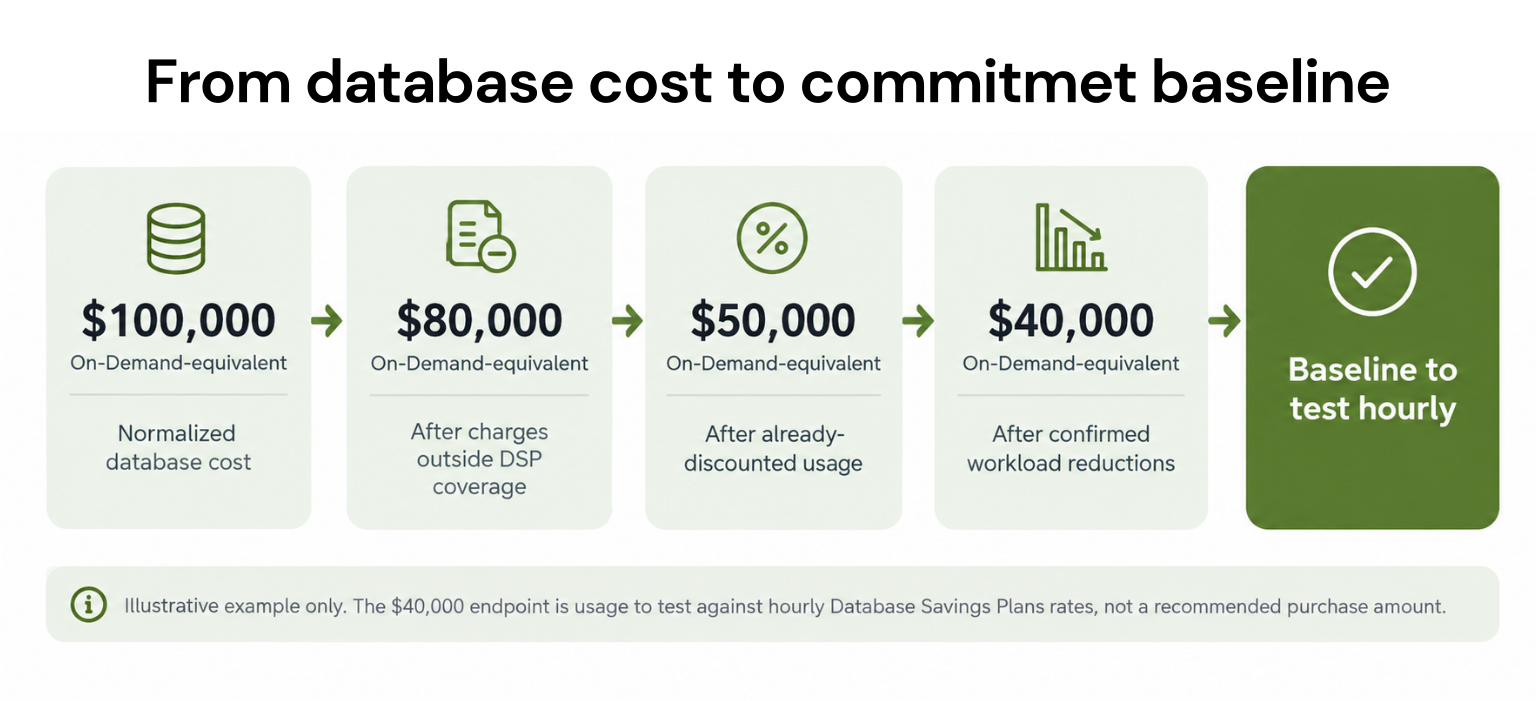
Inspect the remaining usage hour by hour. Monthly averages can hide quiet periods. AWS Database Savings Plans commitments are measured in dollars per hour, so the commitment should reflect a durable hourly floor rather than an average monthly bill. AWS documents hourly commitment mechanics on its Database Savings Plans pricing page.
Step 4: Ask Engineering what changes next
Before sizing anything, ask what will change.A smaller instance, scheduled shutdown, ending migration workload, or other confirmed reduction can lower the usage available to a commitment.
Size against the environment you expect after those changes, not the larger environment you happen to see today.
A move between supported database services or Regions does not necessarily eliminate the Database Savings Plans benefit because AWS allows the discount to follow qualifying usage across supported configurations. But the amount still needs to be recalculated.
Step 5: Compare the same workload with and without the purchase
Do not calculate savings and then subtract an undefined “underutilization risk” again.Compare the same post-rightsizing workload in two scenarios:
Suppose the $40,000 monthly-equivalent baseline receives a uniform illustrative 25% discount. Under that simplified assumption, full commitment coverage would cost $30,000.
| New-commitment scope | Expected use | Lower use |
|---|---|---|
| Cost without new purchase | $40,000 | $32,000 |
| Full commitment charge | $30,000 | $30,000 |
| AWS savings | $10,000 | $2,000 |
| Illustrative fee at 20% of savings | $2,000 | $400 |
| Benefit after illustrative fee | $8,000 | $1,600 |
In the lower-use case, $6,000 of the commitment is unused, but you do not subtract that $6,000 again. It is already included in the full $30,000 commitment charge.
This is also why underutilization and a Cashback-qualifying loss are not automatically the same thing. Usage.ai’s Cashback documentation defines a loss as a case where the covered commitment costs more than equivalent On-Demand usage.
Step 6: Validate the hourly commitment
AWS Purchase Analyzer can compare custom commitment amounts against a historical lookback and show their estimated effect on cost, coverage, and utilization. See AWS’s Purchase Analyzer documentation.But Purchase Analyzer does not forecast your future environment. AWS explicitly states that the analysis uses historical usage and does not account for queued purchases.
Before buying, confirm:
The usage type qualifies.
Existing discounts are counted once.
Rightsizing and confirmed workload changes are included.
The candidate is tested hour by hour.
Approaching expirations and queued purchases are reviewed separately.
Savings and fees use the same comparison baseline.
Review the opportunity with Usage.ai
At Usage.ai, we focus on the recurring work of cloud commitment optimization and management across AWS, Azure, and GCP.Our platform analyzes usage and billing data to identify commitment opportunities. Teams can review recommendations through CoPilot or use Autopilot to manage eligible commitment decisions as usage changes.
For covered workloads, customers typically see 30–50% savings compared with on-demand pricing. We work alongside commitments you already own and manage, including AWS Savings Plans and Reserved Instances, Azure commitments, and GCP CUDs.
Eligible commitments managed through our Flex Insured Commitment Program can also include cashback protection if committed usage falls below expectations. That helps reduce the downside of overcommitting while still capturing commitment savings. See how Usage.ai calculates savings, fees, and cashback.
Before we enable purchasing, you can use the Usage.ai Savings Test with read-only access to see where additional commitment savings may exist in your current environment.
Review database commitments, eligible usage, workload changes, and baseline before committing more.
Frequently asked questions
Can Database Savings Plans and RDS Reserved Instances exist in the same account?
Yes. AWS says they can cover different workloads, but both discounts cannot apply to the same workload.
What happens when database usage rises above the commitment?
Eligible usage within the commitment receives Database Savings Plans pricing. Usage beyond the hourly commitment is billed at On-Demand rates.
Should upcoming RI expirations affect database commitment sizing?
Yes. If an RI or other database commitment is expiring soon, include that change in the review. Otherwise, you may underestimate the amount of usage that will return to On-Demand pricing.
Are database storage, licensing, and other charges automatically covered?
No. Database Savings Plans apply only to supported usage types. Charges such as storage or certain software licensing costs may sit outside the discount, so review each billing component before calculating the opportunity.
What happens if database usage falls after purchasing a commitment?
You still pay the hourly commitment amount. If less qualifying usage is available than expected, utilization can fall and the economic benefit can shrink. That is why sizing against a durable hourly baseline matters more than using a monthly average.