New See exactly what you're overpaying AWS in under 60 seconds. Try the Calculator for free

AWS Database Savings Plans: The Complete Guide for 2026

Updated July 7, 2026
18 min read
AWS Database Savings Plans: The Complete Guide for 2026
Table of Contents
On this page

AWS Database Savings Plans launched at re:Invent 2025 and extended the Savings Plans model — previously limited to compute (EC2, Lambda, Fargate) — to the managed database layer for the first time. For the first time, DB teams can commit to a dollar-per-hour spend level and have discounts applied automatically across their database portfolio, without the instance-type lock-in that made Reserved Instances difficult to manage in evolving environments.

This guide covers everything you need to know: which services and instance families are covered, what the discount levels are, how DSP compares to Reserved Instances, the payment structure, and links to detailed guides for each covered service. It replaces and updates the original Database Savings Plans guide published April 2026.

See exactly what you’re overpaying in under 60 seconds. Try the Calculator for free →

Banner

What Are AWS Database Savings Plans?

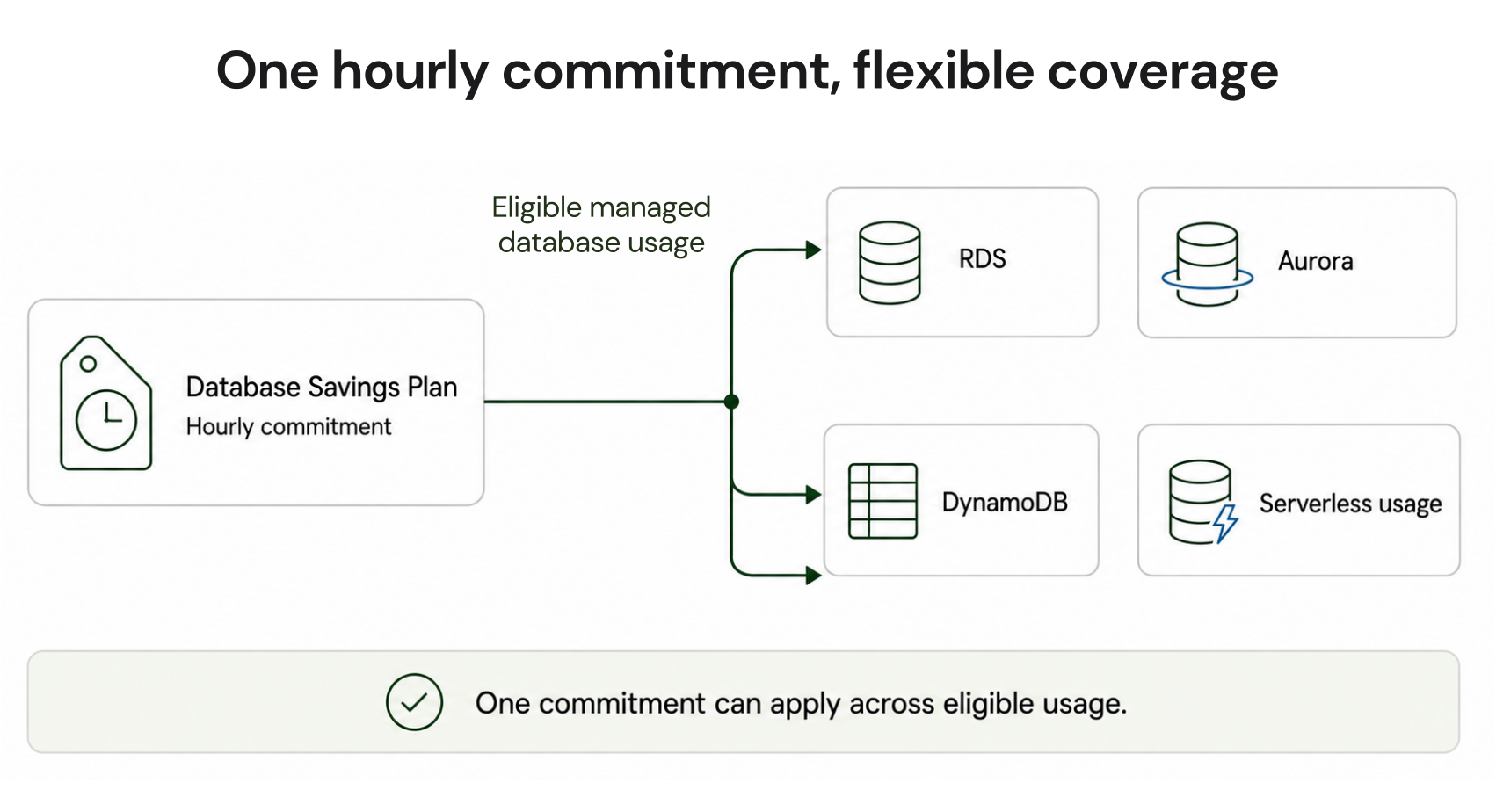
AWS Database Savings Plans are a spend-based commitment model for managed AWS database services. Instead of locking into a specific instance class, database engine, or Region, DB teams commit to a consistent dollar amount of database spend per hour. AWS then applies discounts automatically across all eligible usage up to the committed amount, every hour, without any manual action required.

This mirrors the pricing approach used for Compute Savings Plans, which AWS introduced in 2019, and extends it directly to the database layer. The plan covers both provisioned and serverless database usage, offering a fundamentally more flexible alternative to the rigid, instance-specific structure of Reserved Instances.

How the Commitment Works

With the new model, DB teams commit to a specific hourly spend amount for a one year term. AWS evaluates eligible database usage continuously each hour and applies the discount wherever it provides the most value within the committed amount. Usage beyond the committed hourly spend is charged at standard on-demand rates.

The commitment covers different instance families within the same service, multiple AWS Regions depending on the plan type selected, and both provisioned and serverless deployment models for supported services. A single plan can cover an RDS db.m7g instance in one Region and an Aurora instance in another, without requiring separate Reserved Instances for each configuration.

Which Services Are Covered by Database Savings Plans?

Database Savings Plans cover 10 AWS managed database services. The table below shows coverage, maximum discount, and any engine or instance family restrictions. All rates: US East (N. Virginia), June 2026. Verify at aws.amazon.com/savingsplans/database-pricing/.

Service Max Discount What’s Covered What Requires RI Notes
Amazon RDS Up to 20% Gen 7+ instances: db.r7, db.r8g, db.m7, db.m7g db.r5, db.r6g, db.m5, db.t3, db.t4g and older Older generations require RIs. Migrate to Gen 7+ to access DSP.
Amazon Aurora Up to 35% Gen 7+ instances; Aurora Serverless v2; Aurora DSQL db.r5, db.r6g, db.m5 and older Serverless v2 coverage confirmed. DSQL coverage via DPU spend.
Amazon DynamoDB Up to 18% On-demand throughput; provisioned capacity Cannot combine DSP and reserved capacity on same table DynamoDB reserved capacity applied first. DSP covers remaining eligible spend.
Amazon ElastiCache Up to 30% Valkey engine only: Gen 7+ provisioned + Serverless Standard Redis, Memcached — continue using Reserved Nodes Valkey 20% cheaper than Redis on node-based; 33% cheaper Serverless. DSP only for Valkey.
Amazon DocumentDB Up to 35% Gen 7+ provisioned instances; DocumentDB Serverless Older DocumentDB instance families Serverless uses DCU-based billing. DSP covers DCU spend on eligible clusters.
Amazon Neptune Up to 35% Gen 7+ provisioned instances; Neptune Serverless (NCUs) Older Neptune instance families Neptune Analytics added to DSP coverage March 5, 2026.
Amazon Keyspaces Up to 35% On-demand and provisioned throughput (broadly eligible) No exclusions known No Reserved Instances available for Keyspaces. DSP is the only commitment discount.
Amazon Timestream Up to 20% InfluxDB instances LiveAnalytics usage type (in maintenance mode) LiveAnalytics closed to new customers June 2025. Timestream for InfluxDB is current product.
Amazon OpenSearch Up to 35% Serverless AND Gen 7+ provisioned (expanded March 2026) Older provisioned OpenSearch instance families DSP expanded to OpenSearch provisioned March 5, 2026.
AWS DMS Up to 20% Gen 7+ replication instances; DMS Serverless Older DMS instance families Database Migration Service. Applies to ongoing replication, not one-time migrations.

Source: AWS official Database Savings Plans pricing page (aws.amazon.com/savingsplans/database-pricing/), Usage.ai engineering analysis (January-June 2026), AWS official announcement March 5, 2026 (Neptune Analytics and OpenSearch additions). Verify current eligibility at AWS console before purchasing.

How Database Savings Plans Work

The Spend-Based Commitment Model

Database Savings Plans work differently from Reserved Instances. With RIs, you commit to a specific instance class, database engine, deployment type, and AWS Region. If any of those change, the RI no longer applies. With Database Savings Plans, you commit to a dollar-per-hour spend level for a 1-year term. AWS evaluates eligible database usage every hour and applies the discount automatically across all eligible usage up to the committed amount. Usage above the committed hourly amount is charged at standard on-demand rates.

A single DSP can cover an Aurora Serverless v2 cluster in one Region, a DynamoDB table in another Region, and an ElastiCache Valkey cluster simultaneously — without separate reservations for each. The discount follows the spend, not the configuration.

Payment Structure: No Upfront Only

Database Savings Plans offer one payment structure: No Upfront. The full commitment is billed as monthly charges over the 1-year term with no upfront payment required. There is no All Upfront or Partial Upfront option — unlike EC2 Instance Savings Plans or Compute Savings Plans, which offer multiple payment tiers.

This is both a limitation and an advantage. The limitation: you cannot pay all upfront for a deeper discount as you can with EC2 Savings Plans or 3-year RIs. The advantage: $0 cash outlay at purchase — the commitment is purely a spend obligation, not a capital expenditure.

Application Order: DSP Applies After Reserved Instances

AWS applies discounts in a specific order each billing hour: Reserved Instances are applied first to matching eligible usage. Database Savings Plans are applied second to remaining eligible usage after RIs. DSP cannot be combined with RIs or reserved capacity on the exact same workload. For teams running a mix of old-generation instances (covered by RIs) and new-generation instances (covered by DSP), both discount mechanisms operate in parallel on their respective eligible usage. Source: AWS official DSP documentation.

Key implication: if you have both RIs and DSP active, the RI discount applies first on the instance it covers. The DSP then covers any remaining hourly spend on other eligible resources. You do not double-apply discounts on the same workload. Source: AWS official: ‘DSP is applied second, after Reserved Instances.’

Database Savings Plans vs Reserved Instances: When to Use Each

Both discount mechanisms exist simultaneously. The question is which to use for each workload component.

Factor Reserved Instances Database Savings Plans Choose based on
Commitment basis Specific instance class, engine, Region locked at purchase Hourly spend amount only — no configuration lock Stable fixed config: RI. Evolving config: DSP.
Max discount Up to 72% (3-yr All Upfront, varies by service) Up to 35% (1-yr No Upfront) Maximum discount + stable workload: RI. Flexibility + less upfront: DSP.
Term 1-year or 3-year 1-year only 3-year certainty: RI only.
Payment options All Upfront, Partial Upfront, No Upfront No Upfront only Cash preservation: DSP. Max discount: RI All Upfront.
Eligible instance families Broader — covers older generations (db.r5, db.r6g, etc.) Narrower — Gen 7+ for RDS/Aurora; Valkey only for ElastiCache Older-gen instances: must use RI until migrated to Gen 7+.
Configuration flexibility Breaks if instance, engine, or Region changes Discount follows spend across configuration changes Frequent resizing/migration: DSP.
Serverless coverage No (RIs are instance-specific) Yes — covers Aurora Serverless v2, Neptune Serverless, DocumentDB Serverless, Keyspaces, ElastiCache Serverless (Valkey) Any serverless workload: DSP is the only commitment path.

Source: AWS official DSP and RI pricing pages. Usage.ai analysis January-June 2026.

How to Size and Purchase a Database Savings Plan

Step 1: Measure Your Eligible Hourly Spend

Pull your AWS Cost and Usage Report (CUR) for the past 30-60 days. Filter to the database services you intend to cover. Calculate average hourly spend across all eligible database services. This is your baseline.

Step 2: Identify Your Consistent Floor Spend

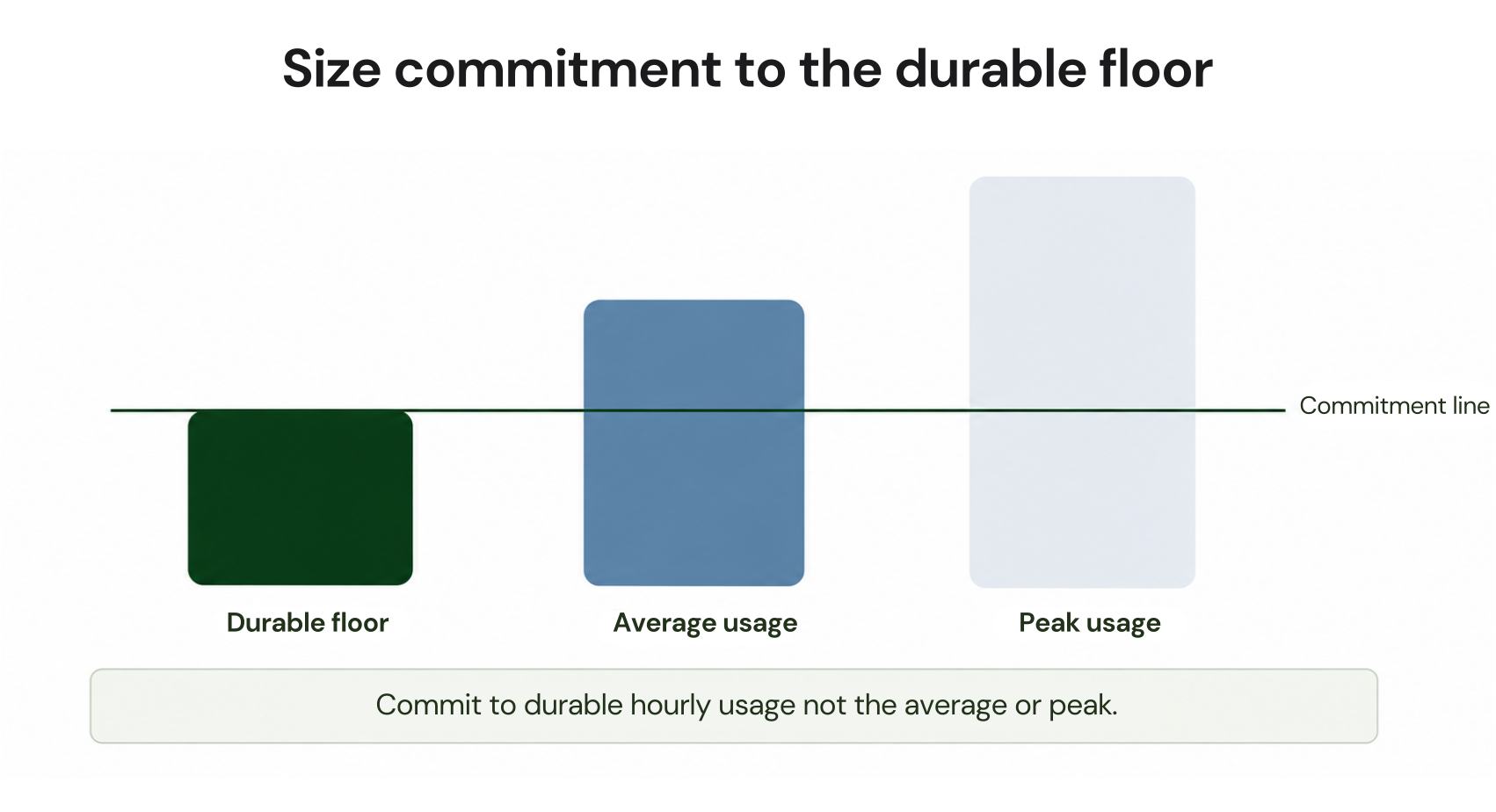
Find the hourly spend level you never drop below — even on weekends, overnight, or during quiet periods. This is the correct DSP commitment amount. Over-committing beyond your floor wastes money during low-traffic periods. Under-committing leaves savings on the table.

Step 3: Check Instance Family Eligibility

For RDS and Aurora: confirm which instances are Gen 7+ (db.r7, db.r8g, db.m7). Older generations require RIs. Only the Gen 7+ spend is eligible for DSP. For ElastiCache: only Valkey engine spend is eligible. Standard Redis and Memcached continue using Reserved Nodes.

Step 4: Purchase in the AWS Console

Navigate to: AWS Cost Management > Savings Plans > Purchase Savings Plan > Database Savings Plans. Enter your hourly commitment amount. Select a 1-year term, No Upfront payment. The plan activates immediately and covers eligible spend from that hour forward.

Usage.ai automates steps 1-3. The platform analyses your CUR data, identifies eligible Gen 7+ and serverless database spend, calculates your consistent floor spend across services, and recommends the correct DSP commitment amount. Usage.ai added native DSP support in January 2026. Fee: percentage of realised savings only.

AWS Cost Management console Database Savings Plans purchase page showing the hourly commitment amount field set to $1.24/hr, term selector showing 1-Year selected, payment option showing No Upfront, and an estimated monthly savings panel showing 23% savings on eligible database spend.

Database Savings Plans Coverage by Service: Detailed Guides

The following guides cover pricing, mechanics, and DSP coverage for each eligible service in detail. All are linked from this hub page as part of the Usage.ai database cost optimization cluster.

Aurora

Aurora Serverless v2 scales compute capacity in fine-grained ACU increments, enabling pay-per-use pricing that aligns costs with actual workload demand. This guide covers ACU billing mechanics, scale-to-zero behavior, and how Database Savings Plans apply to serverless Aurora spend.

Learn more about Aurora Serverless v2 →

Aurora DSQL is a distributed, disaggregated SQL database with a novel architecture that separates compute, storage, and the query layer. This guide explains DPU-based pricing, optimistic concurrency control (OCC), and how DSP commitment spend applies to DSQL workloads.

Learn more about Aurora DSQL →

Aurora DSQL pricing is based on DPU consumption rather than provisioned instance hours, making cost modeling dependent on query patterns and concurrency. This guide breaks down exact DPU rates, storage costs, multi-region pricing differences, and worked cost examples for common workload shapes.

Learn more about Aurora DSQL Pricing →

DynamoDB

DynamoDB on-demand mode charges per request without capacity planning, but hidden cost multipliers — GSI replication, transactional API overhead, and streams — can significantly inflate the effective per-request rate. This guide covers on-demand pricing mechanics, the cost traps teams commonly miss, and when DSP delivers better value than DynamoDB reserved capacity.

Learn more about DynamoDB Serverless and its Pricing →

Neptune

Amazon Neptune is a fully managed graph database service designed for highly connected datasets, supporting both the Gremlin and SPARQL query languages across property graph and RDF models. This guide covers Neptune’s core architecture, primary use cases such as fraud detection and knowledge graphs, and how it fits within the AWS managed database portfolio.

Learn more about Amazon Neptune →

Neptune Serverless bills by Neptune Capacity Units (NCUs), which scale automatically based on graph traversal workload, making cost visibility harder than provisioned instances without proper monitoring. This guide covers exact NCU pricing rates, how to monitor consumption via CloudWatch metrics, and how to size a DSP commitment against variable NCU spend.

Learn more about Neptune Serverless NCU Pricing →

DocumentDB

DocumentDB Serverless eliminates cluster provisioning by billing on DCU consumption, scaling capacity automatically to match document workload demands. This guide covers how DCU-based billing works, when serverless costs less than provisioned DocumentDB, and the mechanics of DSP coverage for serverless clusters.

Learn more about DocumentDB Serverless →

DocumentDB Serverless pricing depends on the storage configuration selected — Standard and I/O-Optimized have meaningfully different cost profiles at different I/O intensities. This guide provides exact DCU rates for both configurations, worked cost examples, and guidance on which storage mode reduces total cost for different workload patterns.

Learn more about DocumentDB Serverless Pricing →

ElastiCache

ElastiCache Reserved Nodes offer commitment-based discounts on provisioned Redis OSS and Memcached clusters, operating independently from Database Savings Plans which cover only the Valkey engine. This guide covers Reserved Node pricing, term options, and how to manage the transition from Reserved Nodes to DSP-eligible Valkey for teams migrating caching infrastructure.

Learn more about ElastiCache Reserved Nodes →

Keyspaces

Amazon Keyspaces is a fully managed, serverless Cassandra-compatible database that charges on demand for reads and writes without requiring cluster provisioning or capacity planning. This guide covers the Keyspaces architecture, on-demand pricing model, and the November 2024 price reduction that changed the DSP break-even calculation for teams with stable Keyspaces spend.

Learn more about Amazon Keyspaces Serverless →

Keyspaces pricing covers read and write throughput, storage, Point-in-Time Recovery (PITR), and TTL-triggered deletes, each billed separately and accumulating differently depending on access patterns. This complete 2026 guide provides exact WRU/RRU rates, storage costs, PITR pricing, TTL billing mechanics, and guidance on optimizing total Keyspaces cost before committing via DSP.

Learn more about Amazon Keyspaces Pricing →

Timestream

AWS Timestream now refers primarily to Timestream for InfluxDB, the active product line, while LiveAnalytics entered maintenance mode in June 2025 and is closed to new customers. This complete guide covers the distinction between the two products, InfluxDB instance-based DPU pricing, DSP coverage scope, and what teams on LiveAnalytics should know about migration paths.

Learn more about AWS Timestream →

Service-Specific DSP Details

Aurora and RDS: Gen 7+ Only

Database Savings Plans cover Aurora and RDS provisioned instances in the Gen 7+ families: db.r7, db.r8g, db.m7, db.m7g. Older generations — db.r5, db.r6g, db.m5, db.t3, db.t4g and earlier — are not eligible for DSP and continue to require Reserved Instances. For Aurora Serverless v2, DSP covers ACU-based spend regardless of ACU count changes. For Aurora DSQL, DSP covers DPU-based spend.

Practical implication: teams still running db.r6g or db.r5 Aurora instances cannot access DSP on that spend until they migrate to Gen 7+. Usage.ai identifies this as a sequenced action: right-size and upgrade instance generation first, then purchase DSP on the confirmed Gen 7+ configuration.

DynamoDB: DSP Cannot Combine with Reserved Capacity

DynamoDB reserved capacity (the DynamoDB-specific commitment mechanism for provisioned tables) and Database Savings Plans cannot be applied to the same table in the same billing hour. Reserved capacity is applied first. DSP then covers any remaining eligible DynamoDB spend not already covered by reserved capacity. The maximum DSP discount for DynamoDB on-demand is 18%; for DynamoDB provisioned capacity, 12%. Source: AWS official DSP pricing page.

For DynamoDB specifically: the ‘may be eligible’ language from the DynamoDB pricing page was clarified in the AWS Database Savings Plans documentation: DynamoDB on-demand and provisioned capacity are both explicitly eligible. Cannot combine with reserved capacity on the same workload. Source: Usage.ai engineering analysis of DSP documentation, January 2026.

ElastiCache: Valkey Engine Only

Database Savings Plans cover ElastiCache for the Valkey engine only. Standard Redis OSS and Memcached are not covered by DSP — these engines continue to use Reserved Nodes for commitment discounts. Both Gen 7+ provisioned Valkey nodes and ElastiCache Serverless for Valkey are eligible for DSP coverage.

The economics make Valkey migration attractive beyond DSP: Valkey is priced 20% lower than Redis OSS for node-based clusters and 33% lower for Serverless, with a 100 MB minimum floor versus 1 GB for Redis OSS. Teams still on Redis OSS face a choice: stay on Redis OSS with Reserved Nodes (no DSP access) or migrate to Valkey (no application changes required) and access both the lower base rate and DSP coverage.

Neptune: Analytics Added March 2026

Neptune Database (provisioned Gen 7+ and Neptune Serverless) was covered from DSP launch. Neptune Analytics was added on March 5, 2026. Usage.ai added native Neptune Analytics DSP support following the March announcement. For teams running both Neptune Database and Neptune Analytics, a single DSP commitment covers both products.

Neptune Serverless NCU Pricing: break-even analysis and DSP commitment sizing

DocumentDB, Keyspaces, Timestream: No Reserved Instances Available

DocumentDB Serverless, Amazon Keyspaces, and Amazon Timestream for InfluxDB do not have Reserved Instance mechanisms. Database Savings Plans are the only available commitment discount for these services. This makes DSP especially important for teams with stable spend on these newer-generation managed databases.

How Usage.ai Automates Database Savings Plans

Usage.ai added native Database Savings Plans support in January 2026. The platform covers the full DSP lifecycle: analysis, recommendation, purchase, monitoring, and adjustment.

Analysis: Usage.ai pulls your AWS Cost and Usage Report and identifies eligible Gen 7+ and serverless database spend across all services. It distinguishes between RI-eligible spend (older-generation instances) and DSP-eligible spend (Gen 7+ and serverless), so the recommendation is correctly scoped.

Recommendation: the platform calculates your consistent hourly floor spend on DSP-eligible usage — the level at which your eligible database costs never drop below across all hours of the past 60 days. This is the correct DSP commitment level: enough to capture savings on the predictable baseline without over-committing on variable peak spend.

Purchase: Usage.ai purchases the DSP commitment on your behalf through billing-layer access. The commitment activates immediately and applies to your next billing hour.

Monitoring: the platform’s 24-hour refresh detects when eligible database spend increases above the committed level (signaling an opportunity to increase the DSP) or when spend drops below the committed level (signaling potential over-commitment). This is the 3-day lag problem in reverse — AWS Cost Explorer refreshes every 72+ hours; Usage.ai refreshes every 24 hours.

Adjustment: if a DSP commitment becomes underutilised — because a database cluster is decommissioned, migrated to a different service, or downsized — Usage.ai provides cashback on the unused committed amount in real money. This is the buyback guarantee that covers DSP commitments the same way it covers Savings Plans and Reserved Instances on other services. Fee: percentage of realised savings only.

See how Usage.ai automates Database Savings Plans across your full database portfolio

Database Savings Plans in the Context of Full AWS FinOps

Database Savings Plans sit at the intersection of two FinOps disciplines: commitment management (buying the right discounts at the right size) and workload optimization (running databases efficiently enough that the committed baseline is accurate).

The correct order of operations for database cost optimization: (1) right-size instances to ensure CPU and memory utilization justify the instance type; (2) migrate to current-generation instances (Gen 7+ for RDS/Aurora, Valkey for ElastiCache) to access both lower base rates and DSP eligibility; (3) evaluate Standard vs I/O-Optimized storage configuration based on actual I/O consumption; (4) purchase DSP on the confirmed, right-sized, current-generation spend floor.

Teams that skip steps 1-3 and jump to DSP purchases lock in commitments on oversized or old-generation infrastructure. The DSP discount is applied, but it discounts a higher spend than necessary. The correct sequence is: optimize first, commit second.

Banner

Frequently Asked Questions

1. What are AWS Database Savings Plans?

Database Savings Plans are a spend-based commitment model for AWS managed database services. You commit to a consistent hourly dollar spend for a 1-year term. AWS applies discounts automatically across all eligible database usage up to the committed amount each hour. Services covered: RDS, Aurora, DynamoDB, ElastiCache (Valkey), DocumentDB, Neptune, Keyspaces, Timestream (InfluxDB), OpenSearch, and DMS. Maximum savings: up to 35% for serverless workloads. No Upfront payment only. Source: AWS official DSP pricing page.


2. Which database services are covered by Database Savings Plans?

10 services: Amazon RDS (Gen 7+ instances), Amazon Aurora (Gen 7+ and Serverless v2 and DSQL), Amazon DynamoDB (on-demand and provisioned), Amazon ElastiCache (Valkey engine only), Amazon DocumentDB (Gen 7+ and Serverless), Amazon Neptune (Gen 7+, Serverless, and Analytics since March 2026), Amazon Keyspaces, Amazon Timestream (InfluxDB), Amazon OpenSearch (Serverless and Gen 7+ since March 2026), and AWS DMS (Gen 7+ and Serverless). Source: AWS official DSP pricing page and March 2026 expansion announcement.


3. How do Database Savings Plans differ from Reserved Instances?

Reserved Instances: commit to specific instance class, engine, and Region. Maximum discounts up to 72% (3-year All Upfront). Covers older instance generations. Breaks if configuration changes. Database Savings Plans: commit to hourly spend only. Maximum 35%. Covers Gen 7+ and serverless only. Discount follows spend through configuration changes. DSP applies after RIs in the discount waterfall. Cannot combine both on the same workload. Source: AWS official documentation.


4. What is the payment structure for Database Savings Plans?

No Upfront only — the only payment option. There is no All Upfront or Partial Upfront option as with Compute and EC2 Instance Savings Plans. The 1-year commitment is billed monthly with no upfront payment required. 3-year terms are not available. Source: AWS official DSP pricing page.


5. How does Usage.ai support Database Savings Plans?

Usage.ai added native DSP support in January 2026. The platform analyzes your CUR data to identify DSP-eligible spend (Gen 7+ instances, Valkey, serverless), calculates the correct commitment level at the consistent floor of hourly spend, purchases the DSP through billing-layer access, monitors utilization with 24-hour refresh, and provides cashback in real money if a commitment becomes underutilized. Fee: percentage of realized savings only.


6. Can Database Savings Plans be combined with Reserved Instances?

Yes — on different workloads simultaneously. RIs continue to apply on older-generation instances; DSP applies on Gen 7+ and serverless workloads. They cannot be combined on the exact same workload in the same billing hour. RIs are applied first; DSP covers remaining eligible spend. DynamoDB reserved capacity and DSP cannot apply to the same table. Source: AWS official documentation.

Cut cloud cost with automation
Latest from our blogs