
 AWS
AWS Microsoft Azure
 Google Cloud

If that baseline is stable, paying the standard On-Demand rate for every node hour may leave savings available. But committing too early can create unnecessary cost if your architecture, engine version, Region, or capacity needs change.
This guide focuses on the pricing mechanics and commitment decisions that matter when evaluating ElastiCache Reserved Nodes.
The short answer
ElastiCache Reserved Nodes are pricing commitments for node-based ElastiCache deployments. You continue creating and running ElastiCache nodes normally, while AWS applies the Reserved Node rate to eligible usage during the commitment period.Reserved Nodes are available for Valkey, Redis OSS, and Memcached node-based deployments and are not available for ElastiCache Serverless. See AWS Reserved Node.
AWS offers one- and three-year terms with No Upfront, Partial Upfront, and All Upfront options. The maximum published discounts are currently up to 48.2% for No Upfront, 52% for Partial Upfront, and 55% for All Upfront.
These are maximum advertised discounts, not guaranteed savings for every node type, Region, engine, or offering.
Reserved Nodes are also size flexible. A reservation can apply across sizes within the applicable node family and Region, subject to the engine rules.
Existing Redis OSS Reserved Nodes have a specific exception: they can also apply to Valkey in the same family and Region.
Three terms to understand
- Reserved Node: A pricing commitment that provides discounted rates for eligible node usage.
- Normalized units: AWS’s measurement for applying a reservation across different node sizes.
- Effective hourly rate: The total reservation cost, including any upfront payment, amortized across the full term.
What are the ElastiCache Reserved Node payment options?
AWS currently provides three payment structures for one- and three-year Reserved Node terms. See AWS ElastiCache pricing.| Payment option | How it works | Maximum published discount |
|---|---|---|
| No Upfront | No initial payment; discounted hourly charges throughout the term | Up to 48.2% |
| Partial Upfront | Part of the commitment is paid upfront; remaining charges are billed hourly | Up to 52% |
| All Upfront | The reservation is paid in full at purchase | Up to 55% |
Which option should you choose?
- No Upfront: useful when preserving cash is more important than maximizing the discount.
- Partial Upfront: a middle ground between cash outlay and effective cost.
- All Upfront: appropriate when the workload is highly predictable and the organization is comfortable paying upfront.
How does Reserved Node size flexibility work?
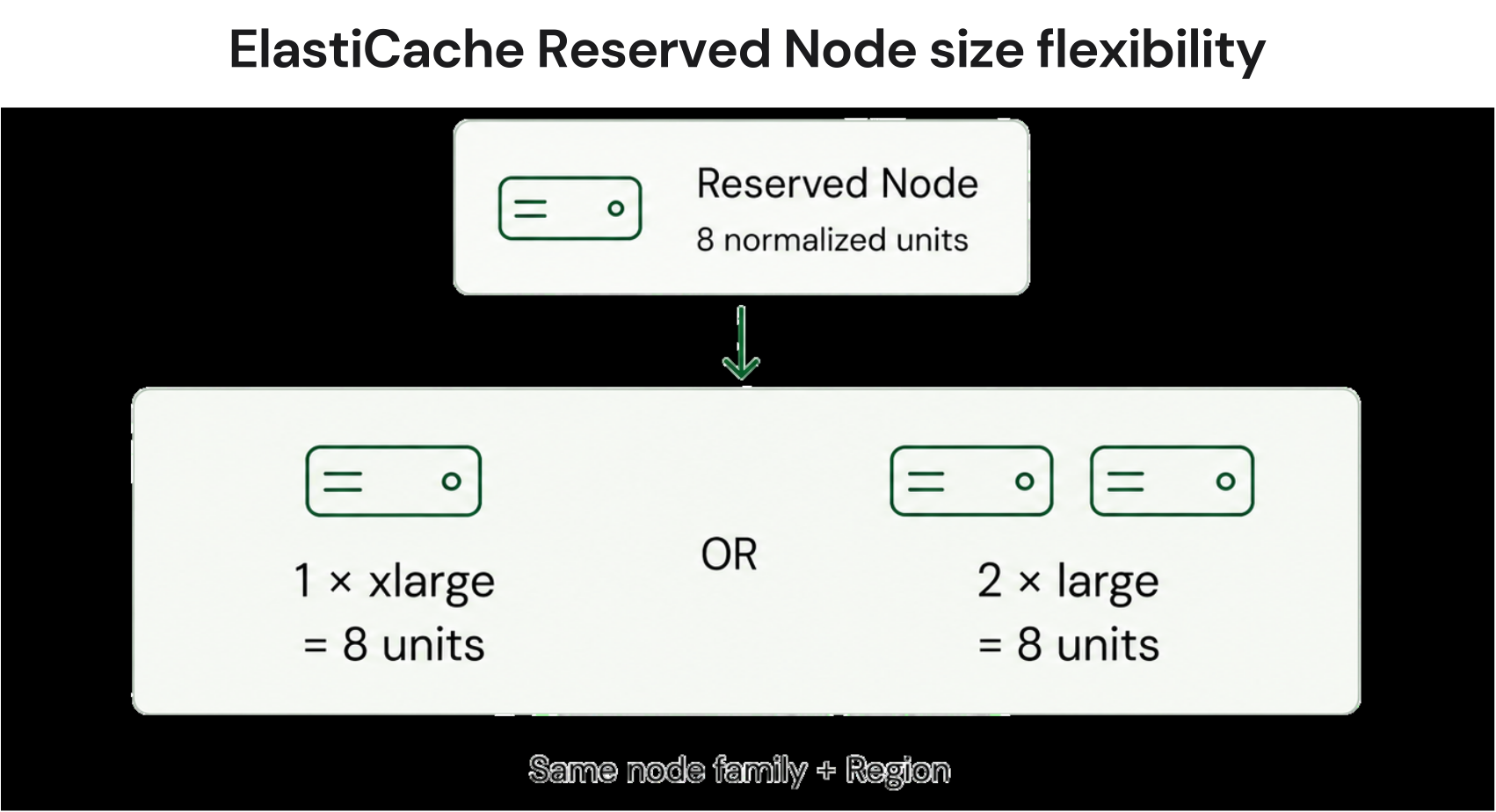
For example, a cache.r6g.xlarge reservation represents eight normalized units and can cover two cache.r6g.large nodes, which also total eight units
Size flexibility does not mean unlimited flexibility. A reservation does not automatically move to another node family or Region.
How normalization units work
AWS assigns normalized units to different node sizes:
- If usage exceeds the reserved normalized capacity, the excess is charged at On-Demand rates.
- If usage falls below the reservation and the remaining units cannot be used by other eligible nodes during that hour, the unused benefit does not roll forward.
Do Redis OSS Reserved Nodes apply to Valkey?
Yes. AWS allows existing Redis OSS Reserved Nodes to apply to Valkey nodes in the same node family and Region. See AWS Reserved Node documentationValkey is priced 20% lower than Redis OSS for node-based ElastiCache. Because Valkey uses lower normalization factors, an existing Redis OSS reservation can cover more Valkey capacity.
For example, AWS documents a cache.r7g.4xlarge Redis OSS reservation as 32 normalized units. The corresponding Valkey node represents 25.6 units, leaving 6.4 units available for other eligible usage in the same family and Region.
This is not a second 20% discount added to the Reserved Node discount. The benefit comes from two separate mechanics:
- Valkey’s node pricing is lower than Redis OSS pricing.
- Redis OSS reservation units can cover more Valkey capacity because Valkey uses lower normalization factors.
What does an ElastiCache Reserved Node actually save?
The correct calculation is based on the actual Reserved Node offering, not the maximum advertised discount.Start with:
Then:
For an upfront reservation, total reservation cost includes the upfront payment and any applicable recurring charges.
Finally:
What Reserved Nodes do not cover
A Reserved Node discount applies to eligible node-hour charges. It does not mean every ElastiCache-related charge becomes discounted. Depending on the deployment, model separately for costs such as:- data transfer;
- backup or storage charges;
- Extended Support;
- Serverless-specific charges; and
- other usage-based charges that are priced separately by AWS.
Should you buy ElastiCache Reserved Nodes?
Reserved Nodes are strongest when a production cache:- runs continuously;
- has a well-understood capacity baseline;
- is expected to remain in the same Region and node family;
- does not have an imminent move to Serverless;
- runs a supported engine version; and
- has enough spend for the discount to materially affect the AWS bill.
- a major architecture change;
- a migration to another engine or deployment model;
- significant rightsizing;
- a regional move;
- a substantial reduction in cache capacity; or
- workload retirement.
Reserved Nodes vs. Database Savings Plans
Database Savings Plans use a different commitment model. Instead of committing to specific Reserved Node capacity, you commit to a consistent amount of eligible usage measured in dollars per hour for one year. For ElastiCache, AWS currently lists:- ElastiCache for Valkey Instances
- ElastiCache for Valkey Serverless
| Consideration | Reserved Nodes | Database Savings Plans |
|---|---|---|
| Commitment model | Reserved node pricing | Consistent $/hour spend |
| Terms | 1 or 3 years | 1 year |
| Payment | No, Partial, or All Upfront | No Upfront |
| Node-based ElastiCache | Valkey, Redis OSS, Memcached | Eligible Valkey usage |
| Serverless | Not eligible | Eligible Valkey Serverless |
| Flexibility | Family and Region constraints | Broader flexibility across eligible usage |
See AWS Database Savings Plans pricing.
Size flexibility does not mean unlimited flexibility. A reservation does not automatically move to another node family or Region.
Before attributing the entire expected benefit to ElastiCache, review account-wide eligible usage and Savings Plan coverage.
Related read: Usage.ai Now Supports All 10 AWS Database Savings Plans
Use Reserved Nodes when their node-specific economics justify the family and Region commitment. Consider Database Savings Plans when broader flexibility is more valuable for eligible Valkey usage, including Serverless.
What is the Extended Support risk?
Extended Support can materially change the economics of a long-term Redis OSS commitment.AWS currently lists Redis OSS versions 4 and 5 as reaching the end of standard support on January 31, 2026.
Starting February 1, 2026, affected caches are automatically enrolled in Extended Support unless upgraded. Redis OSS 6 reaches the end of standard support on January 31, 2027.
See AWS Extended Support versions.
For provisioned Redis OSS instances, Extended Support currently adds:
- 80% premium in Year 1
- 80% premium in Year 2
- 160% premium in Year 3
Before buying a three-year commitment, check the support schedule for the exact Redis OSS major version you run.
A practical checklist before you buy
Confirm these inputs before purchasing:Engine: Valkey, Redis OSS, or Memcached.
Deployment: node-based or Serverless.
Region: confirm the workload's long-term Region.
Node family: confirm the family is unlikely to change.
Baseline: calculate the stable normalized capacity you actually need.
Engine lifecycle: check for upcoming Extended Support.
Architecture: identify planned migrations, rightsizing, or retirement.
Offering: compare the actual Reserved Node price, term, and payment option.
Alternatives: for eligible Valkey workloads, compare the economics and flexibility of Database Savings Plans.
Total bill: model node-hour savings separately from data transfer, storage, backup, and other applicable charges.
What happens if you stop using a Reserved Node?
Deleting the underlying cache does not cancel the Reserved Node commitment. The reservation remains available for eligible usage during the remaining term. AWS states that Reserved Node purchases cannot be cancelled.Size flexibility can help absorb changes within the same eligible family and Region, but it does not eliminate commitment risk. If overall eligible usage falls below the reservation, the unused commitment remains a cost.
How Usage.ai approaches ElastiCache commitment management
Usage.ai helps teams evaluate and manage eligible cloud commitments based on actual usage patterns. For ElastiCache, teams can use Reserved Nodes to reduce predictable node-based costs.Through our Flex Insured Commitment Program, teams can capture up to 50% savings on covered cloud spend, on average, without taking on a three-year commitment risk. Our fee is a percentage of realized savings, and eligible commitments include cashback protection for underutilization.
The best time to commit is after you have stabilized and right-sized your ElastiCache configuration. Once the baseline is predictable, Usage.ai can manage the commitment strategy around that baseline, allowing your team to focus on the workload while Usage.ai handles the commitment management.
Connect in 15 minutes. No contracts, no infrastructure changes. See your Reserved Node savings before committing.
Frequently asked questions
What are ElastiCache Reserved Nodes?
ElastiCache Reserved Nodes are one- or three-year pricing commitments that provide discounted rates for eligible node-based ElastiCache usage. AWS offers No Upfront, Partial Upfront, and All Upfront options.
How much can ElastiCache Reserved Nodes save?
AWS currently advertises maximum discounts of up to 48.2% for No Upfront, 52% for Partial Upfront, and 55% for All Upfront. Actual savings depend on the engine, node type, Region, term, and specific offering.
Are ElastiCache Reserved Nodes size flexible?
Yes. Reserved Nodes are size flexible within the applicable node family and Region. Normalized units determine how the reservation applies when node sizes change.
Do Redis OSS Reserved Nodes work with Valkey?
Yes. Existing Redis OSS Reserved Nodes can apply to Valkey nodes in the same family and Region. Valkey's lower pricing and normalization factors can allow an existing reservation to cover more capacity.
Are Reserved Nodes available for ElastiCache Serverless?
No. Reserved Nodes apply to node-based ElastiCache deployments. Eligible Valkey Serverless usage can instead use Database Savings Plans.
Can I cancel an ElastiCache Reserved Node?
No. AWS states that Reserved Node purchases cannot be cancelled. Deleting a cache covered by a reservation does not cancel the underlying commitment.
What is the difference between Reserved Nodes and Database Savings Plans?
Reserved Nodes are one- or three-year commitments with three payment options. Database Savings Plans are one-year, No Upfront commitments based on consistent hourly spend. AWS currently lists eligible Valkey instance and Serverless usage for ElastiCache DSPs.
What should I check before buying a three-year Reserved Node?
Check the stable workload baseline, node family, Region, engine version, planned architecture changes, actual Reserved Node offering, and the total ElastiCache cost. Also verify the engine support lifecycle before making a long commitment.




