
 AWS
AWS Microsoft Azure
 Google Cloud

That flexibility can lower costs for unpredictable workloads, but it isn’t always the most economical choice.
This guide explains how Neptune Serverless pricing works, what NCUs cost, how to estimate monthly bills, and when Serverless is cheaper than Provisioned.
The short answer
Amazon Neptune Serverless replaces fixed database instances with an automatically scaling compute model. Instead of choosing an instance size, you configure a minimum and maximum compute range.
Neptune continuously adjusts compute capacity based on the database’s observed resource requirements, including memory usage, CPU utilization, connection activity, and workload characteristics within your configured NCU scaling range.
Compute charges are based on Neptune Capacity Units (NCUs), billed per second, while storage, backup storage, I/O requests, and data transfer are billed separately. You can review the latest regional pricing on the Amazon Neptune pricing page.
This pricing model works well for workloads that experience changing or unpredictable traffic because you only pay for the compute capacity your database actually uses over time.
However, automatic scaling doesn’t always translate to lower costs. Applications that run at consistently high utilization may spend less with a provisioned Neptune deployment.
Understanding your workload patterns and where your application falls on the cost curve is essential before deciding which deployment model is right for you.
What Is Amazon Neptune Serverless?
Instead of provisioning fixed database instances, you configure a minimum and maximum compute capacity, and Neptune automatically scales resources within that range based on workload demand. This reduces the operational overhead of capacity planning while allowing compute to adjust as application requirements change.
AWS explains this architecture in its Amazon Neptune Serverless documentation.
Neptune Serverless and Provisioned use the same Neptune database engine and support the same graph models, query languages, security features, backups, read replicas, and monitoring capabilities. The primary difference is how compute capacity is allocated, scaled, and billed.
Neptune Serverless also has deployment-specific constraints, including supported Regions, minimum engine version requirements, a maximum capacity of 128 NCUs per Serverless instance, and some feature limitations, such as the lack of Neptune Lookup Cache support.
The right deployment model depends on your workload’s performance, availability, operational, and cost requirements, as well as whether Neptune Serverless meets your application’s technical constraints.
Also read 2026 Guide to AWS Neptune in detail.
What Is a Neptune Capacity Unit (NCU)?
A Neptune Capacity Unit (NCU) is the fundamental compute unit used by Amazon Neptune Serverless. According to AWS, each NCU provides approximately 2 GiB of memory, while CPU and networking resources scale proportionally with the allocated capacity.
AWS does not publish a fixed mapping between NCUs and specific vCPU or network bandwidth, as the underlying resources are managed automatically.
As application demand changes, Neptune automatically adjusts the number of NCUs allocated to your database within the configured scaling range.
Compute charges are based on the number of NCUs allocated over time, billed per NCU-second.
Example: Estimating Neptune Serverless Costs
- One writer averaging 8 NCUs
- One reader averaging 4 NCUs
- Running continuously for 30 days
- Writer: 8 NCUs × 30 days × 24 hours × 3,600 seconds
- Reader: 4 NCUs × 30 days × 24 hours × 3,600 seconds
In addition to compute, your monthly Neptune bill may include storage, backup storage, data transfer, and read/write I/O charges when using Neptune Standard storage.
Because AWS pricing varies by Region and may change over time, always verify the latest rates on the Amazon Neptune Pricing page before estimating production costs.
How Neptune Serverless Actually Scales
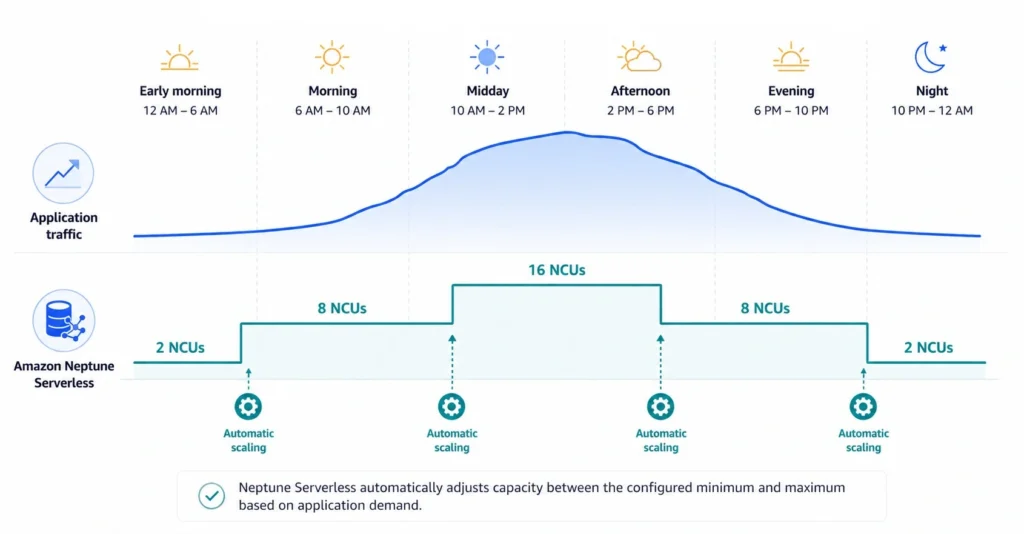
When you create a Neptune Serverless cluster, you configure a supported minimum and maximum NCU range.
The minimum represents the baseline compute that remains available, while the maximum defines the upper limit the service can allocate during periods of increased demand.
For example, imagine you configure:
- Minimum: 2 NCUs
- Maximum: 32 NCUs
This flexibility is what makes Serverless attractive for applications with unpredictable traffic patterns, such as recommendation engines, customer-facing applications, or seasonal workloads.
However, your minimum NCU setting has a direct impact on cost. If your workload rarely falls below 8 NCUs but you’ve configured a minimum of 16 NCUs, you’re paying for capacity your application may not need during quieter periods.
Before lowering it, weigh that savings against scale-up latency during traffic spikes and buffer-cache eviction during quiet periods, both of which can cause extra I/O and slower queries when demand returns. Validate against your burst-response and latency requirements first.
Configuring a higher maximum NCU limit doesn’t incur additional charges by itself, but it allows the database to scale to higher, potentially more expensive compute levels when demand increases.
Production deployments often include one or more read replicas for high availability or read scaling. Each writer and reader instance in Neptune Serverless is billed independently based on its allocated NCUs, and readers in promotion tiers 0 and 1 may scale alongside the writer to remain failover-ready.
When estimating monthly costs or comparing Serverless with Provisioned, include the capacity used by all writer and reader instances, not only the primary writer.
Amazon Neptune Serverless vs. Provisioned: Which Costs Less?
Both deployment options run the same Amazon Neptune database engine and support the same graph models, APIs, security features, backups, and Multi-AZ capabilities.
The difference lies in how compute resources are allocated, scaled, and billed.
If your application experiences frequent traffic fluctuations, Serverless can reduce the amount of idle capacity you’re paying for.
On the other hand, if your workload remains consistently busy throughout the day, the predictability of a provisioned cluster may result in lower long-term compute costs.
Neptune Serverless vs. Provisioned at a Glance
| Feature | Neptune Serverless | Neptune Provisioned |
|---|---|---|
| Compute pricing | Pay only for NCUs consumed | Pay for fixed database instances |
| Scaling | Automatic | Instance sizing is customer-managed |
| Capacity planning | AWS manages scaling | You choose and manage instance sizes |
| Idle capacity costs | Lower, because compute scales down | Fixed instance continues running |
| Cost predictability | Variable | Highly predictable |
| Best suited for | Variable and unpredictable workloads | Stable, continuously busy workloads |
Storage, backup storage, I/O requests, and data transfer are billed separately under both deployment models.
Learn more: AWS Neptune Pricing: The Complete Cost Guide for 2026
When Neptune Serverless Makes More Sense
Common examples include:
- Customer-facing recommendation engines
- E-commerce applications with seasonal traffic
- Fraud detection platforms
- Development and testing environments
- New applications with unpredictable growth
- Internal tools used primarily during business hours
Traffic spikes during promotional campaigns and weekends, but drops significantly overnight. A provisioned cluster must remain sized for those peak periods even when demand is low.
Neptune Serverless automatically scales within your configured NCU range, allowing compute consumption to better match actual workload demand.
For organizations with long idle periods or highly variable traffic, this flexibility often results in better infrastructure utilization and lower operational overhead.
When Provisioned Neptune May Cost Less
Examples include:
- Enterprise knowledge graphs accessed around the clock
- Internal analytics platforms with continuous query activity
- Manufacturing or logistics systems that process data 24×7
- Production environments with consistently high utilization
Instead of paying for changing NCU consumption throughout the month, a fixed instance may provide a lower and more predictable compute cost.
Provisioned deployments can also make budgeting easier because infrastructure costs remain relatively stable from month to month.
The Biggest Pricing Mistake
That’s the wrong metric.
Suppose two applications both reach 20 NCUs every afternoon.
Application A:
- Peaks for two hours
- Runs at 2–4 NCUs for the rest of the day
- Runs between 16–20 NCUs all day
The lesson is simple: The primary compute cost driver for Neptune Serverless is the time-weighted allocated capacity of each Serverless instance, measured in NCU-seconds.
However, your total monthly Neptune cost also depends on storage configuration, reader replicas, I/O charges (for Neptune Standard), backup storage, data transfer, ancillary AWS services, and regional pricing.
When comparing Serverless with Provisioned, evaluate the complete monthly cost and your workload’s performance requirements rather than relying on utilization metrics alone.
A Practical Break-Even Methodology
There isn’t a universal NCU threshold where Serverless suddenly becomes more expensive than Provisioned.
The break-even point depends on several variables, including:
- Average NCU consumption
- Number of hours your workload runs each month
- AWS Region
- The provisioned instance type you’re comparing against
- Whether your workload spends long periods at minimum capacity or near maximum capacity
Instead of looking for a fixed number, compare the monthly compute cost of both deployment models using the same workload.
Step 1: Estimate Serverless Compute
For production deployments, estimate compute cost across every Serverless instance:
Then add:
- Storage
- Backup storage
- I/O charges (Neptune Standard only)
- Data transfer
- Any monitoring or ancillary AWS services
This approach produces a more accurate estimate because each writer and reader instance is billed independently.
Because Neptune bills per NCU-second, workloads that spend long periods at lower NCUs can cost substantially less than workloads that remain near peak capacity, even if their average utilization appears similar.
Use the latest pricing published on the Amazon Neptune pricing page, rather than hardcoding values into your calculations.
Step 2: Estimate Provisioned Compute
Include:
- Primary writer instance
- Read replicas (if applicable)
- Multi-AZ architecture
- Any additional compute required for expected growth
Step 3: Compare Total Monthly Compute Costs
If your application spends most of the month at low utilization, Serverless often provides better value because you’re paying only for the compute you consume.
If your workload remains consistently busy and rarely scales down, Provisioned may become the lower-cost option over time.
The goal isn’t to prove that one deployment model is universally cheaper. It’s to determine which one aligns with your application’s actual usage patterns.
Where FinOps Teams Gain an Advantage
Manual break-even calculations work well when evaluating a single Neptune cluster. The challenge begins when you’re managing dozens of Neptune clusters alongside Amazon RDS, Amazon EC2, Amazon ElastiCache, and other AWS services, where changing workloads make commitment decisions increasingly difficult.
Usage.ai automates AWS commitment management by continuously analyzing compute usage and optimizing Savings Plans and Reserved Instance commitments as usage evolves.
With its Flex Insured Commitments program, eligible teams can manage one-year Neptune Database Savings Plans with conditional cashback protection under program terms. AWS currently advertises up to 30% savings for eligible Neptune usage; actual realized savings depend on the rate, coverage and utilization. A three-year compute commitment discount does not apply to Neptune Serverless.
If a commitment costs more than the equivalent on-demand usage, Usage.ai provides cashback protection to cover the difference, helping teams maintain commitment savings while retaining the flexibility to adapt as workloads change.
Best Practices to Optimize Amazon Neptune Serverless Costs
1. Optimize Graph Queries Before Scaling Compute
Deep graph traversals, poorly filtered searches, and queries that return unnecessary data consume more compute than well-optimized alternatives. Over time, these inefficient queries increase NCU consumption and drive up monthly costs.
Review your most frequently executed Gremlin, openCypher, or SPARQL queries and look for opportunities to:
- Return only the properties your application actually needs.
- Apply filters as early as possible.
- Reduce unnecessary graph traversals.
- Avoid repeatedly executing expensive queries when results can be reused.
- Review execution plans for slow-running queries.
2. Configure Realistic Minimum and Maximum NCUs
A common mistake is configuring a high minimum NCU value “just in case.”
For example, if your workload consistently requires only 2–3 NCUs during off-peak hours but your minimum capacity is configured at 8 NCUs, lowering the minimum may reduce compute costs.
However, validate this change carefully because a lower minimum can increase scale-up time, reduce buffer cache availability, and increase query latency after periods of low activity. Balance potential cost savings against your application’s performance, availability, and responsiveness requirements.
Likewise, configuring an excessively high maximum NCU value does not increase costs by itself, but it allows Neptune Serverless to scale to higher capacity during sustained or unexpected workload spikes.
Ensure your maximum capacity is high enough to accommodate legitimate demand without unnecessarily restricting automatic scaling.
Review your scaling configuration periodically and compare it with actual workload patterns and allocated NCU trends. As your application evolves, revisit your minimum and maximum capacity settings to ensure they continue to balance cost and performance.
3. Monitor NCU Consumption Instead of Monthly Bills
Instead, monitor the operational metrics that drive costs. Useful services include:
- Amazon CloudWatch for database performance metrics.
- AWS Cost Explorer for identifying spending trends.
- AWS Cost and Usage Reports (CUR) for detailed billing analysis.
- AWS Budgets for proactive cost alerts.
Understanding why NCU consumption changed is far more valuable than simply knowing that it changed.
4. Schedule Batch Jobs During Off-Peak Hours
Running these operations during periods of low application activity helps avoid stacking heavy background processing on top of peak customer traffic.
Examples include:
- Product catalog imports
- Knowledge graph updates
- Customer relationship synchronization
- Supply chain data ingestion
- Historical data backfills
5. Review Workload Patterns Regularly
User growth, new features, additional integrations, and changing business requirements all affect database utilization.
Review your Neptune environment periodically and ask:
- Is Serverless still the right deployment model?
- Has average NCU consumption increased?
- Are there new workload spikes?
- Has baseline utilization changed?
- Would Provisioned now be more economical?
Common Neptune Serverless Pricing Mistakes
Assuming Serverless Is Always Cheaper
Using Peak Utilization for Cost Estimates
Ignoring Minimum NCUs
Focusing Only on Storage
Never Revisiting Deployment Decisions
Neptune Cost Optimization Checklist
Usage.ai automates your AWS commitments and backs them with cashback protection, so you capture savings without the commitment risk.
Frequently asked questions
Is Amazon Neptune Serverless cheaper than Provisioned Neptune?
It depends on your workload. Neptune Serverless is generally more cost-effective for variable or unpredictable traffic, while consistently busy workloads may cost less on Provisioned Neptune.
What is a Neptune Capacity Unit (NCU)?
A Neptune Capacity Unit (NCU) is the compute unit used by Amazon Neptune Serverless. Each NCU provides approximately 2 GiB of memory along with proportional CPU and networking resources, scaling automatically based on workload demand.
How is Amazon Neptune Serverless billed?
Neptune Serverless compute is billed per NCU-second. Storage, backup storage, I/O requests, and data transfer are billed separately. See the Amazon Neptune pricing page for the latest regional pricing.
Can Neptune Serverless scale to zero?
No. Neptune Serverless scales only between your configured minimum and maximum NCU values. Your database always maintains at least the minimum capacity.
What affects Neptune Serverless costs the most?
The biggest cost drivers are average NCU utilization, application traffic, query complexity, read/write activity, and minimum NCU configuration. Compute typically has a greater impact on costs than storage.




