Neptune is AWS’s purpose-built managed graph database. It stores entities and the relationships between them, letting applications traverse those connections — finding paths, detecting communities, identifying fraud patterns, generating recommendations — using graph query languages that relational databases handle poorly.
The pricing model is more complex than most AWS database services because Neptune has two distinct products (Neptune Database for OLTP graph queries and Neptune Analytics for in-memory graph analysis), two deployment modes (Provisioned and Serverless), two storage configurations (Standard and I/O-Optimized), and a set of instance generations where the most current generation — Graviton4 R8g, launched May 2025 — offers significantly better price-performance than the instances most guides still reference.
This guide covers every billing component of Neptune in 2026: exact instance rates for current and previous generations, the storage configuration decision, Serverless NCU economics, Neptune Analytics pricing and the new Database Savings Plans coverage, and the decision between Reserved Instances and Database Savings Plans for Neptune specifically.
See exactly what you’re overpaying in under 60 seconds. Try the Calculator for free →
AWS Neptune: Two Products, Three Discount Paths
Understanding Neptune costs requires first understanding that AWS offers two Neptune products with different billing models and different discount mechanisms.
Neptune Database is the core managed graph database for OLTP workloads — social graphs, fraud detection, recommendation engines, knowledge graphs, network topology. It supports property graph queries (Gremlin and openCypher) and RDF queries (SPARQL). Neptune Database can run as Provisioned instances or as Neptune Serverless. It uses shared cluster storage that automatically grows in 10 GB increments.
Neptune Analytics is a separate in-memory graph analytics engine for running algorithms like PageRank, community detection, shortest path, and vector similarity search over tens of billions of graph connections in seconds. It keeps graphs in memory for low-latency analytical queries. Neptune Analytics can be paused when not in use, dropping to 10% of the normal compute price while retaining all data and settings. It is billed in m-NCUs (memory-optimized Neptune Capacity Units, each bundling 1 GB of memory with compute and network capacity for one hour).
Key 2026 update: Database Savings Plans expanded to cover Neptune Analytics on March 5, 2026. Neptune Database was already covered by Database Savings Plans at launch in December 2025. Usage.ai added native Database Savings Plans support in January 2026, with Neptune Analytics coverage following the March expansion.
Neptune Database Instance Pricing: Current Generation Rates
| Instance | Generation | RAM | On-Demand/hr | vs r5 | Notes |
| db.r5.large | Intel x86 | 16 GB | $0.348 | Baseline | Previous gen, widely referenced |
| db.r5.xlarge | Intel x86 | 32 GB | $0.696 | Baseline | Double the r5.large rate |
| db.r6g.large | Graviton2 | 16 GB | ~$0.313 | ~-10% | Graviton2, ARM-based |
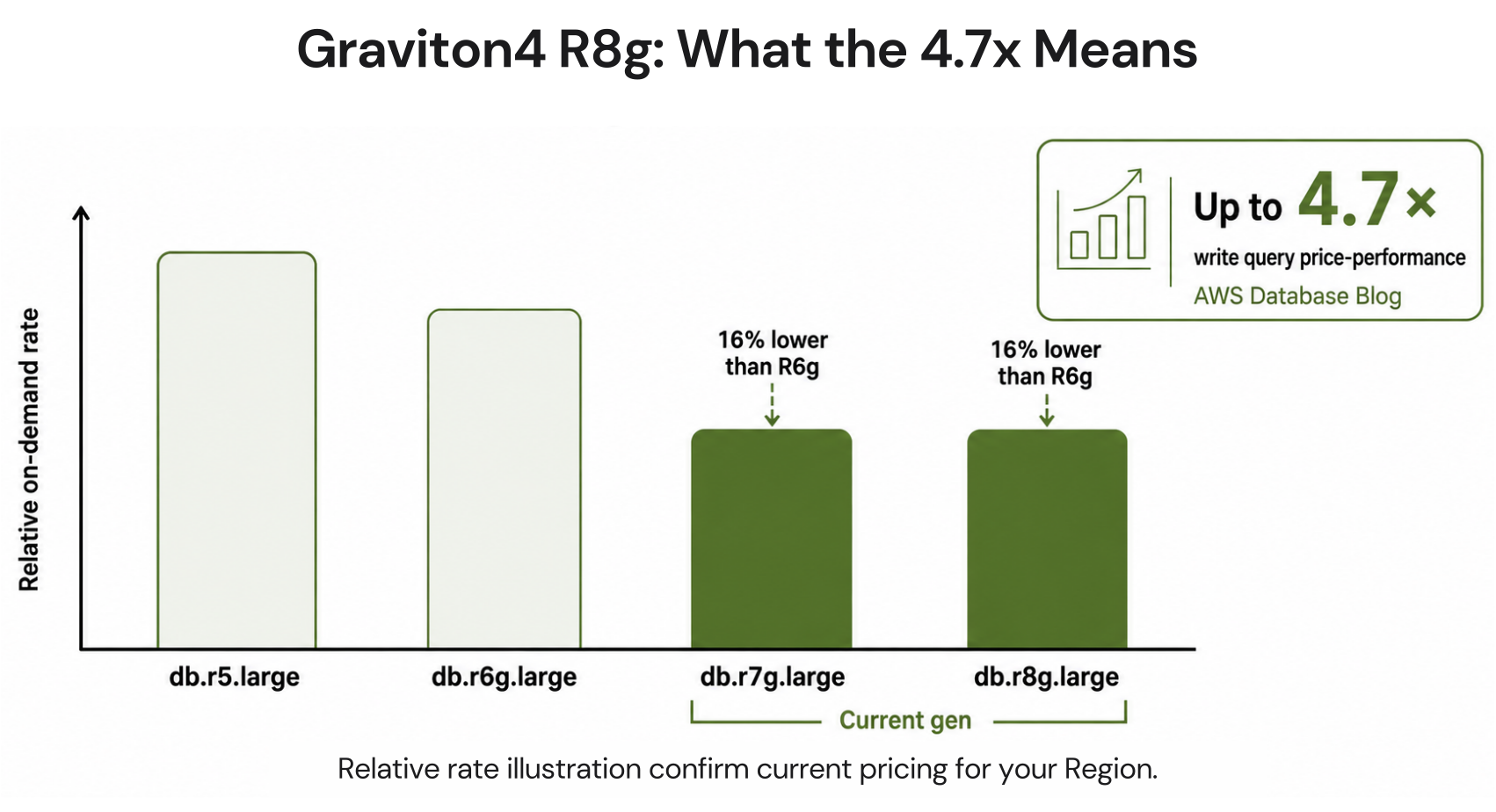
| db.r7g.large | Graviton3 | 16 GB | ~$0.263 | ~-24% | Launched May 2025. Requires Neptune v1.4.5+ |
| db.r8g.large | Graviton4 | 16 GB | ~$0.263 | ~-24%, 4.7x perf | Launched May 2025. Current recommended generation |
| db.t4g.medium (burstable) | Graviton2 | 4 GB | ~$0.073 | Lowest cost | Dev/test. CPU credit overage $0.15/vCPU-hr |
All rates: US East (N. Virginia), June 2026. Verify at aws.amazon.com/neptune/pricing — rates change.
R7g and R8g instances require Neptune engine version 1.4.5 or higher. Priced -16% vs R6g (source: AWS official announcement May 1, 2025). R5 and R6g rates from wring.co (March 2026), oreateai.com (February 2026), and FitGap (2026), all citing AWS official pricing. R7g/R8g rates estimated at -16% vs R6g per AWS announcement. Verify all current rates at aws.amazon.com/neptune/pricing — rates change.
The Graviton4 R8g Benchmark: Why the 4.7x Figure Matters
AWS launched Graviton3-based R7g and Graviton4-based R8g instances for Neptune Database on May 1, 2025. Both are priced 16% lower than equivalent R6g instances. For teams still running Neptune on R5 or R6g, this is a straightforward migration opportunity with no application code changes required.
The performance improvement is significant. AWS Prescriptive Guidance documents 4.7x better write query price-performance with Graviton4 R8g instances using Neptune v1.4.5 compared to R6g. For graph workloads that are write-heavy — ingesting event streams, updating social graph edges, modifying fraud detection rules in real time — Graviton4 R8g delivers a measurable improvement at a lower per-instance cost.
R8g instances for Neptune are available in US East (N. Virginia), US East (Ohio), US West (Oregon), Europe (Ireland), Asia Pacific (Tokyo), Asia Pacific (Mumbai), Asia Pacific (Sydney), Europe (Frankfurt), Europe (Stockholm), and Europe (Spain). R7g instances have broader regional availability.
Migration to R7g or R8g requires Neptune engine version 1.4.5 or higher. Check your current Neptune engine version in the RDS/Neptune console before planning the migration. The instance type modification is the same as any other RDS-family modification: select the new instance type, apply during the next maintenance window or immediately. No cluster recreation required.

Neptune Storage Configuration: Standard vs I/O-Optimized
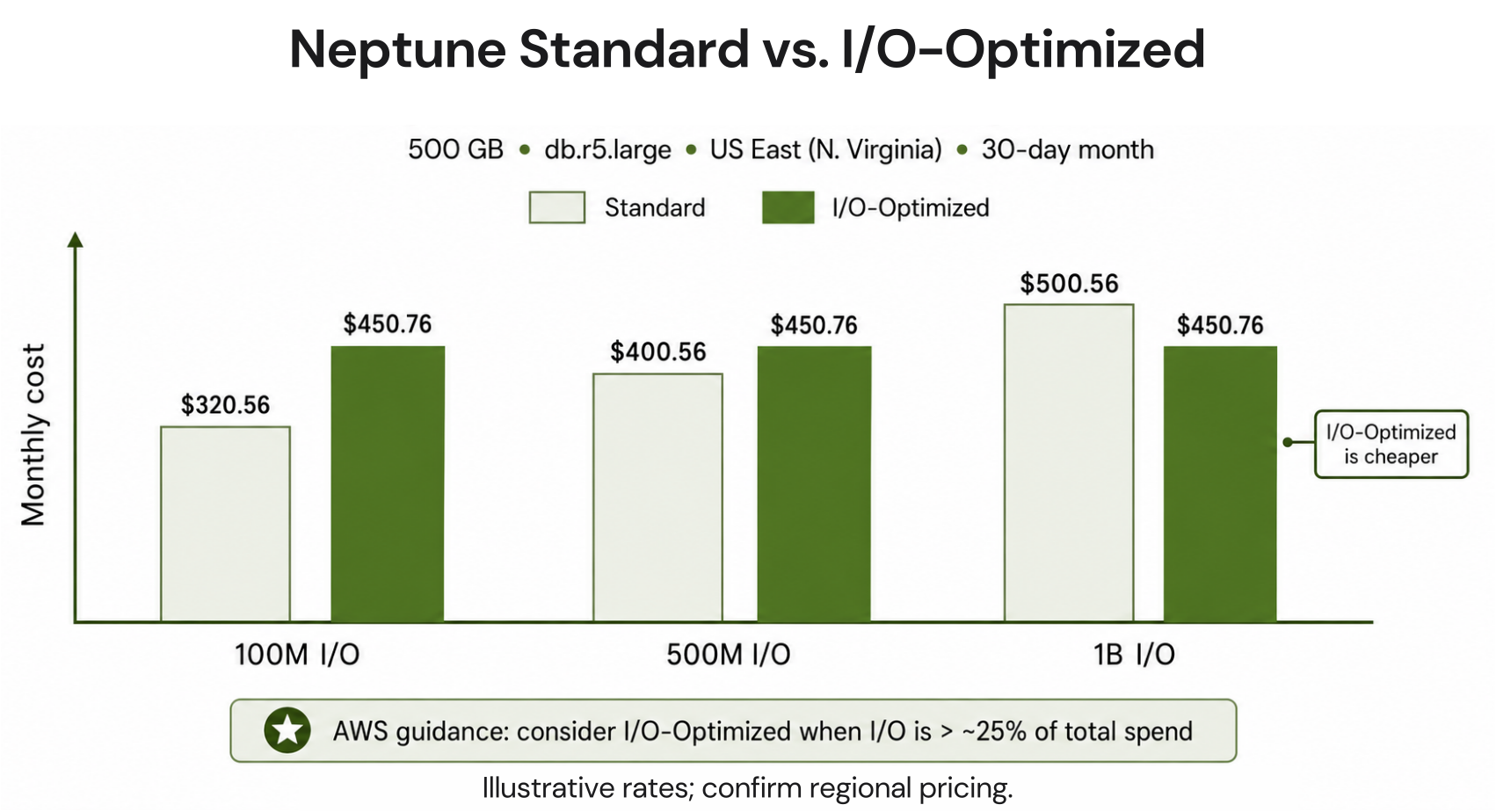
Neptune Database offers two storage configurations with fundamentally different billing models. The choice between them determines not just your storage cost but also whether your I/O usage appears as a separate billing line item.
Neptune Standard
Storage: $0.10/GB-month. I/O: $0.20 per million requests, billed separately. For workloads with low to moderate I/O relative to data size, Standard is cheaper because you only pay for I/O you actually consume. A database storing 500 GB with 100 million I/O requests per month: $50 storage + $20 I/O = $70/month total storage and I/O charges.
Neptune I/O-Optimized
Storage: $0.225/GB-month (2.25x the Standard rate). I/O: included, no per-request charge. For high-I/O workloads where the separate I/O charges would exceed the storage premium, I/O-Optimized is cheaper overall. The break-even: if your I/O cost under Standard would exceed $0.125/GB-month (the premium for I/O-Optimized storage), switch to I/O-Optimized. Source: FitGap (2026) citing AWS official pricing.
A 500 GB database with 1 billion I/O operations per month under Standard: $50 storage + $200 I/O = $250/month. Under I/O-Optimized: $112.50 storage + $0 I/O = $112.50/month. I/O-Optimized saves $137.50/month in this scenario.
The I/O trap for graph workloads: traversal-heavy queries that follow edges across many hops generate more I/O per query than typical relational database queries. A graph query finding all friends-of-friends within 3 hops of a user in a social graph may traverse thousands of edges, generating thousands of individual storage I/O requests per query execution. For Neptune workloads with complex, multi-hop traversals at scale, I/O charges under Standard pricing frequently become the largest single cost component. Use CloudWatch to monitor IOReqs per minute before deciding which configuration to use.
Audit recommendation: pull your Neptune I/O operations from CloudWatch (DatabaseConnections and IOReqs metrics) for the past 30 days. Calculate total I/O costs at $0.20/million under Standard. If that exceeds 12.5% of your storage cost, I/O-Optimized is cheaper overall. If it is below 12.5% of storage cost, Standard is cheaper. The threshold is simply: I/O-Optimized storage premium ($0.125/GB-month) divided by Standard I/O rate ($0.20/million requests) = 625,000 I/O requests per GB per month as the crossover point.
Also read: AWS Database Savings Plans: complete guide for Neptune and other managed databasesÂ
Neptune Serverless: NCU Economics and When It Makes Sense
Neptune Serverless eliminates instance sizing by automatically scaling between your configured minimum and maximum NCU (Neptune Capacity Unit) bounds. Each NCU provides approximately 2 GB of memory with associated CPU and networking. Billing is per NCU per second consumed, invoiced hourly.
Pricing: $0.1098/NCU-hour in US East. Minimum configuration: 1 NCU. Maximum: 128 NCUs. At 1 NCU running continuously: 1 x $0.1098 x 730 hours = $80.15/month minimum. Storage and I/O are billed separately at the same rates as Provisioned Standard configuration. Source: wring.co (March 2026) citing AWS official rates. Verify at aws.amazon.com/neptune/pricing — rates change.
When Neptune Serverless makes sense: development environments where usage is sporadic and you want to avoid paying for idle provisioned instances; new graph applications where the final query load is unknown; applications with highly variable traffic where peak-to-average ratio is greater than 3x. When Neptune Serverless does not make sense: production workloads with consistent, predictable query load where provisioned instances with Reserved pricing deliver lower cost at sustained utilization.
The math comparison for a consistent workload: a db.r6g.large provisioned (approximately $0.313/hr) versus Serverless at the equivalent 8 NCUs (8 x $0.1098 = $0.8784/hr). If the provisioned instance runs at consistent load requiring 8 NCUs, Serverless costs nearly 3x more. The Serverless advantage is only realized when average NCU utilization is significantly below the provisioned equivalent — meaning the cluster spends substantial time scaled down.
Estimation approach from AWS Prescriptive Guidance: if unsure whether provisioned or serverless is cheaper, test the workload on serverless first. Monitor the average NCU consumption across production-like hours. Then compare: (number of hours per month) x (provisioned hourly rate) versus (sum of NCUs per hour across those same hours) x ($0.1098). If provisioned is cheaper, switch. The comparison is straightforward once you have real NCU data from Serverless. Source: AWS Prescriptive Guidance cost optimization pillar for Neptune.
Read more: Related: AWS Database Savings Plans — covers Neptune Serverless and ProvisionedÂ
Neptune Analytics: Separate Product, Different Cost Model
Neptune Analytics is a distinct product from Neptune Database. While Neptune Database is built for OLTP-style graph queries (finding specific paths and subgraphs in real-time), Neptune Analytics is built for analytical algorithms over the full graph — PageRank, betweenness centrality, community detection, shortest path across the entire graph, vector similarity search.
Neptune Analytics keeps graphs in memory for fast analytical access. It is billed in m-NCUs (memory-optimized Neptune Capacity Units), where each m-NCU bundles 1 GB of memory with compute and network capacity for one hour. The pricing model does not specify a USD per m-NCU rate explicitly on the main pricing page — verify current rates at aws.amazon.com/neptune/pricing.
The pause capability is the key economic advantage of Neptune Analytics: when you are not running analytical jobs, you can pause the analytics instance. While paused, you pay approximately 10% of the normal compute price. Your graph data and all settings are retained. Resuming is a single API call. For teams that run graph analytics jobs on a scheduled basis (daily graph metrics, weekly community detection, monthly PageRank recalculation), the pause-resume pattern dramatically reduces cost versus running Neptune Analytics continuously.
Database Savings Plans coverage for Neptune Analytics: as of March 5, 2026, Database Savings Plans now cover Neptune Analytics compute usage. This means teams running both Neptune Database and Neptune Analytics can cover both under a single DSP commitment. The Neptune Analytics DSP discount follows the same structure as other covered services — up to 35% savings on a 1-year term.

Neptune Backup and Additional Cost Components
Automated Backup Storage
AWS includes automated backup storage at no charge up to 100% of the total database storage size. A Neptune cluster with 200 GB of data gets 200 GB of backup storage free.
Backup storage above the free tier is charged at approximately $0.021/GB-month. For databases with high write rates or long backup retention windows (30+ days), backup storage grows well beyond the free tier. A 200 GB database with a 30-day retention window may accumulate 1-3 TB of backup data. At $0.021/GB-month: $21-63/month in backup charges above the free tier.
T4g and T3 Instance CPU Credit Overage
Neptune T4g and T3 instances run in Unlimited mode. When average CPU utilization over a rolling 24-hour period exceeds the baseline of the instance, you are charged for the CPU credits consumed above baseline at $0.15/vCPU-hour. This credit overage does not appear in your Reserved Instance commitment — it is an additional on-demand charge.
For development and testing workloads with occasional bursts, T4g instances are appropriate. For any production workload with consistent CPU utilization above 20-30%, t4g instances will generate CPU credit overage charges that erode the cost savings versus an r-family instance.
Read Replicas
Neptune supports up to 15 read replicas per cluster. Each replica is a full writer-equivalent instance billed at the same on-demand rate as the primary. Replicas use Neptune’s shared cluster storage architecture, so you do not pay for duplicate storage — only the additional instance compute hours. For a four-replica cluster on db.r8g.large (approximately $0.263/hr): total cluster compute = 5 nodes x $0.263 x 730 = $959.95/month on-demand. Replicas serve both read scaling and automatic failover — if the primary fails, the replica with the least replication lag is promoted within 30 seconds. Source: wring.co (March 2026).
Free Trial
AWS offers a 30-day free trial for new Neptune customers: 750 hours of db.t3.medium or db.t4g.medium (approximately one instance running all month), 10 million I/O requests, 1 GB of storage, and 1 GB of backup storage. The trial starts when the first Neptune cluster is created. After 30 days, all resources that remain running move to standard on-demand pricing. Source: AWS official Neptune documentation and FitGap (2026).
Neptune Discount Paths: Reserved Instances vs Database Savings Plans
Neptune has two commitment-based discount mechanisms. The right choice depends on your deployment stability and whether you run Serverless or Provisioned instances.
Reserved Instances: Up to 45% Savings
Neptune Provisioned instances support Reserved Instances with 1-year or 3-year terms across three payment options (All Upfront, Partial Upfront, No Upfront). Reserved Instances provide up to 45% savings versus on-demand for Neptune at standard term lengths. Source: wring.co (March 2026) citing AWS official Neptune pricing.
Reserved Instances are appropriate for Neptune when: the production cluster has run at stable utilization for at least 30 days on a confirmed instance type and size, the Neptune engine version is current enough that a major upgrade requiring an instance change is not anticipated within the term, and the maximum discount justifies the instance-specific commitment.
Neptune Reserved Instances follow the same mechanics as RDS Reserved Instances: the reservation is locked to a specific instance family, size, and region. If you migrate from db.r6g.large to db.r8g.large, a db.r6g Reserved Instance no longer applies. The generation boundary rule applies: plan the Graviton migration before purchasing any Reserved Instance on the new generation.
Database Savings Plans: Up to 35%, Broader Flexibility
Database Savings Plans cover Neptune Provisioned, Neptune Serverless, and — since March 5, 2026 — Neptune Analytics. They offer up to 35% savings on a 1-year term with no instance-family or region lock. The commitment is a dollar-per-hour spend level, not an instance type. If your Neptune cluster migrates from R6g to R8g, scales up or down, or changes regions, the DSP discount continues applying.
The trade-off versus Reserved Instances: DSP savings (up to 35%) are lower than RI savings (up to 45% for Neptune). The flexibility premium costs approximately 10 percentage points of discount depth. For teams where Neptune configuration is actively evolving, or where a Graviton migration is planned within the next year, DSP is likely the better choice — the flexibility prevents the double-billing trap of buying RIs and then migrating to a different instance family.
| Factor | Reserved Instances | Database Savings Plans | Best for |
| Max discount | Up to 45% | Up to 35% | RI for stable workloads |
| Term options | 1-year or 3-year | 1-year only | RI for 3-year certainty |
| Covers Serverless | No | Yes | DSP for Serverless workloads |
| Covers Neptune Analytics | No | Yes (since March 5, 2026) | DSP for Analytics |
| Region flexibility | Fixed region | Any region | DSP if multi-region |
| Instance family flexibility | Fixed family (generation boundary applies) | Any family (covers through migration) | DSP if Graviton migration planned |
| Upfront payment option | All Upfront, Partial, No Upfront | No upfront required | DSP for OpEx-only budgets |
Sources: AWS re:Post (January 2026), Vantage.sh (December 2025), AWS official Neptune pricing, AWS official announcement March 5, 2026 (Neptune Analytics DSP coverage). Discount percentages are maximums for specific configurations. Verify at aws.amazon.com/neptune/pricing and aws.amazon.com/savingsplans/pricing.
Neptune Use Cases: When Neptune Is the Right Database
Neptune is purpose-built for connected data. The decision to use Neptune versus RDS, DynamoDB, or Aurora comes down to whether the queries your application needs to answer are fundamentally about relationships between entities.
Fraud Detection
Fraud patterns — shared devices, circular money flows, account linkage through common PII elements — are relationship patterns. In a relational database, detecting these patterns requires multiple JOINs across large tables, which becomes slow at scale. Neptune stores fraud entities (accounts, devices, IP addresses, phone numbers) as nodes and their connections as edges. A query finding all accounts that share a device with a known fraudulent account, within two hops, executes in milliseconds on Neptune versus seconds in a relational database at the same scale.
Recommendation Engines
Collaborative filtering recommendations — customers who bought X also bought Y — are graph traversals. Neptune stores customers, products, and purchase relationships as a graph and traverses purchase edges to generate recommendations. For e-commerce platforms with millions of customers and hundreds of thousands of products, Neptune’s native graph traversal outperforms SQL-based approaches that require repeatedly querying large cross-reference tables.
Knowledge Graphs
Knowledge graphs store entities and their semantic relationships — used in enterprise search, drug discovery (molecular relationships), legal research (regulatory citation networks), and financial services (entity relationship modeling). Neptune’s RDF/SPARQL support makes it the natural choice for W3C standard knowledge graph workloads, while its property graph support covers less formal knowledge graph implementations.
Social Networks and Identity Graphs
Social graph traversals (friend-of-a-friend queries, influence scoring, community detection) are the canonical graph database use case. Neptune handles social graphs with billions of edges. Neptune Analytics extends this with in-memory algorithms for global analytics — finding the most connected nodes, detecting communities across the full graph, computing centrality scores.
When NOT to Use Neptune
Neptune is the wrong choice when: your data has simple key-value or document access patterns (DynamoDB is cheaper and simpler), your queries are primarily relational aggregations (RDS or Aurora), your primary access pattern is full-text search (OpenSearch), or your graph is small enough (under 1 million edges) that a properly indexed relational database handles traversals adequately at lower cost.
See exactly what you’re overpaying in under 60 seconds. Try the Calculator for free →
How Usage.ai Handles Neptune Cost Optimization
Usage.ai analyzes Neptune provisioned clusters for commitment purchasing opportunities. The platform identifies clusters running at stable utilization for 30+ days and determines whether Reserved Instances or Database Savings Plans deliver better net savings given the cluster’s configuration trajectory.
For Neptune specifically, the Graviton migration opportunity is a key optimization signal. Clusters running on R5 or R6g instances are flagged as candidates for migration to R7g or R8g (priced 16% lower than R6g, requiring Neptune v1.4.5+). Usage.ai sequences the recommendation correctly: migrate first, confirm stability, then purchase the commitment — preventing the double-billing scenario of buying a Reserved Instance on R6g and then migrating to R8g within the RI term.
Database Savings Plans are the recommended commitment path for teams running Neptune Serverless or Neptune Analytics, where Reserved Instances do not apply. Usage.ai added native Database Savings Plans support in January 2026 and extended Neptune Analytics coverage following the March 5, 2026 AWS announcement. The platform’s 24-hour refresh catches workload changes that affect whether a committed hourly spend is correctly sized.
For Neptune Analytics workloads with scheduled analytical jobs, Usage.ai identifies the pause/resume pattern as an optimization recommendation — clusters left running continuously between job executions generate compute charges at 10x the paused rate unnecessarily.
If a Neptune Reserved Instance becomes underutilized — because a cluster is scaled down, migrated to Serverless, or decommissioned — Usage.ai provides cashback on the unused commitment in real money. Fee: percentage of realized savings only.
See how Usage.ai optimizes Neptune Reserved Instances and Database Savings Plans

Frequently Asked Questions
1. How much does Amazon Neptune cost?
Neptune Database starts at $0.348/hr for a db.r5.large on-demand in US East (N. Virginia), approximately $254/month for a single-node cluster. Current-generation Graviton4 R8g instances are priced approximately 16% lower than R6g equivalents (launched May 2025, requires Neptune v1.4.5+). Add storage at $0.10/GB-month (Standard) plus $0.20 per million I/O requests, backup storage above the free tier at $0.021/GB-month, and each read replica at the same hourly rate as the primary. Neptune Serverless starts at $0.1098/NCU-hour (~$80/month minimum). Verify at aws.amazon.com/neptune/pricing.
2. What is Neptune Serverless and when should I use it?
Neptune Serverless automatically scales between configured minimum and maximum NCUs (Neptune Capacity Units, each providing ~2 GB memory) based on query load. Billed per NCU-second at $0.1098/NCU-hour. Use Serverless for: development environments, new applications with unknown query load, and workloads with high peak-to-average ratio (3x or more). For consistent, predictable production workloads, provisioned instances with Reserved pricing are cheaper at sustained utilization. Storage and I/O are billed at Standard rates in addition to NCU charges.
3. What are the discount options for AWS Neptune?
Two commitment-based discount paths: Reserved Instances (up to 45% savings, 1-year or 3-year, provisioned instances only) and Database Savings Plans (up to 35% savings, 1-year only, covers provisioned, serverless, and Neptune Analytics since March 5, 2026). Additionally: migrating to Graviton4 R8g reduces on-demand rates by ~16% versus R6g with no code changes, requiring Neptune v1.4.5+. Source: wring.co (March 2026), AWS official announcement March 5, 2026.
4. What is Neptune Analytics and how is it priced?
Neptune Analytics is a separate AWS product for in-memory graph analytical algorithms (PageRank, community detection, vector similarity search). It loads graphs into memory for fast analytical queries. Billed in m-NCUs (memory-optimized Neptune Capacity Units, each = 1 GB memory + compute). When paused, Neptune Analytics charges approximately 10% of normal compute cost while retaining all data. Database Savings Plans cover Neptune Analytics since March 5, 2026. For scheduled analytical workloads (daily/weekly/monthly jobs), pause Neptune Analytics between runs to reduce cost by 90%.
5. What is the difference between Neptune Standard and I/O-Optimized?
Neptune Standard: storage at $0.10/GB-month, I/O charged separately at $0.20 per million requests. Neptune I/O-Optimized: storage at $0.225/GB-month, I/O included. Choose Standard for low-to-moderate I/O workloads. Choose I/O-Optimized when I/O charges under Standard would exceed $0.125/GB-month — the crossover is approximately 625,000 I/O requests per GB of storage per month. For traversal-heavy graph workloads, I/O-Optimized frequently saves money overall despite higher storage rates.
6. Does Neptune have a free tier?
Neptune offers a 30-day free trial for new customers: 750 hours of db.t3.medium or db.t4g.medium (~one instance running all month), 10 million I/O requests, 1 GB of storage, and 1 GB of backup storage. This trial starts when the first Neptune cluster is created. After 30 days, all remaining resources are billed at standard on-demand rates. There is no always-free Neptune tier. Source: AWS official Neptune documentation.
7. Should I use Neptune Reserved Instances or Database Savings Plans?
Reserved Instances (up to 45%) when: stable provisioned cluster confirmed for 12+ months at a fixed instance type, no Graviton migration planned during the term, maximum discount is the priority. Database Savings Plans (up to 35%) when: running Neptune Serverless or Neptune Analytics (where RIs do not apply), Graviton migration is planned within the term, cluster configuration is evolving, or cross-region flexibility is needed. Most teams with stable provisioned clusters benefit from RI; teams with dynamic or serverless workloads benefit from DSP.