Relational databases are excellent at storing structured data in rows and columns. They struggle when the most important thing about your data is not the data itself but the connections between data points. A customer who is connected to five accounts, each of which shares a device with three other customers, each of which has transactions linking to a flagged merchant — this pattern is a fraud ring. Finding it in a relational database requires multiple expensive JOINs across large tables. In a graph database, it is a traversal.
Amazon Neptune is AWS’s managed graph database service. It stores data as a network of nodes (entities) and edges (relationships), and lets you traverse those connections at millisecond latency regardless of how deeply interconnected the data becomes. Neptune is not a replacement for relational databases — it is the right tool for a specific class of problems where the relationships between data matter as much as, or more than, the data itself.
This guide explains what Neptune is, how the underlying graph model works, which query languages it supports and when to use each, what it costs, and when Neptune is the right choice versus other AWS database services.
See exactly what you’re overpaying in under 60 seconds. Try the Calculator for free →
Why Graph Databases Exist: The Problem Neptune Solves
A relational database stores data in tables. Relationships between tables are expressed through foreign keys and resolved through JOIN operations. For one or two levels of relationship, JOINs are efficient. For deeper traversals — find all users within three degrees of connection to a given user, find all accounts connected through shared identity attributes to a flagged account — the number of JOINs multiplies exponentially and query performance degrades.
Graph databases are built specifically for this class of problem. Instead of tables and rows, graph databases store nodes (entities like users, accounts, products, devices, transactions) and edges (relationships like KNOWS, OWNS, PURCHASED, CONNECTED_TO). Each node and edge can have properties — key-value attributes stored directly on the entity or relationship.
The structural advantage of a graph database: traversal operations — following edges from one node to the next — are direct pointer-following operations, not table scans. Finding all friends of a user in a graph database is a direct lookup of the user’s edge list. In a relational database, it requires a JOIN between the users table and a relationships table. At scale, with hundreds of millions of nodes and billions of edges, the difference in traversal performance is not linear — it is an architectural difference in how the data is physically organized and accessed.
The canonical example: a relational database asked to find all accounts within 4 hops of a given fraudulent account across a 100-million-user dataset might take minutes per query. Neptune, with the same dataset stored as a graph, executes the same traversal in milliseconds. This is not a performance tuning difference — it is the fundamental reason graph databases exist. Source: AWS official Neptune documentation and Neptune GA announcement (May 2018).
What Is Amazon Neptune?
Amazon Neptune is a fully managed graph database service that launched in general availability in May 2018. AWS built Neptune because customers needed a way to extract value from the relationships in their data — not just the data itself. The service is built on a purpose-built, high-performance graph database engine optimized for storing billions of relationships and querying the graph with millisecond latency. Source: AWS News Blog (May 2018) and AWS official Neptune documentation.
Neptune is fully managed: AWS handles hardware provisioning, software updates, backups, failover, and encryption. You do not manage the underlying servers or database binaries. The service runs inside your VPC and integrates with IAM, CloudWatch, AWS Glue, Amazon SageMaker, and other AWS services.
Neptune stores data in a shared cluster volume that automatically grows in 10 GB increments as your data grows, up to 128 TB per cluster. It supports more than 100,000 queries per second for the most demanding applications and scales reads through up to 15 read replicas per cluster. Data is replicated across three Availability Zones within an AWS Region for high availability and durability. Source: AWS official Neptune features page and AlternativeTo citing AWS documentation.
Neptune consists of two distinct products with different billing models and use cases: Neptune Database (for OLTP-style graph queries in production applications) and Neptune Analytics (for in-memory analytical algorithms over graph data). Both are covered in this guide.
Also read: AWS Database Savings Plans
The Two Graph Models Neptune Supports
Neptune supports two fundamentally different ways of modeling graph data. The choice between them determines which query language you use, how your data is structured, and what types of queries are natural or awkward.
Property Graph Model
In the property graph model, graphs consist of nodes and edges. Both nodes and edges can have a label (a type identifier) and properties (key-value pairs). A node representing a user might have properties: userId: ‘u123’, name: ‘Alice’, joinDate: ‘2022-01-15’. An edge representing a purchase relationship between that user and a product might have properties: amount: 49.99, timestamp: ‘2024-03-01’.
Property graphs are the more common choice for application developers because the model is intuitive and maps naturally to object-oriented data models. They are the foundation for social networks, recommendation engines, fraud detection graphs, and network topology maps. Neptune supports the property graph model using two query languages: Gremlin and openCypher.
RDF (Resource Description Framework) Model
RDF is a W3C standard for representing data as triples: subject — predicate — object. Each triple is a statement: for example, (Alice) — (knows) — (Bob), or (molecule_X) — (inhibits) — (protein_Y). RDF graphs do not have properties on edges — relationships are expressed through additional triples. The model is more verbose than property graphs but has specific advantages: it integrates naturally with semantic web standards, enables federated queries across multiple data sources, and has broad adoption in knowledge management, biomedical research, and linked data contexts.
Neptune supports RDF 1.1 and SPARQL 1.1 (Query and Update) and provides an HTTP REST endpoint implementing the SPARQL Protocol 1.1. Existing RDF datasets (Wikidata, PubChem, DBpedia) load directly into Neptune. Source: AWS official Neptune features page.
Both models can coexist in Neptune: the same Neptune cluster can store both property graph and RDF data. They use separate endpoints and query languages. Most applications use one model exclusively — choose based on whether you have existing RDF data or tooling, or whether a property graph more naturally represents your domain. For new deployments with no existing RDF data, property graph (with Gremlin or openCypher) is typically the simpler starting point. Source: AWS official Neptune documentation.
The Three Query Languages: Gremlin, openCypher, and SPARQL
Neptune’s three query languages are tied to the two graph models. Gremlin and openCypher are both property graph languages; SPARQL is for RDF. Choosing between Gremlin and openCypher for a property graph workload is a developer experience decision, not a capability decision.
| Language | Graph Model | Style | Best For | Comes From |
| Gremlin | Property Graph | Imperative (step-based traversal) | Complex multi-hop traversals, procedural logic | Apache TinkerPop |
| openCypher | Property Graph | Declarative (pattern matching) | Developers from relational SQL backgrounds | Neo4j (open standard) |
| SPARQL | RDF | Declarative (triple pattern matching) | Knowledge graphs, semantic web, linked data | W3C standard |
All rates and technical specifications are for US East (N. Virginia), June 2026. Verify at aws.amazon.com/neptune.
Source: AWS official Neptune features page (aws.amazon.com/neptune/features/), AWS Database Blog (openCypher announcement), DataCamp tutorial (June 2025). All three languages are supported natively. Neptune also supports the Bolt binary protocol for openCypher compatibility with Neo4j drivers. Source: DevOpsSchool citing AWS documentation.
Gremlin
Gremlin is a graph traversal language from the Apache TinkerPop project. Neptune supports TinkerPop version 3.3 and provides a Gremlin WebSockets server. Gremlin is imperative — you describe the steps of a traversal explicitly. A query to find all friends of a user named Alice looks like: g.V().has(‘name’,’Alice’).out(‘KNOWS’).values(‘name’). The query starts at a vertex (V()), filters to Alice, follows outgoing KNOWS edges (out(‘KNOWS’)), and returns the name property of each connected vertex.
Gremlin is powerful for complex multi-hop traversals where you want fine-grained control over the traversal path. It has broad library support and is the most mature graph traversal language with the largest community of existing tools and integrations. Existing Gremlin applications can migrate to Neptune by changing the Gremlin service configuration to point to a Neptune endpoint. Source: AWS official Neptune features page.
openCypher
openCypher is a declarative graph query language originally developed by Neo4j and released as an open standard. It uses a pattern-matching syntax that SQL-familiar developers find approachable. A query to find all friends of Alice in openCypher: MATCH (a:Person {name: ‘Alice’})-[:KNOWS]->(b) RETURN b.name. The MATCH clause describes the graph pattern to find; Neptune executes the traversal internally.
openCypher is increasingly popular for new graph applications because of its readability and the large pool of developers familiar with SQL-style declarative queries. Neptune supports openCypher in general availability. Source: AWS Database Blog (openCypher for Neptune announcement). Neptune also supports the Bolt protocol, enabling compatibility with existing Neo4j client drivers that speak Bolt — this simplifies migration of applications built for self-managed Neo4j databases. Source: DevOpsSchool citing AWS documentation.
SPARQL
SPARQL is the W3C-recommended query language for RDF graphs. Where Gremlin and openCypher describe traversals through a property graph, SPARQL describes patterns in a graph of triples. A query to find everyone Alice knows in SPARQL: SELECT ?name WHERE { :Alice :knows ?person . ?person :name ?name . }. SPARQL supports filtering, aggregation, subqueries, and federated queries across multiple RDF stores.
SPARQL is the correct choice when: you are working with existing RDF datasets (Wikidata, biomedical ontologies, linked open data), you need to interoperate with external semantic web systems, or your domain has a strong convention around RDF (pharmaceutical research, regulatory compliance knowledge graphs, enterprise taxonomies). Neptune provides an HTTP REST endpoint implementing SPARQL Protocol 1.1 and supports SPARQL Update for modifying graph data. Source: AWS official Neptune features page.

Neptune Database vs Neptune Analytics: Two Distinct Products
Neptune consists of two separate products with different architectures, billing models, and purposes. Understanding the distinction is essential before evaluating Neptune for any use case.
Neptune Database
Neptune Database is the core operational graph database for production applications. It handles OLTP-style graph queries: finding specific paths and subgraphs in real time, answering application requests like ‘find all products purchased by users similar to this user’ or ‘identify accounts connected to this flagged transaction through shared identifiers within three hops.’
Neptune Database uses a shared cluster storage architecture. A primary writer instance handles all writes and can serve reads. Up to 15 read replicas can serve read traffic and act as automatic failover targets. If the primary fails, the replica with the least replication lag is promoted within approximately 30 seconds. Data is replicated across three Availability Zones automatically.
Neptune Database can be deployed as Provisioned (you choose an instance type, billed per instance-hour) or as Neptune Serverless (auto-scales between minimum and maximum Neptune Capacity Units, billed per NCU-second). Provisioned is better for predictable, consistent production workloads. Serverless eliminates capacity planning for variable or development workloads.
Neptune Analytics
Neptune Analytics is a separate in-memory graph analytics engine for running analytical algorithms over large graphs. While Neptune Database answers queries about specific nodes and their neighborhood (who are Alice’s friends?), Neptune Analytics runs algorithms over the full graph (what is every node’s PageRank score? Which nodes form communities? What is the shortest path between any two nodes in the entire graph?).
Neptune Analytics loads the graph into memory for fast analytical access and is optimized for algorithms like PageRank, betweenness centrality, community detection (label propagation), shortest paths, and vector similarity search. It can analyze tens of billions of graph connections in seconds. Source: AWS official Neptune Analytics documentation.
Neptune Analytics bills in m-NCUs (memory-optimized Neptune Capacity Units, each bundling 1 GB of memory with compute and network for one hour). A key economic feature: Neptune Analytics can be paused when not in use, dropping to approximately 10% of the normal compute price while retaining all data and settings. For teams running scheduled analytical jobs (daily graph metrics, weekly community detection), the pause capability dramatically reduces cost versus continuous operation. Source: oreateai.com (February 2026) citing AWS official documentation.
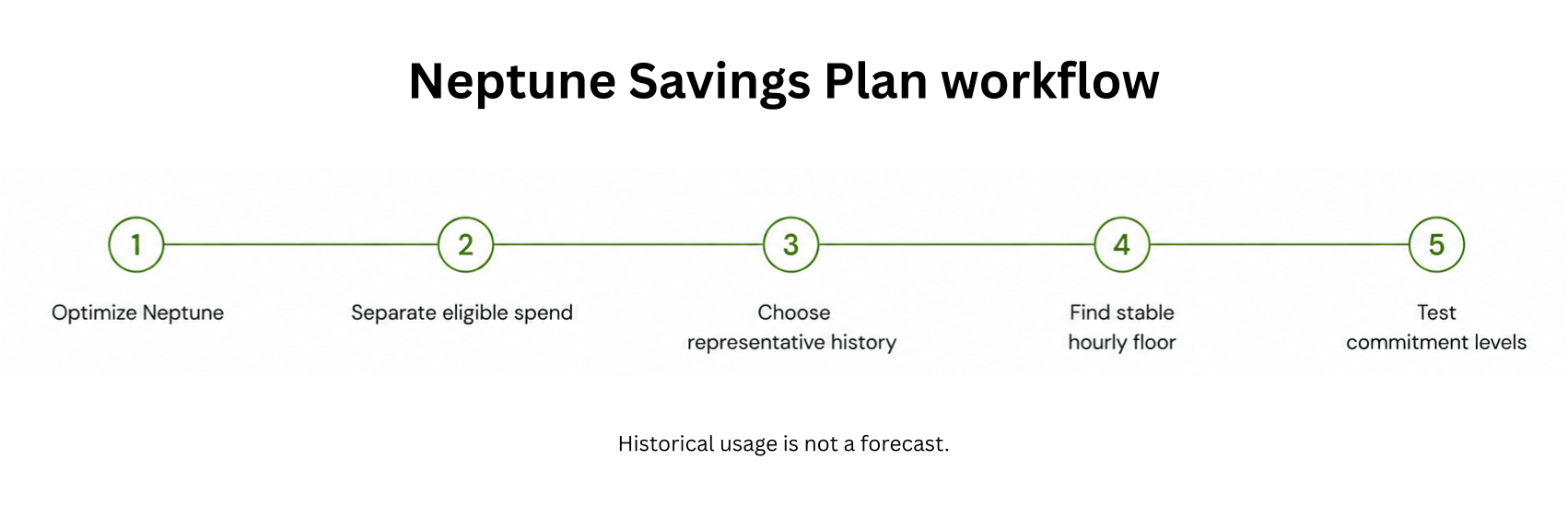
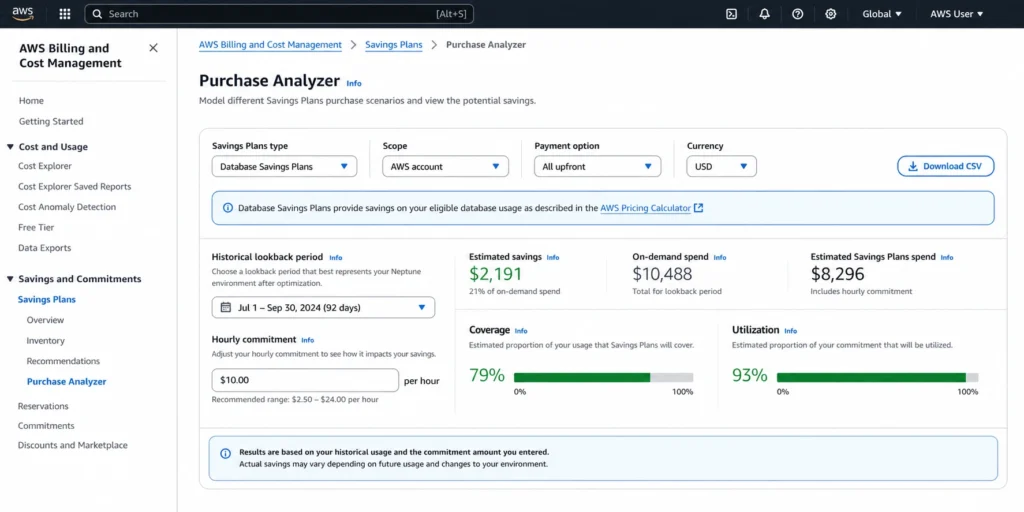
Database Savings Plans cover Neptune Analytics since March 5, 2026, allowing teams to commit to an hourly spend across Neptune Database and Neptune Analytics under a single discount commitment.
Core Features and Capabilities
High Availability and Durability
Neptune automatically replicates data across three Availability Zones in a region. Each cluster has a primary writer instance and optional read replicas. Failover to a replica occurs automatically in approximately 30 seconds. Point-in-time recovery is supported, with continuous backups to Amazon S3. Read replicas can also be configured as failover targets with priority tiers — if the primary fails, Neptune promotes the highest-priority replica.
Neptune also supports Global Database, which spans multiple AWS Regions. A single Neptune cluster serves as the primary, with one or more secondary read-only clusters in other regions. Global Database provides low-latency reads for globally distributed applications and enables disaster recovery at the regional level — if the primary region fails, a secondary can be promoted to primary. Source:
Security
Neptune runs inside your VPC and is not accessible from the public internet by default. Network isolation is enforced at the VPC level, and security groups control which application instances can connect to Neptune endpoints. Encryption at rest uses AES-256, enabled per cluster at creation. Encryption in transit (TLS) is supported for all query protocol connections. IAM integration controls administrative access to cluster management operations. Advanced auditing is available for logging all queries executed against the cluster. Neptune meets HIPAA, PCI DSS, SOC, and ISO compliance standards.
Neptune ML: Machine Learning on Graphs
Neptune ML is a capability that integrates Neptune with Amazon SageMaker and the Deep Graph Library (DGL) to train and deploy Graph Neural Network (GNN) models directly on your Neptune graph data. GNNs learn representations of nodes and edges that capture the structure of the graph, enabling machine learning tasks that incorporate relationship information.
Neptune ML supports: node classification (predicting a property of unlabeled nodes), node regression (predicting a continuous value for nodes), link prediction (predicting whether edges should exist between node pairs), and edge classification. These tasks are valuable for recommendation engines (predicting missing edges in a user-product graph), fraud detection (classifying nodes as fraudulent based on their graph neighborhood), and knowledge graph completion (predicting missing relationships). Source: AWS Database Blog (Neptune ML announcement).
Global Database
Neptune Global Database allows a single Neptune cluster to span multiple AWS Regions. The primary cluster in one region handles all write operations. Secondary read-only clusters in up to five other regions replicate data with typical lag under 1 second. Applications in secondary regions can read from the local cluster for low-latency access.
Global Database enables two scenarios: low-latency reads for globally distributed applications (a social network serving users in multiple continents), and regional disaster recovery (if the primary region fails, a secondary can be promoted to primary in under a minute). Source: AWS official Neptune documentation.
Integration with AWS Services
Neptune integrates natively with the AWS ecosystem. AWS Glue handles ETL for loading data from S3, RDS, DynamoDB, or other sources into Neptune. Amazon SageMaker provides the ML training pipeline for Neptune ML. Amazon CloudWatch monitors cluster metrics (CPU, memory, query throughput, replication lag). AWS Lambda can trigger graph updates based on events from other services. Amazon Athena can query Neptune data directly using the Neptune Athena connector for Gremlin and SPARQL. Amazon Alexa’s knowledge graph is powered by Neptune — Amazon used Neptune for Alexa’s knowledge graph for tens of millions of customers. Source: TechCrunch citing AWS GA announcement (May 2018).

Neptune Pricing Overview: What You Pay For
Neptune pricing has five components. The instance is the largest; I/O can become the largest for traversal-heavy workloads.
1. Instance Compute
Provisioned Neptune Database instances are billed per instance-hour. Pricing starts at $0.348/hr for a db.r5.large in US East (N. Virginia). Current-generation Graviton4 R8g instances (launched May 2025, requires Neptune v1.4.5+) are priced approximately 16% lower than the R6g generation and deliver 4.7x better write query price-performance. For new deployments, R8g is the recommended generation.
2. Storage
Neptune Standard storage: $0.10/GB-month. Neptune I/O-Optimized storage: $0.225/GB-month (I/O included). Storage scales automatically in 10 GB increments up to 128 TB. You are billed for storage consumed, not storage allocated.
3. I/O Requests (Standard Configuration Only)
Under Neptune Standard, I/O operations are billed at $0.20 per million requests. For graph traversal-heavy workloads that follow many edges per query, I/O charges can exceed instance charges. Neptune I/O-Optimized eliminates per-request I/O charges by including I/O in the higher storage rate. Choose I/O-Optimized if your I/O cost under Standard would exceed 12.5% of your storage cost per month.
4. Backup Storage
Automated backup storage is free up to 100% of total database storage. Above that, backup storage is approximately $0.021/GB-month. Manual snapshots are charged from the moment they are created. For long retention windows (30+ days) on actively written databases, backup storage can accumulate significantly. Source: AWS official Neptune documentation.
5. Data Transfer
Data transfer into Neptune is free. Transfer between Neptune and other AWS services in the same region is generally free. Cross-AZ data transfer between application instances and Neptune endpoints is charged at standard AWS rates ($0.01/GB each direction). Cross-region replication for Global Database incurs standard cross-region transfer charges.
Discount Options
Two commitment-based discount paths: Reserved Instances (up to 45% savings, 1-year or 3-year, Provisioned instances only) and Database Savings Plans (up to 35% savings, 1-year, covers Provisioned, Serverless, and Neptune Analytics since March 5, 2026). Additionally: migrating to Graviton4 R8g reduces on-demand rates by approximately 16% versus R6g with no code changes.
Neptune Use Cases: The Right Problems for a Graph Database
Fraud Detection and Risk Networks
Financial fraud often manifests as networks: accounts that share devices, phone numbers, or email addresses with known fraudulent accounts; circular money movements across multiple entities; identity clusters that appear legitimate individually but share suspicious attributes. Neptune stores these entities and their connections as a graph and traverses fraud patterns at millisecond latency.
A fraud detection query: find all accounts within three hops of a known fraudulent account, where the connecting edges are shared device IDs or shared phone numbers, returning accounts with a transaction velocity above a threshold. In Neptune (openCypher): MATCH (fraud:Account {status: ‘FRAUDULENT’})-[:SHARES_DEVICE|SHARES_PHONE*1..3]-(suspect:Account) WHERE suspect.txVelocity > 100 RETURN suspect. Executing this against a 100-million-account graph: milliseconds in Neptune. Minutes in a relational database.
Recommendation Engines
Recommendation systems based on collaborative filtering — people who purchased X also purchased Y — are graph traversal problems. Neptune stores customers and products as nodes and purchase events as edges. A recommendation query traverses: from the current user, follow PURCHASED edges to products, then follow reverse PURCHASED edges from those products to other customers who bought them, then follow their PURCHASED edges to products the current user has not yet bought, ranked by frequency.
This multi-hop pattern becomes natural in Neptune and extremely expensive in a relational database as customer and product counts scale. Amazon itself uses Neptune for recommendation infrastructure at scale. Source: AWS official Neptune documentation.
Knowledge Graphs
Knowledge graphs store entities and their semantic relationships — used across enterprise search (what does our organization know about customer X across all systems?), drug discovery (what molecules inhibit which proteins, and which proteins are implicated in which diseases?), legal research (how do regulatory citations connect across jurisdictions?), and financial services (which entities are related through ownership, board membership, or transaction history?).
Neptune’s RDF/SPARQL support makes it the natural fit for W3C standard knowledge graph workloads. AWS highlighted Thermo Fisher Scientific building a knowledge graph from their data warehouse in Neptune as a production example. Source: AWS Database Blog.
Social Graphs and Identity Graphs
Social networks model users, their connections, and their interactions as a graph. Neptune handles social graphs with billions of edges efficiently. Identity graphs — linking customer identities across multiple touchpoints (email, device, phone, cookie) — are another high-value graph use case. Cox Automotive uses Neptune for identity graph-powered digital personalization at scale. Source: AWS Database Blog.
Network and IT Infrastructure Mapping
IT infrastructure graphs model servers, services, containers, load balancers, and the dependencies between them. Neptune makes it possible to query: which services would be affected if this database instance fails? What is the deployment path of this code change across all dependent services? Infrastructure graph queries answer impact analysis and dependency visualization questions that are awkward in relational databases and document stores. Source: AWS official Neptune use case documentation.
Also read: ElastiCache Reserved Nodes: Complete Pricing Guide
Supply Chain and Logistics Graphs
Supply chain networks — manufacturers, suppliers, distributors, warehouses, customers — are naturally graph-structured. Neptune models supply chain relationships and enables queries like: what is the complete upstream supplier network for this component? Which alternative suppliers can substitute if this node fails? What is the impact of a delay at this facility on downstream commitments? Source: AWS official Neptune documentation.
When NOT to Use Neptune: Choosing the Right Database
Neptune is the right choice when the most important queries in your application traverse relationships. It is not always the right choice, and AWS offers other database services that fit different access patterns more efficiently.
| Database | Best For | Avoid When | Neptune vs This |
| Amazon Neptune | Connected data, multi-hop traversals, relationship queries | Simple key-value, flat document, or primary relational queries | Purpose-built for relationship traversal at scale |
| Amazon RDS / Aurora | Structured relational data, ACID transactions, complex SQL | Deep relationship traversals (3+ JOINs at scale) | Use RDS for transactional relational data; Neptune for the relationship layer |
| Amazon DynamoDB | High-throughput key-value and document access, simple lookup patterns | Complex relationships requiring multi-hop traversal | DynamoDB is cheaper for simple lookups; Neptune required for traversal |
| Amazon OpenSearch | Full-text search, log analytics, unstructured document search | Relationship traversal or graph analytics | OpenSearch for text search; Neptune for entity relationship queries |
| Amazon ElastiCache | Sub-millisecond in-memory caching of frequently accessed data | Graph traversal, persistent data, complex relationship queries | ElastiCache for caching Neptune query results; not a Neptune replacement |
This comparison reflects the primary use case of each service. Many production architectures combine Neptune with other AWS databases: Neptune stores the relationship graph while Aurora handles the transactional data, ElastiCache caches hot graph traversal results, and OpenSearch indexes graph content for text search. Source: AWS official database selection guidance.
See exactly what you’re overpaying in under 60 seconds. Try the Calculator for free →
Getting Started With Neptune
Free Trial
New AWS customers get a 30-day free trial for Neptune: 750 hours of a db.t3.medium or db.t4g.medium instance (approximately one instance running all month), 10 million I/O requests, 1 GB of storage, and 1 GB of backup storage. The trial begins when the first Neptune cluster is created. After 30 days, resources that remain running are billed at standard on-demand rates. Source: AWS official Neptune documentation.
AWS also provides Neptune Jupyter notebooks for learning and development without provisioning a production cluster — these are available at zero cost for exploration before committing to a deployment. Source: AWS official Neptune documentation.
Neptune vs Relational: A Decision Checklist
Use Neptune when: your data contains entities that are connected to other entities and those connections are first-class objects in your queries; you need to traverse more than two levels of relationship efficiently; your queries ask ‘what is connected to what and through what path?’; your dataset contains cycles or bidirectional relationships that make SQL self-joins complex.
Stay with a relational database when: your queries are primarily analytical aggregations (GROUP BY, SUM, COUNT) over flat tables; your data has a clear tabular structure with well-defined foreign keys and shallow JOINs; your primary access pattern is row-level CRUD by a known key; your team has no graph database experience and the relationship traversal benefit does not justify the operational learning curve.
How Usage.ai Helps Optimize Neptune Costs
Neptune is not a low-cost database service. A production Neptune cluster with a primary writer, two read replicas, and meaningful storage is typically $800-2,000/month on-demand before I/O and backup charges. The two highest-leverage cost optimizations — Graviton migration and commitment purchasing — are where Usage.ai applies.
Usage.ai identifies Neptune clusters running on older Graviton or x86 instance generations and surfaces the migration opportunity to R8g, the current-generation Graviton4 instances priced 16% lower than R6g and delivering 4.7x better write query price-performance. The platform sequences the recommendation correctly: verify Neptune version is 1.4.5+, migrate, confirm stability, then purchase the commitment.
For commitment purchasing, Usage.ai evaluates whether Reserved Instances (up to 45%, provisioned only) or Database Savings Plans (up to 35%, covers Provisioned, Serverless, and Neptune Analytics since March 2026) deliver better net savings given the cluster’s configuration. For teams where Neptune Serverless or Neptune Analytics are in scope, DSP is the only applicable discount mechanism and Usage.ai handles that commitment automatically.
Neptune Analytics clusters left running continuously between scheduled analytical jobs are flagged as a cost optimization opportunity — pausing Neptune Analytics between jobs reduces compute costs by 90%, from the full m-NCU rate to 10% of that rate during the paused state.
If any Neptune commitment becomes underutilized — cluster decommissioned, workload migrated, instance resized — Usage.ai provides cashback on the unused commitment in real money. Fee: percentage of realized savings only.

Frequently Asked Questions
1. What is Amazon Neptune?
Amazon Neptune is a fully managed graph database service on AWS. It stores data as nodes (entities) and edges (relationships) and executes traversal queries at millisecond latency, regardless of graph depth. It supports Property Graph queries (Gremlin, openCypher) and RDF queries (SPARQL). Neptune handles more than 100,000 queries per second, stores up to 128 TB per cluster, replicates across three Availability Zones, and launched in general availability in May 2018. Source: AWS official Neptune documentation.
2. What is Neptune used for?
Neptune is used for applications where the relationships between data are as important as the data itself. Primary use cases: fraud detection (traversing networks of connected accounts and identities), recommendation engines (collaborative filtering through purchase and preference graphs), knowledge graphs (semantic relationship modeling for enterprise search and research), social graphs (user connection traversal and community analysis), identity graphs (linking customer identities across touchpoints), and IT infrastructure dependency mapping. Source: AWS official Neptune use cases.
3. What query languages does Neptune support?
Neptune supports three query languages: Gremlin (imperative traversal language from Apache TinkerPop, for property graphs), openCypher (declarative SQL-like language originally from Neo4j, now an open standard, for property graphs), and SPARQL 1.1 (W3C standard for RDF graphs). Neptune also supports the Bolt binary protocol for openCypher, enabling compatibility with Neo4j client drivers. Choose Gremlin or openCypher for property graph workloads (developer preference); SPARQL for RDF/knowledge graph workloads. Source: AWS official Neptune features page.
4. What is the difference between Neptune Database and Neptune Analytics?
Neptune Database is the core graph database for OLTP-style production queries — answering real-time application requests about specific nodes and their neighborhoods. Neptune Analytics is a separate in-memory graph analytical engine for running global graph algorithms (PageRank, community detection, shortest path, vector similarity search) over tens of billions of connections in seconds. They have different billing models: Neptune Database bills per instance-hour; Neptune Analytics bills per m-NCU-hour and supports pausing at 10% of normal compute cost between analytical job runs. Database Savings Plans cover both since March 2026.
5. How much does Amazon Neptune cost?
Neptune Database starts at $0.348/hr for a db.r5.large on-demand in US East. Current-generation Graviton4 R8g instances (launched May 2025, requires Neptune v1.4.5+) are approximately 16% lower than R6g. Storage: $0.10/GB-month (Standard) plus $0.20/million I/O requests, or $0.225/GB-month (I/O-Optimized, I/O included). Neptune Serverless: $0.1098/NCU-hour. Free trial: 30 days, 750 hrs of db.t3.medium or t4g.medium. Reserved Instances save up to 45%; Database Savings Plans save up to 35%. Verify at aws.amazon.com/neptune/pricing.
6. Is Neptune relational or non-relational?
Neptune is a non-relational (NoSQL) database, specifically a graph database. It does not store data in tables and rows. It stores data as nodes and edges in a graph structure. It does not support SQL queries. It is best suited for data where relationships between entities are complex and traversal-heavy. For relational workloads with standard SQL requirements, Amazon RDS or Aurora is the appropriate service.
7. What is a graph database and why is it different from a relational database?
A graph database stores data as nodes (entities with properties) and edges (named relationships between entities with properties). Traversal — following edges from node to node — is a direct pointer-following operation. In a relational database, traversal requires JOIN operations between tables, which become exponentially expensive at depth. A three-hop traversal in a graph database (follow edge, follow edge, follow edge) takes milliseconds. The same traversal in SQL requires three JOINs, and the cost grows with data volume. For flat tabular data with shallow relationships, relational databases are efficient. For deeply connected data, graph databases like Neptune are the correct architecture.