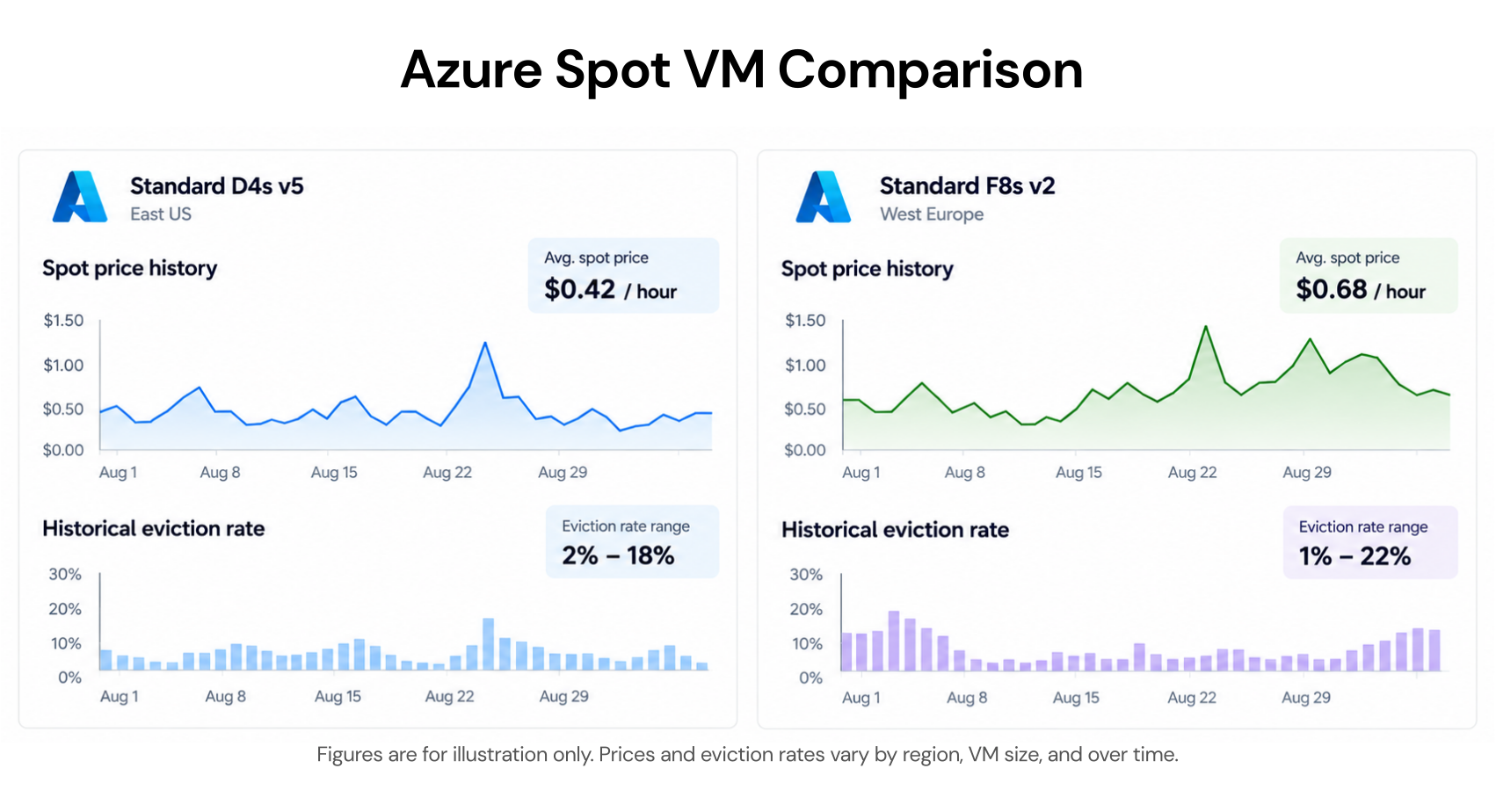
Azure Spot VMs are one of the most cost-effective options in Azure when they are used for the right workloads. The discount — up to 90% versus pay-as-you-go — is real and significant. The trade-off is equally real: Azure can reclaim a Spot VM at any moment, with a minimum of 30 seconds notice. For many workloads, that trade-off is worth making. For others, it is not.
This guide covers how Azure Spot VM pricing works, the two eviction triggers and why the distinction matters for your max price setting, the two eviction policies and what each costs in practice, how the 30-second eviction notice is delivered and what your application can realistically accomplish in that window, and the architectural patterns that make Spot VMs reliable rather than risky.
How Azure Spot VM Pricing Works
Pricing for Azure Spot Virtual Machines is variable, based on region and SKU. Source: learn.microsoft.com/azure/virtual-machines/spot-vms DIRECT QUOTE. Unlike AWS Spot, which has historically used a market-bidding model, Azure Spot pricing is set by Azure based on current supply and demand for unused capacity in each region. You can see current Spot prices in the Azure portal when creating a VM, or query them programmatically via the Azure retail prices API or Azure Resource Graph.
The discount ranges from modest to very deep depending on how saturated the region and VM family are at any given moment. Well-provisioned regions with high standard VM inventory tend to have deeper Spot discounts because unused capacity is more available. Niche or smaller regions may have shallower discounts or limited Spot availability for specific VM sizes.
How to view pricing and eviction rates
When creating an Azure Spot VM in the portal and selecting the Spot option, a link appears titled View pricing history and compare prices in nearby regions. This shows a table or graph of Spot pricing history for the selected VM size, along with historical eviction rates. Source: learn.microsoft.com/azure/virtual-machines/spot-vms DIRECT QUOTE.
Eviction rates are quoted per hour. An eviction rate of 10% means a VM of that size in that region has a 10% chance of being evicted within the next hour, based on historical eviction data from the last 7 days. Source: same DIRECT QUOTE. This is a risk probability per VM per hour — a fleet of 10 VMs at 10% hourly eviction rate should expect roughly one eviction per hour on average. This framing matters for fleet design: designing for the individual VM’s probability versus the fleet’s expected eviction frequency are different calculations.
You can also access pricing history from the last 90 days and eviction rates from the last 28 trailing days programmatically through Azure Resource Graph, allowing you to compare across regions and VM sizes to find SKUs with better cost-to-stability ratios. Source: same DIRECT QUOTE.
The AWS comparison: 30 seconds versus 2 minutes
Azure Spot VM eviction notice is 30 seconds. AWS Spot Instance interruption notice is 2 minutes. This is not a minor difference — it is a 4x difference in the time available for graceful shutdown, state saving, connection draining, and workload handoff. Applications designed for AWS Spot that rely on the 2-minute window may not function correctly when migrated to Azure Spot VMs. If you are running multi-cloud architectures with Spot VMs on both Azure and AWS, your interruption handling logic needs to account for the shorter Azure window explicitly.
The FinOps Foundation’s cloud cost management framework notes that interruption handling design is a prerequisite for Spot cost optimization, not an afterthought. For Azure Spot specifically, the 30-second window forces tighter interruption handling than most AWS Spot architectures require.

The Two Eviction Triggers: Capacity vs Price
Azure Spot VMs can be evicted for two distinct reasons, and understanding the difference is directly relevant to how you set the max price parameter.
Trigger 1: Capacity
Azure needs the underlying compute capacity for other workloads — specifically, for pay-as-you-go workloads that have a higher priority than Spot. When Azure detects insufficient capacity in a region for standard VM demand, it reclaims Spot VM capacity. This eviction happens regardless of current Spot pricing and regardless of your max price setting.
Capacity-based evictions are the most common cause of Spot VM loss in heavily used regions. They cannot be avoided by pricing strategy — even a VM with max price set to -1 (never evict on price) will be evicted if Azure needs the capacity back. The only mitigation is architectural: design workloads to handle interruption gracefully, and consider using multiple regions or VM families to reduce correlated eviction risk.
Trigger 2: Price
If the current Spot price in the region rises above the maximum price you have configured for the VM, Azure evicts it. After eviction for price reasons, the VM does not automatically restart when the price drops back below your max. You would need to redeploy the VM manually or via automation. Source: learn.microsoft.com/en-us/answers/questions/799841 DIRECT.
Setting max price to -1 disables price-based eviction entirely. With max price set to -1, the VM will not be evicted based on price. The price for the VM will be the current Spot price or the standard VM price, whichever is less, as long as there is capacity and quota available.
The practical rule: always set max price to -1 unless you have a specific budget ceiling per VM per hour that you cannot exceed under any circumstances. Price-based evictions are more disruptive than capacity-based ones because they can happen repeatedly as Spot prices fluctuate, while capacity-based evictions tend to be more spread out in time. Setting max price to -1 means your only remaining eviction risk is capacity, which is the unavoidable nature of Spot VMs.
Eviction Policies: Deallocate vs Delete
When a Spot VM is evicted, one of two things happens depending on the eviction policy you configured.
Deallocate policy (default)
The Deallocate policy moves the VM to the stopped-deallocated state, allowing you to redeploy it later. However, there is no guarantee that the allocation will succeed when you attempt to redeploy. Source: learn.microsoft.com/azure/virtual-machines/spot-vms DIRECT QUOTE.
The cost implication of Deallocate: the VM’s underlying managed disks continue to be billed at standard managed disk rates while the VM is in stopped-deallocated state. For a fleet of frequently evicted Spot VMs, this can accumulate meaningful disk storage charges over time. A 128 GB Premium SSD managed disk costs approximately $17.60/month in US East (verify at azure.microsoft.com/pricing/details/managed-disks/) regardless of whether the VM is running or deallocated.
Deallocate is the right policy when the VM’s disk state matters — when you have data, configuration, or installed software on the OS disk that you want to preserve across evictions and redeploy quickly when capacity becomes available again.
Delete policy
The Delete policy deletes the VM and its underlying disks when evicted, so you do not continue to be charged for the storage. Source: learn.microsoft.com/azure/virtual-machines/spot-vms DIRECT QUOTE.
Delete is the right policy when the VM is fully stateless — when everything needed to run the workload is provisioned at startup from external sources (configuration management, container registry, object storage), and there is no disk state worth preserving. For batch processing nodes, CI/CD workers, and stateless compute clusters, Delete policy eliminates the ongoing disk cost after eviction and forces the clean provisioning model that stateless workloads should use anyway.
The operational consideration with Delete policy: your deployment automation must be able to create new VM instances from scratch when replacements are needed after eviction. A fleet running Delete policy that relies on manual redeployment will shrink over time as evictions occur. Scale sets with Spot VMs handle this automatically — they maintain a target instance count and replace evicted VMs automatically.
Also read: Azure Reservations: the complete guide to commitment mechanics, scope, and exchange policy
The 30-Second Eviction Notice: What It Is and What It Is Not
The 30-second eviction notice is delivered through Azure Scheduled Events, which is a metadata service that VMs can query to receive advance warning of upcoming maintenance or evictions. When a Spot eviction is scheduled, Azure sends a Preempt event via Scheduled Events with a minimum of 30 seconds before the actual eviction.
How the query works — and why external monitors cannot receive it
To receive eviction notifications, an application running on the Spot VM must query the Scheduled Events endpoint at the static, non-routable IP address 169.254.169.254. Queries can be made up to every second. Source: same DIRECT QUOTE.
A critical architectural constraint: the query can only come from an application that runs on the Spot VM itself. The query cannot come from an external source. Source: same DIRECT QUOTE. This means you cannot build an external monitoring service that watches for Spot evictions and takes action on your behalf — the eviction detection logic must be embedded in the workload running on the VM. For workloads using containers or orchestrators, this typically means a sidecar or init container that continuously polls the endpoint and triggers graceful shutdown or checkpointing when the Preempt signal arrives.
The immediate eviction scenario
It is possible for Azure to evict a Spot VM as soon as it is created and before your workload runs. In some cases, there might be enough capacity to create a Spot VM, but it will not last. Spot VMs have no availability guarantees or SLAs after creation. Your orchestration needs to account for immediate evictions. The Preempt signal provides a minimum of 30-seconds advance notice of the eviction — but only when the notice can be sent. Orchestration for immediate evictions cannot depend on the Scheduled Events Preempt signal. Source: same DIRECT QUOTE.
This means your workload cannot assume the 30-second notice will always be available. The correct architecture treats the 30-second notice as an optimization (enabling graceful shutdown when possible) rather than a guarantee. The base design must handle hard termination without any notice.
What you can actually accomplish in 30 seconds
The VM shutdown process should be less than 30 seconds and allow your VM to shut down before an eviction. The amount of time the shutdown should take depends on how frequently your workload queries the Scheduled Events endpoint. The more often you query the endpoint, the longer the shutdown process can take. Source: same DIRECT QUOTE. If you query every second and the Preempt event arrives, you have up to 29 seconds to respond. If you query every 10 seconds, you may have as few as 20 seconds.
In 30 seconds, a well-designed application can: write a checkpoint to external storage (Azure Blob, Azure Files, a database), drain in-flight requests and return an error for new incoming connections, flush logs and metrics to a centralized store, and signal an orchestrator or job queue that the current work item should be retried. What 30 seconds cannot accommodate: completing a long-running computation, transferring large amounts of data to external storage, or running complex cleanup sequences with multiple external dependencies.
Regularly creating and saving checkpoints throughout workload execution — not just at eviction — is the correct pattern for Spot workloads. If a checkpoint is written every few minutes, the maximum lost work on eviction is bounded by the checkpoint interval, not by the 30-second window.
Simulating Eviction for Testing
Azure provides an API for simulating Spot VM eviction, allowing you to test how your application responds before relying on Spot VMs in production. The simulation endpoint is a POST request to the VM’s management API with the simulateEviction action. The response code 204 indicates the simulated eviction was successful. Source: learn.microsoft.com/azure/virtual-machines/spot-portal DIRECT QUOTE.
Simulating evictions during development is strongly recommended before deploying Spot VM workloads at scale. It verifies that your Scheduled Events polling logic is working, that checkpointing completes within the window, and that orchestration correctly replaces evicted VMs. Do not wait for a production eviction to discover that your graceful shutdown handler was not functioning.

Scale Sets with Spot VMs: The Production Pattern
Running individual Spot VMs in production is rarely the right architecture. Virtual Machine Scale Sets with Spot VMs provide the automation that makes Spot viable for production-grade workloads: automatic replacement of evicted instances, configurable target instance counts, and the Spot Restore feature.
Spot Restore is a scale set feature that uses AI to automatically try to restore evicted Azure Spot Virtual Machine instances inside a scale set to maintain the target instance count. Attempts to restore Azure Spot VMs evicted due to capacity are designed to run for a longer duration with a lower probability of a capacity-triggered eviction.
Spot Priority Mix is a scale set configuration that allows you to specify a blend of on-demand and Spot VMs within a single scale set. For example, you can configure a scale set to maintain a minimum of 3 on-demand instances at all times (baseline reliability) with additional Spot instances added when available (cost optimization). This eliminates the need for separate on-demand and Spot node pools while providing resilience against Spot capacity loss.
For AKS clusters using Spot VMs, the same principle applies — Spot node pools in AKS are backed by scale sets, and the Cluster Autoscaler handles replacement of evicted nodes. The key design constraint remains the 30-second eviction window: pods running on Spot nodes must be designed to handle rapid termination and rescheduling.
Workload Fit: What Works Well and What Does Not
The workload fit question is not complicated in principle but is frequently misjudged in practice. The key criterion is: can the workload be interrupted at any point and resumed, retried, or abandoned without data loss or service impact?
Strong Spot candidates
Batch processing and ETL pipelines are the canonical Spot use case. A pipeline that reads data from an input queue, processes it, and writes results to output storage can handle an eviction by simply not acknowledging the queue message — the message returns to the queue and gets processed by a replacement VM. This is the standard pattern for Azure Batch, which natively supports Spot VMs (called Low-Priority VMs in the Azure Batch context, with a separate retirement in Azure ML Low-Priority VMs by March 2026 — Spot VMs are the recommended replacement).
CI/CD build workers are naturally stateless. A build that is interrupted simply gets requeued and retried on a replacement instance. The cost of losing a 3-minute build to eviction is less than the cost savings from running the entire build fleet on Spot.
Machine learning training with checkpointing is an excellent Spot use case. Modern ML frameworks write model checkpoints periodically. A training run interrupted by eviction resumes from the last checkpoint on a replacement VM. The closer together the checkpoints, the less forward progress is lost per eviction.
Stateless web services with multiple replicas can tolerate a subset of instances being evicted, as long as the remaining on-demand instances can handle the traffic. The Spot instances add burst capacity at low cost; the on-demand instances provide the reliability floor.
Poor Spot candidates
Stateful databases and services with persistent local state that cannot be checkpointed quickly are unsuitable for Spot unless they use synchronous replication to external storage. A database that loses its local state on eviction and takes 10 minutes to restore from backup is not a Spot workload.
User-facing services with strict latency SLAs are generally not appropriate for Spot. Even with the 30-second notice and graceful shutdown, there is a window where in-flight user requests may be dropped. For services where dropped connections have material user impact, the reliability risk exceeds the cost benefit.
Any workload where the business impact of a failed job exceeds the Spot discount on the compute that runs it. Not all workloads have equal restart costs.
Spot VMs and Azure Savings Plans: The Commitment Gap
Azure Spot VMs cannot be covered by Azure Savings Plans or Azure Reserved VM Instances. Savings Plans and Reservations apply to pay-as-you-go and on-demand VM compute. Spot pricing is already discounted from on-demand, and the discount mechanism is separate from the Savings Plans and Reservations commitment system.
For workloads that run a mix of Spot (for burst and fault-tolerant jobs) and on-demand (for stable baseline workloads), the commitment strategy is to apply Savings Plans and Reservations to the on-demand baseline only — never to the Spot component. Sizing a Savings Plan that covers Spot usage would waste the commitment, since Spot usage already runs below on-demand rates and the Savings Plan discount would not apply to it.
This is where Usage.ai’s analysis adds value for mixed Azure VM environments: identifying which VM usage is stable on-demand (and therefore a candidate for commitment discounts) versus which is Spot (no commitment discount applicable) versus which is on-demand but fault-tolerant enough to be moved to Spot (a cost reduction opportunity). The three categories have different optimization paths, and treating them as a single category leads to either stranded commitments or missed Spot savings.
$91M+ in savings delivered to 300+ customers across AWS, Azure, and GCP. Fee is a percentage of realized savings only. No savings, no fee. 30-minute setup, billing-layer access only.
Frequently Asked Questions
1. How much do Azure Spot VMs cost?
Azure Spot VMs are priced variably based on region, VM size, and operating system, at up to 90% discount compared to pay-as-you-go pricing. Source: learn.microsoft.com/azure/virtual-machines/spot-vms DIRECT. Actual Spot prices fluctuate based on demand and capacity. View current pricing and historical eviction rates in the Azure portal when creating a Spot VM, or query programmatically via the Azure retail prices API or Azure Resource Graph for the last 90 days of pricing history.
2. How much advance notice does Azure give before evicting a Spot VM?
A minimum of 30 seconds notice is provided via Azure Scheduled Events before eviction. Source: learn.microsoft.com/azure/virtual-machines/spot-vms DIRECT QUOTE. This notice is delivered as a Preempt signal to the VM itself — it must be detected by an application running on the VM querying the endpoint at 169.254.169.254. External monitors cannot receive this signal. Additionally, immediate eviction is possible (before the notice) in some capacity situations, so workloads must be designed to handle hard termination without warning.
3. What is the difference between Deallocate and Delete eviction policy?
Deallocate (default): the VM moves to stopped-deallocated state when evicted. Underlying managed disks continue billing at standard disk rates. The VM can be redeployed when capacity is available, though reallocation is not guaranteed. Delete: the VM and its underlying disks are deleted on eviction, stopping all storage charges. Use Deallocate when disk state needs to be preserved. Use Delete for fully stateless workloads where clean reprovisioning is preferable to preserving disk state. Source: learn.microsoft.com/azure/virtual-machines/spot-vms DIRECT.
4. What triggers Azure Spot VM eviction?
Two distinct triggers exist. First, capacity: Azure needs the underlying infrastructure back for pay-as-you-go workloads. This occurs regardless of pricing and cannot be avoided by any max price setting. Second, price: the current Spot price exceeds the maximum price you configured. Setting max price to -1 disables price-based eviction. The VM is then only evicted for capacity reasons. After price-based eviction, the VM does not restart automatically when the price drops. Source: learn.microsoft.com/azure/virtual-machines/spot-vms DIRECT.
5. Can I use Azure Savings Plans or Reserved Instances with Spot VMs?
No. Azure Savings Plans and Reserved VM Instances apply to pay-as-you-go and on-demand VM compute. Spot VMs use a separate variable pricing mechanism and cannot be covered by commitment discounts. Size your Savings Plans and Reservations against the stable on-demand portion of your VM fleet only, not the Spot component.