New See exactly what you're overpaying AWS in under 60 seconds. Try the Calculator for free →

Cloud Rightsizing: Cut Cloud Waste 30-50% Without Guessing

Updated June 3, 2026
18 min read
Cloud Rightsizing: Cut Cloud Waste 30-50% Without Guessing
On this page

Most cloud bills are inflated by 20-40% before a single optimization decision is made. The reason is simple: teams provision based on peak estimates, not actual workload behavior. Cloud rightsizing is the structured process of closing that gap, matching resources to demand, cloud by cloud, service by service.

This guide covers what rightsizing is, how it works across AWS, Azure, and GCP, which tools give the most accurate recommendations, what rightsizing cannot fix, and how commitment optimization picks up where rightsizing leaves off.

What Is Cloud Rightsizing?

Cloud rightsizing is the process of analyzing compute, database, and storage resource utilization over time and adjusting the instance type, size, or service tier to match actual workload demand. The goal is to eliminate idle capacity, or resources you are paying for but not using without reducing application performance or reliability.

Rightsizing is not a one-time event. Workloads change. Traffic patterns shift. A batch job that required an r5.8xlarge six months ago may run comfortably on an r5.4xlarge today. The correct cadence for reviewing rightsizing recommendations is monthly at minimum, and weekly for high-spend workloads.

Three actions fall under rightsizing:

  • Downsizing: Moving an over-provisioned instance to a smaller size or family. Example: dropping from an m5.2xlarge to an m5.xlarge when average CPU utilization is below 15%.
  • Upsizing: Moving an under-provisioned instance to a larger size to prevent performance degradation or instance-level throttling. This is less common but important, an undersized RDS instance causes query latency spikes that cost more in engineering time than the instance cost. See How to Save on RDS Reserved Instances.
  • Termination: Identifying and removing idle resources entirely. Idle EC2 instances, unattached EBS volumes, stopped VMs – these generate charges with zero utilization.

Why Over-Provisioning Is the Default Starting Point

When organizations migrate to the cloud or launch new workloads, the default instinct is to overshoot capacity. The cost of being wrong in the upward direction (performance degradation, outages) is visible and immediate. The cost of being wrong in the downward direction (wasted spend) is invisible and gradual.

The result is most workloads are provisioned for peak load but run at average load most of the time. AWS internal data, cited in multiple published FinOps Foundation reports, consistently shows average EC2 CPU utilization across enterprise accounts running below 20%. For memory-intensive workloads, the pattern is similar.

This is not a failure of judgment. It is a rational response to uncertainty at launch time. Rightsizing is the mechanism for correcting that initial overprovisioning once actual workload data is available.

Enterprise EC2 CPU utilization distribution showing majority of instances below 20% average utilization.

How Cloud Rightsizing Works: The Core Process

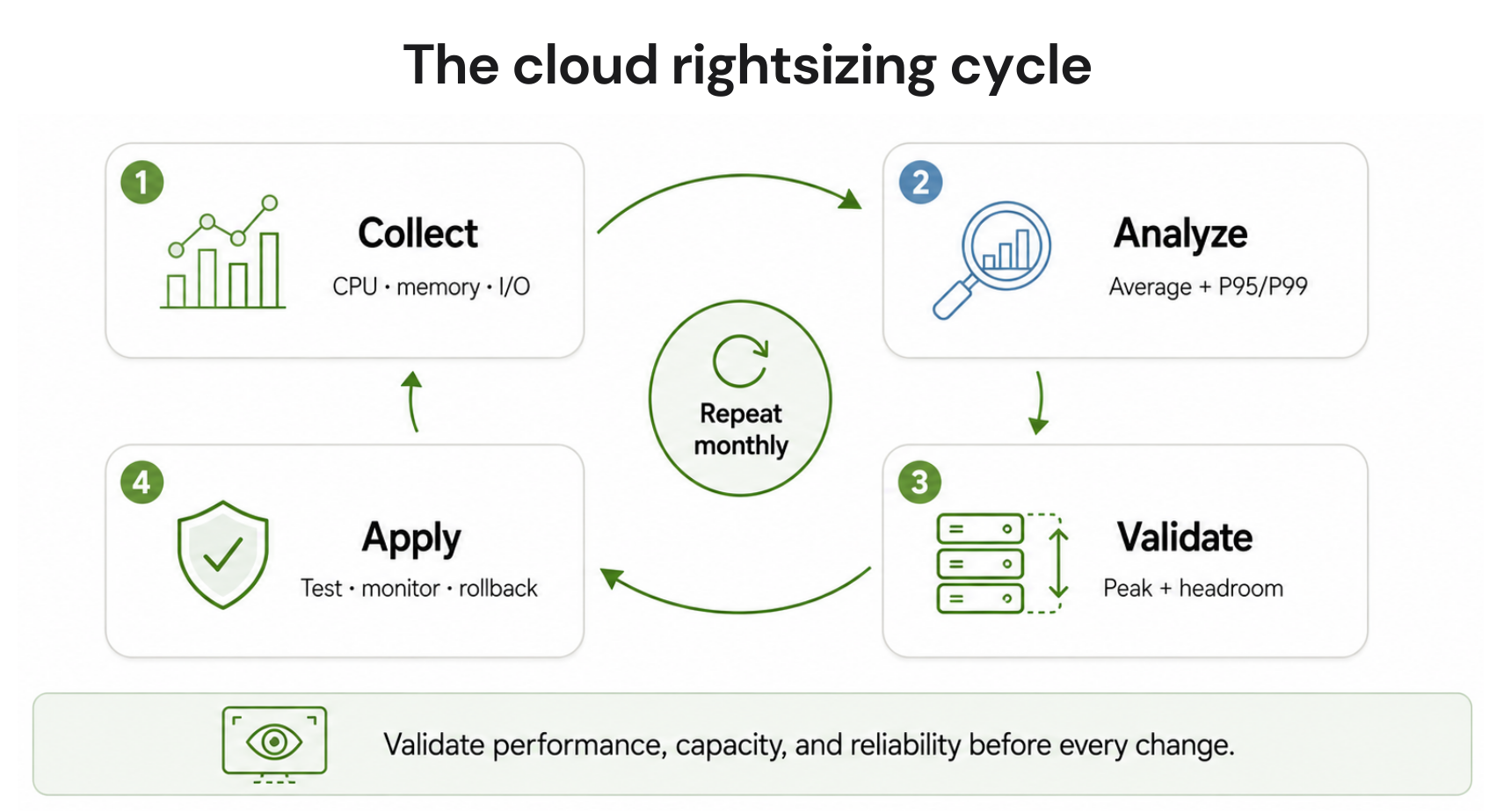
Rightsizing follows a four-step cycle regardless of cloud provider.

Step 1: Collect utilization telemetry.

Pull CPU, memory, network I/O, and disk I/O metrics over a meaningful observation window. Two weeks is the minimum for workloads with weekly seasonality. Thirty days is standard. Ninety days captures monthly billing cycles and is recommended for database instances before any resizing decision.

Step 2: Identify waste patterns.

Flag instances where average CPU utilization is consistently below a threshold (commonly 40%), where peak CPU utilization never approaches the instance’s capacity ceiling, and where memory utilization is similarly low. For databases, flag instances where read/write IOPS are a fraction of the provisioned tier’s capacity.

Step 3: Generate and validate recommendations.

Match under-utilized instances to smaller sizes or families that cover the observed peak plus a defined headroom buffer (typically 20-30%). Validate that the candidate instance type supports the same network bandwidth, storage throughput, and availability zone coverage as the current instance.

Step 4: Test and apply changes.

Test in a non-production environment first. Apply changes in a maintenance window. Monitor for performance regressions for 72 hours minimum after resizing.

This cycle repeats. Rightsizing is not completed, it is maintained.

Cloud Rightsizing by Provider: Tools and Mechanics

AWS Rightsizing: Compute Optimizer and Cost Explorer

AWS provides two primary rightsizing tools.

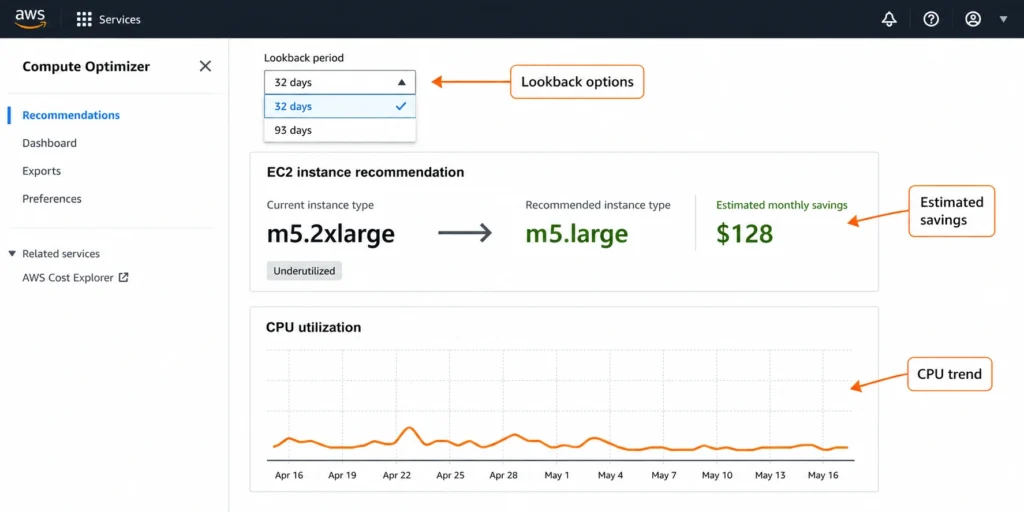
AWS Compute Optimizer analyzes EC2, Auto Scaling Groups, EBS volumes, Lambda functions, ECS services on Fargate, and RDS instances. It uses 14 days of CloudWatch metrics by default, extendable to 93 days with the enhanced metrics feature. Recommendations are categorized as “Over-provisioned,” “Under-provisioned,” or “Optimized.”

Compute Optimizer’s accuracy improves when you enable enhanced infrastructure metrics, which pulls memory utilization data (CloudWatch agent required, as memory is not collected by default). Without memory data, recommendations for memory-optimized instances (r5, x1e families) are based on CPU alone – a meaningful blind spot for in-memory databases and caching workloads.

Compute Optimizer recommendations refresh every 72 hours (verify at Amazon docs – service behavior may change).

AWS Cost Explorer Rightsizing Recommendations focuses specifically on EC2 instances and provides a simpler interface with estimated monthly savings per recommendation. It uses 14 days of metrics and does not support the extended 93-day window. It is useful for a quick fleet scan but less granular than Compute Optimizer for complex workloads.

Key AWS rightsizing metric thresholds to understand:

Metric AWS Compute Optimizer Threshold (verify at docs) Interpretation
CPU utilization Below 40% average over 14 days Candidate for downsizing
Memory utilization Below 40% (requires CloudWatch agent) Candidate for downsizing
Network I/O Below 50% of instance bandwidth Check if network is the binding constraint
EBS throughput Below 50% of provisioned IOPS Candidate for storage tier reduction

GCP Rightsizing: Recommender API and Active Assist

Google Cloud’s rightsizing capability is delivered through the Cloud Recommender API, which is the backend for Active Assist recommendations in the console.

For Compute Engine VMs, the Recommender analyzes CPU and memory utilization over 8 days. Recommendations appear in the console under “VM rightsizing recommendations” and can also be accessed programmatically via the Recommender API for large-scale automation.

A critical GCP-specific consideration: Compute Engine charges for memory independently from vCPUs on custom machine types, which makes rightsizing more granular than on AWS. You can reduce vCPU count independently of memory or reduce memory independently of vCPU count – without being forced into a predefined instance size that overshoots on one dimension.

GCP also provides rightsizing recommendations for GKE clusters through the cluster autoscaler and GKE usage metering. For GKE Autopilot specifically, rightsizing is handled at the pod level through vertical pod autoscaling.

Verify current GCP Recommender behavior at cloud.google.com/recommender/docs.

Azure Rightsizing: Azure Advisor

Azure Advisor provides rightsizing recommendations under the “Cost” category. It analyzes virtual machine CPU utilization over a 7-day period and flags VMs where average CPU utilization is below 5% or network utilization is below 2% (verify at docs.microsoft.com/azure/advisor – thresholds are configurable by subscription owners).

Azure Advisor also integrates with Azure Monitor for more granular workload analysis and supports recommendations for Azure SQL Database, App Service plans, and Azure Kubernetes Service node pools.

Azure-specific rightsizing consideration: Azure Reserved VM Instances are size-flexible within the same instance series (e.g., you can purchase a D-series reservation and apply it to any D-series size). This means rightsizing to a different D-series size does not require modifying or canceling an existing reservation – a meaningful operational advantage compared to AWS Reserved Instances, which require modification or marketplace sale when changing instance types.

Rightsizing Decision Tree: Where to Start

Use this framework to prioritize which resources to rightsize first and which tools to use.

START: Is the resource currently generating cloud charges?|

+– NO –> Terminate it (stop paying for idle resources)

|

+– YES

|

+– Is average CPU utilization > 70%?

|   |

|   +– YES –> Do NOT downsize. Check if the instance is undersized.

|   +– NO  –> Continue below.

|

+– Is average CPU utilization < 40% over 30 days?

|

+– YES

|   |

|   +– Is it a stateful service (database, cache)?

|       |

|       +– YES –> Check memory AND IOPS utilization before resizing.

|       |           Use 30-90 day observation window.

|       |           Test in staging first. Apply during maintenance window.

|       |

|       +– NO  –> Check if memory utilization is also < 40%.

|                   If yes on both: downsize one size increment.

|                   If memory is high: consider compute-optimized family.

|

+– NO (40-70% range) –> Optimized. Review again in 30 days.

For databases specifically: never rightsize based on CPU alone. Memory, IOPS, and connection count all constrain database performance independently. An RDS db.r5.4xlarge running at 20% CPU may be correctly sized because its workload requires 100GB+ of memory for buffer pool capacity.

Once you know which resources to rightsize, find out how much you can save on what remains: Run the free Usage.ai savings calculator and get a cloud-specific savings estimate in under 2 minutes.

What Tools Do Enterprises Actually Use for Rightsizing?

Native cloud tools are the starting point. Third-party platforms add automation, multi-cloud visibility, and in some cases automated execution.

Native Tools (built-in, no additional cost):

AWS Compute Optimizer, AWS Cost Explorer Rightsizing Recommendations, GCP Recommender API, GCP Active Assist, Azure Advisor.

  • Strengths: no additional cost, provider-native telemetry, direct integration with consoles and APIs.
  • Limitations: single-cloud scope, manual review and application required, recommendation refresh cycles measured in days (72 hours for AWS Compute Optimizer), no cross-account aggregation in basic tiers.

Third-Party FinOps Platforms:

Platforms like CloudHealth (VMware), Apptio Cloudability, Spot.io (NetApp), Densify, PerfectScale, and Cast AI provide multi-cloud rightsizing visibility, automated remediation workflows, and in some cases, ML-driven recommendation engines with tighter feedback loops than native tools. See 10 Best Cloud Cost Optimization Tools 2026.

Differentiated capabilities to evaluate:

Capability What to ask vendors
Recommendation refresh rate How often does the engine re-analyze utilization data?
Memory metric ingestion Is memory utilization factored in by default or requires agent setup?
Automated execution Does the platform apply changes automatically or flag for human approval?
Stateful resource support Does it handle RDS, ElastiCache, and database services, or only compute?
Multi-cloud aggregation Can you see EC2, GCP VMs, and Azure VMs in one dashboard?
Historical look-back window What is the maximum observation period for recommendations?

For Kubernetes-specific rightsizing, PerfectScale, Cast AI, and Akamas specialize in pod-level and node-pool-level recommendations. Generic cloud rightsizing tools often handle EC2 and VM instances well but have limited depth for Kubernetes workloads where horizontal pod autoscaling, vertical pod autoscaling, and cluster autoscaling interact in complex ways.

The Most Common Rightsizing Mistakes

Using too short an observation window. Two weeks of CPU data misses monthly batch jobs, end-of-month reporting workloads, and quarterly traffic spikes. Using 14-day data for a workload with monthly seasonality produces bad recommendations. Extend your window to 30-90 days for production workloads.

Rightsizing based on CPU alone. Memory-optimized workloads (in-memory databases, JVM-based applications with large heaps, ML inference servers) require sufficient memory to function correctly – and memory utilization is not collected by default in AWS CloudWatch. If you did not install the CloudWatch agent, your memory metrics are missing, and your recommendations are incomplete.

Applying changes to production without staging validation. An instance downsize that causes a JVM to swap to disk, or an RDS resize that reduces buffer pool capacity below the working set size, can cause cascading latency problems that are hard to diagnose quickly. Always validate in staging first.

Treating rightsizing as a project rather than a process. Cloud bills grow as organizations scale. Workloads change. A team that rightsizes once and moves on will see waste rebuild within two to three months. The correct framing is ongoing governance, not a one-time cleanup.

Ignoring cross-region instances. Resources in secondary or test regions often accumulate without active monitoring. Scan all regions, not just the primary production region.

Conflating rightsizing with cost optimization. Rightsizing eliminates idle capacity, but it does not reduce the price of the resources you are correctly using. Commitment purchasing (Savings Plans, Reserved Instances, GCP Committed Use Discounts) addresses the unit price of correctly-sized resources. Both levers are needed for full optimization.

Rightsizing vs. Commitment Optimization: Two Different Problems

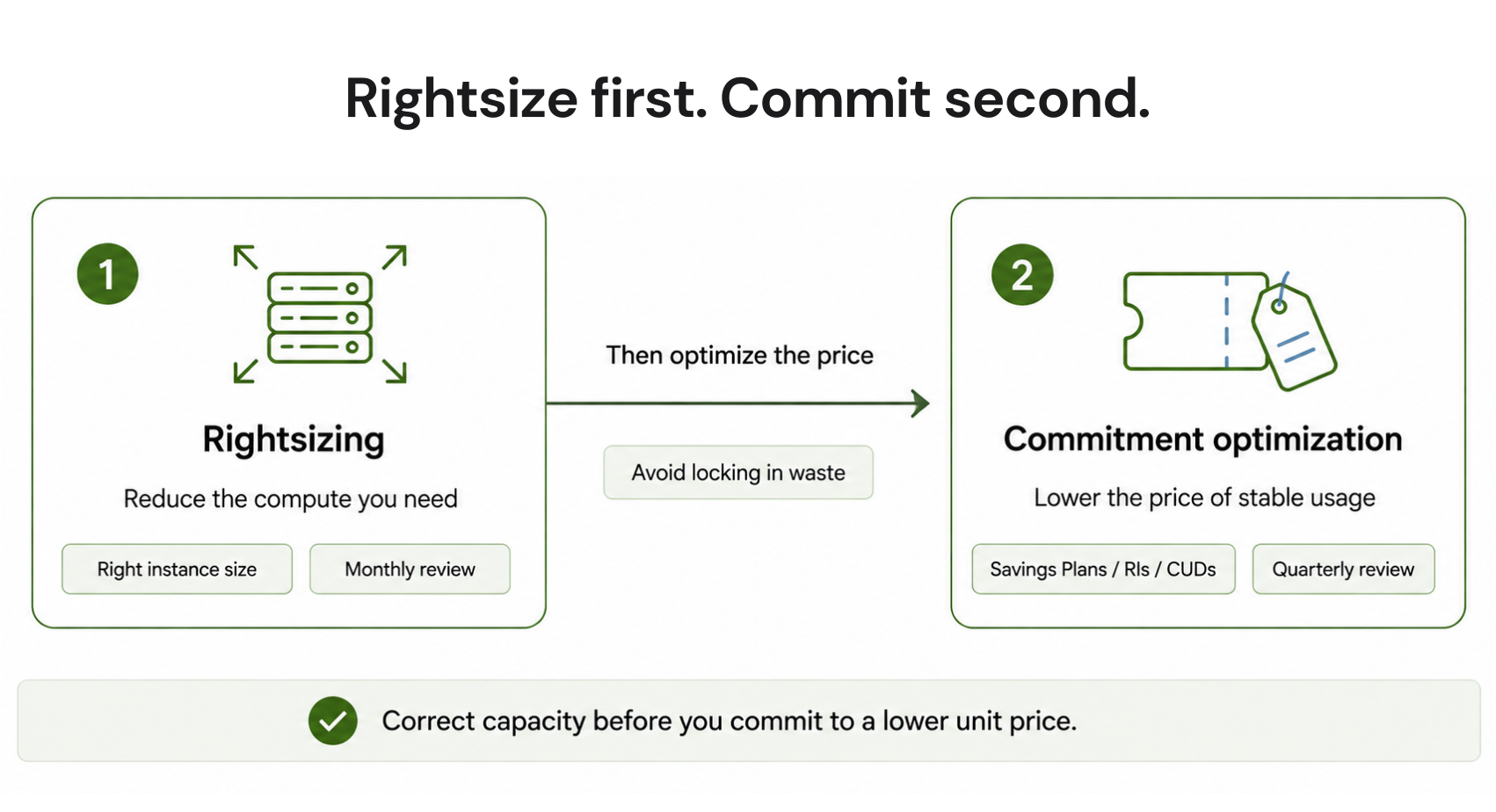
This is the most important distinction in cloud cost optimization, and it is consistently misunderstood.

  • Rightsizing answers: “Are we using the right amount of compute?”
  • Commitment optimization answers: “Are we paying the right price for the compute we are using?”

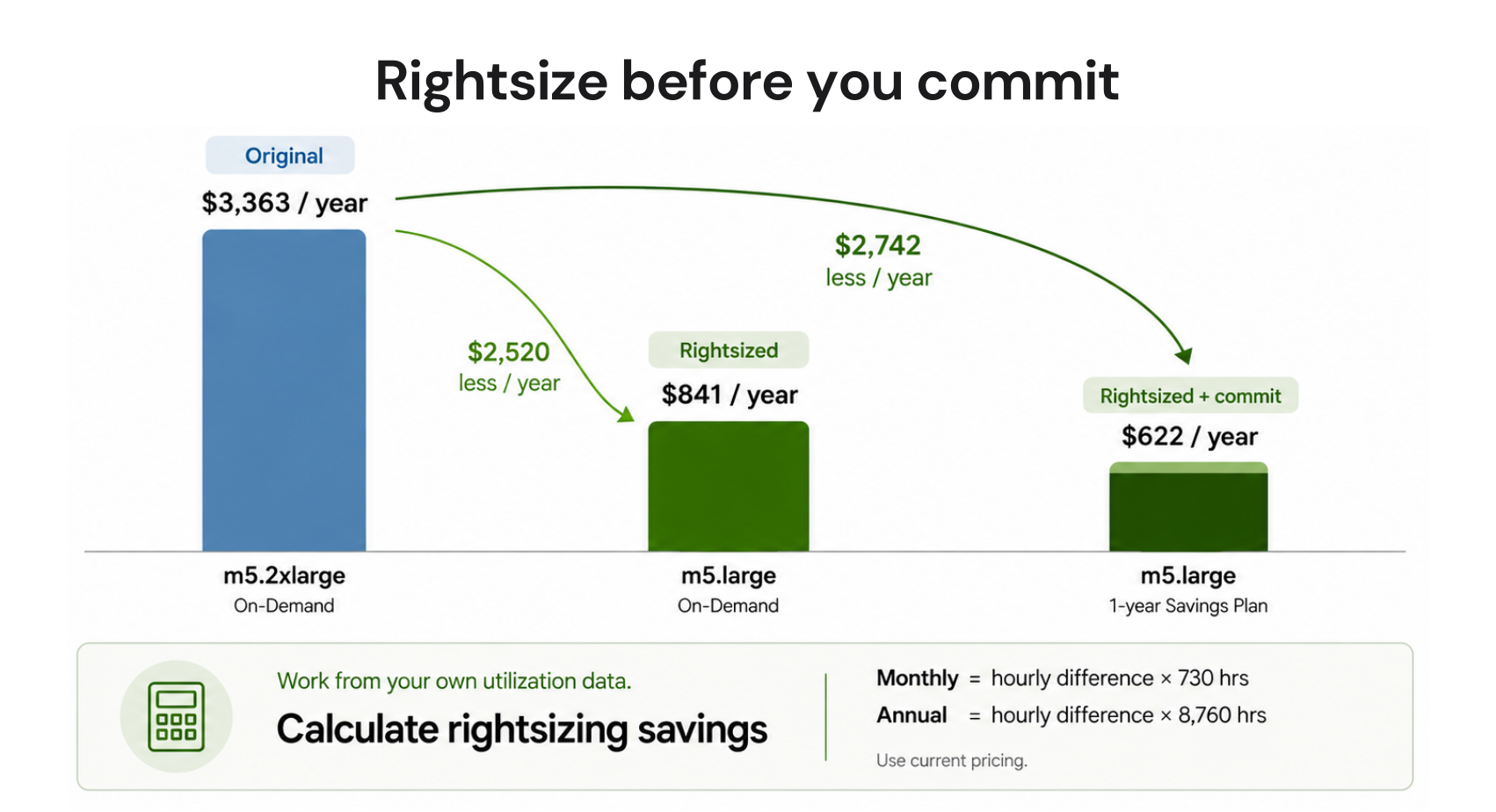
They are sequential, not interchangeable. You should rightsize first and commit second. Buying a Savings Plan or Reserved Instance on an over-provisioned instance locks in a discount on a resource you should not be paying for in the first place.

Dimension Rightsizing Commitment Optimization
What it reduces Instance size / resource tier Unit price (hourly rate)
Typical savings 10-30% of affected spend 20-60% of committed spend
Tools used Compute Optimizer, Advisor, Recommender Savings Plans, RIs, GCP CUDs
Who does it FinOps / DevOps teams FinOps / Finance teams
Risk Performance regression if done incorrectly Underutilization if workload shrinks
How often Monthly review cycle Quarterly or automated continuous

Both deliver real savings. Neither replaces the other. A complete FinOps program runs both in sequence.

Diagram showing rightsizing and commitment optimization as sequential cost reduction steps in a FinOps workflow.

What Happens After Rightsizing: Automating Commitment Purchasing

Once a workload is correctly sized, the next optimization layer is securing discounts on the baseline compute it runs at consistently.

For AWS, this means Savings Plans (EC2, Fargate, Lambda) and Reserved Instances (RDS, ElastiCache, Redshift, OpenSearch, DynamoDB). For GCP, it means Committed Use Discounts on Compute Engine, GKE, and Cloud SQL. For Azure, it means Reserved VM Instances and Azure Hybrid Benefit.

The challenge with commitment purchasing is not the discount itself – the discounts are published and well-understood. The challenge is committing the right amount at the right time without over-committing, which creates stranded spend on commitments you cannot fully utilize.

AWS native commitment tools refresh recommendations every 72 hours. For teams managing large, dynamic fleets, that lag means spend decisions are based on data that is three days old. At $6,000-$12,000 per day in potential covered spend, a 72-hour lag in identifying commitment opportunities compounds to $18,000-$36,000 per refresh cycle in uncaptured savings (verify at aws.amazon.com/pricing – actual figures depend on workload size).

This is where platforms that automate commitment purchasing with faster recommendation cycles and underutilization protection add measurable value – particularly for teams that have rightsized their fleets and are now managing commitment coverage at scale.

Usage.ai automates Savings Plan and Reserved Instance purchasing for AWS (EC2, RDS, ElastiCache, OpenSearch, Redshift, DynamoDB), Azure, and GCP Committed Use Discounts. The platform refreshes recommendations every 24 hours. Every commitment purchased through the platform comes with a buyback guarantee: if a commitment goes underutilized, Usage.ai buys it back and returns the value as cashback (real money, not credits). Setup is billing-layer only, no infrastructure changes, and takes approximately 30 minutes.

Usage.ai Insured Flex Commitments carry no multi-year lock-in. Commitments adjust quarterly. Scale down? No penalty. Underutilized? Cashback paid in real money, not credits.

Rightsizing Metrics Reference: What to Measure and When to Act

Use this table as a working reference for setting rightsizing thresholds across resource types. All thresholds listed here are common industry practice, verify with your own workload performance data before applying.

Resource Type Metric “Consider Downsizing” Signal Observation Window Notes
EC2 / Compute VM CPU utilization Average < 40%, peak < 70% 30 days Requires memory agent for complete picture
EC2 / Compute VM Memory utilization Average < 40% 30 days Not collected by default in CloudWatch
RDS / Cloud SQL CPU utilization Average < 30% 90 days Check memory and IOPS independently
RDS / Cloud SQL Memory utilization Buffer pool hit ratio > 99% at lower size 90 days Verify with slow query log
RDS / Cloud SQL IOPS consumed < 50% of provisioned tier IOPS 90 days Factor in peak transaction periods
EBS / Persistent Disk IOPS consumed < 40% of provisioned IOPS 30 days gp3 volumes allow IOPS/throughput tuning independent of size
Lambda / Cloud Functions Memory setting Execution memory < 60% of allocation 14 days AWS Lambda Compute Optimizer covers this
GKE / EKS Pod CPU request vs actual Request > 2x average actual 14 days Use VPA for automated adjustment
Idle resources Any utilization 0-2% over 7 days 7 days Terminate if no active owner

Multi-resource rightsizing recommendation dashboard showing EC2, RDS, and EBS optimization opportunities with projected savings per resource.

Cloud Rightsizing Savings: Here are Some Realistic Expectations

Published rightsizing savings estimates range widely. Here is a grounded view of what to expect based on workload type and maturity:

  • Greenfield or recently migrated environments: 25-40% waste reduction is achievable. Initial provisioning overestimates are typically highest in lift-and-shift migrations where on-premise sizing assumptions carry over to cloud instances without recalibration.
  • Established environments with infrequent optimization: 15-25% savings on the targeted resource pool. Waste accumulates over time as workloads change but instance sizes remain static.
  • Well-managed environments with regular FinOps reviews: 5-15% incremental improvement per rightsizing cycle. Most obvious waste has already been addressed; remaining opportunities are in long-tail resources and database tiers.
  • Kubernetes workloads: Highly variable. Container CPU and memory request accuracy is often poor, particularly in environments where developers set requests conservatively to avoid throttling. Pod-level rightsizing (via VPA or dedicated tools) commonly yields 20-40% reduction in node compute costs.

These are directional estimates. Your actual savings depend on the maturity of your current optimization state, the variability of your workloads, and how aggressively you apply recommendations. Do not use vendor-published “average savings” figures as a planning number without validating against your own utilization data.


You’re Overpaying AWS. See by How Much in 60 Seconds.Upload your AWS bill and get your exact overspend number for free. No account access, or commitment required.FIND MY SAVINGS


Frequently Asked Questions

1. What is cloud rightsizing and how does it work?

Cloud rightsizing is the process of analyzing actual resource utilization metrics (CPU, memory, IOPS, network) and adjusting instance types, sizes, or service tiers to match real workload demand. It works through a four-step cycle: collect utilization data over a meaningful time window (14-90 days), identify over-provisioned or idle resources, generate validated downsize or termination recommendations, and apply changes after staging validation. The process repeats monthly because workloads change continuously.


2. What is the difference between rightsizing and reserved instances?

Rightsizing reduces the amount of compute you are paying for by matching resources to actual usage. Reserved Instances (and Savings Plans / Committed Use Discounts) reduce the unit price of compute you are correctly using by exchanging flexibility for a discount. They solve different problems and should be applied sequentially: rightsize first to establish the correct baseline, then commit to get discounts on that baseline. Committing before rightsizing locks in a discount on waste.


3. How much can rightsizing save on a cloud bill?

Rightsizing savings depend on the current state of optimization. Recently migrated or unoptimized environments typically see 20-40% reduction in targeted resource costs. Well-managed environments with regular review cycles see 5-15% incremental improvement per cycle. Kubernetes workloads with inaccurate pod resource requests frequently yield 20-40% node cost reduction. Rightsizing addresses idle and over-provisioned capacity; it does not reduce the unit price of correctly-sized resources (that is the role of commitment purchasing).


4. What tools does AWS provide for rightsizing?

AWS provides two native rightsizing tools at no additional charge. AWS Compute Optimizer analyzes EC2, Auto Scaling Groups, EBS volumes, Lambda functions, ECS on Fargate, and RDS instances using up to 93 days of CloudWatch metrics. It requires the CloudWatch agent for memory utilization data. AWS Cost Explorer Rightsizing Recommendations analyzes EC2 instances using 14 days of metrics and provides a simplified cost-focused view. Both tools refresh recommendations every 72 hours. Verify current capabilities at docs.aws.amazon.com/compute-optimizer.


5. How often should you rightsize cloud resources?

Monthly is the standard minimum cadence for production workloads. High-spend workloads (EC2 fleets above $50K/month, large RDS clusters) benefit from weekly review cycles. The 30-day window captures most weekly seasonality patterns. Use 90-day windows for database instances before any resize decision. Rightsizing is not a one-time project – workloads change, teams add resources, and waste rebuilds if the process is not maintained as ongoing governance.


6. Does rightsizing require code changes or infrastructure modifications?

No. Instance type changes, storage tier adjustments, and resource terminations are billing and provisioning actions – they do not require application code changes. However, resizing a production database or changing an instance family may require a brief maintenance window (instance restart or multi-AZ failover). Kubernetes pod rightsizing via Vertical Pod Autoscaler can be done without application changes, though VPA with “Auto” mode may cause pod restarts during adjustment cycles.


7. What happens if I rightsize a database incorrectly?

Downsizing a database instance incorrectly can cause buffer pool thrashing (where the working data set no longer fits in memory), IOPS saturation (if the new tier has lower IOPS throughput), or connection limit exhaustion. These manifest as query latency spikes, timeout errors, and application performance degradation. Prevention: validate memory and IOPS requirements independently of CPU, use a 90-day observation window, test on a read replica or staging clone first, and apply changes during a maintenance window with a rollback plan ready.


8. What is the relationship between rightsizing and commitment purchasing?

Rightsizing and commitment purchasing are sequential cost optimization levers. Rightsizing corrects the amount of compute: it eliminates idle and over-provisioned resources. Commitment purchasing corrects the price of compute: it secures 20-60% discounts on the steady-state baseline that remains after rightsizing. A complete FinOps program applies both. Teams that skip rightsizing and go straight to commitments often find themselves locked into discounts on resources they are over-paying for at the instance level. Rightsize first. Then commit.

Cut cloud cost with automation
Latest from our blogs