AWS
AWS Microsoft Azure
 Google Cloud

The short answer
Infrastructure waste can often be identified and remediated quickly, but it recurs unless ownership, lifecycle controls, and recurring reviews prevent it.
Commitment waste is less visible and can grow as committed usage changes, so it requires ongoing monitoring as well as remediation.
What Is Cloud Waste?
The term covers two different conditions. Idle resources run with no meaningful workload at all; underutilized resources serve live traffic, but at a fraction of their provisioned capacity. The first are deleted, the second resized.
The pattern is the same either way:
- A virtual machine sits idle
- A storage volume goes unattached
- A Reserved Instance covers workloads that no longer exist
Cloud Waste vs Cloud Cost Optimization
For the full practice, see our Cloud Cost Optimization Guide.
The 5 Types of Cloud Waste
Waste accumulates because teams provision resources faster than they govern them. Each of the five types below has a distinct cause, and a distinct fix.
1. Idle Compute
Because cloud resources are billed continuously, even a small forgotten instance accumulates costs every hour it remains active.
Common examples:
- An EC2 instance left running after a sprint ends
- An Azure VM provisioned for load testing and never terminated
- A GCP Compute Engine node in a cluster no one actively monitors
- A GPU cluster left running between AI training runs
2. Overprovisioned Infrastructure
Common examples:
- EC2 instances and Azure Virtual Machines sized for peak traffic that rarely arrives
- GCP Compute Engine nodes and managed databases provisioned conservatively
- Kubernetes node pools carrying more capacity than their pods request
3. Orphaned Storage
Common examples:
- Unattached AWS EBS volumes that persist after EC2 instance termination
- GCP persistent disks left behind after instance deletion
- Azure managed disks detached during a migration and never cleaned up
- Object storage buckets retained after the application they served was deprecated
4. Idle Networking Infrastructure
Common examples:
- An AWS Application Load Balancer still billing hourly for a service decommissioned months ago
- An Azure NAT gateway created during a test environment setup and never removed
- A Google Cloud load balancer or Cloud NAT configuration retained after the workload it supported was retired
5. Underutilized Commitments
The ceiling varies by provider, service, and term: up to 72% on AWS Savings Plans, up to 65% on Azure savings plans, and up to 70% on three-year GCP resource-based CUDs for memory-optimized machine series.
When workloads change, those commitments can cover resources that no longer exist, turning a savings mechanism into a new form of waste:
- Workloads shrink, and committed capacity goes unused
- Workloads migrate an EC2 Reserved Instance covering a service that is later containerized and moved to Fargate may cover nothing for the rest of its term (how Savings Plans and Reserved Instances differ in coverage)
- Workloads change instance type, breaking resource-specific commitments
Low coverage means overpaying on-demand low utilization means paying for capacity nothing uses.
Why it persists: commitment purchases are made quarterly or annually and are rarely revisited at the same cadence as infrastructure changes. The more commitments an organization holds, the greater the exposure when usage shifts.
How to Identify Cloud Waste
- Utilization metrics: CPU, memory, and storage usage over a lookback window long enough to cover the workload’s normal operating cycle identifies resources that are significantly underused or idle.
- Resource lifecycle activity: infrastructure with no meaningful activity over a review period that captures the workload’s operating cycle, including inactive instances, unattached volumes, and forgotten development environments.
Validate ownership, scheduled use, disaster-recovery purpose, and production dependencies before removal. - Commitment coverage and utilization: how much infrastructure runs on discounted commitments versus on-demand, and whether purchased commitments are being consumed, sustained underutilization against a threshold that fits the commitment type and workload variability signals a stranded commitment.
How to Reduce Cloud Waste
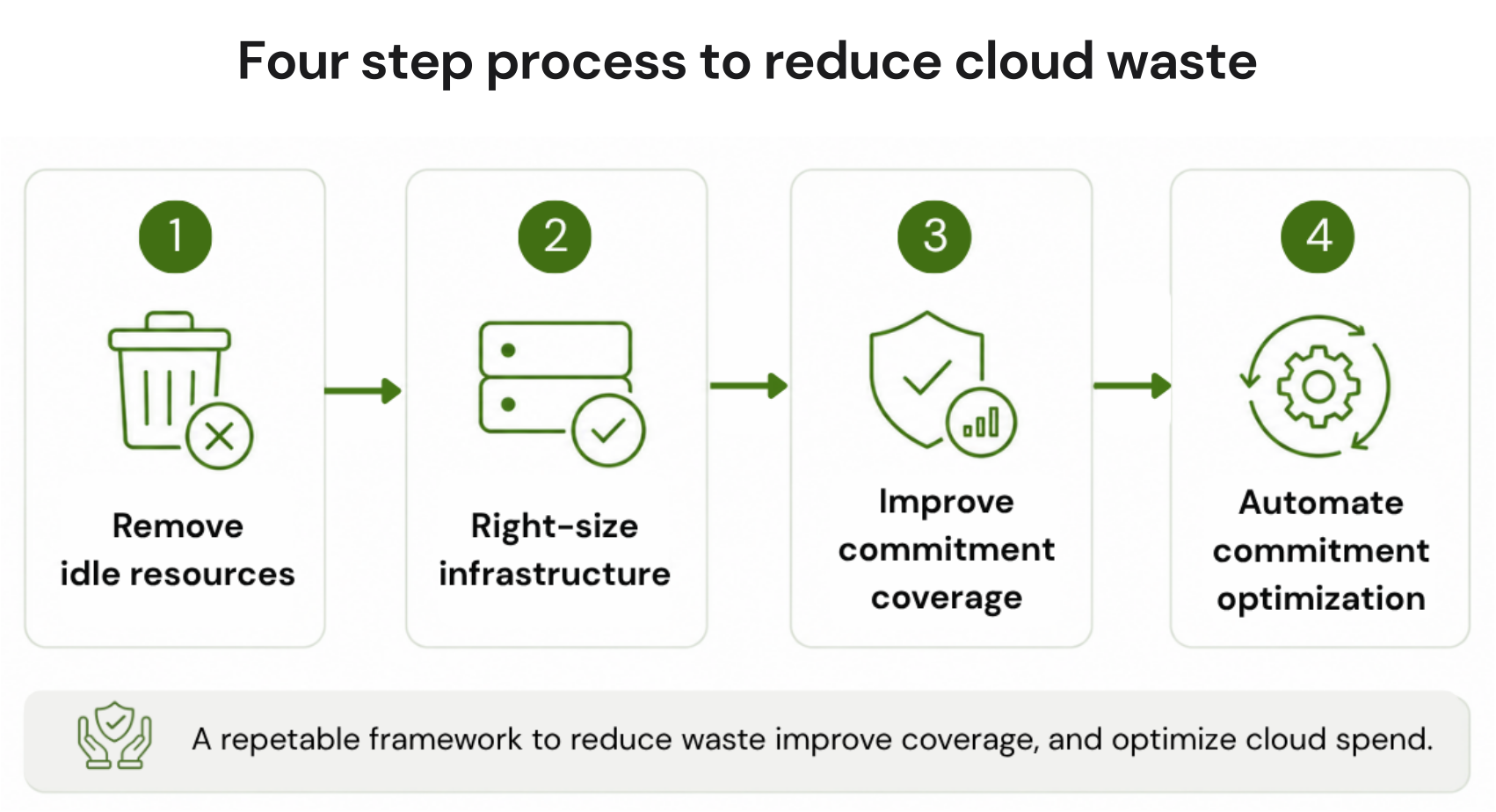
1. Remove Idle Resources
- Idle virtual machines
- Unattached storage volumes
- Abandoned development environments
- Orphaned snapshots
2. Right-Size Infrastructure
Analysis periods and controls differ by provider. AWS Compute Optimizer supports 14-, 32-, and 93-day lookback options, Azure Advisor supports seven- to 90-day lookback periods, and Google Cloud Compute Engine machine-type recommendations analyze the prior eight days.
Validate monthly peaks, seasonality, and performance requirements when the native analysis window does not capture the workload’s full operating cycle.
Rightsizing delivers immediate, recurring savings with no architectural change.
3. Improve Commitment Coverage
Start with the commitment type that best fits the provider, service, and stability of the eligible workload, then set coverage targets using baseline demand, workload variability, existing commitments, forecast confidence, and risk tolerance rather than one cross-cloud percentage.
Our cloud cost optimization best practices cover baseline modeling and coverage targets in depth.
4. Automate Commitment Optimization
How Usage.ai Fits
With Flex Insured Commitments, teams can get the 30–50% savings of a 1- or 3-year commitment with none of the commitment risk. That applies across covered workloads on AWS, Azure, and GCP, and after a customer approves a recommendation, we purchase and manage the commitment on their behalf.
If a commitment ever costs more than the equivalent on-demand usage, we calculate that loss at the end of the month and provide cashback protection for it. We charge a percentage of realized savings, so the fee only exists when the savings do.
Conclusion
For the broader discipline this fits into, read our Cloud Cost Optimization Guide.
Connect in 15 minutes. No contracts, no infrastructure changes. See your savings before committing.
Frequently asked questions
How is cloud waste different from cloud cost optimization?
Cloud waste refers specifically to spend on resources that provide no value idle instances, unused storage, underutilized commitments. Cloud cost optimization is the broader ongoing practice of improving how infrastructure is used and priced, of which waste elimination is the first step.
What is cloud waste management?
Cloud waste management is the ongoing practice of preventing waste from recurring after it has been removed: continuous detection of idle and underutilized resources, ownership and expiry tagging, storage lifecycle policies, and regular review of commitment coverage and utilization.
Does reducing cloud waste require infrastructure access?
Not always. Commitment-related waste can be identified at the billing layer alone, with read-only access to cost and usage reports; acting on it requires commitment-management permissions, though still no infrastructure access. Rightsizing and idle-resource removal do require coordination with engineering teams.
How long does it take to see results from waste reduction?
Idle-resource removal and rightsizing produce results within the first billing cycle, typically 30 days. Commitment optimization savings appear within 60 days of coverage changes.
How much cloud spending is wasted?
An estimated 29% of IaaS and PaaS spend is wasted, according to the Flexera 2026 State of the Cloud Report, the first increase in five years. As environments scale, small inefficiencies across many resources accumulate into significant losses.