The Google Cloud SQL pricing page shows you a per-vCPU hourly rate and a per-GB storage rate. Both are accurate. What the page does not show you is how those two numbers combine with HA configuration, read replicas, automatic storage increases you cannot reverse, an idle IPv4 charge that runs whether or not traffic flows, and egress costs that can dwarf the compute bill for data-heavy workloads. This guide covers every component with verified numbers and explains the five cost surprises that catch teams off guard after their first invoice.
All rates are for us-central1 (Iowa), May 2026, sourced from Google Cloud official documentation and verified third-party sources. Region matters significantly — prices in Singapore, Sydney, or South America run 20-40% higher. Verify at cloud.google.com/sql/pricing after selecting your region.
How Google Cloud SQL Compute Pricing Works
Unlike AWS RDS, which bills a flat per-instance-hour rate based on a pre-defined instance type, Cloud SQL bills compute as two separate line items: vCPU-hours and memory GB-hours. You choose exactly how many vCPUs and how much memory you need rather than selecting from a fixed set of instance types. This gives you precise control but also means the bill is the sum of two independent meters.
For dedicated-core instances (the standard choice for any production workload), the Enterprise edition costs $0.0413 per vCPU-hour and $0.007 per GB-hour of memory in us-central1. Enterprise Plus — which adds higher availability commitments, data cache, and faster point-in-time recovery — costs more per vCPU-hour. Verify the Enterprise Plus rate at cloud.google.com/sql/pricing, as it varies and changes. Source: Google Cloud SQL pricing page, confirmed from umbrellacost.com citing Google documentation, May 2026.
Translating to monthly costs: a 4-vCPU, 15 GB memory instance on Enterprise edition runs 730 hours per month. Compute: (4 x $0.0413 x 730) + (15 x $0.007 x 730) = $120.59 + $76.65 = $197.24/month for compute alone. Add storage and the total reaches approximately $282/month before HA, replicas, backups, or egress. Source: pump.co calculation verified against Google’s pricing formula, May 2026.
Also read: Compute Savings Plans: Complete Guide (AWS and Azure)
Shared-Core Instances: For Development Only
Cloud SQL also offers shared-core instances (db-f1-micro and db-g1-small) at a flat per-instance-hour rate rather than per-vCPU. These are designed for development, testing, and low-traffic workloads. The db-f1-micro runs at approximately $7-10/month depending on region. Two important caveats: shared-core instances are not eligible for Committed Use Discounts, and they are not covered by Cloud SQL’s standard SLA. For any production database, use dedicated-core instances.
The db-g1-small is sometimes chosen for light staging environments, but even a modest production read workload will exhaust its CPU credits quickly. If you are running a shared-core instance and seeing CPU throttling alerts in Cloud Monitoring, the cost of upgrading to a dedicated 2-vCPU instance (approximately $60-70/month) is almost always justified.
Committed Use Discounts: 25% or 52% on Compute — But Not Everything
Cloud SQL Committed Use Discounts (CUDs) are Google’s equivalent of reserved instances on AWS. The discount levels are verified from Google’s official CUD documentation (docs.cloud.google.com/sql/cud, last updated April 2026): 1-year commitment saves 25% on CPU and memory. 3-year commitment saves 52% on CPU and memory.
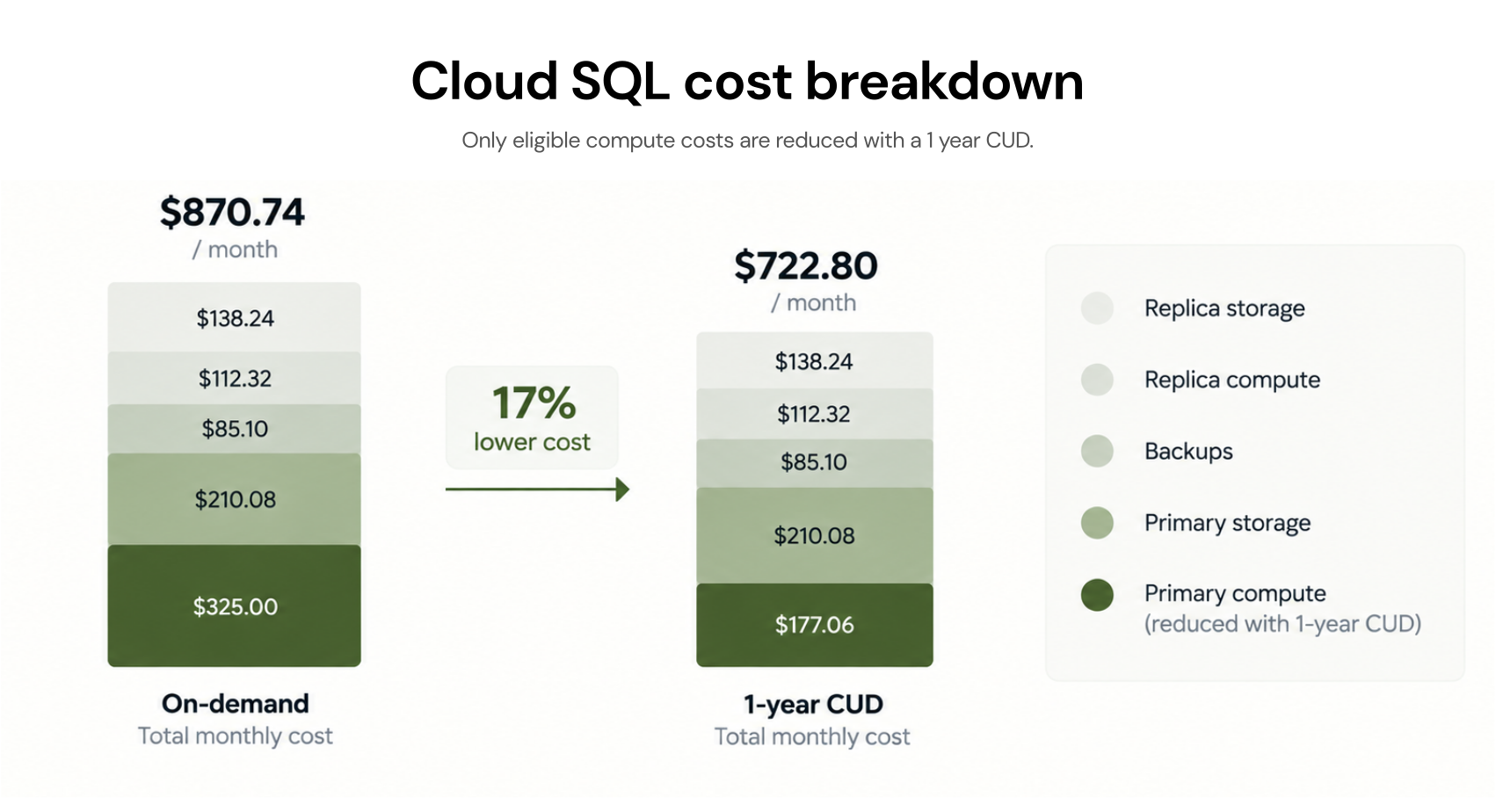
Applying these to the 4-vCPU, 15 GB example: on-demand compute is $197.24/month. With a 1-year CUD at 25% off: $147.93/month. With a 3-year CUD at 52% off: $94.68/month. The 3-year CUD saves $1,232/year on compute alone for this configuration. Source: pump.co calculation ($211.79 vs $158.72 for total monthly including storage) aligned with the official CUD percentages.
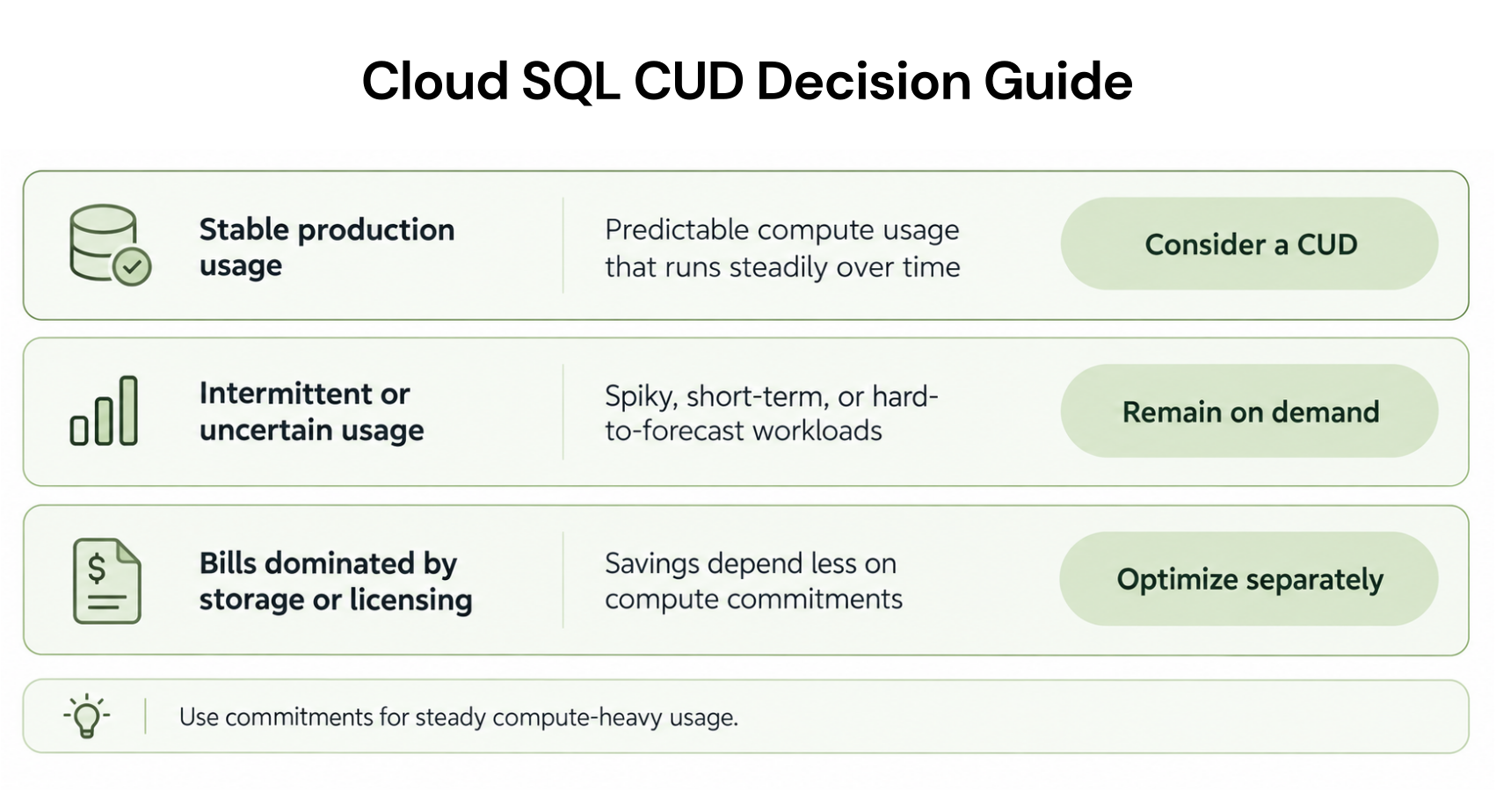
The critical limitation of CUDs: they apply to CPU and memory only. The discount does not extend to storage, backups, networking, IP addresses, licensing, or extended support charges. For an instance where storage is $220/month (1 TB SSD) and backups are another $110/month, the CUD saves nothing on those costs regardless of term.

High Availability: It Does Not Just Double Your Compute
This is the most common Cloud SQL bill surprise. Enabling HA (High Availability) on a Cloud SQL instance creates a standby instance in a second zone within the same region. When the primary fails, the standby takes over in approximately 60 seconds. The cost impact is substantial and applies to two separate billing meters — not just one.
HA doubles your vCPU and memory costs. The same 4-vCPU, 15 GB instance that costs $197.24/month compute on-demand becomes $394.48/month with HA. That part is straightforward.
What the pricing page makes less obvious: HA also increases your storage rate. Standard SSD storage for non-HA instances is approximately $0.22/GB-month. HA SSD storage is approximately $0.34/GB-month — 55% more expensive per GB. For a database with 1 TB of storage, the difference is $220/month versus $340/month — $120/month additional on storage alone. Source: pump.co and umbrellacost.com, both citing Google Cloud’s official pricing page, May 2026.
Combined HA cost impact on the 4-vCPU, 15 GB, 500 GB SSD instance: Non-HA: compute $197/month + storage $110/month = $307/month. HA enabled: compute $394/month + storage $170/month = $564/month. Enabling HA on this configuration adds $257/month, $3,084/year. CUD savings on 1-year: $49/month off the HA compute. The CUD reduces the impact but does not offset the full HA premium. Verify at cloud.google.com/sql/pricing — rates change.
For development and staging databases: disable HA entirely. The monthly savings on a single moderate instance typically run $150-300. For a team running 5 non-production databases, converting all from HA to non-HA saves $750-1,500/month before any other optimization.
Storage Pricing: The Irreversibility Trap
Cloud SQL charges storage per GB per month, which sounds simple. The part the pricing page does not emphasize: storage auto-increases are permanent. If you enable automatic storage increases (the default recommendation for production databases), Cloud SQL will increase your provisioned storage when it approaches capacity — but it will never reduce it, even if your data volume later shrinks.
The rates: SSD persistent storage at approximately $0.22/GB-month for non-HA, $0.34/GB-month for HA. HDD storage at approximately $0.12/GB-month for non-HA ($0.19/GB-month for HA — verify at cloud.google.com/sql/pricing). Backups at approximately $0.11/GB-month. Source: ProsperOps (April 2025) and pump.co, both consistent with Google’s documented rates.
The irreversibility trap in practice: a database starts with 100 GB provisioned at $22/month. A large data migration runs, pushing usage to 380 GB. Auto-increase kicks in and provisions 500 GB at $110/month. The migration data is later deleted, leaving 90 GB of actual data on 500 GB of provisioned storage. You are now paying $110/month for 500 GB of which 410 GB is empty — and you cannot scale back down. To reclaim the cost, you must create a new Cloud SQL instance at a smaller storage size, restore a backup to it, and delete the original. That process works but takes engineering time and introduces downtime or read-only period during migration.
Best practice: size your initial storage conservatively rather than over-provisioning. Enable storage auto-increase but monitor your provisioned vs used ratio monthly. If provisioned storage is more than 3x your actual data size, consider a storage right-sizing migration before committing to a CUD, which would lock your spend against the inflated storage basis for the term.
One exception: read replicas each provision their own storage independently. A primary with 500 GB of provisioned storage plus 2 read replicas = 3 separate storage meters, each billing at the full provisioned amount. Storage for read replicas is never shared with or derived from the primary’s storage allocation.

Also read: What Are Commitment-Based Discounts in Multi-Cloud Services?
Read Replicas and Failover Replicas: Full Instance Cost Each
Read replicas in Cloud SQL are billed as standalone instances. Each replica costs exactly the same per-vCPU-hour and per-GB-hour as the primary. There is no discount for being a replica, and there is no shared compute between primary and replica. Source: Google Cloud SQL pricing page (cloud.google.com/sql/pricing, May 2026): ‘Read replicas are charged at the same rate as stand-alone instances.’
A production setup with 1 primary and 2 read replicas, all at 4 vCPU / 15 GB, costs approximately 3 x $282/month = $846/month in compute before HA, storage, or backups. The read replicas’ storage is provisioned and billed independently, as described above.
Failover replicas follow the same pricing as read replicas for HA configurations in Enterprise edition. In Enterprise Plus, HA is handled differently through a synchronous standby — the architecture is closer to AWS Multi-AZ, where the standby cost is rolled into the HA pricing multiplier rather than being a separate explicit instance.
The Five Hidden Costs the Calculator Does Not Show You by Default
1. The IPv4 Idle Charge
Every Cloud SQL instance with a public IPv4 address incurs a charge of $0.0131/hour when the instance is idle — approximately $9.57/month. This applies whether or not any traffic flows through the IP. An instance that is stopped (hibernated) but retains its IP address continues billing this charge. Source: Bytebase citing Google Cloud documentation, May 2026.
For development databases that run intermittently, this idle IP charge adds up. 10 dev databases each with a static IP: $95.70/month in idle IP charges alone. Solution: use Private IP exclusively for databases that do not require direct external access, or disable the public IP when not in use.
2. Network Egress Surprises
Ingress (data flowing into Cloud SQL) is free. Egress charges depend on destination. Traffic between Cloud SQL and other services in the same region: free. Traffic to different regions within the same continent: approximately $0.12/GB for inter-region North America transfers. Traffic to different continents or to the internet: $0.19/GB. Source: TrustRadius citing Google Cloud documentation, May 2026.
For an analytics workload that exports 5 TB of query results monthly to an application server in a different region: 5,000 GB x $0.12 = $600/month in egress charges. This is separate from the instance compute and storage costs and is not reduced by CUDs. Co-locate your application tier and database in the same region. For cross-region data pipelines, evaluate whether Cloud Interconnect ($0.05/GB for direct connections) reduces the egress cost below the $0.12 standard rate at your traffic volume.
3. Backup Storage Compounds With Retention
Automated backups cost approximately $0.11/GB-month. The cost is proportional to your retention window: a 7-day retention policy on a 500 GB database with moderate daily change rate might accumulate 800 GB of backup data at $88/month. Extending to 30-day retention on the same database could push backup storage to 2-3 TB at $220-330/month. Cloud SQL backup costs are not prominently displayed in the pricing calculator’s default view — the calculator requires you to explicitly add backup storage and estimate the size.
Point-in-time recovery (PITR) stores transaction log data in addition to periodic snapshots, which increases backup storage further. If you enable PITR (recommended for production), factor in an additional 20-40% on top of your estimated snapshot backup volume for the log storage.
4. SQL Server Licensing Minimum
SQL Server instances on Cloud SQL include the license cost, which is charged per vCPU-hour on top of the compute. Enterprise edition license: approximately $0.47/vCPU-hour. Standard edition: approximately $0.13/vCPU-hour. Source: umbrellacost.com, May 2026.
The trap: SQL Server instances are charged a minimum of 4 vCPUs per instance, regardless of the actual vCPU count. A 2-vCPU SQL Server instance is billed at 4 vCPU equivalent for licensing. At $0.47/vCPU-hour for Enterprise, a 2-vCPU instance billed at 4 vCPUs for licensing incurs $0.47 x 4 x 730 = $1,372/month in license fees alone — more than the compute cost of the instance itself. CUDs do not apply to SQL Server licensing fees. Source: cloudchipr.com citing Google documentation, May 2026.
5. Extended Support for Older Database Versions
Cloud SQL charges extended support fees for database versions that have reached end-of-standard-support but are still running on the platform. For dedicated-core instances, extended support is priced per vCPU-hour and is charged in addition to the standard instance rate. CUDs do not apply to extended support charges. Source: Google Cloud SQL pricing page (cloud.google.com/sql/pricing, confirmed May 2026).
The practical impact: before running a Cloud SQL CUD purchase, verify that none of your instances are on engine versions approaching end-of-standard-support. Upgrading the engine version before purchasing a CUD ensures you are not locking a multi-year commitment to an instance that will incur extended support surcharges during the term.
A Worked Cost Example: Medium Production Database
Configuration: 4 vCPUs, 15 GB memory, 500 GB SSD storage, HA enabled, 1 read replica (same spec, no HA), 7-day backup retention, us-central1, MySQL Enterprise edition. All figures from verified sources; compute rates confirmed from pump.co and umbrellacost.com; storage from ProsperOps and Google documentation. Verify at cloud.google.com/sql/pricing — rates change.
Primary instance compute (HA): 4 vCPU x $0.0413/hr x 2 (HA) x 730 hrs = $241.19/month. Memory (HA): 15 GB x $0.007/hr x 2 x 730 = $153.30/month. Primary storage (HA SSD): 500 GB x $0.34/GB-month = $170/month. Backup storage (7-day retention, estimated 300 GB): 300 GB x $0.11 = $33/month. Primary subtotal: $597.49/month.
Read replica compute (no HA): 4 vCPU x $0.0413/hr x 730 = $120.59/month. Memory: 15 GB x $0.007/hr x 730 = $76.65/month. Replica storage (500 GB SSD, no HA): 500 GB x $0.22 = $110/month. Replica subtotal: $307.24/month.
Networking: assume 100 GB outbound egress to application servers in same region = $0. Two static IPv4 addresses: $0.0131/hr x 2 x 730 = $19.13/month.
Total monthly: $597.49 + $307.24 + $19.13 = $923.86/month on-demand. With 1-year CUD (25% off compute only): compute savings = ($241.19 + $153.30 + $120.59 + $76.65) x 0.25 = $147.93/month. Post-CUD total: approximately $775.93/month. Annualized: $9,311 with CUD vs $11,086 without. CUD annual saving: $1,775.
What the pricing calculator shows when you enter this configuration without filling in replicas, backups, and IP charges: approximately $400-450/month — roughly half the actual total bill. The gap is the five hidden costs above.
How Cloud SQL Pricing Compares to AWS RDS
For teams evaluating Cloud SQL against AWS RDS, the comparison requires care because the two pricing models work differently. AWS RDS bills a flat per-instance-hour rate for pre-defined instance types. Cloud SQL bills per-vCPU and per-GB-memory independently, which gives more granularity but makes direct comparison harder.
A rough equivalent: the AWS db.r8g.xlarge (4 vCPU, 32 GB RAM) MySQL Single-AZ on-demand costs $0.478/hr ($349/month). A Cloud SQL 4-vCPU, 32 GB MySQL Enterprise non-HA equivalent: compute = (4 x $0.0413 x 730) + (32 x $0.007 x 730) = $120.59 + $163.52 = $284.11/month. Cloud SQL appears cheaper on compute at similar specs.
The comparison shifts when you factor storage. AWS RDS gp3 storage: $0.115/GB-month. Cloud SQL SSD: $0.22/GB-month — nearly double. For a 1 TB database, storage alone costs $115/month on RDS versus $220/month on Cloud SQL. Add HA and Cloud SQL storage jumps to $340/month versus $230/month on RDS Multi-AZ. The AWS Reserved Instance at 1-year No Upfront on db.r8g.xlarge saves 33% on compute; the Cloud SQL 1-year CUD saves 25%. The 3-year AWS RI can reach 58% savings; the Cloud SQL 3-year CUD saves 52%.
Neither is universally cheaper. For compute-intensive workloads with modest storage, Cloud SQL can be cost-competitive. For storage-heavy workloads, AWS RDS is typically less expensive. For teams already standardized on GCP who want to avoid cross-cloud data transfer costs, Cloud SQL’s integration advantages may outweigh the storage premium.
How Usage.ai Handles Cloud SQL Cost Optimization
Usage.ai supports GCP alongside AWS and Azure. The platform analyzes Cloud SQL instance usage patterns, identifies non-production HA configurations, reads replica sizing inefficiencies, and calculates the optimal CUD commitment level based on actual utilization rather than provisioned capacity.
The CUD calculation matters here specifically because of the storage irreversibility issue. Purchasing a 3-year CUD on an instance with inflated provisioned storage does not lock in the storage cost (CUDs only cover compute), but it does commit the compute spend for 3 years. If the instance later needs to be rebuilt with smaller storage, the CUD covers the new instance’s compute in the same region — the commitment is flexible to instance type changes as long as the CPU and memory totals in the region do not drop below the commitment.
Usage.ai’s 24-hour refresh cycle means that when a Cloud SQL instance is resized, the CUD recommendation updates within 24 hours rather than waiting for the next quarterly review. The platform also identifies idle IPv4 charges on stopped instances and flags them as actionable waste — specific instances, specific dollar amounts, specific remediation steps.
For teams running multi-cloud environments with both AWS RDS and Cloud SQL, Usage.ai provides a unified view of database commitment coverage and savings opportunities across both platforms, with cashback protection on any commitment that becomes underutilized. Fee: percentage of realized savings only.
See how Usage.ai optimizes Cloud SQL and RDS commitments
Quick Pricing Reference: Cloud SQL Key Rates (us-central1, May 2026)
Verify all rates at cloud.google.com/sql/pricing with your region selected — rates change, and regional variation is significant.
| Component | On-Demand Rate | 1-Yr CUD (25% off) | 3-Yr CUD (52% off) |
| vCPU (dedicated, Enterprise) | $0.0413/hr | $0.0310/hr | $0.0198/hr |
| Memory (dedicated, Enterprise) | $0.0070/GB-hr | $0.0053/GB-hr | $0.0034/GB-hr |
| HA multiplier (compute) | 2x compute rate | 2x CUD rate | 2x CUD rate |
| SSD storage (non-HA) | ~$0.22/GB-month | Not discounted | Not discounted |
| SSD storage (HA) | ~$0.34/GB-month | Not discounted | Not discounted |
| HDD storage (non-HA) | ~$0.12/GB-month | Not discounted | Not discounted |
| Backup storage | ~$0.11/GB-month | Not discounted | Not discounted |
| IPv4 address (idle) | $0.0131/hr (~$9.57/month) | Not discounted | Not discounted |
| Egress (inter-region, N. America) | ~$0.12/GB | Not discounted | Not discounted |
| Egress (to internet) | $0.19/GB | Not discounted | Not discounted |
| SQL Server license (Enterprise) | ~$0.47/vCPU-hr (4 vCPU min) | Not discounted | Not discounted |
Sources: Google Cloud official pricing page (cloud.google.com/sql/pricing), Google CUD documentation (docs.cloud.google.com/sql/cud, April 2026), umbrellacost.com, pump.co, ProsperOps. All rates approximate and subject to change. Regional pricing varies — select your region on the Google Cloud pricing page.

Frequently Asked Questions
1. How much does Google Cloud SQL cost per month?
It depends on instance size, region, HA configuration, and storage. A minimal development instance (db-f1-micro shared core, 10 GB SSD, no HA, us-central1) costs approximately $7-10/month. A moderate production database (4 vCPU, 15 GB, 500 GB SSD, HA, us-central1) costs approximately $600-650/month including storage and backups, around $900+ with a read replica. Verify your specific configuration at cloud.google.com/sql/pricing with the official pricing calculator.
2. What are Cloud SQL Committed Use Discounts?
CUDs are Google Cloud’s equivalent of reserved instances. They save 25% on CPU and memory costs with a 1-year commitment, or 52% with a 3-year commitment. The discount applies to all Cloud SQL database engines (MySQL, PostgreSQL, SQL Server) in the committed region. CUDs do not cover storage, backups, networking, IP addresses, or SQL Server licensing. Source: docs.cloud.google.com/sql/cud, April 2026.
3. Does High Availability double the cost of Cloud SQL?
It more than doubles the total bill for most configurations. HA doubles the vCPU and memory charges. It also raises the SSD storage rate from approximately $0.22 to $0.34/GB-month. For a 4-vCPU, 15 GB, 500 GB SSD instance, HA adds approximately $260/month — a total HA premium of roughly 85% on top of the non-HA bill once the storage rate increase is included alongside the compute doubling.
4. Can Cloud SQL storage be reduced after auto-increase?
No. Once Cloud SQL automatically increases provisioned storage, it cannot be reduced. The only way to reduce storage is to create a new instance at a smaller provisioned size, restore a backup to it, test thoroughly, and delete the original. This requires a migration process with potential downtime. To avoid this: start conservatively, enable auto-increase for safety, but monitor the provisioned-to-used ratio monthly. Do not over-provision at instance creation.
5. Are read replicas cheaper than the primary in Cloud SQL?
No. Read replicas are billed at the same per-vCPU and per-GB-memory rates as standalone instances. Each replica is an independent billing unit with its own storage meter. A primary plus 2 read replicas at the same spec incurs 3x the compute and storage cost of the primary alone. HA on replicas would add further cost. Source: cloud.google.com/sql/pricing, May 2026.
6. How does Cloud SQL pricing compare to AWS RDS?
Cloud SQL compute is often cheaper than equivalent AWS RDS for the same vCPU and RAM at list price, but Cloud SQL SSD storage at $0.22/GB-month is nearly double AWS RDS gp3 at $0.115/GB-month. Cloud SQL CUD saves 25-52% on compute vs AWS RDS RI at 33-58% savings. For storage-heavy workloads, AWS RDS is typically less expensive overall. For compute-intensive workloads with modest storage, Cloud SQL can be cost-competitive, especially for teams on GCP avoiding cross-cloud egress.
7. Does the Cloud SQL pricing calculator show the full cost?
Not by default. The calculator shows instance compute accurately but requires manual input for replicas, backup storage size, and egress volume. It also does not prominently display the idle IPv4 charge or the HA storage rate increase versus non-HA storage rate. The worked example in this guide shows a $923/month actual bill versus the $400-450 the calculator shows with default inputs. Always add replicas, backup storage estimates, and an egress assumption manually.