
Azure pay-as-you-go pricing is designed for flexibility. Azure Reservations and Azure Savings Plans are designed for predictability — and they reward it with significantly lower unit rates. Understanding which commitment instrument applies to which workload, how discounts are prioritized and applied, and how to recover from a commitment that no longer matches your usage is the core skill of Azure cost optimization.
This guide covers every dimension of Azure commitment pricing from Microsoft official sources: what reservations cover, how discounts are applied, how scope determines coverage, the rules for modifications and refunds, and the decision framework for choosing between reservations and savings plans.
See what your Azure commitment coverage gap is costing you each month. Try the Calculator for free →
What Azure Reservations Are and What They Are Not
Azure Reservations are a billing discount mechanism. You commit to using a specific Azure resource configuration for one or three years, and Azure applies a reduced rate to matching usage automatically. There is nothing to deploy, nothing to configure in your workloads, and no change to how your applications run. The reservation exists entirely at the billing layer.
Reservations significantly reduce your resource costs by up to 72% from pay-as-you-go prices. You can pay for a reservation up front or monthly. The total cost of upfront and monthly reservations is the same — there are no extra fees for choosing monthly payments. Monthly payments are charged for complete months, not prorated by calendar day. If you purchase a reservation on January 15, the next monthly charge will be around February 15.
What reservations are not: they are not capacity reservations. Purchasing a reservation is a cost-saving mechanism that reserves a discounted price for compute resources, and does not pre-allocate or guarantee specific infrastructure resources for use. If you need capacity guarantees in a specific Availability Zone, On-Demand Capacity Reservations are a separate mechanism.
The reservation discount applies on an hourly basis. If you have matching resources running for every hour of the month, the discount applies for every hour. If you have no matching resources for a given hour, that hour’s discount is lost — reservations do not carry forward unused hours.
The most important fact about reservation discounts: they are use-it-or-lose-it. ‘A reservation discount is use-it-or-lose-it. If you don’t have matching resources for any hour, then you lose a reservation quantity for that hour. You can’t carry forward unused reserved hours.’ This is the primary mechanism that makes over-sizing a reservation or running resources only part-time expensive. Any hour without a matching resource is an hour where you pay the reservation commitment without receiving the discount benefit.
Also read: Azure Savings Plan Scope: Shared vs Subscription vs Management GroupÂ
How Azure Reservation Discounts Are Applied
Attribute matching
When you purchase a reservation, you specify attributes: the SKU (resource type and size), the region, and the scope. Azure continuously checks your running usage against these attributes and applies the reservation discount to matching usage automatically. You do not manually assign reservations to specific resources.
For Virtual Machines, the reservation discount applies to the virtual machine compute cost. It does not cover storage, networking, software licensing (Windows Server, SQL Server), or other charges. These continue to bill at standard rates.
For Azure SQL Database and SQL Managed Instance, the reservation covers compute costs only — it does not cover software license, networking, or storage charges. For services like Azure Synapse Analytics, the reservation covers cDWU usage but not storage or networking. Each service has specific definitions of what the reservation covers.
Instance size flexibility for Virtual Machines
For VM reservations, instance size flexibility allows the reservation discount to apply to VMs of different sizes within the same instance family, rather than only to the exact size you purchased. A D4v4 reservation can apply to two D2v4 instances, or half a D8v4 instance, based on normalized units within the family. Instance size flexibility remains available for existing and new VM reservation purchases.
Instance size flexibility does not apply to all services. For SQL Database and Managed Instance, vCore size flexibility is available within a performance tier and region. For many other services, the reservation must match the exact configuration.
Scope: where the discount applies
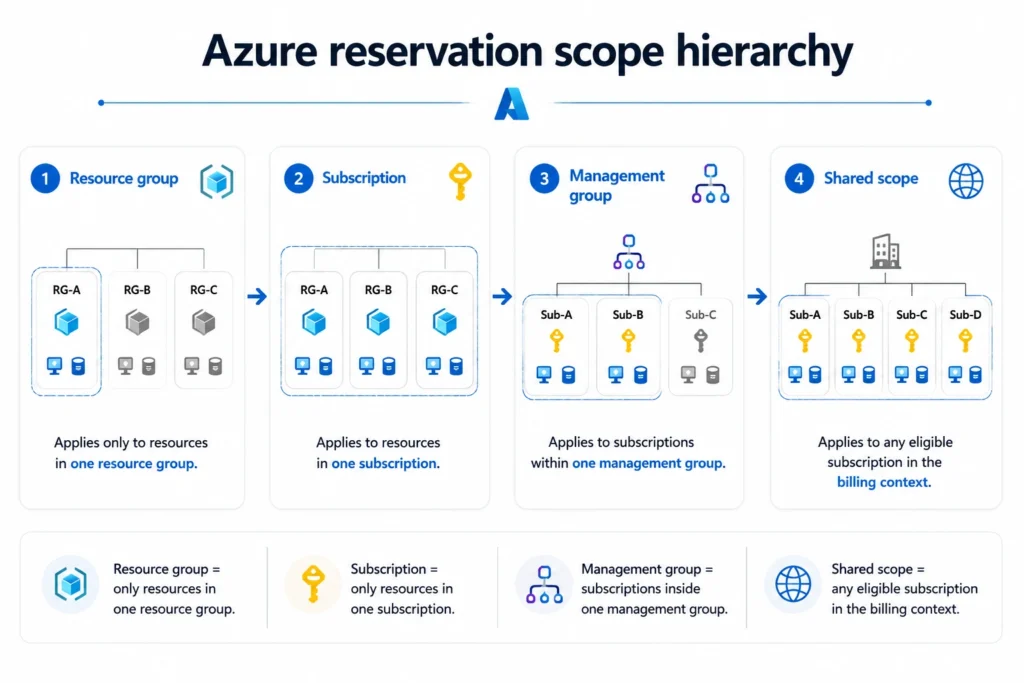
Every reservation has a scope that determines which resources can benefit from the discount. Four scope options are available: resource group, subscription, management group, and shared. Shared scope allows the reservation discount to apply across all eligible subscriptions within your billing context.
When Azure applies reservation benefits in a given hour, it follows a defined priority order: more restrictively scoped benefits are applied first. A resource-group-scoped reservation is applied before a subscription-scoped one, which is applied before a management-group-scoped one, which is applied before a shared-scope one. This ordering minimizes waste by ensuring the most targeted commitments are consumed first.
You can change the scope of a reservation after purchase. If your team structure changes or subscriptions are reorganized, rescoping is available without cancelling and repurchasing.
Reservation priority over savings plans
If you have both reservations and savings plans active, Azure applies reservation benefits before savings plan benefits. The reasoning is that reservations are more restrictive — they apply to specific resource configurations, while savings plans apply to eligible compute spend more broadly. By applying the more restrictive commitment first, Azure minimizes the risk of unused reservation hours.
Similarly, if you have multiple savings plans with different term lengths, Azure applies the three-year plan benefits before one-year plan benefits, to ensure the best rates are applied first.

The Stopped VM Problem Nobody Models
One of the most expensive Azure reservation mistakes is not understanding how stopped VMs interact with reservation billing. When a Virtual Machine is stopped (powered off from within the OS), it remains in a ‘Stopped’ state but the underlying compute resources are still allocated. Stopped VMs are billed and continue to use reservation hours.
To release the compute resources and stop consuming reservation hours, the VM must be deallocated — either through the Azure portal (the Stop button in the portal deallocates by default), the Azure CLI, or an automation script. When you deallocate a VM, Azure releases the underlying compute and the reservation discount automatically applies to another matching resource in the specified scope, if one exists.
The practical implication: a development VM that is ‘stopped’ each evening without being deallocated will consume reservation hours overnight. If the VM is running only 8 hours per day (business hours), 16 hours of reservation hours are lost nightly at no compute benefit. At scale, this is a significant source of reservation waste that does not appear obviously in utilization metrics.
Deallocation vs stop: if you use VM Auto-Shutdown policies in Azure, verify that the shutdown action deallocates the VM rather than simply stopping it. Azure’s Auto-Shutdown feature deallocates VMs by default. However, workloads managed via scripts or third-party tools may use OS-level shutdown, which puts VMs in Stopped (not deallocated) state. Reservation hours consumed by Stopped-but-not-deallocated VMs represent pure waste. Source: Microsoft official Azure VM reservation documentation.
Azure Savings Plans: The Spend-Based Alternative
How savings plans work
An Azure Savings Plan commits to a fixed hourly spend amount on eligible compute services for one or three years. In exchange, Azure applies discounted rates automatically to eligible usage within the plan’s scope. Unlike reservations, which apply to specific resource configurations, a savings plan follows your compute spend wherever it occurs across eligible services, VM sizes, families, and regions.
Savings Plans save up to 65% compared to pay-as-you-go rates. The 65% figure is based on a specific configuration: one M64dsv2 Azure VM for Ubuntu Linux in the East US region running for 36 months at pay-as-you-go versus a 3-year savings plan rate. Based on Azure pricing as of January 2026. Actual savings vary based on location, instance type, and usage.
Savings plan benefits are applied each hour to eligible usage within the plan’s scope. Benefits are applied to the usage that has the highest discount percentage first. If the hourly commitment is reached, any remaining eligible usage is billed at pay-as-you-go rates. Any unused commitment in an hour expires — it does not roll over to the next hour.
Two types of savings plans
Azure offers two savings plan products. The savings plan for compute covers Azure Virtual Machines (excluding BareMetal Infrastructure and Av1 series), Azure Virtual Machine Scale Sets, Azure Kubernetes Service worker nodes, App Service (Premium v3 and Isolated v2 plans upgraded from older tiers), and Azure Functions Premium plan. This plan does not cover networking, storage, or software charges.
The savings plan for databases covers infrastructure and software IP costs for eligible database services. Database savings plans also cover SQL Server on Azure Virtual Machines and SQL Server enabled by Azure Arc hourly license at pay-as-you-go pricing. The database savings plan saves between 0% and 35% — the 35% figure is based on Azure SQL Database serverless running for 12 months at pay-as-you-go versus a 1-year savings plan rate. Based on Azure pricing as of March 2026.
Savings plans cannot be modified or cancelled
Unlike reservations, savings plans cannot be modified or cancelled once the commitment is made. If your usage needs grow beyond the current savings plan, you may purchase an additional savings plan. If your usage shrinks, the committed hourly spend continues billing for the full term regardless of actual compute usage.
There is no exchange mechanism for savings plans — you cannot exchange a savings plan for a reservation or for another savings plan. You can trade in eligible compute or database reservations for savings plans, but not the reverse.
Reservations vs Savings Plans: Choosing the Right Instrument
When reservations are the better choice
Reservations deliver higher savings than savings plans for equivalent resources because the commitment is more specific. If you can predict that a specific VM size in a specific region will be running consistently for the next one to three years, a reservation will reduce that usage by more per hour than a savings plan would. The deeper discount compensates for the lower flexibility.
Reservations are also the better choice when you need predictable, per-resource cost visibility. A reservation commitment for 10 D4v4 VMs in East US gives you a clear, quantifiable cost for those specific resources. A savings plan commitment provides an aggregate hourly spend commitment but no resource-level guarantee.
When savings plans are the better choice
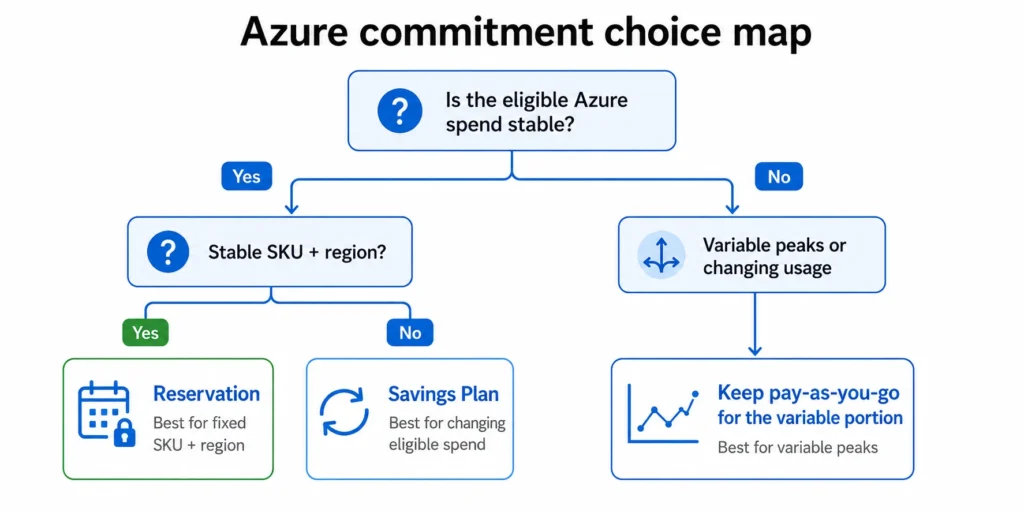
Savings plans are better when the compute mix is changing: VM families evolving with Graviton-equivalent modernization, workloads shifting between regions, or compute services shifting between VMs and containers or serverless. Because savings plans follow eligible compute spend rather than specific configurations, they absorb infrastructure change automatically.
Microsoft’s guidance: ‘Savings plans are based on a dollar-per-hour spend commitment and automatically apply across eligible services and regions, making them ideal for changing or dynamic workloads. Reservations lock in savings for a specific resource, size, and region, which delivers deeper discounts but works best when usage is stable and predictable.’
In practice, the most efficient Azure commitment strategy uses both: reservations for stable, long-running, known configurations (core databases, persistent production VMs in fixed regions), and savings plans for the dynamic compute layer that changes with deployments, scaling, and infrastructure evolution.
Eligible Services for Azure Reservations
Virtual Machines
Azure Reserved VM Instances save up to 72% compared to pay-as-you-go rates. The 72% figure is based on one M64ls Azure VM for SUSE Linux Enterprise OS in East US running for 36 months. Reservations cover the VM compute cost. Storage, networking, and software licensing are billed separately. Azure Spot VMs are not eligible for reservations.
Azure SQL Database and SQL Managed Instance
Azure SQL Database reservations save up to 80% over pay-as-you-go rates. Reservations cover compute costs only, not software license, networking, or storage. The vCore size flexibility allows the reservation discount to apply to databases of different vCore counts within the same performance tier and region. For zone-redundant configurations, separate reservation types are available to cover the zone-redundancy add-on compute cost.
Azure Cosmos DB
Azure Cosmos DB reservations apply to provisioned throughput. The reservation discount coverage depends on the provisioned throughput configuration.
Azure OpenAI and AI services
Azure now offers reservations for certain AI inference services. Azure OpenAI GPT-4o global provisioned throughput reservations save up to 70% compared to pay-as-you-go rates. Based on Azure pricing as of May 1, 2025.
Azure Storage
Certain Azure Storage configurations support reserved capacity. A 3-year Azure Storage Reserved Capacity term for 1 PB of data storage on locally redundant storage (LRS) hot access tier on block blobs saves approximately 38% compared to pay-as-you-go prices. Savings vary by region, redundancy option, storage access tier, and term.
Other eligible services
Azure Synapse Analytics reservations cover cDWU usage. Azure Databricks reservations cover DBU usage. App Service reservations cover stamp fees. Azure Database for PostgreSQL, MySQL, MariaDB, and Cosmos DB all support reserved capacity with vCore size flexibility within performance tiers and regions.
Service-specific eligibility and what each reservation covers (compute only versus compute plus software) vary.
Also read: Multi-Cloud Savings Plan Strategy: applying Azure commitments alongside AWS and GCPÂ
How to Manage Azure Reservations: Rescoping, Splitting, Refunds, and Exchanges
Changing scope
You can change the scope of a reservation after purchase. If a reservation was purchased at subscription scope and you want it to apply across multiple subscriptions, you can update it to shared scope. If a reservation was purchased at shared scope and you want to restrict it to a specific resource group for chargeback purposes, you can narrow the scope. Scope changes take effect at the next billing period.
Splitting reservations
A reservation can be split into two or more smaller reservations. For example, a reservation for 10 VMs can be split into a reservation for 7 VMs and a reservation for 3 VMs and assigned to different scopes. Splitting is useful when teams are reorganized, subscriptions are consolidated, or different portions of a commitment need to be assigned to different billing scopes for chargeback.
Refunds
You can refund an Azure reservation, up to $50,000 USD in a rolling 12-month window. This limit applies to all reservations within the scope of your agreement with Microsoft. Reservations refunded count toward this rolling limit. If a reservation has already been partially used, the refund amount is prorated for the unused portion. Certain reservations (including Azure Databricks) do not allow refunds.
The $50,000 rolling 12-month refund limit is a real constraint for large Azure reservation portfolios. Organizations that purchased large reservations at the start of a year and then restructured their infrastructure may find that the total value of reservations they want to refund exceeds the rolling limit. Planning the refund sequence across billing months and monitoring the rolling total prevents hitting the limit at a critical moment.
Exchanges and trade-ins
For compute reservations (Azure Virtual Machines, Dedicated Hosts, App Service), exchanges for different instance series or regions are no longer supported for reservations purchased after the grace period. Instance size flexibility within a family remains available. If you need to shift from one VM series to another, the path is to trade in the compute reservation for a compute savings plan.
Non-compute reservation exchanges are unchanged — SQL Database, Cosmos DB, PostgreSQL, and other service reservations can still be exchanged for another reservation of the same type.
Trade-in mechanics: you can trade in eligible reservations for a savings plan. The unused value of the traded-in reservation is applied as a credit toward the new savings plan commitment. You can trade in up to 100 reservations at a time as part of a savings plan purchase.

Scope and Billing Agreement Compatibility
Azure Reservations apply to resources in subscriptions with Enterprise Agreement (EA), Microsoft Customer Agreement (MCA), or CSP agreements, as well as subscriptions with pay-as-you-go rates. Resources in subscriptions with other offer types do not receive the reservation discount.
For EA customers, reservation purchases can be made centrally by the EA administrator and applied at the enrollment level via shared scope, or distributed to departments via subscription or resource group scope. For MCA customers, the billing profile or invoice section becomes the relevant scope for shared reservations.
Savings plan rates are priced in USD for MCA and Microsoft Partner Agreement (MPA) customers, and in local currency for EA customers. Reservation pricing follows the same currency approach.
Azure Advisor and Reservation Recommendations
Azure Advisor provides reservation and savings plan purchase recommendations based on your recent usage history. For reservation recommendations, Advisor looks back at your usage over 7, 30, or 60 days and identifies resources that have been running consistently enough to justify a commitment. The recommendations include an estimated annual savings amount.
Recommendations are updated continuously as your usage changes. A resource that has been running steadily for 60 days will generate a stronger recommendation than one that started recently. You can view recommendations in the Azure portal under Advisor, or through the Reservation Recommendations API.
Advisor is the correct starting point for sizing any commitment. Rather than manually analyzing CloudWatch-equivalent metrics, Advisor pre-processes your usage history and surfaces the commitment size and term that maximizes your expected savings given your actual patterns. For organizations without a dedicated FinOps function, Advisor recommendations provide a defensible, data-driven basis for reservation purchases.
See what your Azure commitment coverage gap is costing you each month. Try the Calculator for free →
The Commitment Strategy That Combines Both Instruments
The most effective Azure commitment strategy is not a choice between reservations and savings plans — it is a layered approach that uses each instrument where it performs best.
The stable baseline: identify resources that have been running in the same configuration (same VM size, same region, same service tier) for 12 or more months with no planned changes. These are candidates for reservations. The specific, known configuration allows reservations to deliver their maximum discount — up to 72% on VMs, up to 80% on SQL Database — without the risk of waste from configuration mismatch.
The dynamic compute layer: identify compute spend that shifts across VM families, regions, or services as deployments evolve, infrastructure modernizes, or traffic patterns change. This is the layer for savings plans. The spend-based commitment follows the compute wherever it runs, absorbing the change that would strand a reservation.
The variable peak: compute that runs only at traffic peaks, batch windows, or event-driven invocations is not a candidate for either commitment type. Pay-as-you-go is the correct model for genuinely variable demand. Azure Spot VMs can reduce the cost of fault-tolerant peak workloads by up to 90% versus pay-as-you-go for eligible workloads.
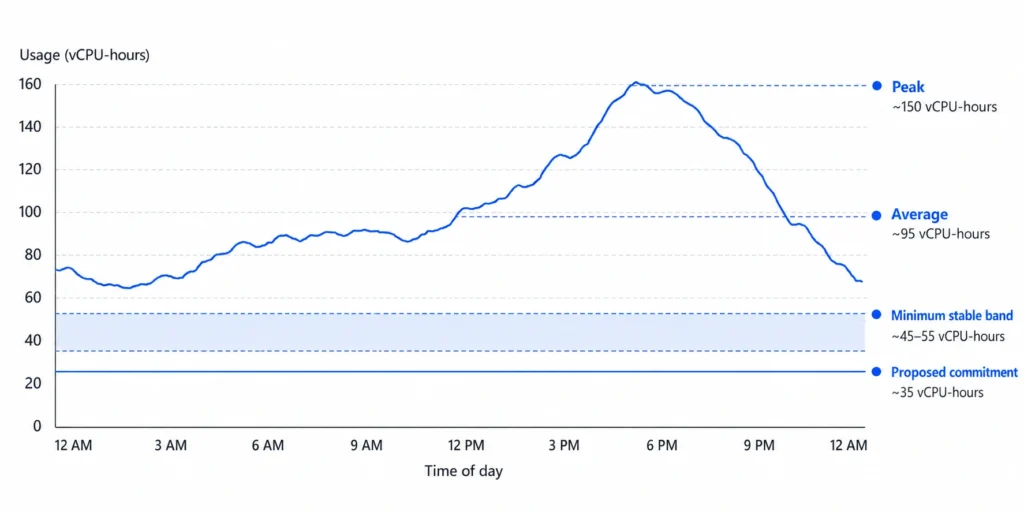
Sizing principle: the commitment baseline should reflect the usage that exists in every hour across your evaluation window, not the average or the peak. Over-committing against average usage creates waste in off-peak hours. Under-committing against the floor leaves savings uncaptured but creates no waste. Microsoft’s recommendation is to analyze consistent base usage before purchasing.
How Usage.ai Handles Azure Reservation Management
Usage.ai manages Azure reservation coverage alongside AWS Savings Plans, AWS Reserved Instances, and GCP Committed Use Discounts in a single multi-cloud platform. For Azure specifically, Usage.ai operates on three optimization signals.
Utilization monitoring: Usage.ai tracks Azure reservation utilization at the hourly granularity. When utilization drops below threshold — a signal that resources have been deallocated, resized, or stopped without consuming reservation hours — the platform surfaces the specific reservations at risk and the projected monthly waste. The 24-hour recommendation refresh cycle identifies utilization drift before it accumulates across a full billing month.
Coverage gap identification: Azure Advisor recommendations are a good starting point, but they are generated from Microsoft’s view of your usage and do not account for the interaction between existing reservations and savings plans. Usage.ai models the combined coverage across all active commitments and identifies the specific compute or database spend that is running uncovered at pay-as-you-go rates with enough stability to justify a commitment.
Scope optimization: reservation scope is a persistent source of waste in multi-subscription Azure environments. A subscription-scoped reservation stops applying coverage when matching resources move to a different subscription. Usage.ai identifies scope mismatches between reservation configuration and actual resource distribution and recommends rescoping before the waste accumulates.
For commitment purchasing: Usage.ai Insured Flex Commitments include a buyback guarantee on Azure reservation purchases. If a committed resource is deallocated, migrated to a different VM series, or decommissioned before the reservation term ends, the unused commitment is bought back and the value returned as cashback in real money. This directly addresses the use-it-or-lose-it risk that makes teams under-commit — with a buyback guarantee, the correct commitment level is the accurate one, not a conservative hedge.
$91M+ in savings delivered to 300+ enterprise customers across AWS, Azure, and GCP. Fee: percentage of realized savings only. $0 if Usage.ai saves nothing. 30-minute setup, billing-layer access only.
Start your free Azure commitment optimization analysis with Usage.ai

Frequently Asked Questions
1. What is the difference between Azure Reservations and Azure Savings Plans?
Azure Reservations commit to a specific resource configuration — VM size, region, and service — for one or three years and deliver discounts up to 72% on VMs and 80% on SQL Database. The discount applies only when matching resources are running. Azure Savings Plans commit to a fixed hourly spend amount across eligible compute services and apply discounts automatically across VM sizes, families, and regions, with savings up to 65% on compute. Reservations deliver deeper discounts but require configuration stability. Savings Plans deliver slightly lower discounts but follow workloads as they change. When both are active, Azure applies reservation benefits first, then savings plan benefits.
2. Are Azure Reservations use-it-or-lose-it?
Yes. If matching resources are not running during a given hour, the reservation discount for that hour is lost. Unused hours do not carry forward. Stopped VMs (not deallocated) continue consuming reservation hours without providing compute value. Deallocating VMs releases the underlying compute so the reservation discount can apply to other matching resources in scope. If no matching resources are found after deallocation, the reservation hours for that period are lost.
3. Can you cancel an Azure Reservation?
Yes, with limits. You can refund an Azure reservation up to $50,000 USD in a rolling 12-month window across all reservations within your agreement scope. The refund amount for a partially-used reservation is prorated for the unused portion. Certain services (including Azure Databricks) do not support refunds. For compute reservations that are no longer needed, a trade-in for a compute savings plan may recover more value than an outright refund if the savings plan commitment is sized appropriately.
4. Do Azure Reservations cover software licensing?
For most services, no. Azure VM reservations cover the compute cost only. Windows Server and SQL Server licensing are billed separately, either as License Included rates or through Azure Hybrid Benefit if you bring existing licenses. Azure SQL Database reservations cover compute costs, not software licensing or storage. Each Azure service has a specific definition of what its reservation covers — verify the coverage for your service at the Microsoft Azure documentation before purchasing.
5. What is instance size flexibility for Azure VM reservations?
Instance size flexibility allows a VM reservation discount to apply to different VM sizes within the same instance family, not just the exact size purchased. A D4v4 reservation can cover two D2v4 instances or half a D8v4, based on normalized units within the Dv4 family. This flexibility reduces the risk of waste when VM sizes change within the same family. Instance size flexibility applies to VM reservations. The ability to exchange reservations for different instance series or regions (cross-series flexibility) has been deprecated for new compute reservation purchases, though a grace period is in effect.
6. Who can manage Azure Reservations?
Reservation purchases require appropriate billing permissions (EA administrator, billing account owner, or billing profile contributor). After purchase, reservation management (scope changes, splits, exchanges, refunds) requires Owner access on the Reservation Order. Billing readers and reservation readers can view reservations and utilization data but cannot modify them.