AWS
AWS Microsoft Azure
 Google Cloud

Start with the billing meters and evaluate each commitment independently. This checklist helps finance, procurement, and engineering align on coverage, sizing, and purchase conditions without treating a discount on one cost layer as savings across the entire workload.
Short Answer
Azure Databricks pre-purchase plans use Databricks commit units (DBCUs) to discount DBU charges. Azure Reserved VM Instances and Azure savings plans for compute can discount separate eligible VM infrastructure used by classic Databricks compute.Size the DBCU pool against consumption over its one- or three-year term. Size VM commitments against hourly eligible usage, accounting for existing commitments, planned optimization, and serverless migrations.
Which Databricks Costs Can Each Commitment Cover?
Coverage depends on the billing meter and compute model, not simply on whether the resource belongs to Databricks.| Cost meter | DBCU pre-purchase | VM reservation / compute savings plan | Buyer implication |
|---|---|---|---|
| Classic compute DBUs | Covers DBU usage | Does not cover DBUs | Evaluate platform consumption separately |
| Classic Azure VM compute | Does not cover VM charges | Covers matching eligible VM usage | Include drivers and workers |
| Serverless DBUs | Covers DBU usage | Does not discount bundled compute | Do not add a separate VM saving |
| Separate storage and networking | Not covered | Not covered | Keep these charges in total cost |
DBCU discount application spans Databricks workloads and tiers within the purchase scope. You do not need separate pools for each workspace tier, although different workload and tier rates change consumption.
Likewise, compute savings plan coverage excludes software, storage, and networking. Keep disks, object storage, egress, and separately billed networking services visible when estimating the workload’s final bill.
Do not add DBU and VM discount percentages together. Calculate net savings by comparing the same usage at your pay-as-you-go rates with total commitment costs, remaining usage charges, and fees. Commitment costs already include unused capacity.
What Should You Check Before Sizing Azure Databricks Cost Commitments?
Build a baseline that engineering can explain and finance can reconcile:DBU demand: Use representative history covering business cycles, seasonal peaks, and project changes. Split consumption by SKU, workspace, workload, and compute model.
VM demand: Identify driver and worker sizes, regions, runtime schedules, and existing benefit coverage. Separate recurring demand from temporary migrations and autoscaling peaks.
Remaining costs: Attribute storage and networking so they cannot silently enter either commitment forecast.
The pricing system table supplies date-effective list pricing, not your final negotiated invoice. Reconcile modeled amounts with Azure billing, purchase charges, and applied benefits; zero on-demand charges after DBCU application do not mean free usage.
Optimize before projecting demand. Validate job compute, workload-appropriate autoscaling, auto-termination, and compute policies. Idle pool instances can retain VM costs without DBU charges, so cluster activity alone does not establish infrastructure demand.
Track Spot workers separately: their lower VM prices do not discount DBUs, and interruptions can change job runtime and consumption. Exclude Spot VM usage from reservation and compute savings plan sizing.
On October 1, 2026, Microsoft will automatically upgrade remaining Azure Databricks Standard workspaces to Premium. If your forecast uses historical Standard usage, apply Premium DBU prices and the corresponding DBCU conversion ratios to the post-upgrade period.
How Much DBCU Capacity Should You Prepurchase?
Base purchases on normalized consumption, not the raw sum of DBUs across unlike workloads.Under Microsoft’s DBCU pre-purchase rules, each workload’s DBUs draw down the pool at a ratio tied to its DBU list price. Calculate:
Use DBCU conversion ratios to forecast pool consumption. Use your purchase price and comparable contracted pay-as-you-go rates to calculate financial savings.
Model conservative, expected, and growth cases separately. Include project start dates and decommissions rather than applying one growth percentage to all usage. Deduct consumption covered by remaining DBCU balances, accounting for expiration dates; Azure consumes the earliest-expiring plan first.
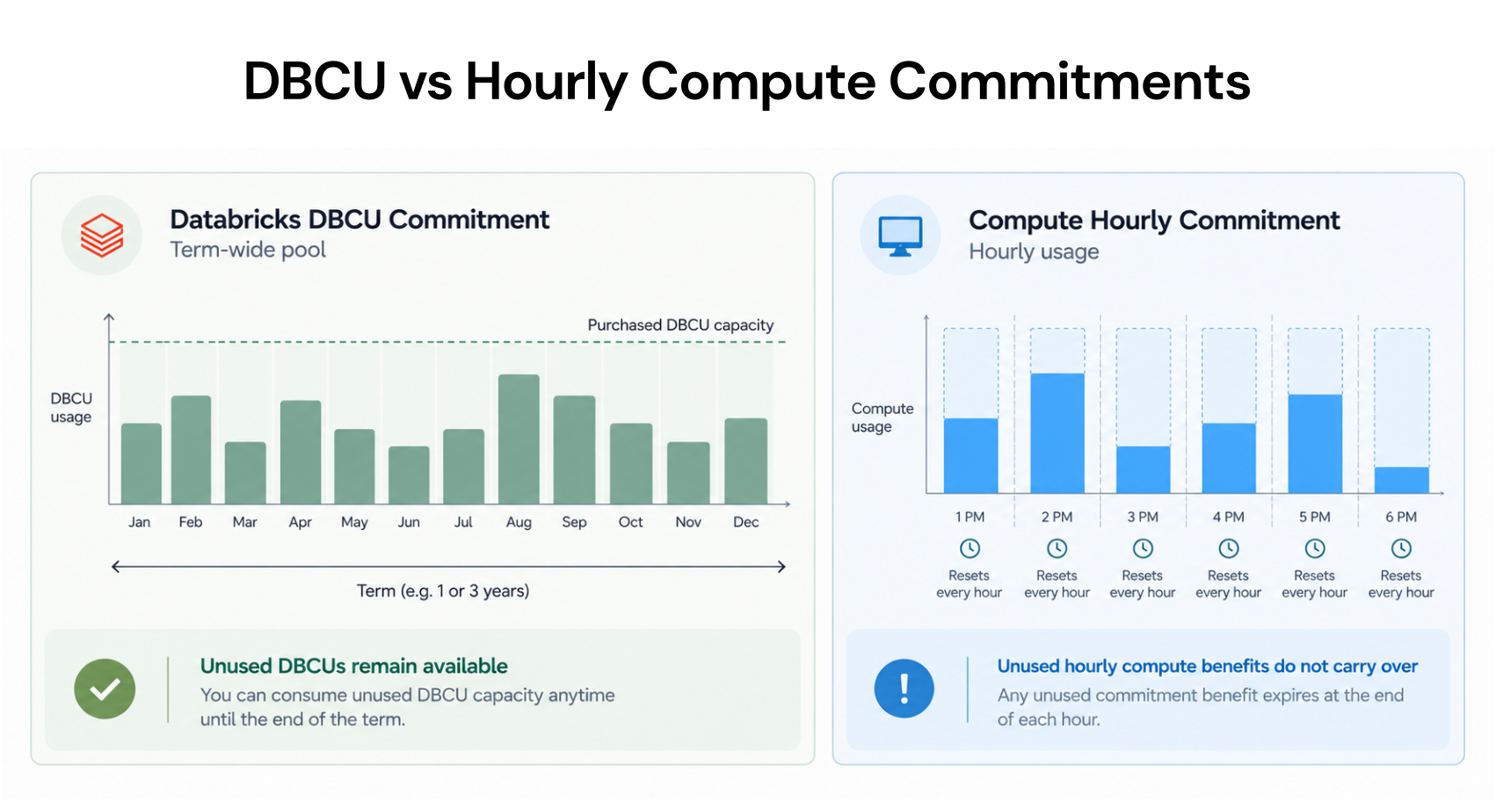
DBCUs can be consumed at any time during a one- or three-year term, so a busy month can absorb capacity left unused in a quiet month. However, unused capacity at expiry reduces realized savings and can make the purchase cost more than pay-as-you-go. Purchases require upfront payment and cannot be canceled or exchanged.
Compare one- and three-year offers using the same workload scenario. A deeper quoted discount is worthwhile only when forecast consumption and cash commitments still fit.
Illustrative economics, not an Azure quote: Assume capacity with a $100,000 pay-as-you-go equivalent costs $80,000 upfront.
| Capacity consumed before expiry | Equivalent pay-as-you-go cost | Result against the $80,000 purchase |
|---|---|---|
| 100% | $100,000 | $20,000 saved |
| 90% | $90,000 | $10,000 saved |
| 75% | $75,000 | $5,000 extra cost |
Which VM Commitment Fits Your Remaining Usage?
After modeling DBU demand, assess the classic infrastructure that remains after optimization and existing coverage.| Option | Best evidence of fit | Main exposure |
|---|---|---|
| Reserved VM Instances | Sustained matching VM usage in a region | Changes outside matching attributes |
| Compute savings plan | Sustained eligible hourly spend across changing VM sizes or regions | Quiet hours with insufficient usage |
| Pay-as-you-go | Short-lived, uncertain, or declining demand | Higher unit price without commitment |
For a savings plan, evaluate hourly spend at savings plan rates. Azure applies reservation benefits first, then uses savings plan benefits on remaining eligible usage, prioritizing the largest discounts. Other eligible services within scope may consume the plan, so assess the shared portfolio rather than Databricks alone.
Unused hourly benefits expire rather than rolling forward. A busy afternoon cannot recover a commitment wasted overnight, and reservations also require matching usage each hour.
Illustrative quiet-hour test: A batch workload costs $20 per hour on demand and runs eight hours daily, or $160 per day. Suppose its discounted usage would consume a $12-per-hour commitment during those eight hours. The commitment still costs $288 across 24 hours. With no other eligible usage, that is $128 more per day despite the assumed 40% unit discount.
Test weekends, maintenance windows, shutdowns, and migration dates. A three-year commitment requires stronger evidence of persistent demand than a one-year purchase. Savings plan prices can change even though the hourly commitment remains fixed.
For broader mechanics, read Azure Savings Plans Explained: Coverage, Billing, and Sizing. Our Azure VM commitment management software guide covers tools for ongoing portfolio oversight.
What Must Be Confirmed Before You Buy?
Turn the analysis into a purchase record with named owners:Meter and scope: Confirm exactly which DBUs or VM usage will receive benefits. Check subscriptions, resource groups, shared billing scope, or management-group boundaries as relevant.
Residual demand: Record existing DBCU balances, VM reservations, and savings plans; avoid purchasing twice against the same forecast.
Commercial terms: Confirm price, term, payment schedule, purchasing permissions, and cancellation/exchange rules. DBCU purchases are final; savings plans cannot be canceled or refunded.
Downside case: Document serverless migrations, smaller clusters, shutdowns, and delayed projects. Show net savings after unused commitments and any management fees.
Monitoring owner: Assign responsibility for DBCU burn, remaining balance, and expiry; VM coverage, utilization, and unused cost; and reconciliation with finalized billing.
How Usage.ai Fits the Commitment Review
As Databricks workloads change, so can the VM usage supporting a compute commitment. We help teams evaluate and manage commitments for eligible Azure VM infrastructure.Our Azure commitment approach analyzes usage and existing commitments and models savings opportunities. We call provider APIs to execute approved purchases directly in your account.
With Autopilot, we automate commitment purchases within the controls you set. With CoPilot, we recommend purchases and wait for your approval before buying. We operate at the billing and commitment layer without starting, stopping, or resizing workloads.
With Flex Insured Commitments, teams can get the up to 65% savings associated with an eligible three-year Azure compute Savings Plan with none of the commitment risk.
If a covered commitment costs more than equivalent pay-as-you-go usage, we calculate the qualifying loss monthly and provide cashback protection for that difference. Cashback does not cancel the Azure commitment.
Our pricing model charges a percentage of realized savings generated through the Flex-Commit Program, billed monthly in arrears after provider billing data is finalized. Include that fee in your net-savings comparison.
For the operating model, also read Azure commitment optimization with managed automation.
Final Verdict: Commit Where the Evidence Supports It
Approve each layer based on its own evidence. Predictable term-wide DBU consumption can support a DBCU purchase even when intermittent VM usage cannot support an hourly commitment. A serverless migration may strengthen platform demand while shrinking the classic VM baseline.Buy where the downside case remains economically sound, and retain flexibility where the forecast is uncertain.
Review DBU forecasts, compute coverage, commitment fit, and uncovered spend.
Frequently asked questions
Can DBCU pre-purchase and an Azure compute savings plan be used together?
Yes. For classic compute, the DBCU plan discounts DBU usage, while the savings plan can discount separate eligible VM charges. They cover different meters. Confirm scope and existing benefits before sizing either purchase.
Does an Azure compute savings plan discount Databricks serverless DBUs?
No. Serverless DBU pricing includes underlying compute, and a compute savings plan does not discount the DBU meter. DBCU pre-purchase covers DBU usage; separately billed storage and networking still require their own review.
Must DBCU and VM commitments have the same term or purchase date?
No. They are separate purchases with different consumption mechanics. Choose each term and purchase timing based on its forecast, existing balances, and migration schedule rather than forcing both into one renewal cycle.
Should existing DBCU balances and VM commitments be reviewed before buying more?
Yes. Remaining DBCUs reduce the additional platform capacity needed. Existing VM benefits reduce uncovered infrastructure usage, and shared-scope compute commitments may already cover other services. Model only the residual demand available to absorb new commitments.