AWS
AWS Microsoft Azure
 Google Cloud

That distinction matters.
A Head of FinOps may see 55% coverage alongside high Reservation utilization and assume the answer is simply to buy more. But the remaining usage could include seasonal demand, temporary environments, planned migrations, or resources awaiting rightsizing.
Microsoft recommends basing Reservation purchases on consistent usage rather than peak demand. Its guidance also notes that usage above the reserved quantity is charged at PAYG rates, while unused reserved capacity does not carry into the next hour. Microsoft explains how to determine what Azure Reservation to purchase.
How much of the remaining eligible usage can you confidently commit without buying more capacity than the environment is likely to consume?
To answer that, coverage needs a clear boundary.
Define what your 55% coverage actually measures
In this article, coverage means the share of eligible hourly usage within a defined service, scope, and reporting period that receives a Reservation benefit rather than being charged at PAYG rates.Do not treat 55% as 55% of your entire Azure bill.
Your calculation should identify:
the Reservation-eligible service or workload
the scope being analyzed
the reporting period
eligible hourly usage
usage already receiving Reservation benefits
Utilization answers a different question: how much of the Reservation capacity you already purchased is actually consumed.
For example:
Reservation coverage: 55%
Reservation utilization: 100%
It does not prove the remaining 45% should also be reserved.
When 55% may be too conservative
Suppose you have 100 normalized units of eligible hourly usage.Your Reservations cover 55 units and remain fully utilized.
If another 25 units persist hour after hour, with no material plan to migrate, downsize, retire, or substantially reconfigure those workloads, your durable baseline may be closer to 80 units.
That makes additional coverage worth evaluating.
Microsoft’s Reservation recommendation engine analyzes hourly usage over the previous 7, 30, and 60 days, models costs at different Reservation quantities, and recommends the quantity that maximizes modeled savings. Microsoft documents the Reservation recommendation methodology.
Microsoft also gives an example of an environment that normally needs 500 VMs but occasionally reaches 700. Because the extra demand is sporadic, the recommendation may remain around 500 rather than sizing to the peak.
The principle is straightforward:
Find the repeatable floor, not the maximum.
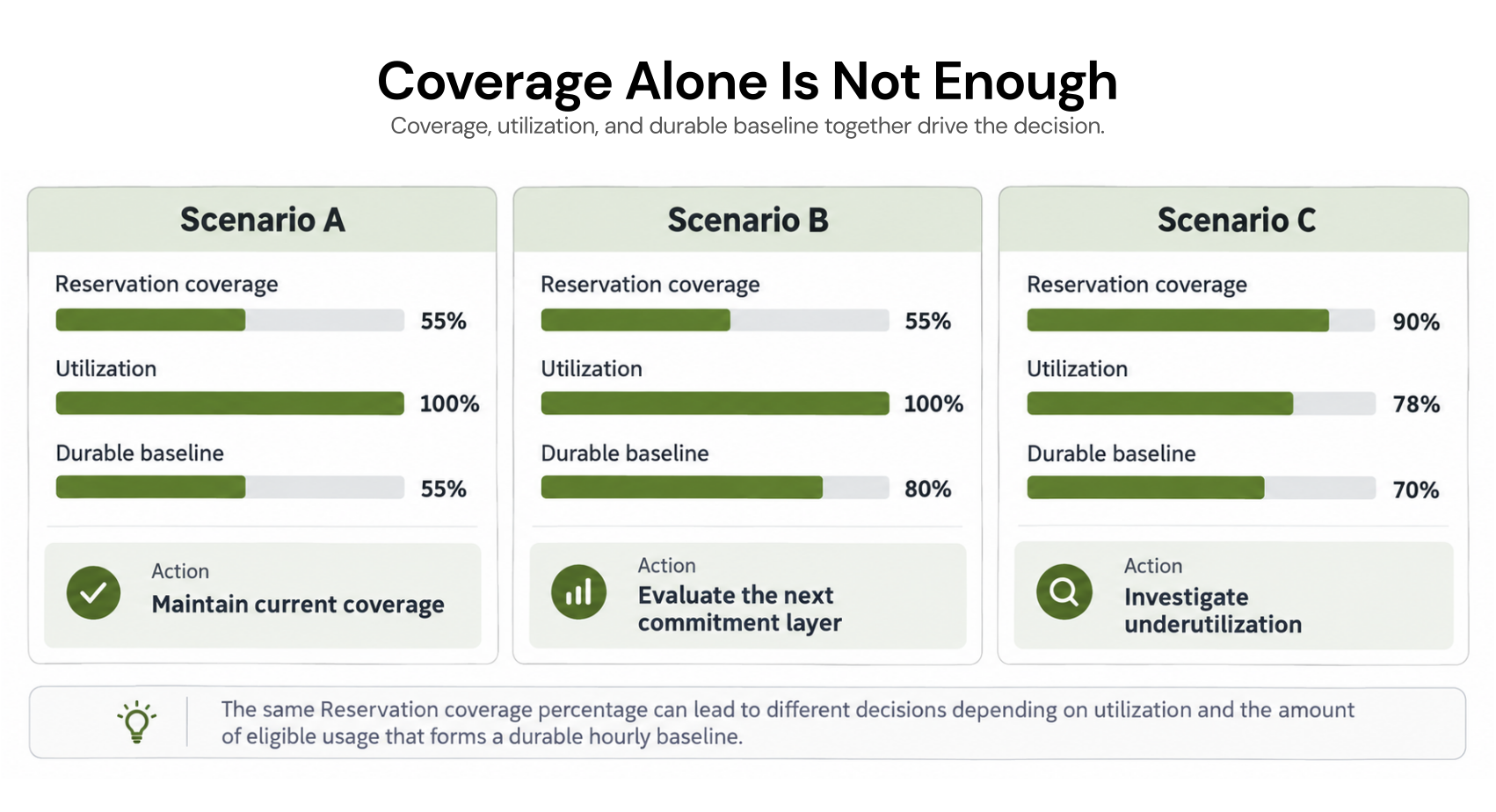
High utilization is not the only goal
Being too cautious can also reduce savings.Microsoft explains that lowering Reservation quantity may increase utilization while reducing total savings because more eligible usage falls back to PAYG pricing.
Consider these illustrative scenarios:
| Scenario | Coverage | Utilization | What it may indicate | Next action |
|---|---|---|---|---|
| Conservative | 55% | 100% | Stable usage may remain PAYG | Validate the uncovered baseline |
| Balanced | 75% | 98% | More durable usage is covered | Monitor usage and changes |
| Overextended | 90% | 78% | Commitment may exceed stable demand | Investigate underutilization |
The goal is not maximum coverage or perfect utilization in isolation. It is to capture commitment savings without creating unnecessary unused capacity.
Calculate your next commitment layer
Use this four-step workflow before increasing coverage.1. Isolate eligible PAYG usage
Remove usage that is not Reservation eligible, and separate usage already covered by other commitment discounts.For Azure VMs, Microsoft states that Reservations apply to qualifying compute charges, while software, networking, and storage are separate. Microsoft explains what Azure Reservations cover.
2. Find the hourly floor
Chart uncovered eligible usage over time.Look for the quantity that persists through normal troughs, not the monthly average or peak.
3. Remove expected workload changes
Subtract demand likely to disappear because of:rightsizing
migrations
shutdowns
architecture changes
region changes
planned service transitions
4. Compare with Microsoft’s recommendation
Compare your adjusted baseline with Azure’s 7-, 30-, and 60-day recommendation data.If Microsoft’s recommendation is higher than your internal forecast, do not purchase automatically. Document the expected change and size the commitment to the demand you reasonably expect to retain.
Historical recommendations cannot account for every future engineering plan.
Review utilization using completed data
Before buying more, confirm that your current reservations are being consumed and matched correctly.Use completed utilization history rather than relying only on the portal’s current-day percentage. Microsoft notes that current-day utilization can temporarily appear lower while usage data is still arriving. Microsoft’s Reservation utilization troubleshooting guidance.
Low utilization can indicate falling demand, but it can also result from matching or configuration changes.
For a deeper explanation of Reservation scope and matching, see our Azure Reservations guide.
Match confidence to the commitment term
Azure Reservations are available for one- or three-year terms.Your confidence in the baseline should match that horizon.
A workload that appears stable for the next 12 months may not be equally predictable over three years.
Before choosing a longer term, ask whether the service, region, architecture, capacity requirement, and business need are likely to remain sufficiently stable for that period.
For more flexible eligible usage, compare the economics of a Savings Plan before increasing Reservation coverage. Our Azure Reservations vs Savings Plans guide covers that decision separately.
Account for the February 2027 exchange change
Commitment flexibility also matters when deciding how aggressively to increase coverage.Starting February 1, 2027, Reservations bought on or after that date are not eligible for exchange when the corresponding service supports Savings Plans.
Reservations bought before February 1, 2027, can still be exchanged before the cutoff. After the cutoff, any unexchanged quantity on the original Reservation has one final exchange. A Reservation created through an exchange after the cutoff is not itself exchangeable. Microsoft documents the February 2027 exchange-policy change.
Instance-size flexibility is unaffected, and Microsoft’s cancellation policy remains separate.
That makes workload stability even more important for new long-term Reservation purchases.
Is 55% Azure Reservation coverage too conservative?
It may be.Additional coverage deserves evaluation when:
current Reservations are well utilized
material eligible usage remains PAYG
that uncovered usage has a persistent hourly floor
major workload changes are not expected
Azure's recommendations also support additional quantity
Start with stable eligible demand, account for future changes, then determine the next commitment layer.
Where we fit
We analyze Azure usage and identify savings opportunities across commitment types. We request read-only access to usage and billing data to analyze spend, while any purchasing permissions are scoped to Reserved Instances and Savings Plans rather than broader resource management. See how our Azure commitment optimization works.With Flex Insured Commitments, teams can get the up-to-65% savings available from an eligible three-year Azure Savings Plan for compute with none of the commitment risk.
If usage drops and a qualifying Flex Commitment costs more than the equivalent on-demand usage, we provide cashback protection for the covered difference, paid as real money rather than credits and subject to program terms. Review our Azure commitment optimization approach.
We manage approved Flex Commitments at the billing layer without changing your Azure infrastructure or how your workloads run. Our fee is based on realized savings, so if we do not generate savings, you do not pay a savings-based fee.
Review utilization, stable PAYG usage, and commitment opportunities before adding another Reservation.
Frequently asked questions
What is a good Azure Reservation coverage percentage?
Microsoft does not prescribe a universal percentage. The appropriate level depends on eligible hourly usage, workload stability, current commitments, scope, and underutilization risk.
Does 100% Reservation utilization mean I should buy more?
No. It only shows that your existing Reservations are being consumed. You still need to determine whether uncovered eligible usage has a stable enough baseline for another commitment.
How does Azure calculate Reservation recommendations?
Azure analyzes hourly usage over the previous 7, 30, and 60 days, simulates different Reservation quantities, and recommends the quantity that maximizes modeled savings.
Should I size Reservations from average usage?
Not from a simple monthly average alone. Microsoft recommends analyzing consistent usage and bases its recommendation methodology on hourly usage.
What if Microsoft's recommendation is higher than our forecast?
Treat the recommendation as an input. If planned rightsizing, migrations, shutdowns, or architecture changes materially reduce expected demand, adjust the commitment decision to reflect those future changes.