On-Demand vs Reserved vs Spot Instances: The Complete AWS Pricing Guide 2026

AWS offers four EC2 pricing models: On-Demand (no commitment, highest per-hour cost), Reserved Instances (1–3 year term, up to 72% savings), Spot Instances (spare capacity auction, up to 90% savings, interruptible with 2-minute warning), and Dedicated Hosts (single-tenant hardware for compliance and BYOL licensing). Most production environments run a blend of Reserved or Savings Plans for steady-state workloads, On-Demand for variable traffic, and Spot for fault-tolerant batch jobs achieving 35–50% blended savings without overcommitting.

Every month, AWS sends your organization a bill. And every month, somewhere between 40% and 60% of that bill is higher than it needs to be because you somehow end up choosing the wrong pricing model for the right workload. And this is one of the most expensive silent mistakes in cloud infrastructure.

AWS gives you four ways to pay for compute. If you pick the wrong one and you're either overpaying on-demand rates for workloads that run 24/7, sitting on unused reserved capacity you can't unwind, or getting your Spot Instance interrupted mid-job because you didn't architect for it. But, if you can pick the right combination, you can routinely cut your EC2 bill by 35–60% without touching a single line of application code.

This guide breaks down all four AWS pricing models, i.e., On-Demand, Reserved Instances, Spot Instances, and Dedicated Hosts with real pricing tables, actual dollar calculations on common instance types, and a decision framework built for FinOps leads and DevOps engineers who need to make the right call. 

Here's what you'll walk away with:

  • A clear understanding of how each pricing model works and what it actually costs
  • Side-by-side dollar comparisons on m5.xlarge, c5.2xlarge, and r5.4xlarge instances
  • A decision framework that maps workload characteristics to the right model
  • The blended strategy mature FinOps teams run in production
  • Multi-cloud context on how AWS pricing models map to Azure and GCP equivalents

What Are the 4 AWS EC2 Pricing Models?

AWS doesn't charge a flat rate for compute. Instead, it offers four distinct pricing models, each designed for a different relationship between commitment, flexibility, and cost. Understanding the tradeoffs between them is the foundation of any serious cloud cost strategy.

Here's the full picture at a glance:

The 4 AWS Pricing Models at a Glance
Pricing Model Commitment Max Discount vs On-Demand Interruption Risk Best For
On-Demand None 0% None Unpredictable, short-term workloads
Reserved Instances 1–3 years Up to 72% None Steady-state, always-on workloads
Spot Instances None Up to 90% Yes, 2-min warning Fault-tolerant, batch, stateless jobs
Dedicated Hosts On-Demand or 1–3 yr Up to 70% None Compliance, BYOL licensing

On-Demand Instances

On-Demand is AWS's default pricing model. You launch an instance, you pay by the second (minimum 60 seconds), and you stop paying the moment you terminate it. There are no upfront cost, contract, or commitment. Every instance type across every region is available on-demand, and you're never turned away for capacity.

The tradeoff, however, is cost. On-Demand is the most expensive way to run persistent compute on AWS by design. Think of it like hailing a taxi. It is available instantly, convenient, but expensive per mile if you're making the same trip every single day.

Reserved Instances (RIs)

Reserved Instances let you commit to a specific instance type in a specific region for one or three years in exchange for a significant discount of up to 72% off On-Demand rates.

There are two types of Reserved Instances: 

  • Standard RIs: Offer deepest discount (up to 72%), but locked to a specific instance type, region, and tenancy. Cannot be exchanged, only sold on the RI Marketplace.
  • Convertible RIs: Offer slightly lower discount (up to 66%), but can be exchanged for a different instance family, size, OS, or tenancy during the term. More flexibility, less savings.

You can also choose how you pay upfront:

Payment Option Discount Level Cash Flow Impact
All Upfront Highest Full year/3-yr cost paid day one
Partial Upfront Mid Partial upfront + lower monthly
No Upfront Lowest of the three Monthly payments, no day-one cost

Think of RIs like an annual gym membership. If you commit for the year, you get a better rate per visit, but whether you show up or not, you’ll still need to pay.

Spot Instances

Spot Instances give you access to AWS's unused EC2 capacity at discounts of up to 90% off On-Demand pricing. The catch is AWS can reclaim that capacity with just a two-minute warning when demand for On-Demand or Reserved capacity rises.

Spot prices fluctuate in real time based on supply and demand within each Availability Zone. In practice, average Spot prices are relatively stable for most instance types, but the interruption risk is real and must be architecturally accounted for.

Think of Spot like a standby flight seat which is deeply discounted, but the airline can bump you if a full-fare passenger needs your seat. If your job can survive a restart, Spot is almost always the smartest compute spend on AWS.

Dedicated Hosts and Dedicated Instances

Dedicated Hosts give you an entire physical server which is exclusively allocated to your account. Dedicated Instances run on hardware dedicated to a single customer but don't give you visibility into the physical host.

Both models exist primarily for two reasons:

  • BYOL (Bring Your Own License): Software vendors like Oracle and Microsoft tie licensing to physical cores or sockets. Running on shared multi-tenant hardware violates those license terms. Dedicated Hosts solve this.
  • Compliance requirements: Certain regulatory frameworks like FedRAMP High, specific HIPAA implementations, financial services regulations mandate physical hardware isolation.

Dedicated Hosts carry a meaningful cost premium over standard instances. They should be used precisely where required and nowhere else.

Also read: What Is AWS Billing and Cost Management? The Complete Guide for Cloud Cost Control

On-Demand vs Reserved vs Spot: What You Actually Pay

Below are verified pricing comparisons for three of the most widely deployed EC2 instance types in us-east-1 (N. Virginia), the AWS region with the largest customer base and most competitive Spot market.

Note: All On-Demand and Reserved Instance prices are sourced from AWS public pricing. Spot prices reflect historical averages and fluctuate in real time. Treat them as directional, not guaranteed.

m5.xlarge for General Purpose (4 vCPU / 16 GB RAM)

This is the workhorse of AWS fleets. It is used for web servers, application backends, mid-tier databases, and microservices.

Pricing Model Hourly Rate Monthly Cost (730 hrs) Annual Cost Savings vs On-Demand
On-Demand $0.192 $140.16 $1,681.92
1-yr RI – No Upfront $0.116 $84.68 $1,016.16 40%
1-yr RI – All Upfront $0.104 $75.92 $911.04 46%
3-yr RI – All Upfront $0.073 $53.29 $639.48 62%
Spot (avg) ~$0.060 ~$43.80 ~$525.60 ~69%

At 50 instances: The difference between running 50 × m5.xlarge On-Demand vs 3-year All Upfront RIs is $52,122 per year, before touching a single workload.

c5.2xlarge for Compute Optimized (8 vCPU / 16 GB RAM)

It is built for CPU-intensive workloads with high-traffic web frontends, scientific modeling, video encoding, gaming servers.

Pricing Model Hourly Rate Monthly Cost (730 hrs) Annual Cost Savings vs On-Demand
On-Demand $0.340 $248.20 $2,978.40
1-yr RI – No Upfront $0.204 $148.92 $1,787.04 40%
1-yr RI – All Upfront $0.185 $135.05 $1,620.60 46%
3-yr RI – All Upfront $0.128 $93.44 $1,121.28 62%
Spot (avg) ~$0.101 ~$73.73 ~$884.76 ~70%

At 20 instances: Switching from On-Demand to 1-year All Upfront RIs saves $27,156/year on c5.2xlarge alone, roughly the cost of a junior cloud engineer.

r5.4xlarge for Memory Optimized (16 vCPU / 128 GB RAM)

This is the default choice for in-memory databases, real-time analytics, large-scale caching layers, and SAP workloads.

Pricing Model Hourly Rate Monthly Cost (730 hrs) Annual Cost Savings vs On-Demand
On-Demand $1.008 $736.00 $8,829.00
1-yr RI – No Upfront $0.605 $441.65 $5,299.80 40%
1-yr RI – All Upfront $0.544 $397.12 $4,765.44 46%
3-yr RI – All Upfront $0.381 $278.13 $3,337.56 62%
Spot (avg) ~$0.302 ~$220.46 ~$2,645.52 ~70%

At 10 instances: On-Demand vs 3-year All Upfront RIs = $54,915 saved per year on a single memory-optimized tier.

The Over-Commitment Tax: A Worked Example

Reserved Instances deliver exceptional savings, but only when fully utilized. Here's what happens when they're not.

For example, a fast-growing SaaS company purchases 100 × m5.xlarge 3-year All Upfront RIs to lock in savings across their application fleet. Total commitment is $63,948/year ($639.48 × 100).

Eight months later, the infrastructure team migrates 30 instances to Graviton2 (m6g.xlarge) for better price-performance. Those 30 Standard RIs, locked to the x86 m5 family, cannot be exchanged. They cannot be applied to Graviton instances.

The math on the waste will look something like this:

Figures
Unused RIs 30 × m5.xlarge Standard RI
Annual RI cost per instance $639.48
Total wasted commitment/year $19,184
Remaining term (months) 28 months
Total waste over remaining term $44,763

This is the over-commitment tax which is a silent, compounding cost that shows up not as a line item on your bill, but as the gap between what you're paying for and what you're actually using.

Standard RIs can be listed on the AWS RI Marketplace, but resale typically yields 60–80 cents on the dollar and is restricted to instances with more than a month remaining on the term. Convertible RIs avoid this trap through exchange flexibility, but at the cost of a lower discount ceiling.

The over-commitment tax is why most FinOps teams don't max out their RI coverage. 

On-Demand vs Reserved vs Spot vs Dedicated: Which Should You Use?

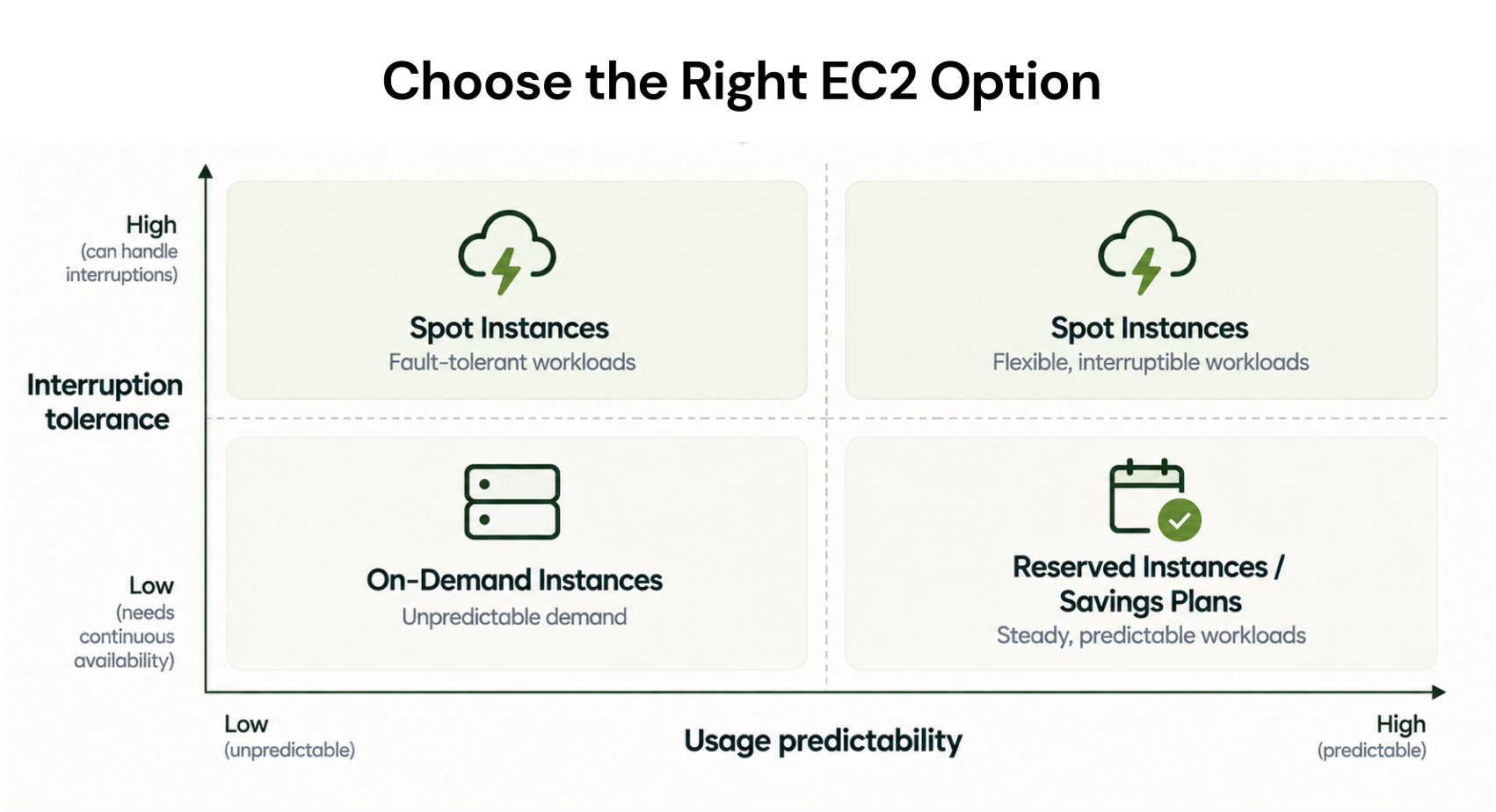
Knowing when to use each one is what separates a FinOps strategy from a guessing game. The answer always starts with four questions about your workload:

  • How long will it run? Hours, days, months, or years?
  • How predictable is its shape? Same instance type and size consistently, or constantly changing?
  • Can it tolerate interruption? If AWS reclaimed the instance mid-job, would it matter?
  • Does it have compliance or licensing constraints? Physical isolation required?

Your answers map directly to a pricing model.

Use On-Demand When:

  • Your workload has been running for less than 3 months and you haven't established a usage baseline yet
  • You're in active development or testing, instance types change frequently as you right-size
  • You need emergency burst capacity during an incident or traffic spike with no lead time
  • The workload runs less than 30% of the time and at that utilization level, a commitment rarely pays back
  • You're evaluating a new service and don't yet know if it will be permanent

Rule of thumb: If you can't confidently predict what your infrastructure looks like in 6 months, On-Demand is cheaper than a wrong commitment. The flexibility premium is worth it.

Use Reserved Instances When:

  • The workload runs 24/7 or near-continuously (>70% utilization) and has done so for at least 6 months
  • You're running managed databases; RDS, ElastiCache, Redshift, OpenSearch rarely change instance families and are ideal RI candidates
  • Your instance type is stable with same family, same size, same region and no planned migrations in the next 12 months
  • You want the deepest possible discount and have the FinOps maturity to track utilization and coverage rates
  • You're comfortable with Convertible RIs if there's any chance of instance family changes during the term

Rule of thumb: If the same instance type has run continuously for 6+ months with >80% utilization, you are almost certainly leaving money on the table by staying On-Demand. Every month without a commitment is a month of avoidable overspend.

Use Spot Instances When:

  • Your workload is stateless and containerized; Kubernetes pods, ECS tasks, Docker workloads that restart cleanly
  • You're running batch processing jobs like data pipelines, ETL, log processing, analytics queries
  • You have machine learning training jobs, long-running GPU or CPU training runs that can checkpoint and resume
  • Your CI/CD pipeline needs elastic build capacity, test runners, compile jobs, integration test suites
  • You're doing video rendering, image processing, or simulation workloads that are naturally parallelizable and restartable

Here are two rules for running Spot safely:

  • Diversify instance types: Request across multiple instance families and sizes (m5.xlarge, m4.xlarge, m5a.xlarge) so AWS has more capacity to draw from and your interruption probability drops significantly
  • Diversify Availability Zones: Spread across at least 2–3 AZs to avoid a single-zone capacity event wiping out your entire Spot fleet

Rule of thumb: If your job can restart without data loss and finish within a reasonable window even with one interruption, Spot is almost always the right answer. The 70–90% discount is too significant to ignore for fault-tolerant workloads.

Use Dedicated Hosts When: 

  • You have BYOL software with per-core or per-socket licensing; Oracle Database, Windows Server, SQL Server, and certain Red Hat licenses are the most common triggers
  • Your compliance framework explicitly mandates physical isolation; FedRAMP High, certain HIPAA implementations, and some financial services regulations fall into this category
  • Your security policy prohibits multi-tenant hardware regardless of regulatory requirement

Rule of thumb: Dedicated Hosts carry a meaningful cost premium. Use them precisely where required, not as a default for "we want more security." AWS's shared infrastructure is hardened; Remember, Dedicated Hosts are only a compliance and licensing tool.

Master Decision Framework: On-Demand vs Reserved vs Spot vs Dedicated
If your workload is Use Reason
Running 24/7, stable instance type, 6+ months tenure Reserved Instance Commitment pays back within months
Unpredictable, variable, < 3-month tenure On-Demand No commitment risk, full flexibility
Stateless, containerized, fault-tolerant Spot 70–90% discount, restartable architecture
BYOL licensed or compliance-isolated Dedicated Host Physical tenancy requirement
Stable baseline + variable burst traffic RI/SP + On-Demand blend Cover the floor, flex the ceiling
Batch, ML training, CI/CD pipelines Spot + On-Demand fallback Maximize discount, guarantee completion
Database tier (RDS, ElastiCache, Redshift) Reserved Instance Most stable workload class on AWS

Also read: Cloud Waste in AWS, Azure, and GCP: Causes, Examples & How to Eliminate It

The Blended Strategy: What Mature FinOps Teams Actually Run

The real answer is Stop Picking One Model and Start Blending All Three

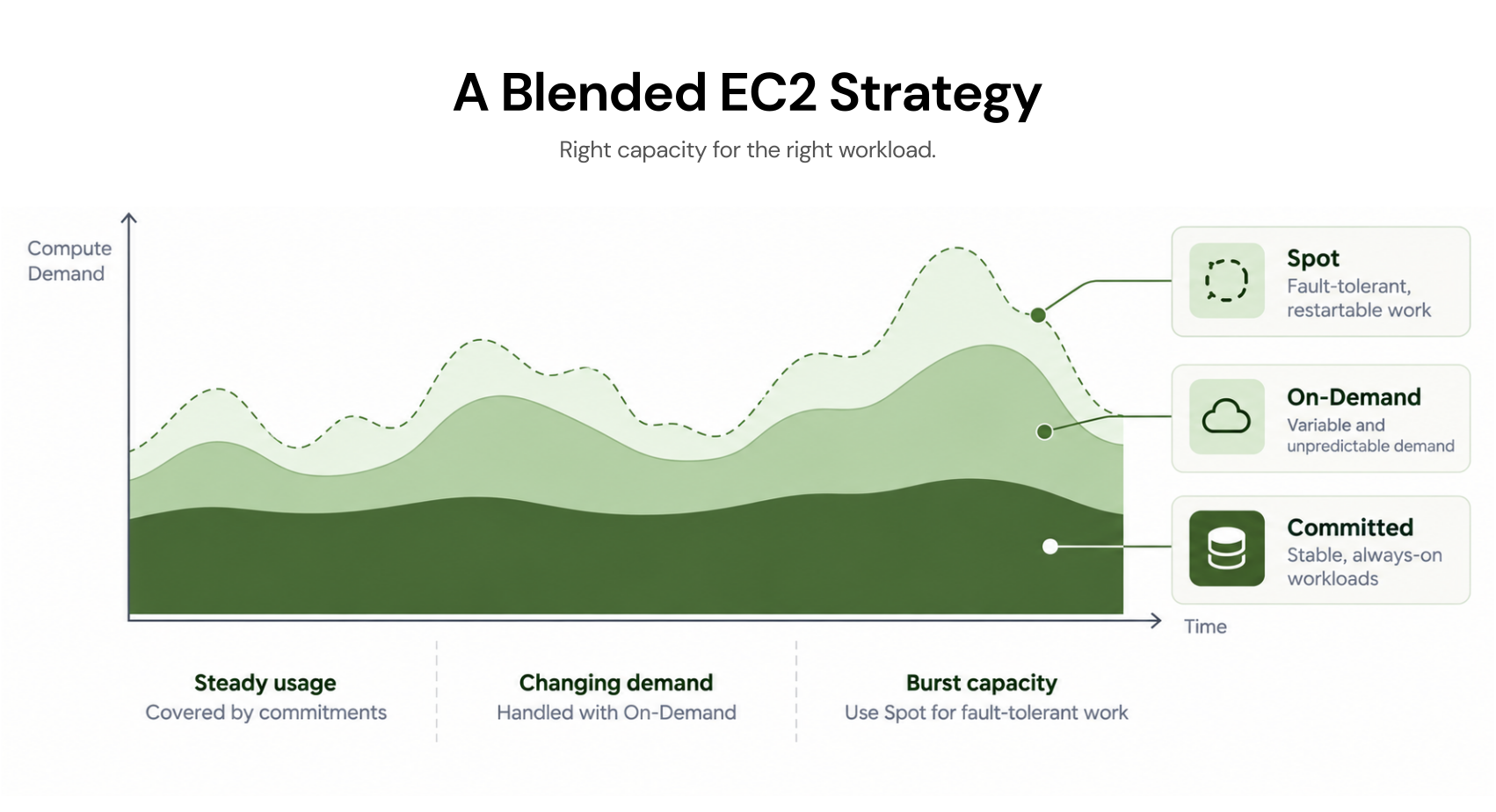
Mature FinOps teams don't choose. They architect a three-layer coverage model that assigns each workload class to its optimal pricing tier and the savings compound across all three layers simultaneously. Here's how it works in practice.

The Three-Layer Architecture

Layer 1: Committed Foundation (Reserved Instances or Savings Plans)

Cover your predictable, steady-state baseline with commitments. This is your always-on application tier, your database layer, your core infrastructure that hasn't changed shape in 6+ months. Target 60–70% of total compute spend here.

Layer 2: On-Demand Buffer

Handle variable, spiky, or short-tenure workloads without commitment risk. New services, traffic burst handling, staging environments, and anything still finding its steady-state shape. Target 15–25% of total compute spend here.

Layer 3: Spot for Elastic and Batch Workloads

Capture maximum discount on everything fault-tolerant. CI/CD, ML training, batch pipelines, data processing. Target 10–25% of total compute spend here.

Real Dollar Model: $500,000/Year Compute Bill
Layer % of Spend Gross Spend Pricing Model Avg Discount Actual Cost
Committed Foundation 65% $325,000 RI / Savings Plan 45% $178,750
On-Demand Buffer 20% $100,000 On-Demand 0% $100,000
Spot Workloads 15% $75,000 Spot 70% $22,500
Total 100% $500,000 $301,250

Blended savings: ~40% — or $198,750 saved annually on a $500K compute baseline, without changing a single workload or touching application code.

Scale that to a $2M/year AWS bill and the same architecture delivers ~$795,000 in annual savings.

AWS Savings Plans vs Reserved Instances: Which Wins?

Both deliver RI-level discounts, but the difference is flexibility.

Savings Plans Reserved Instances
Scope Applies across instance families, sizes, regions (Compute SP) Locked to specific instance type + region
Max Discount Up to 66% (Compute SP) Up to 72% (Standard RI)
Flexibility High, automatically applies to matching usage Low (Standard) to Medium (Convertible)
Best For Diverse, evolving compute fleets Stable, unchanging instance types
Databases Does not cover RDS, ElastiCache, Redshift Covers all major managed services

The practical rule: Use Compute Savings Plans for your EC2 and Lambda baseline when your instance mix evolves regularly. Use Reserved Instances for your database tier. RDS, ElastiCache, Redshift, and OpenSearch are the most stable workload class on AWS and benefit most from the deeper RI discount.

You can run both simultaneously as they stack without conflict.

Learn more: AWS Savings Plans vs Reserved Instances: A Practical Guide to Buying Commitments

The Commitment Coverage Trap

The blended strategy only works if your commitment coverage stays calibrated to your actual usage. This is where most teams fall down.

AWS Cost Explorer and Trusted Advisor generate RI and Savings Plan recommendations, but those recommendations are point-in-time snapshots. They don't update when your infrastructure changes. They don't account for planned migrations. They don't protect you when you over-commit and your utilization drops.

The result is teams either under-commit (leaving 30–40% savings on the table) or over-commit (paying for capacity they no longer use). Neither is acceptable at scale.

Multi-Cloud: Reserved and Spot Equivalents on Azure and GCP

The On-Demand vs Reserved vs Spot decision isn't unique to AWS. Azure and GCP offer structurally identical pricing tiers under different names and the same blended strategy logic applies across all three clouds. If your organization runs workloads on a multi-cloud provider, the optimization playbook is consistent even if the terminology isn't.

Azure Pricing Model Equivalents

AWS Model Azure Equivalent Max Savings Notes
On-Demand Pay-As-You-Go VMs Default billing, per-second
Reserved Instances Azure Reserved VM Instances Up to 72% 1 or 3-year term, same commitment logic
Spot Instances Azure Spot VMs Up to 90% Eviction policy-based, not 2-min warning
Dedicated Hosts Azure Dedicated Hosts Varies Physical isolation, BYOL support
Savings Plans Azure VM Savings Plans Up to 65% Flexible across VM series, AKS, Databricks

Azure's eviction model for Spot VMs differs slightly from AWS. Instead of a fixed 2-minute warning, Azure uses configurable eviction policies (Deallocate or Delete) and eviction rates vary significantly by region and VM size. Architecture for Azure Spot requires the same fault-tolerant design principles as AWS Spot, but the interruption mechanics warrant separate planning.

Also read: Cut Your Azure Bill by 40% in 5 Minutes: The Complete Setup Guide

GCP Pricing Model Equivalents

AWS Model GCP Equivalent Max Savings Notes
On-Demand Regular (On-Demand) pricing Per-second billing
Reserved Instances Committed Use Discounts (CUDs) Up to 57% Resource-based or spend-based
Spot Instances Spot VMs / Preemptible VMs Up to 91% 30-second warning on Preemptible
Dedicated Hosts Sole-Tenant Nodes Varies Physical isolation, BYOL
Sustained Use Discounts (SUDs) Up to 30% Automatic — no commitment required

GCP's Sustained Use Discounts are unique to the market. The longer an instance runs within a billing month, the larger the automatic discount applied, with no commitment required. This makes GCP's effective On-Demand cost lower than AWS's for always-on workloads, even before committing. It doesn't eliminate the value of CUDs, but it changes the baseline math.

Concept AWS Azure GCP
Default pricing On-Demand Pay-As-You-Go On-Demand
Commitment discount Reserved Instances / Savings Plans Reserved Instances / Savings Plans Committed Use Discounts (CUDs)
Spare capacity discount Spot Instances (up to 90%) Spot VMs (up to 90%) Spot / Preemptible VMs (up to 91%)
Automatic discount None None Sustained Use Discounts (up to 30%)
Physical isolation Dedicated Hosts Dedicated Hosts Sole-Tenant Nodes

Conclusion

The On-Demand vs Reserved vs Spot debate has a clear answer. It's not a choice between them, but it's a question of how intelligently you blend all three.

On-Demand for what you can't predict. Reserved Instances or Savings Plans for what you can. Spot for everything fault-tolerant. Dedicated Hosts precisely where compliance or licensing demands it. That architecture, applied consistently across your fleet, delivers 35–50% blended savings without changing a line of application code.

However, the hard part is maintaining the coverage. Infrastructure changes constantly. Instance families evolve. Teams migrate workloads. Commitments go stale. The 24-hour recommendation refresh problem, where your RI coverage analysis is already outdated by the time your next billing cycle closes, is a real operational cost that compounds silently at scale.

Modern FinOps teams are solving this with commitment automation. Instead of manually analyzing usage, purchasing RIs, and monitoring utilization, Usage.ai handles the entire commitment lifecycle automatically and continuously monitoring real-time usage across AWS, Azure, and GCP, executing commitments on your behalf, and refreshing recommendations every 24 hours so coverage never drifts from reality.

What makes Usage.ai different from simply buying RIs yourself is the financial model underneath it. There is $0 upfront, and fees are charged only on realized savings. It also offers  cashback assurance that protects you if a commitment underperforms. You get RI-level and Savings Plan-level discounts around 40–60% on EC2 and Fargate, 20–35% on managed databases, up to 72% on Azure VMs, without carrying the commitment risk yourself.

Book a demo to see how Usage.ai automates your commitment strategy across AWS, Azure, and GCP.

Frequently Asked Questions

1. What is the difference between On-Demand and Reserved Instances?

On-Demand Instances charge you by the second with no commitment. You pay the full hourly rate and can terminate anytime. Reserved Instances require a 1 or 3-year commitment in exchange for discounts of up to 72% off On-Demand rates. On-Demand is best for unpredictable or short-tenure workloads; Reserved Instances are best for steady-state workloads running continuously for 12 months or longer.

2. When should I use Spot Instances vs Reserved Instances?

Use Spot Instances for stateless, fault-tolerant workloads that can tolerate interruption like batch jobs, ML training, CI/CD pipelines, and containerized workloads. Use Reserved Instances for always-on, predictable workloads where interruption is unacceptable, like application servers, databases, and core production infrastructure. Most production environments benefit from running both simultaneously as part of a blended coverage strategy.

3. Can Spot Instances be used for production workloads?

Yes, with the right architecture. Spot Instances are widely used in production for stateless, containerized workloads running on Kubernetes or ECS, where interrupted pods or tasks are automatically rescheduled. They are not suitable for stateful production workloads, like primary databases, session-dependent application servers, or any service where a 2-minute interruption causes data loss or user-facing downtime.

4. What happens to unused Reserved Instances?

Unused Standard Reserved Instances can be listed for resale on the AWS Reserved Instance Marketplace, typically at 60–80 cents on the dollar with restrictions on remaining term length. Convertible Reserved Instances cannot be sold but can be exchanged for a different instance family, size, OS, or tenancy. 

5. What is the difference between a Reserved Instance and a Savings Plan?

Reserved Instances lock a discount to a specific instance type, size, and region, delivering up to 72% savings with the least flexibility. Savings Plans deliver up to 66% savings but apply automatically across instance families, sizes, and regions, making them better suited to evolving compute fleets. Reserved Instances remain the better choice for managed database services like RDS, ElastiCache, and Redshift, which Savings Plans do not cover.

6. How do I choose between a 1-year and 3-year Reserved Instance?

Choose a 1-year RI when you're confident in the workload's stability for the next 12 months but uncertain beyond that. Choose a 3-year RI only for your most stable, mission-critical workloads where the instance type and region are virtually guaranteed not to change. 

7. Can I mix On-Demand and Reserved Instances in the same AWS account?

Yes and this is standard practice. Reserved Instance discounts apply automatically to matching On-Demand usage within your account or AWS Organization. If you have 50 Reserved Instances and run 70 instances of the same type, the first 50 instances receive the RI discount rate and the remaining 20 are billed at On-Demand pricing. No configuration is required and the discount is applied automatically at billing time.

8. What is the difference between a Dedicated Instance and a Dedicated Host?

A Dedicated Instance runs on hardware dedicated to a single AWS account but gives you no visibility into or control over the physical host. A Dedicated Host allocates an entire physical server to your account, giving you visibility into sockets, cores, and host-level configuration, which is required for per-socket or per-core BYOL software licensing. Dedicated Hosts are the correct choice for Oracle, Windows Server, and SQL Server BYOL workloads; Dedicated Instances are sufficient for basic multi-tenancy isolation requirements.

This is some text inside of a div block.

Get started for free

Book  Demo

Share this post

You may like these articles

See all
On-Demand vs Reserved vs Spot Instances: The Complete AWS Pricing Guide 2026
All Articles
AWS

On-Demand vs Reserved vs Spot Instances: The Complete AWS Pricing Guide 2026

AWS engineers overpay 40–60% on the wrong pricing model. Compare On-Demand, Reserved, Spot & Dedicated with real pricing tables and a decision framework.

March 20, 2026
3 mins
 min read
Amazon EC2 Pricing Explained: Models, Costs, and How to Actually Save
All Articles
AWS

Amazon EC2 Pricing Explained: Models, Costs, and How to Actually Save

Learn how Amazon EC2 pricing works, including cost factors, pricing models, real examples, and proven FinOps strategies to reduce AWS compute costs.

March 19, 2026
3 mins
 min read
AWS Savings Plan: A Complete Guide to Maximizing Savings
All Articles
AWS

AWS Savings Plan: A Complete Guide to Maximizing Savings

Learn how AWS Savings Plan work, how much you can save, and the hidden risks. Discover how to optimize commitments and avoid wasted spend.

March 18, 2026
3 mins
 min read

Save towards your growth

Thank you! Your submission has been received!
Oops! Something went wrong while submitting the form.