.png)
 AWS
AWS Microsoft Azure
 Google Cloud


Start with the work left unfinished: allocating shared costs, coordinating action, or managing commitments as workloads change. Each requires different evidence. A better-looking dashboard does not prove another platform will improve your outcome.
Short Answer
Azure Cost Management and the surrounding Microsoft tools can be sufficient when your team can produce required reports, validate recommendations, execute decisions, and reliably review results. Keep that workflow when it meets your needs and accountable owners handle significant cost changes and purchasing decisions.Evaluate another platform when a specific capability or operating gap persists after assessing native configuration and extensions. Choose the product category that addresses that gap, then test whether its supported actions and benefits justify the fees, implementation, and responsibilities your team retains.
What Azure Cost Management Already Covers
Microsoft describes Cost Management as a suite of FinOps tools, covering analysis, monitoring, allocation, and extensibility. Evaluate that suite alongside Advisor and Azure’s purchasing and reporting tools, since their capabilities are not all contained in one dashboard.Cost Analysis supports spend investigation, while exports and APIs feed external reporting. Azure budgets support actual and forecast cost alerts. A budget does not stop consumption on its own; automated responses require a separately configured workflow.
Native allocation is also available. Cost-allocation rules distribute shared costs across subscriptions, resource groups, or tags for supported Enterprise Agreement, MCA-online, and MCA-E agreements. They do not change the invoice or allocate Reservation and Savings Plan purchases.
AKS cost views provide cluster and namespace breakdowns when the cost-analysis add-on requirements are met, including Standard or Premium tier, a supported EA or MCA offer type, the required subscription role, and an available region. Ask whether those views answer your workload questions before assuming Kubernetes requires another platform.
Advisor provides optimization recommendations. The Cost Optimization workbook, available through a Preview template, combines rate and usage opportunities across compute, storage, and networking, including selected Quick Fix actions. Native tooling extends beyond reporting.
Azure Already Recommends Commitments
Microsoft’s Savings Plan purchase recommendations use actual hourly usage and negotiated on-demand rates, simulate commitment amounts, and account for existing commitment coverage. They refresh several times daily and include a safeguard for substantial recent usage reductions.Advisor and the Savings Plan purchase experience use a 30-day lookback, while the recommendations API supports 7-, 30-, and 60-day analysis. Those are experience-specific boundaries, not a blanket limit on every Azure tool.
Azure also provides Reservation purchase recommendations through Advisor, APIs, and the portal purchase experience. After purchase, the portal shows Reservation utilization and Savings Plan utilization to users with the required access, helping your team identify unused commitments.
These recommendations are a capable starting point. Your team still needs to assess planned migrations, application retirements, and other changes not reflected in observed consumption. Another recommendation engine must show an improvement beyond identifying the same opportunity.
When Is Azure Cost Management Enough?
Native tooling is enough when it supports the decisions you need and someone owns the complete workflow. Test it against a recent billing period:Could finance obtain the required team or business-unit breakdown without rebuilding it manually?
Did significant cost changes reach an accountable owner in time to act?
Were recommendations checked against engineering plans and approved promptly?
Were purchases, utilization, expirations, and financial outcomes reviewed afterward?
Where the process fails, identify the cause. An unassigned recommendation may need an owner and deadline. A missing reporting dimension may require better metadata or an allocation model. Software can support these processes, but ownership and business definitions still require decisions within your organization.
Consider extensions before procurement. Microsoft’s FinOps hubs support configured FOCUS-based cost ingestion, including data from other cloud providers. Compare the engineering, infrastructure, reporting-license, and maintenance effort of that approach with the commercial alternative.
What Third-Party FinOps Platforms Can Add
Start with the requirement your current workflow cannot meet efficiently. Broad platforms may address several reporting and governance needs, while specialists focus on particular workloads or purchasing decisions. Neither category automatically provides every capability below.| Requirement | Azure-native starting point | Additional capability to verify | Platform category |
|---|---|---|---|
| Allocation and unit economics | Tags, supported allocation rules, exports | Business mappings, shared-cost rules, cost per customer or transaction | Allocation or broad FinOps platform |
| Cross-cloud reporting | Azure exports; configurable FinOps hubs | Maintained integrations, consistent reporting, reconciliation | Multi-cloud FinOps platform |
| Ownership and governance | Alerts, APIs, configurable internal workflows | Routing, approvals, escalation, action tracking | Workflow-focused or broad platform |
| Workload optimization | Advisor, workbook, AKS cost views | Required workload depth, safe execution, measured outcomes | Workload specialist |
| Commitment management | Native recommendations, purchases, utilization data | Supported approval, purchasing, tracking, and downside terms | Commitment-management specialist |
An allocation problem does not automatically justify commitment software. Likewise, you may not need another reporting suite when the bottleneck is commitment execution.
Our guide to managed Azure commitment automation examines that narrower decision.
Define each tool’s responsibility before adding it. Two systems can analyze the same portfolio, but their purchasing actions must be coordinated so they do not commit against the same remaining usage.
How to Validate a Platform’s Value
A feature demonstration shows what a product can do. An assessment using your data shows whether it meets your requirements. Agree on acceptance criteria before the pilot starts.Test Incremental Net Value
Compare the same eligible usage against a realistic native-managed alternative, including existing negotiated rates, commitments, rightsizing, and purchases your team would otherwise make. Exclude benefits the vendor did not create.Illustrative assumptions, not savings benchmarks. Both alternatives include unused commitment charges.
Projected upside: For the same eligible compute usage, assume the native approach costs $100,000 and the proposed commitment strategy costs $90,000. After a fixed $2,000 platform fee and $1,000 in additional operating cost, the projected net benefit is $7,000 before one-time implementation costs.
Demand-drop downside: If a migration reduces demand, assume the native approach costs $60,000 while the proposed strategy costs $64,000 for the same reduced usage because commitments remain payable. With the same fees and operating costs, the proposal is $7,000 worse that month.
Without qualifying protection, the buyer bears that additional cloud cost. Check what any protection covers and when payment arrives. Azure Savings Plans generally cannot be canceled, exchanged, or refunded; limited billing transfers involving a pricing-currency change can involve cancellation and repurchase.
Count unused commitments once and contractual recoveries once. Keep released staff capacity separate unless it avoids an actual expense. Our cloud cost optimization ROI framework explains attribution and retained savings in more detail.
Check Implementation and Controls
Require five forms of evidence:Fit: Demonstrate the required services, instruments, and actions using your data; identify billing-data access scopes.
Assumptions: Document rates, scopes, existing coverage, representative hours, and engineering changes.
Authority: Separate assessment access from purchasing permissions; verify approvers, limits, revocation procedures, audit records, and coordinated purchasing ownership.
Operating cost: Identify integration owners, maintenance, licenses, fee basis, data retention, and exit obligations.
Results: Reconcile executed actions and fees to finalized billing against the agreed baseline. Label pre-purchase estimates as projected.
Where We Fit Alongside Azure Cost Management
If recurring commitment work is the gap, we can help alongside your existing reporting stack. We are Usage.ai, this article’s publisher, and we help teams manage supported Azure commitments.We analyze usage at the billing layer and model potential savings through a read-only Azure integration. We account for existing Azure Reservations and Savings Plans when recommending supported commitment purchases, and provide reporting on savings and accrued cashback.
We call provider APIs to execute approved purchases of supported Azure Reservations and Savings Plans in your account. With CoPilot, we execute purchases after your approval; with Autopilot, we automate supported purchases within the controls you configure. We do not start, stop, or resize production resources.
With our Flex Insured Commitments, teams can get the up to 65% savings of an eligible three-year Azure compute Savings Plan with none of the commitment risk.
If an eligible Flex Commitment costs more than equivalent pay-as-you-go usage, cashback protection covers the difference under the program terms.Existing customer-owned commitments are not automatically protected as Flex Commitments.
Customers pay us an agreed percentage of realized savings, billed monthly in arrears after Azure billing data is finalized.
Final Verdict: Add a Tool for a Proven Gap
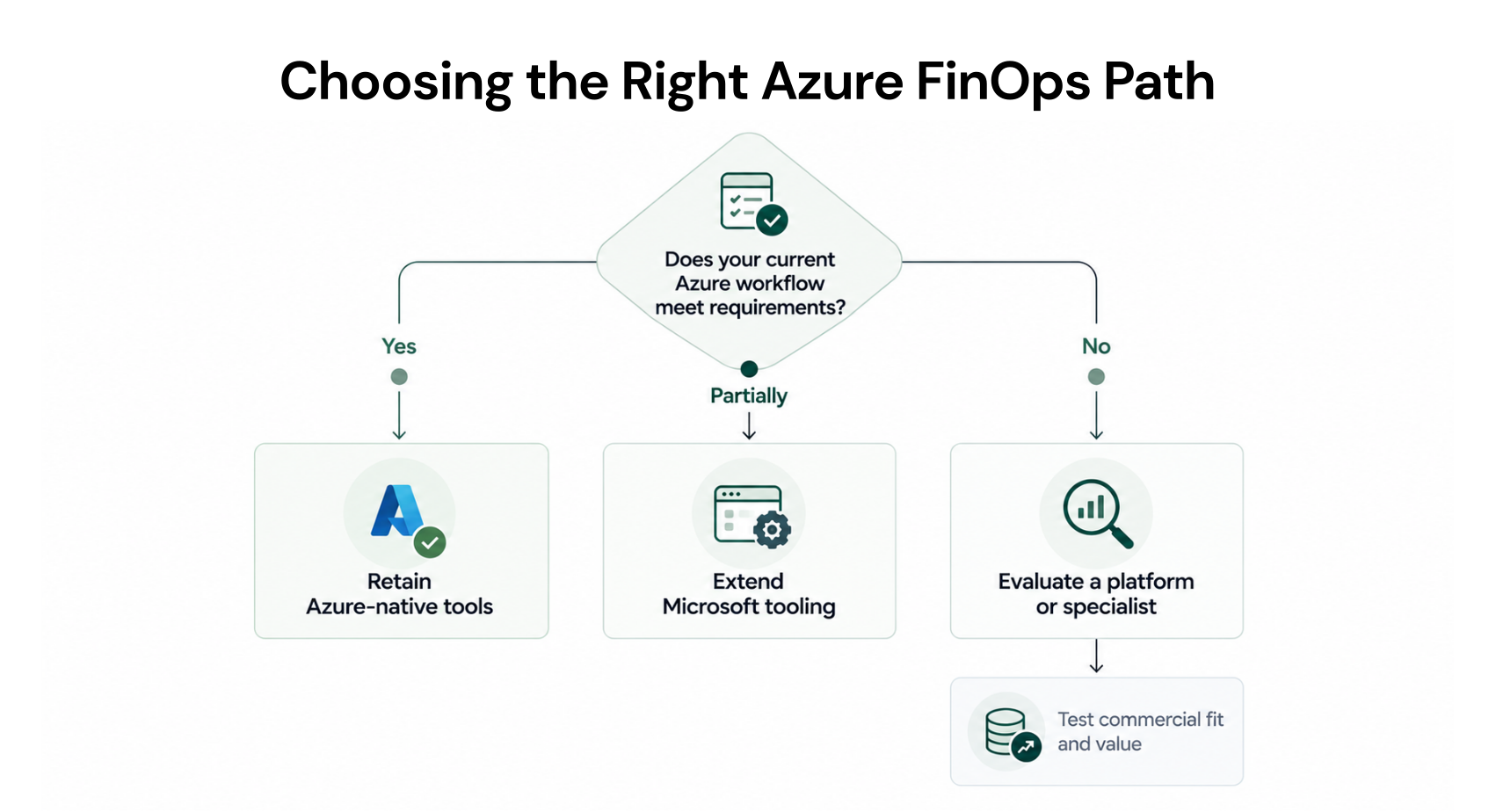
Keep the native workflow when it meets requirements and your team runs it reliably. Extend Microsoft tooling when the additional work is manageable. Evaluate a commercial platform when it addresses a demonstrated gap with acceptable costs, controls, and responsibilities.For a commitment-specific opportunity, compare proposals against your actual portfolio. See what our Savings Test evaluates before authorizing purchases.
Review commitments, opportunities, and potential savings before changing purchasing authority.
Frequently asked questions
Can we keep Azure Cost Management if we add a platform?
Yes. Define which system handles reporting, allocation, recommendations, and execution. A third-party interface does not remove the need to reconcile Azure charges or govern purchases. Evaluate overlap before paying two providers to perform the same work.
Can we extend Microsoft tooling for multi-cloud reporting?
Yes. Configured FinOps hubs can ingest FOCUS-compatible data from other providers. This is a deployed reporting architecture, not an automatic feature of every Cost Management view. Account for ingestion configuration, Azure infrastructure, reporting licenses, maintenance, and supported data versions.
Do all FinOps tools automate Azure commitment purchases?
No. Verify tracking, recommendations, approval-based purchasing, and automated purchasing separately for each instrument and service. A product can provide useful allocation or reporting without buying commitments. Ask for a demonstrated purchase workflow rather than accepting “Azure support” as proof.
Can a read-only savings assessment buy commitments?
Read-only assessment access cannot authorize purchases. Our evaluation permissions support analysis without buying commitments. Execution requires separately enabled permissions and the appropriate approval or configured automation; retain a clear purchasing owner when comparing multiple tools.